Описание
Файлы3
Скриншоты3
Комментарии19
Утилита «HUDFramework» является основой (ядром) для пользовательского интерфейса, который добавляет возможность добавления новых элементов интерфейса на экране из модов, бесконфликтным способом. Статы, время, виджеты и многое другое! Добро пожаловать в новый мир моддинга интерфейса игры.
Детали:
* Ранее, любой мод изменяющий HUD (интерфейс игры), обязательно переписывал и конфликтовал с любым другим модом, также изменяющим HUD (интерфейс игры). HUDFramework решает эту проблему путем динамической загрузки отдельных модов изменяющих интерфейс на экране игры во время выполнения. «HUDFramework» предоставляет модмейкерам инструмент для загрузки пользовательских виджетов и связь со своими виджетами.
* Обратите внимание, «HUDFramework» это только ядро, поэтому вам нужно иметь какие либо установленные моды, которые требуют наличие «HUDFramework» для отображения любых виджетов на экране игры из этих модов! Ниже смотрите список модов которые работают через «HUDFramework» и требуют наличие этого инструмента.
Моды которые требуют наличие HUDFramework:
HoloTime — HUD Clock Widget by registrator2000 (есть у нас на сайте)
Companion Status HUD by registrator2000
Immersive HUD (iHUD) by Gopher
Survival stats widget by Neanka
Explosives widget by Neanka
AmmoTweaks — A Weapon Overhaul by isathar
Ammo count widget by Neanka
PA stats widget by Neanka
Wasteland Energy Shields by neotropic
Power Armor HUD (paHUD) by Gopher
Buffs panel widget by Neanka
Vault-Tec Accelerated Focus System (VAFS) by Ashna
Transfer Settlements — Shareable Settlement Blueprints by CDante (video) (есть у нас на сайте)
Sim Settlements by kinggath (есть у нас на сайте)
Fallout 2287 — Gas Masks of the Wasteland (есть у нас на сайте)
Vault Time — HUD Clock (Tranquility Lane) by Bwones
+ тонна других модов, все не перечислить, полный список всех модов которые требуют наличие данного фреймворка смотрите на Нексусе на главной странице в спойлере с названием Requirements

Требования:
Fallout 4
Java 8 и выше (для патчера «HUDFramework auto-patcher»).
Установка:(можно вручную или через менеджеры модов)
1. Скачайте по осн.ссылке саму утилиту «HUDFramework» и установите с помощью вашего предпочтительного менеджера модов или скопируйте папку Interface и файлы HUDFramework — Main.ba2, HUDFramework.esm в папку Data в игре, подтвердить слияние папки Interface если у вас уже есть в игре такая папка.
2. Активируйте файл HUDFramework.esm в своем менеджере модов или через меню Mods в игре.
Примечание!!!
3. Если вы получили сообщение о перезаписи файла HUDMenu.swf, то у вас есть какой-то установленный в игре мод, так-же изменяющий интерфейс игры. Чтобы использовать оба мода одновременно, вам нужно внедрить «HUDFramework» в другой мод, используя авто-патчер «HUDFramework auto-patcher». Скачайте по доп.ссылке, создайте любую пустую папку и поместите в нее папку Autopatcher 1.0 из архива.
* Как использовать «HUDFramework auto-patcher»:
— Откройте файл autopatch.cmd двойным нажатием мышки для запуска авто-патчера HUDFramework.
— Авто-патчер автоматически внедряет HUDFramebook в любой файл HUDMenu.swf
— Убедитесь что файл HUDMenu.swf, который вы будете исправлять, находится в текущем каталоге, то есть там где файл autopatch.cmd
— Исправленный файл будет называться HUDMenu_patched.swf
— Исходный файл HUDMenu.swf не будет изменен.
— Чтобы использовать уже исправленный файл HUDMenu.swf, переименуйте HUDMenu_patched.swf в HUDMenu.swf и поместите его в папку игры по пути Data/Interface с заменой.
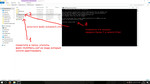
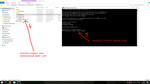
4. Если вы пользуетесь модом DEF_UI, то по доп.ссылке можете скачать уже готовый адаптированный патч и установить в игру с заменой файла HUDMenu.swf
HUDFramework 1.0f (156 kb)Сервер №1
HUDFramework auto-patcher 1.0Сервер №2
HUDFramework DEF_UI PatchСервер №3
-
#1
Hey everyone,
I have just recently gotten back into Fallout 4 again for my upteenth playthrough and started to get all of my mods re-loaded. After loading HudFramework and Sim Settlements i figured i was ready to go. Fired it up and everything was working fine until i unlocked rebuilding Sanctuary and noticed that the HudFramework widget was showing up to display Sanctuary’s needs.
I’ve tried to do a little research online to try and discover where i goofed and have struck out each time. I found that i could enable Papyrus to troubleshoot whether it was a scripting problem so i did that and noticed some oddities:
https://pastebin.com/2ureWb7k
Here’s a sample of an odd message:
[09/12/2018 — 09:32:09PM] error: Failed to call member function HUD_WidgetLoaded on [Quest <kgSIM_WorkshopHUD (0B007000)>] — function name likely invalid, or object incorrect type
stack:
[kgSIM_WorkshopHUD (0B007000)].Quest.CallFunctionNoWait() — «<native>» Line ?
[HUDFramework (0A000F99)].HUDFramework.LoadWidget() — «C:ProgramsSteamsteamappscommonFallout 4DataScriptsSourceUserHUDFramework.psc» Line 227
[HUDFramework (0A000F99)].HUDFramework.AutoloadWidgets() — «C:ProgramsSteamsteamappscommonFallout 4DataScriptsSourceUserHUDFramework.psc» Line 613
[HUDFramework (0A000F99)].HUDFramework.StartSession() — «C:ProgramsSteamsteamappscommonFallout 4DataScriptsSourceUserHUDFramework.psc» Line 551
[HUDFramework (0A000F99)].HUDFramework.::remote_Actor_OnPlayerLoadGame() — «C:ProgramsSteamsteamappscommonFallout 4DataScriptsSourceUserHUDFramework.psc» Line 538
In my load order i made sure that HudFramework is before Sim Settlements. I also pulled the most recent versions of the core module and the expansions.
Also, which may be important, i run an ultra-widescreen monitor 21:9 and am running Tru9 to make my view not poopy. This could be a factor but i am doubtful. Still i’ll try and eliminate it anyways just to be sure.
Is there anything else i can provide to help troubleshoot this down? It is much more difficult to build up a decent town when the needs are just that little bit more inaccessible. Any help would be appreciated!

-
#2
Are you using DEF_UI? There is a known compatibility issue between HUD Framework and DEF_UI due to them both using a «HUDMenu.swf» file. There’s a compatibility patch on the HUD Framework Nexus page that you would need to install if that is the case.
-
#3
You can also look at Kinggath’s video on installing HUD Framework, if you haven’t already:
There is a troubleshooting section at the end of the video.
-
#4
Yeah, i am using DEF_UI and loaded the compatibility patch as well.
I actually just went nuclear and unloaded all of my mods. I noticed that when i tried to start it up with nothing installed that i was missing my HUDMenu.swf file. I’m now starting to wonder if maybe one of the mods broke it at the start and i have just been fighting with that since. Unfortunately i don’t have a base / vanilla version of the file to replace.
In any case, post nuclear, i installed hudframework and loaded, but didn’t see anything. Thought maybe it was because i didn’t have Sim Settlements installed so i installed that and started up. Still nothing. Then installed DEF_UI and compat patch, still nothing.
-
#5
Thanks for the video, i am watching it now as i try things.
Also, i unloaded everything again and just loaded sim settlements and hudframework and now i am getting a CTD when i try to go into workshop mode. And the settlement widget still isn’t showing.
-
#6
I actually just went nuclear and unloaded all of my mods. I noticed that when i tried to start it up with nothing installed that i was missing my HUDMenu.swf file.
Well, there isn’t normally a loose HUDMenu.swf file that comes with Fallout 4. That’s part of the .ba2 files that hud mods overwrite. Since you uninstalled all mods, that file should have been removed. I know that a user on the HUDFramework nexus page reported that a texture mod (they didn’t say which, unfortunately) overrode the .swf file and cause issues for them, even with the correct load order.
Since you’ve already gone nuclear, you may have to go full Exterminatus and reinstall Fallout 4.
However, before you do that, have you tried doing a manual install of Sim Settlements? I don’t know which mod manager you’re using, but NMM has problems with installing SS for some users, and traditionally has had issues with overlapping hud mods.
-
#7
You probably also want to validate your Fallout 4 game files through Steam. (Pre-Exterminatus, of course.)
-
#8
I ran the file verify and everything checked out fine.
I’ll load up hudframework and then the core module for sim settlements manually and see if that does the trick.
Thanks for the help thus far.
-
#9
No problem at all. Let us know how it goes.

-
#10
If you uninstalled DEF_UI you’ll need to re-install HUD Framework, and make sure to remove the patch too.
Basically.. make a clean install of HUD Framework.
-
#11
Yeah, as snarkywriter put it i went full Exterminatus on my install. I uninstalled everything and reinstalled Fallout completely.
After doing so i noticed something odd though. When i went in from a fresh install and loaded my saved game i had no crosshairs visible and was still getting a CTD as soon as i tried to use a workbench.
I then went into the folder holding my preferences, since those don’t get modified when you uninstall (which i didn’t realize at the time), and deleted both the fallout.ini and falloutprefs.ini, which didn’t result in any change once the game was loaded. I then deleted the falloutcustom.ini and that restored functionality. However the game did not recreate the file like it did with the others.
I then installed Hudframework and the core Sim Settlements and my CTD returned.
I then went to sleep 
I’ll try and take another look at it tonight. I was thinking to run maybe Fallrims tools to see what i can see in there. Could some script be stuck that is causing my CTD?
-
#12
Load up a vanilla save and see if everything is working. Once you have a stable base.. then you can move forward.
-
#13
Is that Ms. Vault 111 save file a base save game? Do i need that mod loaded to use it or should it be fine by itself?
-
#14
Yeap, I do the same thing. Often sleeping on it helps me out.
Is that Ms. Vault 111 save file a base save game? Do i need that mod loaded to use it or should it be fine by itself?
That one isn’t a mod per se, it’s a vanilla save file. You’ll want to put the .fos file in your save file folder (Default location for save files is My Documents/My Games/Fallout4/Saves,
or C:Users*YOURNAME*DocumentsMy GamesFallout4Saves), and load the game with no mods installed to make sure you have a good vanilla installation.
I’m assuming throughout all of this, you have not uninstalled TruBy9?
TruBy9 includes custom versions of DEF_UI and HUDFramework in its FOMOD installer, which include custom HUDMenu.swf files. That normally means you should not install the separate versions of these two mods. However, according to the stickied comment in the posts section of the TruBy9 Nexus page, the mod author recommends a very specific installation order for HUDFramework, DEF_UI, and TruBy9. It’s entirely possible that, if you are using a mod manager other than Mod Organizer 2, you may have overwritten the TruBy9+DEF_UI+HUDFramework version of HUDMenu.swf, which could cause CTD’s.
After you verify that your base installation of Fallout 4 (without TruBy9 or any other mod at all) is working with the Ms. Vault 111 save file, I’d recommend trying the following steps, in order, as recommended by the TruBy9 mod author:
- Install HUDFramework
- Install DEF_UI
- Install the DEF_UI and HUDFramework compatibility patch
- Install the TruBy9 HUDFramework+ DEF_UI version of TruBy9, overwriting what it asks you to overwrite
Hopefully that will help!
-
#15
Wow. So i loaded up the vanilla save offered and worked my way to Sanctuary. Once there i tried to use the armor workbench and it CTD. That’s disheartening.
-
#16
Can you load that save without any mods and using the vanilla launcher? meaning.. a pure vanilla game.. and it still crashes.
IF it does still crash in pure vanilla then It’s time for a very clean install of F04.
If it doesn’t, then you have a buggered mod, and good cleaning & reinstalling of all mods is in order.
-
#17
Yeah, when I attempted to use that save I loaded it up with no mods installed. What was odd was that when I choose to load the file it pointed out that a handful of mods we’re no longer available? With the vanilla save and no mods installed.
-
#18
If you mean loading your old save without mods then yes that would be normal to get the popup about missing mods.
The
Ms Vault111
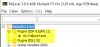
save has never seen any mods thus wouldn’t give you the missing mod warning. Unless you loaded a save you made with it and had mods active, and not the original save.
-
#19
I definitely chose the MsVault 11 save file, since i started by cryo pods. I’ll take a look at the file with that resaver tool and see what it says now.
-
#20
Ah, got it. It was my mistake. I choose another save file that had vault 111 in the title by mistake.
When i scrolled all the way to the bottom of my save list i found the MsVault 111 save file. I loaded that up and all the benches appear to be working correctly. No CTD.
Now i’m wondering if there is any way to salvage my old save games or if i am going to have to start from scratch.
22.11.2017, 03:38
7 629
0
HUDFramework — это утилита для создания пользовательского интерфейса в игре, это ядро необходимое для модов которые добавляют в игру разный интерфейс.
Сам по себе данный мод ничего не добавляет, он добавляет только инструменты и готовые функции для разработчиков модов на основе которых они делают разные интерфейсы для своих модов.
Данный мод создан для лучшей совместимости модов изменяющих HUD игры.
Так же в комплекте идет утилита HUDFramework auto-patcher — данная программа написанная на Java (необходим Java 8.) позволяет установить HUDFramework в случае если у вас уже установлен мод который изменяющий интерфейс игры (файл HUDMenu.swf).
Автор мода: registrator2000
Как установить мод HUDFramework в Фоллаут 4?
1) Скачиваем архив и распаковываем его можно установить при помощи Nexus Mod Manager
2) Для ручной установки, перенесите содержимое папки data мода в папку data которая в папке с игрой.
Если вы получаете сообщение о перезаписи файла HUDMenu.swf, то вам необходимо использовать автопатчер HUDFramework auto-patcher.
3) Активируйте данный файл мода в меню игры — модификации, порядок загрузки, либо отредактировав файл plugins.txt (для старых версий)
Как устанавливать моды на Фоллаут 4, более подробная инструкция.
0
Question

-
- Share
i just installed these 2 mods in MO2 and getting a conflict, so how do you install the DEF_UI Compatibility Patch to fix it?
Link to comment
Share on other sites
Recommended Posts
-
- 0

-
- Share
DEF_UI first, next DEF_UI Translations, DEF_UI Iconlibs Rescaled and Fixed (Nexus 31088) and a DEF_UI HUD preset by choice. After that install HUDFramework and HUDFramework — DEF_UI Compability Patch. Works fine for me.
-

1
Link to comment
Share on other sites
- 0
- Author
-
- Share
On 8/27/2021 at 2:35 AM, easyrider1988 said:
DEF_UI first, next DEF_UI Translations, DEF_UI Iconlibs Rescaled and Fixed (Nexus 31088) and a DEF_UI HUD preset by choice. After that install HUDFramework and HUDFramework — DEF_UI Compability Patch. Works fine for me.
thanks
Link to comment
Share on other sites
Create an account or sign in to comment
You need to be a member in order to leave a comment
Sign in
Already have an account? Sign in here.
Sign In Now