HTTP (HyperText Transfer Protocol — протокол передачи гипертекста) — символьно-ориентированный клиент-серверный протокол прикладного уровня без сохранения состояния, используемый сервисом World Wide Web.
Основным объектом манипуляции в HTTP является ресурс, на который указывает URI (Uniform Resource Identifier – уникальный идентификатор ресурса) в запросе клиента. Основными ресурсами являются хранящиеся на сервере файлы, но ими могут быть и другие логические (напр. каталог на сервере) или абстрактные объекты (напр. ISBN). Протокол HTTP позволяет указать способ представления (кодирования) одного и того же ресурса по различным параметрам: mime-типу, языку и т. д. Благодаря этой возможности клиент и веб-сервер могут обмениваться двоичными данными, хотя данный протокол является текстовым.
Структура протокола
Структура протокола определяет, что каждое HTTP-сообщение состоит из трёх частей (рис. 1), которые передаются в следующем порядке:
- Стартовая строка (англ. Starting line) — определяет тип сообщения;
- Заголовки (англ. Headers) — характеризуют тело сообщения, параметры передачи и прочие сведения;
- Тело сообщения (англ. Message Body) — непосредственно данные сообщения. Обязательно должно отделяться от заголовков пустой строкой.
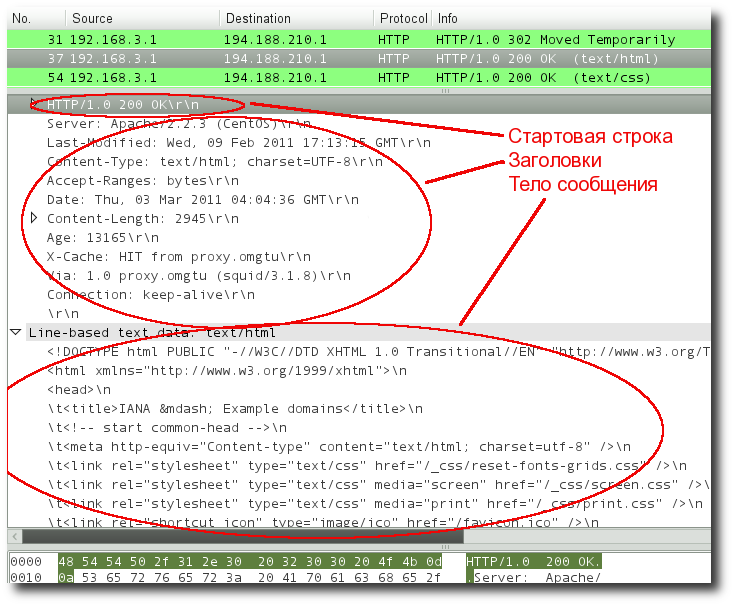
Рис. 1. Структура протокола HTTP (дамп пакета, полученный сниффером Wireshark)
Стартовая строка HTTP
Cтартовая строка является обязательным элементом, так как указывает на тип запроса/ответа, заголовки и тело сообщения могут отсутствовать.
Стартовые строки различаются для запроса и ответа. Строка запроса выглядит так:
Метод URI HTTP/Версия протокола
Пример запроса:
GET /web-programming/index.html HTTP/1.1
Стартовая строка ответа сервера имеет следующий формат:
HTTP/Версия КодСостояния [Пояснение]
Например, на предыдущий наш запрос клиентом данной страницы сервер ответил строкой:
HTTP/1.1 200 Ok
Методы протокола
Метод HTTP (англ. HTTP Method) — последовательность из любых символов, кроме управляющих и разделителей, указывающая на основную операцию над ресурсом. Обычно метод представляет собой короткое английское слово, записанное заглавными буквами (Табл. 1). Названия метода чувствительны к регистру.
Таблица 1. Методы протокола HTTP
| Метод | Краткое описание |
|---|---|
| OPTIONS |
Используется для определения возможностей веб-сервера или параметров соединения для конкретного ресурса. Для того чтобы узнать возможности всего сервера, клиент должен указать в URI звёздочку — «*». Запросы «OPTIONS * HTTP/1.1» могут также применяться для проверки работоспособности сервера (аналогично «пингованию») и тестирования на предмет поддержки сервером протокола HTTP версии 1.1. Результат выполнения этого метода не кэшируется. |
| GET |
Используется для запроса содержимого указанного ресурса. С помощью метода GET можно также начать какой-либо процесс. В этом случае в тело ответного сообщения следует включить информацию о ходе выполнения процесса. Согласно стандарту HTTP, запросы типа GET считаются идемпотентными[4] — многократное повторение одного и того же запроса GET должно приводить к одинаковым результатам (при условии, что сам ресурс не изменился за время между запросами). Это позволяет кэшировать ответы на запросы GET. Кроме обычного метода GET, различают ещё условный GET и частичный GET. Условные запросы GET содержат заголовки If-Modified-Since, If-Match, If-Range и подобные. Частичные GET содержат в запросе Range. Порядок выполнения подобных запросов определён стандартами отдельно. |
| HEAD |
Аналогичен методу GET, за исключением того, что в ответе сервера отсутствует тело. Запрос HEAD обычно применяется для извлечения метаданных, проверки наличия ресурса (валидация URL) и чтобы узнать, не изменился ли он с момента последнего обращения. Заголовки ответа могут кэшироваться. При несовпадении метаданных ресурса с соответствующей информацией в кэше копия ресурса помечается как устаревшая. |
| POST |
Применяется для передачи пользовательских данных заданному ресурсу. Например, в блогах посетители обычно могут вводить свои комментарии к записям в HTML-форму, после чего они передаются серверу методом POST и он помещает их на страницу. При этом передаваемые данные (в примере с блогами — текст комментария) включаются в тело запроса. Аналогично с помощью метода POST обычно загружаются файлы. В отличие от метода GET, метод POST не считается идемпотентным[4], то есть многократное повторение одних и тех же запросов POST может возвращать разные результаты (например, после каждой отправки комментария будет появляться одна копия этого комментария). При результатах выполнения 200 (Ok) и 204 (No Content) в тело ответа следует включить сообщение об итоге выполнения запроса. Если был создан ресурс, то серверу следует вернуть ответ 201 (Created) с указанием URI нового ресурса в заголовке Location. Сообщение ответа сервера на выполнение метода POST не кэшируется. |
| PUT |
Применяется для загрузки содержимого запроса на указанный в запросе URI. Если по заданному URI не существовало ресурса, то сервер создаёт его и возвращает статус 201 (Created). Если же был изменён ресурс, то сервер возвращает 200 (Ok) или 204 (No Content). Сервер не должен игнорировать некорректные заголовки Content-* передаваемые клиентом вместе с сообщением. Если какой-то из этих заголовков не может быть распознан или не допустим при текущих условиях, то необходимо вернуть код ошибки 501 (Not Implemented). Фундаментальное различие методов POST и PUT заключается в понимании предназначений URI ресурсов. Метод POST предполагает, что по указанному URI будет производиться обработка передаваемого клиентом содержимого. Используя PUT, клиент предполагает, что загружаемое содержимое соответствуют находящемуся по данному URI ресурсу. Сообщения ответов сервера на метод PUT не кэшируются. |
| PATCH |
Аналогично PUT, но применяется только к фрагменту ресурса. |
| DELETE |
Удаляет указанный ресурс. |
| TRACE |
Возвращает полученный запрос так, что клиент может увидеть, что промежуточные сервера добавляют или изменяют в запросе. |
| LINK |
Устанавливает связь указанного ресурса с другими. |
| UNLINK |
Убирает связь указанного ресурса с другими. |
Каждый сервер обязан поддерживать как минимум методы GET и HEAD. Если сервер не распознал указанный клиентом метод, то он должен вернуть статус 501 (Not Implemented). Если серверу метод известен, но он не применим к конкретному ресурсу, то возвращается сообщение с кодом 405 (Method Not Allowed). В обоих случаях серверу следует включить в сообщение ответа заголовок Allow со списком поддерживаемых методов.
Наиболее востребованными являются методы GET и POST — на человеко-ориентированных ресурсах, POST — роботами поисковых машин и оффлайн-браузерами.
Примечание
Прокси-сервер
Прокси — это транзитный сервер, перенаправляющий HTTP-трафик. Прокси-серверы используются для ускорения выполнения запросов путем кэширования веб-страниц. В локальной сети применяется как межсетевой экран и средство управления HTTP-трафиком (например, для блокирования доступа к некоторым ресурсам). В Интернете прокси часто используют для анонимизации запросов — в этом случае веб-сервер получает ip-адрес прокси-сервера, а не реального клиента. В современных браузерах можно задать целый список прокси и переключаться между серверами из этого списка по мере необходимости (обычно такая возможность доступна через расширения или плагины браузера).
Коды состояния
Код состояния информирует клиента о результатах выполнения запроса и определяет его дальнейшее поведение. Набор кодов состояния является стандартом, и все они описаны в соответствующих документах RFC.
Каждый код представляется целым трехзначным числом. Первая цифра указывает на класс состояния, последующие — порядковый номер состояния (рис 1.). За кодом ответа обычно следует краткое описание на английском языке.
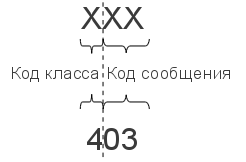
Рис. 1. Структура кода состояния HTTP
Введение новых кодов должно производиться только после согласования с IETF. Клиент может не знать все коды состояния, но он обязан отреагировать в соответствии с классом кода.
Применяемые в настоящее время классы кодов состояния и некоторые примеры ответов сервера приведены в табл. 2.
Таблица 2. Коды состояния протокола HTTP
| Класс кодов | Краткое описание |
|---|---|
| 1xx Informational (Информационный) |
В этот класс выделены коды, информирующие о процессе передачи. В HTTP/1.0 сообщения с такими кодами должны игнорироваться. В HTTP/1.1 клиент должен быть готов принять этот класс сообщений как обычный ответ, но ничего отправлять серверу не нужно. Сами сообщения от сервера содержат только стартовую строку ответа и, если требуется, несколько специфичных для ответа полей заголовка. Прокси-сервера подобные сообщения должны отправлять дальше от сервера к клиенту. Примеры ответов сервера: 100 Continue (Продолжать) 101 Switching Protocols (Переключение протоколов) 102 Processing (Идёт обработка) |
| 2xx Success (Успешно) |
Сообщения данного класса информируют о случаях успешного принятия и обработки запроса клиента. В зависимости от статуса сервер может ещё передать заголовки и тело сообщения. Примеры ответов сервера: 200 OK (Успешно). 201 Created (Создано) 202 Accepted (Принято) 204 No Content (Нет содержимого) 206 Partial Content (Частичное содержимое) |
| 3xx Redirection (Перенаправление) |
Коды статуса класса 3xx сообщают клиенту, что для успешного выполнения операции нужно произвести следующий запрос к другому URI. В большинстве случаев новый адрес указывается в поле Location заголовка. Клиент в этом случае должен, как правило, произвести автоматический переход (жарг. «редирект»). Обратите внимание, что при обращении к следующему ресурсу можно получить ответ из этого же класса кодов. Может получиться даже длинная цепочка из перенаправлений, которые, если будут производиться автоматически, создадут чрезмерную нагрузку на оборудование. Поэтому разработчики протокола HTTP настоятельно рекомендуют после второго подряд подобного ответа обязательно запрашивать подтверждение на перенаправление у пользователя (раньше рекомендовалось после 5-го). За этим следить обязан клиент, так как текущий сервер может перенаправить клиента на ресурс другого сервера. Клиент также должен предотвратить попадание в круговые перенаправления. Примеры ответов сервера: 300 Multiple Choices (Множественный выбор) 301 Moved Permanently (Перемещено навсегда) 304 Not Modified (Не изменялось) |
| 4xx Client Error (Ошибка клиента) |
Класс кодов 4xx предназначен для указания ошибок со стороны клиента. При использовании всех методов, кроме HEAD, сервер должен вернуть в теле сообщения гипертекстовое пояснение для пользователя. Примеры ответов сервера: 401 Unauthorized (Неавторизован) 402 Payment Required (Требуется оплата) 403 Forbidden (Запрещено) 404 Not Found (Не найдено) 405 Method Not Allowed (Метод не поддерживается) 406 Not Acceptable (Не приемлемо) 407 Proxy Authentication Required (Требуется аутентификация прокси) |
| 5xx Server Error (Ошибка сервера) |
Коды 5xx выделены под случаи неудачного выполнения операции по вине сервера. Для всех ситуаций, кроме использования метода HEAD, сервер должен включать в тело сообщения объяснение, которое клиент отобразит пользователю. Примеры ответов сервера: 500 Internal Server Error (Внутренняя ошибка сервера) 502 Bad Gateway (Плохой шлюз) 503 Service Unavailable (Сервис недоступен) 504 Gateway Timeout (Шлюз не отвечает) |
Заголовки HTTP
Заголовок HTTP (HTTP Header) — это строка в HTTP-сообщении, содержащая разделённую двоеточием пару вида «параметр-значение». Формат заголовка соответствует общему формату заголовков текстовых сетевых сообщений ARPA (RFC 822). Как правило, браузер и веб-сервер включают в сообщения более чем по одному заголовку. Заголовки должны отправляться раньше тела сообщения и отделяться от него хотя бы одной пустой строкой (CRLF).
Название параметра должно состоять минимум из одного печатного символа (ASCII-коды от 33 до 126). После названия сразу должен следовать символ двоеточия. Значение может содержать любые символы ASCII, кроме перевода строки (CR, код 10) и возврата каретки (LF, код 13).
Пробельные символы в начале и конце значения обрезаются. Последовательность нескольких пробельных символов внутри значения может восприниматься как один пробел. Регистр символов в названии и значении не имеет значения (если иное не предусмотрено форматом поля).
Пример заголовков ответа сервера:
Server: Apache/2.2.3 (CentOS)
Last-Modified: Wed, 09 Feb 2011 17:13:15 GMT
Content-Type: text/html; charset=UTF-8
Accept-Ranges: bytes
Date: Thu, 03 Mar 2011 04:04:36 GMT
Content-Length: 2945
Age: 51
X-Cache: HIT from proxy.omgtu
Via: 1.0 proxy.omgtu (squid/3.1.8)
Connection: keep-alive

200 OK
Все HTTP-заголовки разделяются на четыре основных группы:
- General Headers (Основные заголовки) — должны включаться в любое сообщение клиента и сервера.
- Request Headers (Заголовки запроса) — используются только в запросах клиента.
- Response Headers (Заголовки ответа) — присутствуют только в ответах сервера.
- Entity Headers (Заголовки сущности) — сопровождают каждую сущность сообщения.
Сущности (entity, в переводах также встречается название “объект”) — это полезная информация, передаваемая в запросе или ответе. Сущность состоит из метаинформации (заголовки) и непосредственно содержания (тело сообщения).
В отдельный класс заголовки сущности выделены, чтобы не путать их с заголовками запроса или заголовками ответа при передаче множественного содержимого (multipart/*). Заголовки запроса и ответа, как и основные заголовки, описывают всё сообщение в целом и размещаются только в начальном блоке заголовков, в то время как заголовки сущности характеризуют содержимое каждой части в отдельности, располагаясь непосредственно перед её телом.
В таблице 3 приведено краткое описание некоторых HTTP-заголовков.
Таблица 3. Заголовки HTTP
| Заголовок | Группа | Краткое описание |
|---|---|---|
| Allow | Entity | Список методов, применимых к запрашиваемому ресурсу. |
| Content-Encoding | Entity | Применяется при необходимости перекодировки содержимого (например, gzip/deflated). |
| Content-Language | Entity | Локализация содержимого (язык(и)) |
| Content-Length | Entity | Размер тела сообщения (в октетах) |
| Content-Range | Entity | Диапазон (используется для поддержания многопоточной загрузки или дозагрузки) |
| Content-Type | Entity | Указывает тип содержимого (mime-type, например text/html).Часто включает указание на таблицу символов локали (charset) |
| Expires | Entity | Дата/время, после которой ресурс считается устаревшим. Используется прокси-серверами |
| Last-Modified | Entity | Дата/время последней модификации сущности |
| Cache-Control | General | Определяет директивы управления механизмами кэширования. Для прокси-серверов. |
| Connection | General | Задает параметры, требуемые для конкретного соединения. |
| Date | General | Дата и время формирования сообщения |
| Pragma | General | Используется для специальных указаний, которые могут (опционально) применяется к любому получателю по всей цепочке запросов/ответов (например, pragma: no-cache). |
| Transfer-Encoding | General | Задает тип преобразования, применимого к телу сообщения. В отличие от Content-Encoding этот заголовок распространяется на все сообщение, а не только на сущность. |
| Via | General | Используется шлюзами и прокси для отображения промежуточных протоколов и узлов между клиентом и веб-сервером. |
| Warning | General | Дополнительная информация о текущем статусе, которая не может быть представлена в сообщении. |
| Accept | Request | Определяет применимые типы данных, ожидаемых в ответе. |
| Accept-Charset | Request | Определяет кодировку символов (charset) для данных, ожидаемых в ответе. |
| Accept-Encoding | Request | Определяет применимые форматы кодирования/декодирования содержимого (напр, gzip) |
| Accept-Language | Request | Применимые языки. Используется для согласования передачи. |
| Authorization | Request | Учетные данные клиента, запрашивающего ресурс. |
| From | Request | Электронный адрес отправителя |
| Host | Request | Имя/сетевой адрес [и порт] сервера. Если порт не указан, используется 80. |
| If-Modified-Since | Request | Используется для выполнения условных методов (Если-Изменился…). Если запрашиваемый ресурс изменился, то он передается с сервера, иначе — из кэша. |
| Max-Forwards | Request | Представляет механиз ограничения количества шлюзов и прокси при использовании методов TRACE и OPTIONS. |
| Proxy-Authorization | Request | Используется при запросах, проходящих через прокси, требующие авторизации |
| Referer | Request | Адрес, с которого выполняется запрос. Этот заголовок отсутствует, если переход выполняется из адресной строки или, например, по ссылке из js-скрипта. |
| User-Agent | Request | Информация о пользовательском агенте (клиенте) |
| Location | Response | Адрес перенаправления |
| Proxy-Authenticate | Response | Сообщение о статусе с кодом 407. |
| Server | Response | Информация о программном обеспечении сервера, отвечающего на запрос (это может быть как веб- так и прокси-сервер). |
В листинге 1 приведен фрагмент дампа заголовков при подключении к серверу http://example.org
Листинг 1. Заголовки HTTP
http://www.example.org/

GET http://www.example.org/ HTTP/1.1
Host: www.example.org
User-Agent: Mozilla/5.0 (X11; U; Linux i686; ru; rv:1.9.2.13) Gecko/20101203 SUSE/3.6.13-0.2.1 Firefox/3.6.13
Accept: text/html,application/xhtml+xml,application/xml;q=0.9,*/*;q=0.8
Accept-Language: ru-ru,ru;q=0.8,en-us;q=0.5,en;q=0.3
Accept-Encoding: gzip,deflate
Accept-Charset: windows-1251,utf-8;q=0.7,*;q=0.7
Keep-Alive: 115
Proxy-Connection: keep-alive

HTTP/1.0 302 Moved Temporarily
Date: Thu, 03 Mar 2011 06:48:28 GMT
Location: http://www.iana.org/domains/example/
Server: BigIP
Content-Length: 0
X-Cache: MISS from proxy.omgtu
Via: 1.0 proxy.omgtu (squid/3.1.8)
Connection: keep-alive
----------------------------------------------------------
http://www.iana.org/domains/example/

GET http://www.iana.org/domains/example/ HTTP/1.1
Host: www.iana.org
User-Agent: Mozilla/5.0 (X11; U; Linux i686; ru; rv:1.9.2.13) Gecko/20101203 SUSE/3.6.13-0.2.1 Firefox/3.6.13
Accept: text/html,application/xhtml+xml,application/xml;q=0.9,*/*;q=0.8
Accept-Language: ru-ru,ru;q=0.8,en-us;q=0.5,en;q=0.3
Accept-Encoding: gzip,deflate
Accept-Charset: windows-1251,utf-8;q=0.7,*;q=0.7
Keep-Alive: 115
Proxy-Connection: keep-alive

HTTP/1.0 200 OK
Server: Apache/2.2.3 (CentOS)
Last-Modified: Wed, 09 Feb 2011 17:13:15 GMT
Content-Type: text/html; charset=UTF-8
Accept-Ranges: bytes
Date: Thu, 03 Mar 2011 04:04:36 GMT
Content-Length: 2945
Age: 9858
X-Cache: HIT from proxy.omgtu
Via: 1.0 proxy.omgtu (squid/3.1.8)
Connection: keep-alive

....
Несколько полезных примеров php-скриптов, обрабатывающих HTTP-заголовки, приведены в статье «Использование файла .htaccess» (редирект, отправка кода ошибки, установка last-modified и т.п.).
Тело сообщения
Тело HTTP сообщения (message-body), если оно присутствует, используется для передачи сущности, связанной с запросом или ответом. Тело сообщения (message-body) отличается от тела сущности (entity-body) только в том случае, когда при передаче применяется кодирование, указанное в заголовке Transfer-Encoding. В остальных случаях тело сообщения идентично телу сущности.
Заголовок Transfer-Encoding должен отправляться для указания любого кодирования передачи, примененного приложением в целях гарантирования безопасной и правильной передачи сообщения. Transfer-Encoding — это свойство сообщения, а не сущности, и оно может быть добавлено или удалено любым приложением в цепочке запросов/ответов.
Присутствие тела сообщения в запросе отмечается добавлением к заголовкам запроса поля заголовка Content-Length или Transfer-Encoding. Тело сообщения (message-body) может быть добавлено в запрос только когда метод запроса допускает тело объекта (entity-body).
Все ответы содержат тело сообщения, возможно нулевой длины, кроме ответов на запрос методом HEAD и ответов с кодами статуса 1xx (Информационные), 204 (Нет содержимого, No Content), и 304 (Не модифицирован, Not Modified).
Контрольные вопросы
- В каком случае клиент получит от сервера ответ с кодом 418?
HTTP — это протокол, позволяющий получать различные ресурсы, например HTML-документы. Протокол HTTP лежит в основе обмена данными в Интернете. HTTP является протоколом клиент-серверного взаимодействия, что означает инициирование запросов к серверу самим получателем, обычно веб-браузером (web-browser). Полученный итоговый документ будет (может) состоять из различных поддокументов, являющихся частью итогового документа: например, из отдельно полученного текста, описания структуры документа, изображений, видео-файлов, скриптов и многого другого.

Клиенты и серверы взаимодействуют, обмениваясь одиночными сообщениями (а не потоком данных). Сообщения, отправленные клиентом, обычно веб-браузером, называются запросами, а сообщения, отправленные сервером, называются ответами.
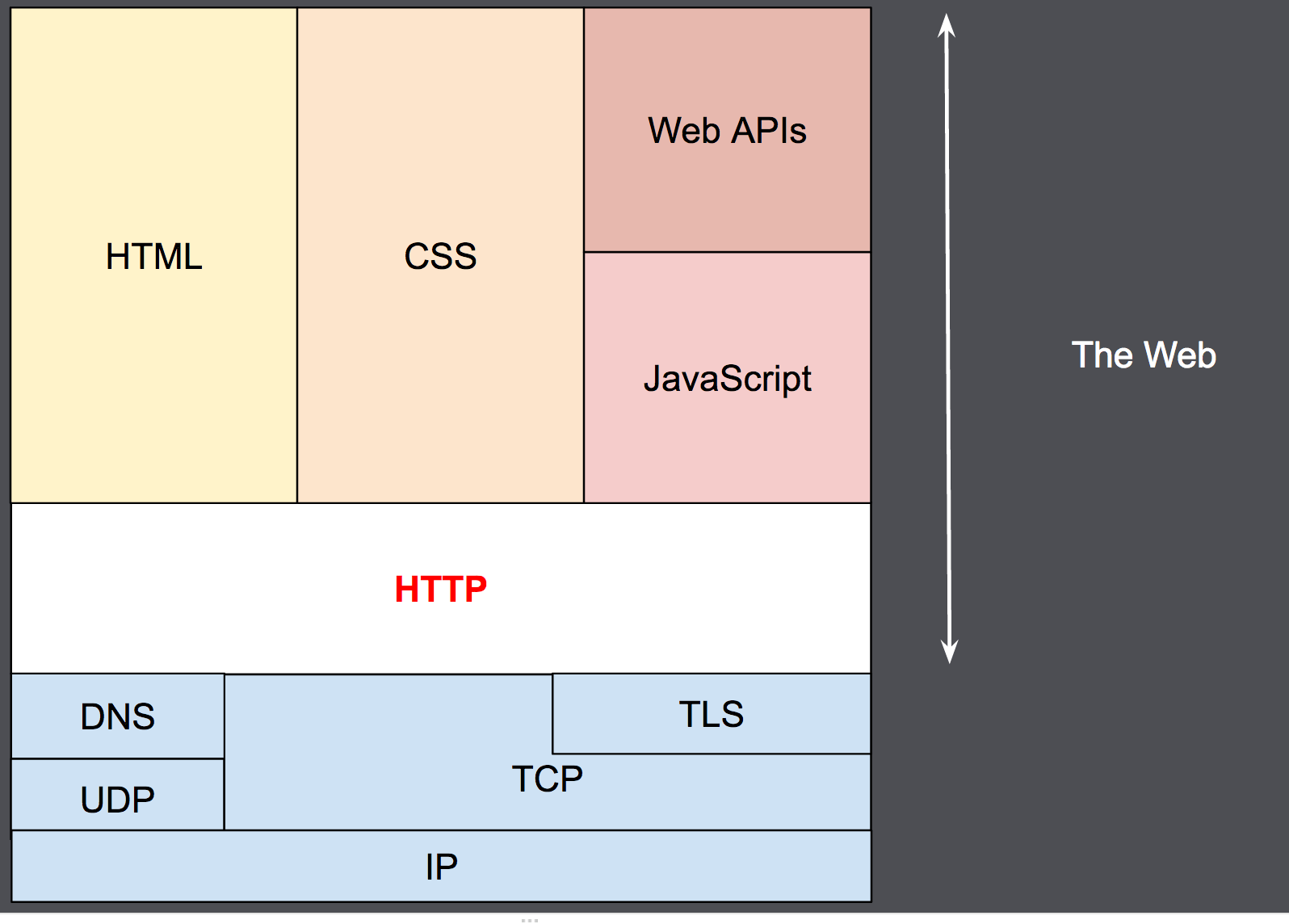 Хотя HTTP был разработан ещё в начале 1990-х годов, за счёт своей расширяемости в дальнейшем он все время совершенствовался. HTTP является протоколом прикладного уровня, который чаще всего использует возможности другого протокола — TCP (или TLS — защищённый TCP) — для пересылки своих сообщений, однако любой другой надёжный транспортный протокол теоретически может быть использован для доставки таких сообщений. Благодаря своей расширяемости, он используется не только для получения клиентом гипертекстовых документов, изображений и видео, но и для передачи содержимого серверам, например, с помощью HTML-форм. HTTP также может быть использован для получения только частей документа с целью обновления веб-страницы по запросу (например, посредством AJAX запроса).
Составляющие систем, основанных на HTTP
HTTP — это клиент-серверный протокол, то есть запросы отправляются какой-то одной стороной — участником обмена (user-agent) (либо прокси вместо него). Чаще всего в качестве участника выступает веб-браузер, но им может быть кто угодно, например, робот, путешествующий по Сети для пополнения и обновления данных индексации веб-страниц для поисковых систем.
Каждый запрос (англ. request) отправляется серверу, который обрабатывает его и возвращает ответ (англ. response). Между этими запросами и ответами как правило существуют многочисленные посредники, называемые прокси, которые выполняют различные операции и работают как шлюзы или кэш, например.

Обычно между браузером и сервером гораздо больше различных устройств-посредников, которые играют какую-либо роль в обработке запроса: маршрутизаторы, модемы и так далее. Благодаря тому, что Сеть построена на основе системы уровней (слоёв) взаимодействия, эти посредники «спрятаны» на сетевом и транспортном уровнях. В этой системе уровней HTTP занимает самый верхний уровень, который называется «прикладным» (или «уровнем приложений»). Знания об уровнях сети, таких как представительский, сеансовый, транспортный, сетевой, канальный и физический, имеют важное значение для понимания работы сети и диагностики возможных проблем, но не требуются для описания и понимания HTTP.
Клиент: участник обмена
Участник обмена (user agent) — это любой инструмент или устройство, действующие от лица пользователя. Эту задачу преимущественно выполняет веб-браузер; в некоторых случаях участниками выступают программы, которые используются инженерами и веб-разработчиками для отладки своих приложений.
Браузер всегда является той сущностью, которая создаёт запрос. Сервер обычно этого не делает, хотя за многие годы существования сети были придуманы способы, которые могут позволить выполнить запросы со стороны сервера.
Чтобы отобразить веб страницу, браузер отправляет начальный запрос для получения HTML-документа этой страницы. После этого браузер изучает этот документ и запрашивает дополнительные файлы, необходимые для отображения содержания веб-страницы (исполняемые скрипты, информацию о макете страницы — CSS таблицы стилей, дополнительные ресурсы в виде изображений и видео-файлов), которые непосредственно являются частью исходного документа, но расположены в других местах сети. Далее браузер соединяет все эти ресурсы для отображения их пользователю в виде единого документа — веб-страницы. Скрипты, выполняемые самим браузером, могут получать по сети дополнительные ресурсы на последующих этапах обработки веб-страницы, и браузер соответствующим образом обновляет отображение этой страницы для пользователя.
Веб-страница является гипертекстовым документом. Это означает, что некоторые части отображаемого текста являются ссылками, которые могут быть активированы (обычно нажатием кнопки мыши) с целью получения и соответственно отображения новой веб-страницы (переход по ссылке). Это позволяет пользователю «перемещаться» по страницам сети (Internet). Браузер преобразует эти гиперссылки в HTTP-запросы и в дальнейшем полученные HTTP-ответы отображает в понятном для пользователя виде.
Веб-сервер
На другой стороне коммуникационного канала расположен сервер, который обслуживает (англ. serve) пользователя, предоставляя ему документы по запросу. С точки зрения конечного пользователя, сервер всегда является некой одной виртуальной машиной, полностью или частично генерирующей документ, хотя фактически он может быть группой серверов, между которыми балансируется нагрузка, то есть перераспределяются запросы различных пользователей, либо сложным программным обеспечением, опрашивающим другие компьютеры (такие как кеширующие серверы, серверы баз данных, серверы приложений электронной коммерции и другие).
Сервер не обязательно расположен на одной машине, и наоборот — несколько серверов могут быть расположены (поститься) на одной и той же машине. В соответствии с версией HTTP/1.1 и имея Host заголовок, они даже могут делить тот же самый IP-адрес.
Прокси
Между веб-браузером и сервером находятся большое количество сетевых узлов, передающих HTTP сообщения. Из-за слоистой структуры большинство из них оперируют также на транспортном сетевом или физическом уровнях, становясь прозрачным на HTTP слое и потенциально снижая производительность. Эти операции на уровне приложений называются прокси. Они могут быть прозрачными или нет, (изменяющие запросы не пройдут через них), и способны исполнять множество функций:
- caching (кеш может быть публичным или приватными, как кеш браузера)
- фильтрация (как сканирование антивируса, родительский контроль, …)
- выравнивание нагрузки (позволить нескольким серверам обслуживать разные запросы)
- аутентификация (контролировать доступом к разным ресурсам)
- протоколирование (разрешение на хранение истории операций)
Основные аспекты HTTP
HTTP — прост
Даже с большей сложностью, введённой в HTTP/2 путём инкапсуляции HTTP-сообщений в фреймы, HTTP, как правило, прост и удобен для восприятия человеком. HTTP-сообщения могут читаться и пониматься людьми, обеспечивая более лёгкое тестирование разработчиков и уменьшенную сложность для новых пользователей.
HTTP — расширяемый
Введённые в HTTP/1.0 HTTP-заголовки сделали этот протокол лёгким для расширения и экспериментирования. Новая функциональность может быть даже введена простым соглашением между клиентом и сервером о семантике нового заголовка.
HTTP не имеет состояния, но имеет сессию
HTTP не имеет состояния: не существует связи между двумя запросами, которые последовательно выполняются по одному соединению. Из этого немедленно следует возможность проблем для пользователя, пытающегося взаимодействовать с определённой страницей последовательно, например, при использовании корзины в электронном магазине. Но хотя ядро HTTP не имеет состояния, куки позволяют использовать сессии с сохранением состояния. Используя расширяемость заголовков, куки добавляются к рабочему потоку, позволяя сессии на каждом HTTP-запросе делиться некоторым контекстом или состоянием.
HTTP и соединения
Соединение управляется на транспортном уровне, и потому принципиально выходит за границы HTTP. Хотя HTTP не требует, чтобы базовый транспортный протокол был основан на соединениях, требуя только надёжность, или отсутствие потерянных сообщений (т.е. как минимум представление ошибки). Среди двух наиболее распространённых транспортных протоколов Интернета, TCP надёжен, а UDP — нет. HTTP впоследствии полагается на стандарт TCP, являющийся основанным на соединениях, несмотря на то, что соединение не всегда требуется.
HTTP/1.0 открывал TCP-соединение для каждого обмена запросом/ответом, имея два важных недостатка: открытие соединения требует нескольких обменов сообщениями, и потому медленно, хотя становится более эффективным при отправке нескольких сообщений, или при регулярной отправке сообщений: тёплые соединения более эффективны, чем холодные.
Для смягчения этих недостатков, HTTP/1.1 предоставил конвейерную обработку (которую оказалось трудно реализовать) и устойчивые соединения: лежащее в основе TCP соединение можно частично контролировать через заголовок Connection. HTTP/2 сделал следующий шаг, добавив мультиплексирование сообщений через простое соединение, помогающее держать соединение тёплым и более эффективным.
Проводятся эксперименты по разработке лучшего транспортного протокола, более подходящего для HTTP. Например, Google экспериментирует с QUIC (которая основана на UDP) для предоставления более надёжного и эффективного транспортного протокола.
Чем можно управлять через HTTP
Естественная расширяемость HTTP со временем позволила большее управление и функциональность Сети. Кеш и методы аутентификации были ранними функциями в истории HTTP. Способность ослабить первоначальные ограничения, напротив, была добавлена в 2010-е.
Ниже перечислены общие функции, управляемые с HTTP.
-
Кеш
Сервер может инструктировать прокси и клиенты, указывая что и как долго кешировать. Клиент может инструктировать прокси промежуточных кешей игнорировать хранимые документы. -
Ослабление ограничений источника
Для предотвращения шпионских и других нарушающих приватность вторжений, веб-браузер обеспечивает строгое разделение между веб-сайтами. Только страницы из того же источника могут получить доступ к информации на веб-странице. Хотя такие ограничение нагружают сервер, заголовки HTTP могут ослабить строгое разделение на стороне сервера, позволяя документу стать частью информации с различных доменов (по причинам безопасности). -
Аутентификация
Некоторые страницы доступны только специальным пользователям. Базовая аутентификация может предоставляться через HTTP, либо через использование заголовкаWWW-Authenticate(en-US) и подобных ему, либо с помощью настройки спецсессии, используя куки. -
Прокси и туннелирование (en-US)
Серверы и/или клиенты часто располагаются в интернете и скрывают свои истинные IP-адреса от других. HTTP запросы идут через прокси для пересечения этого сетевого барьера. Не все прокси — HTTP прокси. SOCKS-протокол, например, оперирует на более низком уровне. Другие, как, например, ftp, могут быть обработаны этими прокси. -
Сессии
Использование HTTP кук позволяет связать запрос с состоянием на сервере. Это создаёт сессию, хотя ядро HTTP — протокол без состояния. Это полезно не только для корзин в интернет-магазинах, но также для любых сайтов, позволяющих пользователю настроить выход.
HTTP поток
Когда клиент хочет взаимодействовать с сервером, являющимся конечным сервером или промежуточным прокси, он выполняет следующие шаги:
- Открытие TCP соединения: TCP-соединение будет использоваться для отправки запроса (или запросов) и получения ответа. Клиент может открыть новое соединение, переиспользовать существующее или открыть несколько TCP-соединений к серверу.
- Отправка HTTP-сообщения: HTTP-сообщения (до HTTP/2) являются человекочитаемыми. Начиная с HTTP/2, простые сообщения инкапсулируются во фреймы, делая невозможным их чтение напрямую, но принципиально остаются такими же.
GET / HTTP/1.1 Host: developer.mozilla.org Accept-Language: fr - Читает ответ от сервера:
HTTP/1.1 200 OK Date: Sat, 09 Oct 2010 14:28:02 GMT Server: Apache Last-Modified: Tue, 01 Dec 2009 20:18:22 GMT ETag: "51142bc1-7449-479b075b2891b" Accept-Ranges: bytes Content-Length: 29769 Content-Type: text/html <!DOCTYPE html... (here comes the 29769 bytes of the requested web page) - Закрывает или переиспользует соединение для дальнейших запросов.
Если активирован HTTP-конвейер, несколько запросов могут быть отправлены без ожидания получения первого ответа целиком. HTTP-конвейер тяжело внедряется в существующие сети, где старые куски ПО сосуществуют с современными версиями. HTTP-конвейер был заменён в HTTP/2 на более надёжные мультиплексные запросы во фрейме.
HTTP сообщения
Подробнее в отдельной статье «Сообщения HTTP»
HTTP/1.1 и более ранние HTTP сообщения человекочитаемые. В версии HTTP/2 эти сообщения встроены в новую бинарную структуру, фрейм, позволяющий оптимизации, такие как компрессия заголовков и мультиплексирование. Даже если часть оригинального HTTP сообщения отправлена в этой версии HTTP, семантика каждого сообщения не изменяется и клиент воссоздаёт (виртуально) оригинальный HTTP-запрос. Это также полезно для понимания HTTP/2 сообщений в формате HTTP/1.1.
Существует два типа HTTP сообщений, запросы и ответы, каждый в своём формате.
Запросы
Примеры HTTP запросов:
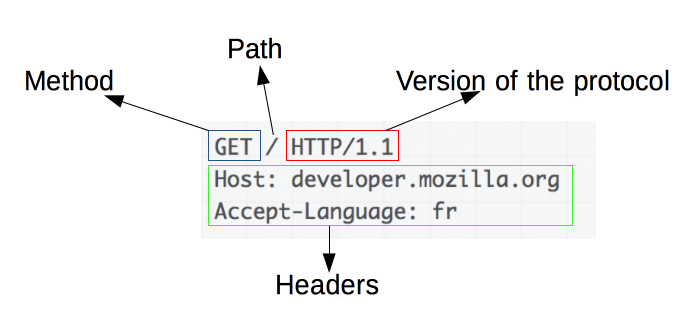
Запросы содержат следующие элементы:
- HTTP-метод, обычно глагол подобно
GET,POSTили существительное, какOPTIONSилиHEAD, определяющее операцию, которую клиент хочет выполнить. Обычно, клиент хочет получить ресурс (используяGET) или передать значения HTML-формы (используяPOST), хотя другие операции могут быть необходимы в других случаях. - Путь к ресурсу: URL ресурсы лишены элементов, которые очевидны из контекста, например без протокола (
http://), домена (здесьdeveloper.mozilla.org), или TCP порта (здесь80). - Версию HTTP-протокола.
- Заголовки (опционально), предоставляющие дополнительную информацию для сервера.
- Или тело, для некоторых методов, таких как
POST, которое содержит отправленный ресурс.
Ответы
Примеры ответов:
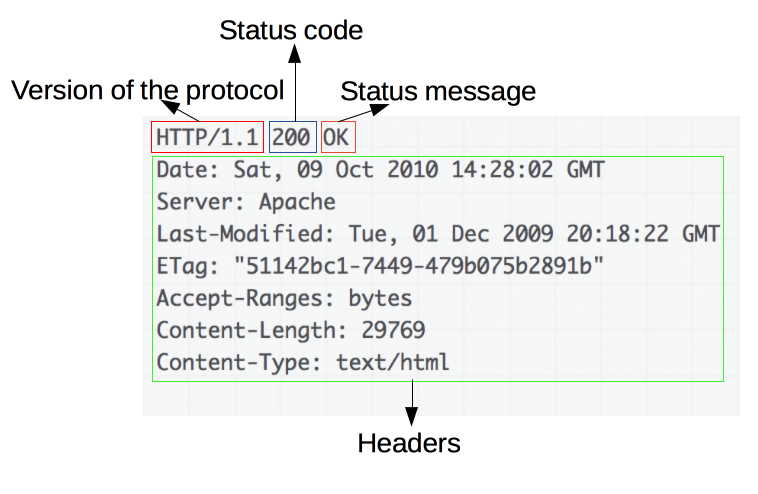
Ответы содержат следующие элементы:
- Версию HTTP-протокола.
- HTTP код состояния, сообщающий об успешности запроса или причине неудачи.
- Сообщение состояния — краткое описание кода состояния.
- HTTP заголовки, подобно заголовкам в запросах.
- Опционально: тело, содержащее пересылаемый ресурс.
Вывод
HTTP — лёгкий в использовании расширяемый протокол. Структура клиент-сервера, вместе со способностью к простому добавлению заголовков, позволяет HTTP продвигаться вместе с расширяющимися возможностями Сети.
Хотя HTTP/2 добавляет некоторую сложность, встраивая HTTP сообщения во фреймы для улучшения производительности, базовая структура сообщений осталась с HTTP/1.0. Сессионный поток остаётся простым, позволяя исследовать и отлаживать с простым монитором HTTP-сообщений.

Опубликовано: 06 мая 2021
Вернуться в блог
Содержание
- Видео
- HTTP
- Структура HTTP-запросов и ответов
- URL запроса
- Методы HTTP-запросов
- Статус-коды ответа
- Заголовки HTTP
- HTTP-редиректы
- SSL шифрование
- Версии HTTP
- HTTP/2
- HTTP/3
Что отличает настоящего айтишника?
Настоящий знает, как работает Интернет. Рассказываем для всех простым языком, как работает HTTP.
Видео
HTTP
Структура HTTP-запросов и ответов
В HTTP и запрос, и ответ имеют похожую структуру:
- URL
- Метод
- Версия HTTP
- Заголовки
- Статус-код (обязательно только для HTTP-ответов)
- Тело (необязательно)
Пример HTTP-запроса:
POST /cgi-bin/process.cgi HTTP/1.1
User-Agent: Mozilla/4.0 (compatible; MSIE5.01; Windows NT)
Host: www.tutorialspoint.com
Content-Type: application/x-www-form-urlencoded
Content-Length: length
Accept-Language: en-us
Accept-Encoding: gzip, deflate
Connection: Keep-Alive

licenseID=string&content=string&/paramsXML=string
, где
POST— метод,/cgi-bin/process.cgi— URL,HTTP/1.1— версия протокола HTTP,User-Agent,Hostи другие — заголовкиlicenseID=string&content=string&/paramsXML=string— тело запроса.
Пример HTTP-ответа:
HTTP/1.1 200 OK
Date: Mon, 27 Jul 2009 12:28:53 GMT
Server: Apache/2.2.14 (Win32)
Last-Modified: Wed, 22 Jul 2009 19:15:56 GMT
Content-Length: 88
Content-Type: text/html
Connection: Closed

<html>
<body>
<h1>Hello, World!</h1>
</body>
</html>
В данном ответе отсутствует URL и метод, зато появился статус-код 200, означающий «успех».
URL запроса
Структура URL-адреса
http://blog.example.com:80/catalog/category/knifes?key1=value1&amp;key2=value2#anchor
где
- http:// — протокол
- blog — поддомен (субдомен, домен третьего уровня)
- example — домен (домен второго уровня)
- com — доменная зона (домен первого уровня)
- 80 — порт. Для http — 80, для https — 443
- /catalog/category/knifes — ЧПУ-адрес (человеко-понятный URL)
- key1=value1&key2=value2 — GET параметры запроса
- anchor — якорь
Абсолютные и относительные URL
Абсолютные адреса в проекте — зло. Используйте относительные.
Абсолютный URL
https://developer.mozilla.org/ru/docs/Learn
Абсолютный URL, скрыт протокол
//developer.mozilla.org/ru/docs/Learn
Относительный URL (неправильно) 🚫
ru/docs/Learn
если мы на странице https://domain.ru/ru/about, то преобразуется в https://domain.ru/ru/aboutru/docs/Learn
Относительный URL (правильно) ✅
/ru/docs/Learn
если мы на странице https://domain.ru/ru/about, то преобразуется в https://domain.ru/ru/docs/Learn
Якоря (анкоры) ⚓️
Якоря придуманы в HTML, чтобы давать ссылки не просто на HTML-страницу, а на определенное место на странице. Позже якоря стали активно использоваться для передачи параметров в JS.
URL с якорем
https://domain.ru/url#someAnchor
HTML-элемент, на который ведет якорь
<h2 name="someAnchor">Заголовок с якорем</h2>
Методы HTTP-запросов
Если при повторении одного и того же запроса на сервере ничего не меняется, запрос считается идемпотентным. Если повторение одинакового запроса несколько раз изменяет состояние сервера, то он не идемпотентен и, вообще говоря, менее безопасен.
| Метод | POST-параметры | Идемпотентность | Предназначение |
|---|---|---|---|
| GET | нет | да | получает информацию о ресурсе |
| POST | да | нет | создает ресурс |
| PUT | да | да | заменяет ресурс целиком |
| PATCH | да | да | редактирует ресурс |
| DELETE | нет | да | удаляет ресурс |
| HEAD | нет | да | не получает body, только отправляет и получает HTTP-заголовки |
PUT заменяет существующую сущность. Те элементы сущности, которые не представлены в запросе, будут очищены или заменены на null.
GET и POST параметры
В контексте методов HTTP-запросов стоит упомянуть GET и POST параметры, так как вы будете постоянно с ними встречаться и так проще понять, как используются методы.
GET-параметры передаются в URL запроса. Пример URL с GET-параметрами я приводил выше. Любой из перечисленных ниже методов может иметь или не иметь GET-параметры, это совершенно нормально.
POST-параметры — это любые параметры, передаваемые в теле (body) запроса. POST-параметры не следует использовать для некоторых методов, например, для GET, DELETE и HEAD.
Статус-коды ответа
По группам
- 100 — 199 Информационные
- 200 — 299 Успешные
- 300 — 399 Редиректы
- 400 — 499 Клиентские ошибки
- 500 — 599 Серверные ошибки
Популярные коды ответа
- Для редиректов SEO-шники рекомендуют 301 редиректы.
- 401 не авторизован (юзер не представился)
- 403 запрещено (юзер не уполномочен)
- 404 ресурс не найден
- 418 я чайник
- 419 кука протухла (обычно ошибка проверки CSRF)
- 502 Bad Gateway. Программа веб-сервер (Nginx) получила неправильный ответ от бэкенда (PHP). Скорее всего, что-то сломалось или неправильно настроено на сервере
- 504 Gateway Timeout. Программа веб-сервер устала ждать ответа от бэкенда и отменила запрос к нему. Скорее всего, на бэкенде происходит что-то очень долгое, какое-то большое вычисление. Ну и все равно это не нормально, такого быть не должно.
- 503 Maintenance Mode. На сервере ведутся технические работы.
Коды ответа, как и заголовки, можно посмотреть в браузере на вкладке Network или получить командой curl -I domain.ru. В отличие от заголовков, коды ответа бывают только в ответе и не используются в запросе.
Заголовки HTTP
Заголовки — часть HTTP-запроса и/или HTTP-ответа, они не видимы пользователю. Представляют собой пары ключ: значение. Заголовки можно посмотреть в браузере на вкладке Network или получить командой curl -I domain.ru (так можно получить только заголовки ответа сервера).
Заголовки запроса
- Host — ВАЖНО. Домен, по которому мы переходим
- Cookie — куки, отдаваемые браузером серверу
- User-Agent — браузер, которым делаем запрос
- Accept-Language и Accept-Encoding — принимаемые браузером язык и кодировка
- Referer — предыдущая страница
- Authorization — реквизиты для базовой авторизации (логин, пароль)
Заголовки ответа
- Cache-Control — сервер говорит браузеру, как кэшировать данные
- Content-Type — тип и подтип содержимого, а также кодировка и приложение для открытия содержимого. Примеры:
- Content-Type: text/html; charset=UTF-8 — Тип текст, подтип HTML. Кодировка UTF-8
- Content-Type: image/gif — Тип картинка, подтип GIF
- Content-Type: application/pdf — Тип «открываемый внешним приложением», подтип PDF
- Content-Disposition — говорит браузеру, скачивать или открывать документ как веб-страницу
- Location — заголовок для редиректа
- Set-Cookie — сервер передает браузеру куку
- WWW-Authenticate — выводит окно с базовой аутентификацией
- Content-Encoding — сервер говорит браузеру, сжата ли страница и в каком виде
- Server и X-Powered-By — технологии, на которых работает сайт
HTTP-редиректы
Редиректы — способ перенаправить браузер на другой URL. Это похоже на то, как если бы вы пришли в магазин и там увидели надпись «мы переехали, вот наш новый адрес». После этого вы идете в магазин по новому адресу. Важно понимать, что редирект со стороны сайта лишь просит ваш браузер перейти на другой адрес, а не подсовывает вам другую страницу. Другими словами, технически редирект происходит на стороне клиента, а не сервера.
www и http://
Проверка редиректов очень важна для проверки настроек префиксов домена типа www и http/https.
То есть у каждого домена обычно есть 4 варианта написания:
И 3 из этих 4 вариантов обязательно должны ссылаться на один из них, то есть на главный. Главный вариант определяет заказчик, но обычно это https://domain.ru
Инструменты
Редиректы можно проверить браузером через вкладку Network

Разработчикам будет удобнее воспользоваться утилитой
curl -I -L https://domain.ru
Как сбросить кэш редиректов браузера
На Windows нажать ctrl+H, затем «очистить историю», оставить включенной (отжатой) только галочку напротив «Изображения и другие файлы, сохраненные в кэше». Затем нажать «удалить данные».
SSL шифрование
Принцип — передача только зашифрованных данных.

Типы SSL-сертификатов
- Платные (Comodo, Thawte, reg.ru)
- Срок — 1 год или более
- Стоимость — от 1500 руб/год
- Let’s Encrypt (обычно мы используем именно LE)
- Срок — 3 месяца
- Стоимость — бесплатно
- Нюанс: Wild Card сертификаты для поддоменов (*.flagstudio.ru). Доступны в LE только при DNS-аутентификации, то есть добавлении TXT-записи, которую нужно обновлять каждые 3 месяца. Для обновления используется API, которое есть не у всех DNS-провайдеров.
Диагностика SSL
Если на сайте проблемы с SSL, то причина — в одном из двух:
- Что-то не так с сертификатом (кончился, выдан не на этот домен или самоподписанный)
- Страница запрашивает что-то по HTTP
На скриншоте видно, как посмотреть подробности о сертификате и наличие ошибок в странице. Конкретно на этом скриншоте показана вторая проблема, так называемая «mixed-content error», то есть часть контента прилетает по HTTP.
Для диагности SSL на вашем сайте вы также можете использовать онлайн-сервис https://www.ssllabs.com/ssltest/ .
Учтите, данные о сертификате, как и HTTP-редиректы, сильно кэшируются браузером. Сбрасываются так же, как кэш редиректов (смотрите выше).
Версии HTTP
HTTP/2
Суть — мультиплексирование запросов по TCP.
Преимущества перед HTTP/1.1
- Скорость. HTTP/2 — бинарный протокол, а HTTP/1.1 — текстовый
- Скорость. Мультиплексирование множества запросов в одном соединении TCP
- Скорость. Сжатие HTTP-заголовков
- Server Push. Принудительная отправка данных сервером в браузер
- Приоритеты запросов
Минусы
- Из-за «head-of-line blocking» на медленном интернете HTTP/1.1 работает быстрее
- Для работы HTTP/2 нужен SSL
Распространение: По данным W3Techs на 1 ноября 2020 года, 49% из 10 млн самых популярных интернет-сайтов поддерживают протокол HTTP/2.
Подробная статья с понятными картинками — https://habr.com/ru/company/nix/blog/304518/
HTTP/3
Суть — мультиплексирование по UDP.
Преимущества перед HTTP/2:
- Решена проблема «head-of-line blocking»
- Шифрование и транспорт объединены, пакеты шифруются независимо
- Протокол реализуется на уровне приложений, а не ОС. Поэтому быстро внедряется
Минусы:
- Протокол реализуется на уровне приложений, а не ОС. Поэтому HTTP/3 использует больше CPU
Результаты: По данным Google, страницы загружаются примерно на 5% быстрее, а в потоковом видео на 30% меньше подвисаний по сравнению с TCP.
Распространение: По данным W3Techs на 1 сентября 2020 года, 7% из 10 млн самых популярных интернет-сайтов поддерживают протокол HTTP/3.
Если у вас появились какие-то вопросы, вы можете задать их в комментариях, а мы на них ответим 🙂
HTTP (англ. HyperText Transfer Protocol — «протокол передачи гипертекста») — протокол прикладного уровня передачи данных, изначально — в виде гипертекстовых документов (то есть документов, которые могут содержать ссылки, позволяющие организовать переход к другим документам) в формате HTML, в настоящее время используется для передачи произвольных данных.
Основой HTTP является технология «клиент-сервер», то есть предполагается существование:
-
Потребителей (клиентов), которые инициируют соединение и посылают запрос;
-
Поставщиков (серверов), которые ожидают соединения для получения запроса, производят необходимые действия и возвращают обратно сообщение с результатом.
HTTP используется также в качестве «транспорта» для других протоколов прикладного уровня, таких как SOAP, XML-RPC, WebDAV.
Основным объектом манипуляции в HTTP является ресурс, на который указывает URI (Uniform Resource Identifier) в запросе клиента. Обычно такими ресурсами являются хранящиеся на сервере файлы, но ими могут быть логические объекты или что-то абстрактное. Особенностью протокола HTTP является возможность указать в запросе и ответе способ представления одного и того же ресурса по различным параметрам: формату, кодировке, языку и т. д. (в частности, для этого используется HTTP-заголовок). Именно благодаря возможности указания способа кодирования сообщения клиент и сервер могут обмениваться двоичными данными, хотя данный протокол является текстовым.
HTTP — протокол прикладного уровня; аналогичными ему являются FTP и SMTP. Обмен сообщениями идёт по обыкновенной схеме «запрос-ответ». Для идентификации ресурсов HTTP использует глобальные URI. В отличие от многих других протоколов, HTTP не сохраняет своего состояния (stateless). Это означает отсутствие сохранения промежуточного состояния между парами «запрос-ответ». Компоненты, использующие HTTP, могут самостоятельно осуществлять сохранение информации о состоянии, связанной с последними запросами и ответами (например, «куки» на стороне клиента, «сессии» на стороне сервера). Браузер, посылающий запросы, может отслеживать задержки ответов. Сервер может хранить IP-адреса и заголовки запросов последних клиентов. Однако сам протокол не осведомлён о предыдущих запросах и ответах, в нём не предусмотрена внутренняя поддержка состояния, к нему не предъявляются такие требования.
Большинство протоколов предусматривает установление TCP-сессии, в ходе которой один раз происходит авторизация, и дальнейшие действия выполняются в контексте этой авторизации. HTTP же устанавливает отдельную TCP-сессию на каждый запрос; в более поздних версиях HTTP было разрешено делать несколько запросов в ходе одной TCP-сессии, но браузеры обычно запрашивают только страницу и включенные в нее объекты (картинки, каскадные стили и т. п.), а затем сразу разрывают TCP-сессию. Для поддержки авторизованного (неанонимного) доступа в HTTP используются cookies; причем такой способ авторизации позволяет сохранить сессию даже после перезагрузки клиента и сервера.
При доступе к данным по FTP или по файловым протоколам тип файла (точнее, тип содержащихся в нем данных) определяется по расширению имени файла, что не всегда удобно. HTTP перед тем, как передать сами данные, передаёт заголовок «Content-Type: тип/подтип», позволяющий клиенту однозначно определить, каким образом обрабатывать присланные данные. Это особенно важно при работе с CGI-скриптами, когда расширение имени файла указывает не на тип присылаемых клиенту данных, а на необходимость запуска данного файла на сервере и отправки клиенту результатов работы программы, записанной в этом файле (при этом один и тот же файл в зависимости от аргументов запроса и своих собственных соображений может порождать ответы разных типов — в простейшем случае картинки в разных форматах).
Кроме того, HTTP позволяет клиенту прислать на сервер параметры, которые будут переданы запускаемому CGI-скрипту. Для этого же в HTML были введены формы.
Каждое HTTP-сообщение состоит из трёх частей, которые передаются в указанном порядке:
-
1.
Стартовая строка (англ. Starting line) — определяет тип сообщения, различается для запроса и ответа;
-
2.
Заголовки (англ. Headers) — характеризуют тело сообщения, параметры передачи и прочие сведения;
-
3.
Тело сообщения (англ. Message Body) — непосредственно данные сообщения. Обязательно должно отделяться от заголовков пустой строкой.
Для версии протокола 1.1 сообщение запроса обязательно должно содержать заголовок Host.
-
Стартовая строка запроса выглядит так: Метод URI HTTP/Версия, где:
-
Метод (англ. Method) — тип запроса, одно слово заглавными буквами;
-
URI определяет путь к запрашиваемому документу;
-
Версия (англ. Version) — пара разделенных точкой цифр. Например: 1.1.
Чтобы запросить страницу данной статьи, клиент должен передать строку (задан всего один заголовок):
-
-
Стартовая строка ответа сервера имеет следующий формат: HTTP/Версия КодСостояния Пояснение, где:
-
Версия — пара разделенных точкой цифр, как в запросе;
-
Код состояния (англ. Status Code) — три цифры. По коду состояния определяется дальнейшее содержимое сообщения и поведение клиента;
-
Пояснение (англ. Reason Phrase) — текстовое короткое пояснение к коду ответа для пользователя. Никак не влияет на сообщение и является необязательным.
Например, стартовая строка ответа сервера на предыдущий запрос может выглядеть так:
-
2. Заголовки: Заголовки HTTP (англ. HTTP Headers) — это строки в HTTP-сообщении, содержащие разделённую двоеточием пару параметр-значение. Формат заголовков соответствует общему формату заголовков текстовых сетевых сообщений ARPA (см. RFC 822). Заголовки должны отделяться от тела сообщения хотя бы одной пустой строкой. Примеры заголовков:
-
Server: Apache/2.2.11 (Win32) PHP/5.3.0
-
Last-Modified: Sat, 16 Jan 2010 21:16:42 GMT
-
Content-Type: text/plain; charset=windows-1251
В примере выше каждая строка представляет собой один заголовок. При этом то, что находится до двоеточия, называется именем (англ. name), а что после него — значением (англ. value).
Все заголовки разделяются на четыре основных группы:
-
General Headers («Основные заголовки») — могут включаться в любое сообщение клиента и сервера;
-
Request Headers («Заголовки запроса») — используются только в запросах клиента;
-
Response Headers («Заголовки ответа») — только для ответов от сервера;
-
Entity Headers («Заголовки сущности») — сопровождают каждую сущность сообщения.
Именно в таком порядке рекомендуется посылать заголовки получателю.
Все необходимые для функционирования HTTP заголовки описаны в основных RFC. Если не хватает существующих, то можно вводить свои. Традиционно к именам таких дополнительных заголовков добавляют префикс «X-» для избежания конфликта имён с возможно существующими. Например, как в заголовках X-Powered-By или X-Cache. Некоторые разработчики используют свои индивидуальные префиксы. Примерами таких заголовков могут служить Ms-Echo-Request и Ms-Echo-Reply, введённые корпорацией Microsoft для расширения WebDAV. Больше можно узнать
тут
.
Какие заголовки важны тестировщику: очевидно, смотря что мы тестируем. В основном это заголовки, касающиеся авторизации, кук, кэша и юзер-агент, хотя для того же security тестера они будут иные. Больше
тут
и
тут
.
Как сервер узнает, с какого типа устройства/браузера/ОС/языка вы открываете веб-сайт (Например, для Adaptive design): когда вы отправляете HTTP-запрос, он содержит в себе заголовки (headers) с различной информацией. Одним из них является User-Agent. Он сообщает: браузер, его версию и язык, движок браузера, версию движка, операционную систему.
3. Тело сообщения: Тело HTTP-сообщения (message-body), если оно присутствует, используется для передачи тела объекта, связанного с запросом или ответом. Тело сообщения отличается от тела объекта (entity-body) только в том случае, когда применяется кодирование передачи, что указывается полем заголовка Transfer-Encoding.
Поле Transfer-Encoding должно использоваться для указания любого кодирования передачи, примененного приложением в целях гарантирования безопасной и правильной передачи сообщения. Поле Transfer-Encoding — это свойство сообщения, а не объекта, и, таким образом, может быть добавлено или удалено любым приложением в цепочке запросов/ответов.
Правила, устанавливающие допустимость тела сообщения в сообщении, отличны для запросов и ответов.
Присутствие тела сообщения в запросе отмечается добавлением к заголовкам запроса поля заголовка Content-Length или Transfer-Encoding. Тело сообщения может быть добавлено в запрос, только когда метод запроса допускает тело объекта.
Включается или не включается тело сообщения в сообщение ответа — зависит как от метода запроса, так и от кода состояния ответа. Все ответы на запрос с методом HEAD не должны включать тело сообщения, даже если присутствуют поля заголовка объекта (entity-header), заставляющие поверить в присутствие объекта. Никакие ответы с кодами состояния 1xx (Информационные), 204 (Нет содержимого, No Content), и 304 (Не модифицирован, Not Modified) не должны содержать тела сообщения. Все другие ответы содержат тело сообщения, даже если оно имеет нулевую длину.
Метод HTTP (англ. HTTP Method) — последовательность из любых символов, кроме управляющих и разделителей, указывающая на основную операцию над ресурсом. Обычно метод представляет собой короткое английское слово, записанное заглавными буквами. Обратите внимание, что название метода чувствительно к регистру.
Сервер может использовать любые методы, не существует обязательных методов для сервера или клиента, кроме того, программист может связать метод и выполняемую функцию как угодно его фантазии. Во избежание хаоса существуют соглашения (тот же REST) и стандарты. Формально если сервер не распознал указанный клиентом метод, то он должен вернуть статус 501 (Not Implemented). Если серверу метод известен, но он неприменим к конкретному ресурсу, то возвращается сообщение с кодом 405 (Method Not Allowed). В обоих случаях серверу следует включить в сообщение ответа заголовок Allow со списком поддерживаемых методов.
Основными и чаще всего используемыми методами являются GET, POST, PUT, DELETE которые эквивалентны базовым функциям при работе с БД или любыми хранимыми вычислительными сущностями —
CRUD
(create, read, update, delete).
-
OPTIONS: Используется для определения возможностей веб-сервера или параметров соединения для конкретного ресурса. В ответ серверу следует включить заголовок Allow со списком поддерживаемых методов. Также в заголовке ответа может включаться информация о поддерживаемых расширениях. Предполагается, что запрос клиента может содержать тело сообщения для указания интересующих его сведений. Формат тела и порядок работы с ним в настоящий момент не определен; сервер пока должен его игнорировать. Аналогичная ситуация и с телом в ответе сервера. Для того, чтобы узнать возможности всего сервера, клиент должен указать в URI звёздочку — «*». Запросы «OPTIONS * HTTP/1.1» могут также применяться для проверки работоспособности сервера (аналогично «пингованию») и тестирования на предмет поддержки сервером протокола HTTP версии 1.1. Результат выполнения этого метода не кэшируется;
-
GET: Используется для запроса содержимого указанного ресурса. С помощью метода GET можно также начать какой-либо процесс. В этом случае в тело ответного сообщения следует включить информацию о ходе выполнения процесса. Клиент может передавать параметры выполнения запроса в URI целевого ресурса после символа «?»: GET /path/resource?param1=value1¶m2=value2 HTTP/1.1. Согласно стандарту HTTP, запросы типа GET считаются идемпотентными. Кроме обычного метода GET, различают ещё
-
Условный GET — содержит заголовки If-Modified-Since, If-Match, If-Range и подобные;
-
Частичный GET — содержит в запросе Range.
Порядок выполнения подобных запросов определен стандартами отдельно;
-
-
HEAD: Аналогичен методу GET, за исключением того, что в ответе сервера отсутствует тело. Запрос HEAD обычно применяется для извлечения метаданных, проверки наличия ресурса (валидация URL) и чтобы узнать, не изменился ли он с момента последнего обращения. Заголовки ответа могут кэшироваться. При несовпадении метаданных ресурса с соответствующей информацией в кэше — копия ресурса помечается как устаревшая;
-
POST: Применяется для передачи пользовательских данных заданному ресурсу. Например, в блогах посетители обычно могут вводить свои комментарии к записям в HTML-форму, после чего они передаются серверу методом POST и он помещает их на страницу. При этом передаваемые данные (в примере с блогами — текст комментария) включаются в тело запроса. Аналогично с помощью метода POST обычно загружаются файлы на сервер. В отличие от метода GET, метод POST не считается идемпотентным, то есть многократное повторение одних и тех же запросов POST может возвращать разные результаты (например, после каждой отправки комментария будет появляться очередная копия этого комментария). При результате выполнения 200 (Ok) в тело ответа следует включить сообщение об итоге выполнения запроса. Если был создан ресурс, то серверу следует вернуть ответ 201 (Created) с указанием URI нового ресурса в заголовке Location. Сообщение ответа сервера на выполнение метода POST не кэшируется. Стоит отметить, что
не всегда данные могут быть лишь в теле
;
-
PUT: Применяется для загрузки содержимого запроса на указанный в запросе URI. Если по заданному URI не существует ресурса, то сервер создаёт его и возвращает статус 201 (Created). Если же ресурс был изменен, то сервер возвращает 200 (Ok) или 204 (No Content). Сервер не должен игнорировать некорректные заголовки Content-*, передаваемые клиентом вместе с сообщением. Если какой-то из этих заголовков не может быть распознан или недопустим при текущих условиях, то необходимо вернуть код ошибки 501 (Not Implemented). Фундаментальное различие методов POST и PUT заключается в понимании предназначений URI ресурсов. Метод POST предполагает, что по указанному URI будет производиться обработка передаваемого клиентом содержимого. Используя PUT, клиент предполагает, что загружаемое содержимое соответствует находящемуся по данному URI ресурсу. Сообщения ответов сервера на метод PUT не кэшируются;
-
PATCH: Аналогично PUT, но применяется только к фрагменту ресурса;
-
DELETE: Удаляет указанный ресурс;
-
TRACE: Возвращает полученный запрос так, что клиент может увидеть, какую информацию промежуточные серверы добавляют или изменяют в запросе;
-
CONNECT: Преобразует соединение запроса в прозрачный TCP/IP-туннель, обычно чтобы содействовать установлению защищенного SSL-соединения через нешифрованный прокси.
Различия методов GET и POST
Основное состоит в способе передачи данных веб-формы обрабатывающему скрипту, а именно:
-
Метод GET отправляет скрипту всю собранную информацию формы как часть URL: http://www.komtet.ru/script.php?login=admin&name=komtet
-
Метод POST передает данные таким образом, что пользователь сайта уже не видит передаваемые скрипту данные: http://www.komtet.ru/script.php
-
Количество информации, передаваемой методом GET через URL строку ограничено 2048 символами (минус служебная информация браузера);
-
Страницу, сгенерированную методом GET, можно добавить в закладки и поделиться ссылкой;
-
Sensitive data в таком открытом виде очевидно плохо влияют на безопасность;
-
Метод POST в отличие от метода GET позволяет передавать запросу файлы;
-
При использовании метода GET существует риск того, что поисковый робот может выполнить тот или иной открытый запрос.
Код состояния является частью первой строки ответа сервера. Он представляет собой целое число из трёх цифр. Первая цифра указывает на класс состояния. За кодом ответа обычно следует отделенная пробелом поясняющая фраза на английском языке, которая разъясняет человеку причину именно такого ответа. Примеры:
-
403 Access allowed only for registered users;
-
507 Insufficient Storage.
Клиент узнаёт по коду ответа о результатах его запроса и определяет, какие действия ему предпринимать дальше. Набор кодов состояния является стандартом, и они описаны в соответствующих документах RFC. Введение новых кодов должно производиться только после согласования с IETF. Клиент может не знать все коды состояния, но он обязан отреагировать в соответствии с классом кода.
В настоящее время выделено пять классов кодов состояния.
|
Код |
Класс |
Назначение |
|
100-е (1ХХ) |
Информационный (англ. informational) |
Информирование о процессе передачи. В HTTP/1.0 — сообщения с такими кодами должны игнорироваться. В HTTP/1.1 — клиент должен быть готов принять этот класс сообщений как обычный ответ, но ничего отправлять серверу не нужно. Сами сообщения от сервера содержат только стартовую строку ответа и, если требуется, несколько специфичных для ответа полей заголовка. Прокси-серверы подобные сообщения должны отправлять дальше от сервера к клиенту. |
|
200-е (2ХХ) |
Успех (англ. Success) |
Информирование о случаях успешного принятия и обработки запроса клиента. В зависимости от статуса, сервер может ещё передать заголовки и тело сообщения. |
|
300-е (3ХХ) |
Перенаправление (англ. Redirection) |
Сообщает клиенту, что для успешного выполнения операции необходимо сделать другой запрос (как правило по другому URI). Из данного класса пять кодов 301, 302, 303, 305 и 307 относятся непосредственно к перенаправлениям (редирект). Адрес, по которому клиенту следует произвести запрос, сервер указывает в заголовке Location. При этом допускается использование фрагментов в целевом URI. |
|
400-е (4ХХ) |
Ошибка клиента (англ. Client Error) |
Указание ошибок со стороны клиента. При использовании всех методов, кроме HEAD, сервер должен вернуть в теле сообщения гипертекстовое пояснение для пользователя. |
|
500-е (5ХХ) |
Ошибка сервера (англ. Server Error) |
Информирование о случаях неудачного выполнения операции по вине сервера. Для всех ситуаций, кроме использования метода HEAD, сервер должен включать в тело сообщения объяснение, которое клиент отобразит пользователю. |
Полный перечень можно найти
тут
. Данные диапазоны определены в стандартах, однако ничего не мешает в повседневной жизни увидеть и
неофициальные
,
еще
и
еще
.
Почему ошибка 404 относится к 4 — клиентской, если по интуитивно должна быть серверной? Объясняется это тем, что сервер работает и готов вернуть страницу в ответ на запрос, однако страницы по запрашиваемому адресу у него попросту нет. Таким образом, вины сервера в этом нет и предполагается опечатка в URL, которая является виной клиента. В этом вопросе сбивает с толку то, что ошибка 404 часто возвращается, когда страница была перемещена или удалена, или не совпадает имя файла в коде и на сервере. Тогда корректнее показывать ошибки 301 Moved Permanently (перемещено), что можно настроить в конфигурации большинства серверов, либо производить перенаправление на другой URL, и возвращать код 410 Gone (удалено). Однако, так как эти два варианта требуют специальной настройки сервера, большинство веб-сайтов не используют их.
На какой метод не может вернуться ошибка 501? The HTTP 501 Not Implemented серверный код ответа на ошибку указывает, что метод запроса не поддерживается сервером и не может быть обработан. Единственными методами, которые необходимы серверам для поддержки (и, следовательно, не должны возвращать этот код), являются GET и HEAD.
Отличия HTTP/1.1 от HTTP/2.0
11 февраля 2015 года опубликованы финальные версии черновика следующей версии протокола. В отличие от предыдущих версий, протокол HTTP/2 является бинарным. Среди ключевых особенностей: мультиплексирование запросов, расстановка приоритетов для запросов, сжатие заголовков, загрузка нескольких элементов параллельно посредством одного TCP-соединения, поддержка проактивных push-уведомлений со стороны сервера. Подробнее
тут
.
Десятилетиями весь интернет держался на TCP, но он начал устаревать еще в конце 2000-х. Его предполагаемая замена, новый транспортный протокол под названием QUIC, настолько отличается от TCP по ключевым пунктам, что просто использовать поверх него HTTP/2 было бы очень сложно. Поэтому сам по себе HTTP/3 — это относительно незначительное изменение HTTP/2 для адаптации к новому протоколу QUIC. Вот он-то как раз и содержит те фичи, которые всех приводят в восторг.

https://hsto.org/r/w1560/webt/nb/71/n2/nb71n20vpyaiwsjwnafwhl1pxx4.png
TCP, который мы использовали с первых дней интернета, изначально был создан не на максимуме эффективности, поэтому нам и стал нужен QUIC. Например, TCP требует рукопожатие для установки нового соединения, чтобы проверить, что клиент и сервер существуют и готовы обмениваться данными. Нужно сделать полный круговой путь по сети, прежде чем можно будет делать что-то ещё. Если клиент и сервер находятся далеко, время кругового пути (round-trip time, RTT) может составить более 100 мс, что приводит к ощутимым задержкам.
Второй пример: TCP видит все данные, которые передает, как один «файл», или поток байтов, даже если мы передаем несколько файлов одновременно (например, загружаем страницу с несколькими ресурсами). На практике это означает, что, если пакеты TCP с данными одного файла теряются, все остальные файлы будут ждать восстановления этих пакетов. Это так называемая блокировка начала очереди — head-of-line (HoL) blocking. На практике с этими недостатками можно бороться (иначе зачем бы мы мучились с TCP целых 30 с лишним лет), но они серьезно влияют на протоколы верхнего уровня, например, HTTP.
На самом деле нам нужен был не HTTP/3, а TCP/2. Просто в процессе у нас сам собой получился HTTP/3. Всё то, чего мы с таким нетерпением ждем от HTTP/3 (быстрая установка соединения, меньше блокировок HoL, миграция соединения и т. д.), — на самом деле уже реализовано в QUIC.
QUIC — это универсальный транспортный протокол. Как и TCP, он может и будет использоваться в разных сценариях, не только для HTTP и загрузки сайтов. Например, поверх QUIC можно пристроить DNS, SSH, SMB, RTP и так далее. Давайте узнаем о QUIC чуть больше, ведь именно с ним связаны многие заблуждения по поводу HTTP/3.
Вы, наверное, слышали, что QUIC работает поверх еще одного протокола — UDP. Это правда, но производительность тут ни при чём. В идеале QUIC мог бы быть полностью независимым транспортным протоколом сразу над IP в стеке, как на картинке выше.
Но тогда возникли бы те же сложности, что и при попытке развивать TCP: пришлось бы сначала обновить все устройства в интернете, чтобы они распознавали и разрешали QUIC. К счастью, мы можем разместить QUIC поверх еще одного распространенного протокола транспортного уровня: UDP.
Многие говорят, что HTTP/3 создан поверх UDP в целях производительности. Якобы HTTP/3 работает быстрее, потому что, как и UDP, не устанавливает соединение и не ждет повторной передачи пакетов. Не верьте. Мы уже сказали, что UDP используется протоколом QUIC, а значит и HTTP/3, в надежде, что так их будет проще развернуть, ведь UDP уже знают и используют почти все устройства в интернете.
Расположенный поверх UDP, QUIC, по сути, реализует почти все функции, которые делают TCP таким эффективным и популярным (пусть и чуть более медленным) протоколом. QUIC абсолютно надежен — он использует подтверждение полученных пакетов и повторные передачи, чтобы добрать то, что потерялось. QUIC по-прежнему устанавливает соединение и использует сложную систему рукопожатий.
Наконец, QUIC использует механизмы flow-control и congestion-control, которые не дают отправителю перегрузить сеть или получателя, но замедляют TCP по сравнению «чистым» UDP. Правда QUIC реализует эти функции умнее и эффективнее. В нём собраны десятилетия опыта и лучших практик TCP и новые функции.
У HTTP есть один недостаток: данные передаются в открытом виде и никак не защищены. На пути из точки А в точку Б информация в интернете проходит через десятки промежуточных узлов, и, если хоть один из них находится под контролем злоумышленника, данные могут перехватить. То же самое может произойти, когда вы пользуетесь незащищенной сетью Wi-Fi, например, в кафе. Для установки безопасного соединения используется протокол HTTPS с поддержкой шифрования.
HTTPS (аббр. от англ. HyperText Transfer Protocol Secure) — расширение протокола HTTP для поддержки шифрования в целях повышения безопасности. Данные в протоколе HTTPS передаются поверх криптографических протоколов TLS или устаревшего в 2015 году SSL.
HTTPS не является отдельным протоколом. Это обычный HTTP, работающий через шифрованные транспортные механизмы SSL и TLS. Он обеспечивает защиту от атак, основанных на прослушивании сетевого соединения — от снифферских атак и атак типа man-in-the-middle, при условии, что будут использоваться шифрующие средства и сертификат сервера проверен и ему доверяют.
По умолчанию HTTPS URL использует 443 TCP-порт (для незащищенного HTTP — 80). Чтобы подготовить веб-сервер для обработки https-соединений, администратор должен получить и установить в систему сертификат открытого и закрытого ключа для этого веб-сервера. В TLS используется как асимметричная схема шифрования (для выработки общего секретного ключа), так и симметричная (для обмена данными, зашифрованными общим ключом). Сертификат открытого ключа подтверждает принадлежность данного открытого ключа владельцу сайта. Сертификат открытого ключа и сам открытый ключ посылаются клиенту при установлении соединения; закрытый ключ используется для расшифровки сообщений от клиента.
Существует возможность создать такой сертификат, не обращаясь в центр сертификации. Подписываются такие сертификаты этим же сертификатом и называются самоподписанными (self-signed). Без проверки сертификата каким-то другим способом (например, звонок владельцу и проверка контрольной суммы сертификата) такое использование HTTPS подвержено атаке посредника.
Эта система также может использоваться для аутентификации клиента, чтобы обеспечить доступ к серверу только авторизованным пользователям. Для этого администратор обычно создает сертификаты для каждого пользователя и загружает их в браузер каждого пользователя. Также будут приниматься все сертификаты, подписанные организациями, которым доверяет сервер. Такой сертификат обычно содержит имя и адрес электронной почты авторизованного пользователя, которые проверяются при каждом соединении, чтобы проверить личность пользователя без ввода пароля.
В HTTPS для шифрования используется длина ключа 40, 56, 128 или 256 бит. Некоторые старые версии браузеров используют длину ключа 40 бит (пример тому — IE версий до 4.0), что связано с экспортными ограничениями в США. Длина ключа 40 бит не является надежной. Многие современные сайты требуют использования новых версий браузеров, поддерживающих шифрование с длиной ключа 128 бит, с целью обеспечить достаточный уровень безопасности. Шифрование с длиной ключа 128 бит значительно затрудняет подбор паролей и доступ к личной информации.
Традиционно на одном IP-адресе может работать только один HTTPS-сайт. Для работы нескольких HTTPS-сайтов с различными сертификатами применяется расширение TLS под названием Server Name Indication (SNI).
-
Идентификация сервера: HTTP/TLS запросы генерируются путём разыменования URI, вследствие чего имя хоста становится известно клиенту. В начале общения, сервер посылает клиенту свой сертификат, чтобы клиент идентифицировал его. Это позволяет предотвратить атаку посредника. В сертификате указывается URI сервера. Согласование имени хоста и данных, указанных в сертификате, происходит в соответствии с протоколом RFC2459. Если имя сервера не совпадает с указанным в сертификате, то пользовательские программы, например браузеры, сообщают об этом пользователю. В основном, браузеры предоставляют пользователю выбор: продолжить незащищённое соединение или прервать его.
-
Идентификация клиента: Обычно сервер не располагает информацией о клиенте, достаточной для его идентификации. Однако для обеспечения повышенной защищенности соединения используется так называемая two-way authentication. При этом сервер после подтверждения его сертификата клиентом также запрашивает сертификат. Таким образом, схема подтверждения клиента аналогична идентификации сервера.
 |
|
| International standard |
|
|---|---|
| Developed by | initially CERN; IETF, W3C |
| Introduced | 1991; 32 years ago |
| Website | https://httpwg.org/specs/ |
The Hypertext Transfer Protocol (HTTP) is an application layer protocol in the Internet protocol suite model for distributed, collaborative, hypermedia information systems.[1] HTTP is the foundation of data communication for the World Wide Web, where hypertext documents include hyperlinks to other resources that the user can easily access, for example by a mouse click or by tapping the screen in a web browser.
Development of HTTP was initiated by Tim Berners-Lee at CERN in 1989 and summarized in a simple document describing the behavior of a client and a server using the first HTTP protocol version that was named 0.9.[2]
That first version of HTTP protocol soon evolved into a more elaborated version that was the first draft toward a far future version 1.0.[3]
Development of early HTTP Requests for Comments (RFCs) started a few years later and it was a coordinated effort by the Internet Engineering Task Force (IETF) and the World Wide Web Consortium (W3C), with work later moving to the IETF.
HTTP/1 was finalized and fully documented (as version 1.0) in 1996.[4] It evolved (as version 1.1) in 1997 and then its specifications were updated in 1999, 2014, and 2022.[5]
Its secure variant named HTTPS is used by more than 80% of websites.[6]
HTTP/2, published in 2015, provides a more efficient expression of HTTP’s semantics «on the wire». It is now used by 41% of websites[7] and supported by almost all web browsers (over 97% of users).[8] It is also supported by major web servers over Transport Layer Security (TLS) using an Application-Layer Protocol Negotiation (ALPN) extension[9] where TLS 1.2 or newer is required.[10][11]
HTTP/3, the successor to HTTP/2, was published in 2022.[12] It is now used by over 25% of websites[13] and is supported by many web browsers (over 75% of users).[14] HTTP/3 uses QUIC instead of TCP for the underlying transport protocol. Like HTTP/2, it does not obsolesce previous major versions of the protocol. Support for HTTP/3 was added to Cloudflare and Google Chrome first,[15][16] and is also enabled in Firefox.[17] HTTP/3 has lower latency for real-world web pages, if enabled on the server, load faster than with HTTP/2, and even faster than HTTP/1.1, in some cases over 3× faster than HTTP/1.1 (which is still commonly only enabled).[18]
Technical overview[edit]

URL beginning with the HTTP scheme and the WWW domain name label
HTTP functions as a request–response protocol in the client–server model. A web browser, for example, may be the client whereas a process, named web server, running on a computer hosting one or more websites may be the server. The client submits an HTTP request message to the server. The server, which provides resources such as HTML files and other content or performs other functions on behalf of the client, returns a response message to the client. The response contains completion status information about the request and may also contain requested content in its message body.
A web browser is an example of a user agent (UA). Other types of user agent include the indexing software used by search providers (web crawlers), voice browsers, mobile apps, and other software that accesses, consumes, or displays web content.
HTTP is designed to permit intermediate network elements to improve or enable communications between clients and servers. High-traffic websites often benefit from web cache servers that deliver content on behalf of upstream servers to improve response time. Web browsers cache previously accessed web resources and reuse them, whenever possible, to reduce network traffic. HTTP proxy servers at private network boundaries can facilitate communication for clients without a globally routable address, by relaying messages with external servers.
To allow intermediate HTTP nodes (proxy servers, web caches, etc.) to accomplish their functions, some of the HTTP headers (found in HTTP requests/responses) are managed hop-by-hop whereas other HTTP headers are managed end-to-end (managed only by the source client and by the target web server).
HTTP is an application layer protocol designed within the framework of the Internet protocol suite. Its definition presumes an underlying and reliable transport layer protocol,[19] thus Transmission Control Protocol (TCP) is commonly used. However, HTTP can be adapted to use unreliable protocols such as the User Datagram Protocol (UDP), for example in HTTPU and Simple Service Discovery Protocol (SSDP).
HTTP resources are identified and located on the network by Uniform Resource Locators (URLs), using the Uniform Resource Identifiers (URI’s) schemes http and https. As defined in RFC 3986, URIs are encoded as hyperlinks in HTML documents, so as to form interlinked hypertext documents.
In HTTP/1.0 a separate connection to the same server is made for every resource request.[20]
In HTTP/1.1 instead a TCP connection can be reused to make multiple resource requests (i.e. of HTML pages, frames, images, scripts, stylesheets, etc.).[21][22]
HTTP/1.1 communications therefore experience less latency as the establishment of TCP connections presents considerable overhead, specially under high traffic conditions.[23]
HTTP/2 is a revision of previous HTTP/1.1 in order to maintain the same client–server model and the same protocol methods but with these differences in order:
- to use a compressed binary representation of metadata (HTTP headers) instead of a textual one, so that headers require much less space;
- to use a single TCP/IP (usually encrypted) connection per accessed server domain instead of 2 to 8 TCP/IP connections;
- to use one or more bidirectional streams per TCP/IP connection in which HTTP requests and responses are broken down and transmitted in small packets to almost solve the problem of the HOLB (head of line blocking). [note 1]
- to add a push capability to allow server application to send data to clients whenever new data is available (without forcing clients to request periodically new data to server by using polling methods).[24]
HTTP/2 communications therefore experience much less latency and, in most cases, even more speed than HTTP/1.1 communications.
HTTP/3 is a revision of previous HTTP/2 in order to use QUIC + UDP transport protocols instead of TCP/IP connections also to slightly improve the average speed of communications and to avoid the occasional (very rare) problem of TCP/IP connection congestion that can temporarily block or slow down the data flow of all its streams (another form of «head of line blocking«).
History[edit]

The term hypertext was coined by Ted Nelson in 1965 in the Xanadu Project, which was in turn inspired by Vannevar Bush’s 1930s vision of the microfilm-based information retrieval and management «memex» system described in his 1945 essay «As We May Think». Tim Berners-Lee and his team at CERN are credited with inventing the original HTTP, along with HTML and the associated technology for a web server and a client user interface called web browser. Berners-Lee designed HTTP in order to help with the adoption of his other idea: the «WorldWideWeb» project, which was first proposed in 1989, now known as the World Wide Web.
The first web server went live in 1990.[25][26] The protocol used had only one method, namely GET, which would request a page from a server.[27] The response from the server was always an HTML page.[2]
Summary of HTTP milestone versions[edit]
| Version | Year introduced | Current status |
|---|---|---|
| HTTP/0.9 | 1991 | Obsolete |
| HTTP/1.0 | 1996 | Obsolete |
| HTTP/1.1 | 1997 | Standard |
| HTTP/2 | 2015 | Standard |
| HTTP/3 | 2022 | Standard |
- HTTP/0.9
- In 1991, the first documented official version of HTTP was written as a plain document, less than 700 words long, and this version was named HTTP/0.9. HTTP/0.9 supported only GET method, allowing clients to only retrieve HTML documents from the server, but not supporting any other file formats or information upload.[2]
- HTTP/1.0-draft
- Since 1992, a new document was written to specify the evolution of the basic protocol towards its next full version. It supported both the simple request method of the 0.9 version and the full GET request that included the client HTTP version. This was the first of the many unofficial HTTP/1.0 drafts that preceded the final work on HTTP/1.0.[3]
- W3C HTTP Working Group
- After having decided that new features of HTTP protocol were required and that they had to be fully documented as official RFCs, in early 1995 the HTTP Working Group (HTTP WG, led by Dave Raggett) was constituted with the aim to standardize and expand the protocol with extended operations, extended negotiation, richer meta-information, tied with a security protocol which became more efficient by adding additional methods and header fields.[28][29]
- The HTTP WG planned to revise and publish new versions of the protocol as HTTP/1.0 and HTTP/1.1 within 1995, but, because of the many revisions, that timeline lasted much more than one year.[30]
- The HTTP WG planned also to specify a far future version of HTTP called HTTP-NG (HTTP Next Generation) that would have solved all remaining problems, of previous versions, related to performances, low latency responses, etc. but this work started only a few years later and it was never completed.
- HTTP/1.0
- In May 1996, RFC 1945 was published as a final HTTP/1.0 revision of what had been used in previous 4 years as a pre-standard HTTP/1.0-draft which was already used by many web browsers and web servers.
- In early 1996 developers started to even include unofficial extensions of the HTTP/1.0 protocol (i.e. keep-alive connections, etc.) into their products by using drafts of the upcoming HTTP/1.1 specifications.[31]
- HTTP/1.1
- Since early 1996, major web browsers and web server developers also started to implement new features specified by pre-standard HTTP/1.1 drafts specifications. End-user adoption of the new versions of browsers and servers was rapid. In March 1996, one web hosting company reported that over 40% of browsers in use on the Internet used the new HTTP/1.1 header «Host» to enable virtual hosting. That same web hosting company reported that by June 1996, 65% of all browsers accessing their servers were pre-standard HTTP/1.1 compliant.[32]
- In January 1997, RFC 2068 was officially released as HTTP/1.1 specifications.
- In June 1999, RFC 2616 was released to include all improvements and updates based on previous (obsolete) HTTP/1.1 specifications.
- W3C HTTP-NG Working Group
- Resuming the old 1995 plan of previous HTTP Working Group, in 1997 an HTTP-NG Working Group was formed to develop a new HTTP protocol named HTTP-NG (HTTP New Generation). A few proposals / drafts were produced for the new protocol to use multiplexing of HTTP transactions inside a single TCP/IP connection, but in 1999, the group stopped its activity passing the technical problems to IETF.[33]
- IETF HTTP Working Group restarted
- In 2007, the IETF HTTP Working Group (HTTP WG bis or HTTPbis) was restarted firstly to revise and clarify previous HTTP/1.1 specifications and secondly to write and refine future HTTP/2 specifications (named httpbis).[34][35]
- SPDY: an unofficial HTTP protocol developed by Google
- In 2009, Google, a private company, announced that it had developed and tested a new HTTP binary protocol named SPDY. The implicit aim was to greatly speed up web traffic (specially between future web browsers and its servers).
- SPDY was indeed much faster than HTTP/1.1 in many tests and so it was quickly adopted by Chromium and then by other major web browsers.[36]
- Some of the ideas about multiplexing HTTP streams over a single TCP/IP connection were taken from various sources, including the work of W3C HTTP-NG Working Group.
- HTTP/2
- In January–March 2012, HTTP Working Group (HTTPbis) announced the need to start to focus on a new HTTP/2 protocol (while finishing the revision of HTTP/1.1 specifications), maybe taking in consideration ideas and work done for SPDY.[37][38]
- After a few months about what to do to develop a new version of HTTP, it was decided to derive it from SPDY.[39]
- In May 2015, HTTP/2 was published as RFC 7540 and quickly adopted by all web browsers already supporting SPDY and more slowly by web servers.
- 2014 updates to HTTP/1.1
- In June 2014, the HTTP Working Group released an updated six-part HTTP/1.1 specification obsoleting RFC 2616:
- RFC 7230, HTTP/1.1: Message Syntax and Routing
- RFC 7231, HTTP/1.1: Semantics and Content
- RFC 7232, HTTP/1.1: Conditional Requests
- RFC 7233, HTTP/1.1: Range Requests
- RFC 7234, HTTP/1.1: Caching
- RFC 7235, HTTP/1.1: Authentication
- HTTP/0.9 Deprecation
- In RFC 7230 Appendix-A, HTTP/0.9 was deprecated for servers supporting HTTP/1.1 version (and higher):[40]
Since HTTP/0.9 did not support header fields in a request, there is no mechanism for it to support name-based virtual hosts (selection of resource by inspection of the Host header field). Any server that implements name-based virtual hosts ought to disable support for HTTP/0.9. Most requests that appear to be HTTP/0.9 are, in fact, badly constructed HTTP/1.x requests caused by a client failing to properly encode the request-target.
- Since 2016 many product managers and developers of user agents (browsers, etc.) and web servers have begun planning to gradually deprecate and dismiss support for HTTP/0.9 protocol, mainly for the following reasons:[41]
- it is so simple that an RFC document was never written (there is only the original document);[2]
- it has no HTTP headers and lacks many other features that nowadays are required for minimal security reasons;
- it has not been widespread since 1999..2000 (because of HTTP/1.0 and HTTP/1.1) and is commonly used only by some very old network hardware, i.e. routers, etc.
- [note 2]
- HTTP/3
- In 2020, the first drafts HTTP/3 were published and major web browsers and web servers started to adopt it.
- On 6 June 2022, IETF standardized HTTP/3 as RFC 9114.[42]
- Updates and refactoring in 2022
- In June 2022, a batch of RFCs was published, deprecating many of the previous documents and introducing a few minor changes and a refactoring of HTTP semantics description into a separate document.
- RFC 9110, HTTP Semantics
- RFC 9111, HTTP Caching
- RFC 9112, HTTP/1.1
- RFC 9113, HTTP/2
- RFC 9114, HTTP/3 (see also the section above)
- RFC 9204, QPACK: Field Compression for HTTP/3
- RFC 9218, Extensible Prioritization Scheme for HTTP
HTTP data exchange[edit]
HTTP is a stateless application-level protocol and it requires a reliable network transport connection to exchange data between client and server.[19] In HTTP implementations, TCP/IP connections are used using well known ports (typically port 80 if the connection is unencrypted or port 443 if the connection is encrypted, see also List of TCP and UDP port numbers).[43][44] In HTTP/2, a TCP/IP connection plus multiple protocol channels are used. In HTTP/3, the application transport protocol QUIC over UDP is used.
Request and response messages through connections[edit]
Data is exchanged through a sequence of request–response messages which are exchanged by a session layer transport connection.[19] An HTTP client initially tries to connect to a server establishing a connection (real or virtual). An HTTP(S) server listening on that port accepts the connection and then waits for a client’s request message. The client sends its request to the server. Upon receiving the request, the server sends back an HTTP response message (header plus a body if it is required). The body of this message is typically the requested resource, although an error message or other information may also be returned. At any time (for many reasons) client or server can close the connection. Closing a connection is usually advertised in advance by using one or more HTTP headers in the last request/response message sent to server or client.[21]
Persistent connections[edit]
In HTTP/0.9, the TCP/IP connection is always closed after server response has been sent, so it is never persistent.
In HTTP/1.0, as stated in RFC 1945, the TCP/IP connection should always be closed by server after a response has been sent. [note 3]
In HTTP/1.1 a keep-alive-mechanism was officially introduced so that a connection could be reused for more than one request/response. Such persistent connections reduce request latency perceptibly because the client does not need to re-negotiate the TCP 3-Way-Handshake connection after the first request has been sent. Another positive side effect is that, in general, the connection becomes faster with time due to TCP’s slow-start-mechanism.
HTTP/1.1 added also HTTP pipelining in order to further reduce lag time when using persistent connections by allowing clients to send multiple requests before waiting for each response. This optimization was never considered really safe because a few web servers and many proxy servers, specially transparent proxy servers placed in Internet / Intranets between clients and servers, did not handle pipelined requests properly (they served only the first request discarding the others, they closed the connection because they saw more data after the first request or some proxies even returned responses out of order etc.). Besides this only HEAD and some GET requests (i.e. limited to real file requests and so with URLs without query string used as a command, etc.) could be pipelined in a safe and idempotent mode. After many years of struggling with the problems introduced by enabling pipelining, this feature was first disabled and then removed from most browsers also because of the announced adoption of HTTP/2.
HTTP/2 extended the usage of persistent connections by multiplexing many concurrent requests/responses through a single TCP/IP connection.
HTTP/3 does not use TCP/IP connections but QUIC + UDP (see also: technical overview).
Content retrieval optimizations[edit]
- HTTP/0.9
- a requested resource was always sent entirely.
- HTTP/1.0
- HTTP/1.0 added headers to manage resources cached by client in order to allow conditional GET requests; in practice a server has to return the entire content of the requested resource only if its last modified time is not known by client or if it changed since last full response to GET request. One of these headers, «Content-Encoding», was added to specify whether the returned content of a resource was or was not compressed.
- If the total length of the content of a resource was not known in advance (i.e. because it was dynamically generated, etc.) then the header
"Content-Length: number"was not present in HTTP headers and the client assumed that when server closed the connection, the content had been entirely sent. This mechanism could not distinguish between a resource transfer successfully completed and an interrupted one (because of a server / network error or something else). - HTTP/1.1
- HTTP/1.1 introduced:
- new headers to better manage the conditional retrieval of cached resources.
- chunked transfer encoding to allow content to be streamed in chunks in order to reliably send it even when the server does not know in advance its length (i.e. because it is dynamically generated, etc.).
- byte range serving, where a client can request only one or more portions (ranges of bytes) of a resource (i.e. the first part, a part in the middle or in the end of the entire content, etc.) and the server usually sends only the requested part(s). This is useful to resume an interrupted download (when a file is really big), when only a part of a content has to be shown or dynamically added to the already visible part by a browser (i.e. only the first or the following n comments of a web page) in order to spare time, bandwidth and system resources, etc.
- HTTP/2, HTTP/3
- Both HTTP/2 and HTTP/3 have kept the above mentioned features of HTTP/1.1.
HTTP authentication[edit]
HTTP provides multiple authentication schemes such as basic access authentication and digest access authentication which operate via a challenge–response mechanism whereby the server identifies and issues a challenge before serving the requested content.
HTTP provides a general framework for access control and authentication, via an extensible set of challenge–response authentication schemes, which can be used by a server to challenge a client request and by a client to provide authentication information.[1]
The authentication mechanisms described above belong to the HTTP protocol and are managed by client and server HTTP software (if configured to require authentication before allowing client access to one or more web resources), and not by the web applications using a web application session.
Authentication realms[edit]
The HTTP Authentication specification also provides an arbitrary, implementation-specific construct for further dividing resources common to a given root URI. The realm value string, if present, is combined with the canonical root URI to form the protection space component of the challenge. This in effect allows the server to define separate authentication scopes under one root URI.[1]
HTTP application session [edit]
HTTP is a stateless protocol. A stateless protocol does not require the web server to retain information or status about each user for the duration of multiple requests.
Some web applications need to manage user sessions, so they implement states, or server side sessions, using for instance HTTP cookies[45] or hidden variables within web forms.
To start an application user session, an interactive authentication via web application login must be performed. To stop a user session a logout operation must be requested by user. These kind of operations do not use HTTP authentication but a custom managed web application authentication.
HTTP/1.1 request messages[edit]
Request messages are sent by a client to a target server.[note 4]
Request syntax[edit]
A client sends request messages to the server, which consist of:[46]
- a request line, consisting of the case-sensitive request method, a space, the requested URL, another space, the protocol version, a carriage return, and a line feed, e.g.:
GET /images/logo.png HTTP/1.1
- zero or more request header fields (at least 1 or more headers in case of HTTP/1.1), each consisting of the case-insensitive field name, a colon, optional leading whitespace, the field value, an optional trailing whitespace and ending with a carriage return and a line feed, e.g.:
Host: www.example.com
Accept-Language: en
- an empty line, consisting of a carriage return and a line feed;
- an optional message body.
In the HTTP/1.1 protocol, all header fields except Host: hostname are optional.
A request line containing only the path name is accepted by servers to maintain compatibility with HTTP clients before the HTTP/1.0 specification in RFC 1945.[47]
Request methods[edit]
An HTTP/1.1 request made using telnet. The request message, response header section, and response body are highlighted.
HTTP defines methods (sometimes referred to as verbs, but nowhere in the specification does it mention verb) to indicate the desired action to be performed on the identified resource. What this resource represents, whether pre-existing data or data that is generated dynamically, depends on the implementation of the server. Often, the resource corresponds to a file or the output of an executable residing on the server. The HTTP/1.0 specification[48] defined the GET, HEAD, and POST methods, and the HTTP/1.1 specification[49] added five new methods: PUT, DELETE, CONNECT, OPTIONS, and TRACE. Any client can use any method and the server can be configured to support any combination of methods. If a method is unknown to an intermediate, it will be treated as an unsafe and non-idempotent method. There is no limit to the number of methods that can be defined, which allows for future methods to be specified without breaking existing infrastructure. For example, WebDAV defined seven new methods and RFC 5789 specified the PATCH method.
Method names are case sensitive.[50][51] This is in contrast to HTTP header field names which are case-insensitive.[52]
- GET
- The GET method requests that the target resource transfer a representation of its state. GET requests should only retrieve data and should have no other effect. (This is also true of some other HTTP methods.)[1] For retrieving resources without making changes, GET is preferred over POST, as they can be addressed through a URL. This enables bookmarking and sharing and makes GET responses eligible for caching, which can save bandwidth. The W3C has published guidance principles on this distinction, saying, «Web application design should be informed by the above principles, but also by the relevant limitations.»[53] See safe methods below.
- HEAD
- The HEAD method requests that the target resource transfer a representation of its state, as for a GET request, but without the representation data enclosed in the response body. This is useful for retrieving the representation metadata in the response header, without having to transfer the entire representation. Uses include checking whether a page is available through the status code and quickly finding the size of a file (
Content-Length).
- POST
- The POST method requests that the target resource process the representation enclosed in the request according to the semantics of the target resource. For example, it is used for posting a message to an Internet forum, subscribing to a mailing list, or completing an online shopping transaction.[54]
- PUT
- The PUT method requests that the target resource create or update its state with the state defined by the representation enclosed in the request. A distinction from POST is that the client specifies the target location on the server.[55]
- DELETE
- The DELETE method requests that the target resource delete its state.
- CONNECT
- The CONNECT method requests that the intermediary establish a TCP/IP tunnel to the origin server identified by the request target. It is often used to secure connections through one or more HTTP proxies with TLS.[56][57] See HTTP CONNECT method.
- OPTIONS
- The OPTIONS method requests that the target resource transfer the HTTP methods that it supports. This can be used to check the functionality of a web server by requesting ‘*’ instead of a specific resource.
- TRACE
- The TRACE method requests that the target resource transfer the received request in the response body. That way a client can see what (if any) changes or additions have been made by intermediaries.
- PATCH
- The PATCH method requests that the target resource modify its state according to the partial update defined in the representation enclosed in the request. This can save bandwidth by updating a part of a file or document without having to transfer it entirely.[58]
All general-purpose web servers are required to implement at least the GET and HEAD methods, and all other methods are considered optional by the specification.[51]
| Request method | RFC | Request has payload body | Response has payload body | Safe | Idempotent | Cacheable |
|---|---|---|---|---|---|---|
| GET | RFC 9110 | Optional | Yes | Yes | Yes | Yes |
| HEAD | RFC 9110 | Optional | No | Yes | Yes | Yes |
| POST | RFC 9110 | Yes | Yes | No | No | Yes |
| PUT | RFC 9110 | Yes | Yes | No | Yes | No |
| DELETE | RFC 9110 | Optional | Yes | No | Yes | No |
| CONNECT | RFC 9110 | Optional | Yes | No | No | No |
| OPTIONS | RFC 9110 | Optional | Yes | Yes | Yes | No |
| TRACE | RFC 9110 | No | Yes | Yes | Yes | No |
| PATCH | RFC 5789 | Yes | Yes | No | No | No |
Safe methods[edit]
A request method is safe if a request with that method has no intended effect on the server. The methods GET, HEAD, OPTIONS, and TRACE are defined as safe. In other words, safe methods are intended to be read-only. They do not exclude side effects though, such as appending request information to a log file or charging an advertising account, since they are not requested by the client, by definition.
In contrast, the methods POST, PUT, DELETE, CONNECT, and PATCH are not safe. They may modify the state of the server or have other effects such as sending an email. Such methods are therefore not usually used by conforming web robots or web crawlers; some that do not conform tend to make requests without regard to context or consequences.
Despite the prescribed safety of GET requests, in practice their handling by the server is not technically limited in any way. Careless or deliberately irregular programming can allow GET requests to cause non-trivial changes on the server. This is discouraged because of the problems which can occur when web caching, search engines, and other automated agents make unintended changes on the server. For example, a website might allow deletion of a resource through a URL such as https://example.com/article/1234/delete, which, if arbitrarily fetched, even using GET, would simply delete the article.[59] A properly coded website would require a DELETE or POST method for this action, which non-malicious bots would not make.
One example of this occurring in practice was during the short-lived Google Web Accelerator beta, which prefetched arbitrary URLs on the page a user was viewing, causing records to be automatically altered or deleted en masse. The beta was suspended only weeks after its first release, following widespread criticism.[60][59]
Idempotent methods[edit]
A request method is idempotent if multiple identical requests with that method have the same effect as a single such request. The methods PUT and DELETE, and safe methods are defined as idempotent. Safe methods are trivially idempotent, since they are intended to have no effect on the server whatsoever; the PUT and DELETE methods, meanwhile, are idempotent since successive identical requests will be ignored. A website might, for instance, set up a PUT endpoint to modify a user’s recorded email address. If this endpoint is configured correctly, any requests which ask to change a user’s email address to the same email address which is already recorded—e.g. duplicate requests following a successful request—will have no effect. Similarly, a request to DELETE a certain user will have no effect if that user has already been deleted.
In contrast, the methods POST, CONNECT, and PATCH are not necessarily idempotent, and therefore sending an identical POST request multiple times may further modify the state of the server or have further effects, such as sending multiple emails. In some cases this is the desired effect, but in other cases it may occur accidentally. A user might, for example, inadvertently send multiple POST requests by clicking a button again if they were not given clear feedback that the first click was being processed. While web browsers may show alert dialog boxes to warn users in some cases where reloading a page may re-submit a POST request, it is generally up to the web application to handle cases where a POST request should not be submitted more than once.
Note that whether or not a method is idempotent is not enforced by the protocol or web server. It is perfectly possible to write a web application in which (for example) a database insert or other non-idempotent action is triggered by a GET or other request. To do so against recommendations, however, may result in undesirable consequences, if a user agent assumes that repeating the same request is safe when it is not.
Cacheable methods[edit]
A request method is cacheable if responses to requests with that method may be stored for future reuse. The methods GET, HEAD, and POST are defined as cacheable.
In contrast, the methods PUT, DELETE, CONNECT, OPTIONS, TRACE, and PATCH are not cacheable.
[edit]
Request header fields allow the client to pass additional information beyond the request line, acting as request modifiers (similarly to the parameters of a procedure). They give information about the client, about the target resource, or about the expected handling of the request.
HTTP/1.1 response messages[edit]
A response message is sent by a server to a client as a reply to its former request message.[note 4]
Response syntax[edit]
A server sends response messages to the client, which consist of:[46]
- a status line, consisting of the protocol version, a space, the response status code, another space, a possibly empty reason phrase, a carriage return and a line feed, e.g.:
HTTP/1.1 200 OK
- zero or more response header fields, each consisting of the case-insensitive field name, a colon, optional leading whitespace, the field value, an optional trailing whitespace and ending with a carriage return and a line feed, e.g.:
Content-Type: text/html
- an empty line, consisting of a carriage return and a line feed;
- an optional message body.
Response status codes[edit]
In HTTP/1.0 and since, the first line of the HTTP response is called the status line and includes a numeric status code (such as «404») and a textual reason phrase (such as «Not Found»). The response status code is a three-digit integer code representing the result of the server’s attempt to understand and satisfy the client’s corresponding request. The way the client handles the response depends primarily on the status code, and secondarily on the other response header fields. Clients may not understand all registered status codes but they must understand their class (given by the first digit of the status code) and treat an unrecognized status code as being equivalent to the x00 status code of that class.
The standard reason phrases are only recommendations, and can be replaced with «local equivalents» at the web developer’s discretion. If the status code indicated a problem, the user agent might display the reason phrase to the user to provide further information about the nature of the problem. The standard also allows the user agent to attempt to interpret the reason phrase, though this might be unwise since the standard explicitly specifies that status codes are machine-readable and reason phrases are human-readable.
The first digit of the status code defines its class:
1XX(informational)- The request was received, continuing process.
2XX(successful)- The request was successfully received, understood, and accepted.
3XX(redirection)- Further action needs to be taken in order to complete the request.
4XX(client error)- The request contains bad syntax or cannot be fulfilled.
5XX(server error)- The server failed to fulfill an apparently valid request.
[edit]
The response header fields allow the server to pass additional information beyond the status line, acting as response modifiers. They give information about the server or about further access to the target resource or related resources.
Each response header field has a defined meaning which can be further refined by the semantics of the request method or response status code.
HTTP/1.1 example of request / response transaction[edit]
Below is a sample HTTP transaction between an HTTP/1.1 client and an HTTP/1.1 server running on www.example.com, port 80.[note 5][note 6]
Client request[edit]
GET / HTTP/1.1
Host: www.example.com
User-Agent: Mozilla/5.0
Accept: text/html,application/xhtml+xml,application/xml;q=0.9,image/avif,image/webp,*/*;q=0.8
Accept-Language: en-GB,en;q=0.5
Accept-Encoding: gzip, deflate, br
Connection: keep-alive
A client request (consisting in this case of the request line and a few headers that can be reduced to only the "Host: hostname" header) is followed by a blank line, so that the request ends with a double end of line, each in the form of a carriage return followed by a line feed. The "Host: hostname" header value distinguishes between various DNS names sharing a single IP address, allowing name-based virtual hosting. While optional in HTTP/1.0, it is mandatory in HTTP/1.1. (A «/» (slash) will usually fetch a /index.html file if there is one.)
Server response[edit]
HTTP/1.1 200 OK
Date: Mon, 23 May 2005 22:38:34 GMT
Content-Type: text/html; charset=UTF-8
Content-Length: 155
Last-Modified: Wed, 08 Jan 2003 23:11:55 GMT
Server: Apache/1.3.3.7 (Unix) (Red-Hat/Linux)
ETag: "3f80f-1b6-3e1cb03b"
Accept-Ranges: bytes
Connection: close

<html>
  <head>
    <title>An Example Page</title>
  </head>
  <body>
    <p>Hello World, this is a very simple HTML document.</p>
  </body>
</html>
The ETag (entity tag) header field is used to determine if a cached version of the requested resource is identical to the current version of the resource on the server. "Content-Type" specifies the Internet media type of the data conveyed by the HTTP message, while "Content-Length" indicates its length in bytes. The HTTP/1.1 webserver publishes its ability to respond to requests for certain byte ranges of the document by setting the field "Accept-Ranges: bytes". This is useful, if the client needs to have only certain portions[61] of a resource sent by the server, which is called byte serving. When "Connection: close" is sent, it means that the web server will close the TCP connection immediately after the end of the transfer of this response.[21]
Most of the header lines are optional but some are mandatory. When header "Content-Length: number" is missing in a response with an entity body then this should be considered an error in HTTP/1.0 but it may not be an error in HTTP/1.1 if header "Transfer-Encoding: chunked" is present. Chunked transfer encoding uses a chunk size of 0 to mark the end of the content. Some old implementations of HTTP/1.0 omitted the header "Content-Length" when the length of the body entity was not known at the beginning of the response and so the transfer of data to client continued until server closed the socket.
A "Content-Encoding: gzip" can be used to inform the client that the body entity part of the transmitted data is compressed by gzip algorithm.
Encrypted connections[edit]
The most popular way of establishing an encrypted HTTP connection is HTTPS.[62] Two other methods for establishing an encrypted HTTP connection also exist: Secure Hypertext Transfer Protocol, and using the HTTP/1.1 Upgrade header to specify an upgrade to TLS. Browser support for these two is, however, nearly non-existent.[63][64][65]
Similar protocols[edit]
- The Gopher protocol is a content delivery protocol that was displaced by HTTP in the early 1990s.
- The SPDY protocol is an alternative to HTTP developed at Google, superseded by HTTP/2.
- The Gemini protocol is a Gopher-inspired protocol which mandates privacy-related features.
See also[edit]
- InterPlanetary File System — can replace http
- Comparison of file transfer protocols
- Constrained Application Protocol – a semantically similar protocol to HTTP but used UDP or UDP-like messages targeted for devices with limited processing capability; re-uses HTTP and other internet concepts like Internet media type and web linking (RFC 5988)[66]
- Content negotiation
- Digest access authentication
- HTTP compression
- HTTP/2 – developed by the IETF’s Hypertext Transfer Protocol (httpbis) working group[67]
- List of HTTP header fields
- List of HTTP status codes
- Representational state transfer (REST)
- Variant object
- Web cache
- WebSocket
Notes[edit]
- ^ In practice, these streams are used as multiple TCP/IP sub-connections to multiplex concurrent requests/responses, thus greatly reducing the number of real TCP/IP connections on server side, from 2..8 per client to 1, and allowing many more clients to be served at once.
- ^ In 2022, HTTP/0.9 support has not been officially completely deprecated and is still present in many web servers and browsers (for server responses only), even if usually disabled. It is unclear how long it will take to decommission HTTP/0.9.
- ^ Since late 1996, some developers of popular HTTP/1.0 browsers and servers (specially those who had planned support for HTTP/1.1 too), started to deploy (as an unofficial extension) a sort of keep-alive-mechanism (by using new HTTP headers) in order to keep the TCP/IP connection open for more than a request/response pair and so to speed up the exchange of multiple requests/responses.[31]
- ^ a b HTTP/2 and HTTP/3 have a different representation for HTTP methods and headers.
- ^ HTTP/1.0 has the same messages except for a few missing headers.
- ^ HTTP/2 and HTTP/3 use the same request / response mechanism but with different representations for HTTP headers.
References[edit]
- ^ a b c d Fielding, R.; Nottingham, M.; Reschke, J. (June 2022). HTTP Semantics. IETF. doi:10.17487/RFC9110. RFC 9110.
- ^ a b c d Tim Berner-Lee (1991-01-01). «The Original HTTP as defined in 1991». www.w3.org. World Wide Web Consortium. Retrieved 2010-07-24.
- ^ a b Tim Berner-Lee (1992). «Basic HTTP as defined in 1992». www.w3.org. World Wide Web Consortium. Retrieved 2021-10-19.
- ^ In RFC 1945. That specification was then overcome by HTTP/1.1.
- ^ RFC 2068 (1997) was obsoleted by RFC 2616 in 1999, which was obsoleted by RFC 7230 in 2014, which was obsoleted by RFC 9110 in 2022.
- ^ «Usage Statistics of Default protocol https for websites». w3techs.com. Retrieved 2022-10-16.
- ^ «Usage Statistics of HTTP/2 for websites». w3techs.com. Retrieved 2022-12-02.
- ^ «Can I use… Support tables for HTML5, CSS3, etc». caniuse.com. Retrieved 2022-10-16.
- ^ «Transport Layer Security (TLS) Application-Layer Protocol Negotiation Extension». IETF. July 2014. RFC 7301.
- ^ Belshe, M.; Peon, R.; Thomson, M. «Hypertext Transfer Protocol Version 2, Use of TLS Features». Archived from the original on 2013-07-15. Retrieved 2015-02-10.
- ^ Benjamin, David. «Using TLS 1.3 with HTTP/2». tools.ietf.org. Retrieved 2020-06-02.
This lowers the barrier for deploying TLS 1.3, a major security improvement over TLS 1.2.
- ^ «HTTP/3». Retrieved 2022-06-06.
- ^ «Usage Statistics of HTTP/3 for websites». w3techs.com. Retrieved 2022-10-16.
- ^ «Can I use… Support tables for HTML5, CSS3, etc». caniuse.com. Retrieved 2022-10-16.
- ^ Cimpanu, Catalin (26 September 2019). «Cloudflare, Google Chrome, and Firefox add HTTP/3 support». ZDNet. Retrieved 27 September 2019.
- ^ «HTTP/3: the past, the present, and the future». The Cloudflare Blog. 2019-09-26. Retrieved 2019-10-30.
- ^ «Firefox Nightly supports HTTP 3 — General — Cloudflare Community». 2019-11-19. Retrieved 2020-01-23.
- ^ «HTTP/3 is Fast». Request Metrics. Retrieved 2022-07-01.
- ^ a b c «Connections, Clients, and Servers». RFC 9110, HTTP Semantics. sec. 3.3. doi:10.17487/RFC9110. RFC 9110.
- ^ «Overall Operation». RFC 1945. pp. 6–8. sec. 1.3. doi:10.17487/RFC1945. RFC 1945.
- ^ a b c «Connection Management: Establishment». RFC 9112, HTTP/1.1. sec. 9.1. doi:10.17487/RFC9112. RFC 9112.
- ^ «Connection Management: Persistence». RFC 9112, HTTP/1.1. sec. 9.3. doi:10.17487/RFC9112. RFC 9112.
- ^ «Classic HTTP Documents». W3.org. 1998-05-14. Retrieved 2010-08-01.
- ^ «HTTP/2 Protocol Overview». RFC 9113, HTTP/2). sec. 2. doi:10.17487/RFC7540. RFC 7540.
- ^ «Invention Of The Web, Web History, Who Invented the Web, Tim Berners-Lee, Robert Cailliau, CERN, First Web Server». LivingInternet. Retrieved 2021-08-11.
- ^ Berners-Lee, Tim (1990-10-02). «daemon.c — TCP/IP based server for HyperText». www.w3.org. Retrieved 2021-08-11.
- ^ Berners-Lee, Tim. «HyperText Transfer Protocol». World Wide Web Consortium. Retrieved 31 August 2010.
- ^ Raggett, Dave. «Dave Raggett’s Bio». World Wide Web Consortium. Retrieved 11 June 2010.
- ^ Raggett, Dave; Berners-Lee, Tim. «Hypertext Transfer Protocol Working Group». World Wide Web Consortium. Retrieved 29 September 2010.
- ^ Raggett, Dave. «HTTP WG Plans». World Wide Web Consortium. Retrieved 29 September 2010.
- ^ a b David Gourley; Brian Totty; Marjorie Sayer; Anshu Aggarwal; Sailu Reddy (2002). HTTP: The Definitive Guide. (excerpt of chapter: «Persistent Connections»). O’Reilly Media, inc. ISBN 9781565925090. Retrieved 2021-10-18.
- ^ «HTTP/1.1». Webcom.com Glossary entry. Archived from the original on 2001-11-21. Retrieved 2009-05-29.
- ^ «HTTP-NG Working Group». www.w3.org. World Wide Web Consortium. 1997. Retrieved 2021-10-19.
- ^ Web Administrator (2007). «HTTP Working Group». httpwg.org. IETF. Retrieved 2021-10-19.
- ^ Web Administrator (2007). «HTTP Working Group: charter httpbis». datatracker.ietf.org. IETF. Retrieved 2021-10-19.
- ^ «SPDY: An experimental protocol for a faster web». dev.chromium.org. Google. 2009-11-01. Retrieved 2021-10-19.
- ^ «Rechartering httpbis». IETF; HTTP WG. 2012-01-24. Retrieved 2021-10-19.
- ^ IESG Secretary (2012-03-19). «WG Action: RECHARTER: Hypertext Transfer Protocol Bis (httpbis)». IETF; HTTP WG. Retrieved 2021-10-19.
- ^ Ilya Grigorik; Surma (2019-09-03). «High Performance Browser Networking: Introduction to HTTP/2». developers.google.com. Google Inc. Retrieved 2021-10-19.
- ^ «Appendix-A: HTTP Version History». RFC 7230, HTTP/1.1: Message Syntax and Routing. p. 78. sec. A. doi:10.17487/RFC7230. RFC 7230.
- ^ Matt Menke (2016-06-30). «Intent to Deprecate and Remove: HTTP/0.9 Support». groups.google.com. Retrieved 2021-10-15.
- ^ «HTTP/3». Retrieved 2022-06-06.
- ^ «http URI Scheme». RFC 9110, HTTP Semantics. sec. 4.2.1. doi:10.17487/RFC9110. RFC 9110.
- ^ «https URI Scheme». RFC 9110, HTTP Semantics. sec. 4.2.2. doi:10.17487/RFC9110. RFC 9110.
- ^ Lee, Wei-Bin; Chen, Hsing-Bai; Chang, Shun-Shyan; Chen, Tzung-Her (2019-01-25). «Secure and efficient protection for HTTP cookies with self-verification». International Journal of Communication Systems. 32 (2): e3857. doi:10.1002/dac.3857. S2CID 59524143.
- ^ a b «Message format». RFC 9112: HTTP/1.1. sec. 2.1. doi:10.17487/RFC9112. RFC 9112.
- ^ «Apache Week. HTTP/1.1». 090502 apacheweek.com
- ^ Berners-Lee, Tim; Fielding, Roy T.; Nielsen, Henrik Frystyk. «Method Definitions». Hypertext Transfer Protocol – HTTP/1.0. IETF. pp. 30–32. sec. 8. doi:10.17487/RFC1945. RFC 1945.
- ^ «Method Definitions». RFC 2616. pp. 51–57. sec. 9. doi:10.17487/RFC2616. RFC 2616.
- ^ «Request Line». RFC 9112, HTTP/1.1. sec. 3. doi:10.17487/RFC9112. RFC 9112.
- ^ a b «Methods: Overview». RFC 9110, HTTP Semantics. sec. 9.1. doi:10.17487/RFC9110. RFC 9110.
- ^ «Header Fields». RFC 9110, HTTP Semantics. sec. 6.3. doi:10.17487/RFC9110. RFC 9110.
- ^ Jacobs, Ian (2004). «URIs, Addressability, and the use of HTTP GET and POST». Technical Architecture Group finding. W3C. Retrieved 26 September 2010.
- ^ «POST». RFC 9110, HTTP Semantics. sec. 9.3.3. doi:10.17487/RFC9110. RFC 9110.
- ^ «PUT». RFC 9110, HTTP Semantics. sec. 9.3.4. doi:10.17487/RFC9110. RFC 9110.
- ^ «CONNECT». RFC 9110, HTTP Semantics. sec. 9.3.6. doi:10.17487/RFC9110. RFC 9110.
- ^ «Vulnerability Note VU#150227: HTTP proxy default configurations allow arbitrary TCP connections». US-CERT. 2002-05-17. Retrieved 2007-05-10.
- ^ Dusseault, Lisa; Snell, James M. (March 2010). PATCH Method for HTTP. IETF. doi:10.17487/RFC5789. RFC 5789.
- ^ a b Ediger, Brad (2007-12-21). Advanced Rails: Building Industrial-Strength Web Apps in Record Time. O’Reilly Media, Inc. p. 188. ISBN 978-0596519728.
A common mistake is to use GET for an action that updates a resource. […] This problem came into the Rails public eye in 2005, when the Google Web Accelerator was released.
- ^ Cantrell, Christian (2005-06-01). «What Have We Learned From the Google Web Accelerator?». Adobe Blogs. Adobe. Archived from the original on 2017-08-19. Retrieved 2018-11-19.
- ^ Luotonen, Ari; Franks, John (February 22, 1996). Byte Range Retrieval Extension to HTTP. IETF. I-D draft-ietf-http-range-retrieval-00.
- ^ Canavan, John (2001). Fundamentals of Networking Security. Norwood, MA: Artech House. pp. 82–83. ISBN 9781580531764.
- ^ Zalewski, Michal. «Browser Security Handbook». Retrieved 30 April 2015.
- ^ «Chromium Issue 4527: implement RFC 2817: Upgrading to TLS Within HTTP/1.1». Retrieved 30 April 2015.
- ^ «Mozilla Bug 276813 – [RFE] Support RFC 2817 / TLS Upgrade for HTTP 1.1». Retrieved 30 April 2015.
- ^ Nottingham, Mark (October 2010). Web Linking. IETF. doi:10.17487/RFC5988. RFC 5988.
- ^ «Hypertext Transfer Protocol Bis (httpbis) – Charter». IETF. 2012.
External links[edit]
- Official website

- IETF HTTP Working Group on GitHub
- «Change History for HTTP». W3.org. Retrieved 2010-08-01. A detailed technical history of HTTP.
- «Design Issues for HTTP». W3.org. Retrieved 2010-08-01. Design Issues by Berners-Lee when he was designing the protocol.
|
|
| International standard |
|
|---|---|
| Developed by | initially CERN; IETF, W3C |
| Introduced | 1991; 32 years ago |
| Website | https://httpwg.org/specs/ |
The Hypertext Transfer Protocol (HTTP) is an application layer protocol in the Internet protocol suite model for distributed, collaborative, hypermedia information systems.[1] HTTP is the foundation of data communication for the World Wide Web, where hypertext documents include hyperlinks to other resources that the user can easily access, for example by a mouse click or by tapping the screen in a web browser.
Development of HTTP was initiated by Tim Berners-Lee at CERN in 1989 and summarized in a simple document describing the behavior of a client and a server using the first HTTP protocol version that was named 0.9.[2]
That first version of HTTP protocol soon evolved into a more elaborated version that was the first draft toward a far future version 1.0.[3]
Development of early HTTP Requests for Comments (RFCs) started a few years later and it was a coordinated effort by the Internet Engineering Task Force (IETF) and the World Wide Web Consortium (W3C), with work later moving to the IETF.
HTTP/1 was finalized and fully documented (as version 1.0) in 1996.[4] It evolved (as version 1.1) in 1997 and then its specifications were updated in 1999, 2014, and 2022.[5]
Its secure variant named HTTPS is used by more than 80% of websites.[6]
HTTP/2, published in 2015, provides a more efficient expression of HTTP’s semantics «on the wire». It is now used by 41% of websites[7] and supported by almost all web browsers (over 97% of users).[8] It is also supported by major web servers over Transport Layer Security (TLS) using an Application-Layer Protocol Negotiation (ALPN) extension[9] where TLS 1.2 or newer is required.[10][11]
HTTP/3, the successor to HTTP/2, was published in 2022.[12] It is now used by over 25% of websites[13] and is supported by many web browsers (over 75% of users).[14] HTTP/3 uses QUIC instead of TCP for the underlying transport protocol. Like HTTP/2, it does not obsolesce previous major versions of the protocol. Support for HTTP/3 was added to Cloudflare and Google Chrome first,[15][16] and is also enabled in Firefox.[17] HTTP/3 has lower latency for real-world web pages, if enabled on the server, load faster than with HTTP/2, and even faster than HTTP/1.1, in some cases over 3× faster than HTTP/1.1 (which is still commonly only enabled).[18]
Technical overview[edit]
URL beginning with the HTTP scheme and the WWW domain name label
HTTP functions as a request–response protocol in the client–server model. A web browser, for example, may be the client whereas a process, named web server, running on a computer hosting one or more websites may be the server. The client submits an HTTP request message to the server. The server, which provides resources such as HTML files and other content or performs other functions on behalf of the client, returns a response message to the client. The response contains completion status information about the request and may also contain requested content in its message body.
A web browser is an example of a user agent (UA). Other types of user agent include the indexing software used by search providers (web crawlers), voice browsers, mobile apps, and other software that accesses, consumes, or displays web content.
HTTP is designed to permit intermediate network elements to improve or enable communications between clients and servers. High-traffic websites often benefit from web cache servers that deliver content on behalf of upstream servers to improve response time. Web browsers cache previously accessed web resources and reuse them, whenever possible, to reduce network traffic. HTTP proxy servers at private network boundaries can facilitate communication for clients without a globally routable address, by relaying messages with external servers.
To allow intermediate HTTP nodes (proxy servers, web caches, etc.) to accomplish their functions, some of the HTTP headers (found in HTTP requests/responses) are managed hop-by-hop whereas other HTTP headers are managed end-to-end (managed only by the source client and by the target web server).
HTTP is an application layer protocol designed within the framework of the Internet protocol suite. Its definition presumes an underlying and reliable transport layer protocol,[19] thus Transmission Control Protocol (TCP) is commonly used. However, HTTP can be adapted to use unreliable protocols such as the User Datagram Protocol (UDP), for example in HTTPU and Simple Service Discovery Protocol (SSDP).
HTTP resources are identified and located on the network by Uniform Resource Locators (URLs), using the Uniform Resource Identifiers (URI’s) schemes http and https. As defined in RFC 3986, URIs are encoded as hyperlinks in HTML documents, so as to form interlinked hypertext documents.
In HTTP/1.0 a separate connection to the same server is made for every resource request.[20]
In HTTP/1.1 instead a TCP connection can be reused to make multiple resource requests (i.e. of HTML pages, frames, images, scripts, stylesheets, etc.).[21][22]
HTTP/1.1 communications therefore experience less latency as the establishment of TCP connections presents considerable overhead, specially under high traffic conditions.[23]
HTTP/2 is a revision of previous HTTP/1.1 in order to maintain the same client–server model and the same protocol methods but with these differences in order:
- to use a compressed binary representation of metadata (HTTP headers) instead of a textual one, so that headers require much less space;
- to use a single TCP/IP (usually encrypted) connection per accessed server domain instead of 2 to 8 TCP/IP connections;
- to use one or more bidirectional streams per TCP/IP connection in which HTTP requests and responses are broken down and transmitted in small packets to almost solve the problem of the HOLB (head of line blocking). [note 1]
- to add a push capability to allow server application to send data to clients whenever new data is available (without forcing clients to request periodically new data to server by using polling methods).[24]
HTTP/2 communications therefore experience much less latency and, in most cases, even more speed than HTTP/1.1 communications.
HTTP/3 is a revision of previous HTTP/2 in order to use QUIC + UDP transport protocols instead of TCP/IP connections also to slightly improve the average speed of communications and to avoid the occasional (very rare) problem of TCP/IP connection congestion that can temporarily block or slow down the data flow of all its streams (another form of «head of line blocking«).
History[edit]
The term hypertext was coined by Ted Nelson in 1965 in the Xanadu Project, which was in turn inspired by Vannevar Bush’s 1930s vision of the microfilm-based information retrieval and management «memex» system described in his 1945 essay «As We May Think». Tim Berners-Lee and his team at CERN are credited with inventing the original HTTP, along with HTML and the associated technology for a web server and a client user interface called web browser. Berners-Lee designed HTTP in order to help with the adoption of his other idea: the «WorldWideWeb» project, which was first proposed in 1989, now known as the World Wide Web.
The first web server went live in 1990.[25][26] The protocol used had only one method, namely GET, which would request a page from a server.[27] The response from the server was always an HTML page.[2]
Summary of HTTP milestone versions[edit]
| Version | Year introduced | Current status |
|---|---|---|
| HTTP/0.9 | 1991 | Obsolete |
| HTTP/1.0 | 1996 | Obsolete |
| HTTP/1.1 | 1997 | Standard |
| HTTP/2 | 2015 | Standard |
| HTTP/3 | 2022 | Standard |
- HTTP/0.9
- In 1991, the first documented official version of HTTP was written as a plain document, less than 700 words long, and this version was named HTTP/0.9. HTTP/0.9 supported only GET method, allowing clients to only retrieve HTML documents from the server, but not supporting any other file formats or information upload.[2]
- HTTP/1.0-draft
- Since 1992, a new document was written to specify the evolution of the basic protocol towards its next full version. It supported both the simple request method of the 0.9 version and the full GET request that included the client HTTP version. This was the first of the many unofficial HTTP/1.0 drafts that preceded the final work on HTTP/1.0.[3]
- W3C HTTP Working Group
- After having decided that new features of HTTP protocol were required and that they had to be fully documented as official RFCs, in early 1995 the HTTP Working Group (HTTP WG, led by Dave Raggett) was constituted with the aim to standardize and expand the protocol with extended operations, extended negotiation, richer meta-information, tied with a security protocol which became more efficient by adding additional methods and header fields.[28][29]
- The HTTP WG planned to revise and publish new versions of the protocol as HTTP/1.0 and HTTP/1.1 within 1995, but, because of the many revisions, that timeline lasted much more than one year.[30]
- The HTTP WG planned also to specify a far future version of HTTP called HTTP-NG (HTTP Next Generation) that would have solved all remaining problems, of previous versions, related to performances, low latency responses, etc. but this work started only a few years later and it was never completed.
- HTTP/1.0
- In May 1996, RFC 1945 was published as a final HTTP/1.0 revision of what had been used in previous 4 years as a pre-standard HTTP/1.0-draft which was already used by many web browsers and web servers.
- In early 1996 developers started to even include unofficial extensions of the HTTP/1.0 protocol (i.e. keep-alive connections, etc.) into their products by using drafts of the upcoming HTTP/1.1 specifications.[31]
- HTTP/1.1
- Since early 1996, major web browsers and web server developers also started to implement new features specified by pre-standard HTTP/1.1 drafts specifications. End-user adoption of the new versions of browsers and servers was rapid. In March 1996, one web hosting company reported that over 40% of browsers in use on the Internet used the new HTTP/1.1 header «Host» to enable virtual hosting. That same web hosting company reported that by June 1996, 65% of all browsers accessing their servers were pre-standard HTTP/1.1 compliant.[32]
- In January 1997, RFC 2068 was officially released as HTTP/1.1 specifications.
- In June 1999, RFC 2616 was released to include all improvements and updates based on previous (obsolete) HTTP/1.1 specifications.
- W3C HTTP-NG Working Group
- Resuming the old 1995 plan of previous HTTP Working Group, in 1997 an HTTP-NG Working Group was formed to develop a new HTTP protocol named HTTP-NG (HTTP New Generation). A few proposals / drafts were produced for the new protocol to use multiplexing of HTTP transactions inside a single TCP/IP connection, but in 1999, the group stopped its activity passing the technical problems to IETF.[33]
- IETF HTTP Working Group restarted
- In 2007, the IETF HTTP Working Group (HTTP WG bis or HTTPbis) was restarted firstly to revise and clarify previous HTTP/1.1 specifications and secondly to write and refine future HTTP/2 specifications (named httpbis).[34][35]
- SPDY: an unofficial HTTP protocol developed by Google
- In 2009, Google, a private company, announced that it had developed and tested a new HTTP binary protocol named SPDY. The implicit aim was to greatly speed up web traffic (specially between future web browsers and its servers).
- SPDY was indeed much faster than HTTP/1.1 in many tests and so it was quickly adopted by Chromium and then by other major web browsers.[36]
- Some of the ideas about multiplexing HTTP streams over a single TCP/IP connection were taken from various sources, including the work of W3C HTTP-NG Working Group.
- HTTP/2
- In January–March 2012, HTTP Working Group (HTTPbis) announced the need to start to focus on a new HTTP/2 protocol (while finishing the revision of HTTP/1.1 specifications), maybe taking in consideration ideas and work done for SPDY.[37][38]
- After a few months about what to do to develop a new version of HTTP, it was decided to derive it from SPDY.[39]
- In May 2015, HTTP/2 was published as RFC 7540 and quickly adopted by all web browsers already supporting SPDY and more slowly by web servers.
- 2014 updates to HTTP/1.1
- In June 2014, the HTTP Working Group released an updated six-part HTTP/1.1 specification obsoleting RFC 2616:
- RFC 7230, HTTP/1.1: Message Syntax and Routing
- RFC 7231, HTTP/1.1: Semantics and Content
- RFC 7232, HTTP/1.1: Conditional Requests
- RFC 7233, HTTP/1.1: Range Requests
- RFC 7234, HTTP/1.1: Caching
- RFC 7235, HTTP/1.1: Authentication
- HTTP/0.9 Deprecation
- In RFC 7230 Appendix-A, HTTP/0.9 was deprecated for servers supporting HTTP/1.1 version (and higher):[40]
Since HTTP/0.9 did not support header fields in a request, there is no mechanism for it to support name-based virtual hosts (selection of resource by inspection of the Host header field). Any server that implements name-based virtual hosts ought to disable support for HTTP/0.9. Most requests that appear to be HTTP/0.9 are, in fact, badly constructed HTTP/1.x requests caused by a client failing to properly encode the request-target.
- Since 2016 many product managers and developers of user agents (browsers, etc.) and web servers have begun planning to gradually deprecate and dismiss support for HTTP/0.9 protocol, mainly for the following reasons:[41]
- it is so simple that an RFC document was never written (there is only the original document);[2]
- it has no HTTP headers and lacks many other features that nowadays are required for minimal security reasons;
- it has not been widespread since 1999..2000 (because of HTTP/1.0 and HTTP/1.1) and is commonly used only by some very old network hardware, i.e. routers, etc.
- [note 2]
- HTTP/3
- In 2020, the first drafts HTTP/3 were published and major web browsers and web servers started to adopt it.
- On 6 June 2022, IETF standardized HTTP/3 as RFC 9114.[42]
- Updates and refactoring in 2022
- In June 2022, a batch of RFCs was published, deprecating many of the previous documents and introducing a few minor changes and a refactoring of HTTP semantics description into a separate document.
- RFC 9110, HTTP Semantics
- RFC 9111, HTTP Caching
- RFC 9112, HTTP/1.1
- RFC 9113, HTTP/2
- RFC 9114, HTTP/3 (see also the section above)
- RFC 9204, QPACK: Field Compression for HTTP/3
- RFC 9218, Extensible Prioritization Scheme for HTTP
HTTP data exchange[edit]
HTTP is a stateless application-level protocol and it requires a reliable network transport connection to exchange data between client and server.[19] In HTTP implementations, TCP/IP connections are used using well known ports (typically port 80 if the connection is unencrypted or port 443 if the connection is encrypted, see also List of TCP and UDP port numbers).[43][44] In HTTP/2, a TCP/IP connection plus multiple protocol channels are used. In HTTP/3, the application transport protocol QUIC over UDP is used.
Request and response messages through connections[edit]
Data is exchanged through a sequence of request–response messages which are exchanged by a session layer transport connection.[19] An HTTP client initially tries to connect to a server establishing a connection (real or virtual). An HTTP(S) server listening on that port accepts the connection and then waits for a client’s request message. The client sends its request to the server. Upon receiving the request, the server sends back an HTTP response message (header plus a body if it is required). The body of this message is typically the requested resource, although an error message or other information may also be returned. At any time (for many reasons) client or server can close the connection. Closing a connection is usually advertised in advance by using one or more HTTP headers in the last request/response message sent to server or client.[21]
Persistent connections[edit]
In HTTP/0.9, the TCP/IP connection is always closed after server response has been sent, so it is never persistent.
In HTTP/1.0, as stated in RFC 1945, the TCP/IP connection should always be closed by server after a response has been sent. [note 3]
In HTTP/1.1 a keep-alive-mechanism was officially introduced so that a connection could be reused for more than one request/response. Such persistent connections reduce request latency perceptibly because the client does not need to re-negotiate the TCP 3-Way-Handshake connection after the first request has been sent. Another positive side effect is that, in general, the connection becomes faster with time due to TCP’s slow-start-mechanism.
HTTP/1.1 added also HTTP pipelining in order to further reduce lag time when using persistent connections by allowing clients to send multiple requests before waiting for each response. This optimization was never considered really safe because a few web servers and many proxy servers, specially transparent proxy servers placed in Internet / Intranets between clients and servers, did not handle pipelined requests properly (they served only the first request discarding the others, they closed the connection because they saw more data after the first request or some proxies even returned responses out of order etc.). Besides this only HEAD and some GET requests (i.e. limited to real file requests and so with URLs without query string used as a command, etc.) could be pipelined in a safe and idempotent mode. After many years of struggling with the problems introduced by enabling pipelining, this feature was first disabled and then removed from most browsers also because of the announced adoption of HTTP/2.
HTTP/2 extended the usage of persistent connections by multiplexing many concurrent requests/responses through a single TCP/IP connection.
HTTP/3 does not use TCP/IP connections but QUIC + UDP (see also: technical overview).
Content retrieval optimizations[edit]
- HTTP/0.9
- a requested resource was always sent entirely.
- HTTP/1.0
- HTTP/1.0 added headers to manage resources cached by client in order to allow conditional GET requests; in practice a server has to return the entire content of the requested resource only if its last modified time is not known by client or if it changed since last full response to GET request. One of these headers, «Content-Encoding», was added to specify whether the returned content of a resource was or was not compressed.
- If the total length of the content of a resource was not known in advance (i.e. because it was dynamically generated, etc.) then the header
"Content-Length: number"was not present in HTTP headers and the client assumed that when server closed the connection, the content had been entirely sent. This mechanism could not distinguish between a resource transfer successfully completed and an interrupted one (because of a server / network error or something else). - HTTP/1.1
- HTTP/1.1 introduced:
- new headers to better manage the conditional retrieval of cached resources.
- chunked transfer encoding to allow content to be streamed in chunks in order to reliably send it even when the server does not know in advance its length (i.e. because it is dynamically generated, etc.).
- byte range serving, where a client can request only one or more portions (ranges of bytes) of a resource (i.e. the first part, a part in the middle or in the end of the entire content, etc.) and the server usually sends only the requested part(s). This is useful to resume an interrupted download (when a file is really big), when only a part of a content has to be shown or dynamically added to the already visible part by a browser (i.e. only the first or the following n comments of a web page) in order to spare time, bandwidth and system resources, etc.
- HTTP/2, HTTP/3
- Both HTTP/2 and HTTP/3 have kept the above mentioned features of HTTP/1.1.
HTTP authentication[edit]
HTTP provides multiple authentication schemes such as basic access authentication and digest access authentication which operate via a challenge–response mechanism whereby the server identifies and issues a challenge before serving the requested content.
HTTP provides a general framework for access control and authentication, via an extensible set of challenge–response authentication schemes, which can be used by a server to challenge a client request and by a client to provide authentication information.[1]
The authentication mechanisms described above belong to the HTTP protocol and are managed by client and server HTTP software (if configured to require authentication before allowing client access to one or more web resources), and not by the web applications using a web application session.
Authentication realms[edit]
The HTTP Authentication specification also provides an arbitrary, implementation-specific construct for further dividing resources common to a given root URI. The realm value string, if present, is combined with the canonical root URI to form the protection space component of the challenge. This in effect allows the server to define separate authentication scopes under one root URI.[1]
HTTP application session [edit]
HTTP is a stateless protocol. A stateless protocol does not require the web server to retain information or status about each user for the duration of multiple requests.
Some web applications need to manage user sessions, so they implement states, or server side sessions, using for instance HTTP cookies[45] or hidden variables within web forms.
To start an application user session, an interactive authentication via web application login must be performed. To stop a user session a logout operation must be requested by user. These kind of operations do not use HTTP authentication but a custom managed web application authentication.
HTTP/1.1 request messages[edit]
Request messages are sent by a client to a target server.[note 4]
Request syntax[edit]
A client sends request messages to the server, which consist of:[46]
- a request line, consisting of the case-sensitive request method, a space, the requested URL, another space, the protocol version, a carriage return, and a line feed, e.g.:
GET /images/logo.png HTTP/1.1
- zero or more request header fields (at least 1 or more headers in case of HTTP/1.1), each consisting of the case-insensitive field name, a colon, optional leading whitespace, the field value, an optional trailing whitespace and ending with a carriage return and a line feed, e.g.:
Host: www.example.com
Accept-Language: en
- an empty line, consisting of a carriage return and a line feed;
- an optional message body.
In the HTTP/1.1 protocol, all header fields except Host: hostname are optional.
A request line containing only the path name is accepted by servers to maintain compatibility with HTTP clients before the HTTP/1.0 specification in RFC 1945.[47]
Request methods[edit]
An HTTP/1.1 request made using telnet. The request message, response header section, and response body are highlighted.
HTTP defines methods (sometimes referred to as verbs, but nowhere in the specification does it mention verb) to indicate the desired action to be performed on the identified resource. What this resource represents, whether pre-existing data or data that is generated dynamically, depends on the implementation of the server. Often, the resource corresponds to a file or the output of an executable residing on the server. The HTTP/1.0 specification[48] defined the GET, HEAD, and POST methods, and the HTTP/1.1 specification[49] added five new methods: PUT, DELETE, CONNECT, OPTIONS, and TRACE. Any client can use any method and the server can be configured to support any combination of methods. If a method is unknown to an intermediate, it will be treated as an unsafe and non-idempotent method. There is no limit to the number of methods that can be defined, which allows for future methods to be specified without breaking existing infrastructure. For example, WebDAV defined seven new methods and RFC 5789 specified the PATCH method.
Method names are case sensitive.[50][51] This is in contrast to HTTP header field names which are case-insensitive.[52]
- GET
- The GET method requests that the target resource transfer a representation of its state. GET requests should only retrieve data and should have no other effect. (This is also true of some other HTTP methods.)[1] For retrieving resources without making changes, GET is preferred over POST, as they can be addressed through a URL. This enables bookmarking and sharing and makes GET responses eligible for caching, which can save bandwidth. The W3C has published guidance principles on this distinction, saying, «Web application design should be informed by the above principles, but also by the relevant limitations.»[53] See safe methods below.
- HEAD
- The HEAD method requests that the target resource transfer a representation of its state, as for a GET request, but without the representation data enclosed in the response body. This is useful for retrieving the representation metadata in the response header, without having to transfer the entire representation. Uses include checking whether a page is available through the status code and quickly finding the size of a file (
Content-Length).
- POST
- The POST method requests that the target resource process the representation enclosed in the request according to the semantics of the target resource. For example, it is used for posting a message to an Internet forum, subscribing to a mailing list, or completing an online shopping transaction.[54]
- PUT
- The PUT method requests that the target resource create or update its state with the state defined by the representation enclosed in the request. A distinction from POST is that the client specifies the target location on the server.[55]
- DELETE
- The DELETE method requests that the target resource delete its state.
- CONNECT
- The CONNECT method requests that the intermediary establish a TCP/IP tunnel to the origin server identified by the request target. It is often used to secure connections through one or more HTTP proxies with TLS.[56][57] See HTTP CONNECT method.
- OPTIONS
- The OPTIONS method requests that the target resource transfer the HTTP methods that it supports. This can be used to check the functionality of a web server by requesting ‘*’ instead of a specific resource.
- TRACE
- The TRACE method requests that the target resource transfer the received request in the response body. That way a client can see what (if any) changes or additions have been made by intermediaries.
- PATCH
- The PATCH method requests that the target resource modify its state according to the partial update defined in the representation enclosed in the request. This can save bandwidth by updating a part of a file or document without having to transfer it entirely.[58]
All general-purpose web servers are required to implement at least the GET and HEAD methods, and all other methods are considered optional by the specification.[51]
| Request method | RFC | Request has payload body | Response has payload body | Safe | Idempotent | Cacheable |
|---|---|---|---|---|---|---|
| GET | RFC 9110 | Optional | Yes | Yes | Yes | Yes |
| HEAD | RFC 9110 | Optional | No | Yes | Yes | Yes |
| POST | RFC 9110 | Yes | Yes | No | No | Yes |
| PUT | RFC 9110 | Yes | Yes | No | Yes | No |
| DELETE | RFC 9110 | Optional | Yes | No | Yes | No |
| CONNECT | RFC 9110 | Optional | Yes | No | No | No |
| OPTIONS | RFC 9110 | Optional | Yes | Yes | Yes | No |
| TRACE | RFC 9110 | No | Yes | Yes | Yes | No |
| PATCH | RFC 5789 | Yes | Yes | No | No | No |
Safe methods[edit]
A request method is safe if a request with that method has no intended effect on the server. The methods GET, HEAD, OPTIONS, and TRACE are defined as safe. In other words, safe methods are intended to be read-only. They do not exclude side effects though, such as appending request information to a log file or charging an advertising account, since they are not requested by the client, by definition.
In contrast, the methods POST, PUT, DELETE, CONNECT, and PATCH are not safe. They may modify the state of the server or have other effects such as sending an email. Such methods are therefore not usually used by conforming web robots or web crawlers; some that do not conform tend to make requests without regard to context or consequences.
Despite the prescribed safety of GET requests, in practice their handling by the server is not technically limited in any way. Careless or deliberately irregular programming can allow GET requests to cause non-trivial changes on the server. This is discouraged because of the problems which can occur when web caching, search engines, and other automated agents make unintended changes on the server. For example, a website might allow deletion of a resource through a URL such as https://example.com/article/1234/delete, which, if arbitrarily fetched, even using GET, would simply delete the article.[59] A properly coded website would require a DELETE or POST method for this action, which non-malicious bots would not make.
One example of this occurring in practice was during the short-lived Google Web Accelerator beta, which prefetched arbitrary URLs on the page a user was viewing, causing records to be automatically altered or deleted en masse. The beta was suspended only weeks after its first release, following widespread criticism.[60][59]
Idempotent methods[edit]
A request method is idempotent if multiple identical requests with that method have the same effect as a single such request. The methods PUT and DELETE, and safe methods are defined as idempotent. Safe methods are trivially idempotent, since they are intended to have no effect on the server whatsoever; the PUT and DELETE methods, meanwhile, are idempotent since successive identical requests will be ignored. A website might, for instance, set up a PUT endpoint to modify a user’s recorded email address. If this endpoint is configured correctly, any requests which ask to change a user’s email address to the same email address which is already recorded—e.g. duplicate requests following a successful request—will have no effect. Similarly, a request to DELETE a certain user will have no effect if that user has already been deleted.
In contrast, the methods POST, CONNECT, and PATCH are not necessarily idempotent, and therefore sending an identical POST request multiple times may further modify the state of the server or have further effects, such as sending multiple emails. In some cases this is the desired effect, but in other cases it may occur accidentally. A user might, for example, inadvertently send multiple POST requests by clicking a button again if they were not given clear feedback that the first click was being processed. While web browsers may show alert dialog boxes to warn users in some cases where reloading a page may re-submit a POST request, it is generally up to the web application to handle cases where a POST request should not be submitted more than once.
Note that whether or not a method is idempotent is not enforced by the protocol or web server. It is perfectly possible to write a web application in which (for example) a database insert or other non-idempotent action is triggered by a GET or other request. To do so against recommendations, however, may result in undesirable consequences, if a user agent assumes that repeating the same request is safe when it is not.
Cacheable methods[edit]
A request method is cacheable if responses to requests with that method may be stored for future reuse. The methods GET, HEAD, and POST are defined as cacheable.
In contrast, the methods PUT, DELETE, CONNECT, OPTIONS, TRACE, and PATCH are not cacheable.
[edit]
Request header fields allow the client to pass additional information beyond the request line, acting as request modifiers (similarly to the parameters of a procedure). They give information about the client, about the target resource, or about the expected handling of the request.
HTTP/1.1 response messages[edit]
A response message is sent by a server to a client as a reply to its former request message.[note 4]
Response syntax[edit]
A server sends response messages to the client, which consist of:[46]
- a status line, consisting of the protocol version, a space, the response status code, another space, a possibly empty reason phrase, a carriage return and a line feed, e.g.:
HTTP/1.1 200 OK
- zero or more response header fields, each consisting of the case-insensitive field name, a colon, optional leading whitespace, the field value, an optional trailing whitespace and ending with a carriage return and a line feed, e.g.:
Content-Type: text/html
- an empty line, consisting of a carriage return and a line feed;
- an optional message body.
Response status codes[edit]
In HTTP/1.0 and since, the first line of the HTTP response is called the status line and includes a numeric status code (such as «404») and a textual reason phrase (such as «Not Found»). The response status code is a three-digit integer code representing the result of the server’s attempt to understand and satisfy the client’s corresponding request. The way the client handles the response depends primarily on the status code, and secondarily on the other response header fields. Clients may not understand all registered status codes but they must understand their class (given by the first digit of the status code) and treat an unrecognized status code as being equivalent to the x00 status code of that class.
The standard reason phrases are only recommendations, and can be replaced with «local equivalents» at the web developer’s discretion. If the status code indicated a problem, the user agent might display the reason phrase to the user to provide further information about the nature of the problem. The standard also allows the user agent to attempt to interpret the reason phrase, though this might be unwise since the standard explicitly specifies that status codes are machine-readable and reason phrases are human-readable.
The first digit of the status code defines its class:
1XX(informational)- The request was received, continuing process.
2XX(successful)- The request was successfully received, understood, and accepted.
3XX(redirection)- Further action needs to be taken in order to complete the request.
4XX(client error)- The request contains bad syntax or cannot be fulfilled.
5XX(server error)- The server failed to fulfill an apparently valid request.
[edit]
The response header fields allow the server to pass additional information beyond the status line, acting as response modifiers. They give information about the server or about further access to the target resource or related resources.
Each response header field has a defined meaning which can be further refined by the semantics of the request method or response status code.
HTTP/1.1 example of request / response transaction[edit]
Below is a sample HTTP transaction between an HTTP/1.1 client and an HTTP/1.1 server running on www.example.com, port 80.[note 5][note 6]
Client request[edit]
GET / HTTP/1.1
Host: www.example.com
User-Agent: Mozilla/5.0
Accept: text/html,application/xhtml+xml,application/xml;q=0.9,image/avif,image/webp,*/*;q=0.8
Accept-Language: en-GB,en;q=0.5
Accept-Encoding: gzip, deflate, br
Connection: keep-alive
A client request (consisting in this case of the request line and a few headers that can be reduced to only the "Host: hostname" header) is followed by a blank line, so that the request ends with a double end of line, each in the form of a carriage return followed by a line feed. The "Host: hostname" header value distinguishes between various DNS names sharing a single IP address, allowing name-based virtual hosting. While optional in HTTP/1.0, it is mandatory in HTTP/1.1. (A «/» (slash) will usually fetch a /index.html file if there is one.)
Server response[edit]
HTTP/1.1 200 OK
Date: Mon, 23 May 2005 22:38:34 GMT
Content-Type: text/html; charset=UTF-8
Content-Length: 155
Last-Modified: Wed, 08 Jan 2003 23:11:55 GMT
Server: Apache/1.3.3.7 (Unix) (Red-Hat/Linux)
ETag: "3f80f-1b6-3e1cb03b"
Accept-Ranges: bytes
Connection: close

<html>
  <head>
    <title>An Example Page</title>
  </head>
  <body>
    <p>Hello World, this is a very simple HTML document.</p>
  </body>
</html>
The ETag (entity tag) header field is used to determine if a cached version of the requested resource is identical to the current version of the resource on the server. "Content-Type" specifies the Internet media type of the data conveyed by the HTTP message, while "Content-Length" indicates its length in bytes. The HTTP/1.1 webserver publishes its ability to respond to requests for certain byte ranges of the document by setting the field "Accept-Ranges: bytes". This is useful, if the client needs to have only certain portions[61] of a resource sent by the server, which is called byte serving. When "Connection: close" is sent, it means that the web server will close the TCP connection immediately after the end of the transfer of this response.[21]
Most of the header lines are optional but some are mandatory. When header "Content-Length: number" is missing in a response with an entity body then this should be considered an error in HTTP/1.0 but it may not be an error in HTTP/1.1 if header "Transfer-Encoding: chunked" is present. Chunked transfer encoding uses a chunk size of 0 to mark the end of the content. Some old implementations of HTTP/1.0 omitted the header "Content-Length" when the length of the body entity was not known at the beginning of the response and so the transfer of data to client continued until server closed the socket.
A "Content-Encoding: gzip" can be used to inform the client that the body entity part of the transmitted data is compressed by gzip algorithm.
Encrypted connections[edit]
The most popular way of establishing an encrypted HTTP connection is HTTPS.[62] Two other methods for establishing an encrypted HTTP connection also exist: Secure Hypertext Transfer Protocol, and using the HTTP/1.1 Upgrade header to specify an upgrade to TLS. Browser support for these two is, however, nearly non-existent.[63][64][65]
Similar protocols[edit]
- The Gopher protocol is a content delivery protocol that was displaced by HTTP in the early 1990s.
- The SPDY protocol is an alternative to HTTP developed at Google, superseded by HTTP/2.
- The Gemini protocol is a Gopher-inspired protocol which mandates privacy-related features.
See also[edit]
- InterPlanetary File System — can replace http
- Comparison of file transfer protocols
- Constrained Application Protocol – a semantically similar protocol to HTTP but used UDP or UDP-like messages targeted for devices with limited processing capability; re-uses HTTP and other internet concepts like Internet media type and web linking (RFC 5988)[66]
- Content negotiation
- Digest access authentication
- HTTP compression
- HTTP/2 – developed by the IETF’s Hypertext Transfer Protocol (httpbis) working group[67]
- List of HTTP header fields
- List of HTTP status codes
- Representational state transfer (REST)
- Variant object
- Web cache
- WebSocket
Notes[edit]
- ^ In practice, these streams are used as multiple TCP/IP sub-connections to multiplex concurrent requests/responses, thus greatly reducing the number of real TCP/IP connections on server side, from 2..8 per client to 1, and allowing many more clients to be served at once.
- ^ In 2022, HTTP/0.9 support has not been officially completely deprecated and is still present in many web servers and browsers (for server responses only), even if usually disabled. It is unclear how long it will take to decommission HTTP/0.9.
- ^ Since late 1996, some developers of popular HTTP/1.0 browsers and servers (specially those who had planned support for HTTP/1.1 too), started to deploy (as an unofficial extension) a sort of keep-alive-mechanism (by using new HTTP headers) in order to keep the TCP/IP connection open for more than a request/response pair and so to speed up the exchange of multiple requests/responses.[31]
- ^ a b HTTP/2 and HTTP/3 have a different representation for HTTP methods and headers.
- ^ HTTP/1.0 has the same messages except for a few missing headers.
- ^ HTTP/2 and HTTP/3 use the same request / response mechanism but with different representations for HTTP headers.
References[edit]
- ^ a b c d Fielding, R.; Nottingham, M.; Reschke, J. (June 2022). HTTP Semantics. IETF. doi:10.17487/RFC9110. RFC 9110.
- ^ a b c d Tim Berner-Lee (1991-01-01). «The Original HTTP as defined in 1991». www.w3.org. World Wide Web Consortium. Retrieved 2010-07-24.
- ^ a b Tim Berner-Lee (1992). «Basic HTTP as defined in 1992». www.w3.org. World Wide Web Consortium. Retrieved 2021-10-19.
- ^ In RFC 1945. That specification was then overcome by HTTP/1.1.
- ^ RFC 2068 (1997) was obsoleted by RFC 2616 in 1999, which was obsoleted by RFC 7230 in 2014, which was obsoleted by RFC 9110 in 2022.
- ^ «Usage Statistics of Default protocol https for websites». w3techs.com. Retrieved 2022-10-16.
- ^ «Usage Statistics of HTTP/2 for websites». w3techs.com. Retrieved 2022-12-02.
- ^ «Can I use… Support tables for HTML5, CSS3, etc». caniuse.com. Retrieved 2022-10-16.
- ^ «Transport Layer Security (TLS) Application-Layer Protocol Negotiation Extension». IETF. July 2014. RFC 7301.
- ^ Belshe, M.; Peon, R.; Thomson, M. «Hypertext Transfer Protocol Version 2, Use of TLS Features». Archived from the original on 2013-07-15. Retrieved 2015-02-10.
- ^ Benjamin, David. «Using TLS 1.3 with HTTP/2». tools.ietf.org. Retrieved 2020-06-02.
This lowers the barrier for deploying TLS 1.3, a major security improvement over TLS 1.2.
- ^ «HTTP/3». Retrieved 2022-06-06.
- ^ «Usage Statistics of HTTP/3 for websites». w3techs.com. Retrieved 2022-10-16.
- ^ «Can I use… Support tables for HTML5, CSS3, etc». caniuse.com. Retrieved 2022-10-16.
- ^ Cimpanu, Catalin (26 September 2019). «Cloudflare, Google Chrome, and Firefox add HTTP/3 support». ZDNet. Retrieved 27 September 2019.
- ^ «HTTP/3: the past, the present, and the future». The Cloudflare Blog. 2019-09-26. Retrieved 2019-10-30.
- ^ «Firefox Nightly supports HTTP 3 — General — Cloudflare Community». 2019-11-19. Retrieved 2020-01-23.
- ^ «HTTP/3 is Fast». Request Metrics. Retrieved 2022-07-01.
- ^ a b c «Connections, Clients, and Servers». RFC 9110, HTTP Semantics. sec. 3.3. doi:10.17487/RFC9110. RFC 9110.
- ^ «Overall Operation». RFC 1945. pp. 6–8. sec. 1.3. doi:10.17487/RFC1945. RFC 1945.
- ^ a b c «Connection Management: Establishment». RFC 9112, HTTP/1.1. sec. 9.1. doi:10.17487/RFC9112. RFC 9112.
- ^ «Connection Management: Persistence». RFC 9112, HTTP/1.1. sec. 9.3. doi:10.17487/RFC9112. RFC 9112.
- ^ «Classic HTTP Documents». W3.org. 1998-05-14. Retrieved 2010-08-01.
- ^ «HTTP/2 Protocol Overview». RFC 9113, HTTP/2). sec. 2. doi:10.17487/RFC7540. RFC 7540.
- ^ «Invention Of The Web, Web History, Who Invented the Web, Tim Berners-Lee, Robert Cailliau, CERN, First Web Server». LivingInternet. Retrieved 2021-08-11.
- ^ Berners-Lee, Tim (1990-10-02). «daemon.c — TCP/IP based server for HyperText». www.w3.org. Retrieved 2021-08-11.
- ^ Berners-Lee, Tim. «HyperText Transfer Protocol». World Wide Web Consortium. Retrieved 31 August 2010.
- ^ Raggett, Dave. «Dave Raggett’s Bio». World Wide Web Consortium. Retrieved 11 June 2010.
- ^ Raggett, Dave; Berners-Lee, Tim. «Hypertext Transfer Protocol Working Group». World Wide Web Consortium. Retrieved 29 September 2010.
- ^ Raggett, Dave. «HTTP WG Plans». World Wide Web Consortium. Retrieved 29 September 2010.
- ^ a b David Gourley; Brian Totty; Marjorie Sayer; Anshu Aggarwal; Sailu Reddy (2002). HTTP: The Definitive Guide. (excerpt of chapter: «Persistent Connections»). O’Reilly Media, inc. ISBN 9781565925090. Retrieved 2021-10-18.
- ^ «HTTP/1.1». Webcom.com Glossary entry. Archived from the original on 2001-11-21. Retrieved 2009-05-29.
- ^ «HTTP-NG Working Group». www.w3.org. World Wide Web Consortium. 1997. Retrieved 2021-10-19.
- ^ Web Administrator (2007). «HTTP Working Group». httpwg.org. IETF. Retrieved 2021-10-19.
- ^ Web Administrator (2007). «HTTP Working Group: charter httpbis». datatracker.ietf.org. IETF. Retrieved 2021-10-19.
- ^ «SPDY: An experimental protocol for a faster web». dev.chromium.org. Google. 2009-11-01. Retrieved 2021-10-19.
- ^ «Rechartering httpbis». IETF; HTTP WG. 2012-01-24. Retrieved 2021-10-19.
- ^ IESG Secretary (2012-03-19). «WG Action: RECHARTER: Hypertext Transfer Protocol Bis (httpbis)». IETF; HTTP WG. Retrieved 2021-10-19.
- ^ Ilya Grigorik; Surma (2019-09-03). «High Performance Browser Networking: Introduction to HTTP/2». developers.google.com. Google Inc. Retrieved 2021-10-19.
- ^ «Appendix-A: HTTP Version History». RFC 7230, HTTP/1.1: Message Syntax and Routing. p. 78. sec. A. doi:10.17487/RFC7230. RFC 7230.
- ^ Matt Menke (2016-06-30). «Intent to Deprecate and Remove: HTTP/0.9 Support». groups.google.com. Retrieved 2021-10-15.
- ^ «HTTP/3». Retrieved 2022-06-06.
- ^ «http URI Scheme». RFC 9110, HTTP Semantics. sec. 4.2.1. doi:10.17487/RFC9110. RFC 9110.
- ^ «https URI Scheme». RFC 9110, HTTP Semantics. sec. 4.2.2. doi:10.17487/RFC9110. RFC 9110.
- ^ Lee, Wei-Bin; Chen, Hsing-Bai; Chang, Shun-Shyan; Chen, Tzung-Her (2019-01-25). «Secure and efficient protection for HTTP cookies with self-verification». International Journal of Communication Systems. 32 (2): e3857. doi:10.1002/dac.3857. S2CID 59524143.
- ^ a b «Message format». RFC 9112: HTTP/1.1. sec. 2.1. doi:10.17487/RFC9112. RFC 9112.
- ^ «Apache Week. HTTP/1.1». 090502 apacheweek.com
- ^ Berners-Lee, Tim; Fielding, Roy T.; Nielsen, Henrik Frystyk. «Method Definitions». Hypertext Transfer Protocol – HTTP/1.0. IETF. pp. 30–32. sec. 8. doi:10.17487/RFC1945. RFC 1945.
- ^ «Method Definitions». RFC 2616. pp. 51–57. sec. 9. doi:10.17487/RFC2616. RFC 2616.
- ^ «Request Line». RFC 9112, HTTP/1.1. sec. 3. doi:10.17487/RFC9112. RFC 9112.
- ^ a b «Methods: Overview». RFC 9110, HTTP Semantics. sec. 9.1. doi:10.17487/RFC9110. RFC 9110.
- ^ «Header Fields». RFC 9110, HTTP Semantics. sec. 6.3. doi:10.17487/RFC9110. RFC 9110.
- ^ Jacobs, Ian (2004). «URIs, Addressability, and the use of HTTP GET and POST». Technical Architecture Group finding. W3C. Retrieved 26 September 2010.
- ^ «POST». RFC 9110, HTTP Semantics. sec. 9.3.3. doi:10.17487/RFC9110. RFC 9110.
- ^ «PUT». RFC 9110, HTTP Semantics. sec. 9.3.4. doi:10.17487/RFC9110. RFC 9110.
- ^ «CONNECT». RFC 9110, HTTP Semantics. sec. 9.3.6. doi:10.17487/RFC9110. RFC 9110.
- ^ «Vulnerability Note VU#150227: HTTP proxy default configurations allow arbitrary TCP connections». US-CERT. 2002-05-17. Retrieved 2007-05-10.
- ^ Dusseault, Lisa; Snell, James M. (March 2010). PATCH Method for HTTP. IETF. doi:10.17487/RFC5789. RFC 5789.
- ^ a b Ediger, Brad (2007-12-21). Advanced Rails: Building Industrial-Strength Web Apps in Record Time. O’Reilly Media, Inc. p. 188. ISBN 978-0596519728.
A common mistake is to use GET for an action that updates a resource. […] This problem came into the Rails public eye in 2005, when the Google Web Accelerator was released.
- ^ Cantrell, Christian (2005-06-01). «What Have We Learned From the Google Web Accelerator?». Adobe Blogs. Adobe. Archived from the original on 2017-08-19. Retrieved 2018-11-19.
- ^ Luotonen, Ari; Franks, John (February 22, 1996). Byte Range Retrieval Extension to HTTP. IETF. I-D draft-ietf-http-range-retrieval-00.
- ^ Canavan, John (2001). Fundamentals of Networking Security. Norwood, MA: Artech House. pp. 82–83. ISBN 9781580531764.
- ^ Zalewski, Michal. «Browser Security Handbook». Retrieved 30 April 2015.
- ^ «Chromium Issue 4527: implement RFC 2817: Upgrading to TLS Within HTTP/1.1». Retrieved 30 April 2015.
- ^ «Mozilla Bug 276813 – [RFE] Support RFC 2817 / TLS Upgrade for HTTP 1.1». Retrieved 30 April 2015.
- ^ Nottingham, Mark (October 2010). Web Linking. IETF. doi:10.17487/RFC5988. RFC 5988.
- ^ «Hypertext Transfer Protocol Bis (httpbis) – Charter». IETF. 2012.
External links[edit]
- Official website
- IETF HTTP Working Group on GitHub
- «Change History for HTTP». W3.org. Retrieved 2010-08-01. A detailed technical history of HTTP.
- «Design Issues for HTTP». W3.org. Retrieved 2010-08-01. Design Issues by Berners-Lee when he was designing the protocol.