Did you see the error code 302 on your Hikvision iVMS-4200 software?
Alright, you arrived at the right place. In this article, I talk about this problem…
There’s a quick fix for this problem, so don’t worry too much about it.
What is this error about?
Incompatibility or glitch in the firmware version your device is using.
That’s it. Sometimes the devices jus don’t communicate because the small piece of software that is inside the camera or recorder doesn’t work well with the software.
Here’s how you can see the error message:
- Connecting to the device. Error Code iVMS-4200.exe[302]
- Error Code iVMS-4200.exe[302] (Camera is disabled or not connected)
- Error Code 302 the device cannot be connected
Once the communication between the camera/recorder and the iVMS-4200 is not good you get the 302 error right away. But don’t worry there’s a quick fix for that.
The solution for the iVMS-4200 error code 302
You just need to get everything updated to fix the error.
I’m talking about using the latest software and firmware.
Upgrade the device’s firmware
And here’s one of the solutions for the problem… Firmware upgrade.
Just simple like that, you can download the latest firmware for your camera, DVR and NVR and make sure to upgrade. Visit the Hikvision firmware webpage and follow the instructions to download and install the firmware for your device.
Install the latest version of the iVMS-4200
Just visit the Hikvision software download website and get the latest i-VMS-4200.
Don’t worry, you don’t need to pay for this version, so it’s just a question of getting the software to your computer and installing it to work with your devices.
That’s easy, isn’t it?
Extra information
OK, now you have everything updated and fresh and everything is perfect, right?
Huuum, not quite yet. Sometimes you can have other types of problems.
Just make sure you checked other things related to your network.
Here are some related articles that can help you out.
Conclusion
The Hikvision iVMS-4200 Error code 302 is easy to fix.
Sometimes this problem with incompatiliby occurs and most of the time the engineers already found a solution for the problem and you just need to update everything that you are using.
I hope you can solve your problem. Please share this article with your friends.
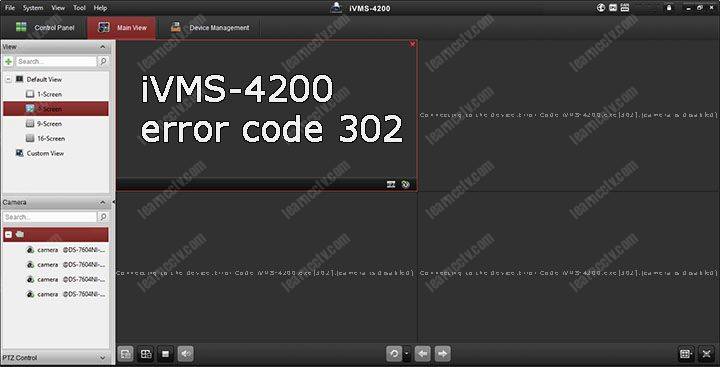
Hikvision error code 302 shows on the iVMS-4200 software when you’re trying to view the cameras on the live view mode. Sometimes the cameras are working fine and suddenly they’ll go offline and show error code 302 (camera is disabled or not connected).
While you can’t see these cameras on the iVMS-4200 software, they’ll show up fine on the phone or on the web browser. So the issue is related to the iVMS-4200 only.
The exact message on the screen is: Connecting to the device. Error Code iVMS-4200.exe[302].(Camera is disabled or not connected.) In other instances, you’ll see Date Time Camera: Failed to get Stream. Start Reconnection. Error Code iVMS-4200.exe[302] (Camera is disabled or not connected).
On the Hikvision error codes list, this error is marked as “Rule parameter is illegal”.

This type of error is quite rare and can be solved by following the steps shown below.
Make sure you’re using the latest iVMS-4200 version. Go to the Hikvision website and download the newest release and try to see the cameras again. You can get it from here as well.
Update the firmware on the NVR where the cameras are hooked up. In most of the cases the error code 302 is solved by doing this step. It has been reported that many firmware versions contain a certain software bug that makes the cameras go offline on iVMS-4200.
Another unorthodox way that is reported to work is by uninstalling the iVMS-4200 software and re-installing it again.
Disable the Firewall or any antivirus software installed on your computer. Then check out if you can see the cameras on the live view mode. If not, re-enable the antivirus.

-
Forums
-
Manufacturer Specific Forums
-
Hikvision
You should upgrade or use an alternative browser.
HikVision error: 302 (camera is disabled or not connected)
-
Thread starterMark Simpson
-
Start dateNov 22, 2017
-
-
Tags -
ivms-4200
-
- Status
- Not open for further replies.

-
#1
We can still see all cameras available via the web interface so that isn’t true.
I’ve installed the software to 3 computers which all worked fine for weeks, and now suddenly we’re getting this.
Any ideas or suggestions?
Many thanks

- Messages
- 4,662
- Points
- 113
-
#2
What changed?
Are you using the latest version of IVMS (V2.6.2.7) from September?
Download here:
DOWNLOAD PORTAL
NB new NVR firmware about a week ago too (V4).
And probably camera firmware too recently.
- Thread starter
-
#3
I’m on 2.6.2.6 and a lot older firmware. I’ll try those to see if it improves.
Thank you
- Thread starter
-
#4
My process: use SADP tool to activate camera > locate camera on NVR after plugging in and add. Job done.
New firmware — added cameras with spurious IP, worked for a week. Reconfigured IP manually with SADP tool. Worked for another week. Camera has wrong IP address and whatever I set with SADP tool is ignored.
This is happening with 3 new cameras (same models as existing) and 2 of the original set that had never failed before the upgrade.
Any advice please?
Thank you.
- Messages
- 4,662
- Points
- 113
-
#5
Being POE powered by your NVR?
(I think probably not, just checking)
- Thread starter
-
#6
No the cameras are plugged into a Cisco POE switch which is in turn plugged into the NVR and set as LAN 1.
LAN 2 is plugged into my network on a different IP range.
Thanks
- Messages
- 4,662
- Points
- 113
-
#7
You’re sure they are not duplicate IP addresses?
Have you updated your cameras to the latest available firmware?
(if you let me know model numbers I’m happy to link you to latest)
- Thread starter
-
#8
Success — and my fault.. I forgot to disable WiFi on my laptop connected to the CCTV network. I think that’s where the dhcp broadcast was leaking in. I set the IPs to static in the SADP tool. Almost immediately I was getting pictures. The whole system is back up and running and recording happily. We’ve still not filled up all the disks since September! 1 1/2 to go of 8. We’ve set recording to motion detection which works well for us, plus H.256+. A mix of 3 & 5mp cameras.
- Messages
- 4,662
- Points
- 113
-
#9
-
#10
- Thread starter
-
#11
Take a look at my new thread. Is the same subject. No answers yet, just investigating further. Maybe some of Phil’s tips will help you.
- Messages
- 4,662
- Points
- 113
-
#13
Hi LemTake a look at my new thread. Is the same subject. No answers yet, just investigating further. Maybe some of Phil’s tips will help you.
I’m having same problem changed to bt hub 6 but cannot work it out yet cctv is working on iphone
- Thread starter
-
#14
- Messages
- 4,662
- Points
- 113
-
#15
I’m having same problem changed to bt hub 6 but cannot work it out yet cctv is working on iphone
Hi Lynne,
If you’re still having problems, please feel free to start a new thread in the Hikvision forum and explain what issues you are seeing.
-
#16
- Messages
- 4,662
- Points
- 113
- Status
- Not open for further replies.
Similar threads

-
Forums
-
Manufacturer Specific Forums
-
Hikvision
-
#1
Hi all,
I am not an expert in networking or CCTV related issues.
We have iVMS 4200 installed (v 2.3.1.3 ) installed for 8 CCTV cameras in our office premises. The firmware version is V 3.4.1 build 160108.
We have 4 Desktop PCs in all.
However , recently we have had problems with the Software showing error code 302 in 2 of our PCs. As soon as we boot it, it shows error 302, Camera disabled or not connected. It stays that way for 30 mins after booting.
After I click on Refresh All after 30 mins, the cameras &/or the software works normally.
This does not happen on the other 2 PCs.
I would be grateful if someone can give some hints and guidance on this topic.
Thank you.
-
161.2 KB
Views: 11