The Hikvision error code 153 occurs when there are too many attempts to login into the camera or DVR by using the wrong password in the iVMS-4500 mobile App. To solve the problem just reset the device or wait for 30 minutes.
What causes the error code 153
When the device receives too many requests with the wrong password the error 153 shows up in the iVMS-4500 screen (see the picture below).
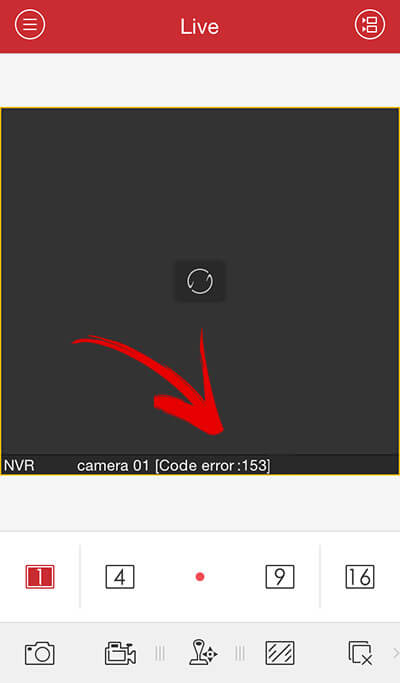
Sometimes the password is incorrectly typed into the mobile phone and the App sends it to the device more than once and that generate an error and lock the camera for some time to protect against a hacker attack.
There are different ways to solve the problem with this error:
1. Reboot the device
The solution for this error is very simple, just correct the password in the iVMS-4500 and reboot the camera or DVR by turning it off and back on.
2. Wait for sometime
You can also solve the error code 153 problem just by waiting some time until the camera is ready again to let the App authenticate again.
The camera is locked for about 30 minutes and then come back to normal.
3. Access the device from a computer
You can also access the camera/DVR from another computer that has a different IP, and go to remote configuration -> system -> login security to change the configuration and unlock the IP used by the mobile.
Security concern
Perhaps you are using the correct username and password but for some reason, the iVMS-4500 App is still showing the error code 153 very often.
That could be somebody else trying access your camera or recorder by just sending a different combination of username and password.
The camera or DVR locked itself for 30 min to prevent this type of situation and that can cause a problem for you, so check your network security.
The error code 153 in other devices
Hikvision sells its products for other companies that resell them with a different brand (OEM products), so sometimes the same problem with the error code 153 shows up in other cameras.
A good example is with the LTC cameras that use Hikvision hardware and the same error occurs and it’s not possible to login into the camera.
How to fix the problem in LTC cameras
To fix the error code 153 in the LTC cameras go to the «security service» configuration tab and uncheck the box «Enable Illegal Login Lock«.
If your LTC camera is presenting this issue is recommended to upgrade the firmware because this problem usually occurs with old firmware.
Conclusion
The error code 153 is a problem that is simple to fix but it’s important to upgrade the firmware in the camera or recorder and also make sure you are using the last version of the iVMS-4500 App.
Want to learn more ?
If you want to become a professional CCTV installer or designer, take a look at the material available in the blog. Just click the links below:

Please share this information with your friends…
На чтение 5 мин. Просмотров 140 Опубликовано 15.12.2019

Что такое «Hikvision» сегодня объяснять уже не приходится, компания зарекомендовала себя, как поставщик самого современного и надежного оборудования для систем видеонаблюдения. Для удаленного подключения к IP видеокамерам или видеорегистратору с мобильных устройств на IOS и Android, «Hikvision» использует облачный клиент ivms 4500, лично по мне это лучший мобильный клиент из тех, с чем мне приходилось работать.
В данной статье мы рассмотрим инструкцию по настройке ivms 4500 для IOS и Android на русском языке.
Содержание
- Возможности ivms 4500
- Где скачать ivms 4500 для ios, andro >
- Настройка ivms 4500
- Воспроизведение видеозаписей.
- Ошибки возникающие при работе с ivms 4500
Возможности ivms 4500
- Отображение видео с камер наблюдения в реальном времени
- Удаленное воспроизведение видеозаписей с жесткого диска или флэш карты сетевой видеокамеры
- Отображение звука в реальном времени и при записи
- Управление Ptz видеокамерами
- Тревожные оповещания в случае срабатывания датчика движения
- Отображение до 16 видеокамер на одном экране мобильного устройства
Где скачать ivms 4500 для ios, andro > 
Приложение доступно для операционных систем на IOS и Android.
Cкачать приложение для Andro >https://play.google.com/store/apps/details? >
Для IOS воспользуйтесь этой ссылкой: https://itunes.apple.com/us/app/ivms-4500-lite/ >
Для компьютера на windows ivms 4500 не существует, для этого есть ivms 4200 специальная программа СMS, она доступна по данной ссылке с официального сайта Hikvision: http://hikvision.org.ua/ru/articles/skachat-hikvision-ivms-4200
Настройка ivms 4500

В левом верхнем углу открываем основное вспомогательное меню. В нем нас интересует вкладка «Устройства».

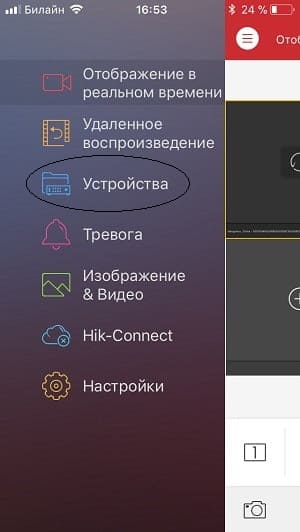
Для добавления нового устройства в правом верхнем углу необходимо нажать на значек ⊕. В открывшейся вкладке выбираем «Ручное добавление».
Вы так же можете добавить устройство по QR-коду( наклейка на видеокамере или видеорегистраторе) или же если вы находитесь в одной wi-fi сети с добавляемым устройством осуществить поиск внутри сети с помощью вкладки «Онлайн устройства».


Так как я имею статический белый ip адрес я буду подключаться при помощи «IP/Domain».
Так же доступно подключение при помощи HIDDNS через создание постоянного доменного имени или в обход статических адресов и имен с обыкновенного динамического IP адреса с помощью серийного номера Hik-Connect Domain.

Приступаем к вводу необходимых данных.
Имя — любое произвольное название устройства.
Режим регистрации — выбор метода подключения.
Адрес — белый статичеcкий ip адрес. выданный провайдером.
Порт — порт устройства, проброшенный на роутере.
Имя пользователя — login видеокамеры или видеорегистратора ( по умолчанию admin)
Пароль — Password видеокамеры или видеорегистратора
Номер камеры — неактивно, скорей всего разработчиками планировалось выставлять количество видеокамер, который поддерживает подключаемый видеорегистратор.
Если все настройки произведены верно в новом окне вы увидите подключенные видеокамеры. Для удобства можно разбить экран на количество видеокамер.
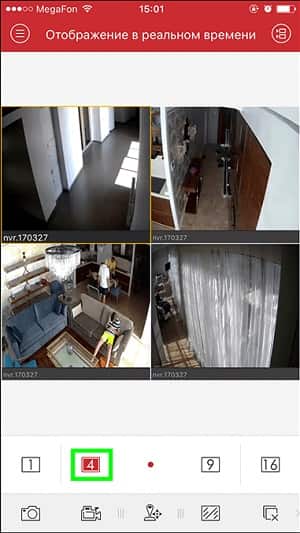
Воспроизведение видеозаписей.
Для воспроизведения видеозаписей необходимо в вспомогательном меню выбрать вкладку «Удаленное воспроизведение». Далее при выборе необходимой видеокамеры появляется ее шкала записи, при движении по которой осуществляется перемотка.
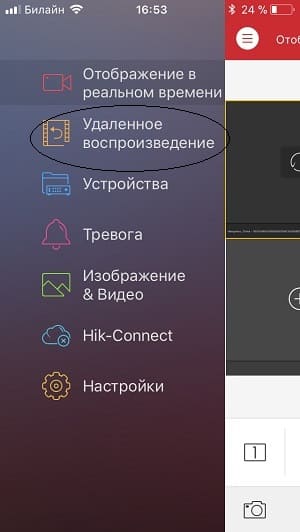
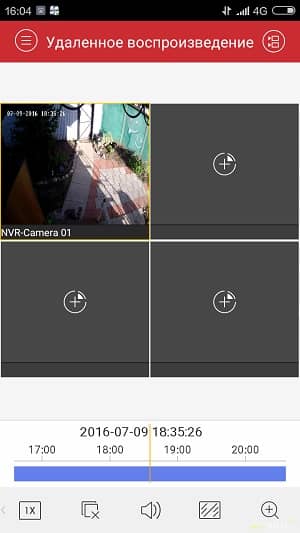
Ошибки возникающие при работе с ivms 4500
Как правило ошибки, возникающие при работе с ivms 4500 связаны либо с некачественным интернетом со стороны устройства или с неверными настройками при добавлении устройства. Самые популярные ошибки смотрим ниже:
Код ошибки 43 — некорректный ip адрес или проброс порта.
Код ошибки 96 — устройство не имеет DDNS
Код ошибки 153 — Неоднократный неправильный ввод пароля ( кто — то пытается попасть на ваше устройство), через 30 минут ошибка должна исчезнуть.
«The device serial # is not registered,please check the input and the device network settings» — Серийный номер устройства не зарегистрирован, проверьте параметры подключения устройства к сети.
При попытке просмотра в реальном времени устройства Hikvision, которое поддерживает доступ к платформе Hik-Connect, появляется сообщение об ошибке «поток зашифрован».
[Причина]
Включена функция шифрования потока.
[Решение]
Вы должны ввести пароль по следующему пути в iVMS-4200 и перезапустить режим просмотра в реальном времени:
Управление устройствами -> Группа -> Выберите устройство -> Изменить -> Введите ключ
На веб-интерфейсе устройства:
Настройки -> Локальные -> Ключ шифрования -> Введите ключ
Ключ шифрования — это код подтверждения устройства, который вы можете найти на устройстве. Если устройство не имеет кода подтверждения, пароль по умолчанию — ABCDEF.
Вы можете изменить пароль или отключить функцию шифрования потока через веб-клиент Ezviz или мобильное приложение Hik-Connect.
Как отключить функцию шифрования потока через учетную запись Ezviz:
1) посетите сайт www.ezvizlife.com и войдите в свою учетную запись
2) Перейдите по следующему пути: Управление системой-> Управление устройствами-> Мое устройство. Перейдите в настройки устройства и отключите шифрование потока.
3) Код для отключения функции будет отправлен на ваш телефон или по электронной почте.
4) Введите полученный код, чтобы отключить шифрование потока.
Как отключить функцию шифрования потока через приложение Hik-Connect либо Ezviz:
1) Запустите приложение Hik-Connect и войдите в свою учетную запись.
2) Ваше устройство-> щелкните на устройстве-> Конфигурация-> отключить шифрование потока.
3) Код для отключения функции будет отправлен на ваш телефон или по электронной почте.
4) Введите полученный код, чтобы отключить шифрование потока.
Сегодня при подключении к видеорегистратору Hikvision приложение для Android IVMS-4500 выдало ошибку 153, и видеопоток с камер показывать отказалось. Хотя до этого все работало нормально. Эта ошибка означает что кто-то пытался подключиться к видеорегистратору с использованием неправильного пароля. По умолчанию видеорегистраторы Hikvision блокируют ваш IP-адрес если неправильно ввести пароль 10 раз. IP-адрес блокируется на полчаса.
Для снятия блокировки можно подождать полчаса, или подключиться к видеорегистратору используя браузер или десктопный клиент (IVMS-4200). В нём необходимо зайти управление устройствами (management device) и на вкладке система (system) найти пункт Login Security: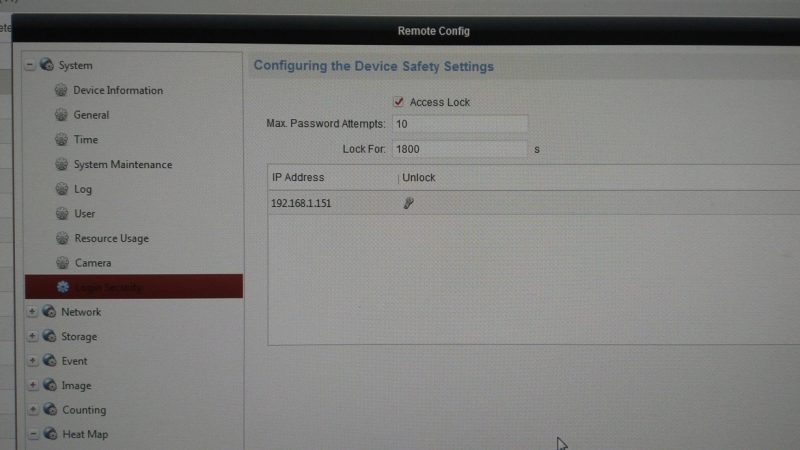
Тут вы увидите параметры блокировки:
- Access Lock — включить или выключить блокировку;
- Max password attemps — количество попыток ввода после которого IP будет заблокирован;
- Lock for — время блокировки ip в секундах
Ниже будет список заблокированных IP-адресов, а внизу окна кнопка Unlock All — жмем ее, она удалить все IP и снимет блокировку. После этого можно подключаться всё будет работать, а если ошибка повторится, то теперь вы знаете что делать.

Код ошибки Hikvision 153 возникает, когда слишком много попыток войти в камеру или видеорегистратор с использованием неверного пароля в мобильном приложении iVMS-4500. Для решения проблемы просто перезагрузите устройство или подождите 30 минут.
Что вызывает код ошибки 153
Когда устройство получает слишком много запросов с неправильным паролем, на экране iVMS-4500 появляется ошибка 153 (см. Рисунок ниже).

Иногда пароль неправильно вводится в мобильный телефон, и приложение отправляет его на устройство более одного раза, что приводит к ошибке и блокирует камеру на некоторое время для защиты от хакерской атаки.
Как исправить ошибку 153
Есть разные способы решить проблему с этой ошибкой:
1. Перезагрузите устройство
Решение этой ошибки очень простое: просто исправьте пароль в iVMS-4500 и перезагрузите камеру или видеорегистратор, выключив и снова включив его.
2. Подожди немного
Вы также можете решить проблему с кодом ошибки 153, просто подождав некоторое время, пока камера снова будет готова, чтобы приложение снова могло аутентифицироваться.
Камера блокируется на 30 минут, а затем возвращается в нормальное состояние.
3. Доступ к устройству с компьютера
Это может быть кто-то другой, пытающийся получить доступ к вашей камере или рекордеру, просто отправив другую комбинацию имени пользователя и пароля.
Камера или видеорегистратор заблокировались на 30 минут, чтобы предотвратить возникновение подобного рода ситуаций, которые могут вызвать проблемы, поэтому проверьте безопасность своей сети.
Код ошибки 153 в других устройствах
Hikvision продает свои продукты другим компаниям, которые перепродают их под другим брендом (OEM-продукты), поэтому иногда такая же проблема с кодом ошибки 153 появляется в других камерах.
Как исправить проблему в камерах LTC
Чтобы исправить код ошибки 153 в камерах LTC, перейдите на вкладку конфигурации « Служба безопасности» и снимите флажок « Включить блокировку нелегального входа ».
Если ваша LTC-камера представляет эту проблему, рекомендуется обновить прошивку, потому что эта проблема обычно возникает со старой прошивкой.
Заключение
Если понравилась статья поделитесь в социальных сетях, кликнув по иконкам ниже
Hikvision error code 153 (how to fix)
The Hikvision error code 153 occurs when there are too many attempts to login into the camera or DVR by using the wrong password in the iVMS-4500 mobile App. To solve the problem just reset the device or wait for 30 minutes.
What causes the error code 153
When the device receives too many requests with the wrong password the error 153 shows up in the iVMS-4500 screen (see the picture below).

Sometimes the password is incorrectly typed into the mobile phone and the App sends it to the device more than once and that generate an error and lock the camera for some time to protect against a hacker attack.
How to fix the error 153
There are different ways to solve the problem with this error:
1. Reboot the device
The solution for this error is very simple, just correct the password in the iVMS-4500 and reboot the camera or DVR by turning it off and back on.
2. Wait for sometime
You can also solve the error code 153 problem just by waiting some time until the camera is ready again to let the App authenticate again.
The camera is locked for about 30 minutes and then come back to normal.
3. Access the device from a computer
Security concern
Perhaps you are using the correct username and password but for some reason, the iVMS-4500 App is still showing the error code 153 very often.
That could be somebody else trying access your camera or recorder by just sending a different combination of username and password.
The camera or DVR locked itself for 30 min to prevent this type of situation and that can cause a problem for you, so check your network security.
The error code 153 in other devices
Hikvision sells its products for other companies that resell them with a different brand (OEM products), so sometimes the same problem with the error code 153 shows up in other cameras.
A good example is with the LTC cameras that use Hikvision hardware and the same error occurs and it’s not possible to login into the camera.
How to fix the problem in LTC cameras
To fix the error code 153 in the LTC cameras go to the «security service» configuration tab and uncheck the box «Enable Illegal Login Lock«.
If your LTC camera is presenting this issue is recommended to upgrade the firmware because this problem usually occurs with old firmware.
Conclusion
The error code 153 is a problem that is simple to fix but it’s important to upgrade the firmware in the camera or recorder and also make sure you are using the last version of the iVMS-4500 App.
If you want to become a professional CCTV installer or designer, take a look at the material available in the blog. Just click the links below:
Please share this information with your friends.
Claudemir Martins is a former Samsung Engineer with 18+ experience in the surveillance industry. He has been traveling around 17 different countries to teach people how to design, and install CCTV systems.
Источники:
https://security59.ru/a231614-kod-oshibki-hikvision. html
https://learncctv. com/hikvision-error-code-153-solved/

Как исправить ошибки при работе мобильной системы видеонаблюдения Hikvision?
Как исправить ошибки при работе мобильной системы видеонаблюдения Hikvision?
При работе систем видеонаблюдения часто приходится сталкиваться с системными ошибками, которые отображаются на экране в виде определенного кода ошибки.
У систем видеоконтроля Hikvision чаще всего выдает ошибки с кодами 153 и 8200. В этой статье мы расскажем из-за чего возникают данные ошибки и как их исправить.
Ошибка 153
Код ошибки Hikvision 153 возникает, когда пользователь совершает слишком много попыток войти в систему, используя неверный пароль в мобильном приложении iVMS-4500.
Когда устройство получает слишком много запросов с неправильным паролем, на экране iVMS-4500 появляется ошибка 153.
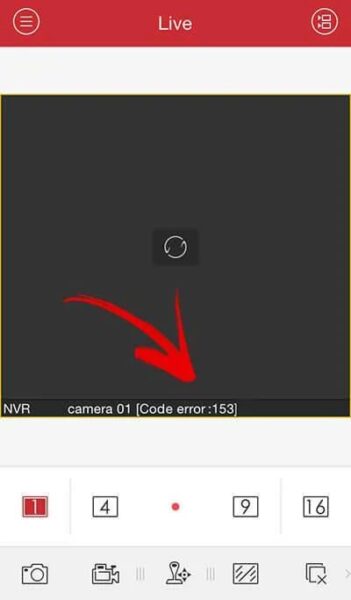
Когда пароль неправильно вводится в мобильный телефон, и приложение отправляет его на устройство более одного раза, это приводит к ошибке, которая блокирует камеру на некоторое время для защиты от хакерской атаки.
Существуют разные способы решить проблему с этой ошибкой, а именно:
1. Перезагрузка мобильного устройства
Решение этой ошибки очень простое: просто исправьте пароль в iVMS-4500 и перезагрузите камеру или видеорегистратор, выключив и снова включив его.
2. Ожидание перед новой попыткой входа
Вы также можете решить проблему с кодом ошибки 153, просто подождав некоторое время, пока камера снова будет готова, чтобы приложение снова могло аутентифицироваться. Камера блокируется на 30 минут, а затем возвращается в нормальное состояние.
3. Доступ к устройству с компьютера
Вы также можете получить доступ к камере / цифровому видеорегистратору с другого компьютера с другим IP-адресом и перейти к удаленной настройке -> Система -> Безопасность входа в систему, чтобы изменить конфигурацию и разблокировать IP-адрес, используемый мобильным телефоном.
Иногда бывает так, что вы используете правильное имя пользователя и пароль, но по какой-то причине приложение iVMS-4500 по-прежнему часто показывает код ошибки 153. Это может быть из-за того, что кто-то другой пытается получить доступ к вашей камере или рекордеру, отправив другую комбинацию имени пользователя и пароля.
Также при попытке входа в систему камера или видеорегистратор уже заблокированы на 30 минут. То есть вашу систему видеонаблюдения кто-то упорно пытается взломать. Чтобы предотвратить это, проверьте безопасность своей сети, а после проверки смените логин и пароль для входа в систему.
Нужно отметить, что Hikvision продает свои продукты другим компаниям, которые перепродают их под другим брендом (OEM-продукты), поэтому иногда такая же проблема с кодом ошибки 153 появляется в системах видеонаблюдения других производителей. Например это часто случается с системами LTC, использующими аппаратное обеспечение Hikvision.
Чтобы исправить код ошибки 153 в камерах LTC, перейдите на вкладку конфигурации « Служба безопасности» и снимите флажок « Включить блокировку нелегального входа ».
Если ваша LTC система часто сталкивается с данной проблемой, рекомендуется обновить прошивку, т.к. чаще всего причина в том, что у вас стоит старая прошивка.
Код ошибки 153 — это проблема, которую легко исправить, но важно помнить, что система периодически требует обновления встроенного ПО для видеомониторинга. Поэтому стоит всегда проверять, используете ли Вы последнюю версию приложения iVMS-4500.
Ошибка 8200
1. Шифрование видеопотока
Шифрование рекомендуется использовать его для лучшей защиты вашей системы видеонаблюдения, однако шифрование данных стоит больше вычислительной мощности, что может вызвать некоторые проблемы.
Исправить код ошибки 8200, вызванный шифрованием , можно с помощью мобильных приложений Hi-Connect или EzViz. При их использовании в меню устройства есть опция шифрования, вы можете включить или отключить ее в окошке.
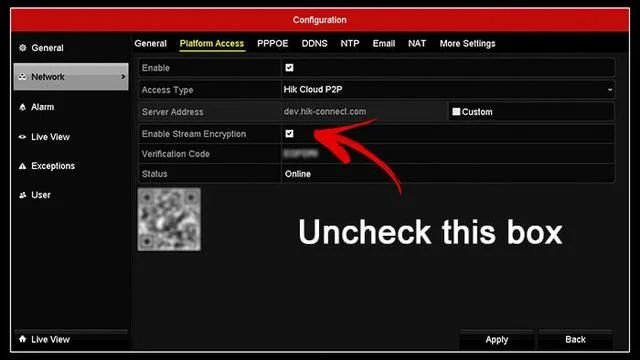
2. Поврежденный файл конфигурации
Иногда неправильная конфигурация устройства или внутренний поврежденный файл могут вызвать проблемы и генерировать код ошибки 8200 .
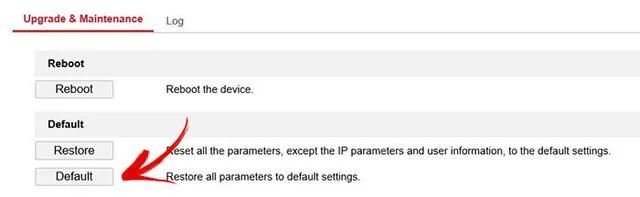
Очень часто приходится сбрасывать устройства до заводского состояния по умолчанию и начинать заново с новой конфигурацией для решения различных типов проблем.
Решение проблемы заключается в том, чтобы перезагрузить устройство и вручную настроить его снова. Просто не импортируйте старый файл конфигурации, который может привести к неправильной настройке или возникновению проблем на устройстве.
3. Устройство, использующее старую прошивку
Прошивка устройства может вызвать много разных проблем, если она слишком старая и содержит ошибки, которые еще не были исправлены. Поэтому важно иметь устройство, которое позволяет обновлять прошивку
Для этого просто зайдите в меню обслуживания системы и найдите опцию проверки обновлений. Это меню может отличаться для камер, DVR и NVR. Вы также можете использовать веб-браузер для входа и обновления прошивки.
На рисунке ниже показан вариант проверки прошивки в видеорегистраторе.
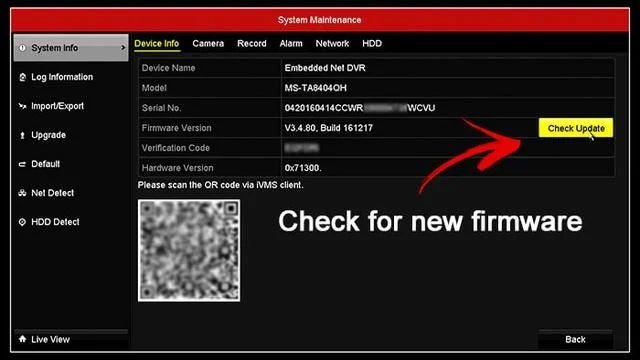
Нажмите кнопку Проверить обновление, чтобы найти новую прошивку.
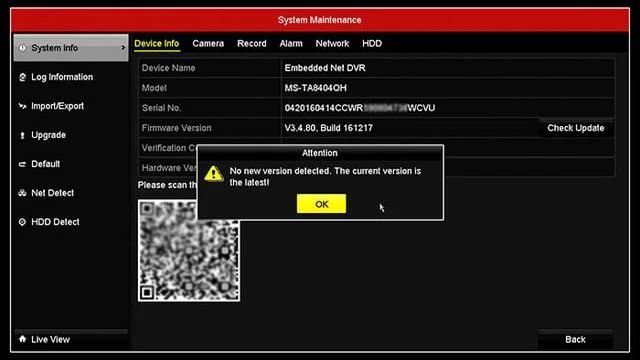
На рисунке ниже видно, чтое DVR уже использует последнюю доступную прошивку.
UPnP (Universal Plug and Play) — это универсальный протокол, который позволяет находить устройства в сети. Большинство сетевых устройств имеют эту опцию в меню. Попробуйте отключите UPnP, чтобы исправить код ошибки 8200
Чтобы отключить UPnP на устройстве, просто войдите в систему и найдите конфигурацию NAT (преобразование сетевых адресов).
Иногда вы можете найти эту опцию в другом меню, но идея состоит в том, чтобы просто найти ее и отключить, чтобы проверить, исчезает ли код ошибки 8200.
На рисунке ниже показано поле «Включить UPnP». Просто уберите галочку.

5. Проблемы с пропускной способностью
Пропускная способность является основополагающей для передачи данных по сети, не имеет значения, аудио это, видео или какой-либо другой тип данных. Так что вам нужно проверить эту часть.
С более высоким качеством видео возникает необходимость в большей полосе пропускания. Более высокое разрешение и более высокая частота кадров влияют непосредственно на полосу пропускания, поэтому вы можете контролировать, какую полосу пропускания использует система, просто настраивая эти параметры.
Другой вариант — ограничить полосу пропускания, которую может использовать камера, отрегулировав битрейт.
На рисунке ниже показано использование полосы пропускания в DVR.
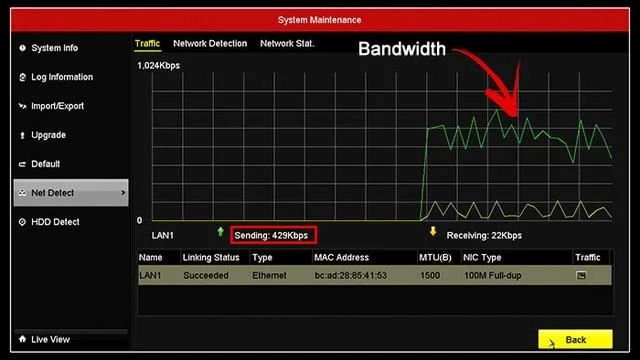
Этот пример относится только к одной камере, подключенной к DVR. С большим количеством камер значение будет выше, поэтому следите за пропускной способностью.
Также вы можете найти возможность либо изменить качество изображения, либо ограничить полосу пропускания вашей камеры или рекордера. При этом не допускайте ошибки при настройке высококачественного видеопотока с большим ограничением пропускной способности. Это не работает так.
Если вы хотите иметь высококачественное видео, вам нужно обеспечить достаточную пропускную способность для вашей камеры или рекордера.
На рисунке ниже показано меню для настройки битрейта.
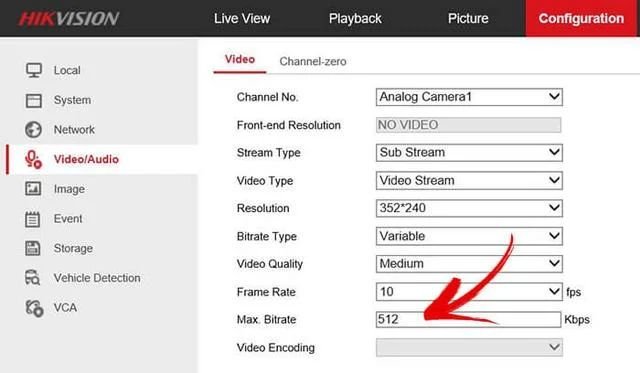
Обратите внимание, что разрешение составляет 352 x 240 пикселей, и поэтому вы можете установить Max, битрейт на 512 Кбит / с или чуть ниже. Из разрешения выше, например, 1280х720 установить макс. битрейт до 512 кбит / с просто снизит качество видео до действительно плохого уровня.
6. Переустановка приложения iVMS-4500
Компьютерное программное обеспечение и мобильные приложения иногда могут вести себя нестандартно.
Для переустановки приложения, просто удалите его со своего мобильного телефона, а затем установите снова (не обновляйте приложение, нужно обязательно удалить его).
После удаления приложения откройте Google Play или App Store, найдите новую версию iVMS-4500 и нажмите кнопку «Установить». Это иногда может решить вашу проблему с кодом ошибки 8200.
Другие ошибки iVMS-4500
Возможные причины
1. Неверный IP-адрес или доменное имя
2. Стороннее устройство
Устранение неполадок для iVMS-4500 с кодом ошибки 43
1. Убедитесь, что IP-адрес или имя домена действительны.
2. Убедитесь, что устройство является продуктом Hikvision.
3. Проверьте правильность IP-адреса или номера порта на hik-online.com.
IP-адрес телефона не принадлежит к авторизованным IP-адресам в настройках устройства. Пользователи, вероятно, настроили в устройстве доступ только к некоторым определенным IP-адресам.
Устранение неполадок для iVMS-4500 с кодом ошибки 55
Проверьте в разделе «Конфигурация»> «Расширенная конфигурация»> «Безопасность»> «Фильтр IP-адресов», включен ли фильтр IP-адресов. Также проверьте в локальном меню, можно ли получить доступ к учетной записи с определенного IP-адреса: Menu> Configuration> User> Edit.
3. Код ошибки 56
Пользователи, вероятно, настроили доступ только к определенным MAC-адресам.
Устранение неполадок для iVMS-4500 с кодом ошибки 56
Проверьте в локальном меню, есть ли доступ к учетной записи по определенному MAC-адресу: Меню> Конфигурация> Пользователь> Изменить. Если возникнут вопросы, прочтите эту статью: Код ошибки Hikvision 56 (решение).
Проблема может быть вызвана неправильной настройкой переадресации портов.
Устранение неполадок для iVMS-4500 с кодом ошибки 73
1. Как открыть порты для рекордеров Hikvision?
2. Как добавить устройство в учетную запись Hik-Connect
3. Как включить P2P (Hik-Connect) на устройствах Hikvision
Это означает, что соединение с сервером не удалось.
Устранение неполадок для iVMS-4500 с кодом ошибки 340015
Обратитесь к своему торговому посреднику или в команду Hikvision (через их веб-сайт или по телефону).
Возможные причины
Это означает ошибку номера канала. На устройстве нет соответствующего номера канала
Устранение неполадок для iVMS-4500 с кодом ошибки 4
Чтобы исправить эту ошибку, вам необходимо получить доступ к вашему DVR или NVR и отменить скрытие канала. Итак, канал есть, но в настройках он скрыт. В этой статье приведены шаги по устранению этой проблемы: Проблема с отсутствующими каналами Hikvision DVR .
Возможные причины
Это означает ошибку имени пользователя или пароля.
Устранение неполадок с кодом ошибки iVMS-4200 1
Убедитесь, что имя пользователя и пароль введены правильно. Войдите еще раз, чтобы проверить, работает ли это.
Код ошибки 7
Возможные причины
Не удалось подключиться к устройству. Устройство отключено, или тайм-аут подключения вызван сетью. Поиск и устранение неисправностей для кода ошибки iVMS-4200 7 Локальное соединение: проверьте конфигурацию сети и IP-адрес компьютера. Удаленное соединение: проверьте, перенаправлены ли порты для устройства.
Код ошибки 9
Не удалось получить данные с устройства.
Устранение неполадок для кода ошибки iVMS-4200 9
Обычно это происходит из-за тайм-аута подключения, вызванного сетевым подключением или пропускной способностью.
Код ошибки 10
Тайм-аут при получении данных от устройства. Обычно это происходит из-за тайм-аута подключения, вызванного сетевым подключением или пропускной способностью.
Похожие записи
Содержание
- Исправляем ошибку файла HCNetSDK.dll
- Ошибки в настройках камеры
- Другие возможные причины и способы исправления ошибки
- Reconnecting.Error Code HCNetSDK.dll[91] (solved)
- The problem with power
- ivms 4200 ошибка кода hcnetsdk dll 7
- Шаг 1
- Шаг 2
- Шаг 3
- Шаг 4
- Шаг 5
- Очередь просмотра
- Очередь
- YouTube Premium
- Хотите сохраните это видео?
- Пожаловаться на видео?
- Понравилось?
- Не понравилось?
- Hikvision iVMS-4200 error code 7 (HCNetSDK.ddl[7])
- How to fix Hikvision error code 7
- Ivms hcnetsdk dll error
Исправляем ошибку файла HCNetSDK.dll
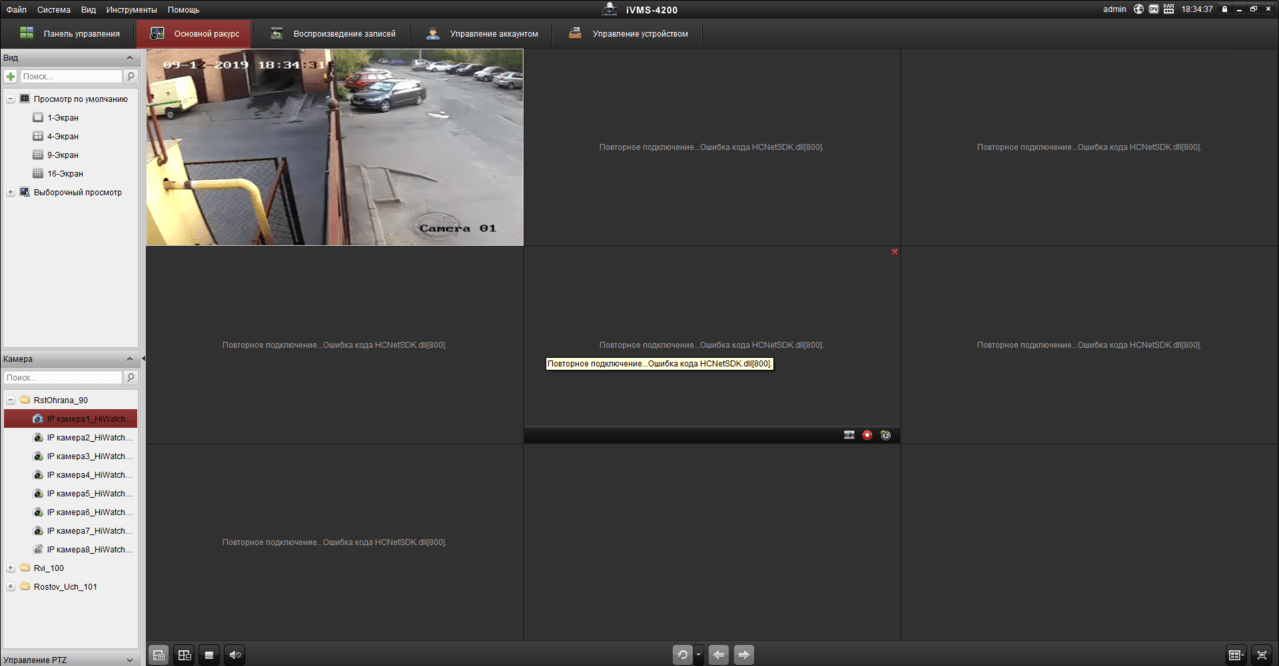
Ошибка с файлом HCNetSDK появляется при использовании видеорегистратора с несколькими камерами. Часто сбой проявляется в работе только одного записывающего устройства, в то время как остальные функционируют в штатном режиме. Разбираемся с тем, что может быть причиной такого поведения камер.
Ошибки в настройках камеры
При появлении сообщения об ошибке камера перестаёт записывать. Иногда при двойном клике на неё в программе изображение появляется, однако затем снова пропадает. Если ошибка проявляется только на одной или нескольких камерах, а не всех сразу, то пробуем переустановить настройки:
- Отключаем кабель питания.
- Зажимаем кнопку Reset.
- Подключаем питание обратно (кнопку Reset всё ещё держим).
- Ждём, пока камера перезагрузится.
- Настраиваем устройство заново.
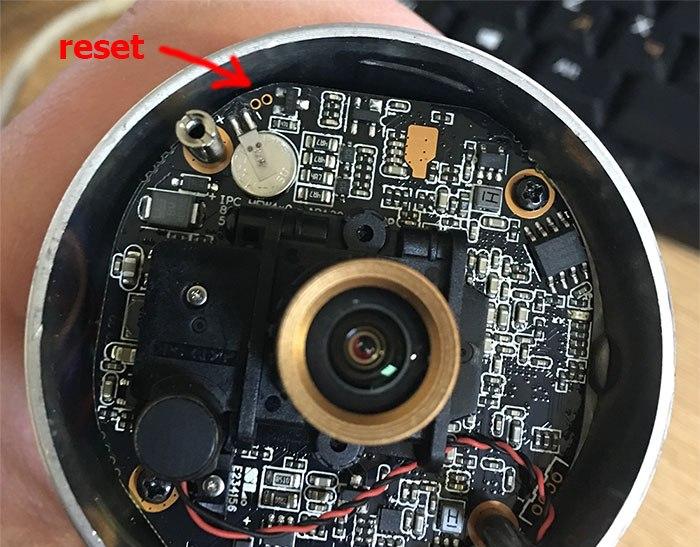
Сбрасываем настройки камеры и устанавливаем подключение заново
После сброса настроек и повторной установки ошибка не должна повторяться. Если не работает несколько камер, то можно попробовать в программе управления ими включить второй поток.
Другие возможные причины и способы исправления ошибки
Ошибка с упоминаем HCNetSDK.dll может возникать также по другим причинам. Если сброс параметров и повторная настройка не помогла, то проверяем следующие факторы:
- Если камера получает питание через POE (Power Over Ethernet) убеждаемся, что источник и устройство поддерживают одинаковые стандарты. Кроме того, источник должен иметь достаточную мощность и не быть перегруженным другими камерами.
- Проверяем качество витой пары. Разъёмы на обоих концах должны быть правильно обжаты, особенно если используется подключение через POE.
- В главном меню изменяем тип потока на автоматический.
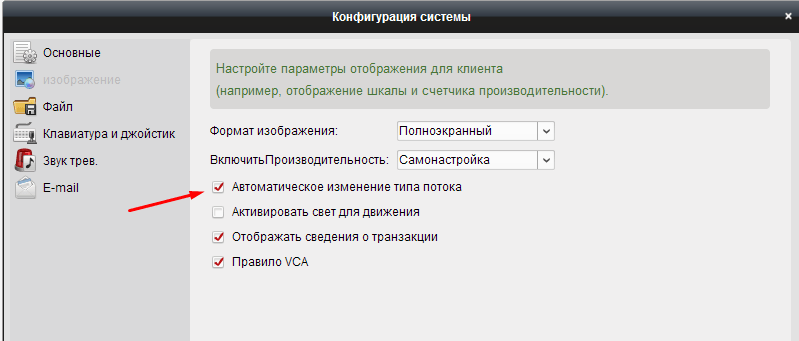
Включаем автоматическое изменение типа потока в настройках регистратора
Если проблема носит массовый характер, то может помочь также обновление прошивки. Однако обычно удаётся решить проблему одним из перечисленных выше способов.
Источник
Reconnecting.Error Code HCNetSDK.dll[91] (solved)
If you are looking for a solution to fix the Error Code HCNetSDK.dll[91] on your Hikvision camera, don’t look any further. Just read this article.
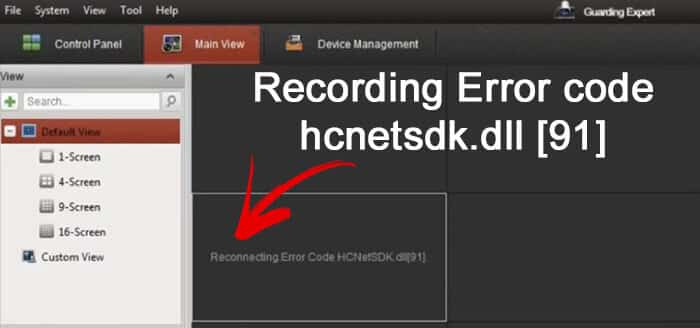
There are two main reasons to have this issue with your IP camera.
The Hikvision reconnecting Error Code HCNetSDK.dll[91] occurs when there’s no enough power for the camera or when the Auto Change stream type is on. The easiest solution to solve the problem is to use a better PoE power supply and turn the auto change stream off.
The problem with power
When using PoE (Power Over Ethernet) to power the camera up, is necessary to follow the international standards such as the IEEE 802.3af and IEEE 802.3at to have enough power.
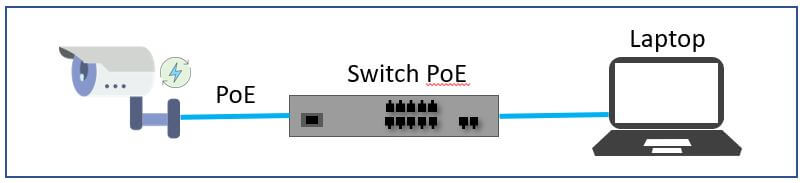
Each one these IEEE standards are designed to have specific voltage (V) and power (W) for the cameras and you need to use the correct power supply to have your camera working properly without some type of error.
You can use either a PoE switch or a PoE power supply, just ask the vendor a model that follows the IEEE 802.3af standard for fix cameras (dome or bullet) or the IEEE 802.3at standard for PTZ cameras.
Some users and technicians have reported a problem with the message in the iVMS-4200 screen «Reconnecting.Error Code HCNetSDK.dll[91]» due to the lack of power for the camera (when using the wrong PoE power supply).
Just make sure you are using the correct PoE power supply or switch.
To learn more about PoE read the article PoE switch for IP camera
Источник
ivms 4200 ошибка кода hcnetsdk dll 7
Часто в службу технической поддержки hikvision.org.ua обращаются с проблемой подключения к IVMS-4200 устройств, уже привязанных к облаку Ezviz или Hik-Connect. Одни не знают с какой стороны подойти, а у других подключенные устройства не отображают видео.
Сегодня расскажем как решить эти проблемы самостоятельно.
Шаг 1
Зайдите в IVMS-4200.
Откройте вкладку “Управление устройствами” (стрелка 1).
Нажмите “Добавить новый тип устройства” (стрелка 2).

Шаг 2
Выберите “Hik-Connect Device” или “Устройство Hik-Connect” (стрелка 1). У нас этот пункт неактивен, потому что такой тип устройства уже добавлен.
Подтвердите выбор (стрелка 2).

Шаг 3
Перейдите во вкладку Hik-Connect Device. Выберите страну Украина. Нажмите “Login”.

Появится окно входа. Введите свой логин, e-mail, номер телефона и пароль. Нажмите “Login”.

Шаг 4
Если в профиле еще нет устройств, во вкладке Hik-Connect Device нажмите кнопку “Add Device” (стрелка 2).

Добавленное устройство появится в этом окне. Казалось бы, все необходимое сделано, но именно на этом этапе у многих возникают трудности. Что делать дальше?

Шаг 5
Во вкладке “Device Management” выберите пункт “Group” (стрелка 1). Если устройство уже прикреплено к профилю, выберите папку с именем вашего профиля в Hik-Connect.
Если устройство добавлено только что, создайте группу (стрелка 3). Группа будет носить имя устройства (видно по стрелке 2). После того, как найдете новую папку, выделите устройство (стрелка 4) и нажмите на кнопку “Modify” (стрелка 5). Если все сделано правильно, кнопка станет активной, синего цвета.

При нажатии “Modify” в открывшемся окне в поле “Stream Key” (стрелка 1) введите верификационный код. Не забудьте нажать кнопку “ОК”.

Теперь во вкладке онлайн-просмотра все работает корректно, вместо непонятных ошибок вы увидите изображение с камеры.
Очередь просмотра
Очередь
YouTube Premium

Хотите сохраните это видео?
Пожаловаться на видео?
Выполните вход, чтобы сообщить о неприемлемом контенте.
Понравилось?
Не понравилось?
Hello Friends, I am Nitin Khatri running this channel, if you like this video Please Subscribe Channel and Press Bell icon. If you need any help please buy our online technical support services.
Charges are 20$ / 1,200 Indian Rupee Per Call.
Payment Options:
Google Pay — 91-9829692846 (India)
Paypal — https://www.paypal.me/nitinkhatri/USD20
Email : nitinplus@gmail.com Hello All,
See This error has two solutions,1st solution i have shown you in this video and 2nd is the power issue as per Hikvision if camera does not get proper power from PoE Adeptor or PoE Switch then this error comes. please change the power source then it will resolve this error.
In this video i will share a solution for Hikvision error code. 91, if you have this error «Reconnecting.Error Code HCNetSDK.dll
[91] «, Then this video will help you to solve this.Please watch full video. This is the IP camera which has issue.
Please Do Like, Share & Subscribe Channel and Press Bell Icon to Get Latest Videos update .
Многие используют популярные DVR компании Hikvision, для их управления используется родной софт программа — iVMS различных версий. Она же подходит и для просмотра записей и видео с камер в реальном времени из любой точки мира, существуют версии для Windows, Mac и приложения для Android и iOS от Apple.
Приложение iVMS для Windows и Mac: 
Для просмотра видео с камер через интернет согласно официальной инструкции достаточно пробросить на видеорегистратор порт 8000, но по факту в некоторых случая этого недостаточно. Я пробросил нужный порт, добавил в программу видеорегистратор, он успешно нашелся и можно было им управлять, например изменять настройки. Когда я попытался просмотреть видео с камер — получил ошибку HCNetSDK.dll[7] Connection failed: device of-line or connection timout:

Для исправления ошибки нужно пробросить еще два порта 554 и 80. Оказалось что разные версии DVR Hikvision для правильной работы требует разные порты, некоторым достаточно одного порта 8000, некоторым хватает двух 8000 и 554, а некоторым требуется еще и третий порт — 80 для корректной работы приложения через инернет.
Источник
Hikvision iVMS-4200 error code 7 (HCNetSDK.ddl[7])
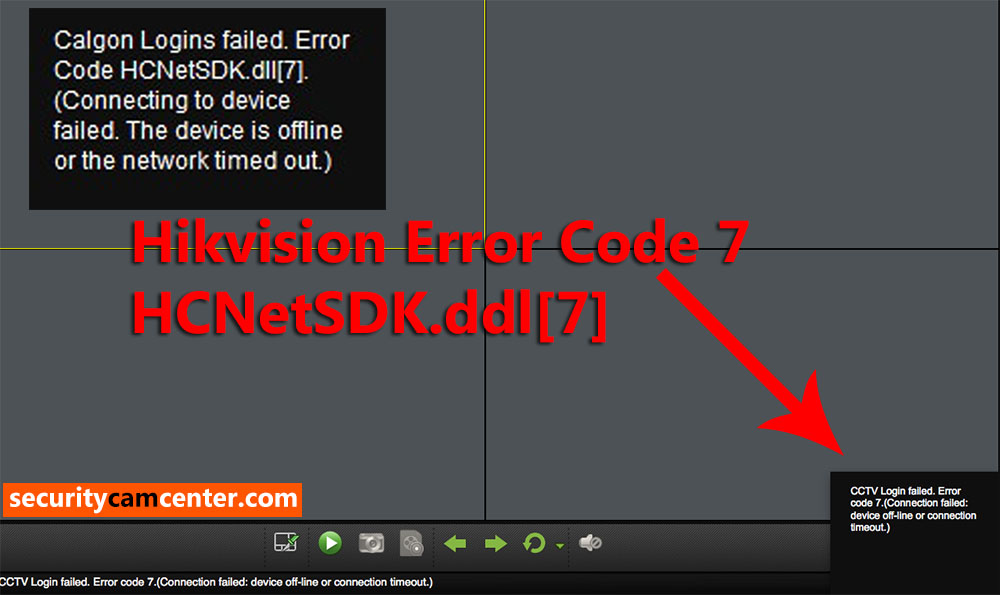
Hikvision error code 7 shows up when you’re trying to view the cameras remotely on the iVMS-4200 camera management software. It’s caused by a misconfiguration of the local IP address on the recorder and by a port forwarding issue on the router.
The full message for this Hikvision error code is: HCNetSDK.ddl[7]. Failed to connect to the device. The device is off-line, or connection timeout caused by network.
In other cases it can be displayed as: [camera name] Logins failed. Error Code HCNetSDK.dll[7]. (Connecting to device failed. The device is offline or the network timed out).
You may see this error as “The device is off-line”, “The network is unreachable”, “Failed to connect to the device”, “Connection time-out”, “Connecting to device failed”.
How to fix Hikvision error code 7
There are a few things you need to check and modify in order to fix this issue.
It has been reported that error code 7 can be caused by a misconfiguration of the IP settings on the recorder. Go to the network setting of your recorder and take a look at the IP address, default gateway, subnet mask, preferred DNS, and alternate DNS. Make sure they match your network.
- DVR/NVR IP address: 192.168.1.100
- DVR/NVR Subnet Mask: 255.255.255.0
- DVR/NVR Gateway (your router’s IP address): 192.168.1.1
- Preferred DNS: 8.8.8.8 (for both DVR/NVR and router)
- Alternate DNS: 8.8.4.4 (for both DVR/NVR and router)
Check if all the ports are open on your router. You need to open the HTTP port, Server port, and RTSP port. Make sure these ports show all open. Contact your ISP support if you can’t fix it.
In a few cases, the ISP blocks the ports even if you forwarded them correctly on your router. So, you need to forward all these three ports (http, server, rtsp), most of the time the error code 7 is solved by following this step. Also, forward them on both UDP and TCP.
Many users report that changing the RTSP port from 554 to something else (let’s say 8554) fixed the issue. The new port still needs to be opened on the router.
Double-check the credentials settings on the iVMS-4200. Go to the Device Manager and check the added remote device IP address, username, password, all should be correct and without spaces.
All that being said, ensure you’re using the latest version of iVMS-4200 software and that the firmware on your DVR/NVR is updated to the newest one.
Источник
Ivms hcnetsdk dll error
а так .
NET_DVR_NETWORK_FAIL_CONNECT 7 Failed to connect the device. The device is off-line, or connection timeout caused by network.
Мотивация, направление, посыл 😉
Узнавание паролей Dahua SmartPSS, Hikvision iVMS4200, генерация временного для Uniview. Исследования IT.
www.iTuneDVR.ru
| 5d144 | Дата: Четверг, 01.12.2016, 18:10 | Сообщение # 3 |
 Через IVMS 4200 ошибка Через IVMS 4200 ошибка 
Камеры через интернет порты проброшены в IVMS 4500 (android) отображаются. Пробовал через 8000 hik и ONVIF 80—та же проблема. С регистратора Камера сейчас подключена к локальному сетевому регистратору, на нем все отлично пишется и смотрится уже второй год. Сейчас возникла задача писать камеру удаленно на выше указанном регистраторе, и смотреть на IVMS 4200 на компе. И вот . |
|
| iTuneDVR | Дата: Четверг, 01.12.2016, 19:07 | Сообщение # 4 |
 |
Версия iVMS4200 скриншот? Сетевая нагрузка из диспетчера задач, скриншот? Скриншот с настройками камеры. Сброс настроек на заводские и попробоваать. TFTP перепрошивка камеры и попробовать. Мотивация, направление, посыл 😉 Узнавание паролей Dahua SmartPSS, Hikvision iVMS4200, генерация временного для Uniview. Исследования IT. www.iTuneDVR.ru |
| kaza | Дата: Понедельник, 05.12.2016, 10:41 | Сообщение # 5 |
| какие порты на камеру открыты? нужно два порта открывать к камере sdk и rtsp порт, подключать по sdk, также если подключается по onvif то надо еще http порт открывать. | |

| 5d144 | Дата: Четверг, 08.12.2016, 00:39 | Сообщение # 6 |
| Зачем RTSP открывать? Как IVMS узнает номер RTSP порта? куда его (номер порта) прописывать в IVMS ? | |
| 5d144 | Дата: Четверг, 08.12.2016, 00:49 | Сообщение # 7 |
| iTuneDVR | Дата: Четверг, 08.12.2016, 02:23 | Сообщение # 8 |
|
Залёт — это нечто другое Ошибка в принципе красноречиво говорит о том, что таймаут подключения к камере. Т.е. в момент подключения камера не отвечает на запросы: занята или в оффлайне или пакеты не дошли. По скольку через мобильный она работает, то вопрос сколько таких подключений к камере вообще? Понимаю, что всё работало, значит что-то поменялось. Может клиентов на просмотр добавилось или. |
|

С таймаутом все в порядке. Скачал версию IVMS4200 версия 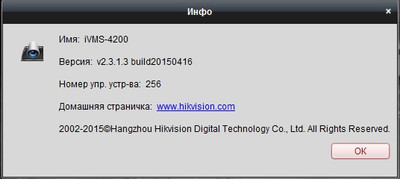
И камера к этой версии нормально подключилась. Т.е. проблема не таймаута.
К камере подключено: регистратор по локальной сети, и переодически подключается IVMS 4500. Сейчас я пытаюсь все настроить и подключаюсь к ней поочередно то 4200клиентом , то 4500, то регистратором DS-7216HQHI-F2/N. В IVMS4500 поток выбирается «четкий», «текущий»,и в «обычный» можно выбрать разрешение кадры и битрейт— выбираю 1920-1080 битрейет 4096 все показывает. Камера подключена прямо в роутер, инет 50-60 мегабит на отдачу, и используется только для просмотра видео.
Половина вопроса решена —смотреть через комп на IVMS4200 переодически.
Теперь остается задача —смотреть и писать регистратором DS-7216HQHI-F2/N постоянно.
Какие есть идеи ?
| 5d144 | Дата: Суббота, 10.12.2016, 22:46 | Сообщение # 9 |
| iTuneDVR | Дата: Воскресенье, 11.12.2016, 02:06 | Сообщение # 10 |
| |
Есть конечно и более свежее версии, но я не стал указывать на это, потому как я понял, что до этого всё работало на этой версии. Возможно изменилась сетевая обстановки и IVMS по каким-то причинам сам не успевал, потому и выкидывал такую ошибку таймаута. Немного не стыкуется со скрином выше с загрузкой сети. Источник |
| Network Communication Error Code | |
| 200-240 | Array Error Code |
| 250-252 | Security Activation Error Code |
| 300-348 | Intelligent Device Error Code |
| 400-446 | RTSP Error Code |
| 500-528 | Decoding Error Code |
| 600-619 | Audio Intercom Error Code |
| 678-700 | Qos Error Code |
| 717-802 | Other Error Code |
| 803-814 | N+1 Function Error Code |
| 821-823 | Other Error Code |
| 901-927 | Multi-screen Controller Error Code |
| 951-962 | Decoder Error Code |
| 1000-1008 | Capability Set Error Code |
| 1101-1105 | Other Error Code |
| 1201-1220 | Alarm Device Error Code |
| 1400-1499 | ITS Camera Error Code |
| 1500-1504 | VQD Error Code |
| 1600-1604 | Capture Camera Error Code |
| 1900-1908 | Access Control Host Error Code |
| Network Communication Error Code | ||
| Error Type | Returned Value | Information |
| NET_DVR_NOERROR | 0 | No error. |
| NET_DVR_PASSWORD_ERROR | 1 | User name or password error. |
| NET_DVR_NOENOUGHPRI | 2 | Not authorized to do this operation. |
| NET_DVR_NOINIT | 3 | SDK is not initialized. |
| NET_DVR_CHANNEL_ERROR | 4 | Channel number error. There is no corresponding channel number on the device. |
| NET_DVR_OVER_MAXLINK NET_DVR_VERSIONNOMATCH |
5 6 |
The number of connection with the device has exceeded the max limit. Version mismatch. SDK version is not matching with the device. |
| NET_DVR_NETWORK_FAIL_CONNECT | 7 | Failed to connect to the device. The device is off-line, or connection timeout caused by network. |
| NET_DVR_NETWORK_SEND_ERROR | 8 | Failed to send data to the device. |
| NET_DVR_NETWORK_RECV_ERROR | 9 | Failed to receive data from the device. |
| NET_DVR_NETWORK_RECV_TIMEOUT | 10 | Timeout when receiving data from the device. |
| NET_DVR_NETWORK_ERRORDATA NET_DVR_ORDER_ERROR NET_DVR_OPERNOPERMIT NET_DVR_COMMANDTIMEOUT NET_DVR_ERRORSERIALPORT |
11 12 13 14 15 |
The data sent to the device is illegal, or the data received from the device error. E.g. The input data is not supported by the device for remote configuration. API calling order error. Not authorized for this operation. Executing command on the device is timeout. Serial port number error. The assigned serial port does not exist on the device. |
| NET_DVR_ERRORALARMPORT | 16 | Alarm port number error. |
| NET_DVR_PARAMETER_ERROR NET_DVR_CHAN_EXCEPTION NET_DVR_NODISK NET_DVR_ERRORDISKNUM |
17 18 19 20 |
Parameter error. Input or output parameters in the SDK API is NULL, or the value or format of the parameters does not match with the requirement. Device channel is in exception status. No hard disk on the device, and the operation of recording and hard disk configuration will fail. Hard disk number error. The assigned hard disk number does not exist during hard disk management. |
| NET_DVR_DISK_FULL | 21 | Device hark disk is full. |
| NET_DVR_DISK_ERROR | 22 | Device hard disk error. |
| NET_DVR_NOSUPPORT | 23 | Device does not support this function. |
| NET_DVR_BUSY | 24 | Device is busy. |
| NET_DVR_MODIFY_FAIL | 25 | Failed to modify device parameters. |
| NET_DVR_PASSWORD_FORMAT_ERROR | 26 | The inputting password format is not correct. |
| NET_DVR_DISK_FORMATING | 27 | Hard disk is formatting, and the operation cannot be done. |
| NET_DVR_DVRNORESOURCE | 28 | Not enough resource on the device. |
| NET_DVR_DVROPRATEFAILED | 29 | Device operation failed. |
| NET_DVR_OPENHOSTSOUND_FAIL NET_DVR_DVRVOICEOPENED NET_DVR_TIMEINPUTERROR |
30 31 32 |
Failed to collect local audio data or to open audio output during voice talk / broadcasting. Voice talk channel on the device has been occupied. Time input is not correct. |
| NET_DVR_NOSPECFILE | 33 | There is no selected file for playback. |
| NET_DVR_CREATEFILE_ERROR NET_DVR_FILEOPENFAIL |
34 35 |
Failed to create a file, during local recording, saving picture, getting configuration file or downloading record file. Failed to open a file, when importing configuration file, upgrading device or uploading inquest file. |
| NET_DVR_OPERNOTFINISH | 36 | The last operation has not been completed. |
| NET_DVR_GETPLAYTIMEFAIL | 37 | Failed to get the current played time. |
| NET_DVR_PLAYFAIL | 38 | Failed to start playback. |
| NET_DVR_FILEFORMAT_ERROR | 39 | The file format is not correct. |
| NET_DVR_DIR_ERROR | 40 | File directory error. |
| NET_DVR_ALLOC_RESOURCE_ERROR | 41 | Resource allocation error. |
| NET_DVR_AUDIO_MODE_ERROR NET_DVR_NOENOUGH_BUF NET_DVR_CREATESOCKET_ERROR NET_DVR_SETSOCKET_ERROR NET_DVR_MAX_NUM NET_DVR_USERNOTEXIST |
42 43 44 45 46 47 |
Sound adapter mode error. Currently opened sound playing mode does not match with the set mode. Buffer is not enough. Create SOCKET error. Set SOCKET error The number of login or preview connections has exceeded the SDK limitation. User doest not exist. The user ID has been logged out or unavailable. |
| NET_DVR_WRITEFLASHERROR | 48 | Writing FLASH error. Failed to write FLASH during device upgrade. |
| NET_DVR_UPGRADEFAIL NET_DVR_CARDHAVEINIT NET_DVR_PLAYERFAILED NET_DVR_MAX_USERNUM NET_DVR_GETLOCALIPANDMACFAIL NET_DVR_NOENCODEING NET_DVR_IPMISMATCH NET_DVR_MACMISMATCH NET_DVR_UPGRADELANGMISMATCH |
49 50 51 52 53 54 55 56 57 |
Failed to upgrade device. It is caused by network problem or the language mismatch between the device and the upgrade file. The decode card has alreadly been initialed. Failed to call API of player SDK. The number of login user has reached the maximum limit. Failed to get the IP address or physical address of local PC. This channel hasn’t started encoding. IP address not match MAC address not match The language of upgrading file does not match the language of the device. |
| NET_DVR_MAX_PLAYERPORT NET_DVR_NOSPACEBACKUP NET_DVR_NODEVICEBACKUP |
58 59 60 |
The number of player ports has reached the maximum limit. No enough space to backup file in backup device. No backup device. |
| NET_DVR_PICTURE_BITS_ERROR NET_DVR_PICTURE_DIMENSION_ERROR NET_DVR_PICTURE_SIZ_ERROR NET_DVR_LOADPLAYERSDKFAILED NET_DVR_LOADPLAYERSDKPROC_ERROR NET_DVR_LOADDSSDKFAILED NET_DVR_LOADDSSDKPROC_ERROR NET_DVR_DSSDK_ERROR NET_DVR_VOICEMONOPOLIZE NET_DVR_JOINMULTICASTFAILED NET_DVR_CREATEDIR_ERROR NET_DVR_BINDSOCKET_ERROR NET_DVR_SOCKETCLOSE_ERROR |
61 62 63 64 65 66 67 68 69 70 71 72 73 |
The color quality seeting of the picture does not match the requirement, and it should be limited to 24. The dimension is over 128×256. The size of picture is over 100K Failed to load player SDK. Can not find the function in player SDK. Failed to load the library file-“DsSdk”. Can not find the API in “DsSdk”. Failed to call the API in “DsSdk”. Sound adapter has been monopolized. Failed to join to multicast group. Failed to create log file directory. Failed to bind socket. Socket disconnected. It is caused by network disconnection or destination unreachable. |
| NET_DVR_USERID_ISUSING | 74 | The user ID is operating when logout. |
| NET_DVR_SOCKETLISTEN_ERROR | 75 | Failed to listen |
| NET_DVR_PROGRAM_EXCEPTION | 76 | Sdk program exception |
| NET_DVR_WRITEFILE_FAILED | 77 | Failed to write file, during local recording, saving picture or downloading record file. |
| NET_DVR_FORMAT_READONLY | 78 | Failed to format read-only HD |
| NET_DVR_WITHSAMEUSERNAME | 79 | This user name already exists in the user configuration structure. |
| NET_DVR_DEVICETYPE_ERROR | 80 | Device type does not match when import configuration. |
| NET_DVR_LANGUAGE_ERROR | 81 | Language does not match when import configuration. |
| NET_DVR_PARAVERSION_ERROR | 82 | Software version does not match when import configuration. |
| NET_DVR_IPCHAN_NOTALIVE | 83 | IP channel is not on-line when previewing. |
| NET_DVR_RTSP_SDK_ERROR | 84 | Load StreamTransClient.dll failed |
| NET_DVR_CONVERT_SDK_ERROR | 85 | Load SystemTransform.dll failed |
| NET_DVR_IPC_COUNT_OVERFLOW | 86 | over maximun ipc count |
| NET_DVR_MAX_ADD_NUM | 87 | add label or other operation reach the maximum number |
| NET_DVR_PARAMMODE_ERROR NET_DVR_CODESPITTER_OFFLINE NET_DVR_BACKUP_COPYING |
88 89 90 |
Image intensifier, parameter mode error. This error may occur when client sets software or hardware parameters. Code splitter is offline. Device is backing up. |
| NET_DVR_CHAN_NOTSUPPORT | 91 | Channel not support |
| NET_DVR_CALLINEINVALID NET_DVR_CALCANCELCONFLICT |
92 93 |
The height line location is too concentrated, or the length line is not inclined enough. Cancel calibration conflict, if the rule and overall actual size filter have been set. |
| NET_DVR_CALPOINTOUTRANGE | 94 | Calibration point exceeds the range. |
| NET_DVR_FILTERRECTINVALID | 95 | The size filter does not meet the requirement. |
| NET_DVR_DDNS_DEVOFFLINE | 96 | Device has not registered to DDNS. |
| NET_DVR_DDNS_INTER_ERROR | 97 | DDNS inner error. |
| NET_DVR_FUNCTION_NOT_SUPPORT_OS | 98 | This function don’t support this OS. |
| NET_DVR_DEC_CHAN_REBIND | 99 | Decode channel can not bind with two display channel. |
| NET_DVR_INTERCOM_SDK_ERROR | 100 | Failed to load the audio intercom SDK from current directory. |
| NET_DVR_NO_CURRENT_UPDATEFILE | 101 | No current upgrade pack. |
| NET_DVR_USER_NOT_SUCC_LOGIN | 102 | The user has not logined the device. |
| NET_DVR_USE_LOG_SWITCH_FILE | 103 | It is using the log swtich file. |
| NET_DVR_POOL_PORT_EXHAUST | 104 | The ports used to bound in port pool is exhausted. |
| NET_DVR_PACKET_TYPE_NOT_SUPPORT | 105 | The packet type of stream is error. |
| NET_DVR_IPPARA_IPID_ERROR | 106 | IPID of IP access configuration is error. |
| NET_DVR_LOAD_HCPREVIEW_SDK_ERROR | 107 | Load Preview component Failed. |
| NET_DVR_LOAD_HCVOICETALK_SDK_ERROR | 108 | Load Voice talk component Failed. |
| NET_DVR_LOAD_HCALARM_SDK_ERROR | 109 | Load Alarm component Failed. |
| NET_DVR_LOAD_HCPLAYBACK_SDK_ERROR | 110 | Load Playback component Failed. |
| NET_DVR_LOAD_HCDISPLAY_SDK_ERROR | 111 | Load Display component Failed. |
| NET_DVR_LOAD_HCINDUSTRY_SDK_ERROR | 112 | Load Industry component Failed. |
| NET_DVR_LOAD_HCGENERALCFGMGR_SDK_ERROR | 123 | Load general configuration management component failed. |
| NET_DVR_CORE_VER_MISMATCH | 121 | There is a mismatch between the component and core version. |
| NET_DVR_CORE_VER_MISMATCH_HCPREVIEW | 122 | There is a mismatch between Live view component and core version. |
| NET_DVR_CORE_VER_MISMATCH_HCVOICETALK | 123 | There is a mismatch between voice component and core version. |
| NET_DVR_CORE_VER_MISMATCH_HCALARM | 124 | There is a mismatch between alarm component and core version. |
| NET_DVR_CORE_VER_MISMATCH_HCPLAYBACK | 125 | There is a mismatch between playback component and core version. |
| NET_DVR_CORE_VER_MISMATCH_HCDISPLAY | 126 | There is a mismatch between display component and core version. |
| NET_DVR_CORE_VER_MISMATCH_HCINDUSTRY NET_DVR_CORE_VER_MISMATCH_HCGENERALCFGMGR |
127 128 |
There is a mismatch between industrial application component and core version. There is a mismatch between general configuration management component and the core version. |
| NET_DVR_COM_VER_MISMATCH_HCPREVIEW NET_DVR_COM_VER_MISMATCH_HCVOICETALK NET_DVR_COM_VER_MISMATCH_HCALARM |
136 137 138 |
There is a mismatch between Live view component and HCNetSDK version. There is a mismatch between voice component and HCNetSDK version. here is a mismatch between alarm component and HCNetSDK version. |
| NET_DVR_COM_VER_MISMATCH_HCPLAYBACK | 139 | There is a mismatch between playback component and HCNetSDK version. |
| NET_DVR_COM_VER_MISMATCH_HCDISPLAY NET_DVR_COM_VER_MISMATCH_HCINDUSTRY |
140 141 |
There is a mismatch between display component and HCNetSDK version. There is a mismatch between industrial application component and HCNetSDK version. |
| NET_DVR_COM_VER_MISMATCH_HCGENERALCFGMGR | 142 | There is a mismatch between General configuration management component and the HCNetSDK version. |
| NET_DVR_ALIAS_DUPLICATE | 150 | Alias is duplicate (for HiDDNS) |
| NET_DVR_USERNAME_NOT_EXIST | 152 | The user name doesn’t exist. |
| NET_ERR_USERNAME_LOCKED | 153 | The user name is locked. |
| NET_DVR_INVALID_USERID | 154 | Invalid User ID. |
| NET_DVR_LOW_LOGIN_VERSION | 155 | The login version is too low. |
| NET_DVR_LOAD_LIBEAY32_DLL_ERROR | 156 | Failed to load libeay32.dll. |
| NET_DVR_LOAD_SSLEAY32_DLL_ERROR | 157 | Failed to load ssleay32.dll. |
| NET_DVR_TEST_SERVER_FAIL_CONNECT | 165 | Failed to connect to test server. |
| NET_DVR_NAS_SERVER_INVALID_DIR NET_DVR_NAS_SERVER_NOENOUGH_PRI NET_DVR_EMAIL_SERVER_NOT_CONFIG_DNS NET_DVR_EMAIL_SERVER_NOT_CONFIG_GATEWAY |
166 167 168 169 |
Failed to mount to NAS server (No such directory, or user name/password error). Failed to mount to NAS server (not authorized) DNS has not been configured, so domain address may invalid. GateWay of Email server has not been configured, so it may be failed to send mail. |
| NET_DVR_TEST_SERVER_PASSWORD_ERROR | 170 | User name and password tried to login the test server are not matching. |
| NET_DVR_EMAIL_SERVER_CONNECT_EXCEPTION_WITH_S MTP | 171 | The connection between device and SMTP server is abnormal. |
| NET_DVR_FTP_SERVER_FAIL_CREATE_DIR | 172 | Failed to create directory in the FTP server. |
| NET_DVR_FTP_SERVER_NO_WRITE_PIR | 173 | Do not have permission to write in the FTP server. |
| NET_DVR_IP_CONFLICT | 174 | IP conflict. |
| NET_DVR_INSUFFICIENT_STORAGEPOOL_SPACE | 175 | The storage pool is full. |
| NET_DVR_STORAGEPOOL_INVALID NET_DVR_EFFECTIVENESS_REBOOT | 176 177 |
The storage pool of cloud server is invalid, for not configure the storage pool or the ID of storage pool error. Need reboot the device. |
| Array Error Code | ||
| Error Type | Returned Value | Information |
| NET_DVR_NAME_NOT_ONLY | 200 | Existing name. |
| NET_DVR_OVER_MAX_ARRAY | 201 | Number of arrays has reached its limit. |
| NET_DVR_OVER_MAX_VD | 202 | Number of virtual disks has reached its limit. |
| NET_DVR_VD_SLOT_EXCEED | 203 | Virtual disk slot is full. |
| NET_DVR_PD_STATUS_INVALID | 204 | Physical disk for rebuilding array is with error status. |
| NET_DVR_PD_BE_DEDICATE_SPARE | 205 | Physical disk for rebuilding array is specified as spare drive. |
| NET_DVR_PD_NOT_FREE | 206 | Physical disk for rebuilding array is not idle. |
| NET_DVR_CANNOT_MIG2NEWMODE | 207 | Unable to migrate from the current array type to the new array type. |
| NET_DVR_MIG_PAUSE | 208 | The migration operation has been paused. |
| NET_DVR_MIG_CANCEL | 209 | The migration operation has been cancelled. |
| NET_DVR_EXIST_VD | 210 | Operation failed! Please delete the virtual disk existed in the array first. |
| NET_DVR_TARGET_IN_LD_FUNCTIONAL | 211 | Target physical disk is part of the virtual disk and is functional. |
| NET_DVR_HD_IS_ASSIGNED_ALREADY | 212 | Specified physical disk is assigned to a virtual disk |
| NET_DVR_INVALID_HD_COUNT | 213 | Number of physical disks doesn’t fit the specified RAID level. |
| NET_DVR_LD_IS_FUNCTIONAL | 214 | Specified virtual disk is functional. |
| NET_DVR_BGA_RUNNING | 215 | BGA is running. |
| NET_DVR_LD_NO_ATAPI | 216 | Can not create virtual disk with ATAPI drive. |
| NET_DVR_MIGRATION_NOT_NEED | 217 | Migration is not necessary. |
| NET_DVR_HD_TYPE_MISMATCH | 218 | Physical disks are not of the same type. |
| NET_DVR_NO_LD_IN_DG | 219 | No virtual disk exist on the specified array. |
| NET_DVR_NO_ROOM_FOR_SPARE | 220 | Disk space is too small to be assigned as spare drive. |
| NET_DVR_SPARE_IS_IN_MULTI_DG | 221 | Disk is already assigned as a spare drive for an array. |
| NET_DVR_DG_HAS_MISSING_PD | 222 | Disk is missing from an array. |
| NET_DVR_NAME_EMPTY | 223 | Name is empty. |
| NET_DVR_INPUT_PARAM | 224 | The input parameter is error. |
| NET_DVR_PD_NOT_AVAILABLE | 225 | The physical disk is not available. |
| NET_DVR_ARRAY_NOT_AVAILABLE | 226 | The RAID is not available |
| NET_DVR_PD_COUNT | 227 | The count of physical disks is not correct. |
| NET_DVR_VD_SMALL | 228 | Virtual disk is too small. |
| NET_DVR_NO_EXIST | 229 | Not exist. |
| NET_DVR_NOT_SUPPORT | 230 | Not support the operation. |
| NET_DVR_NOT_FUNCTIONAL | 231 | The status of RAID is abnormal. |
| NET_DVR_DEV_NODE_NOT_FOUND | 232 | The device node of virtual disk does not exist. |
| NET_DVR_SLOT_EXCEED | 233 | The count of slots reaches the upper limit. |
| NET_DVR_NO_VD_IN_ARRAY | 234 | There is not virtual disk in the RAID. |
| NET_DVR_VD_SLOT_INVALID | 235 | The slot of virtual disk is invalid. |
| NET_DVR_PD_NO_ENOUGH_SPACE | 236 | The required space of physical disk is not enough. |
| NET_DVR_ARRAY_NONFUNCTION | 237 | Only the RAID on normal state supports to be migrated. |
| NET_DVR_ARRAY_NO_ENOUGH_SPACE | 238 | The space of RAID is not enough. |
| NET_DVR_STOPPING_SCANNING_ARRAY | 239 | It is pulling the disk out safely or rescanning the disk. |
| NET_DVR_NOT_SUPPORT_16T | 240 | Not support create the RAID larger than 16T. |
| Security Activation Error Code | ||
| NET_DVR_ERROR_DEVICE_NOT_ACTIVATED | 250 | The device has not been activated. |
| NET_DVR_ERROR_RISK_PASSWORD | 251 | There is a risk of the password. |
| NET_DVR_ERROR_DEVICE_HAS_ACTIVATED | 252 | The device has been activated. |
| NET_DVR_CALIBRATE_DATA_CONFLICT | 307 | Calibration error. |
| NET_DVR_CALIBRATE_CALC_FAIL | 308 | Failed to calculate camera calibration parameter. |
| NET_DVR_CALIBRATE_LINE_OUT_RECT | 309 | The input calibrating line exceeds the external rectangle sample. |
| NET_DVR_ENTER_RULE_NOT_READY | 310 | Enter rule not ready. |
| NET_DVR_AID_RULE_NO_INCLUDE_LANE NET_DVR_LANE_NOT_READY NET_DVR_RULE_INCLUDE_TWO_WAY NET_DVR_LANE_TPS_RULE_CONFLICT NET_DVR_NOT_SUPPORT_EVENT_TYPE NET_DVR_LANE_NO_WAY NET_DVR_SIZE_FILTER_ERROR NET_DVR_LIB_FFL_NO_FACE NET_DVR_LIB_FFL_IMG_TOO_SMALL NET_DVR_LIB_FD_IMG_NO_FACE NET_DVR_LIB_FACE_TOO_SMALL NET_DVR_LIB_FACE_QUALITY_TOO_BAD NET_DVR_KEY_PARAM_ERR NET_DVR_CALIBRATE_DATA_ERR |
311 312 313 314 315 316 317 318 319 320 321 322 323 324 |
It does not include lane in the traffic event rule (especial for traffic jam or driving against the traffic). Lane not ready. There are two different directions in event rule. The lane conflicts with the data rule. The event type is not supported by the device. The lane has no direction. The size of filter is illegal. There is no face when feature point positioning. The input image is too small when feature point positioning. The input image has no face when detecting face in single image. Face is too small when building model. Face image is of poor quality when building model. Advanced parameter setting error. Calibration sample size error, or data value error, or sample points beyond the horizon |
| NET_DVR_CALIBRATE_DISABLE_FAIL | 325 | The configured rules do not allow to cancel calibration. |
| NET_DVR_VCA_LIB_FD_SCALE_OUTRANGE | 326 | Filter scale is out range. |
| NET_DVR_LIB_FD_REGION_TOO_LARGE | 327 | Region is too big. |
| NET_DVR_TRIAL_OVERDUE | 328 | Trial overdue. |
| NET_DVR_CONFIG_FILE_CONFLICT | 329 | Config file conflict. |
| NET_DVR_FR_FPL_FAIL | 330 | Feature points location is error in face recognition. |
| NET_DVR_FR_IQA_FAIL | 331 | Image quality assessment is error in face recognition. |
| NET_DVR_FR_FEM_FAIL | 332 | Feature extract & match error in face recognition. |
| NET_DVR_FPL_DT_CONF_TOO_LOW | 333 | Detection confidence is too low in feature points location. |
| NET_DVR_FPL_CONF_TOO_LOW | 334 | Confidence is too low in feature points location. |
| NET_DVR_E_DATA_SIZE | 335 | Size of model data error. |
| NET_DVR_FR_MODEL_VERSION_ERR | 336 | Model version is error. |
| NET_DVR_FR_FD_FAIL | 337 | Face detection error in face recognition. |
| NET_DVR_FA_NORMALIZE_ERR | 338 | Face attribute normalize error. |
| NET_DVR_DOG_PUSTREAM_NOT_MATCH | 339 | Pustream and softdog are mismatched. |
| NET_DVR_DEV_PUSTREAM_NOT_MATCH | 340 | Pustream device version is error. |
| NET_DVR_PUSTREAM_ALREADY_EXISTS | 341 | The pustream has existence. |
| NET_DVR_SEARCH_CONNECT_FAILED | 342 | Failed to connect face retrieval device. |
| NET_DVR_INSUFFICIENT_DISK_SPACE | 343 | Storage space is insufficient. |
| NET_DVR_DATABASE_CONNECTION_FAILED | 344 | Failed to connect database. |
| NET_DVR_DATABASE_ADM_PW_ERROR | 345 | Username or password is error for database. |
| NET_DVR_DECODE_YUV | 346 | Failed to decode image. |
| NET_DVR_IMAGE_RESOLUTION_ERROR | 347 | Image resolution is unreasonable. |
| NET_DVR_CHAN_WORKMODE_ERROR | 348 | Channel work mode error. |
| RTSP Error Code | ||
| Error Type | Returned Value | Information |
| NET_DVR_RTSP_ERROR_NOENOUGHPRI | 401 | Authentication failed: if server returns 401, it will change to this error code |
| NET_DVR_RTSP_ERROR_ALLOC_RESOURCE | 402 | Failed to allocate the resource |
| NET_DVR_RTSP_ERROR_PARAMETER | 403 | Parameter error |
| NET_DVR_RTSP_ERROR_NO_URL NET_DVR_RTSP_ERROR_FORCE_STOP NET_DVR_RTSP_GETPORTFAILED NET_DVR_RTSP_DESCRIBERROR NET_DVR_RTSP_DESCRIBESENDTIMEOUT NET_DVR_RTSP_DESCRIBESENDERROR NET_DVR_RTSP_DESCRIBERECVTIMEOUT NET_DVR_RTSP_DESCRIBERECVDATALOST NET_DVR_RTSP_DESCRIBERECVERROR NET_DVR_RTSP_DESCRIBESERVERERR NET_DVR_RTSP_SETUPERROR |
404 406 407 410 411 412 413 414 415 416 420 |
The assigned URL does not exist: when the server returns 404, SDK turns into this error code. E.g. the channel is not available, or the channel does not support sub stream The user forces to exit midway RTSP port getting error. RTSP DECRIBE communicate error Sending RTSP DECRIBE is timeout. Failed to send RTSP DECRIBE. Receiving RTSP DECRIBE is timeout. Receiving data of RTSP DECRIBE error. Failed to receive RTSP DECRIBE. RTSP DECRIBE device returns the error. (or 419), RTSP SETUP interaction error. Generally, it is that the address (URL) returned by the device is not accessible, or it is rejected by the server |
| NET_DVR_RTSP_SETUPSENDTIMEOUT | 421 | Sending RTSP SETUP is timeout. |
| NET_DVR_RTSP_SETUPSENDERROR | 422 | Sending RTSP SETUP error. |
| NET_DVR_RTSP_SETUPRECVTIMEOUT | 423 | Receiving RTSP SETUP is timeout. |
| NET_DVR_RTSP_SETUPRECVDATALOST | 424 | Receiving data of RTSP SETUP error. |
| NET_DVR_RTSP_SETUPRECVERROR | 425 | Failed to receive RTSP SETUP. |
| NET_DVR_RTSP_OVER_MAX_CHAN NET_DVR_RTSP_SETUPSERVERERR NET_DVR_RTSP_PLAYERROR NET_DVR_RTSP_PLAYSENDTIMEOUT NET_DVR_RTSP_PLAYSENDERROR NET_DVR_RTSP_PLAYRECVTIMEOUT NET_DVR_RTSP_PLAYRECVDATALOST NET_DVR_RTSP_PLAYRECVERROR NET_DVR_RTSP_PLAYSERVERERR NET_DVR_RTSP_TEARDOWNERROR NET_DVR_RTSP_TEARDOWNSENDTIMEOUT NET_DVR_RTSP_TEARDOWNSENDERROR NET_DVR_RTSP_TEARDOWNRECVTIMEOUT NET_DVR_RTSP_TEARDOWNRECVDATALOST NET_DVR_RTSP_TEARDOWNRECVERROR NET_DVR_RTSP_TEARDOWNSERVERERR |
426 427 430 431 432 433 434 435 436 440 441 442 443 444 445 446 |
It exceeds the max connection number of server. or server has not enough resource. RTSP SETUP device returns the error. RTSP PLAY interaction error. Sending RTSP PLAY is timeout. Sending RTSP PLAY error. Receiving RTSP PLAY is timeout. Receiving data of RTSP PLAY error. Failed to receive RTSP PLAY. RTSP PLAY device returns the error. RTSP TEARDOWN interaction error. Sending RTSP TEARDOWN is timeout. Sending RTSP TEARDOWN error. Receiving RTSP TEARDOWN is timeout. Receiving data of RTSP TEARDOWN error. Failed to receive RTSP TEARDOWN. RTSP TEARDOWN device returns the error. |
| Decoding Error Code | ||
| Error Type NET_PLAYM4_NOERROR NET_PLAYM4_PARA_OVER NET_PLAYM4_ORDER_ERROR NET_PLAYM4_TIMER_ERROR NET_PLAYM4_DEC_VIDEO_ERROR NET_PLAYM4_DEC_AUDIO_ERROR NET_PLAYM4_ALLOC_MEMORY_ERROR |
Returned Value 500 501 502 503 504 505 506 |
Information no error input parameter is invalid The order of the function to be called is error Create multimedia clock failed Decode video data failed Decode audio data failed Allocate memory failed |
| NET_PLAYM4_OPEN_FILE_ERROR | 507 | Open the file failed |
| NET_PLAYM4_CREATE_OBJ_ERROR | 508 | Create thread or event failed |
| NET_PLAYM4_CREATE_DDRAW_ERROR | 509 | Create DirectDraw object failed |
| NET_PLAYM4_CREATE_OFFSCREEN_ERROR | 510 | failed when creating off-screen surface |
| NET_PLAYM4_BUF_OVER | 511 | buffer is overflow |
| NET_PLAYM4_CREATE_SOUND_ERROR | 512 | failed when creating audio device |
| NET_PLAYM4_SET_VOLUME_ERROR | 513 | Set volume failed |
| NET_PLAYM4_SUPPORT_FILE_ONLY | 514 | The function only support play file |
| NET_PLAYM4_SUPPORT_STREAM_ONLY | 515 | The function only support play stream |
| NET_PLAYM4_SYS_NOT_SUPPORT | 516 | System not support |
| NET_PLAYM4_FILEHEADER_UNKNOWN | 517 | No file header |
| NET_PLAYM4_VERSION_INCORRECT | 518 | The version of decoder and encoder is not adapted |
| NET_PALYM4_INIT_DECODER_ERROR | 519 | nitialize decoder failed |
| NET_PLAYM4_CHECK_FILE_ERROR | 520 | The file data is unknown |
| NET_PLAYM4_INIT_TIMER_ERROR | 521 | Initialize decoder failed |
| NET_PLAYM4_BLT_ERROR | 522 | Blt failed |
| NET_PLAYM4_UPDATE_ERROR | 523 | Update failed |
| NET_PLAYM4_OPEN_FILE_ERROR_MULTI | 524 | openfile error, streamtype is multi |
| NET_PLAYM4_OPEN_FILE_ERROR_VIDEO | 525 | openfile error, streamtype is video |
| NET_PLAYM4_JPEG_COMPRESS_ERROR | 526 | JPEG compress error |
| NET_PLAYM4_EXTRACT_NOT_SUPPORT | 527 | Don’t support the version of this file. |
| NET_PLAYM4_EXTRACT_DATA_ERROR | 528 | Extract video data failed. |
| Audio Intercom Error Code | ||
| Error Type | Returned Value | Information |
| NET_AUDIOINTERCOM_OK | 600 | No error. |
| NET_AUDIOINTECOM_ERR_NOTSUPORT | 601 | Not support. |
| NET_AUDIOINTECOM_ERR_ALLOC_MEMERY | 602 | Memory allocation error. |
| NET_AUDIOINTECOM_ERR_PARAMETER | 603 | Parameter error. |
| NET_AUDIOINTECOM_ERR_CALL_ORDER | 604 | API calling order error. |
| NET_AUDIOINTECOM_ERR_FIND_DEVICE | 605 | No audio device |
| NET_AUDIOINTECOM_ERR_OPEN_DEVICE | 606 | Failed to open the audio device |
| NET_AUDIOINTECOM_ERR_NO_CONTEXT NET_AUDIOINTECOM_ERR_NO_WAVFILE NET_AUDIOINTECOM_ERR_INVALID_TYPE |
607 608 609 |
Context error. WAV file error. The type of WAV parameter is invalid |
| NET_AUDIOINTECOM_ERR_ENCODE_FAIL | 610 | Failed to encode data |
| NET_AUDIOINTECOM_ERR_DECODE_FAIL | 611 | Failed to decode data |
| NET_AUDIOINTECOM_ERR_NO_PLAYBACK | 612 | Failed to play audio |
| NET_AUDIOINTECOM_ERR_DENOISE_FAIL | 613 | Failed to denoise |
| NET_AUDIOINTECOM_ERR_UNKOWN | 619 | Unknown |
| Qos Error Code | ||
| Error Type | Returned Value | Information |
| NET_QOS_ERR_SCHEDPARAMS_BAD_MINIMUM_INTERVA L NET_QOS_ERR_SCHEDPARAMS_BAD_FRACTION NET_QOS_ERR_SCHEDPARAMS_INVALID_BANDWIDTH |
678 679 680 |
Scheduled parameter of minimum interval is bad . Scheduled parameter of fraction is bad. Scheduled parameter of bandwidth is not invalid. |
| NET_QOS_ERR_PACKET_TOO_BIG | 687 | Packet too big. |
| NET_QOS_ERR_PACKET_LENGTH | 688 | Packet length error. |
| NET_QOS_ERR_PACKET_VERSION NET_QOS_ERR_PACKET_UNKNOW NET_QOS_ERR_OUTOFMEM NET_QOS_ERR_LIB_NOT_INITIALIZED NET_QOS_ERR_SESSION_NOT_FOUND NET_QOS_ERR_INVALID_ARGUMENTS NET_QOS_ERROR NET_QOS_OK |
689 690 695 696 697 698 699 700 |
Packet version error. Packet unknow. Out of memory. Lib not initialized. Session not found. Invalid arguments. Qos error. No error. |
|
Other Error Code |
||
| NET_SDK_ERR_REMOTE_DISCONNEC | 803 | Unable to connect to the remote device. |
| NET_SDK_ERR_RD_ADD_RD | 804 | It does not support add spare device to a spare device. |
| NET_SDK_ERR_BACKUP_DISK_EXCEPT | 805 | The backup disk is abnormal. |
| NET_SDK_ERR_RD_LIMIT | 806 | The count of spare devices has reached the maximum limit. |
| NET_SDK_ERR_ADDED_RD_IS_WD | 807 | The spare device to be added is a working device. |
| NET_SDK_ERR_ADD_ORDER_WRONG | 808 | The adding order is wrong, such as, to add the working device to the spare device before adding the spare device to the working device. |
| NET_SDK_ERR_WD_ADD_WD | 809 | It does not support add working device to a working device. |
| NET_SDK_ERR_WD_SERVICE_EXCETP | 810 | The CVR server is abnormal. |
| NET_SDK_ERR_RD_SERVICE_EXCETP | 811 | The spare device is abnormal. |
| NET_SDK_ERR_ADDED_WD_IS_RD | 812 | The working device to be added is a spare device. |
| NET_SDK_ERR_PERFORMANCE_LIMIT | 813 | The performance reaches the upper limit |
| NET_SDK_ERR_ADDED_DEVICE_EXIST | 814 | The devcie to be added has existed. |
| Other Error Code | ||
| NET_SDK_ERR_CHAN_AUDIO_BIND | 821 | Chan bind aduio error or no bind. |
| NET_DVR_N_PLUS_ONE_MODE | 822 | Not support to set cloud storage mode, for the device is in N+1 mode. |
| NET_DVR_CLOUD_STORAGE_OPENED | 823 | The cloud storage mode has been opened. |
| Multi-screen Controller Error Code | ||
| NET_ERR_WINCHAN_IDX NET_ERR_WIN_LAYER |
901 902 |
Window channel index error. Window layer number error(the count of window layers on a single screen exceeds the max number). |
| NET_ERR_WIN_BLK_NUM NET_ERR_OUTPUT_RESOLUTION NET_ERR_LAYOUT NET_ERR_INPUT_RESOLUTION NET_ERR_SUBDEVICE_OFFLINE NET_ERR_NO_DECODE_CHAN NET_ERR_MAX_WINDOW_ABILITY NET_ERR_ORDER_ERROR NET_ERR_PLAYING_PLAN |
903 904 905 906 907 908 909 910 911 |
Window block number error(the count of screens that single window overlays exceeds the max number). The output resolution error. Layout index error. The input resolution is not supported. The sub-device is off-line. There is no free decoding channel. The upper limit of window number. Calling order error. Be playing plan. |
| NET_ERR_DECODER_USED | 912 | Decoder board is in use. |
| NET_ERR_OUTPUT_BOARD_DATA_OVERFLOW | 913 | The data of output board is over the limit. |
| NET_ERR_SAME_USER_NAME | 914 | The user name is duplicate. |
| NET_ERR_INVALID_USER_NAME | 915 | Invalid username. |
| NET_ERR_MATRIX_USING | 916 | The input matrix is in use. |
| NET_ERR_DIFFERENT_CHAN_TYPE NET_ERR_INPUT_CHAN_BINDED NET_ERR_BINDED_OUTPUT_CHAN_OVERFLOW |
917 918 919 |
The channel type is error (the output channel of matrix is different with the input of controller) The input channel has been bound by other matrix. The number of the matrix output channels in use has exceeded the number of channels bound with controller. |
| NET_ERR_MAX_SIGNAL_NUM | 920 | The number of input signal sources is over the limit. |
| NET_ERR_INPUT_CHAN_USING | 921 | The input channel is in use. |
| NET_ERR_MANAGER_LOGON | 922 | The operation failed, for the manager has logged in. |
| NET_ERR_USERALREADY_LOGON | 923 | The operation failed, for the user has logged in. |
| NET_ERR_LAYOUT_INIT | 924 | The operation failed, for the layout is being initialized. |
| NET_ERR_BASEMAP_SIZE_NOT_MATCH | 925 | The size of traced drawing not match |
| NET_ERR_WINDOW_OPERATING | 926 | The operation failed, for the window is performing other operation. |
| NET_ERR_SIGNAL_UPLIMIT | 927 | The number of windows has reached the maximum limit. |
| Decoder Error Code | ||
| NET_ERR_MAX_WIN_OVERLAP | 951 | The number of windows overlap has reached the maximum limit. |
| NET_ERR_STREAMID_CHAN_BOTH_VALID | 952 | stream ID and channel number are both valid. |
| NET_ERR_NO_ZERO_CHAN | 953 | The device has no zero channel. |
| NEED_RECONNECT | 955 | Need redirection (for transcoding system) |
| NET_ERR_NO_STREAM_ID | 956 | The stream ID does not exist. |
| NET_DVR_TRANS_NOT_START | 957 | The transcoding has not been started. |
| NET_ERR_MAXNUM_STREAM_ID | 958 | The number of stream ID has reached the maximum limit. |
| NET_ERR_WORKMODE_MISMATCH | 959 | The work mode does not match with the requirement. |
| NET_ERR_MODE_IS_USING | 960 | It Has been working in current mode. |
| NET_ERR_DEV_PROGRESSING | 961 | The device is in processing |
| NET_ERR_PASSIVE_TRANSCODING | 962 | It is in transcoding. |
|
Capability Set Error Code |
||
| XML_ANALYZE_FIND_LOCALXML_ERROR | 1002 | Can not find the corresponding xml file. |
| XML_ANALYZE_LOAD_LOCALXML_ERROR | 1003 | Failed to load the local xml file. |
| XML_NANLYZE_DVR_DATA_FORMAT_ERROR | 1004 | Data format of the capability is wrong. |
| XML_ANALYZE_TYPE_ERROR | 1005 | The type of capability set is wrong. |
| XML_ANALYZE_XML_NODE_ERROR | 1006 | Format of XML capability node is wrong. |
| XML_INPUT_PARAM_ERROR | 1007 | The input value of XML capability node is wrong. |
| XML_VERSION_MISMATCH | 1008 | XML version not match |
| Other Error Code | ||
| NET_ERR_TRANS_CHAN_START | 1101 | The operation is failed, for transparent channel has been opened. |
| NET_ERR_DEV_UPGRADING | 1102 | The device is upgrading. |
| NET_ERR_MISMATCH_UPGRADE_PACK_TYPE | 1103 | The type of upgrade package not match. |
| NET_ERR_DEV_FORMATTING | 1104 | The device is being formatted. |
| NET_ERR_MISMATCH_UPGRADE_PACK_VERSION | 1105 | The version of upgrade package not match. |
| Alarm Device Error Code | ||
| NET_ERR_SEARCHING_MODULE | 1201 | The device is searching for the external module. |
| NET_ERR_REGISTERING_MODULE | 1202 | The device is registering to the external module. |
| NET_ERR_GETTING_ZONES | 1203 | The device is getting defense zone parameters. |
| NET_ERR_GETTING_TRIGGERS | 1204 | The device is getting triggers. |
| NET_ERR_ARMED_STATUS | 1205 | The system is armed. |
| NET_ERR_PROGRAM_MODE_STATUS | 1206 | The system is in programming mode. |
| NET_ERR_WALK_TEST_MODE_STATUS | 1207 | The system is in pacing mode. |
| NET_ERR_BYPASS_STATUS | 1208 | Bypass state |
| NET_ERR_DISABLED_MODULE_STATUS | 1209 | The function is disabled. |
| NET_ERR_NOT_SUPPORT_OPERATE_ZONE | 1210 | The defense zone does not support the operation. |
| NET_ERR_NOT_SUPPORT_MOD_MODULE_ADDR | 1211 | The module address can not be modified. |
| NET_ERR_UNREGISTERED_MODULE | 1212 | The module is unregistered. |
| NET_ERR_PUBLIC_SUBSYSTEM_ASSOCIATE_SELF | 1213 | The public subsystem is set to associate with itself. |
| NET_ERR_EXCEEDS_ASSOCIATE_SUBSYSTEM_NUM | 1214 | The number of subsystems associated with the public subsystem exceeds the max limit. |
| NET_ERR_BE_ASSOCIATED_BY_PUBLIC_SUBSYSTEM NET_ERR_ZONE_FAULT_STATUS NET_ERR_SAME_EVENT_TYPE |
1215 1216 1217 |
The subsystem has been associated with the other public subsystem. The defense zone is in the fault state. The opening and close of alarm output triggered by event have associated with same event type. |
| NET_ERR_ZONE_ALARM_STATUS | 1218 | The defense zone is in the alarm state. |
| NET_ERR_EXPANSION_BUS_SHORT_CIRCUIT | 1219 | Short circuit of expansion bus. |
| NET_ERR_PWD_CONFLICT | 1220 | Password conflict. |
| ITS Camera Error Code | ||
| NET_DVR_ERR_LANENUM_EXCEED NET_DVR_ERR_PRAREA_EXCEED NET_DVR_ERR_LIGHT_PARAM NET_DVR_ERR_LANE_LINE_INVALID NET_DVR_ERR_STOP_LINE_INVALID NET_DVR_ERR_LEFTORRIGHT_LINE_INVALID NET_DVR_ERR_LANE_NO_REPEAT NET_DVR_ERR_PRAREA_INVALID |
1400 1401 1402 1403 1404 1405 1406 1407 |
The number of lanes exceeds the limit. License plate recognition region is too large. The access parameters of traffic light is error. The configuration of lane line is invalid. The configuration of stop line is invalid. The boundary line configuration of left-turn or right-turn lane is invalid. The overlaid lane number is repeated. The polygon region of license plate recognition does not meet the requirement. |
| NET_DVR_ERR_LIGHT_NUM_EXCEED NET_DVR_ERR_SUBLIGHT_NUM_INVALID NET_DVR_ERR_LIGHT_AREASIZE_INVALID NET_DVR_ERR_LIGHT_COLOR_INVALID NET_DVR_ERR_LIGHT_DIRECTION_INVALID NET_DVR_ERR_LACK_IOABLITY NET_DVR_ERR_FTP_PORT NET_DVR_ERR_FTP_CATALOGUE NET_DVR_ERR_FTP_UPLOAD_TYPE NET_DVR_ERR_FLASH_PARAM_WRITE NET_DVR_ERR_FLASH_PARAM_READ NET_DVR_ERR_PICNAME_DELIMITER |
1408 1409 1410 1411 1412 1413 1414 1415 1416 1417 1418 1419 |
The number of traffic lights of the video detection exceeds the max limit. The number of the sub traffic lights of video detection is illegal. The input area size of the video detection traffic light is illegal. The color of the video detection traffic light is illegal. The direction of the video detection traffic light is illegal. Lack of IO ablity. FTP port error. FTP catalogue error. FTP upload type error. Setting param flash write error. Getting param flash read error. Pic name delimiter error. |
| NET_DVR_ERR_PICNAME_ITEM | 1420 | Pic name item error. |
| NET_DVR_ERR_PLATE_RECOGNIZE_TYPE | 1421 | Plate recognize type error. |
| NET_DVR_ERR_CAPTURE_TIMES | 1422 | Capture times error. |
| NET_DVR_ERR_LOOP_DISTANCE | 1423 | Loop distance error. |
| NET_DVR_ERR_LOOP_INPUT_STATUS | 1424 | Loop input status error. |
| NET_DVR_ERR_RELATE_IO_CONFLICT | 1425 | Related IO conflict. |
| NET_DVR_ERR_INTERVAL_TIME | 1426 | Interval time error. |
| NET_DVR_ERR_SIGN_SPEED | 1427 | Sign speed error. |
| NET_DVR_ERR_PIC_FLIP | 1428 | Flip is used. |
| NET_DVR_ERR_RELATE_LANE_NUMBER | 1429 | Related lane number error. |
| NET_DVR_ERR_TRIGGER_MODE | 1430 | Trigger mode error. |
| NET_DVR_ERR_DELAY_TIME | 1431 | Delay time error. |
| NET_DVR_ERR_EXCEED_RS485_COUNT | 1432 | Exceed RS485 count. |
| NET_DVR_ERR_RADAR_TYPE | 1433 | Radar type error. |
| NET_DVR_ERR_RADAR_ANGLE | 1434 | Radar angle error. |
| NET_DVR_ERR_RADAR_SPEED_VALID_TIME | 1435 | Radar speed valid time error. |
| NET_DVR_ERR_RADAR_LINE_CORRECT | 1436 | Radar line correct error. |
| NET_DVR_ERR_RADAR_CONST_CORRECT | 1437 | Radar const correct error. |
| NET_DVR_ERR_RECORD_PARAM | 1438 | Record param error. |
| NET_DVR_ERR_LIGHT_WITHOUT_COLOR_AND_DIRECTION | 1439 | Light number and other param error. |
| NET_DVR_ERR_LIGHT_WITHOUT_DETECTION_REGION NET_DVR_ERR_RECOGNIZE_PROVINCE_PARAM NET_DVR_ERR_SPEED_TIMEOUT NET_DVR_ERR_NTP_TIMEZONE NET_DVR_ERR_NTP_INTERVAL_TIME NET_DVR_ERR_NETWORK_CARD_NUM NET_DVR_ERR_DEFAULT_ROUTE NET_DVR_ERR_BONDING_WORK_MODE NET_DVR_ERR_SLAVE_CARD NET_DVR_ERR_PRIMARY_CARD NET_DVR_ERR_DHCP_PPOE_WORK NET_DVR_ERR_NET_INTERFACE |
1440 1441 1442 1443 1444 1445 1446 1447 1448 1449 1450 1451 |
Light number and detection region error. Plate recognize Province param error. IO Speed TimeOut Param error. NTP TimeZone Param error. NTP Interval Time error. Network Card Num error. Default Route error. Banding Work Mode error. Slave Card error. Primary Card error. DHCP and PPOE not Meanwhile start. Net Interface invalid. |
| NET_DVR_ERR_MTU | 1452 | MTU Param invalid. |
| NET_DVR_ERR_NETMASK | 1453 | Netmask address invalid. |
| NET_DVR_ERR_IP_INVALID | 1454 | IP address invalid. |
| NET_DVR_ERR_MULTICAST_IP_INVALID | 1455 | Multicast IP address invalid. |
| NET_DVR_ERR_GATEWAY_INVALID | 1456 | Gateway address invalid. |
| NET_DVR_ERR_DNS_INVALID | 1457 | DNS Param invalid. |
| NET_DVR_ERR_ALARMHOST_IP_INVALID | 1458 | AlarmHost IP invalid. |
| NET_DVR_ERR_IP_CONFLICT | 1459 | IP address Conflict. |
| NET_DVR_ERR_NETWORK_SEGMENT | 1460 | IP not support Multi Network segment. |
| NET_DVR_ERR_NETPORT | 1461 | NetPort param error. |
| NET_DVR_ERR_PPPOE_NOSUPPORT | 1462 | Unsupport PPPOE. |
| NET_DVR_ERR_DOMAINNAME_NOSUPPORT | 1463 | Not Support Domain Name. |
| NET_DVR_ERR_NO_SPEED | 1464 | Speed Not Enabled. |
| NET_DVR_ERR_IOSTATUS_INVALID | 1465 | IO Status invalid. |
| NET_DVR_ERR_BURST_INTERVAL_INVALID | 1466 | Burst Interval invalid. |
| NET_DVR_ERR_RESERVE_MODE | 1467 | Reserve Mode invalid. |
| NET_DVR_ERR_LANE_NO | 1468 | Lane No error. |
| NET_DVR_ERR_COIL_AREA_TYPE | 1469 | Coil Area Type error. |
| NET_DVR_ERR_TRIGGER_AREA_PARAM | 1470 | Trigger Area Param error. |
| NET_DVR_ERR_SPEED_LIMIT_PARAM | 1471 | Speed Limit Param error. |
| NET_DVR_ERR_LANE_PROTOCOL_TYPE | 1472 | Lane Protocol Type error. |
| NET_DVR_ERR_INTERVAL_TYPE | 1473 | Capture Interval Type error. |
| NET_DVR_ERR_INTERVAL_DISTANCE | 1474 | Capture Interval Distance error. |
| NET_DVR_ERR_RS485_ASSOCIATE_DEVTYPE | 1475 | Rs485 Associate DevType error. |
| NET_DVR_ERR_RS485_ASSOCIATE_LANENO | 1476 | Rs485 Associate LaneNo error. |
| NET_DVR_ERR_LANENO_ASSOCIATE_MULTIRS485 | 1477 | LaneNo Associate MulitRs485 error. |
| NET_DVR_ERR_LIGHT_DETECTION_REGION | 1478 | Light Detection Region error. |
| NET_DVR_ERR_DN2D_NOSUPPORT | 1479 | UnSupport Capture Frame 2D Noise Reduction. |
| NET_DVR_ERR_IRISMODE_NOSUPPORT | 1480 | UnSupport scene Mode. |
| NET_DVR_ERR_WB_NOSUPPORT | 1481 | UnSupport White Balance Mode. |
| NET_DVR_ERR_IO_EFFECTIVENESS | 1482 | IO Effectiveness invalid. |
| NET_DVR_ERR_LIGHTNO_MAX | 1483 | Access Detector Lights Red / Yellow Overrun. |
| NET_DVR_ERR_LIGHTNO_CONFLICT | 1484 | Access Detector Lights Red / Yellow Conflict. |
| NET_DVR_ERR_CANCEL_LINE | 1485 | Trigger straight line error. |
| NET_DVR_ERR_STOP_LINE | 1486 | Subject line area stop line error. |
| NET_DVR_ERR_RUSH_REDLIGHT_LINE | 1487 | Red light trigger lines error. |
| NET_DVR_ERR_IOOUTNO_MAX | 1488 | IO out port error. |
| NET_DVR_ERR_IOOUTNO_AHEADTIME_MAX | 1489 | IO out ahead time error. |
| NET_DVR_ERR_IOOUTNO_IOWORKTIME | 1490 | IO out inwork time error. |
| NET_DVR_ERR_IOOUTNO_FREQMULTI | 1491 | IO out frequency multiplication error. |
| NET_DVR_ERR_IOOUTNO_DUTYRATE | 1492 | IO out duty rate error. |
| NET_DVR_ERR_VIDEO_WITH_EXPOSURE | 1493 | IO out work mode error. |
| NET_DVR_ERR_PLATE_BRIGHTNESS_WITHOUT_FLASHDET NET_DVR_ERR_RECOGNIZE_TYPE_PARAM NET_DVR_ERR_PALTE_RECOGNIZE_AREA_PARAM NET_DVR_ERR_PORT_CONFLICT NET_DVR_ERR_LOOP_IP NET_DVR_ERR_DRIVELINE_SENSITIVE |
1494 1495 1496 1497 1498 1499 |
Plate enable in plate compensate mode on. Recognize Type error. Plate Recognize Area Param error. Port Conflict. IP cannot be the loopback address. Driveline sensitivity error. |
| VQD Error Code | ||
| NET_ERR_VQD_TIME_CONFLICT | 1500 | The time period conflict. |
| NET_ERR_VQD_PLAN_NO_EXIST | 1501 | The diagnostic plan of VQD dese not exist. |
| NET_ERR_VQD_CHAN_NO_EXIST | 1502 | The channel dese not exist. |
| NET_ERR_VQD_CHAN_MAX | 1503 | The total number of VQD plans exceeds the max limit. |
| NET_ERR_VQD_TASK_MAX | 1504 | The total number of VQD tasks exceeds the max limit. |
| Capture Camera Error Code | ||
| NET_DVR_ERR_EXCEED_MAX_CAPTURE_TIMES | 1600 | Capture times exceed 2 in flash mode. |
| NET_DVR_ERR_REDAR_TYPE_CONFLICT | 1601 | Radar type conflict. |
| NET_DVR_ERR_LICENSE_PLATE_NULL | 1602 | The license plate is null. |
| NET_DVR_ERR_WRITE_DATABASE | 1603 | Failed to write data into the database. |
| NET_DVR_ERR_LICENSE_EFFECTIVE_TIME | 1604 | The effective time of licence plate error. |
| Access Control Host Error Code | ||
| NET_ERR_TIME_OVERLAP | 1900 | The time period is overlapped. |
| NET_ERR_HOLIDAY_PLAN_OVERLAP NET_ERR_CARDNO_NOT_SORT NET_ERR_CARDNO_NOT_EXIST |
1901 1902 1903 |
The holiday plan is overlapped. The card number is not sorted. The card number is not existed. |
| NET_ERR_ILLEGAL_CARDNO | 1904 | The card number is false. |
| NET_ERR_ZONE_ALARM | 1905 | The zone is armed(the modification of parameters is not allowed) |
| NET_ERR_ZONE_OPERATION_NOT_SUPPORT | 1906 | The zone does not support the operation. |
| NET_ERR_INTERLOCK_ANTI_CONFLICT | 1907 | Both the multi-door interlocking and anti-sneak configuration are false. |
| NET_ERR_DEVICE_CARD_FULL | 1908 | The card is full(return when up to 10W). |
Ошибка с файлом HCNetSDK появляется при использовании видеорегистратора с несколькими камерами. Часто сбой проявляется в работе только одного записывающего устройства, в то время как остальные функционируют в штатном режиме. Разбираемся с тем, что может быть причиной такого поведения камер.
Ошибки в настройках камеры
При появлении сообщения об ошибке камера перестаёт записывать. Иногда при двойном клике на неё в программе изображение появляется, однако затем снова пропадает. Если ошибка проявляется только на одной или нескольких камерах, а не всех сразу, то пробуем переустановить настройки:
- Отключаем кабель питания.
- Зажимаем кнопку Reset.
- Подключаем питание обратно (кнопку Reset всё ещё держим).
- Ждём, пока камера перезагрузится.
- Настраиваем устройство заново.
-
Сбрасываем настройки камеры и устанавливаем подключение заново
После сброса настроек и повторной установки ошибка не должна повторяться. Если не работает несколько камер, то можно попробовать в программе управления ими включить второй поток.
Другие возможные причины и способы исправления ошибки
Ошибка с упоминаем HCNetSDK.dll может возникать также по другим причинам. Если сброс параметров и повторная настройка не помогла, то проверяем следующие факторы:
- Если камера получает питание через POE (Power Over Ethernet) убеждаемся, что источник и устройство поддерживают одинаковые стандарты. Кроме того, источник должен иметь достаточную мощность и не быть перегруженным другими камерами.
- Проверяем качество витой пары. Разъёмы на обоих концах должны быть правильно обжаты, особенно если используется подключение через POE.
- В главном меню изменяем тип потока на автоматический.
-
Включаем автоматическое изменение типа потока в настройках регистратора
Если проблема носит массовый характер, то может помочь также обновление прошивки. Однако обычно удаётся решить проблему одним из перечисленных выше способов.
Post Views: 4 357