
Купил готику 2 в стиме, затем по инструкции установил все нужные патчи, но после запуска игры выдается большое окно с этой ошибкой. Затем решил скачать репак с уже готовыми патчами и дополнениями, ну и там такая же ошибка (уже перепробовал несколько репаков). Кто знает, что делать? Win 10, а на 7 вроде не было такой проблемы

MrWorld
http://steamcommunity.com/app/65540/discussions/0/620695877175405108/ вот там посмотри! а вообще думаю не надо патч ставить)
MrWorld
и вот еще нашел что
mister.kirianow
Я уже игру в стиме вернул) Так что скачаю репак ещё раз и проверю, но точно не знаю, будет ли у меня файл GameOverlayRenderer.dll
mister.kirianow
Ну ролик полный абсурд
порыскай в нете что там пишут? не отчаивайся

MrWorld
Не знаю почему, но на Windows старше XP Готика очень не любит длинные пути с пробелами и кириллицей. У некоторых проблема решается, если игру просто установить в корень диска (C:Gothic). Также проверь, какие именно патчи ты ставил — для оригинальной второй части или с дополнением Ночь ворона. StarForce сносится патчем gothic2_fix-1.30.0.0 для оригинала и gothic2_fix-2.6.0.0-rev2 для Ночи ворона. Ну и так как у тебя десятая винда, проверь, все ли дрова она тебе воткнула и правильно ли это сделала. Эти три шага решают большинство общих случаев, если нет, то проблема глубже.
ArMaGeddon_AJ
Сейчас попробую переустановить в корень диска С
ArMaGeddon_AJ
Не получилось. Игра установлена сразу на диск C, в путях всё на английском, но ошибка выходит. Я вообще хз в чем проблема, под коментами этого репака никто не жаловался на данную проблему. Я и другие репаки проверил, ну и там такая же ошибка.
MrWorld
Какие патчи ставил? И какая версия игры, оригинал или ночь ворона?
ArMaGeddon_AJ
В общем я скачал этот репак http://rus torka.com/forum/viewtopic.php?t=223718 там в лаунчере есть версия с патчами и без и обе не работают
ArMaGeddon_AJ
С репаком же вроде всё нормально?

Ну че епта,как решить это

Напишите кто справился с проблемой?


https://github.com/dosinabox/g2_steam_fix/releases/tag/12.21
Малый .exe отсюда скачай и запусти с указанием пути на папку готики.
(3 часа убил на поиск)
Если скачать более современный файл, то там отсутствует русский перевод.
Так что качать стоит именно то, что по ссылке.
И это ещё не всё! (прошлая ссылка дала только запустить игру)
Тут целая эпопея с этой ошибкой. Каждый отдельный case разбирают и находят решение!
https://rpgrussia.com/tags/access-violation/
Так что пробегаетесь по темам и находите свою вариацию ошибки.
Да прибудут с вами Терпение и Удача)
Авторизуйтесь, чтобы принять участие в обсуждении.

Чтобы начать эту игру нужно пройти целый квест по её установке, короч я полдня мучался весь форум облазил, сделал все что было написано в разных темах, даже полностью переустановил игру (и саму готику 2 и возращение и заново закинул аб мод) Короч не могу её начать выкидывает ошибку Access Violation! Как и говорил ничего что я находил на форуме не помогает. Из инфы могу сказать что после установки игры и мода игра не запускалась (белый экран), потом отключил директ и теперь выскакивает эта ошибка. Чё делать не шарю
А без АБ запускается возвращение? Или хотя бы готика 2: НВ?
Последнее редактирование: 5 Фев 2021
@Фанат равена, Белый экран из Directx11, видимо играешь на ноутбуке. Ошибка Acess Violation может быть из-за того, что ты не добавил gothic2.exe и стартеры в исключение DEP’a.
p.s Чтобы убрать белый экран .
Не, с белым экраном вопрос решен а ошибку не шарю чёто, как это? Добавить в исключение депа? Что это?
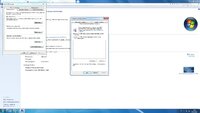
@Фанат равена, Панель управления > Система и безопасность > Система > Дополнительные параметры системы > Быстродействие > Предотвращение выполнения данных. Если это влючено, добавь файл gothic2.exe и gothicstarter (ну типо того) в исключения, если функция работает только на основных программах и служб, ничего делать не надо.
Объясню покороче, если галочка стоит на пункте «Включить DEP для всех программ и служб, кроме выбранных ниже», добавь exeшники, которые я говорил, в исключение. Если галочка стоит на пункте «Включить DEP только для основных программ и служб» — ничего делать не надо.
-
262,7 КБ
Просмотров: 443
@Фанат равена, Панель управления > Система и безопасность > Система > Дополнительные параметры системы > Быстродействие > Предотвращение выполнения данных. Если это влючено, добавь файл gothic2.exe и gothicstarter (ну типо того) в исключения, если функция работает только на основных программах и служб, ничего делать не надо.
Объясню покороче, если галочка стоит на пункте «Включить DEP для всех программ и служб, кроме выбранных ниже», добавь exeшники, которые я говорил, в исключение. Если галочка стоит на пункте «Включить DEP только для основных программ и служб» — ничего делать не надо.
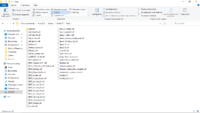
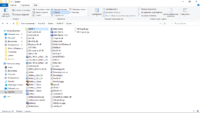
@Фанат равена, по какому пути стоит готика? Скрины папки Data и System, желательно.
Путь: C:GamesGothic II
Overview
[Same Description/Intro as my First Gothic Guide]Everyone been having the same problem with this ‘Access Violation’ message, when the game crashes. Gothic is an old game with great potential. Its not so friendly with the newer OS, like wins 7 or higher. I’ve tried many methods and solutions from other guides and forums. Somehow the game doesnt launch and play in the Steam library (Guess I’m not lucky at all). Although I’ve discovered my own way to enjoy the game without this ‘Access Violation’ nonsense.Note: Wont be able to play Gothic through Steam, but you can keep track of your playtime and show that you’re in-game.New Edit:Added to ‘Step 1’ a new download link for Widescreen PatchAdded to ‘Step 4’ of file extensions being hidden by default (Need to check before doing ‘Step 4’)
Before We Start…
You will be playing the Classic Gothic II: Gold Edition.
If you want to play the modded one with DirectX 11, HQ HD Textures and Tessellation.
Click on this guide instead:
[link]
If not… Please do continue my guide.
Step One
===========================================================================
Will be needing ‘gothic2_fix-2.6.0.0-rev2’, ‘Player-Mod-Kit’ and ‘Widescreen Patch’
===========================================================================
[1] ‘gothic2_fix-2.6.0.0-rev2’ is an older patch. (One version down)
So basically, you’re degrading the version of the game from 2.7 to 2.6.
(Don’t freak out)
Which can be found here:
[link]
(Its in German, need to translate the language. Unless you know German)
To download:
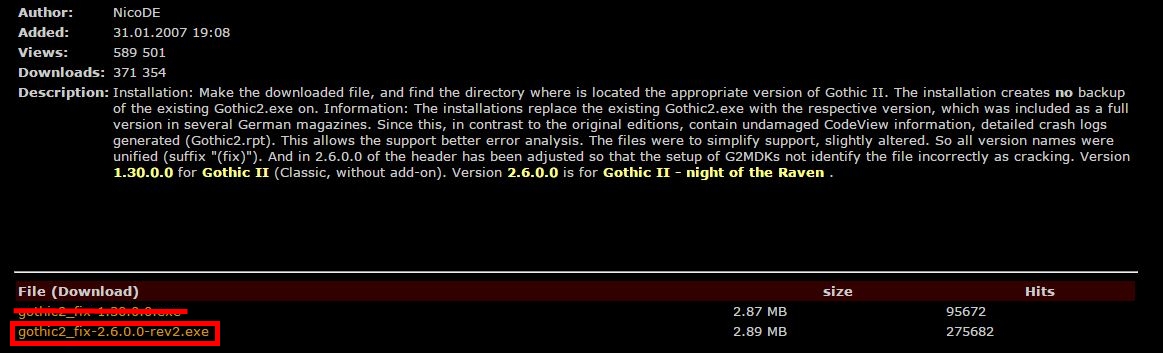
Click on ‘gothic2_fix-2.6.0.0-rev2.exe’
(Not the ‘gothic2_fix-1.30.0.0.exe’.)
[2] Next is ‘Player-Mod-Kit’. This is what you need for the game to work.
Which can be found here:
[link]
(Its in German, need to translate the language. Unless you know German)
To download:
Click on ‘gothic2_playerkit-2.6f.exe’
(Trust me, You wont miss it)
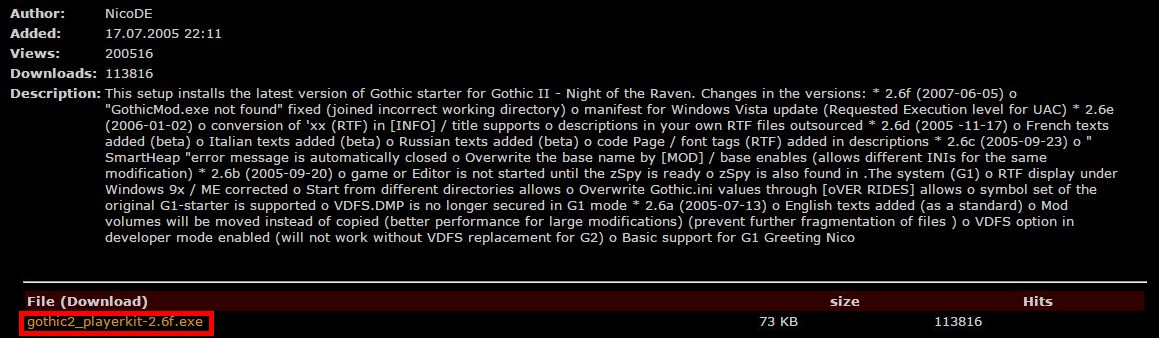
[3] Now for ‘Widescreen Patch’. The patch adjust the graphic resolution to your liking and adds a nice FOV.
Which can be found here:
[link]
(Pervious Download link, site went down for good)
To download:
Go top right hand corner and Click on the ‘DOWNLOAD’

Step Two
===================================================================
Installing ‘gothic2_fix-2.6.0.0-rev2’, ‘Player-Mod-Kit’ and ‘Widescreen Patch’
===================================================================
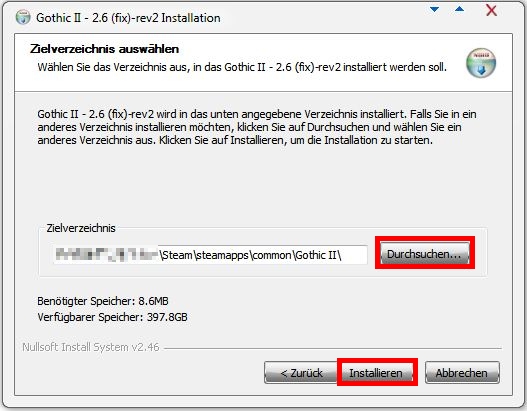
[1] Install the ‘gothic2_fix-2.6.0.0-rev2’ to the game ‘File Location’.
C:Program Files (x86)SteamSteamAppscommonGothicII
(Wherever you installed your Steam)
The installation is in German.
(Should be easy to get through. Common knowledge)
===================================================================
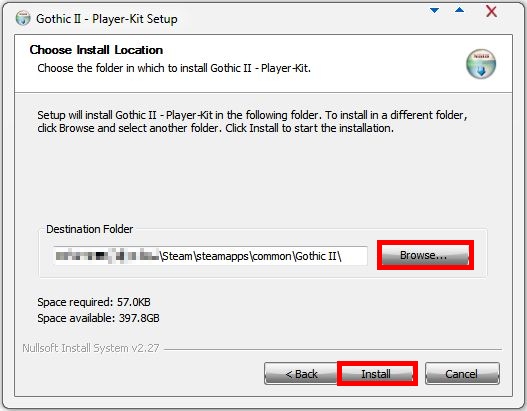
[2] Install the ‘Player-Mod-Kit’ to the game ‘File Location’.
The installation is in English.
===================================================================
[3] Install the ‘Widescreen Patch’ to the game ‘File Location’.
The installation is in English.
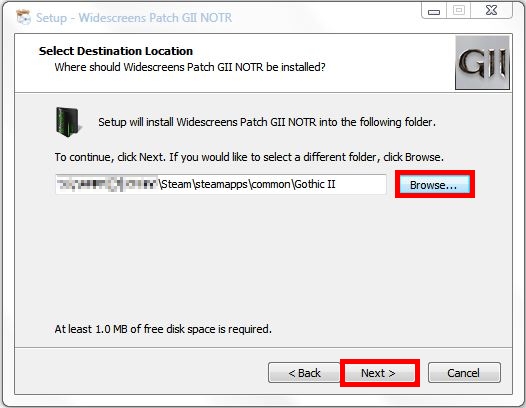
Once the installation is done, This will pop out:
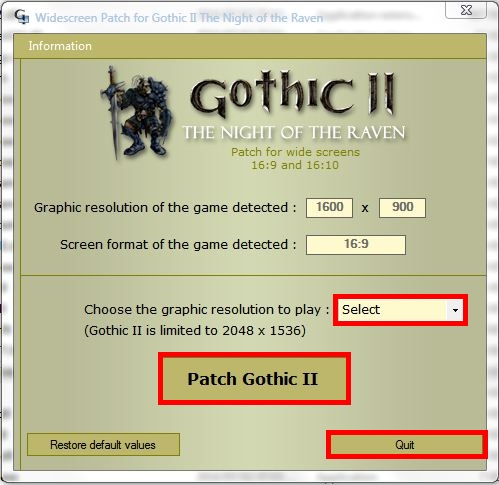
[1] Select your Resolution size.
[2] Patch it, To save it.
[3] And quit the box.
===================================================================
Step Three
============================================================================
Go back into your game folder. Under ‘System’:
============================================================================
[1] Rename ‘Gothic2.exe’ to ‘Gothic2Fixed.exe’
(This is the Fixed Gothic II you will play on. You’ll see what to do in ‘Step Four’)
============================================================================
[2] Rename ‘GothicStarter.exe’ to ‘Gothic2.exe’
(If you launch it on Steam, It will display the ‘Gothic Starter’. Never click ‘Play The Game’, Just minimum the box. This will keep track of your playtime and show that you’re in-game)
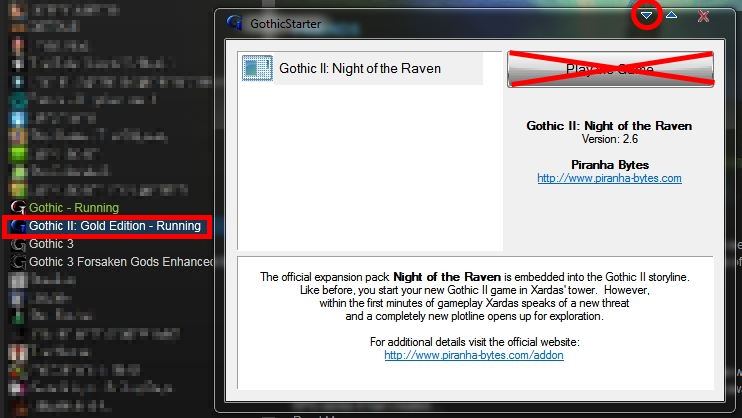
Should look like this, when you finish with both:
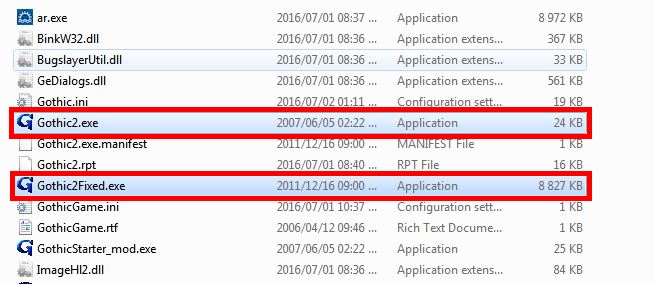
Once thats done, Don’t touch the game yet or try to launch it. We nearly done!
============================================================================
Step Four
===========================================================================
Theres a small voice dialogue problem. You can’t hear them speak, but you can read the texts.
(No need to worry)
===========================================================================
This will solve the problem:
Go into your game folder ONCE AGAIN -___-
(Thanks to Ripe Plaintain “windows by default hides most common file extensions and you have to go into folder options to turn that off. How you do this is different for each version of windows”)
Under ‘GothicII_workDataScriptsContentCutscene’
Rename ‘Ou.dat’ to ‘Ou.bin’ and ‘Ou.isc’ to ‘Ou.csi’.

===========================================================================
Go back into your game folder. Under ‘System’:
===========================================================================
Click on ‘GothicFixed.exe’
Make a shortcut onto your desktop and name it ‘Gothic II’ or ‘Gothic 2’.
(This is your Fixed Gothic 2 to play on.)

===========================================================================
You may launch the game now 😀
No Crash! Voice Dialogue Fixed! Fixed Resolution! Enjoy!
(If the startup is in German. Don’t worry! Once you in the game, Its all in English.)
Oh yes! Part I – II video for those who never played the game or wanting a better understanding. Might be funny, but does give you some tips and tricks.
My Pervious Guide For:
[link]

Данная проблема актуальна для всех модов использующих скриптовый расширитель IKARUS.
Решение:
Открываем окно свойства Винды(комбинация клавиш: Win+Pause)
В открывшемся окне переходишь во вкладку «Дополнительно», в ней выбираешь в блоке «Быстродействие» кнопу «Параметры».
Откроется окно «Параметры быстродействия», в нем переходишь во вкладку «Предотвращение выполнения данных», в этом окне будет два радиобаттона:
— Включить DEP только для основных программ и служб Windows;
— Включить DEP для всех программ и служб, кроме выбранных ниже;
Так вот, если Деп включен для второй строки, то в ней ждем кнопу «Добавить…», в открывшимся окно идешь в каталог установленной игры «..system»
и из него добавляешь все ехе-шники(Gothic2.exe, GothicStarter.exe) в это окно..
Как все добавил жмешь «Применить» и «Ок».
Если включен для первой, ничего не делаешь.
Далее идешь в каталог игры Г2НВ «..system»
В свойствах ехе-шников проставляешь/ставишь галки, во вкладке «Совместимость», пункт «Режим совместимости»
— Запустить программу в режиме совместимости WinXP SP3 *
и
— Запускать с правами администратора.
Жмешь «Применить» и «Ок».
Проверяешь в работе игру..
* — если игра будет подтупливать с этим параметром запуска, то его можно отключить, такое бывает, но редко и не у всех..
Игру всегда запускать с админ правами, если ОСь выше Вин ХР..
Create an account to follow your favorite communities and start taking part in conversations.
r/worldofgothic

When I start the game on steam it will open in an awful resolution, and when I click new game the game will crash and an error appears saying access violation. Anyway to fix this?
level 1
You NEED the following:
-
Patch 1.08k (not needed for the GOG.com version)
-
The PlayerKit
-
The SystemPack
Installing these three things will make the game work on modern systems, enable high resolutions and remove the FPS cap. It will also fix many bugs, glitches and crashes.
level 2
Yeah I also run into the same violation issue last week after I decided to replay gothic. I installed all three patches/player kits as per a steam guide that I found and the game runs relatively well. The problem is that I randomly get FPS drops in the old camp and during fights. The game is still playable and I’m still gonna finish it but if someone could suggest a fix that would be awesome 🙂
level 2
Do I download the .exe? or is there a manual download with winrar or zip?
level 1
run as administrator + patch 1.08k
level 1
So not install the directx11 patch! Nur so as tge other commentator says and install those patches
About Community

The subreddit for anything Gothic or Risen related!
Click the link below to check out our discord server:
https://discordapp.com/invite/29Zmzrp
14.9k
Followers of Sleeper

If the world of Gothic 2 is not enough for you, you can take a look at Chronicles of Myrtanda: Archolos. This mod features a brand new world that focuses on the Kingdom of Archolos. This guide will show you how to fix your game if you encounter an Access Violation Error.
Before starting anything, make sure that the game is closed and that it is not running in the background. Go to your Steam Library and right-click on the game. In the drop-down menu, select the Manage tab.
Click on Browse Local Files and it will take you to the directory folder of the game. Double-click on the System folder to open it. In the folder, you will see a Gothic.ini file or configuration settings file.

Right-click on the file and select Open with Notepad. In the notepad, scroll down until you see the setting called zStartupWindowed=0. Change this into zStartupWindowed=1.
Select the File option at the top of the Notepad and click Save.
Exit the notepad and go back to your Steam Library.
Launch the game and you won’t encounter the Access Violation Error anymore. If the issue persists, do not hesitate to contact the developers of the mod.
Here’s to a smoother and uninterrupted gameplay!
ALSO READ: Fix Crash On Startup – Chronicles Of Myrtana: Archolos
Chronicles Of Myrtana: Archolos