
#61

OFFLINE
Old
-

- Пользователи
-

- 8 сообщений
Начинающий летчик
- Город:Kolomna
Отправлено 06 Май 2017 — 10:47
iLoveDrones, друг покупал в Китае в магазине, потом привез в Россию
-
0
#62
OFFLINE
Spasov
Spasov
- Город:Москва
- Коптер:DJI Mavic 2 Pro
Отправлено 06 Май 2017 — 11:07
Old,
Значит первый пункт исключаем из моего предыдущего сообщения)
-
0
#63
OFFLINE
shushera
shushera
- Город:Хабаровск
- Коптер:mavic
Отправлено 09 Май 2017 — 04:05
Возникла такая проблема. При включении мавика обнаружил что камера не фокусируется. За день до этого отлетал три аккума без проблем и в штатном режиме. Калибровка подвеса, перепрошивка на разные версии не спасают положение. При попытке сброса настроек камеры кратковременно появляется фокус и опять уходит в никуда. В ручном режиме на изменения фокуса не реагирует совсем. Что делать?
Добавлено позже (09 Май 2017 — 13:05)
Отписал жалобу в DJI. пришел ответ мол обращайся к продавцу за заменой ремонтом. Брал коптер на али.
-
0
#64
OFFLINE
nktklbv
nktklbv
-
- Пользователи
-
- 3 сообщений
Начинающий летчик
- Город:Moscow
- Коптер:Mavic
Отправлено 11 Май 2017 — 09:10
Привет всем, подскажите на мавике с чем может быть связано данное предупреждение? — Gimbal motor overload. Check whether gimbal clamp is removed
Фиксатор камеры снят, калибруется и двигается все нормально. Появляется почти каждый раз при включении. Еще было что на инициализации камера дергается в разные стороны и не может видимо выйти в готовность, после выключения и включения опять все норм. Мавик новый, не падал. В интернете нашел видео где площадку с камерой вытаскивают за три ограничителя и потом вставляют на место (что меняется после этого немного растягиваются резинки или как то площадка выравнивается?), после этого не было ошибки при первом включение. С чем может быть связана данная проблема и является ли она критичной если все работает нормально, плавно двигается, калибруется? Еще вопрос как устроен подвес там есть шлейф, а еще серебристый пучек это тоже провода?
-
0
#65
OFFLINE
remisha
remisha
-

- Пользователи
-
- 16 сообщений
Начинающий летчик
- Город:Soligorsk
- Коптер:dji mavic pro
Отправлено 11 Май 2017 — 11:39
Но в полёте если вращать дрона, то горизонт всё равно заваливается
проблему решили ? или нет? если да, то как ?
-
0
#66
OFFLINE
shushera
shushera
- Город:Хабаровск
- Коптер:mavic
Отправлено 12 Май 2017 — 03:38
Еще вопрос как устроен подвес там есть шлейф, а еще серебристый пучек это тоже провода?
Если я правильно понимаю то плоский поводящий шлейф это управление подвесом. А пучок серебристых проводов это провода непосредственно с самой камеры.
-
0
#67
OFFLINE
Трос
Трос
- Город:Мурманск
- Коптер:Mavic
Отправлено 12 Май 2017 — 11:27
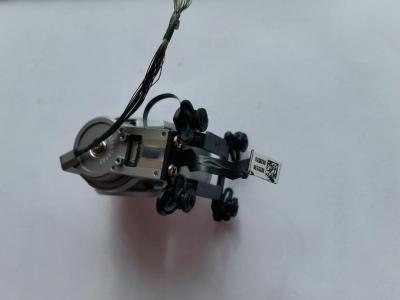
У меня переодически на новом мавике тряслась камера. Как будто не было контакта где то.При очередной тряске трогал шлейф плоский-все ок. Сделал вывод,что что то со шлейфом. Снял видео и отослал китайцам. Разобрал мавик,долез до шлейфа. Опытным путем выяснил-глючит шлейф примерно в 1см от разъема к плате(было еле заметное вздутие)подпер его упором из пластика и о чудо-тряска прекратилась,мотор не греется. А потом фигакс-пошел дым и шлейф перегорел. Китаезы предложили заменить мавик на новый или часть денег. Выбрал деньги. Заказал шлейф. Мавик один раз в автомате взлетел и тут же я его посадил. Без падений. Брак,явный брак. Китаезы общались с dji…. Знают они эту проблему,но замалчивают. Заменю шлейф. Мавик с кешбэком по акции и этой выплатой обошелся довольно дешего теперь,но ремонт…
Прикрепленные изображения
-
0
#68
OFFLINE
N00B
N00B
- Город:Moscow
- Коптер:Небесный Нубас
Отправлено 13 Май 2017 — 12:37
Прикрепленные изображения
А вот и выяснилось где серийный номер подвеса скрыт))) В ветке по ремонту спрашивали как найти его
-
0
#69
OFFLINE
DimasF
DimasF
- Город:Москва
- Коптер:Mavic Pro
Отправлено 13 Май 2017 — 08:24
Зараза, неделю отлетал в Питере без проблем, в ветрюгу. Сегодня же в Москве вначале в точке интереса связь потерял, потом два раза при включении писал, чти Мотор подвеса прегружен — убедитесь, что сняли фиксатор. Потом на высоте камеру переклинило, потом отклинило. Потом еще эта NFZ не давала спутники поймать.
Территориально: усадьба Покрово-стрешнево.
А началось все с алкаша, который решил, что мы с нтв приехали. И предлагал его снимать, потом сказал, что у него тут снайперы и лучше тут не летать… 🙂
-
0
#70
OFFLINE
nktklbv
nktklbv
-
- Пользователи
-
- 3 сообщений
Начинающий летчик
- Город:Moscow
- Коптер:Mavic
Отправлено 14 Май 2017 — 12:24
Трос,еще заметил что при работе, после ошибок Gimbal motor overload. Check whether gimbal clamp is removed, начинает сильно греться подвес где мотор наверно по вертикали, это нормально? Или как у вас в дальнейшем может перегореть?
-
0
#71
OFFLINE
Эжен
Эжен
-
- Пользователи
-
- 2 сообщений
Начинающий летчик
- Город:Moscow
- Коптер:Mavic Pro
Отправлено 14 Май 2017 — 05:44
Коллеги, добрый день!
Появилась проблема, как у Gamayun, с «желе» на видео. Визуальный осмотр подвеса, продув, калибровки не дали результата. Может кто сталкивался? Подскажите, у кого какие мысли?
С разрешения Gamayun покажу его видео еще раз.
-
0
#72
OFFLINE
Трос
Трос
- Город:Мурманск
- Коптер:Mavic
Отправлено 15 Май 2017 — 07:32
nktklbv,у меня тоже при дергании мотор этот моментально нагревался. Когда дерганий не было,не грелся. Думаю,что это не хорошо. В итоге у меня шлейф вспыхнул.
-
0
#73
OFFLINE
unlim
unlim
- Город:RB
- Коптер:MAVIC
Отправлено 16 Май 2017 — 03:17
rylskov, это болезнь или брак завода, иногда есть иногда нету, я забил на это
-
0
#74
OFFLINE
Boldyrev
Boldyrev
- Город:Москва
- Коптер:Mavic
Отправлено 17 Май 2017 — 10:51
unlim, в смысле забил? так и летаете?
-
0
#75
OFFLINE
ChaTLaHiH
ChaTLaHiH
-
- Пользователи
-
- 4 сообщений
Начинающий летчик
- Город:Санкт-Петербург
- Коптер:Mavic
Отправлено 17 Май 2017 — 03:40
nktklbv, а это часом не после прошивки началось? я только прошился и сразу начал тупить подвес
-
0
#76
OFFLINE
nktklbv
nktklbv
-
- Пользователи
-
- 3 сообщений
Начинающий летчик
- Город:Moscow
- Коптер:Mavic
Отправлено 17 Май 2017 — 03:45
ChaTLaHiH,нет, после покупки как его из коробки достали и включили, сразу камера не вышла в готовность. А какая у вас прошивка до этого была?
Сообщение отредактировал nktklbv: 17 Май 2017 — 03:51
-
0
#77
OFFLINE
MycaeB
MycaeB
-
- Пользователи
-
- 3 сообщений
Начинающий летчик
- Город:Москва
Отправлено 18 Май 2017 — 09:18
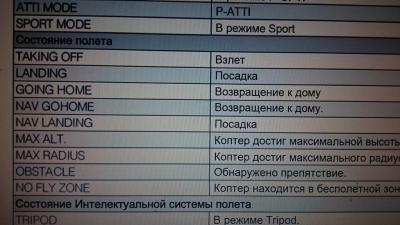
taking off obstacle пишет и сигналит что это значит?
-
0
#78
OFFLINE
DimasF
DimasF
- Город:Москва
- Коптер:Mavic Pro
Отправлено 18 Май 2017 — 10:27
MycaeB,
Прикрепленные изображения
-
0
#79
OFFLINE
NSG
NSG
-
- Пользователи
-
- 34 сообщений
Начинающий летчик
- Город:Almaty
- Коптер:Mavic Pro, Mavic Air
Отправлено 19 Май 2017 — 01:56
желе»
а вы случайно не с «блендой» летали?!
т.к. на хорошей высоте и скорости, потоки воздуха задувают в подвес так, что картинка становится с эффектом желе.
-
0
#80
OFFLINE
andreynofx
andreynofx
-
- Пользователи
-
- 13 сообщений
Начинающий летчик
- Город:Moscow
Отправлено 19 Май 2017 — 01:59
Знающие, подскажите плиз, почему видео стробит, если снято плавно на мануальных настройках 30фпс и скорость затвора 60? Так же мне кажется что ОЧЕНЬ много шумов.
Видео снято с такими настройками: ND16, iso 100, shutter speed 60, 4k30fps, NTSC, white balance — sunny, style:+1 -2 +1. Colorstyle: d-cinelike
-
0
I got my OSMO today and was very disappointed. I expected it to be working out of the box, or at a minimum, minor setup.
But it’s been a nightmare, since the minute I got it.
1) My first problem was that I had to register before I could use it. When I connect to the camera, via WiFi, apparently I lost my internet (phone). When I connect to the internet, I lose connection to camera. Kind of hard to register, if I need both at the same time.
Regardless, I was able to flip by wifi between camera and internet and eventually got it to register.
2) Next, I connected the app to the camera to try and use it. I was met with a popup with grayed out button that said I have to unlock the gimbals. They are definitely NOT locked. All three axis were rotated to the position for unlock AND in the order specified.
Yet, my app won’t go past the gimbal lock screen, and the button never turns blue so that I can get to full app.
3) Sometimes the gimbal will cycle through it’s ranges, but stops the camera rolled up and back, contacting the gimbal.
4) The trigger doesn’t trigger anything. Holding does nothing. double-click doesn’t center. And selfie never selfies. 
The gimbals are still in their sleep mode. Loose and not powered.
5) I have locked all the gimbals and unlocked them in the order specified and in other order and nothing helps. The OSMO beeps slowly for the locked gimbals.
6) Batteries are charged.
7) I removed the camera and put it back on the handle, in case there was a contact issue. Nothing helps.
8) And if that’s not enough, I tried to post the problem on the DJI site and receive a popup saying I need to verify. They send me a link that does nothing. Clicking their verify link takes me to a blank page that just hangs. I have tried this link on multiple browsers and multiple times and can’t get registered to post the problem.
Anyone see this behavior, with the OSMO? Locked gimbal warning, when not locked? Suggestions?

DJI drones especially the Mavic line up has this issue that comes up from time to time where it says “Gimbal Stuck, check whether gimbal lock is removed and ensure gimbal can rotate freely, Error 40002“
This happens Usually because something sticky or tiny have gotten inside the rotation areas of the gimbal, it can be liquids, solids, or in some cases, the gimbal may be dislocated.
More than 90% of the time this problem is caused by landing in sand, dust, and even on grass, where tiny particles like sand get to the gimbal and strict its movement.
Now I will show you two ways that can assist you, the first one is easy and it won’t take more than a couple of minutes and it will solve most problems. the second way I am going to show for people who have had a crash, and it is a bit more complicated.
- Turn on the aircraft without the remote controller.
- As the aircraft starts, help the gimbal and camera get unstuck by gently moving it around in spots where it may have trouble.
- Repeat the process till the gimbal is able to compensate for the aircraft’s movement.
- Finally, restart the drone and connect the controller.
Turn on Aircraft without the remote controller.
First, turn on your drone as you normally would but make sure the controller is still of cause it can give you a bunch of errors, you can also do this while the drone is still off.
Help it unstuck
Help the gimbal unstuck by moving it with your finger slowly and lightly in every direction, while doing that you can blow air on it by your mouth to help tiny particles to get unclogged.
Repeat this process until the gimbal is able to do its start-up routine freely, the gimbal should be pointing forward when it is in a good condition.
Make sure it’s working by moving the aircraft around, if it can move freely on every axis which means if the gimbal will move up-down, left-right, counterclockwise, and clockwise), if it does those movements freely you are good to go.
Connect to controller
Finally, Turn on the controller but only after you made sure you freed the gimbal until it moves/ compensates for your aircraft’s movement then connect them the error must be gone by now if not there is still something in there or it might be broken
Note: The remote won’t detect a stuck gimble unless it is still stuck.
Final alternative
If there is something that won’t come out you can buy a compressed air duster and Shoot the air into the rotating parts of the gimbal.
However never use oils or grease, it will make it worse.
Another method for displaced gimbal
If you had a crash, the gimbal can be displaced which is common DJI Mavic’s because their gimbal is in a very vulnerable place.
If the gimbal is shoved back to the drone you can either do 2 things, the first is removing the frame of the drone which you will see in the video below or you can also push the gimbal out with a piece of wood or metal.
However, before you try to fix a crashed drone check if anything is cracked. Check the camera and the gimbal if there is anything broken contact DJI support and they will fix it for you.
caution: Be careful not to dislodge cables from connectors or damage them!
*Also note: you can void your warranty by trying to fix your drone*
If you are not comfortable removing the frame you can try this method
- Turn off the drone
- Get two pencils
- Hold the gimbal and pivot the pencils on the drone
- Push the gimbal outwards equally and very gently it pops out
Final choice
If none of this seems to work contact DJI support they will give you a form to fill, if the drone is within a year period from activation or if you have DJI care you can get it fixed without any cost. If not you might have to pay, and depending on the situation you can get charged 100s of dollars.
After you hand it to DJI it can take up to 15 days till they fix it and send it back to you, and it can take longer if you don’t live in the united states
How to prevent this problem in the future
Identifying the cause can help you avoid it in the future
Sand and dust– Landing and taking off from sandy or dusty ground is what causes this problem most of the time, so in the future, it is better if you avoid doing that.
The easiest way to avoid that is by investing on a launchpad, it is sold for $10 on Amazon and it is really good not only for the gimbal but it is good for the heath of the drone
Crashes– No one crashes their drone intentionally but be extra cautious when flying because you can damage the gimbal or the camera permanently and that can cost you hundreds of dollars.
To avoid permanent damage in a drone crash, you can also get a gimbal cover it is also sold in online stores and it can help a little
Mishandling– I see a lot of young people mishandling their drones putting it in random places or holding it with a dirty hand this can shorten the life of the drone and cause these kinds of errors.
При вращении стабилизатора в миссии с виртуальным джойстиком с помощью rotateWithRotation кажется, что функция завершения срабатывает до того, как стабилизатор завершит качание до желаемой степени. Ожидается ли это? Глядя на примеры Virtual Stick в документах SDK, кажется, что сон или NSTimer довольно часто используются для облегчения этих сценариев. Кажется немного хакерским. Есть ли лучший способ узнать, когда подвес фактически завершил вращение?
Например, я хочу сделать снимок после завершения вращения стабилизатора, как показано ниже.
DJIGimbalRotation *rotation = [DJIGimbalRotation gimbalRotationWithPitchValue:-90 rollValue:0 yawValue:0 time:2 mode:DJIGimbalRotationModeAbsoluteAngle ignore:NO];
DJIGimbal *gimbal = [DJISDKManager product].gimbal;
[gimbal rotateWithRotation:rotation completion:^(NSError * _Nullable error) {
        if (error) {
            NSLog(@"Rotate Gimbal Failed: %@", [NSString stringWithFormat:@"%@", error.description]);
        } else {
            NSLog(@"Rotating Gimbal Completed");
            NSLog(@"About to shoot photo");
            [camera startShootPhotoWithCompletion:nil];
        }
    }];
1 ответ
Я использовал его правильно без каких-либо проблем, попробуйте доработать свой код как мой и попробуйте еще раз. Обратите внимание, что этот код запускается в случае «прогресс» при запуске миссии с путевой точкой в элементах действия на временной шкале.
Попробуйте также изменить параметр игнорирования на «Да».
 DispatchQueue.main.async { [self] in
            let gimbal = fetchGimbal()
            gimbal?.rotate(with: DJIGimbalRotation(pitchValue: -45, rollValue: 0, yawValue: 0, time: 2, mode: .absoluteAngle, ignore: true), completion: { (error) in
                    if (error != nil) {
                        print("Error", error as Any)
                    } else {
                        print("Gimabl has moved or is moving!")
                    }
                })
            }
        }
0
Mohamad Ghaith Alzin
14 Май 2021 в 05:20