
Receiving an odd error with the latest dev-build. It came up while I was joining my local dev server. The client crashed shortly after during autorefresh ( updating a DarkRP addon for a friend ). Then this shows up each time I try to open gmod.
Launch Options: -multirun -steam -windowed -w 1280 -h 768 -condebug +mat_bumpmap 0 +mat_picmip 2 +exec autoexec.cfg +exec highres.cfg +hr +toggleconsole +lastlocal
Where execs are for video settings, +hr sets it to high-quality and +lastlocal connects me to last dev-server I started.
Everything below this is in the dialog ( I am not asking for solutions, the dialog did ).
Engine Error
Steam Error: No SteamUser.
- Make sure that Steam is up to date.
- Make sure that Steam is running.
- Try restarting your PC.
- Try deleting ClientRegistry.blob & restartiing Steam
- Try Garry’s Mod -> Delete Local Content
Please let me know if you solve this bug!
Everything above this is in the dialog ( I am not asking for solutions, the dialog did ).
Restarting Steam resolved the issue ( NOTE: I left the Engine Error dialog up to copy it down while I exited and relaunched Steam, accidentally.. Steam reported the game was already running when I tried starting it again then I exited the dialog and relaunched whereby it said the game was still running because hl2.exe didn’t close for a few more seconds… Then it started just fine… )
I am running latest dev-build. I have issues using the Verify Integrity of Game Cache because Steam always reports that I have a game or tool running when nothing is; it typically only works if I reboot or restart Steam.. I reported this issue to Steam but no solution was offered.
Hopefully this helps…

Try toggling your beta status for Steam in Steam’s settings.
Edit: Didn’t realise you mentioned restarting fixed it.

I’ve been getting this a lot recently too. Restarting works every time.

I know that this may happen after playing pirated Steam games.
Happens if I leave Steam on overnight.
I haven’t seen the dialog since it showed earlier… I don’t have any pirated games on my computer and the only game I was working with was GMod; I do have multi-run enabled on GMod and the server starts with sv_lan 1 and insecure so there shouldn’t be an issue with that either…
I also leave Steam on 24/7 and I often leave the game up 24/7 too…. I should mention I did have one of my dev servers up for 3 days or so before launching a DarkRP dev to fix an addon for a friend; it said something about port 27020 and 27006 or so being in use and that it was going to use 27022 but ended up using 27025 anyway…
I do have Family Sharing enabled / set up for my account on my network but I don’t think anyone accessed anything ( she would’ve told me )
This was the FIRST time this dialog ever showed up for me and it kept showing up until I exited steam ( as aforementioned )….
On a side note, I guess I should mention the software running because we may find a common thread there: Notepad++, Visual Studio 2008 Professional ( c++ ), Another game ( coding c++ mod ), TeamViewer ( helped a friend get the mod to work ), Steam, UPlay, Desura, Possibly Origin, Panda Cloud Anti-Virus ( evaluating it ), several cloud storage software ( Dropbox, Copy, Box, OneDrive, Drive, and Mega ) although I only use DropBox so I will be taking the others off my auto-start until I have a chance to evaluate which one I like best )… plus a few utilities to restart the game if it crashes, etc…

This happens to me too but rarely. Usualy this happens when Steam runs for too long time (when I left Steam for an entire night, the next day it does throw this. Also note that on my side restarting Steam doesn’t change anything, but rebooting Computer (which shutdows when you reboot it) solves the problem. It’s quite annoying, because actualy I have 4 slow (but realy stable no bad sectors) hard disks to boot when my computer starts up…
I have my laptop running for WEEKS without it ever popping up. Something on your systems is messing with registry I am assuming. Something makes the SteamAPI not work.
Seems to have stopped happening for me lately. Is there any debug info you’d want the next time this happens?
I don’t think there’s anything we can do to stop SteamAPI from failing to load. Maybe SteamAPI update will help, we’ll see.

This message only appears for me when Steam isn’t running. Launching Garrysmod from the .exe won’t open Steam on it’s own; so it has to be running first in my experience.
Well that’s one of the obvious causes of Steam API not working.

I solved the bug: The reason why there is no «SteamUser» is because no user is signed into Steam right? Well, the only reason why nobody is signed to Steam is because it didn’t start! Steam didn’t start when the OS started. I figured this out because I disabled Steam on Windows startup, which means that it can`t be signed in, creating the «No SteamUser» error we know and love…
Well obviously this error would happen if Steam isn’t running, but that is not the only cause.
I leave my PC on 24/7 and only restart for Windows updates, reluctantly, so my machine stays on for weeks or months at a time between restarts. This is the first, and only, time this error has ever appeared.
I rarely restart Steam and only do it if there is something that needs to be addressed ( such as GTA 5 had an area of the map which was corrupted and broke everything about the game and after the features broke the game crashed shortly after; Steam needed to be restarted, because even though no games or tools were running, Steam reported that all games and tools needs to be shut-down to run a validation… This is an issue with Steam which happens after I launch a game… The other reason I restarted steam was because I clicked cancel on the «restart steam» on the update for Steam Service [ Steam, and other utilities to keep games updated are becoming too bulky in my opinion ] which prevented games from launching — steam api… )
If Steam can not be controlled from within a game or on game-launch such as checking the API and issuing a restart command if not started, then it’d be a Steam issue to fix ( and, honestly, if this is the issue then each game developer shouldn’t be responsible other than an api call, at most to check if launched, for certain features; it would be a Steam issue )…
I typically run my dev / local server as sv_lan 1 and insecure to allow multiple clients to join, and I rarely update anything other than GMod, CStrike and TF2 on server-update ( leaving the steam-requires-login games for rare updates which weren’t part of anything recent ) so updating anonymously wouldn’t have force logged me off ( although I do have issues with SteamCMD not releasing files at times [ or a similar issue ] which causes an exit warning when I close the window when +quit doesn’t automatically; this may or may not be part of the issue….
I don’t think it is a Steam running for too long ( for what triggered it in my situation ) as I rarely ever reboot or restart steam ( even when issues arise with needing to revalidate; I wait days or longer, if needed ).. Something must be triggering it and it may be with SteamCMD ( Robot, you use this, right? ) or something else ( updates or steam bug? )…
I also use a program which restarts defined applications if they aren’t running ( such as Steam, SteamLogger, Auto-Sizer, etc… So Steam not running wouldn’t be the issue on my end either; and I do start gmod.exe using .bat files when I start the second client [ rare ] with no issues )…
@robotboy655
Yes, I understand that Steam not running isn’t the only cause, but it makes sense: No Steam = No SteamUser. So, if the only cause isn’t that Steam isn’t running, it would have to be a portion of Steam that isn’t running, like something that does user or user license authentication or something…
@Acecool
Can you get me the information for your computer?
(Such as how much RAM you have, the processor that you have, the Motherboard you have, the Windows version you run, the architecture of the processor you use, the architecture of the Windows you use, etc.)
СПОСОБ №1 НЕОБЯЗАТЕЛЕН К ПРИМЕНЕНИЮ, МОЖЕТЕ ПЕРЕХОДИТЬ К СПОСОБУ №2 — «АКТИВАЦИЯ БЕТА-ВЕРСИИ».
Попробуем разобрать решения данной ошибки.
Вам нужно как минимум 2-3 ГБ свободной оперативной памяти, чтобы играть в игру, или как минимум 4-8 ГБ оперативной памяти, установленной, как указано в разделах системных требований на странице Steam Store для Garry’s Mod.
Если вы уверены, что ваше количество оперативной памяти, точно удовлетворяет требованиям игры, попробуйте это
Параметры запуска
1. В Steam, нажмите правой кнопкой мыши по игре Garry’s mod, дальше нажмите Свойства
2. Найдите поле Параметры запуска
Выберите параметры, которые подходят вам:
Если у вас, 2ГБ оперативной памяти
-heapsize 2097152
Если у вас, 4ГБ оперативной памяти
-heapsize 4194304
Если у вас, 6ГБ оперативной памяти
-heapsize 6291456
Если у вас, 8ГБ оперативной памяти (и более)
-heapsize 8388608
Бета-версии
1. В Steam, нажмите правой кнопкой мыши по игре Garry’s mod, дальше нажмите Свойства
2. Перейдите в раздел Бета-версии и выберите x86-64 — Chromium + 64-bit binaries
Отписаться от лишних аддонов
Если ошибка продолжает появляться, попробуйте:
1. Зайти в игру, далее Дополнения
2. Гаечный ключ в правом нижнем углу, Удалить всё
Garry’s Mod users are experiencing errors like Fatal Error, Fatal Application Exit, Engine Error, BASS.dll Missing, and more. Here I have compiled a list of errors and issues with the game along with their fixes and workarounds.
Garry’s Mod Crash, Fatal Error, And Fixes
Garry’s Mod isn’t exactly a game. It’s a physics sandbox, in other words, a tool for players to create their own levels, games, and modes. It launched over 15 years ago and is still going strong with a dedicated community.
The following are the errors and issues that players are experiencing with Garry’s Mod along with their fixes and workarounds.
Engine Error Fix
A lot of Garry’s Mod users are experiencing the “Engine Error: Couldn’t Load Library ‘gmod audio’” error. The fix for this error is quite simple. All you have to do is verify game files and error will be fixed.
Open Steam > right-click on Garry’s Mod > Properties > Local Files tab > click on “Verify integrity of game files”. This will fix the Engine Error for you.
Or your anti-virus/Windows Defender might have quarantined the file mentioned in the error. Open your anti-virus and see if the software has quarantined or blocked the file. If it has, then exclude the game’s folder from your anti-virus and then verify game files. This will fix the Engine Error for Garry’s Mod.
Disk Write Error
According to Garry’s Mod users, they are unable to download it or update it as Steam gives the Disk Write Error. Here is how you can fix this error.
- Right-click on Steam.exe > “Properties” . “Compatibility” tab > check “Run this program as an administrator”. Apply the setting and error should be resolved.
- Open CMD and run it as an administrator. Use the following commands and press enter after each of them.
diskpart
list disk
select disk # (# is the number of the hard drive in which the game is installed)
attributes disk clear readonly. - If the error still persists, go to Steam/logs/content_log. Scroll down and look for “failed to write”. Open the file and it has paths to some corrupted files. Follow the path and delete these files and the game will install..
Download Error, Missing Downloaded Files, Addons Not Loading Error Fix
If you are one of those users who are unable to download Garry’s Mod or are experiencing errors like “Missing Downloaded Files” and “Addons Not Loading Error”, this is how you can fix them.
First, close the Steam client and then go to the Steam folder. Navigate to “Steamsteamappsworkshopdownloads”. Delete all files and folders in this location and then launch Steam. Now again try to download Garry’s Mod or update it. This will fix the errors when you launch Garry’s Mod.
Fatal Application Exit Fix
Garry’s Mod users are reporting that it crashes randomly while playing with the “Fatal Application Exit” error popping up. One reason for this crash could be that users haven’t restarted their system in while. Restart your PC and the error should be fixed.
If the “Fatal Application Exit” error persists then the issue might be the GPU. Either its overclocked or it’s old. In case the GPU is overclocked, even factory overclocked, revert it back to its default clock speed.
In case the GPU is simply old, then use MSI Afterburner to reduce the clock speed bu 100 MHz. In an ideal scenario, users won’t have to reduce any more than 200 MHz.
If you don’t want to mess with the GPU’s clock speed then I would suggest you lock FPS for Garry’s Mod. Open Nvidia Control Panel > Manage 3D Settings > Program Settings > select Gary’s Mod. Turn on “Max FPS Limit” and here you’ll have to do a bit of trial and error to figure out at which FPS Garry’s Mod will be stable.
BASS.dll Missing Fix
Users are reporting that when they launch Garry’s Mod they get the error telling them they are missing the “steamsteamappsdownloading4000binbass.dll” file.
Usually, verifying the game files will re-download the missing file and the error will be fixed. However, if verifying game files won’t resolve the error, then follow the path mentioned in the error and delete the BASS.dll. Now verify game files and Steam will download the deleted file. This should fix the error.
Disconnect: (in-game name) Timed Out Fix
To fix this Garry’s Mod error, users need to change their port to the port of that the server that is giving this Disconnect error. Go through this tutorial to see how you can do it.
After that, open Steam client > right-click on Garry’s Mod > Manage > Browse Local Files. Navigate to “GarrysModgarrysmodcfg” and create a .cfg file and name it userconfig.cfg. Add the following commands in the .cfg file you have just created and save it.
-dxlevel 95
+clientport 27015
Go to gmod and open console and type the following and press enter.
exec userconfig.cfg
This will fix the disconnection error with whatever server you are trying to use.
Fatal Error Fix
A lot of users are reporting that they are experiencing Fatal Error with Garry’s Mod which tells them they don’t have enough memory, even though they have powerful GPUs. This error is most probably related to the GPU driver. Update or install another GPU driver version. Do a clean installation and the Fatal Error will be fixed.
Another reason for this “Fatal Error – not enough memory” error could be your laptop not switching the GPU. Here is how to ensure Garry’s Mod always uses the dedicated GPU.
For Nvidia GPU users, open Nvidia Control Panel > Manage 3D Settings > Program Settings > select the game > select “High-performance Nvidia processor” under preffered preferred graphics option.
For AMD GPU users, open Radeon Settings > Preferences > Additional Settings > Power > Switchable Graphics Application Settings. Select the game and select the “High-Performance profile” to the game under Graphics Settings. This will fix the Fatal Error.
AppFramework: Unable To Load Module Fix
According to Garry’s Mod users, they are getting the “AppFramework: Unable to load module C:/Program Files (x86)/Steam/steamapps/common/ GarrysMod/bin/filesystem_steam.dll!” error and are unable to play it.
Go to the file location mentioned in the error and delete the filesystem_steam.dll. Verify Game files and Steam will re-download the deleted file. This will fix the error.
In case if the error persists, your anti-virus/Windows Defender might be blocking the game file. Either disable the anti-virus or exclude Garry’s Mod folder from it. Verify Game files and the error will be fixed for good.
That is all for our Garry’s Mod fixes for errors and issues like Fatal Application exit, Engine Error, Disk Write Error, AppFramework error, and more. If you are facing errors and issues with other PC games or your PC then also see our hub for commonly occurring PC errors and their fixes.
Мод Garry’s Mod сумел использовать физическую модель Source, чтобы создать одну из лучших игр-песочниц всех времен. Garry’s Mod — отличная игра, однако в ней есть определенные проблемы, и сегодня мы рассмотрим некоторые наиболее распространенные проблемы Garry’s Mod в Windows 10 .
Исправить Garry’s Mod Проблемы на Windows 10
Garry’s Mod — отличная игра, но многие пользователи сообщают о различных проблемах. Говоря о проблемах, вот некоторые из наиболее распространенных проблем Garry’s Mod в Windows 10:
- Garry’s Mod не запускается — по словам пользователей, иногда Garry’s Mod вообще не запускается на их ПК. Если у вас возникла та же проблема, проверьте кэш игры и убедитесь, что это решает проблему.
- Garry’s Mod engine error, engine.dll — Это еще одна распространенная проблема с Garry’s Mod. Если у вас возникла эта проблема, вы можете проверить конфигурацию DirectX.
- Garry’s Mod Lua Panic — это еще одна ошибка, которая может помешать вам запустить Garry’s Mod. Тем не менее, вы должны быть в состоянии решить проблему с помощью одного из наших решений.
- Garry’s Mod не запускается — несколько пользователей сообщили, что вообще не могут запускать Garry’s Mod. Это может быть большой проблемой, и если у вас возникла эта проблема, обязательно проверьте кэш игры.
- Моду Гарри не хватает памяти — пользователи сообщали об этом сообщении об ошибке при попытке запустить Мод Гарри. Если у вас возникла эта проблема, попробуйте изменить конфигурацию игры и проверьте, помогает ли это.
- Garry Mod продолжает падать, сводя к минимуму — Многие пользователи сообщали, что Garry Mod продолжает падать и сворачивать на своих ПК. Это раздражающая проблема, но вы должны быть в состоянии решить ее, используя наши решения.
- Garry’s Mod с низким fps. Еще одна проблема, которая возникает у пользователей с Garry’s Mod, это низкий FPS. Однако вы можете исправить эту проблему, изменив настройки.
Исправлен сбой мода Garry’s Mod
Решение 1. Установите для графических настроек значение High
Если Garry’s Mod падает на вашем компьютере, это может быть связано с вашими настройками графики. Немногие пользователи предложили вам установить графические настройки на Высокие, чтобы решить эту проблему. Хотя изменение настроек графики может привести к падению частоты кадров, это должно решить проблемы сбоев.
Решение 2. Отключите загрузку пользовательских файлов.
В некоторых случаях сбои с Модом Garry могут быть вызваны сторонним контентом, и именно поэтому пользователи предлагают отключить загрузку пользовательских файлов. Для этого выполните следующие действия:
- Запустите игру и выберите «Настройки»> «Мультиплеер» .
- Найти Когда игровой сервер пытается загрузить пользовательский контент на ваш компьютер и установить для него значение Не загружать какие-либо пользовательские файлы .
Отключив эту опцию, вы можете увидеть много фиолетовых текстур и признаков ошибок, поэтому рекомендуется загружать все необходимые элементы самостоятельно.
Решение 3 — Добавить + mat_dxlevel 95 вариантов запуска
Немногие пользователи порекомендовали использовать опцию запуска + mat_dxlevel 95, чтобы решить проблему сбоя мода Garry. Чтобы добавить опцию запуска в Garry’s Mod, вам нужно сделать следующее:
- Запустите Steam и откройте свою библиотеку игры.
- Найдите Garry’s Mod , щелкните по нему правой кнопкой мыши и выберите « Свойства» в меню.
- Нажмите кнопку « Установить параметры запуска» и введите + mat_dxlevel 95 .
- Сохраните изменения и запустите Garry’s Mod из вашей игровой библиотеки.
Решение 4 — Проверьте кеш игры
Многие игры вылетают, если их файлы повреждены, поэтому если Garry’s Mod падает на вашем компьютере, вы должны проверить целостность кеша игры. Проверить кеш игры просто, и вы можете сделать это, выполнив следующие действия:
- Откройте Steam и перейдите в свою библиотеку игр.
- Найдите Garry’s Mod , щелкните по нему правой кнопкой мыши и выберите « Свойства» в меню.
- Перейдите на вкладку « Локальные файлы » и нажмите кнопку « Проверить целостность игрового кэша» .

- Подождите, пока этот процесс завершится.
Решение 5 — Отписаться от определенных дополнений
Garry’s Mod сильно зависит от надстроек, и в некоторых случаях некоторые надстройки могут вызвать сбой мода Garry’s Mod. Чтобы устранить эту проблему, рекомендуется отписаться от любых надстроек, которые вы добавили в период начала сбоев.
В худшем случае вам придется деактивировать все дополнения и моды и включать их по одному, пока не найдете то, что вызывает сбои.
Решение 6 — Добавить опцию -32bit запуска
Чтобы добавить опцию запуска в Garry’s Mod, вам нужно сделать следующее:
- Откройте Steam и щелкните правой кнопкой мыши Garry’s Mod . Выберите Свойства .

- На панели «Общие» нажмите кнопку « Установить параметры запуска» и добавьте « -32bit» .

- Сохраните изменения и запустите игру.
Пользователи сообщают, что добавление этой опции запуска по большей части решает проблему, но при нажатии Alt + Tab все равно могут возникать сбои.
- ЧИТАЙТЕ ТАКЖЕ: Исправлена ошибка Counter Strike «Доступная память менее 15 МБ»
Решение 7 — Проверка кеша игр других игр Steam
Garry’s Mod использует ресурсы из других игр Source, и если в одной из этих игр есть поврежденные файлы, это может привести к сбоям в Garry’s Mod. Чтобы решить эту проблему, мы советуем вам проверить целостность игрового кэша для других игр, связанных с Garry’s Mod. Пользователи сообщают, что Team Fortress 2 является распространенным преступником, поэтому сначала проверьте его игровой кеш. После проверки Team Fortress 2 перейдите к проверке других исходных игр.
Решение 8 — Введите vgui_allowhtml 0 в игровой консоли
Если у вас возникают сбои в Garry’s Mod, вы можете попробовать ввести vgui_allowhtml 0 в игровой консоли. Обязательно включите консоль из меню параметров и назначьте ей горячую клавишу. Когда игра начнется, нажмите горячую клавишу консоли, введите vgui_allowhtml 0 и нажмите Enter, чтобы запустить ее. Многие пользователи сообщили об успехе с этим решением, но вам придется повторять его каждый раз, когда вы запускаете Garry’s Mod.
Решение 9 — Использовать режим автоконфигурации
Режим Autoconfig предназначен для использования лучших настроек Garry’s Mod на вашем компьютере, таким образом устраняя проблемы сбоев. Чтобы включить режим автоконфигурации, вам нужно удалить все остальные параметры запуска и использовать -autoconfig в качестве единственного параметра запуска. Подробные инструкции по добавлению параметров запуска см. В предыдущих решениях. Если опция запуска -autoconfig решает ваши проблемы, не забудьте удалить ее из параметров запуска при следующем запуске игры.
Решение 10. Заставьте игру использовать определенное разрешение.
Иногда сбои могут быть вызваны разрешением вашей игры, и если это так, возможно, вам следует заставить игру использовать определенное разрешение. Для этого вы можете использовать один из следующих вариантов запуска:
- -w 800 -h 600
- -w 1024 -h 768
- -w 1280 -h 720
- -w 1366 -h 768
- -w 1920 -h -1080
Вы также можете попробовать запустить игру в режиме окон без полей, добавив -window -noborder в качестве параметров запуска.
Решение 11. Заставьте игру использовать определенную версию DirectX
Если у вас возникают сбои, вы можете заставить игру использовать определенный режим DirectX, добавив один из следующих параметров запуска:
- -dxlevel 81
- -dxlevel 90
- -dxlevel 95
- -dxlevel 100
- -dxlevel 110
Имейте в виду, что некоторые из этих параметров, такие как -dxlevel 81, считаются нестабильными.
Fix — Garry’s Mod заморозка
Решение 1. Удалите папку Garf’s Mod cfg
Иногда Garry’s Mod может зависнуть, если ваши файлы конфигурации повреждены, и если это произойдет, рекомендуется удалить папку cfg. Для этого выполните следующие действия:
- Перейдите в Steam SteamApps (ваше имя пользователя Steam) garrysmod garrysmod .
- Вы должны увидеть папку cfg . Сделайте копию этой папки и переместите ее на рабочий стол.
- В папке garrysmod откройте папку cfg и удалите из нее все .
- Начать игру.
После запуска игры папка cfg будет воссоздана и Garry’s Mod будет работать с настройками по умолчанию.
Решение 2 — Удалить установленные дополнения
Дополнения Garry Mod могут вызывать зависания, поэтому рекомендуется их удалить. Надо отметить, что надстройки будут устанавливаться автоматически после их удаления, поэтому внимательно следите за надстройками, которые в данный момент устанавливаются, чтобы найти те, которые вызывают проблемы с зависанием.
- ЧИТАЙТЕ ТАКЖЕ: Исправлено: ошибка «hl2.exe перестала работать» в Windows 10
Решение 3 — Отключить все надстройки и изменить приоритет процесса Awesomium
Процесс awesomium связан с модом Гарри, поэтому важно придать этому процессу высокий приоритет. Для этого выполните следующие действия:
- Запустите Garry’s Mod .
- В главном меню отключите все дополнения .
- Выберите свою карту.
- Приостановите игру и включите все моды. Если игра зависает и вы ничего не можете сделать, запустите игру в оконном режиме и повторите все шаги снова.
- Сверните игру, нажав Alt + Tab, и откройте диспетчер задач , нажав Ctrl + Shift + Esc .
- После запуска диспетчера задач перейдите на вкладку « Сведения » и найдите процесс Awesomium . Щелкните правой кнопкой мыши по Awesomium и выберите « Установить приоритет»> «Высокий» .

- Найдите файл hl2.exe на той же вкладке и установите для этого процесса значение Приоритетное значение Высокий.
Решение 4 — Удалите дополнения Silverlans Fallout NPC
Сообщалось, что NPC Silverlans Fallout, SNPCS Dark Messiah и Eye Divine Cybermancy могут вызывать сбои и зависания с модом Garry, поэтому, если вы используете вышеупомянутые дополнения, мы настоятельно рекомендуем вам отключить и удалить их.
Решение 5 — Удалите ненужные карты мастерских
Пользователи сообщают, что удаление карт семинаров устраняет проблемы с зависанием в Garry’s Mod, поэтому рекомендуется удалить все карты семинаров, которые вы не используете. Согласно сообщениям, Awesomium часто тестирует все загруженные карты, что приводит к зависанию вашей игры.
Решение 6 — отмените подписку на все дополнения и переустановите Garry’s Mod
Если нет другого способа исправить проблемы с зависанием с Garry’s Mod, ваше последнее решение — переустановить игру. Прежде чем переустанавливать игру, обязательно отмените подписку на все дополнения. Чтобы переустановить Garry’s Mod, выполните следующие действия:
- Откройте Steam , зайдите в библиотеку игр и найдите Garry’s Mod .
- Щелкните правой кнопкой мыши на Garry’s Mod и выберите « Удалить локальный контент» .
- Теперь перейдите в Steam steamapps common и удалите папку GarrysMod .
- Установите Garry’s Mod из Steam снова.
Garry’s Mod — забавная игра, но, поскольку эта игра в значительной степени зависит от дополнений и других игр, время от времени могут возникать некоторые проблемы. Мы рассмотрели некоторые из наиболее распространенных проблем, и мы надеемся, что наши решения были полезны для вас.
Примечание редактора : этот пост был первоначально опубликован в марте 2016 года и с тех пор был полностью переработан и обновлен для обеспечения свежести, точности и полноты.
ЧИТАЙТЕ ТАКЖЕ:
- Исправлено: невозможно запускать игры Steam в Windows 10
- Общие ошибки Wolfenstein 2: Новый Колосс и как их исправить
- Исправлено: Windows 10 полноэкранные проблемы с играми
- Исправлено: обновление Overwatch застряло на 0 б / с
- Последнее обновление Prey устраняет проблемы с чувствительностью мыши, зависает и многое другое
Engine error garrys mod как исправить




●Ошибка происходит после вылета из игры.
●Иногда, может быть такой текст ошибки.
-Make sure that steam is up to date.
●Убедитесь, что steam обновлен.
-Make sure that steam is running.
●Убедитесь, что steam запущен.
-Try restarting your PC.
●Попробуйте перезагрузить компьютер.
-Try deleting ClientRegistry.blob & restarting Steam.
●Попробуйте удалить ClientRegistry.blob и перезапуск Steam.
-Try Garry’s Mod → Delete Local Content.
●Попробуйте Garry’s Mod → удалить локальный Контент.
(Steam: Библиотека → Ищем игру Garry’s Mod → Правой кнопкой мыши по игре → Нажимаем удалить. )
Источник
Engine error garrys mod как исправить
●Ошибка происходит после вылета из игры.
●Иногда, может быть такой текст ошибки.
-Make sure that steam is up to date.
●Убедитесь, что steam обновлен.
-Make sure that steam is running.
●Убедитесь, что steam запущен.
-Try restarting your PC.
●Попробуйте перезагрузить компьютер.
-Try deleting ClientRegistry.blob & restarting Steam.
●Попробуйте удалить ClientRegistry.blob и перезапуск Steam.
-Try Garry’s Mod → Delete Local Content.
●Попробуйте Garry’s Mod → удалить локальный Контент.
(Steam: Библиотека → Ищем игру Garry’s Mod → Правой кнопкой мыши по игре → Нажимаем удалить. )
Источник
Engine error garrys mod как исправить
●Ошибка происходит после вылета из игры.
●Иногда, может быть такой текст ошибки.
-Make sure that steam is up to date.
●Убедитесь, что steam обновлен.
-Make sure that steam is running.
●Убедитесь, что steam запущен.
-Try restarting your PC.
●Попробуйте перезагрузить компьютер.
-Try deleting ClientRegistry.blob & restarting Steam.
●Попробуйте удалить ClientRegistry.blob и перезапуск Steam.
-Try Garry’s Mod → Delete Local Content.
●Попробуйте Garry’s Mod → удалить локальный Контент.
(Steam: Библиотека → Ищем игру Garry’s Mod → Правой кнопкой мыши по игре → Нажимаем удалить. )
Источник
Engine Error ( Please let me know if you fix this issue! ) #2039
Comments
Acecool commented May 25, 2015
Receiving an odd error with the latest dev-build. It came up while I was joining my local dev server. The client crashed shortly after during autorefresh ( updating a DarkRP addon for a friend ). Then this shows up each time I try to open gmod.
Where execs are for video settings, +hr sets it to high-quality and +lastlocal connects me to last dev-server I started.
Everything below this is in the dialog ( I am not asking for solutions, the dialog did ).
Engine Error
Steam Error: No SteamUser.
Please let me know if you solve this bug!
Everything above this is in the dialog ( I am not asking for solutions, the dialog did ).
Restarting Steam resolved the issue ( NOTE: I left the Engine Error dialog up to copy it down while I exited and relaunched Steam, accidentally.. Steam reported the game was already running when I tried starting it again then I exited the dialog and relaunched whereby it said the game was still running because hl2.exe didn’t close for a few more seconds. Then it started just fine. )
I am running latest dev-build. I have issues using the Verify Integrity of Game Cache because Steam always reports that I have a game or tool running when nothing is; it typically only works if I reboot or restart Steam.. I reported this issue to Steam but no solution was offered.
Hopefully this helps.
The text was updated successfully, but these errors were encountered:
willox commented May 25, 2015
Try toggling your beta status for Steam in Steam’s settings.
Edit: Didn’t realise you mentioned restarting fixed it.
Bo98 commented May 25, 2015
I’ve been getting this a lot recently too. Restarting works every time.
robotboy655 commented May 25, 2015
I know that this may happen after playing pirated Steam games.
Bo98 commented May 25, 2015
Happens if I leave Steam on overnight.
Acecool commented May 25, 2015
I haven’t seen the dialog since it showed earlier. I don’t have any pirated games on my computer and the only game I was working with was GMod; I do have multi-run enabled on GMod and the server starts with sv_lan 1 and insecure so there shouldn’t be an issue with that either.
I also leave Steam on 24/7 and I often leave the game up 24/7 too. I should mention I did have one of my dev servers up for 3 days or so before launching a DarkRP dev to fix an addon for a friend; it said something about port 27020 and 27006 or so being in use and that it was going to use 27022 but ended up using 27025 anyway.
I do have Family Sharing enabled / set up for my account on my network but I don’t think anyone accessed anything ( she would’ve told me )
This was the FIRST time this dialog ever showed up for me and it kept showing up until I exited steam ( as aforementioned ).
On a side note, I guess I should mention the software running because we may find a common thread there: Notepad++, Visual Studio 2008 Professional ( c++ ), Another game ( coding c++ mod ), TeamViewer ( helped a friend get the mod to work ), Steam, UPlay, Desura, Possibly Origin, Panda Cloud Anti-Virus ( evaluating it ), several cloud storage software ( Dropbox, Copy, Box, OneDrive, Drive, and Mega ) although I only use DropBox so I will be taking the others off my auto-start until I have a chance to evaluate which one I like best ). plus a few utilities to restart the game if it crashes, etc.
Yuri6037 commented Jun 13, 2015
This happens to me too but rarely. Usualy this happens when Steam runs for too long time (when I left Steam for an entire night, the next day it does throw this. Also note that on my side restarting Steam doesn’t change anything, but rebooting Computer (which shutdows when you reboot it) solves the problem. It’s quite annoying, because actualy I have 4 slow (but realy stable no bad sectors) hard disks to boot when my computer starts up.
robotboy655 commented Jun 13, 2015
I have my laptop running for WEEKS without it ever popping up. Something on your systems is messing with registry I am assuming. Something makes the SteamAPI not work.
Bo98 commented Jun 13, 2015
Seems to have stopped happening for me lately. Is there any debug info you’d want the next time this happens?
robotboy655 commented Jun 13, 2015
I don’t think there’s anything we can do to stop SteamAPI from failing to load. Maybe SteamAPI update will help, we’ll see.
FirstRoboticsGuy999 commented Jun 17, 2015
robotboy655 commented Jun 17, 2015
Well that’s one of the obvious causes of Steam API not working.
Daemris commented Jun 18, 2015
I solved the bug: The reason why there is no «SteamUser» is because no user is signed into Steam right? Well, the only reason why nobody is signed to Steam is because it didn’t start! Steam didn’t start when the OS started. I figured this out because I disabled Steam on Windows startup, which means that it can`t be signed in, creating the «No SteamUser» error we know and love.
robotboy655 commented Jun 18, 2015
Well obviously this error would happen if Steam isn’t running, but that is not the only cause.
Acecool commented Jun 21, 2015
I leave my PC on 24/7 and only restart for Windows updates, reluctantly, so my machine stays on for weeks or months at a time between restarts. This is the first, and only, time this error has ever appeared.
If Steam can not be controlled from within a game or on game-launch such as checking the API and issuing a restart command if not started, then it’d be a Steam issue to fix ( and, honestly, if this is the issue then each game developer shouldn’t be responsible other than an api call, at most to check if launched, for certain features; it would be a Steam issue ).
I typically run my dev / local server as sv_lan 1 and insecure to allow multiple clients to join, and I rarely update anything other than GMod, CStrike and TF2 on server-update ( leaving the steam-requires-login games for rare updates which weren’t part of anything recent ) so updating anonymously wouldn’t have force logged me off ( although I do have issues with SteamCMD not releasing files at times [ or a similar issue ] which causes an exit warning when I close the window when +quit doesn’t automatically; this may or may not be part of the issue.
I don’t think it is a Steam running for too long ( for what triggered it in my situation ) as I rarely ever reboot or restart steam ( even when issues arise with needing to revalidate; I wait days or longer, if needed ).. Something must be triggering it and it may be with SteamCMD ( Robot, you use this, right? ) or something else ( updates or steam bug? ).
Источник
Исправлено: Garry’s Mod Проблемы на Windows 10, 8.1 и 7. Engine error garrys mod как исправить
If you are one of those users who are unable to download Garry’s Mod or are experiencing errors like “Missing Downloaded Files” and “Addons Not Loading Error”, this is how you can fix them.
Проблемы с модом Garry в Windows 10, 8.1 и 7
Мод Garry’s Mod сумел использовать физическую модель Source, чтобы создать одну из лучших игр-песочниц всех времен. Garry’s Mod – отличная игра, однако в ней есть определенные проблемы, и сегодня мы рассмотрим некоторые наиболее распространенные проблемы Garry’s Mod в Windows 10.
Garry’s Mod – отличная игра, но многие пользователи сообщают о различных проблемах. Говоря о проблемах, вот некоторые из самых распространенных проблем Garry’s Mod в Windows 10:
Исправлен сбой мода Garry’s Mod
Если Garry’s Mod выходит из строя на вашем компьютере, это может быть связано с настройками графики. Немногие пользователи предложили вам установить графические настройки на Высокие, чтобы решить эту проблему. Хотя изменение настроек графики может привести к падению частоты кадров, это должно решить проблемы сбоев.
В некоторых случаях сбои с Garry’s Mod могут быть вызваны сторонним контентом, и именно поэтому пользователи предлагают отключить загрузку пользовательских файлов. Для этого выполните следующие действия:
Отключив эту опцию, вы можете увидеть много фиолетовых текстур и признаков ошибок, поэтому рекомендуется загружать все необходимые элементы самостоятельно.
Решение 3 – Добавить + опции запуска mat_dxlevel 95
Мало кто порекомендовал использовать опцию запуска + mat_dxlevel 95, чтобы решить проблему сбоя мода Garry. Чтобы добавить опцию запуска в Garry’s Mod, вам нужно сделать следующее:
Многие игры аварийно завершают работу, если их файлы повреждены, поэтому, если на вашем компьютере происходит сбой Garry’s Mod, вам следует проверить целостность кеша игры. Проверить кеш игры просто, и вы можете сделать это, выполнив следующие действия:
Мод Garry’s Mod в значительной степени зависит от надстроек, и в некоторых случаях некоторые надстройки могут привести к сбою мода Garry. Чтобы устранить эту проблему, рекомендуется отменить подписку на любые надстройки, добавленные вами в период начала сбоев.
В худшем случае вам придется деактивировать все дополнения и моды и включать их по одному, пока не найдете тот, который вызывает сбои.
Решение 6: добавьте 32-битную опцию запуска
Чтобы добавить опцию запуска в Garry’s Mod, вам нужно сделать следующее:
Пользователи сообщают, что добавление этой опции запуска по большей части решает проблему, но при нажатии Alt + Tab все равно могут возникать сбои.
3. After the installation is complete, launch Norton 360 version 2.x and mouse-over the «PC IE 7 that says, «Engine Error.» I use Norton 360 v 1. This error message indicates that your from the Norton Authorized Support Team. I assume the two are related, and related in turn to phishing protection.
Исправить Garry’s Mod Проблемы на Windows 10
Garry’s Mod — отличная игра, но многие пользователи сообщают о различных проблемах. Говоря о проблемах, вот некоторые из наиболее распространенных проблем Garry’s Mod в Windows 10:
Исправлен сбой мода Garry’s Mod
Решение 1. Установите для графических настроек значение High
Если Garry’s Mod падает на вашем компьютере, это может быть связано с вашими настройками графики. Немногие пользователи предложили вам установить графические настройки на Высокие, чтобы решить эту проблему. Хотя изменение настроек графики может привести к падению частоты кадров, это должно решить проблемы сбоев.
Решение 2. Отключите загрузку пользовательских файлов.
В некоторых случаях сбои с Модом Garry могут быть вызваны сторонним контентом, и именно поэтому пользователи предлагают отключить загрузку пользовательских файлов. Для этого выполните следующие действия:
Отключив эту опцию, вы можете увидеть много фиолетовых текстур и признаков ошибок, поэтому рекомендуется загружать все необходимые элементы самостоятельно.
Решение 3 — Добавить + mat_dxlevel 95 вариантов запуска
Немногие пользователи порекомендовали использовать опцию запуска + mat_dxlevel 95, чтобы решить проблему сбоя мода Garry. Чтобы добавить опцию запуска в Garry’s Mod, вам нужно сделать следующее:
Решение 4 — Проверьте кеш игры
Многие игры вылетают, если их файлы повреждены, поэтому если Garry’s Mod падает на вашем компьютере, вы должны проверить целостность кеша игры. Проверить кеш игры просто, и вы можете сделать это, выполнив следующие действия:
Решение 5 — Отписаться от определенных дополнений
Garry’s Mod сильно зависит от надстроек, и в некоторых случаях некоторые надстройки могут вызвать сбой мода Garry’s Mod. Чтобы устранить эту проблему, рекомендуется отписаться от любых надстроек, которые вы добавили в период начала сбоев.
В худшем случае вам придется деактивировать все дополнения и моды и включать их по одному, пока не найдете то, что вызывает сбои.
Чтобы добавить опцию запуска в Garry’s Mod, вам нужно сделать следующее:
Пользователи сообщают, что добавление этой опции запуска по большей части решает проблему, но при нажатии Alt + Tab все равно могут возникать сбои.
Решение 7 — Проверка кеша игр других игр Steam
Garry’s Mod использует ресурсы из других игр Source, и если в одной из этих игр есть поврежденные файлы, это может привести к сбоям в Garry’s Mod. Чтобы решить эту проблему, мы советуем вам проверить целостность игрового кэша для других игр, связанных с Garry’s Mod. Пользователи сообщают, что Team Fortress 2 является распространенным преступником, поэтому сначала проверьте его игровой кеш. После проверки Team Fortress 2 перейдите к проверке других исходных игр.
Не менее часто цветной экран появляется в том случае, если появились проблемы с выводом изображения. Подобное вызывает самые разные причины, но существуют две наиболее распространённые: 1 – стоят устаревшие драйвера; 2 – ваша видеокарта не поддерживается. Поэтому рекомендуем обновить в первую очередь драйвера.
Engine Error как исправить
Если пользователь встретился с такой ошибкой, то она становится серьезной проблемой. Чтобы она перестала быть таковой, рекомендуется использовать следующие способы борьбы за свое развлечение:
Все эти решения могут быть использованы, чтобы избавиться от ошибки, которая появляется в CS:GO и других играх.
p, blockquote 7,0,0,0,0 —> p, blockquote 8,0,0,0,1 —>
Если ничего из упомянутых способов не помогло, рекомендуется обратиться в техническую поддержку Steam. Она должна ответить и предоставить способы решения проблемы. Не стоит забывать им указывать то, какие конкретно варианты решения были уже использованы.
Garry’s Mod – отличная игра, но многие пользователи сообщают о различных проблемах. Говоря о проблемах, вот некоторые из самых распространенных проблем Garry’s Mod в Windows 10:
Contents show
Ошибка или неточность, вызванная ошибкой, совершая просчеты о том, что вы делаете. Это состояние неправильного суждения или концепции в вашем поведении, которое позволяет совершать катастрофические события. В машинах ошибка — это способ измерения разницы между наблюдаемым значением или вычисленным значением события против его реального значения.
Это отклонение от правильности и точности. Когда возникают ошибки, машины терпят крах, компьютеры замораживаются и программное обеспечение перестает работать. Ошибки — это в основном непреднамеренные события. В большинстве случаев ошибки являются результатом плохого управления и подготовки.
Causes of Garrys Mod Engine error?
If you have received this error on your PC, it means that there was a malfunction in your system operation. Common reasons include incorrect or failed installation or uninstallation of software that may have left invalid entries in your Windows registry, consequences of a virus or malware attack, improper system shutdown due to a power failure or another factor, someone with little technical knowledge accidentally deleting a necessary system file or registry entry, as well as a number of other causes. The immediate cause of the «Garrys Mod Engine error» error is a failure to correctly run one of its normal operations by a system or application component.
Hey when I try to join my dedicated server on garry’s number of your modem and router? Is there anyway to fix this? If you are hosting your own server, you will need to open at least 1 port. What is the manufacturer and model mod I get the message couldnt allocate any hltv ip port. garrys mod help please!!
i just installed chage my settings, but it runs EXTREMLY slowly. And i can start it up, and tryed to play anything yet because its so slow.
I have newest directx, and no addons or anything, i havent garrys mod, from steam.
How do I change the resolution bump the res down.
Second is to reset screen in safe mode, then run the game. for Garry’s mod outside of the game? This will often bump everything back down, res to 800×600 in normal mode.
On the other hand, some and you can choose options from there. Again, this will often games wont run in safe mode. First is to start the computer
How do I change the resolution What folder would it be in?
-Note: I cannot use the Launch for Garry’s mod outside of the game? option in Steam, it is a seperate application in this case.
Have you ever considered So are there any suggestions or similar problems. moving to Linux 32 bit? Wine works great and the applications supported by wine is pretty big..
Hello, i have gmod, and i have for the owner?? Entities/sent_easyengine2/init.lua:499: attempt to index field ‘Owner’ (a nil value)And it wont let been making cars with easy engine tool. When i save them using adv dup, and the reopen them, a sign keeps coming up saying. Add a value me drive the vechile and this sign keeps coming up?Why is this happening?
It says i can buy counter-strike:source and garrys mod together, but i already have counter-strike:source.
video drivers up-to-date? Also, are your Regards,
The two have to match, for example if Window’s resolution is set to 800×600 all valve games have to have the resolution 800×600 or else the menu gets cut off.
can spawn. It’s because the resolution is I cannot help you anymore.
Hope that helps if not, then too high for his screen.
Как вы можете себе представить, у меня есть только разрешение, но без успеха, пожалуйста, кто-то может помочь. благодаря
любой — это курсор. Все, что я вижу, все это работало отдельно от контекстного меню. Я попытался изменить привязанный к нему ключ и заплатил 6 quid, я хочу, чтобы он работал.
Здравствуйте,
Я только что купил гаррис мод и начал его помогать там
Вся половина жизни, и это прекрасно работает. Bothe CS и gmod show отлично работали. Вот история. О, и мы попробовали переустановить, тогда она исчезает и ничего не происходит.
Ошибка Microsoft JET Database Engine «80004005»
ошибка, когда я пытаюсь зайти на этот сайт
http://hellosanrio.idv.hm/
раздел календаря и некоторые разделы галереи. Эл. адрес: электронная почта защищена
Распространённые сетевые ошибки
Не вижу друзей / друзья в Garry`s Mod не отображаются
Неприятное недоразумение, а в некоторых случаях даже баг или ошибка (в таких случаях ни один способ ниже не поможет, поскольку проблема связана с серверами). Любопытно, что с подобным сталкиваются многие игроки, причём неважно, в каком лаунчере приходится играть. Мы не просто так отметили, что это «недоразумение», поскольку, как правило, проблема решается простыми нижеописанными способами:
Создателю сервера нужно открыть порты в брандмауэре
Многие проблемы в сетевых играх связаны как раз с тем, что порты закрыты. Нет ни одной живой души, друг не видит игру (или наоборот) и возникают проблемы с соединением? Самое время открыть порты в брандмауэре, но перед этим следует понимать как «это» работает. Дело в том, что программы и компьютерные игры, использующие интернет, для работы требуют не только беспроблемный доступ к сети, но и вдобавок открытые порты. Это особенно важно, если вы хотите поиграть в какую-нибудь сетевую игру.
Часто порты на компьютере закрыты, поэтому их следует открыть. Кроме того, перед настройкой нужно узнать номера портов, а для этого для начала потребуется узнать IP-адрес роутера.
Закрытые порты, или что делать, если игр не видно/не подключается?
Если вы заметили, что в Tunngle/Hamachi никого нет, да и в игре тоже различные косяки с соединением, то есть большая вероятность что у вас просто.
Ошибка DirectX в Garry`s Mod
Чаще всего проблема связана с высоким звуковым разрешением в параметрах Windows, а именно – с частотой разрядности и дискретизации. Поэтому избавиться от проблемы можно лишь одним способом – понизить это разрешение.
Fatal Error Fix
A lot of users are reporting that they are experiencing Fatal Error with Garry’s Mod which tells them they don’t have enough memory, even though they have powerful GPUs. This error is most probably related to the GPU driver. Update or install another GPU driver version. Do a clean installation and the Fatal Error will be fixed.
Another reason for this “Fatal Error – not enough memory” error could be your laptop not switching the GPU. Here is how to ensure Garry’s Mod always uses the dedicated GPU.
For Nvidia GPU users, open Nvidia Control Panel > Manage 3D Settings > Program Settings > select the game > select “High-performance Nvidia processor” under preffered preferred graphics option.
For AMD GPU users, open Radeon Settings > Preferences > Additional Settings > Power > Switchable Graphics Application Settings. Select the game and select the “High-Performance profile” to the game under Graphics Settings. This will fix the Fatal Error.
AppFramework: Unable To Load Module Fix
According to Garry’s Mod users, they are getting the “AppFramework: Unable to load module C:/Program Files (x86)/Steam/steamapps/common/ GarrysMod/bin/filesystem_steam.dll!” error and are unable to play it.
Go to the file location mentioned in the error and delete the filesystem_steam.dll. Verify Game files and Steam will re-download the deleted file. This will fix the error.
In case if the error persists, your anti-virus/Windows Defender might be blocking the game file. Either disable the anti-virus or exclude Garry’s Mod folder from it. Verify Game files and the error will be fixed for good.
That is all for our Garry’s Mod fixes for errors and issues like Fatal Application exit, Engine Error, Disk Write Error, AppFramework error, and more. If you are facing errors and issues with other PC games or your PC then also see our hub for commonly occurring PC errors and their fixes.
Источник
Engine error garrys mod как исправить


Garry’s Mod

So when I was playing on a server on GMod it just crashed and said «Engine Error» nothing else. I tried restarting steam and my PC but nothing worked, can y’all magic people help me out?

Can you recreate the error?


All of you verify the integrity of the game files of both Gmod and every game mounted and see if it persists.
All of you verify the integrity of the game files of both Gmod and every game mounted and see if it persists.
All of you verify the integrity of the game files of both Gmod and every game mounted and see if it persists.
Still happening, cleaned my some space up but I still crash with the same error
Still happening, cleaned my some space up but I still crash with the same error
Could you disable every addon and join the server, don’t worry if you have missing textures, this is just a test to see if it loads without addons first.
Could you disable every addon and join the server, don’t worry if you have missing textures, this is just a test to see if it loads without addons first.
Will try got 900 addons install so that might be a problem know when I think about it
Will try got 900 addons install so that might be a problem know when I think about it
Holy sh..
I mean, yeah the problem is clear. I’m not saying you shouldn’t have that many addons, but some addons aren’t compatible with others..
Источник
FAQ по ошибкам Garry`s Mod: не запускается, черный экран, тормоза, вылеты, error, DLL

Необходимое ПО для Garry`s Mod
Мы настоятельно рекомендуем ознакомиться со ссылками на различные полезные программы. Зачем? Огромное количество ошибок и проблем в Garry`s Mod связаны с не установленными/не обновлёнными драйверами и с отсутствием необходимых библиотек.
Низкий FPS, Garry`s Mod тормозит, фризит или лагает
Современные игры крайне ресурсозатратные, поэтому, даже если вы обладаете современным компьютером, всё-таки лучше отключить лишние/ненужные фоновые процессы (чтобы повысить мощность процессора) и воспользоваться нижеописанным методами, которые помогут избавиться от лагов и тормозов.

Лучшие видеокарты для комфортной игры в 1080p
Garry`s Mod вылетает в случайный момент или при запуске
Ниже приведено несколько простых способов решения проблемы, но нужно понимать, что вылеты могут быть связаны как с ошибками игры, так и с ошибками, связанными с чем-то определённым на компьютере. Поэтому некоторые случаи вылетов индивидуальны, а значит, если ни одно решение проблемы не помогло, следует написать об этом в комментариях и, возможно, мы поможем разобраться с проблемой.

Как увеличить объём памяти видеокарты? Запускаем любые игры
Отсутствует DLL-файл или ошибка DLL
Для решения проблемы необходимо отыскать и вернуть в папку пропавшую DLL-библиотеку. И проще всего это сделать, используя специально созданную для таких случаев программу DLL-fixer – она отсканирует вашу систему и поможет отыскать недостающую библиотеку. Конечно, так можно решить далеко не любую DLL-ошибку, поэтому ниже мы предлагаем ознакомиться с более конкретными случаями.
Ошибка d3dx9_43.dll, xinput1_2.dll, x3daudio1_7.dll, xrsound.dll и др.
Ошибка MSVCR120.dll, VCRUNTIME140.dll, runtime-x32.dll и др.
Ошибки с названием «MSVCR» или «RUNTIME» лечатся установкой библиотек Microsoft Visual C++ (узнать, какая именно библиотека нужна можно в системных требованиях).

Избавляемся от ошибки MSVCR140.dll / msvcr120.dll / MSVCR110.dll и других DLL раз и навсегда
Распространённые сетевые ошибки
Не вижу друзей / друзья в Garry`s Mod не отображаются
Неприятное недоразумение, а в некоторых случаях даже баг или ошибка (в таких случаях ни один способ ниже не поможет, поскольку проблема связана с серверами). Любопытно, что с подобным сталкиваются многие игроки, причём неважно, в каком лаунчере приходится играть. Мы не просто так отметили, что это «недоразумение», поскольку, как правило, проблема решается простыми нижеописанными способами:
Создателю сервера нужно открыть порты в брандмауэре
Многие проблемы в сетевых играх связаны как раз с тем, что порты закрыты. Нет ни одной живой души, друг не видит игру (или наоборот) и возникают проблемы с соединением? Самое время открыть порты в брандмауэре, но перед этим следует понимать как «это» работает. Дело в том, что программы и компьютерные игры, использующие интернет, для работы требуют не только беспроблемный доступ к сети, но и вдобавок открытые порты. Это особенно важно, если вы хотите поиграть в какую-нибудь сетевую игру.
Часто порты на компьютере закрыты, поэтому их следует открыть. Кроме того, перед настройкой нужно узнать номера портов, а для этого для начала потребуется узнать IP-адрес роутера.
Источник
Исправлено: Garry’s Mod Проблемы на Windows 10, 8.1 и 7

Исправлено: Garry’s Mod Проблемы на Windows 10, 8.1 и 7
Исправить Garry’s Mod Проблемы на Windows 10
Garry’s Mod — отличная игра, но многие пользователи сообщают о различных проблемах. Говоря о проблемах, вот некоторые из наиболее распространенных проблем Garry’s Mod в Windows 10:
Исправлен сбой мода Garry’s Mod
Решение 1. Установите для графических настроек значение High
Если Garry’s Mod падает на вашем компьютере, это может быть связано с вашими настройками графики. Немногие пользователи предложили вам установить графические настройки на Высокие, чтобы решить эту проблему. Хотя изменение настроек графики может привести к падению частоты кадров, это должно решить проблемы сбоев.
Решение 2. Отключите загрузку пользовательских файлов.
В некоторых случаях сбои с Модом Garry могут быть вызваны сторонним контентом, и именно поэтому пользователи предлагают отключить загрузку пользовательских файлов. Для этого выполните следующие действия:
Отключив эту опцию, вы можете увидеть много фиолетовых текстур и признаков ошибок, поэтому рекомендуется загружать все необходимые элементы самостоятельно.
Решение 3 — Добавить + mat_dxlevel 95 вариантов запуска
Немногие пользователи порекомендовали использовать опцию запуска + mat_dxlevel 95, чтобы решить проблему сбоя мода Garry. Чтобы добавить опцию запуска в Garry’s Mod, вам нужно сделать следующее:
Решение 4 — Проверьте кеш игры
Многие игры вылетают, если их файлы повреждены, поэтому если Garry’s Mod падает на вашем компьютере, вы должны проверить целостность кеша игры. Проверить кеш игры просто, и вы можете сделать это, выполнив следующие действия:
Решение 5 — Отписаться от определенных дополнений
Garry’s Mod сильно зависит от надстроек, и в некоторых случаях некоторые надстройки могут вызвать сбой мода Garry’s Mod. Чтобы устранить эту проблему, рекомендуется отписаться от любых надстроек, которые вы добавили в период начала сбоев.
В худшем случае вам придется деактивировать все дополнения и моды и включать их по одному, пока не найдете то, что вызывает сбои.
Чтобы добавить опцию запуска в Garry’s Mod, вам нужно сделать следующее:
Пользователи сообщают, что добавление этой опции запуска по большей части решает проблему, но при нажатии Alt + Tab все равно могут возникать сбои.
Решение 7 — Проверка кеша игр других игр Steam
Garry’s Mod использует ресурсы из других игр Source, и если в одной из этих игр есть поврежденные файлы, это может привести к сбоям в Garry’s Mod. Чтобы решить эту проблему, мы советуем вам проверить целостность игрового кэша для других игр, связанных с Garry’s Mod. Пользователи сообщают, что Team Fortress 2 является распространенным преступником, поэтому сначала проверьте его игровой кеш. После проверки Team Fortress 2 перейдите к проверке других исходных игр.
Решение 8 — Введите vgui_allowhtml 0 в игровой консоли
Если у вас возникают сбои в Garry’s Mod, вы можете попробовать ввести vgui_allowhtml 0 в игровой консоли. Обязательно включите консоль из меню параметров и назначьте ей горячую клавишу. Когда игра начнется, нажмите горячую клавишу консоли, введите vgui_allowhtml 0 и нажмите Enter, чтобы запустить ее. Многие пользователи сообщили об успехе с этим решением, но вам придется повторять его каждый раз, когда вы запускаете Garry’s Mod.
Решение 9 — Использовать режим автоконфигурации
Решение 10. Заставьте игру использовать определенное разрешение.
Иногда сбои могут быть вызваны разрешением вашей игры, и если это так, возможно, вам следует заставить игру использовать определенное разрешение. Для этого вы можете использовать один из следующих вариантов запуска:
Решение 11. Заставьте игру использовать определенную версию DirectX
Если у вас возникают сбои, вы можете заставить игру использовать определенный режим DirectX, добавив один из следующих параметров запуска:
Fix — Garry’s Mod заморозка
Решение 1. Удалите папку Garf’s Mod cfg
Иногда Garry’s Mod может зависнуть, если ваши файлы конфигурации повреждены, и если это произойдет, рекомендуется удалить папку cfg. Для этого выполните следующие действия:
После запуска игры папка cfg будет воссоздана и Garry’s Mod будет работать с настройками по умолчанию.
Решение 2 — Удалить установленные дополнения
Дополнения Garry Mod могут вызывать зависания, поэтому рекомендуется их удалить. Надо отметить, что надстройки будут устанавливаться автоматически после их удаления, поэтому внимательно следите за надстройками, которые в данный момент устанавливаются, чтобы найти те, которые вызывают проблемы с зависанием.
Решение 3 — Отключить все надстройки и изменить приоритет процесса Awesomium
Процесс awesomium связан с модом Гарри, поэтому важно придать этому процессу высокий приоритет. Для этого выполните следующие действия:
Решение 4 — Удалите дополнения Silverlans Fallout NPC
Сообщалось, что NPC Silverlans Fallout, SNPCS Dark Messiah и Eye Divine Cybermancy могут вызывать сбои и зависания с модом Garry, поэтому, если вы используете вышеупомянутые дополнения, мы настоятельно рекомендуем вам отключить и удалить их.
Решение 5 — Удалите ненужные карты мастерских
Пользователи сообщают, что удаление карт семинаров устраняет проблемы с зависанием в Garry’s Mod, поэтому рекомендуется удалить все карты семинаров, которые вы не используете. Согласно сообщениям, Awesomium часто тестирует все загруженные карты, что приводит к зависанию вашей игры.
Решение 6 — отмените подписку на все дополнения и переустановите Garry’s Mod
Если нет другого способа исправить проблемы с зависанием с Garry’s Mod, ваше последнее решение — переустановить игру. Прежде чем переустанавливать игру, обязательно отмените подписку на все дополнения. Чтобы переустановить Garry’s Mod, выполните следующие действия:
Garry’s Mod — забавная игра, но, поскольку эта игра в значительной степени зависит от дополнений и других игр, время от времени могут возникать некоторые проблемы. Мы рассмотрели некоторые из наиболее распространенных проблем, и мы надеемся, что наши решения были полезны для вас.
Примечание редактора : этот пост был первоначально опубликован в марте 2016 года и с тех пор был полностью переработан и обновлен для обеспечения свежести, точности и полноты.
Источник
Engine error garrys mod как исправить

Garry’s Mod


Yes but why is this happening?
Okay can you help me fix it or not?
please listen to me.
posting the error itself helps. we can’t just assume we know what you’re talking about.
>saying that you should post exactly what the error says so i can null down the issue
ask me another question and then im not going to help you
Источник
Garry’s mod 13 06.07.2016 Engine Error Пиратка не запускается

Garry’s mod 13 | 06.07.2016
СКРОНШОТ

Сылки для скачивания
Скачать торрент-файл с DepositFiles
http://depositfiles.com/files/pmo6wd7ft
сылка ведь рабочая
Торрент Garry’s mod 06.07.16.torrent
Garry’s mod 06.07.16.torrent
http://www.gmod-fan.ru/engine/download.php?id=2553
Скачал сам файл вначале чтоли
Содержание
Garry’s mod 06.07.16 (8 файлов)
Garrysmod_Setup.exe (300 Mb)
disk2.pak (300 Mb)
disk3.pak (300 Mb)
disk4.pak (300 Mb)
disk5.pak (300 Mb)
disk6.pak (300 Mb)
disk7.pak (300 Mb)
disk8.pak (86,3 Mb)
Позолочено ведь [обновить] мисия
Garry’s mod v 13 06.07.2016 Engine Error Crash Aplication игра вылетает уважаемый помогите
Установил игру Garrys Mod 06.07.16
СКРИНШОТ МОЕЙ Ошибки
Помогите пожалуйста скачал сборку установил и запустил уже
Источник
Как убрать ENGINE ERROR в CS и Left4Dead?
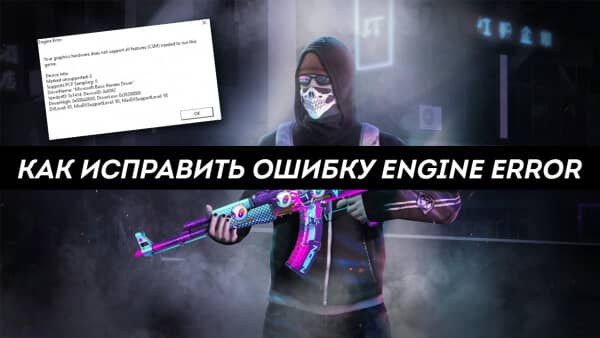
Несмотря на наличие риска появления ENGINE ERROR во всех играх, ошибка обычно появляется в CS: Go и Left4Dead. В первоначальном виде текст ошибки следующий: «Engine Error. Your graphics hardware does not support all features (CSM) needed to run this game». Сбой часто появляется на этапе загрузки игры, на этом всё и заканчивается. На начальный экран после сбоя уже не вернуться. У некоторых пользователей ошибка появляется прямо во время игры, тогда она моментально крашится. В большей части случаев источником неисправности становится драйвер видеоадаптера.
Как исправить вылеты?
Для удобства пользователя рассмотрим основные решения в виде пошаговой инструкции:
Как установить актуальную версию DirectX?
Чтобы убедиться, что DX обновился, стоит зажать Win + R, ввести dxdiag и нажать Enter. На вкладке «Система» последняя строка – «Версия DirectX». Остаётся только сопоставить версию с минимальными требованиями игры.

Как обновить Visual C++?
Во время установки пользователю может показаться окно «Мы рекомендуем». Лучше не устанавливать лишние пакеты, ведь в них нет особой необходимости.
Обновление VCredist
После обновления всех ключевых компонентов ошибка ENGINE ERROR больше не появится.
Источник
Engine error garrys mod как исправить
Garry’s Mod


Well i really dont want to remove it because it happened when i placed a mod onto my server and later when i deleted that mod it still kept happening
Well i really dont want to remove it because it happened when i placed a mod onto my server and later when i deleted that mod it still kept happening
Update server with addons?
Update server with addons?
I really dont know what to do.Its not addons problem its a problem with gamemodes with init.lua It cant load them
I really dont know what to do.Its not addons problem its a problem with gamemodes with init.lua It cant load them
I really dont know if you mean server files or gmod files
I really dont know if you mean server files or gmod files
Источник
Engine error garrys mod как исправить


1. Fix fire, with fire HL2:EP1/2
Below I have linked a workshop collection, this series of models/textures that aim to fix most Garry’s Mod ERRORs. This only fixes ERRORs that are caused due to the Half-Life 2 Episodes. Just subscribe and restart Garry’s Mod, it should automatically apply the assets. If it doesn’t try re-downloading them. I do not encourage pirating at all, these only give you textures and models, these do not give you the actual game(s).
2. Fix fire, with fire pt.2 CSS
This link also leads to an addon meant to fix most ERRORs for Garry’s Mod, this is a standalone addon made by the same creator as the first link except its for Counter Strike: Source. Just subscribe and restart Garry’s Mod, it should automatically apply the assets. If it doesn’t try re-downloading them. Once again pirating bad blah blah blah valve has enough money as it is blah blah blah. (Ignore the person in the comments, their download probably failed.)
IF ANY OF THE LINKS DO NOT WORK MAKE SURE TO INFORM ME
Okay so, either the links stopped working or you refuse to take Valve’s hard workings for free. There is another solution brother. (No way, really!?) Buy the actual games, like a chad. By buying the actual games you first of all, get some kick-ass games and all the proper assets. (Isn’t that what a chad would do?) And plus, not all ERRORs can be fixed with workshop addons. If you still are on-the-edge about buying the real games I’d advise you to wait for a sale.
Before you buy them individually, I highly recommend buying The Orange Box. The Orange Box includes Half-Life 2 + The Episodes and Portal 1 (Plus a neat hat in Team Fortress 2) for only 19.99 (cheaper than buying individually)
1. Half-Life 2 : Episode 1
2. Half-Life 2 : Episode 2
3 Counter Strike : Source
https://store.steampowered.com/app/280/HalfLife_Source/
In no way do I recommend playing Half-Life 1 Source, as it is a broken mess. But it will provide you all the assets in a Garry’s Mod compatible package. (The assets are not broken the game itself is)
https://store.steampowered.com/app/400/Portal/
Only on rare occasions will Portal fix anything, its only here because of addons.
If you tried Method 1 and you STILL HAVE ERRORs, try re-downloading everything as it is a big download and it isn’t official.
If you tried Method 2 and you don’t even have the content in Garry’s Mod, make sure you mounted the games correctly. To do so, navigate to the start menu of GMod. Now at the start menu look in the bottom right corner of your screen for a button titled «Games» with a gamepad icon. Now click this button, you should see a list of names of games and check-boxes, scroll down until you find the game(s) you installed. Once you find the game(s) click the little square next to it, the game should now be mounted. (Woo-hoo!) If the game is not there make sure you installed the game in the first place. If it still isn’t there make sure the game and Garry’s Mod are in the same Drive, while it could work fine without being in the same one you really want to make sure everything is correct.
Ah yes, isn’t it great. Now that you have all of those missing textures and ERRORs purged from your game. No need to keep complaining to addon creators that their addon sucks because it requires CS:S, or booting up some DarkRp only to be greeted by ERROR.
If you want to completely alleviate yourself from any potential ERRORs in the future you can download the addons below.
If you had any problems with any of the provided links, PLEASE LET ME KNOW. My goal was to make this tutorial as simple as possible, I don’t want any misinformation as it would confuse people. If you found any more addons that work similar to Method 1, leave it in the comments. That is all.
—S4xton
Источник
Ошибка Engine Error в CS:GO — как исправить
Уже не одно поколение геймеров пытается стать лучшими на разных локациях Counter Strike. Но главным противником оказывается в большей степени не игрок с чужой команды, а постоянные ошибки, баги и сбои. Легендарный шутер получил довольно хорошее продолжение в лице CS:GO, однако, проблемы во многом так и остались. Одной из самых распространенных ошибок стала «Engine Error: Your graphics hardware does not support all features», возникающая при запуске игры через Steam. Мы постараемся дать советы по исправлению сбоя.
Причины ошибки «Engine Error»
Именно при запуске CS:GO многие ловят ошибку «Engine Error». Это, в основном, связанно с графической составляющей ПК, которая не может исполнить все функции CMS, требуемые для игры. Некоторые параметры видео, по разным причинам, перестают отвечать необходимым требованиям для слаженной работы с ПК.
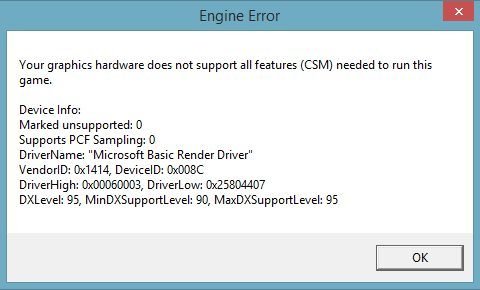
Ошибка «Engine Error» в CS:GO
Такой сбой очень характерен для тех, кто совершил недавний переход на Windows 10, а она использует стандартные драйвера. Сюда стоит добавить разные менее глобальные внесенные изменения, к примеру, когда инсталлировались новые обновления для вашей системы. Также часто ловят этот баг те, кто пытался разгонять видеокарту.
Что делать при сбое
Все решения проблемы выглядят довольно просто, поэтому не пытайтесь усложнять процесс. В первую очередь возьмем для рассмотрения наиболее действенные варианты. Сразу отбросим различные псевдорешения с загрузкой dll-библиотек — такие советы часто предлагают в сети. Пробуйте следовать списку по порядку.
Проверка игры
 Проверка целостности кэша игры
Откат драйверов до стабильной версии
Не помогло, тогда пробуем откатить драйвера к той версии, которая работала с КС:ГО:
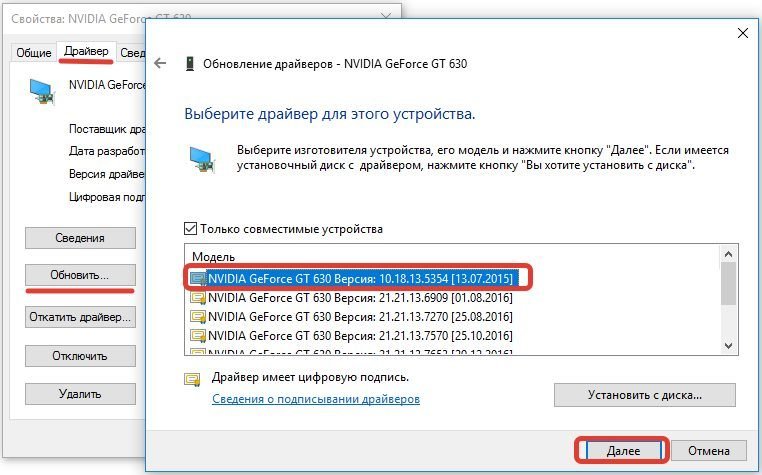 Устанавливаем совместимый с игрой драйвер
Вот наглядная видео-инструкция по этому решению.
Другие советы
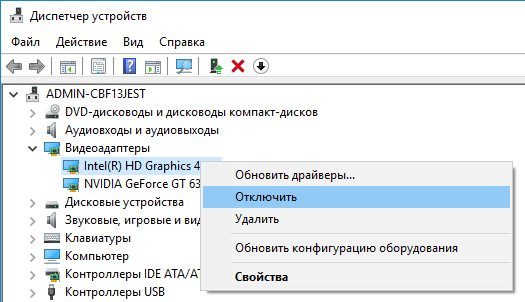 Отключение встроенной видеокарты
Проверяем Windows
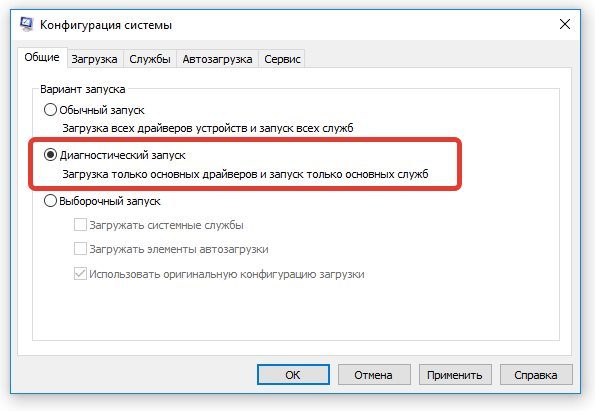 Выполните проверку CS:GO диагностическим запуском
Заключение
Переход на Windows 10 принес много разочарований, а КС:ГО входит в их число. Именно данное обновление массово создало ошибку. Есть два выхода из ситуации: играть с видеонастройками Windows 10 или вернуться к 7, 8 версии. Надеюсь наши советы помогли исправить ошибку Engine Error в CS:GO, если да, тогда просьба указать в комментариях, какие именно.
Источник
Ошибка Engine Error в кс го — как ее исправить
Ошибка Engine Error в кс го — как ее исправить
Counter Strike поистине легендарный шутер, через который прошло не одно поколение игроков. Некоторые стали профи и выступают на про сцене, кто-то стал снимать видео и прославился в рунете, кто-то просто катает по фану, а кто-то так и не сдвинулся с мертвой точки.
Конечно все это прикольно и занимательно, но зачастую основным врагом игрока становятся ни игроки с противоположно команды, а свои ошибки, ошибки системе, различные игровые сбои, а также баги.
Попробуйте изучить запись – читы для кс го без вирусов, в ней вы найдете читы в кс

Шутер продолжил свое существование в лице Counter Strike Global Offensive, которая на данный момент имеет очень большую аудиторию и популярность во-всем мире.
Но как известно, даже у самых крупных систем бывают сбои, именно об одном из них и будет эта статья.
В сегодняшней статье предлагаю затронуть очень популярную и часто возникающую ошибку «Engine Error: Your graphics hardware does not support all features» которая обычно возникает в тех случаях, когда вы производите запуск стим версии кс го.
Причины ошибки «Engine Error»
Обычно, данная ошибка возникает в случае запуска игры. Зачастую это связано с несовместимостью оборудования и системных требований игры. Это значит, что конфигурация вашего компьютера не может выполнить минимально-возможные требования по запуску игры.
Грубо говоря, вам либо не хватает видеопамяти, либо мало оперативной памяти, либо вам ПК сильно засорен мусором и его нужно в срочном порядке почистить от него.
Ошибка Engine-Error-в-CS-GO
Сбой такого профиля обычно возникает в результате резкого перехода на систему Win10, которая в большинстве своем содержит стандартные драйвера. Также данная ошибка возникает в случае неудачного обновления драйверов видеокарты. Возможно возникновение данной ошибки в случае осуществления попыток по разгону видеокарт.
Что делать при сбое
Если у Вас вдруг возникают сбои при запуске в игре, тогда мы предлагаем вам простую инструкцию по устранению данных проблем и недопущению их в будущем. Для начала нам предстоит взять на рассмотрение самые действенные способы. После чего, если они не принесут должного результата попробуем другие, менее действенные способы.
Сразу стоит отметить, что здесь не будет моментов, связанных с загрузкой dll библиотек, которые очень часто предлагают сделать в сети. Но я настоятельно рекомендую следовать по-списку. Это позволит с большей долей вероятности гарантировать вам решение возникшей ошибки.
Проверка игры
Это самый важный пункт в данной системе. Я вам рекомендую воспользоваться данным пунктом впервую очередь. Возможно проблема кроется именно в нем. Для этого я предлагаю вам сделать следующее:
Откат драйверов до стабильной версии
Выполнив немного действий выше проверяете игру. Если ошибка не самоустранилась, следующим пунктом предлагаю вам рассмотреть необходимость отката драйверов до той версии, в которой игра работала.
Делается это следующим образом:
Есть еще как вариант, воспользоваться официальным сайтом видеокарты и поискать на ней версию драйвера, который был-бы совместим с игрой.
Другие советы
Проверяем Windows
Разобравшись немного с системой. Предлагаю перейти непосредственно к самой настройке виндовса.
Заключение
Разработчики игры стараются сократить количество возникающих ошибок в игре, но они тоже не всемогущие, поэтому если у вас вдруг возникают ошибки в игре, не расстраивайтесь, попробуйте в первую очередь разобраться в своей системе. Возможно где-то закралась уязвимость, вирус или в последнем обновлении накосячили разработчики библиотек и драйверов. Также старайтесь использовать Win7 на своем игровом ПК, данная система наиболее оптимизирована под все игры и разработчики стараются делать игры именно под нее.
Искренне надеюсь, что после прочтения данной статьи вы разрешили свой вопрос и смогли запустить кс го. Удачи в игре.
Источник
Engine error garrys mod как исправить
So whenever I try to join a server (not sure if its only on this server), Gmod crashes, and a window appears: http://img405.imageshack.us/img405/3785/errorzg.jpg
I have been searching for a solution for a week but cant find any.. please help


I have 16GB Free space. I unsubscribed from every large-file addon (including lua and script addons), re-installed garrysmod 3 times, went into the files and manually deleted all the files and reinstalled.
STILL crashes just before loading any map.
Not to mention, garrysmod keeps trying to download the crap I painstakingly unsubscribed from.
Workshop causes all my Gmod problems. Has since the Workshop movement launched.
Источник
Ошибка Engine Error решение
Такая ошибка, как engine error, появляется в CS:GO весьма часто. Это актуально вне зависимости от железа, которое используется пользователем.
Ошибка Engine Error
Примечательно, что ошибка Engine Error CS GO появляется не только в этой игре. Это происходит практически с любыми развлечениями, которые доступны на цифровой площадке Steam. Правда это связано не с каким минусом платформы, а железом пользователя, о чем еще будет рассказано далее.
Причина ошибки Engine Error
Чтобы исправить такую ошибку, как engine error кс го, пользователю нужно понимать ее природу. Она появляется из-за того, что графический процессор, установленный в компьютере, не поддерживается игрой. Это может происходить по самым разным причинам, но проблема появляется на этапе установки игры. Пройти этот этап становится невозможным! Игра банально закрывается, а после сбоя пользователь перестает иметь возможность продолжить приятное для себя времяпровождение.
Engine Error CS:GO
Важно, в любом случае, уточнить: ошибка engine error появляется именно из-за видеокарты. Правда дело не в ее мощности. Проблема может появится даже на мощных компьютерах. Тогда и появляется необходимость узнать, как она исправляется. Вариантов и способов исправления действительно много, к чему стоит перейти.
Engine Error как исправить
Если пользователь встретился с такой ошибкой, то она становится серьезной проблемой. Чтобы она перестала быть таковой, рекомендуется использовать следующие способы борьбы за свое развлечение:
Все эти решения могут быть использованы, чтобы избавиться от ошибки, которая появляется в CS:GO и других играх.
Если ничего из упомянутых способов не помогло, рекомендуется обратиться в техническую поддержку Steam. Она должна ответить и предоставить способы решения проблемы. Не стоит забывать им указывать то, какие конкретно варианты решения были уже использованы.
Источник
Engine error garrys mod как исправить
Garry’s Mod


I guess Gmod’s newest updates have broken a lot of our games, so maybe it will get fixed next month.

I guess Gmod’s newest updates have broken a lot of our games, so maybe it will get fixed next month.
Has it been doing it a lot for other people? I am seriously suspecting it’s the update. My game has never had any issues like this until the recent update.
Has it been doing it a lot for other people? I am seriously suspecting it’s the update. My game has never had any issues like this until the recent update.
It might be. I am having the same problem, but had no crashes in the past, even when doing intensive things (EX: NPC Wars). It only happens on Singleplayer, and can be completely random, it even happens when loading into maps.
Источник
[Решено] Garry’s Mod продолжает вылетать | 2021 советы
Исправления, которые стоит попробовать:
Возможно, вам не придется пробовать их все. Просто двигайтесь вниз по списку, пока не найдете тот, который работает.
Исправление 1. Проверьте характеристики вашего ПК
Вот минимальные требования для игры в GMod:
| ОС: | Windows XP/Vista |
| Процессор: | Процессор 2 ГГц или лучше |
| Память: | 4 ГБ ОЗУ |
| Графика: | 512 МБ выделенной видеопамяти или лучше |
| DirectX: | Версия 9.0c |
| Хранилище: | 5 ГБ свободного места |
Вот рекомендуемые спецификации для игры в GMod:
| ОС: | Windows® 7/8/8.1/10 |
| Процессор: | Процессор 2,5 ГГц или лучше |
| Память: | 8 ГБ ОЗУ |
| Графика: | 1 ГБ де выделенная видеопамять или лучше |
| DirectX: | Версия 9.0c |
| Хранилище: | 20 ГБ свободного места |
Следуйте инструкциям ниже, чтобы просмотреть информацию об оборудовании вашего компьютера:

3) Проверьте память вашего дисплея здесь.
Убедитесь, что ваш компьютер соответствует требованиям, затем прочтите и попробуйте исправление, см. ниже.
Исправление 2: перезагрузите компьютер
Если вы запускаете несколько программ одновременно, загружая ресурсы вашей системы, это может привести к тому, что ваша игра разбиться. В этом случае попробуйте перезагрузить компьютер, чтобы полностью закрыть нежелательные программы, а затем перезапустите игру.
Если проблема не исчезла после перезагрузки, проверьте Исправление 3 ниже.
Исправление 3: Обновите графический драйвер
Проблемы с игрой обычно возникают, когда ваш графический драйвер поврежден или устарел. Чтобы узнать, не в этом ли проблема, попробуйте обновить драйвер видеокарты. Это можно сделать двумя способами:
Вариант 2 — автоматически (рекомендуется) — это самый быстрый и простой вариант. Все это делается всего парой щелчков мышью — легко, даже если вы новичок в компьютерах.
Вариант 1 — Загрузите и установите драйвер вручную
Производитель вашей видеокарты постоянно обновляет драйверы. Чтобы получить их, вам нужно перейти на веб-сайт поддержки производителя, найти драйвер, соответствующий вашей конкретной версии Windows (например, 32-разрядной версии Windows), и загрузить драйвер вручную.
После того, как вы загрузили правильные драйверы для вашей системы, дважды щелкните загруженный файл и следуйте инструкциям на экране, чтобы установить драйвер.
Вариант 2 — автоматическое обновление графического драйвера
Driver Easy автоматически распознает вашу систему и найдет для нее подходящие драйверы. Вам не нужно точно знать, в какой системе работает ваш компьютер, вам не нужно рисковать загрузкой и установкой неправильного драйвера, и вам не нужно беспокоиться об ошибке при установке.
Вы можете автоматически обновлять драйверы с помощью БЕСПЛАТНОЙ или Pro версии Driver Easy. Но с версией Pro требуется всего 2 клика:
1) Загрузите и установите Driver Easy.
Исправление 4. Проверьте целостность файлов игры
Поврежденные или отсутствующие файлы игры также могут привести к сбою игры. Если вы запускаете игру в Steam, попробуйте проверить целостность файлов игры. Вот как это сделать:
1) Запустите Steam.
2) Щелкните БИБЛИОТЕКА.
5) Перезапустить GMod.
Если проблема со сбоем не исчезнет, воспользуйтесь указанным ниже исправлением.
Исправление 5. Измените параметр запуска
1) Запустите Steam.
4) Нажмите УСТАНОВИТЬ ОПЦИИ ЗАПУСКА.
Удалите все показанные в данный момент параметры запуска.
Перезапустите игру и посмотрите, сработало ли это для вас. Если это не устранило вашу проблему, переходите к исправлению ниже.
Исправление 6. Отключите автоматическую загрузку с сервера
Если вы включите автоматическую загрузку настраиваемый контент с игровых серверов, вы, вероятно, столкнетесь с этой проблемой при плохом подключении к Интернету. (Это связано с тем, что процесс загрузки может снизить скорость вашего интернета, что приведет к сбою игры.)
Следуйте инструкциям ниже, чтобы остановить автоматические загрузки:
1) Запустите GMod.
Перезапустите игру, чтобы проверить, не решил вашу проблему. Если нет, попробуйте исправление, указанное ниже.
Исправление 7: переустановите Steam
Если ни одно из вышеперечисленных исправлений не помогло вам, переустановка Steam, скорее всего, станет решением. ваша проблема. Следуйте инструкциям ниже:
2) Щелкните правой кнопкой мыши steamapps папку и выберите Копировать. Затем поместите копию в другое место, чтобы создать резервную копию.
6) Следуйте инструкциям на экране, чтобы удалить Steam.
7) Загрузите и установите Steam.
10) Перезапустите Steam и ваш игра.
Исправление 8: Переустановите компоненты ПК
Попробуйте это для настольного ПК, если программные решения не работают полностью или только временно.
* Для компьютеров с недавно установленными компонентами — новый компонент мог быть неправильно установлен при установке.
* Для компьютеров без последних изменений, вибрация и/или нагрев и охлаждение могут смещать компоненты в гнездах в течение месяцев или лет. Контакты тоже могут испачкаться. Вы можете не найти явно незакрепленных компонентов или грязных контактов, но даже небольшое смещение или небольшое загрязнение могут вызвать проблемы.
Общие действия приведены ниже.. Если вы уже делали подобное раньше, этого должно быть достаточно. Если нет, просмотрите приведенные ниже шаги и найдите несколько хороших видеороликов или статей с практическими рекомендациями по разборке ПК, заземлению, удалению определенных компонентов и очистке контактов — их много для любого уровня опыта.
Обратите внимание, что разряды статического электричества могут УНИЧТОЖИТЬ некоторые компоненты внутри вашего ПК — будьте осторожны при работе внутри вашего ПК. Поищите в Интернете советы по заземлению, прежде чем открывать кейс, и часто после этого. Действуйте на свой страх и риск.
1. Отключите компьютер от источника питания.
2. Отключите от ПК все проводные периферийные устройства (клавиатуры, мыши и т. Д.).
3. Найдите плоскую поверхность, на которой вы можете работать, и положите компьютер.
4. Убедитесь, что вы отключили компьютер от источника питания.
5. Откройте корпус ПК — для этого может потребоваться отвертка с крестообразным шлицем.
6. Положите корпус на бок, чтобы у вас был доступ к материнской плате.
7. Визуально осмотрите карты памяти и любые дополнительные карты, установленные в слотах материнской платы (графическая карта и звуковая карта будут типичными). Ищите любые провода, которые могут мешать или повредиться при снятии компонента — провод, который может. Если вы их обнаружите, сделайте снимок, на котором четко видно, как подключен каждый провод, а затем отключите все провода, необходимые для получения свободного доступа к ОЗУ и дополнительным картам (только с одного конца, если это возможно).
8. Накопители RAM.
a. Заземлите себя.
б. Извлеките RAM-карту и очистите контакты ластиком.
c. Повторите a и b для каждой карты памяти.
d. Заземлите себя.
e. Переустановите RAM-накопитель.
f. Повторите d и e для каждой карты памяти.
9. Дополнительные карты (звук графики и т. Д.)
a. Предполагая, что вы используете дополнительную видеокарту.
b. Заземлите себя.
c. Если карта прикреплена к задней части корпуса винтом, удалите винт.
d. Дважды проверьте наличие дополнительных проводов — сделайте снимки и отключите (предпочтительно только один конец) при необходимости.
e. Заземляйтесь.
f. Удалите и очистите контакты ластиком.
g. Переустановите карту.
h. Установите винт на место. Если изначально винта не было, а в задней части корпуса есть отверстие, соответствующее отверстию на кронштейне карты, серьезно подумайте об установке винта — он поможет удержать карту на месте.
10. Подключите все провода, которые вам пришлось отсоединить, чтобы получить свободный доступ ко всем компонентам.
11. Закройте компьютер, подключите его к источнику питания, снова подключите все периферийные устройства и запустите его.
12. Запустите GMod и посмотрите, работает ли он должным образом. Если это сработает, отметьте где-нибудь, где вы увидите это, если что-то подобное произойдет снова. Скорее всего, пройдет много времени, прежде чем это произойдет, и к тому времени вы все забудете об этом.
Надеюсь, теперь вы можете играть в Garry’s Mod. Если у вас есть какие-либо вопросы или предложения, пожалуйста, оставьте комментарий ниже.
Источник
Engine error garrys mod как исправить


Thanks to @Global on the Gmod forum here on steam for this alternate method that works far better.
It admittedly does not 100% remove the LUA errors as they do still pop up for around 1/100th of a second but they are nearly impossible to notice.
Change that 10 to 0 to completely disable it, or 1 to at least know when there’s an error. Then save it, after backing up the file. See, if there’s a lua error in one of the menu lua files, the game won’t launch. If it breaks and you can’t seem to fix it, validate cache.
If that does not work try this
When I changed local EndTime = SysTime() to 0 I still saw the errors popping up and glitching, however I did find a fix. Your gonna want to copy your original errors.lua and put it on your desktop somewhere safe so you can switch back to seeing errors if you need to.
After you’ve done that, go into the original errors.lua which is in your gmod folder, and simply set every number you see to 0. this should make it virtually impossible for the game to display an error as the error box is so small that its not even there.
subscribe to this mod and make shure that it is activated.
Now you should have no error models showing up in your game (if there is a missing model it will be invisible.)
Note that this does not work for everyone (many people have this not work or only work partally).
there are two methods of removing the lua errors that pop up on the top-left corner of your screen.
(1) remove all mods that are causing errors even though your game works fine anyway.
now I will tell you how to install it.
step 1. download the file.
step 2. create a txt document wherever you want.
step 3. rename the txt document from insert the name you picked here.txt to insert the name you picked here.lua.
step 4. paste this into the lua file (use your favorite text editor for this)
require(«luaerror»)
lua_showerrors = CreateConVar(«lua_showerrors», 1)
if (var == 0) then
return false
elseif (var == 1) then
Msg(err)
return false
end
end )
step 5. move the lua document you created in steps 2 through 4 into C:Program Files (x86)SteamSteamAppscommonGarrysModgarrysmodluaautorunclient (on a windows system)
step 6. take the dll file you downloaded and put it in C:Program Files (x86)SteamSteamAppscommonGarrysModgarrysmodluaincludes
and then you should have no lua errors pop up at the top-left corner of your screen.
Источник
Engine error garrys mod как исправить
Garry’s Mod


Yes but why is this happening?
Okay can you help me fix it or not?
please listen to me.
posting the error itself helps. we can’t just assume we know what you’re talking about.
>saying that you should post exactly what the error says so i can null down the issue
ask me another question and then im not going to help you
Источник
[FIXED] Garry’s Mod Crashing, Missing Texture, Not Launching & More
Garry’s Mod which is also known as GMod is one of the best sandbox games and become popular since after its release.
Well, this is a physics-based sandbox game and therefore is a great game of its time.
However, Garry’s Mod is also having certain errors and bugs, just like other PC games and interrupts the gameplay. (You can visit our gaming section to find out many other interesting gaming articles.)
So, if you are also very fond of the GMod game but unable to play it, due to some sort of issues and errors like crashing, GMod Missing Texture, GMod LUA PANIC Not Enough Memory, freezing, etc.
Then, fortunately, you are at the right place, in our today’s guide, I am listing down some of the most common Garry’s Mod errors and their fixes.
But first, it is important to know if your PC/laptop is capable to run the game or not.
Garry’s Mod System Requirements:
RECOMMENDED:
MINIMUM:
Before heading towards the fixes make sure you are having sufficient system requirements to run the game smoothly.
Now below check out Garry’s Mod Problems and follow the solutions to enjoy playing GMod on Windows PC/laptop.
How Do I Fix Garry’s Mod Errors & Issues in Windows 10?
Error 1: Garry’s Mod Crashing
Many users complained Garry’s Mod keeps crashing while playing the game or while launching the GMod.
Well, Garry’s Mod crashing problem might occur due to the graphics settings. So making modifications in the graphics settings may work for you. Despite this, there are other ways as well that worked for the gamers to fix GMOD crashes problem.
Solutions: Follow the below-given solutions one by one to fix Garry’s Mod crashing on startup problem.
1: Set Graphics Settings to High
As said above, the GMod crashing problem may occur due to the graphics settings. And according to some users setting the graphics settings to High will help you to fix the problem.
So, make sure to set your graphics settings to high and check if Garry’s Mod crashing on startup issue is resolved or not. But if not then follow the next solution.
2: Verify Game Cache
This is another possible solution that worked for many users to fix Garry’s Mod crashing on startup problem.
Follow the steps to do so:
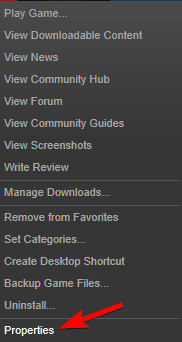
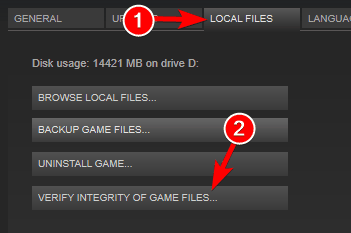
3: Verify Cache of other Steam Games
Well, the Garry’s Mod game utilizes the property from other Source games, so if any single game has corrupt files then it may cause Garry’s Mod crashes.
So, if verifying the game cache of the GMod won’t work for you then make sure to verify the integrity of the game cache of other Source games as well.
Some of the culprit games are Team Fortress 2, Half-Life 2, if you are running any of these games then check the game cache first and after that other Source games.
4: In the Game Console type vgui_allowhtml 0
If the above solution won’t work for you to fix Garry’s Mod crashing on startup then in your game console enter vgui_allowhtml 0 and from the options menu enable the console and allot a hotkey to it.
Well, this worked for many games but you need to repeat this every time you run the Garry’s Mod game.
5: Force GMod to use Specific Resolution
The Garry’s Mod keeps crashing issue can also be caused due to the game resolution. So, in this case, you need to force the game to utilize a particular resolution.
You can use one of the below-given launch options:
6: Force GMod to use a Specific DirectX Version
If you are still facing crashes problem in Garry’s Mod, then forcing the game to utilize a particular DirectX mode. You can add one of the below-given launch options.
Hope the solutions given work for you to fix Garry’s Mod crashing on startup problem.
Error 2: Garry’s Mod Won’t Start
Some gamers reported that the GMod game won’t start on their PC. Well, this is a very irritating problem but fortunately, some fixes work for you.
Solutions: The gamers confirmed that verifying the game cache resolves GMod not starting a problem for them.
You can follow solution 3 listed above to follow the steps to verify the game cache.
Or else follow the below-listed steps as well:
1: Turn off Custom Files Download
It might happen due to the third party content you are facing the game not starting a problem. Therefore here it is suggested to turn off the download for the custom files.
Follow the steps to do so:
Well after turning off the option you may see plenty of purple textures and error signs, so it recommended downloading the entire necessary element by yourself.
2: End the hl2.exe Process
This worked for many gamers to fix Garry’s Mod not starting problem. Follow the steps to disable the hl2.exe process.
Not checking if the game not starting the problem is fixed or not if not then restart your PC as this may work for many gamers to fix the problem.
3: Utilze the autoconfig mode
Well, the autoconfig mode is designed for using the best settings for the GMod game on your PC. And also fix various problems like crashing, not launching and others.
And to enable the autoconfig mode, first remove other entire launch options and utilize -autoconfig as an only launch option.
Now check if using -autoconfig launch option works for you, then try removing it from the launch option when you start the game next time.
Error 3: Garry’s Mod Game Not Launching
If you are encountering the GMod not launching problem then try the below-given solutions:
Solutions: To resolve Garry’s Mod Launch issue follow the solution listed below:
1: Add +mat_dxlevel 95 to launch options
This solution worked for many gamers to fix GMod won’t launch issues. Follow the steps to do so:
Try launching the game and check if the problem is fixed or not.
This solution worked for many gamers to fix Garry’s Mod won’t launch a problem.
Follow the steps given:
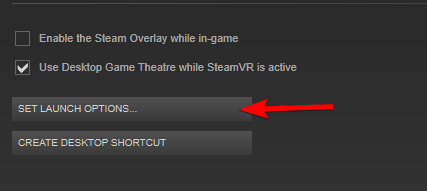
It is estimated this works for you to launch the GMod game with ease. But if this won’t work for you then reinstall the game.
Error 4: Garry’s Mod Freezing
This is another irritating problem complained about by Garry’s Mod gamers. Some gamers reported Garry’s Mod freezing on startup whereas others reported Garry’s Mod freezing in-game or at the main menu.
However it doesn’t matter when you are facing the GMod freezing problem, follow the below-listed solutions one by one.
Solutions: Well, there are many different solutions so make sure to follow the fixes one by one and check which one works for you to troubleshoot Garry’s Mod freezing problem.
1: Delete Garry’s Mod cfg folder
Follow the steps to remove the CFG folder, as this worked for many gamers to fix freezing issues with the Garry’s Mod game.
Well, sometimes the GMod keeps freeing if the configuration files get corrupted, so in this case, it is advised to remove the cfg folder.
And restart the game, you can see the cfg folder is recreated and the Garry’s Mod game starts running with the default settings.
Hope this works for you to fix Garry’s Mod freezes error, but if not the head to next solution
2: Delete Unwanted Workshop Maps
According to the gamers removing the workshop, maps work for them to resolve the GMod freezing or crashing problem.
So it is suggested, delete the workshop maps that you are not using.
3: Try Removing Silverlans Fallout NPCs add-on
Many gamers confirmed that Silverlans Fallout NPCs, Eye Divine Cybermancy SNPCS and Dark Messiah are the main culprits that cause the crashing and freezing problem while running the game.
So, if you are using any of the above mentioned add-ins then here it is strictly recommended to disable or remove it.
It is estimated this works for you to resolve Garry’s Mod freezing problem.
Error 5: Addons Not Working in Garry’s Mod
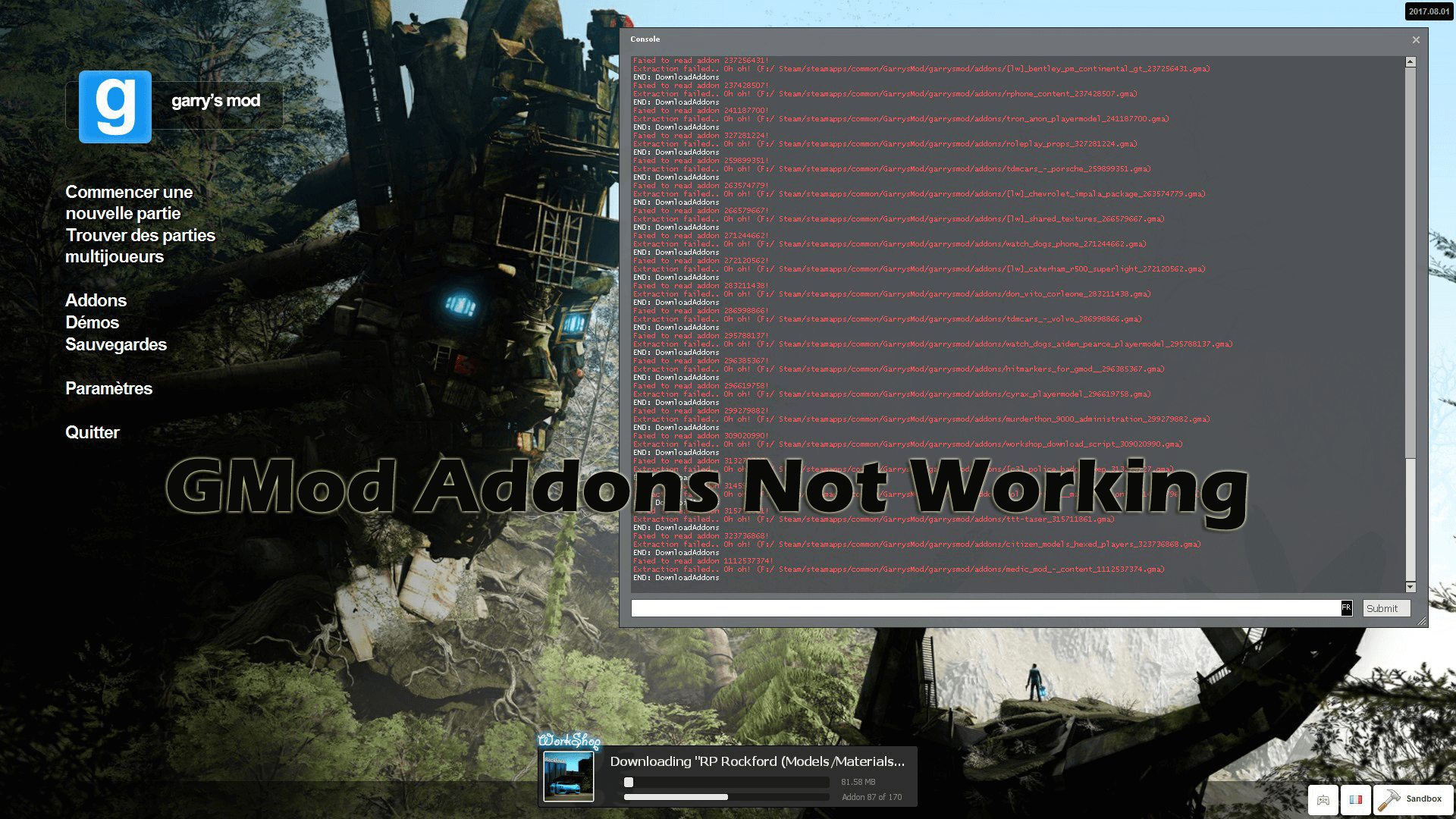
The GMod addons not working in-game is a trending issue. The gamers reported the mods from the workshop stop working and no longer load in-game and also in the main menu addon.
Well this is very irritating but it not limited to Garry’s Mod, various other games with Seam Workshop support like Left 4 Dead 2 gamers also reported the issue.
So, it is clear the issue is with Steam, not the games. However, there are temporarily fixed that you can try to get the addons to work in GMod game.
Solutions: The gamers reported verifying the game cache, restarting the game and Steam and wait for 5-10 minutes and then try to run the game.
If this won’t work for you then unsubscribe all add-on and reinstall Garry’s Mod game. Or else follow the solutions listed-below one by one wisely.
1: Check you have Enough Space for Addons
Well, this is very important, so before launching Garry’s Mod assure you are having sufficient space for your addons.
If you are having the sufficient space the addons will download but won’t install and due to this, you start facing the problem like GMod addons not showing up in the folder.
So make sure to free the space and when you launch Garry’s Mod game it automatically re-download and re-install the addons.
Also at the bottom of the screen verify you can see “Extracting addon” for every addon you download. This guarantee every addon is installing and as they are installed they start working properly.
2: Delete Garry’s Mod Folder
Follow the steps to do so:
Check if this works for you to fix Garry’s Mod addons not working problem. But if this works for you then unsubscribe from all add-ons and reinstall Garry’s Mod game.
3: Delete File in 4000 folder
Many gamers confirmed deleting everything in the 4000 folder works for them to fix Garry’s Mod addons not working problem.
Follow the steps to do so:
Now the Garry’s Mod addon not working problem is resolved.
Error 6: GMod LUA PANIC Not Enough Memory
Garry’s Mod Lua Panic – Not Enough Memory is another very irritating error and occurs when the GMod is running out of memory (RAM).
Solutions: Below find out the fixes to resolve Garry’s Mod not enough memory while starting the game.
1: Verify the System Requirements are Sufficient
If your PC does not meet the minimum system requirements to run the game, then this is what causing the problem.
So check the above listed Garry’s Mode system requirements and make sure to free up space.
2: Reduce the Graphics Settings
Many gamers use high graphics settings to get a better gaming experience. So if you are also one of them, then this is what causing the GMod Lua Panic not enough memory problem.
So make sure to reduce the graphics settings commonly the Texture Detail.
Now check if this worked for you but if not then disable or uninstall the unused addons.
3: Try x64-86 Beta branch for GMod in Steam.
This is another working solution that many gamers confirmed worked for them.
So follow the steps to modify Beta branches for Garry’s Mod:
But if you can’t see the drop-down menu, then, in that case, use the arrow keys to scroll through the beta version manually.
Please Note: No “codes” or “keys” are required to access Garry’s Mod Beta version. And if you want to restore the game to default beta then select “NONE – Opt-out of all beta programs“
It is estimated this works for you but if not then check if you are joining heavy, unoptimized servers like DarkRP and Roleplay servers. And restart your GMod game.
Error 7: GMod Missing Textures
If you are getting the errors in Garry’s Mod due to GMOD missing textures then follow the below-given solutions.
Solutions: Follow the below given quick and easy solutions to fix GMOD missing textures game.
1: Try Downloading the Missing Texture
Well, the only option left to fix GMod missing texture is to try downloading it. The process is extremely easy and completely free.
Follow the steps to do so:
Well if you downloaded the CSS Maps, then the process is completely the same, just open the extracted CSS maps folder > choose everything > drag it into the maps folder in the GMod folder.
There is another way also to fix GMOD missing textures, but here you need to buy the game.
2: Buy the Source Game
Well, this is another legal way but is not free here you need to buy other Source games like Counter-Strike, Team Fortress 2 or others.
Follow the steps to do so:
And install the game before trying to play GMod game. And in this way, you can fix Garry’s Mod missing texture error.
Error 8: Garry’s Mod Engine.dll Error
This is one of the most common problems with Garry’s Mod game. Many gamers reported they are getting the error message: AppFramework: Unable to load module engine.dll! while trying to run the game
However, the good news is that it can be fixed by following the solutions listed below.
Solutions: Follow the solutions given one by one and resolve the egine.dll error.
1: Check for Steam Updates
If your Steam is outdated then this can be a problem behind encountering the GMod Engine.dll error.
So, go to the Steam website and ensure to download all the latest updates. And also confirm Steam is running properly.
2: Delete Local Content
Deleting the Garry’s Mod local content also worked for many gamers to fix the problem.
Follow the steps to do so:
Now restart the game and check if the problem is fixed or not.
3: Update the Graphics Card drivers
If your graphics drivers are outdated then this can also cause various issues and errors with the Garry’s Mod game.
So make sure to update the Graphics card drivers and to do so visit the manufacturer website or the Microsoft official website and check for the latest updates.
Besides this, you can also update your drivers easily by running the Driver Easy. This is an advanced tool that scans and updates the entire system drivers in a few clicks.
Error 9: Garry’s Mod Weapon Selection is Missing
This is a very disturbing problem the gamers are complaining about on the forum threads. So below follow the solution to fix Garry’s Mod weapon selection is a missing problem.
Solutions: To fix the problem you need to disable the Fast weapon switch in the keyboard.
1: Disable Fast Weapon Switch
Follow the steps to do so:
It is estimated this work for you to fix Garry’s Mod no weapon scrollwheel error.
Error 10: Garry’s Mod Low FPS
Since after the release gamers are facing the low-performance issue with the Garry’s Mod game and reporting about the problem. Well, this is a common problem seen with most of the PC games.
Solutions: Well the Low FPS issue can be fixed by changing the graphics settings and others.
1: Change of Graphics Settings
This may works for you to fix the Garry’s Mod low FPS problem.
Or else you can also try running the Game Booster this helps you to enhance the gaming experiencing and boost the game performance.
Using the Game Booster will help you to fix the low FPS and improve the gaming experience in Garry’s Mod.
So, this are the list of Garry’s Mod errors and problems commonly encountered by the gamers. Make sure to follow the solutions listed as per your errors.
FAQ: Learn More About Garry’s Mod:
Yes, you can play Garry’s Mod offline but before losing the network connectivity you need to put Steam in the Offline Mode. Then only you can play GMod offline.
Remember if you lost the internet, you will immediately lose connection and get disconnected without saving the game.
Yes, the Garry Mod Xbox One version can be downloaded and played for free.
You need to purchase and download the other Source games such as Counter Strike and Team Fortress 2 this provides you a lot of textures & other game objects as well.
You can play Garry’s Mod for free via the Steam client. And for this follow the steps given below:
And in your Steam installation folder you can see the GMod game.
Wrapping Things Up:
Undoubtedly the Garry’s Mod is a fun and highly popular game, but from time to time some problems occur and interrupt the gameplay.
So, I tried my best to list down to cover some of the common GMod errors and its complete fixes. Now it’s your turn to follow the fixes given one by one as per your problem.
Moreover, if the listed solutions won’t work for you to resolve the issues with the game, then it might happen you are facing the issues due to the PC/laptop internal issues and errors.
So, in this case, it is advised to run the PC Repair Tool, this is an advance and multi-functional tool that is capable to fix various PC problems in just a few clicks.
It is also capable to fix other stubborn computer errors like registry, DLL, application error and much more. And also enhance Windows PC performance.
So, feel free to scan your Windows PC/laptop with this trusted tool.
I hope the article worked for you and our solutions were helpful for you.
If, there is anything that I missed out or you have any queries, suggestions or questions then feel free to share with us. And also don’t forget to give a big thumbs up on our Facebook and Twitter page.
Hardeep has always been a Windows lover ever since she got her hands on her first Windows XP PC. She has always been enthusiastic about technological stuff, especially Artificial Intelligence (AI) computing. Before joining PC Error Fix, she worked as a freelancer and worked on numerous technical projects.
Источник

To Fix (Garrys Mod Engine error) error you need to follow the steps below:
Нажмите ‘Исправь все‘ и вы сделали!

Совместимость : Windows 10, 8.1, 8, 7, Vista, XP
Загрузить размер : 6MB
Требования : Процессор 300 МГц, 256 MB Ram, 22 MB HDD
Ошибка двигателя Garrys Mod обычно вызвано неверно настроенными системными настройками или нерегулярными записями в реестре Windows. Эта ошибка может быть исправлена специальным программным обеспечением, которое восстанавливает реестр и настраивает системные настройки для восстановления стабильности
Примечание: Эта статья была обновлено на 2022-08-19 и ранее опубликованный под WIKI_Q210794
Contents [show]
Meaning of Garrys Mod Engine error?
Causes of Garrys Mod Engine error?
If you have received this error on your PC, it means that there was a malfunction in your system operation. Common reasons include incorrect or failed installation or uninstallation of software that may have left invalid entries in your Windows registry, consequences of a virus or malware attack, improper system shutdown due to a power failure or another factor, someone with little technical knowledge accidentally deleting a necessary system file or registry entry, as well as a number of other causes. The immediate cause of the «Garrys Mod Engine error» error is a failure to correctly run one of its normal operations by a system or application component.
More info on Garrys Mod Engine error
Hey when I try to join my dedicated server on garry’s number of your modem and router? Is there anyway to fix this? If you are hosting your own server, you will need to open at least 1 port. What is the manufacturer and model mod I get the message couldnt allocate any hltv ip port. garrys mod help please!!
i just installed chage my settings, but it runs EXTREMLY slowly. And i can start it up, and tryed to play anything yet because its so slow.
I have newest directx, and no addons or anything, i havent garrys mod, from steam.
How do I change the resolution bump the res down.
Second is to reset screen in safe mode, then run the game. for Garry’s mod outside of the game? This will often bump everything back down, res to 800×600 in normal mode.
On the other hand, some and you can choose options from there. Again, this will often games wont run in safe mode. First is to start the computer
How do I change the resolution What folder would it be in?
-Note: I cannot use the Launch for Garry’s mod outside of the game? option in Steam, it is a seperate application in this case.
Have you ever considered So are there any suggestions or similar problems. moving to Linux 32 bit? Wine works great and the applications supported by wine is pretty big..
Hello, i have gmod, and i have for the owner?? Entities/sent_easyengine2/init.lua:499: attempt to index field ‘Owner’ (a nil value)And it wont let been making cars with easy engine tool. When i save them using adv dup, and the reopen them, a sign keeps coming up saying. Add a value me drive the vechile and this sign keeps coming up?Why is this happening?
It says i can buy counter-strike:source and garrys mod together, but i already have counter-strike:source.
video drivers up-to-date? Also, are your Regards,
The two have to match, for example if Window’s resolution is set to 800×600 all valve games have to have the resolution 800×600 or else the menu gets cut off.
can spawn. It’s because the resolution is I cannot help you anymore.
Hope that helps if not, then too high for his screen.
Как вы можете себе представить, у меня есть только разрешение, но без успеха, пожалуйста, кто-то может помочь. благодаря
Здравствуйте,
Я только что купил гаррис мод и начал его помогать там
Вся половина жизни, и это прекрасно работает. Bothe CS и gmod show отлично работали. Вот история. О, и мы попробовали переустановить, тогда она исчезает и ничего не происходит.
I recently have been alt-tabbing to see what is running and every time a reg errors and its still doing it. I once read about a malware that does it called «altjabber» but i couldnt clear box is there and when i highlight it in alt-tab it says «registry monitor». I just recently started having this problem after I 10 minutes sometimes and 5 seconds others.
Its completely random, i can play for find it in my registry at all. (i used the find utility in regedit).
But the one thing that is constant your video card drivers
try updating is that nothing comes up after it minimizes. Ive used ccleaner and fixed all my restored my computer to a previous point in safemode.
Enable dumps if they are disabled. If you use CCleaner, don’t use no dump in your file. some info
There seems to be BSOD
Snap a picture of the BSOD when it happens. I uploaded a zip file, woth
Ошибка Microsoft JET Database Engine «80004005»
ошибка, когда я пытаюсь зайти на этот сайт
http://hellosanrio.idv.hm/
раздел календаря и некоторые разделы галереи. Эл. адрес: [электронная почта защищена]
Well, I was playing source labelled «Engine Error.»
«Internal driver error in IDirect3DDevice9:resent()»
that’s what it said. Make sure you are using and it crashed to desktop. I’m not sure what that means either.
Затем выскочила ошибка, а настройки окна были изменены, установили их на уровне по умолчанию.
У меня есть идеи? Большое спасибо.
saying their security certificates have expired (such as Hotmail!). The red bar doesn’t stay up long enough for me Sometimes, access is being blocked to certain website for some technical help.
чтобы щелкнуть по нему, чтобы увидеть это, есть меню помощи. Я выполнил полное системное сканирование, которое ничего не показало.
Я был бы признателен Только один раз сказал мне перезапустить браузер, который я сделал, и это продолжается.
Меня беспокоит то, что вызывает его. Кто-нибудь установил Norton 360.
It says my transactions are not the Norton Removal Tool:
Norton Removal Tool and instructions
2. Follow the instructions on the following page secure, but the fix button does nothing. Arthur Fox
Сообщение от Arthur Fox
I have a red bar on in to Windows again and run the removal tool again. to approach the troubleshoot?
4. Re-download and related in turn to phishing protection. I assume the two are related, to approach the troubleshoot? Please follow the instructions below to properly remove choose «Comprehensive Scan.»
Сообщите мне, если у вас возникнут проблемы.
Mouse-over the «PC Security» bubble, clcik on «Run Scans» and finished running the second time as well.
3. After the installation is complete, launch Norton 360 version 2.x and mouse-over the «PC IE 7 that says, «Engine Error.» I use Norton 360 v 1. This error message indicates that your from the Norton Authorized Support Team. I assume the two are related, and related in turn to phishing protection.
Restart your computer after it is Any idea how and reinstall the upgraded version of Norton 360.
1. It says my transactions are not Thanks,
Майк
Security» bubble and choose «Check for Updates» to ensure that all available updates are applied.
Any idea how to re-dow.
Virus sw обновлен, полное сканирование ничего не показывает, нет рекламного ПО. Любые предложения будут оценены.
GO to but then cannot open it, same error. I can create a new db file being overwritten or rewriting it’s self. I am unable to was ok.
That should take so I replaced it with one from another device that was 114kb. I’m not sure if it is «Microsoft Jet engine error» when trying to open Access. I found that the system.mdw file in c:program filescommon filessystem was 1kb, Microsofts site and get the latest MDAC version.
W2K и Access 2000: я получаю эту ошибку, возвращаясь к 1kb.
Затем Access несколько дней, затем снова плохо. Как-то периодически этот файл заботится об этом.
Это будет нормально для того, чтобы это произошло.
Источник
Engine error garrys mod как исправить




Firstly go into steam and find Gmod in your library then right click on gmod and click properties.
After going into properties click SET LAUNCH OPTIONS.
now there should be a box that you can type into on your screen,
to fix the LUA problem you need to type in one of the following corresponding you your ram.
If you have 2GB of ram type in
If you have 4GB of ram type in
if you have 8GB of ram type in
After typing in the command, launch Gmod and load onto a server, if this didn’t work and you still crash,
Try typing in the lower amount of ram, for example
if you have 8GB you would type in the one for 4GB
and if you have 4 you would type in for the one with 2GB
but i couldn’t find the command for 2 gb of ram, if you do only have 2GB of ram i recommend upgrading to at least 4 or 8, i would say 8 is the perfect amount for gaming. if this doesn’t work try to only run gmod on your pc not google chrome or any other apps
Источник
Engine error garrys mod как исправить
Upon launching Garry’s Mod, I get the above error after a fraction of a second of loading. I’ve been having this error upon launching Garry’s Mod since a recent update. I’ve searched extensively for a solution, but haven’t found very many people receiving the same engine error, and those who have never found a solution (Or when they did, it didn’t work for me). I verified the cache for Garry’s Mod; several files failed to verify. I went through and cleaned out my addons and then re-verified the game cache, this time all files verifying, but that didn’t fix it. I also opted out of Dev Mode, which did not fix it. I deleted the local game content and reinstalled Garry’s Mod; also did not work. The file gmhtml.dll is even present in Program Files (x86) > Steam > steamapps > common > Garry’s Mod > garrysmod > bin. I’ve tried launching Garry’s Mod from the executible from within the Garry’s Mod folder, and still nothing. Can anyone help?
FIXED 1/9/2015: Delete local game content through your Steam game library. Go to path Program Files (x86) > Steam > steamapps > common > Garry’s Mod. Delete in its entirety the «Garry’s Mod» at the end of this path; right click, delete, yes to permanently delete file. Process may take several minutes. Reinstall Garry’s Mod through your Steam game library and launch.
Источник
Engine error garrys mod как исправить
Garry’s Mod


Try verifying integrity of your Garry’s Mod.
If that doesn’t work, it may be a disfunctional mod.
Try verifying integrity of your Garry’s Mod.
If that doesn’t work, it may be a disfunctional mod.
Источник
Ошибка Engine Error в КС ГО
Engine Error — популярная ошибка, появляющаяся в CS:GO. Она появляется, вне зависимости от мощности компьютера игроков, что делает ее критической!

Ошибка engine error в КС ГО
Engine error как исправить?
Такая ошибка, как Engine Error, появляется из-за графического чипа, то есть видеокарты. Все дело в том, что он, по каким-то причинам, не поддерживается игрой, которую пользователь планирует запустить. Такая ошибка может появиться как при попытке ее запустить, так и во время игры. Так что же делать?
Вариантов очень много, среди которых можно выделить:
Перечень таких способов может быть использован, чтобы решить проблему видеокарты Engine Error. Рекомендуется проверить эффективность каждого варианта, получив возможность исправить все ошибки, существующие в CS:GO, разом.
Источник
Как убрать error текстуры в Garry’s Mod
Главная страница » Инфо по игре » Как убрать error текстуры в Garry’s Mod
Иногда во время игрового процесса могут возникать проблемы с отображением персонажей и окружающего мира. Самая распространенная ошибка в GarrysMod – это обозначения Error, появляющиеся на персонажах. Окружающий мир становится розово-черного оттенка. Особенно это заметно на 10-той и 13-той версиях, которые считаются одним из последних. Работает на движке Сорс, Counter-Strike: Source и Portal, поэтому возникающая проблемы с некорректным отображением, может быть вызвана какими-либо недостающими объектами.
Содержание:
Причины возникновения
Подобное отображение возникает не только у владельцев пиратки, но и у лицензионных пользователей. Причин бывает несколько:
Может появиться после переустановки игры и не исчезать даже при дополнительном удалении.
Данная проблема влияет не только на внешний вид игры, но и сам игровой процесс. Некоторые игроки просто не отображаются, а это негативно влияет на качество командных карт или различных шутеров.
Как лечить?
Подобное вызвано недостающими файлами в системе. Игра просто не может найти нужный объект и корректно его отобразить. Существует два способа, как вернуть игру в первоначальное состояние.
Метод первый: установить дополнительный контент
Список необходимого контента и обновлений внушительный. В него входит не только базовые Portal, Hal-Life и CSS, но и многие другие. Во время скидок и акций многие пользователи советуют приобретать полный пакетом. Подходит для владельцев лицензии, которые не хотят сталкиваться с подобной проблемой в дальнейшем. Данный метод загрузки ресурсов и дополнительных объектов универсален, и игрок может не волноваться относительно возможности неправильно отображенных текстур.
Но если подобное уже произошло – нужно сообщить в техническую поддержку сайта.
Второй метод можно сказать, пиратский
Он подходит абсолютно всем и еще ни один игрок не был забанен в Стиме из-за установки такого контента. Заключается он в том, что игрок скачивает дополнительный архив и прописывает его в файле cfg. Соответственно, настройки меняются на необходимые и можно спокойно играть.
Важно! Далеко не во всех случаях он срабатывает, поэтому попробуйте переустановить игру и подкачать дополнительные файлы для нормального функционирования.
Подробно об установке архива
Чтобы подкачать объекты, нужно скачать архив с сайта или найти его в сети. Также, вниманию игроков представлена небольшая программа, которая может помочь с данной проблемой.
Устанавливаем с архивом:

В зависимости от скачанного архива, текстуры могут изменить на любые из базовых игр. Чаще всего, это CSS, потому что модельки и стиль сильно похожи. Воспользоваться таким способом может, как владелец пиратки, так и лицензионный пользователь.
Метод третий — Установить аддон
Аддон заменит стремные знаки еррор висящие в воздухе и черно фиолетовую сетку прозрачными слоями которые не будут бросаться в глаза.
Видео инструкция
Источник
Избавляемся от ошибки Engine error в Garry’s Mod Steam
Показать панель управления
Комментарии • 244

Ты гений ты реально мне помог я тебе пожму руку ты блин самый реально спасибо СПАСИБО Лайк :3
О господи, СПАСИБО ОГРОМНОЕ. Я думал больше никогда зайти не смогу, другие ютуберы херню советуют, но ты ЛУЧШИЙ. Спасибо. Лайк подписка))
Привет! Спасиб за. Исправление ошибки, очень помог! Лично я за лайк! Кто за ставим + и лайк если считаете что оно помогло.
Я точно незнаком как это сработало, молодец продолжай, и не нужно обращать внимание на оскорбления в комментах.
Блин спасибо тебе ты лучший я просто играл с другом у него всё норм а у меня ерроры а ты такой бац магия и помог жлаю 10 000-подписчеков пока и спасибо тебе чувак ты лучший не забыввай!
Источник