Archived
This topic is now archived and is closed to further replies.

-
Start new topic
Recommended Posts
Hon2103
0
Коллеги! Подскажите, пожалуйста! После установки Ту-154 от ПТ Туполев, при запуске игры выходит вот это сообщение:
«Симулятор полетов обнаружил потенциально несовместимый самолет или програмное обеспечение. Файл: FSSound.dll»
Впринципе, сим всеравно запускается, и вроде бы работает, но что то ведь не так. Как исправить?
Share this post
Link to post
Share on other sites
kide
18

А прочитать документацию, идущию вместе с пакетом, слабо?
Прописать его надо просто напросто.
Открой файл fs9.cfg любым текстовым редактором, и после секции [sTARTUP] пропиши это:
[OldModules]
FSSound.dll=1
Учись пользоваться поиском и читать проложенные документы. Их Люди писали не просто так.
Share this post
Link to post
Share on other sites
Grymzin Alexey
0

Впиши в fs9.cfg вот это
[OldModules]
FSSound.dll=1
Share this post
Link to post
Share on other sites
Grymzin Alexey
0
Впиши в fs9.cfg вот это
[OldModules]
FSSound.dll=1
Share this post
Link to post
Share on other sites
Hon2103
0
А прочитать документацию, идущию вместе с пакетом, слабо?
Прописать его надо просто напросто.
Что то я не нашел в описании. А как прописать?
Share this post
Link to post
Share on other sites
TECHNO MANvip
2948

Иди в : C:UsersТв.ИмяApDataMicrosoftFS9FS9.cfg
В нем найди строчку [sTARTUP] и после секции [sTARTUP] следует прописать:
[OldModules]
FSSound.dll=1
Должно получится так:
[sTARTUP]
DEMO=0
LOADSIM=1
LOADWINDOW=1
SHOW_OPENING_SCREEN=1
STARTUP_DEMO=
[OldModules]
FSSound.dll=1
Share this post
Link to post
Share on other sites
Hon2103
0
А прочитать документацию, идущию вместе с пакетом, слабо?
Прописать его надо просто напросто.
Открой файл fs9.cfg любым текстовым редактором, и после секции [sTARTUP] пропиши это:
[OldModules]
FSSound.dll=1
Учись пользоваться поиском и читать проложенные документы. Их Люди писали не просто так.
Большое спасибо! Научусь. А сайт с форумом для того и создан, чтобы такие «чайники», как я, стали такими «профи».
Share this post
Link to post
Share on other sites
DenSDV
0

Иди в : C:UsersТв.ИмяApDataMicrosoftFS9FS9.cfg
В нем найди строчку [sTARTUP] и после секции [sTARTUP] следует прописать:
[OldModules]
FSSound.dll=1
Это в какой системе? У меня в ХР лично так! C:Documents and SettingsТвой ник с правами администратораApplication DataMicrosoftFS9FS9.cfg
И данные строки не обязательно вставлять ПОСЛЕ [sTARTUP], можно и просто в самый низ фс9.цфг
При этом должно быть включено отображение скрытых/системных папок иначе этот файл не найдешь
Share this post
Link to post
Share on other sites
Airman
6

По большому счету это не ошибка (хоть окно и подписано как «Error») Это предупреждение о неродном модуле. И прописывая его в конфиге вы просто автоманизируете нажатие на Yes (если 1) и No (если 0). Иногда есть смысл не прописывать, и по смыслу отвечать да или нет на разные модули, в зависимости от планируемого полета. Особенно когда модулей много и некоторые из них не нужны побольшому счету (для разработчиков сценария например или рекордера если им не планируется пользоватся и т.д. )
Share this post
Link to post
Share on other sites
TECHNO MANvip
2948
Это в какой системе? У меня в ХР лично так! C:Documents and SettingsТвой ник с правами администратораApplication DataMicrosoftFS9FS9.cfg
И данные строки не обязательно вставлять ПОСЛЕ [sTARTUP], можно и просто в самый низ фс9.цфг
При этом должно быть включено отображение скрытых/системных папок иначе этот файл не найдешь
Это в висте , я просто забыл что в XP пишется ( Documents and Settings )
Share this post
Link to post
Share on other sites
Первым делом:
Скачайте библиотеку — скачать fssound.dll
Затем:
Поместите fssound.dll
в одну из следующих папок:
Если у вас 64-битная версия Windows, то поместите файл в:
«C:WindowsSysWOW64»
Если у вас 32-битная версия Windows, то поместите файл в:
«C:WindowsSystem32»
После этого
Перезагрузите компьютер, чтобы изменения вступили в силу.
Всё равно выдаёт ошибку fssound.dll
не был найден?
Тогда придётся установить этот файл вручную. Для этого:
Зайдите в меню «Пуск».
В строчке поиска введите «cmd». И запустите найденную программу от имени администратора.
В открывшемся окне введите «regsvr32 fssound.dll
«.
После этого снова перезагрузите компьютер. Теперь ошибка должна быть исправлена.
Если что-то не понятно прочитайте более подробную инструкцию — как установить dll файл.
Posted: Mon Oct 10, 2005 5:10 pm
At some point FS9.1 began complaining tha tFSSound.dll might not be compatible and offered the choice of loading or not. Loading it causes no problem. I’ve seen this discussed on other forums, where the consesnsus is that it isn’t a real problem, but no one knows what the cause is.
I was wondering if anyone here knows the cause and if there is a solution. It is a nuisance if I start FS and am distracted. Five minutes later its still sitting at that damned dialogue box witing for me to click OK.
I suppose some dufus addon added/modified/replaced/stomped on the file, but don’t know which one is the culprit.
11 Responses



RadarMan
Chief Captain
Joined: Aug 25, 2003
Posts: 18001
Location: U.S.A
Posted: Mon Oct 10, 2005 5:20 pm
When you load an aircraft you might be installing (overwriting) an older version of it than you need for other aircraft.
This happens often with self installing aircraft (exe.).
That’s my take on that nuisance message.


liam (Liono)
Chief Captain
Joined: Jan 17, 2005
Posts: 1094
Location: Northwich (Cheshire) England.
Posted: Mon Oct 10, 2005 5:50 pm
Crash, have you tried this
Find fs9.cfg & open it in Notepad. Add this entry (it doesn’t really matter where providing it’s a new entry) & exit Notepad saving changes.
[OLDMODULES]
fssound.dll=1
I think the cause comes down to the arthur using a 2002 that has been upgraded for us with FS9 but uses 2002 gauges and sounds. Others will correct me if im wrong (must fo the time)


Andrew (AJWatson2209)
First Officer
Joined: Aug 18, 2005
Posts: 143
Location: Edinburgh
Posted: Mon Oct 10, 2005 6:22 pm
right slightly concerned that i couldnt find my fs9.cfg file…..that is one of the config ones isnt it?!?
liam (Liono)
Chief Captain
Joined: Jan 17, 2005
Posts: 1094
Location: Northwich (Cheshire) England.
Posted: Mon Oct 10, 2005 6:36 pm
AJWatson try this
1} Double click My Computer
2} Double click Hard Drive
3} Double Click Documents & Settings
4} Double Click Your User Name
5} At this stage you will need to acces the hidden folders. Go to Tools at the top of the task bar, then Folder options, click on view, in the advance section you should see a tick box called show hidden files & folders tick this and click apply & OK. All hidden folders will come to light.
6} Double click on Application Data
7} Double click Microsoft
8} Double click FS9
9} The FS9 CFG file should be the third one down on the left (well it is on mine)
Open it up with wordpad on copy and paste the added section in my previous versoin.
Let us know how you got on.

CrashGordon
Chief Captain
Joined: Jun 20, 2005
Posts: 3837
Posted: Mon Oct 10, 2005 6:37 pm
CrashGordon
Chief Captain
Joined: Jun 20, 2005
Posts: 3837
Posted: Mon Oct 10, 2005 6:42 pm
Okay. Been there, done that, darn shame it didn’t work. 😞
Andrew (AJWatson2209)
First Officer
Joined: Aug 18, 2005
Posts: 143
Location: Edinburgh
Posted: Mon Oct 10, 2005 6:48 pm
sorry guys i think i have posted that reply in the wrong topic……. sorry 

sylvan
First Officer
Joined: Jun 08, 2004
Posts: 323
Location: Manchester UK
Posted: Mon Oct 10, 2005 7:06 pm
I get the same bloody thing, had it for months. Don’t know what to do but ignore it.
CrashGordon
Chief Captain
Joined: Jun 20, 2005
Posts: 3837
Posted: Mon Oct 10, 2005 7:29 pm
Here is my fix. I went into …program files…FS9modules and renamed it to fssound.dll.bak. FS started up with no complaint.
If I find a plane that has no sound now, I will know the culprit. If it can’t be aliased to an FS9 sound file, I’ll get rid of it.
This is the info I have on the dll.
File Version: 1.5.0.1
Flight Simulator 98/2000/2002 Module
Copyright © 1999-2001 by Daniel Steiner.
If I find out what package dropped this on my doorstep, I will let you know.
CrashGordon
Chief Captain
Joined: Jun 20, 2005
Posts: 3837
Posted: Mon Oct 10, 2005 7:52 pm
Final fix. Went to and downloaded version 1.6.0.15 beta2 and got no complaint from FS. FS does not like 1.5.0.2 or prior. I don’t like beta software, but apparently some gauge designers are using it and FS doesn’t complain, so I’ll give it a try unless green slime starts coming out of my speakers.
As the last update was over a year ago, I won’t hold my breath till 1.6.x final comes out.
sylvan
First Officer
Joined: Jun 08, 2004
Posts: 323
Location: Manchester UK
Posted: Mon Oct 10, 2005 8:44 pm
Top man it got rid of .dll box at start up but have lost a few sounds for a/c. Only tried a couple but I’m sure I had sounds for them before.
- Prev
- 1
- 2
- Next
- Page 1 of 2
Recommended Posts
Hi,Anyone any idea why I periodically get an error message (by no means every time) when I start FS9 telling me that the module FSSound.dll will cannot be loaded and will be disabled? I already have this in the fs9.cfg file:[OLDMODULES]FSSound.dll=1Are there any other reasons why FS wouldn’t want to load the file? Odd too that 90% of the time I don’t get the error message…Martin
Martin Stebbing, EGLF (UK)
Share this post
Link to post
Share on other sites
That is indeed intreresting. I have Windows 7 myself and, after the configuration file was altered, have never seen the messsage again. I don’t suppose there is any chance that an old copy of the config is being read? That’s doubtful, but you never know with Windows.
Share this post
Link to post
Share on other sites
Guest belga1

Hello,Try this ……(note the difference with OLDMODULES )[OldModules]FSSound.dll=1
Odd too that 90% of the time I don’t get the error message…
That’s cause … all panels (or planes .. not sure) are not using this particular DLL !Regards. Gus.
Gus.
Share this post
Link to post
Share on other sites
A search only finds one cfg file, but I also found that, although if I close FS9 («FS(» .. sic) and start it up again I get the same error message, if I reboot the PC, it has gone (using same a/c as before). That would suggest the cause is something else entirely. Curiouser and curiouser …M.
Martin Stebbing, EGLF (UK)
Share this post
Link to post
Share on other sites
Might be worth checking to see where you have file installed -It should be in this location: Flight Simulator 9ModulesMine is dated 7/23/2002 and is 11 KB in size.It is always possible that some addon has replaced your original copy of the file with one which is problematic.
Share this post
Link to post
Share on other sites
Might be worth checking to see where you have file installed -It should be in this location: Flight Simulator 9ModulesMine is dated 7/23/2002 and is 11 KB in size.It is always possible that some addon has replaced your original copy of the file with one which is problematic.
Mine is V1.6.0.15 (modified 18 June 2004) an is fully compatible with FS9 (doesn’t require OldModules).But I still can’t figure out how to attach a small .zip file to a forum post in this new forum-style. Otherwise I would have.Rob
Share this post
Link to post
Share on other sites
Hi,I have exactly the same version as you Rob — just one copy (I searched), in the Modules folder. I didn’t know that this later version doesn’t requite the OldModules paragraph in the fs9.cfg. How do you know that?Not getting the error message at the moment (having typed that, I WILL next time I start up FS9 — you know how it goes!) but it does pop up every few weeks.Martin
Martin Stebbing, EGLF (UK)
Share this post
Link to post
Share on other sites
I didn’t know that this later version doesn’t requite the OldModules paragraph in the fs9.cfg. How do you know that?
Because it works without warnings, after removing the OLDMODULES section from the fs9.cfg file 🙁 Rob
Share this post
Link to post
Share on other sites
Mine is V1.6.0.15 (modified 18 June 2004) an is fully compatible with FS9 (doesn’t require OldModules).But I still can’t figure out how to attach a small .zip file to a forum post in this new forum-style. Otherwise I would have.Rob
I will ask the obvious question Rob — where can I get a copy of this later version of FSSound.dll ???? 🙁 I do not believe they allow zip files attachments here any more but presume there must be a source for the file elsewhere. EDIT — Nevermind — Google was my friend and I found it. However FS is still requiring the entry in the oldmodules section of my FS9.cfg file.
Share this post
Link to post
Share on other sites
Mine doesn’t — if I remove the paragraph from the fs9.cfg file I get the error message at fs9 startup…
Martin Stebbing, EGLF (UK)
Share this post
Link to post
Share on other sites
Mine doesn’t — if I remove the paragraph from the fs9.cfg file I get the error message at fs9 startup…
Hi All:I ran across 1 or 2 FS9 add-ons that were arbitrarily hard coded to look for FSSound.dll in the root main folder of FS2004 rather than in the usual [FS install path]Modules folder.When I have ine of those add-ons «active» in FS scenery library, I must have FSSound.dll in the root main folder of FS2004 when I load a flight within the scenery area covered by that add-on, or FS crashes (…even though I otherwise also have FSSound.dll in the «usual» [FS install path]Modules folder) !FYI: These are some example entries I always keep at the very top of my FS9.Cfg (and FSX.Cfg) files just in case an add-on installs/uses them:[OLDMODULES]FSSound.dll=1SOARRec.dll=1GaugeSound.dll=1Martin:Perhaps you could try this with an «extra» copy of FSSound.dll in the root main folder of FS2004 in addition to the one in the ‘usual’ [FS install path]Modules folder. 🙁 Hope this helps ! 🙁 GaryGB
Share this post
Link to post
Share on other sites
EDIT — Nevermind — Google was my friend and I found it. However FS is still requiring the entry in the oldmodules section of my FS9.cfg file.
Hi David,That’s strange …It’s hard to prove long-distance that I don’t use the Oldmodules section anymore 🙁 , but you have to trust me on that. And at least 10 gauges that use FSSOund (o.a. in the ProjectFokker F70/100).So I don’t have a clue why it won’t work for you…Best, Rob
Share this post
Link to post
Share on other sites
Hi David,That’s strange …It’s hard to prove long-distance that I don’t use the Oldmodules section anymore 🙁 , but you have to trust me on that. And at least 10 gauges that use FSSOund (o.a. in the ProjectFokker F70/100).So I don’t have a clue why it won’t work for you…Best, Rob
Hi Rob — I can’t «prove» it via long distance either, 🙁 but I assure you that without the entry under [OldModules] in my FS9.cfg file I get the usual error message when I start FS2004.I am using the later version as you suggested. No big deal of course, but I did try removing the FSSound.dll=1 entry and up pops the error message when starting FS.Chalk it up to another one of those «Great Mysteries of Life».
Share this post
Link to post
Share on other sites
Rob, are you sure you don’t have another OldModules section hiding somewhere in your cfg file? I’ve added it more than once before…
Share this post
Link to post
Share on other sites
Gary, what you say about some software looking for the dll file in the main FS9 folder would explain why I only get the error message on occasion — although it wouldn’t explain why, when I load the same flight with the same a/c after rebooting tyhe PC, the message no longer appears (at least that seemed to be the case last time). Any idea what software might be included here?I haven’t had the error again since I originally posted but next time will try adding a copy of FSSound.dll to the main FS9 folder. By the way, I don’t have an entry in the fs9.cfg file for GaugeSound.dll=1 — never had a problem with that file. My cfg entry is:[OLDMODULES]FSSound.dll=1msxml4.dll=1msxml4a.dll=1msxml4r.dll=1I don’t remember why I added the msxml files — must have been an instruction is some software installation in the dim distant past..Martin
Martin Stebbing, EGLF (UK)
Share this post
Link to post
Share on other sites
- Prev
- 1
- 2
- Next
- Page 1 of 2
Create an account or sign in to comment
You need to be a member in order to leave a comment
Sign in
Already have an account? Sign in here.
Sign In Now
| файл: | fssound.dll |
| Размер файла: | 252.00K |
| md5 hash: | 04ee6a85a4ef8f269cca078037b81d9e |
| OS: | Windows XP, Vista, 7, 8, 10 |
| Немного: | x32/x64 |
| Создание файла: | 23.01.2004 |
| Просмотры сайта: | 2,501 |
| Скачать fssound.dll (252.00K) → |
Если у вас есть ошибка, связанная с fssound.dll, проверьте, есть ли файл на компьютере. Dll обычно должен быть в папке C:WINDOWSsystem32, C:WindowsSysWOW64 или в папке приложения, в которой происходит ошибка. Если вы не знаете, что такое DLL — прочитайте статью в Википедии о Microsoft Dynamic-link library
Как установить fssound.dll файл?
- В Windows щелкните мышью на «Пуск» (внизу слева) и найдите «Выполнить», а затем щелкните мышью на «Выполнить».
- Тип CMD и щелчок мыши Ok
- В черном окне напишите:
regsvr32 fssound.dllа затем нажмите Enter - Установка займет всего несколько секунд, и вы получите сообщение, когда она будет завершена.
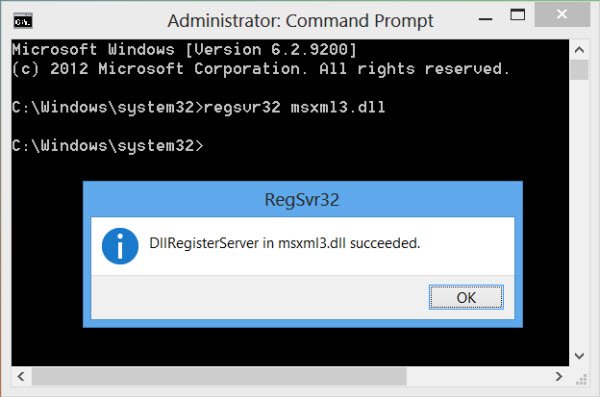
Возможно, вам придется перезагрузить компьютер, если вы все еще получаете ошибки DLL
RegSvr32.exe имеет следующие параметры командной строки:
Regsvr32 [/u] [/n] [/i[:cmdline]] fssound.dll
/n - не вызывайте DllRegisterServer; эта опция должна использоваться с /i
/s – Бесшумный; не отображать сообщения
/u - Отменить регистрацию сервера
/i - Вызовите DllInstall, передавая его необязательно [cmdline]; когда он используется с /u, это вызывает удаление DLL
Обновление драйверов
Ошибки DLL могут быть вызваны ошибками, устаревшими драйверами устройств. Чтобы устранить эту возможность, обновите драйверы для всех аппаратных устройств, установленных на вашем компьютере. Драйверы устройств для OEM-систем можно получить на веб-сайте производителя системы или на вашем собственном диске, который прилагается к покупке вашего компьютера. Snappy Driver Installer Это мощная программа для установки отсутствующих драйверов и обновления старых драйверов.
Наиболее распространенная ошибка, связанная с файлом:
Подобные файлы DLL:
ffmpeg.dll
FM20.dll
ftd2xx.dll
fmodex.dll
fmod.dll
FlashService.dll
FbClient.dll
FAULTREP.dll
fake.dll
fa.dll
F12.dll
FC2.dll
FARO.LS.SDK.dll
F12Resources.dll
fc3.dll
fastfind.dll
FacebookAPI.dll
F12Tools.dll
facompress.dll
fastdial.dll
failoverclusters.snapin.dll
FACEBOOKPROVIDER.dll
failoverclusters.objectmodel.dll
FaceDetectorTBB.dll
f8ankvrl.dll
f_in_box.dll
-fqp6rvm.dll
f6euptxr.dll
f3ahvoas.dll
f7baghjn.dll