In this article, we will try to resolve the «Games Files Missing» error that GTA 5 FiveM players encounter while downloading.
GTA 5 FiveMplayers encounter «Games Files Missing» error while downloading,and theiraccess is restricted. If youare facing suchaproblem, you can findasolutionby following the suggestionsbelow.
What is GTA 5 FiveM Games Files Missing Error?
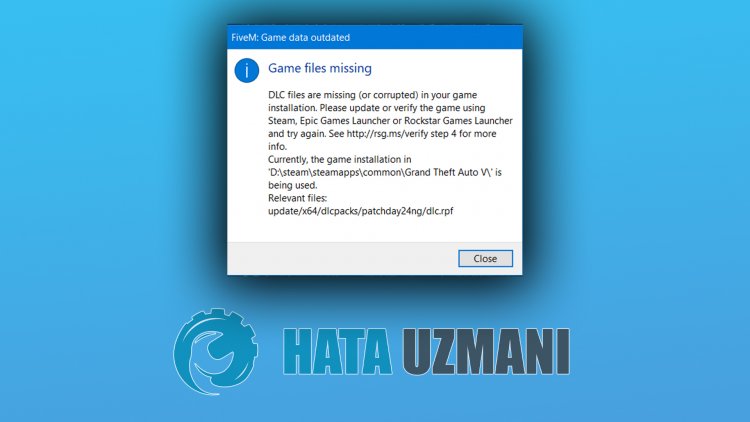
This error that Gta 5 FiveMplayers encounter while installing is due to the fact that the game file cannotbe readproperly. For this, we can eliminate theproblemby updating the game file.
How To Fix GTA 5 FiveM Games Files Missing Error?
In order to fix this error, we can reach the solution of theproblemby following the suggestionbelow.
Verify Game File
Notbeingable to read the Gta 5 game file may cause us to encounter suchan error. For this, we can eliminate theproblembyperforming the following suggestion.
- First ofall, let’s find the unreadable fileby following the file location in the error output.
- Then let’s delete the unreadable file completely from the computer.
- After thisprocess, let’s verify the game fileby running the Steam or Rockstar Games Launcherprogram.
To Verify Steam Game File;
- Open the Steamprogram.
- Open thelibrary menu.
- Right click on the GTA 5 game on the leftand open the Properties tab.
- Open the Local Files menu on the left side of the screen that opens.
- Click on thebutton Verify integrity of game files in the Local Files We Encountered menu.
After thisprocess, the download willbeperformedby scanning the damaged game files. After theprocess is finished, try to open the gameagain.
To Verify Rockstar Games Launcher Game File;
- Run the Rockstar Games Launcher.
- Open the Settings menu.
- Select the game Gta 5 on the left.
- Verify the fileby going to the «Verify File Integrity» option on the screen that opensandpressing the «Verify Integrity«button.
After thisprocess, the download willbeperformedby scanning the damaged game files. After theprocess is finished, try to open the gameagain.
Здравствуйте!Нужна помощь,при установке fivem указал неправильное расположение гта 5, Five M запускается,но при загрузке на сервер ,полоска доходит до конца и выкидывает,при переустановке five m он у меня уже не спрашивает куда его установить,а тем более про гта 5 тоже ,устанавливает на диск С, не заходит ни на один сервер….
Ссылка на комментарий

1 час назад, Александр14 сказал:
Здравствуйте!Нужна помощь,при установке fivem указал неправильное расположение гта 5, Five M запускается,но при загрузке на сервер ,полоска доходит до конца и выкидывает,при переустановке five m он у меня уже не спрашивает куда его установить,а тем более про гта 5 тоже ,устанавливает на диск С, не заходит ни на один сервер….
Есть два варианта решения с невозможностью подключения к серверам:
1. Необходимо добавить GTA V и FiveM в исключения Вашего брандмауэра.
2. Необходимо скачать и установить Microsoft Visual C++ 2015 для Вашей системы Windows. Скачать можно с официального сайта Microsoft.
Если есть проблемы с установкой, то необходимо удалить
полностью
FiveM с компьютера (можно используя стороннюю утилиту CCleaner), проверить реестр на наличие ошибок и заново установить FiveM.
Ссылка на комментарий
да уже все перебпробывал,брэнмаузер отключен,антивирус тоже, на какой сервер не захожу ,бесконечная загрузка и все
Ссылка на комментарий
5 минут назад, Александр14 сказал:
да уже все перебпробывал,брэнмаузер отключен,антивирус тоже, на какой сервер не захожу ,бесконечная загрузка и все
Имя компьютера на кириллице или латинице?
Ссылка на комментарий
Ссылка на комментарий
День добрый, нужна мне помощь. Устанавливаю FiveM и т.д все окей поставил расположение. FiveM GTA5 запустился. Потом выхожу с него и нету: самого ярлыка, папки с FiveM. что делать?
Ссылка на комментарий
30.10.2019 в 21:17, Player сказал:
День добрый, нужна мне помощь. Устанавливаю FiveM и т.д все окей поставил расположение. FiveM GTA5 запустился. Потом выхожу с него и нету: самого ярлыка, папки с FiveM. что делать?
Доброго времени суток. Какой версией windows Вы пользуетесь?
Ссылка на комментарий
Добрый. открываю FiveM, просит войти в социал клаб, вхожу, а он пишет: the social club account specified does not own a valid license fivem. Помогите плз.
Ссылка на комментарий
Помогите, не видит файл gta5.exe. Я указываю путь к папке в которой есть этот файл но он его не напходитю
Ссылка на комментарий
Здравствуйте, установил я FiveM и указал путь к папке с игрой
но после открытия он мне пишет что ему нужны какие-то два файла dlc (mpchristmas2017/dlc.rpf и patchday17ng/dlc.rpf)
подскажите где их найти можно ?
Ссылка на комментарий
3 минуты назад, Meka сказал:
Здравствуйте, установил я FiveM и указал путь к папке с игрой
но после открытия он мне пишет что ему нужны какие-то два файла dlc (mpchristmas2017/dlc.rpf и patchday17ng/dlc.rpf)
подскажите где их найти можно ?
Нашел, спасибо 😀
Ссылка на комментарий

Teconz

131296048

479000

720

23.08.2015

IN
This tutorial is about how to fix fivem game data outdated game files missing dlc files are missing (or corrupted) in your game installation.
This solucion also works for windows 11 based pro and home versions.
Here i using the 2022 released fivem app,but in future 2023 if may be they release any new update some setting location may be varying.
So there is no need to download the new setup file.
This is best for gta 5 to create the own server and works on steam,epic games and rockstar.
This video has english subtitle at same time you can translate to cara mengatasi,hatası çözümü,español,deutsch and como resolver languages.
Today i get the following one error notification while i try to run the fivem application in my windows 10 pc :
FiveM Game data outdated
Game files missing
DLC files are missing (or corrupted) in your game installation.
Please update or verify the game using Steam,Epic Games Launcher or Rockstar Games Launcher and try again.
Currently,the game installation in GTA V is being used.
Relevant files
Close
►►Whatsapp New Update » View Once » : 🤍youtu.be/vefFj5dK3iU
►►How To See Your Liked YouTube Shorts : 🤍youtu.be/KDYs_0Hb4x4
►►How To Find Sent Friend Requests On Facebook : 🤍youtu.be/Nww3p107QGw
How to solve dlc files are missing or corrupted fivem :
1.One of my subscriber ask to me,why fivem analyzing game data for long time or stuck?.
2.This is occurs due to cache files.
3.So if you like to fix this issue,just delete all the cache folders and files.
4.And also disable «Run program as an administrator» mode.
5.So i hope if you follow this simple steps,finally this problem is solved in permanently.
#gamedataoutdated #gamefilesmissing #dlcfilesaremissing
Комментарии пользователей:

ChrisTheDog 101
2023-01-04 21:31:05
i love you brodha 😘😘

XHOLDMYGLOCKX
2022-12-20 00:31:03
thanks bro it worked liked the vid btw keep up brudda

Podii Smek
2022-12-16 12:43:04
oh yes, thanks for nothing
Recommend Projects
-

React
A declarative, efficient, and flexible JavaScript library for building user interfaces.
-
Vue.js
🖖 Vue.js is a progressive, incrementally-adoptable JavaScript framework for building UI on the web.
-

Typescript
TypeScript is a superset of JavaScript that compiles to clean JavaScript output.
-
TensorFlow
An Open Source Machine Learning Framework for Everyone
-
Django
The Web framework for perfectionists with deadlines.
-

Laravel
A PHP framework for web artisans
-
D3
Bring data to life with SVG, Canvas and HTML. 📊📈🎉

Recommend Topics
-
javascript
JavaScript (JS) is a lightweight interpreted programming language with first-class functions.
-
web
Some thing interesting about web. New door for the world.
-
server
A server is a program made to process requests and deliver data to clients.
-
Machine learning
Machine learning is a way of modeling and interpreting data that allows a piece of software to respond intelligently.
-
Visualization
Some thing interesting about visualization, use data art
-
Game
Some thing interesting about game, make everyone happy.
Recommend Org
-
Facebook
We are working to build community through open source technology. NB: members must have two-factor auth.
-
Microsoft
Open source projects and samples from Microsoft.
-
Google
Google ❤️ Open Source for everyone.
-
Alibaba
Alibaba Open Source for everyone
-
D3
Data-Driven Documents codes.
-
Tencent
China tencent open source team.


FiveM is a medication for Grand Auto enabling you to play multiplayer on customized dedicated servers. However, some players encounter “FiveM not launching”. If you are facing the issue, please read the post from MiniTool Partition Wizard where the reasons and solutions are discussed.
Reasons for “FiveM Not Launching”
Why does FiveM not work? The possible reasons are:
- Security program interference: Windows Firewall or the antivirus on your computer might impede FiveM from working.
- Corrupt files: When the FiveM files contain some corrupt elements, it is impossible to launch FiveM.
- Integrated GPU interference: FiveM will fail to launch when your computer has two graphics processing units and it tries to run the game on the integrated GPU rather than the dedicated one.
Based on these reasons, we have some solutions to “FiveM not working”. Please try them one by one.
Solutions to “FiveM Not Launching”
- Disable security programs
- Verify integrity of game files
- Delete temporary files
- Copy FiveM.exe file to GTA folder
- Disable the integrated GPU
Fix 1: Disable Security Programs
Here mainly shows how to disable Windows Firewall and Windows Defender on Windows 10.
Step 1: Press Windows + X and then choose the Settings option from the menu.
Step 2: Click the Update & security setting on the Settings window.
Step 3: Choose the Windows Defender option on the left side.
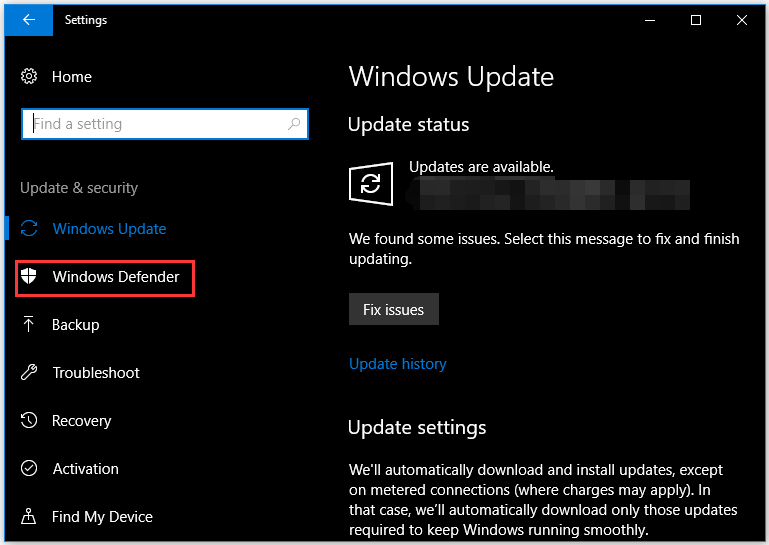
Step 4: Click the Open Windows Defender Security Center button on the right side.
Step 5: Once inside the Windows Defender Security Center window, click the Virus & threat protection option.
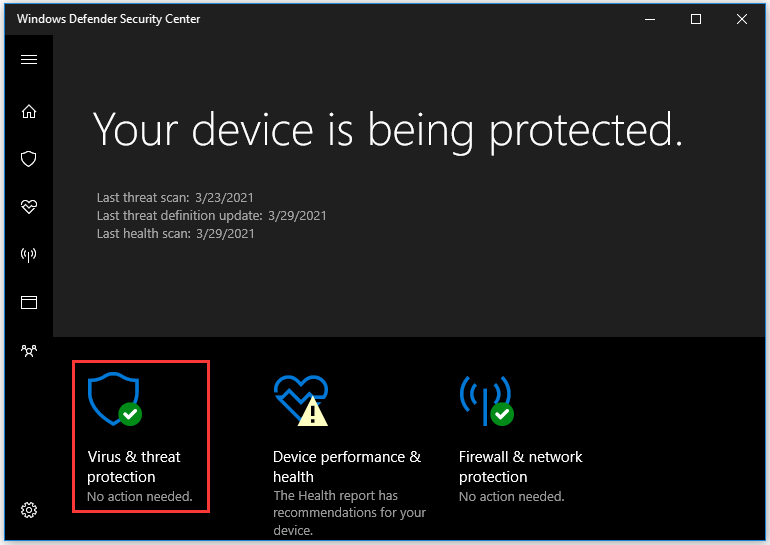
Step 6: Scroll down the window until you see the Virus & threat protection settings option and click it.
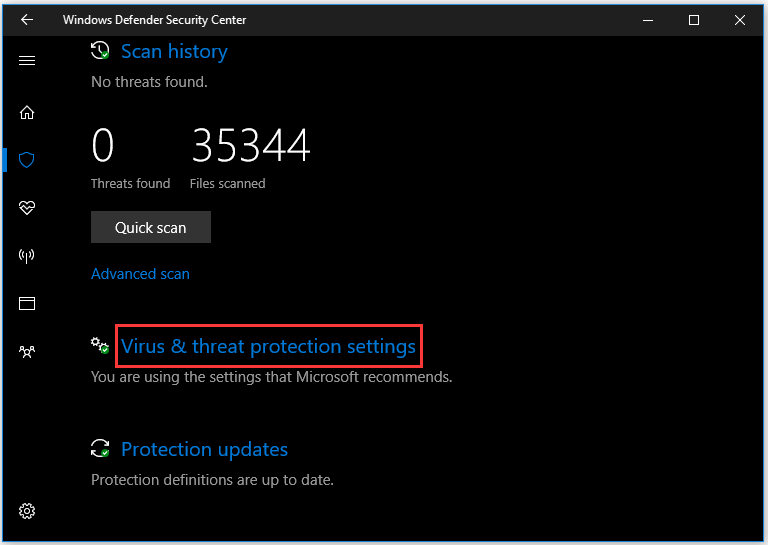
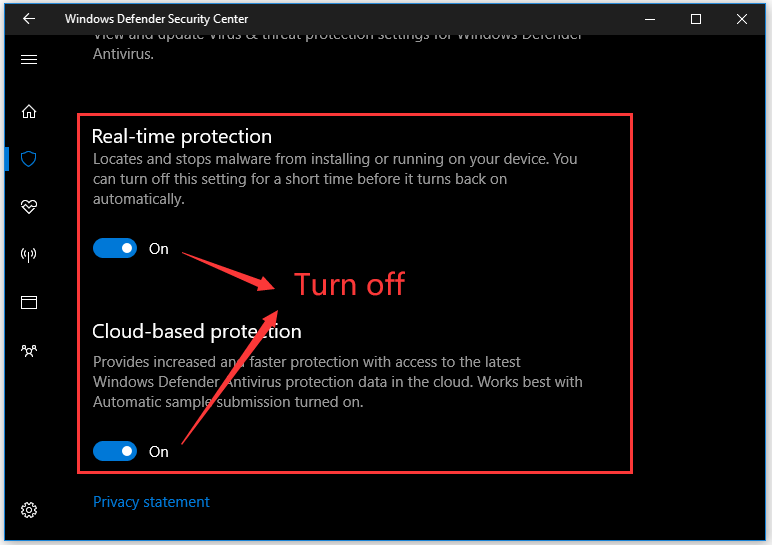
Step 7: Turn off both the options: Real-time protection and Cloud-based protection.
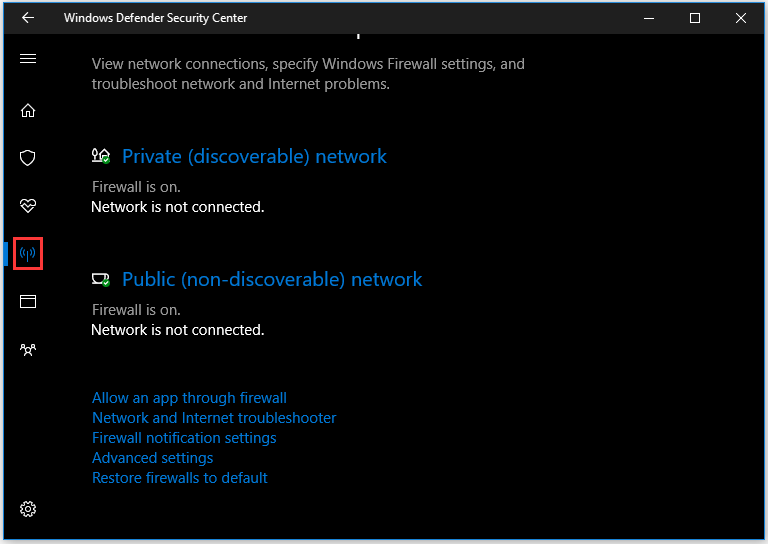
Step 8: Continue to disable Windows Firewall. Click the Firewall & Network Protection icon on the left side of the Windows Defender Security Center window.
Step 9: Click the type of network followed by the word “active” and turn off Windows Firewall.
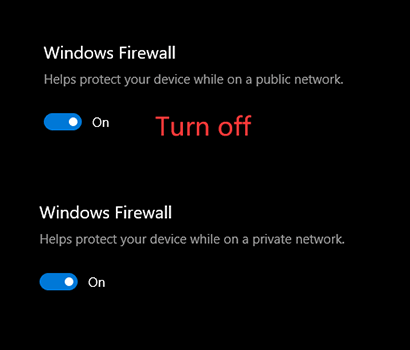
Now Windows Firewall and Windows Defender have been turned off, and you can try launching FiveM again. If the failure happens again, it seems that the interference of the security programs is not the real cause. So, enable repeat the above steps to enable Windows Firewall and Windows Defender and move to the following solutions.
Fix 2: Verify Integrity of Game Files
Now verify the integrity of the GTA V game files to see if there are no corrupt or missing game files.
To verify the integrity of game files, please perform the steps below:
Step 1: Go to your game installation folder, scroll down the folder to find the GTAVlauncher.exe file.
Step 2: Right-click the file and then choose the Create shortcut option.
Step 3: Once the shortcut is created, right-click it and choose the Properties option.
Step 4: On the file properties window, modify the address next to Target – ass “-verify” with space at the end of the address.
Step 5: Click the Apply button to save the modification.
Step 6: Double-click the shortcut and you will see that the shortcut is opened in verification mode. The mode will verify all of the game files and make sure that no game files have been damaged or misplaced.
Step 7: When the verification ends, launch the game through GTAV.exe and wait till the game loads to the Main Menu.
Step 8: Once in the Main Menu, close the game and attempt to open FiveM.
You might be interested in How to Recover Corrupted Files Efficiently to Minimize Losses
Fix 3: Delete temporary files
The third solution to “FiveM not launching” is to remove the temporary files. Here is how to do that:
Step 1: Press Windows + R, type %localappdata% in the Run dialog box, and hit the Enter key.
Step 2: Navigate to the path: FiveM/FiveM Application Data/Cache.
Step 3: Find the folder called priv and delete it.
Step 4: Restart your computer.
Once your system reboots, see if the issue persists.
Fix 4: Copy FiveM.exe File to GTA Folder
Lots of users solved “FiveM not launching” after coping FiveM.exe file to GTA folder. This works because FiveM requires some modules and libraries that exist in the GTA directory. So, give the fix a try.
Fix 5: Disable the integrated GPU
If the above solutions cannot help you, and your computer has two GPUs, please disable the integrated one.
Here is the tutorial:
Step 1: Open Device Manager by right-clicking This PC on the desktop and choosing Manage.
Step 2: On the Computer Management window, choose Device Manager.
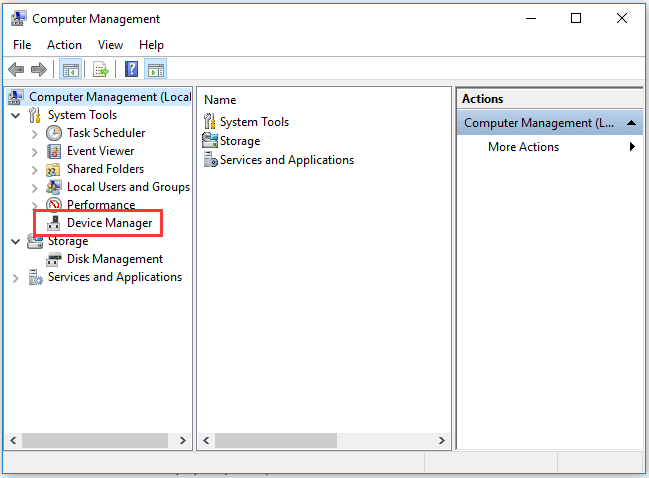
Step 3: Double-click Display adapter and right-click the integrated GPU model that your computer has to choose Disable device.
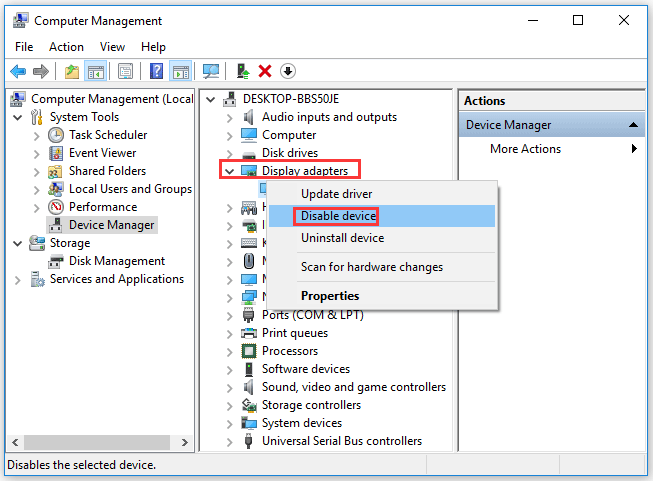
Now your integrated GPU is disabled and you can try relaunching FiveM again.
Hope this article can help you run FiveM successfully again.
FiveM is a medication for Grand Auto enabling you to play multiplayer on customized dedicated servers. However, some players encounter “FiveM not launching”. If you are facing the issue, please read the post from MiniTool Partition Wizard where the reasons and solutions are discussed.
Reasons for “FiveM Not Launching”
Why does FiveM not work? The possible reasons are:
- Security program interference: Windows Firewall or the antivirus on your computer might impede FiveM from working.
- Corrupt files: When the FiveM files contain some corrupt elements, it is impossible to launch FiveM.
- Integrated GPU interference: FiveM will fail to launch when your computer has two graphics processing units and it tries to run the game on the integrated GPU rather than the dedicated one.
Based on these reasons, we have some solutions to “FiveM not working”. Please try them one by one.
Solutions to “FiveM Not Launching”
- Disable security programs
- Verify integrity of game files
- Delete temporary files
- Copy FiveM.exe file to GTA folder
- Disable the integrated GPU
Fix 1: Disable Security Programs
Here mainly shows how to disable Windows Firewall and Windows Defender on Windows 10.
Step 1: Press Windows + X and then choose the Settings option from the menu.
Step 2: Click the Update & security setting on the Settings window.
Step 3: Choose the Windows Defender option on the left side.
Step 4: Click the Open Windows Defender Security Center button on the right side.
Step 5: Once inside the Windows Defender Security Center window, click the Virus & threat protection option.
Step 6: Scroll down the window until you see the Virus & threat protection settings option and click it.
Step 7: Turn off both the options: Real-time protection and Cloud-based protection.
Step 8: Continue to disable Windows Firewall. Click the Firewall & Network Protection icon on the left side of the Windows Defender Security Center window.
Step 9: Click the type of network followed by the word “active” and turn off Windows Firewall.
Now Windows Firewall and Windows Defender have been turned off, and you can try launching FiveM again. If the failure happens again, it seems that the interference of the security programs is not the real cause. So, enable repeat the above steps to enable Windows Firewall and Windows Defender and move to the following solutions.
Fix 2: Verify Integrity of Game Files
Now verify the integrity of the GTA V game files to see if there are no corrupt or missing game files.
To verify the integrity of game files, please perform the steps below:
Step 1: Go to your game installation folder, scroll down the folder to find the GTAVlauncher.exe file.
Step 2: Right-click the file and then choose the Create shortcut option.
Step 3: Once the shortcut is created, right-click it and choose the Properties option.
Step 4: On the file properties window, modify the address next to Target – ass “-verify” with space at the end of the address.
Step 5: Click the Apply button to save the modification.
Step 6: Double-click the shortcut and you will see that the shortcut is opened in verification mode. The mode will verify all of the game files and make sure that no game files have been damaged or misplaced.
Step 7: When the verification ends, launch the game through GTAV.exe and wait till the game loads to the Main Menu.
Step 8: Once in the Main Menu, close the game and attempt to open FiveM.
You might be interested in How to Recover Corrupted Files Efficiently to Minimize Losses
Fix 3: Delete temporary files
The third solution to “FiveM not launching” is to remove the temporary files. Here is how to do that:
Step 1: Press Windows + R, type %localappdata% in the Run dialog box, and hit the Enter key.
Step 2: Navigate to the path: FiveM/FiveM Application Data/Cache.
Step 3: Find the folder called priv and delete it.
Step 4: Restart your computer.
Once your system reboots, see if the issue persists.
Fix 4: Copy FiveM.exe File to GTA Folder
Lots of users solved “FiveM not launching” after coping FiveM.exe file to GTA folder. This works because FiveM requires some modules and libraries that exist in the GTA directory. So, give the fix a try.
Fix 5: Disable the integrated GPU
If the above solutions cannot help you, and your computer has two GPUs, please disable the integrated one.
Here is the tutorial:
Step 1: Open Device Manager by right-clicking This PC on the desktop and choosing Manage.
Step 2: On the Computer Management window, choose Device Manager.
Step 3: Double-click Display adapter and right-click the integrated GPU model that your computer has to choose Disable device.
Now your integrated GPU is disabled and you can try relaunching FiveM again.
Hope this article can help you run FiveM successfully again.
- Мультиплеер FiveM не работает или вылетает
- Безопасна ли установка FiveM?
- Что можно делать в FiveM?
- Установка модов на мультиплеер FiveM
- Бесконечная загрузка
- Не входит на сервер
- Какие DLC нужны для FiveM?
- Как включить тюнинг машин?
- Как общаться во время игры?
- Как использовать трейнер?
- Что делать если не работает трейнер?
- Нужна ли какая-либо таблетка или кряк?
- Ограбления и миссии в FiveM
- Ники игроков в FiveM
- Скины для игроков FiveM
- При запуске GTA 5 FiveM выходит ошибка «Вы находитесь вне сети» или «Требуется активация»
- Ошибка CitizenFX fatal error
- Ошибка входа 202
- Несколько процессов FiveM.exe в диспетчере задач
- Ошибка error code 201
- Ошибка — FiveM.exe точка входа не найдена
- Ошибка: требуется более новая версия Social Club
- Как сделать скриншот в FiveM?
- Ошибка downloading failed CURL code 0x16
- Ошибка CitizenFX Fatal error code 1114
- Застревает на надписи Get yourself a new t20 — crash free
FiveM не изменяет никакие файлы GTA V, в любой момент, Вы можете удалить мультиплеер, не затронув оригинальные файлы игры.
удаление
установка
файлы fivem
- Откройте папку, в которой лежит FiveM.exe и найдите файл components.json
- Кликаем по нему двойным щелчком и в появившемся окне выбираем второй пункт, как на рисунке
Показать - Выберите Блокнот и нажмите кнопку ОК
Показать - Удостоверьтесь, что в файле есть слова «asi:five» и «scripthookv» и если их нет – добавьте, должно получиться так: …
Читать дальше
установка
моды
плагины
plugins
asi
components.json
Добавьте GTA V и FiveM в исключения Вашего брандмауэра.
не входит
Если у Вас ошибка «DLC count mismatch XX DLC mount exist locally, but YY are expected. Please check that you have installed all core game updates and try again.»
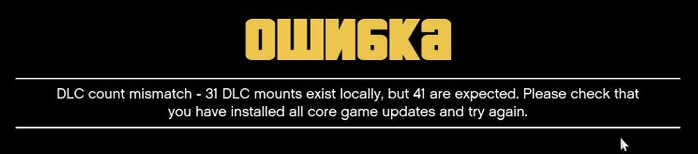
Вообще, нужны все dlc, которые вышли на данный момент.
Убедитесь, что у Вас установлены как минимум следующие DLC: …
Читать дальше
моды
запуск
dlc
- текстовый чат — клавиша T
- голосовой чат — клавиша N (нажать и удерживать)
клавиши
чат
кнопки
К сожалению, мультиплеер FiveM не предоставляет возможности грабить магазины и совершать командные ограбления или выполнять миссии во время игры в мультиплеер.
Нужно понимать, что FiveM – это не GTA Online, там нет ограблений или миссий (заданий, квестов).
Впрочем, так как он поддерживает моды, можно надеяться на умельцев, которые добавят возможность совершать ограбления в Лос Сантосе в мультиплеере FiveM.
моды
ограбления
миссии
грабить
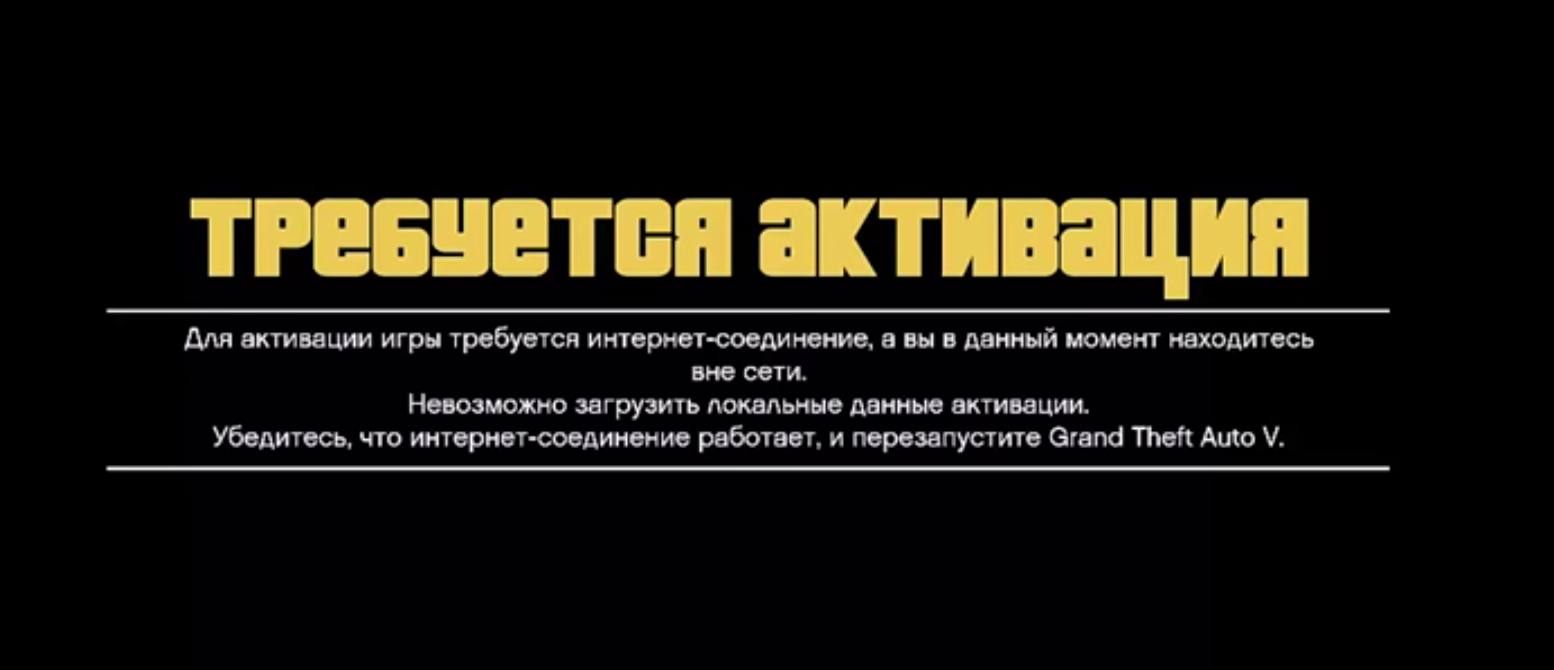
Если при запуске GTA 5 FiveM выходит ошибка «Требуется активация»
Для активации игры требуется интернет-соединение, а вы в данный момент находитесь вне сети. Невозможно загрузить локальные данные активации. Убедитесь, что интернет-соединение работает, и перезапустите Grand Theft Auto V.
…
Читать дальше
требуется активация
social club
ошибка

Чтобы решить проблему с ошибкой входа 202, нужно проделать следующее:
- Скачиваем и устанавливаем Steam
- Если у вас есть учетная запись в Steam — входим, если нет — регистрируемся и входим.
- Аккаунт Steam лучше использовать новый, на котором нет ни одной игры, иначе можете словить бан в Steam!
- Запускаем FiveM.
- В окне FiveM должен появиться новый аккаунт из Steam.
- Выбираем в этом окне Ваш аккаунт Steam и потом всегда входим через него.
- Если требуется — логинимся в Rockstar Games Social Club.
- Поставьте галочку «входить автоматически» в Social Club.
- Profit.
Если ошибка повторяется, и не удается войти, попробуйте …
Читать дальше
не входит
ошибка
steam
rockstar games social club
ошибка входа
Что за процессы скрываются под одним именем? Можно ли их убрать? Не влияют ли они на производительность?
Ответ на вопрос о том, что это за дублирующиеся процессы FiveM.exe прост — это …
Читать дальше
трейнер
моды
плагины
fivem.exe
Если у вас выходит ошибка Social Club: требуется более новая версия Social Club. Возможно имела место ошибка в работе программы обновления. Пожалуйста, покиньте игру и заново установите последнюю весрию Social Club. Установленная версия X.X.X.X. Нажмите ОК для просмотра статьи, которая может помочь вам разрешить проблему. Нажмите ОТМЕНА, чтобы выйти.

Чтобы поиграть в FiveM, Вам нужно установить …
Читать дальше
social club
ошибка входа
Скриншот во время игры через Steam можно сделать с помощью клавиши F12. Он будет сохранен в папке Steamuserdataxxxxxx760remotescreenshots. Не забывайте делиться своими скриншотами в нашей группе Вконтакте
steam
скриншот
Что делать, если у Вас выходит ошибка CitizenFX Fatal error: Could not load dependent module steam_api64.dll. Error code was 1114.
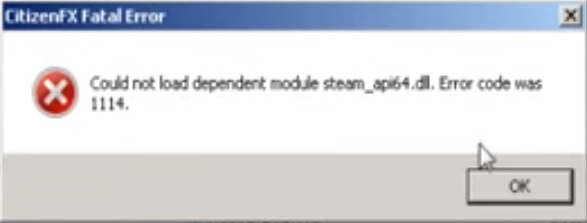
Решить данную проблему можно, установив соответствующий файл. Скачать можно отсюда: …
Читать дальше
ошибка
steam
steam_api64.dll
steam_api.dll