В данной инструкции разберем, как исправить ошибку, когда запуск программы невозможен, так как на компьютере отсутствует d3d12.dll и, где скачать оригинальный файл D3D12.dll (X32-X64 бита) для Windows 11 и 10. Ошибка обычно появляется при запуске таких игр как Farming Simulator 2022, Far Cry 6, Assassin Creed Valhalla, Age of Empires 4, Сivilization 6 и графических программ Adobe Photoshop Premiere.

Библиотека d3d12.dll является частью среды выполнения графики D3D12 и связан с DirectX 12. Виновником ошибки может быть повреждение самого файла d3d12.dll, его отсутствие в системе windows 11/10, видеокарта не поддерживает графику D3D12 и соответственно DirectX 12. Кроме того, если вы используете Windows 7 и игра требует наличие DirectX 12, то данная ОС Win 7 не поддерживает DirectX 12, нужно обновиться или установить минимум Windows 10.
! Всё о DirectX для Win 10/8.1/7/XP и Server
1. Скачать оригинальный D3D12.dll X86 и X64
Не рекомендую скачивать со сторонних сайтов различные DLL файлы, так как имеется большая вероятность, что это может быть вирус. В этом случае, имеется сайт winbindex, который скачивает прямиком библиотеки с манифеста обновлений Windows.
- Перейдите на сайт winbindex
- Скачайте d3d12.dll для Windows 11 или 10
- Должны скачать два файла X86 и X64
- Далее вставьте файлы по путям
- Файл d3d12.dll X86 вставить по пути C:WindowsSystem32
- d3d12.dll X64 по пути C:WindowsSysWOW64
! Как пользоваться winbindex

2. Обновить Windows 11/10
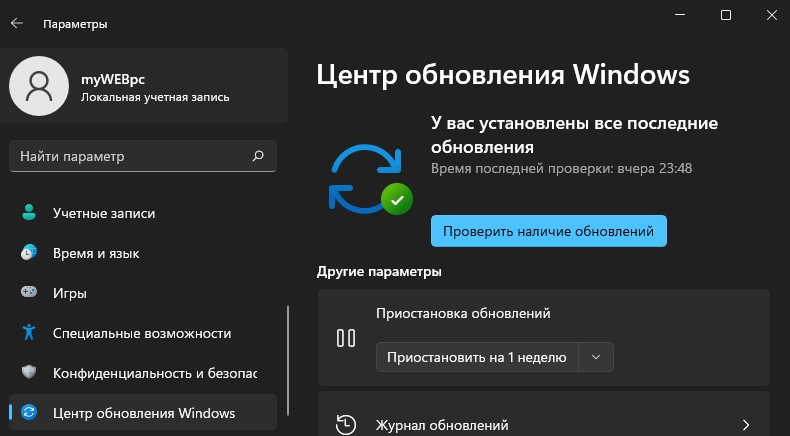
DirectX 12 предустановлен в Windows 11 и 10. По этой причине нет отдельного официального установщика DirectX 12, чтобы его скачать и установить. Перейдите в Центр обновления Windows и установите, обновите все ожидающие обновления, если таковы имеются.
3. Восстановить поврежденный d3d12.dll
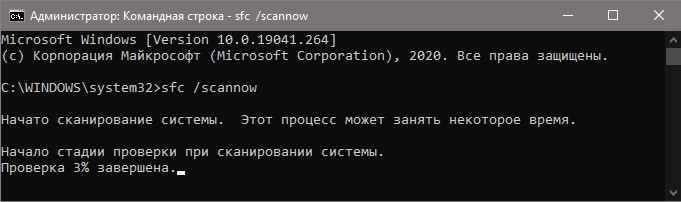
Так как библиотека является системной и, если она повреждена, то автоматическая проверка целостности системы поможет исправить ошибку, когда d3d12.dll отсутствует. Для этого, запустите командную строку от имени администратора и введите ниже команды по очереди, нажимая Enter после каждой.
sfc /scannowDISM /Online /Cleanup-Image /RestoreHealth
Смотрите еще:
- Скачать d3dx11.dll и исправить ошибку в Windows 11/10/7
- Отсутствует d3dx9_42.dll в Windows 10/7 — Решение
- Отсутствует d3dx9_27.dll — Запуск программы невозможен
- Скачать d3d9.dll и исправить ошибку в Windows
- Скачать d3dx9_43.dll для Windows 10/8/7
[ Telegram | Поддержать ]

d3d12.dll — это системный компонент, который входит в состав Microsoft DirectX. Программное обеспечение используется для правильной отрисовки трехмерной графики в играх и, если таковая отсутствует, вы столкнетесь с ошибкой, когда ПО не запускается.
Что это за файл?
Операционная система Windows имеет несколько динамических библиотек ссылок, каждая из которых ориентирована под конкретные задачи. В нашем случае это DirectX, а значит, речь идет об отрисовке 3D-графики. Если мы работаем с пиратской игрой, например, Farming Simulator 2022, проблема решается путем ручной установки и регистрации файла.
Как установить
Переходим к практической части статьи. Рассмотрим конкретную пошаговую инструкцию:
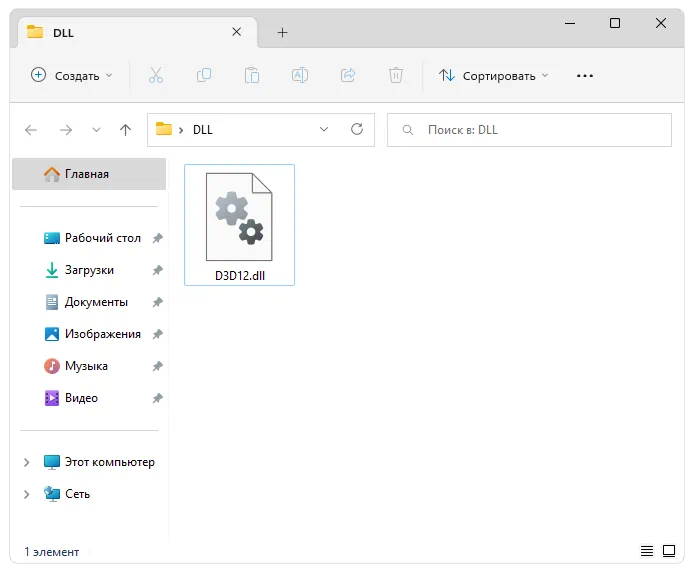
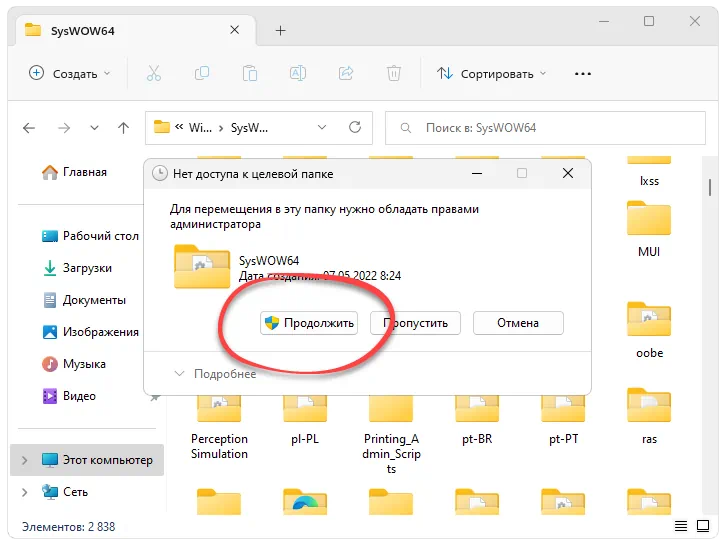
- Скачиваем отсутствующий файл, распаковываем содержимое архива и помещаем DLL в один из системных каталогов. Появится еще одно окно, в которое мы должны утвердить доступ к полномочиям администратора.
Для Windows 32 Bit: C:WindowsSystem32
Для Windows 64 Bit: C:WindowsSysWOW64
- Теперь переходим к поисковому инструменту, находим командную строку, делаем правый клик и осуществляем запуск с полномочиями администратора. При помощи оператора
cdпроизводим переход к той папке, в которую предварительно копировали DLL. Дальше производится и сама регистрация. Для этого наберитеregsvr32 d3d12.dll, а затем нажмите «Enter».
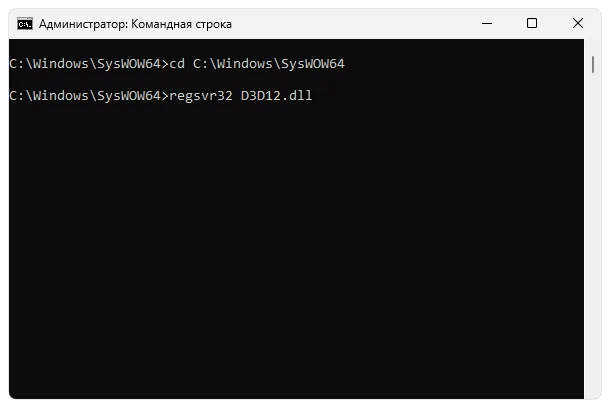
- Обязательно перезагружаем операционную систему и переходим к попытке запуска игры только после следующего старта компьютера.
Если вы не знаете, как определить разрядность установленной операционной системы, просто воспользуйтесь сочетанием горячих клавиш «Win» + «Pause».
Скачать
Исполняемые файлы весит достаточно мало, поэтому скачивание предусмотрено по прямой ссылке.
| Активация: | Бесплатно |
| Разработчик: | Microsoft |
| Платформа: | Windows XP, 7, 8, 10, 11 |
d3d12.dll
Users are often perplexed because programs that only worked a short time ago don’t start. For example, Photoshop and Skype were running, but now the error «The program can’t start because d3d12.dll is missing from your computer» appears.
What should I do? How do I get it back? How and where to download d3d12.dll and where to put it? All your questions are answered here!
What is d3d12.dll?
«d3d12.dll is missing» is a reasonably standard error on Windows PCs. The most common occurrence of the problem is the installation of a Windows update and a failed installation of some program.:
A .dll file (Dynamic Link Library) functions when a particular program needs this .dll file. If it is damaged/missing, users see, for example, the error d3d12.dll, which leads to crashes. It is worth adding that d3d12.dll is the file used in the Visual C++ Redistributable for Visual Studio 2015.:
When a missing file notification appears, users start searching to download d3d12.dll. It is better to do it in a verified place, like the DLL Kit website, where there are no threats or viruses.:
Most common errors with d3d12.dll file on Windows
- d3d12.dll file is deleted/damaged. The main reason is an important .dll file for the application has been deleted or damaged. You need to restore the file or download it again.
- Error in Adobe’s Creative Cloud. A Visual C ++ breakdown causes the problem.
- Visual Studio 2015 files are corrupted/missing. The .dll file is missing on the PC or corrupted by an application/system/virus.
- The PC system is infected with viruses. Malware and viruses always corrupt the d3d12.dll file.
- It has damaged system files. Errors and damage occur after improperly rebooting Windows and working with infected programs and applications.
Other common d3d12.dll errors include:
- “d3d12.dll is missing”
- “d3d12.dll error loading”
- “d3d12.dll crash”
- “d3d12.dll was not found”
- “d3d12.dll could not be located”
- “d3d12.dll Access Violation”
- “The procedure entry point d3d12.dll error”
- “Cannot find d3d12.dll”
- “Cannot register d3d12.dll”
Method 1: Download d3d12.dll automatically
Here you can search through available versions of d3d12.dll from the list below. Users can select the correct file and press the «Download» link.
Not sure what version of d3d12.dll you need? Don’t worry; use the automatic method to solve the problem or just read the article below.
DOWNLOAD
Method 2: Download d3d12.dll and install manually
For this method, download d3d12.dll on our cite and use the command line to register the missing d3d12.dll:
- Press the Windows and R keys on your keyboard simultaneously — the Run window will appear — type cmd — press Ctrl+Shift+Enter — a command line with administrator privileges will appear in front of you.
- When prompted, you need to allow the command line to make changes, so click Yes.
- Now delete the registry file (type or copy the command regsvr32 /u d3d12.dll and then press Enter).
- Now register the file: type the command regsvr32 d3d12.dll and then press Enter.
- Close the command line and run the application.
d3d12.dll, 14 available versions
| Bits & Version | File size | Language | Description | Checksums | |
|---|---|---|---|---|---|
|
64bit 10.0.19041.423 |
1.84 MB | U.S. English | Direct3D 12 Runtime |
MD5 SHA1 |
|
|
32bit 10.0.19041.423 |
1.52 MB | U.S. English | Direct3D 12 Runtime |
MD5 SHA1 |
|
|
32bit 10.0.19041.1 |
1.52 MB | U.S. English | Direct3D 12 Runtime |
MD5 SHA1 |
|
|
32bit 10.0.18362.329 |
1.46 MB | U.S. English | Direct3D 12 Runtime |
MD5 SHA1 |
|
|
64bit 10.0.18362.267 |
1.8 MB | U.S. English | Direct3D 12 Runtime |
MD5 SHA1 |
|
|
32bit 10.0.18362.1 |
1.46 MB | U.S. English | Direct3D 12 Runtime |
MD5 SHA1 |
|
|
64bit 10.0.18362.1 |
1.8 MB | U.S. English | Direct3D 12 Runtime |
MD5 SHA1 |
|
|
64bit 10.0.17763.404 |
1.76 MB | U.S. English | Direct3D 12 Runtime |
MD5 SHA1 |
|
|
32bit 10.0.15063.0 |
0.95 MB | U.S. English | Direct3D 12 Runtime |
MD5 SHA1 |
|
|
64bit 10.0.15063.0 |
1.16 MB | U.S. English | Direct3D 12 Runtime |
MD5 SHA1 |
|
|
32bit 10.0.14393.0 |
0.77 MB | U.S. English | Direct3D 12 Runtime |
MD5 SHA1 |
|
|
64bit 10.0.14393.0 |
0.96 MB | U.S. English | Direct3D 12 Runtime |
MD5 SHA1 |
|
|
64bit 10.0.10586.0 |
0.86 MB | U.S. English | Direct3D 12 Runtime |
MD5 SHA1 |
|
|
32bit 10.0.10586.0 |
0.68 MB | U.S. English | Direct3D 12 Runtime |
MD5 SHA1 |
What is the correct version of d3d12.dll?
Look at the descriptions in the table where you can choose the right file. There are versions for 64-bit or 32-bit Windows and the languages used in them. Choose those dll files whose language is identical to the language of the program itself. Load the latest versions of dll-files for your program.
Where should you place d3d12.dll?
The error «d3d12.dll is missing» will be fixed if you move the file to the application or game installation folder. You can also move d3d12.dll to the Windows system directory.
If this method didn’t help you, use the following one.
Method 3: Reinstall Visual C++ Redistributable for Visual Studio 2015
We recommend reinstalling the Visual C++ Redistributable for Visual Studio 2015. Please, adhere to Microsoft’s recommendations to install the missing files correctly.
It is recommended to download the program from the official Microsoft website:
- You need to download the Microsoft Visual C++ Redistributable from the official Microsoft website.
- Select the file for your Windows version: vc_redist.x64.exe for the 64-bit version or vc_redist.x86.exe for the 32-bit operating system. Check the box next to the file and click Next.
- Open the file — read Microsoft software licensing terms and conditions — agree — choose Install.
If this method didn’t help you, use the following one.
Some Visual C++ runtime library files list
- mfc140u.dll
- mfcm140.dll
- mfcm140u.dll
- mfc140chs.dll
- mfc140cht.dll
- ucrtbase.dll
- vcruntime140.dll
- msvcp140.dll
- concrt140.dll
- vccorlib140.dll
- vcamp140.dll
Here is some solutions to fix the «d3d12.dll is Missing» error. Please, read all instructions and follow them to successfully add a specific version of the .dll file to Windows to restore the d3d12.dll problem.
Method 4: Run SFC scan (System File Checker)
The System File Checker (SFC scan) is an instrument that is available in Windows. The device is considered the fastest way to fix corrupt system files automatically. To get started, you should run it:
- Press Windows+R on your keyboard — Run utility will appear — type cmd — now press Ctrl+Shift+Enter to open the command line as an administrator.
- When prompted, you need to give the command line permission to make changes. Type the command sfc /scannow and press Enter.
- System File Checker will scan your PC quickly. After that, all errors will appear, and you should automatically fix them thanks to the SFC command.
If this method didn’t help you, use the following one.
Method 5: Update Windows to the latest release
Even a simple Windows update can help with the problem. By updating your operating system to the latest version, all d3d12.dll errors may disappear:
- Open Settings from the Start menu or by the Windows+I key combination.
- Go to Update & Security.
- In the Windows Update tab, click on Check for updates.
- The new update is found — Install now.
If this method didn’t help you, use the following one.
Method 6: Reinstall the required app
When none of the methods can help, the final solution may be to reinstall the app after uninstalling it completely:
- Go to Settings using the Start menu or by pressing Windows+I.
- Click on Apps.
- Find the required problem application — click it once — in its settings, select the Uninstall option, and continue following the demonstrated instructions.
- Reboot the software and reinstall it from a verified source.
If this method didn’t help you, use the following one.
Summary
Following all the listed methods, the user can quickly fix the error «d3d12.dll is missing». Now in your PC, the Windows operating system is fully ready to run any application before, without the appearance of errors associated with DLL files.