узелок на память.
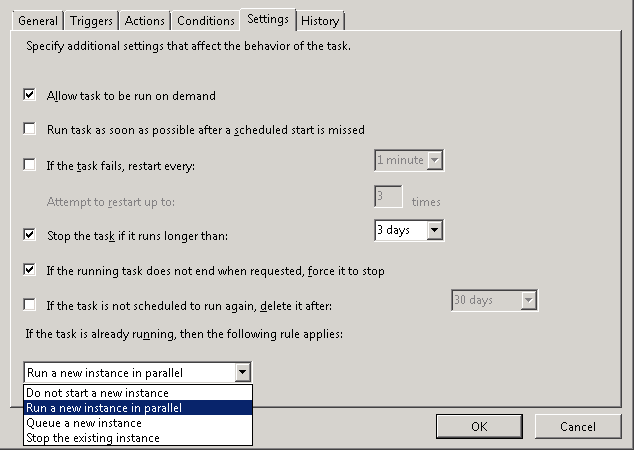
Столкнулся недавно с ошибкой 2147750687 в логах при попытке автоматического запуска запланированного задания в Windows Server 2008. Дело в том, что в данном задании установлен параметр «Не запускать второй экземпляр задания» («Do not start a new instance» условия «If the task is already running, then the following rule applies:» на вкладке Settings), а так как у меня выполнялись несколько однотипных vbs-скриптов в разное время и время выполнения предыдущего скрипта превысило интервал между запуском этих заданий то текущий экземпляр программы wscript уже не смог запуститься. Ошибка описана в Winerror.h:
# as an HRESULT: Severity: FAILURE (1), FACILITY_WIN32 (0x7), Code 0x4dd
# for decimal 1245 / hex 0x4dd
ERROR_NOT_LOGGED_ON
# The operation being requested was not performed because the
# user has not logged on to the network.
# The specified service does not exist.
Также советую проверить параметр выполнения задания при не выполненном входе в систему пользователя, от имени которого запускается задание («Run whether user is logged or not») и снята ли галка «Do not store password. The task will only have access to local computer resources».
Rating: 5.0/5 (1 vote cast)
Здравствуйте! Вот журнал задания из планировщика задач, в котором есть запуск двух экземпляров. Подскажите, пожалуйста, почему так происходит и как избавиться от ошибки.
Уровень Дата и время Код события Категория задачи Рабочий код Код корреляции
Сведения 04.04.2011 22:11:12 102 Задача завершена (2) aeedef8b-f9b0-4460-8dec-f639c955e980
«Планировщик заданий успешно завершил экземпляр «»{AEEDEF8B-F9B0-4460-8DEC-F639C955E980}»» задачи «»Первая копия папки for_users»» для пользователя «»****Администратор»».»
Сведения 04.04.2011 22:11:12 201 Действие выполнено
(2) aeedef8b-f9b0-4460-8dec-f639c955e980 «Планировщик заданий успешно завершил выполнение задания «»Первая копия папки for_users»» ,экземпляра «»{AEEDEF8B-F9B0-4460-8DEC-F639C955E980}»»
, действия «»C:WindowsSYSTEM32cmd.exe»» с кодом возврата 11.»
Сведения 04.04.2011 22:00:00 129 Обработка созданной задачи Сведения
00000000-0000-0000-0000-000000000000 «Планировщик заданий запустил задачу «»Первая копия папки for_users»» (экземпляр «»C:WindowsSYSTEM32cmd.exe»») с идентификатором процесса 4172.»
Сведения 04.04.2011 22:00:00 200 Действие запущено (1) aeedef8b-f9b0-4460-8dec-f639c955e980
«Планировщик заданий запустил действие «»D:backup.bat»» в экземпляре «»{AEEDEF8B-F9B0-4460-8DEC-F639C955E980}»» задачи «»Первая копия папки for_users»».»
Ошибка 04.04.2011 22:00:00 101 Не удается запустить задачу
Сбой запуска 00000000-0000-0000-0000-000000000000 «Планировщику заданий не удается запустить задачу «»Первая копия папки for_users»» для пользователя «»*****Администратор»». Дополнительные
сведения: значение ошибки: 2147750687.»
Предупреждение 04.04.2011 22:00:00 322 Запрос на запуск проигнорирован, экземпляр уже выполняется Сведения
aeedef8b-f9b0-4460-8dec-f639c955e980 «Планировщик заданий не запустил задачу «»Первая копия папки for_users»», так как уже запущен экземпляр «»{AEEDEF8B-F9B0-4460-8DEC-F639C955E980}»» той же задачи.»
Сведения 04.04.2011 22:00:00 100 Задача запущена (1) aeedef8b-f9b0-4460-8dec-f639c955e980
«Планировщик заданий запустил экземпляр «»{AEEDEF8B-F9B0-4460-8DEC-F639C955E980}»» задачи «»Первая копия папки for_users»» для пользователя «»****Администратор»».»
Сведения 04.04.2011 22:00:00 319 Обработчик задач получил сообщение с запросом на запуск задачи
(1) 00000000-0000-0000-0000-000000000000 «Обработчик задач «»S-1-5-21-436374069-1659004503-725345543-500:ERGOLTDАдминистратор:Password:»» получил от службы планировщика заданий запрос
на запуск задачи «»Первая копия папки for_users»».»
Сведения 04.04.2011 22:00:00 107 Задача вызвана планировщиком Сведения
c1b15e0e-e367-4c2b-b9e9-934e4ddc7539 «Планировщик заданий запустил экземпляр «»{C1B15E0E-E367-4C2B-B9E9-934E4DDC7539}»» задачи «»Первая копия папки for_users»» в связи с выполнением условия,
определенного в триггере времени.»
Сведения 04.04.2011 22:00:00 107 Задача вызвана планировщиком Сведения
aeedef8b-f9b0-4460-8dec-f639c955e980 «Планировщик заданий запустил экземпляр «»{AEEDEF8B-F9B0-4460-8DEC-F639C955E980}»» задачи «»Первая копия папки for_users»» в связи с выполнением условия,
определенного в триггере времени.»
Спасибо!
-
Изменен тип
18 апреля 2011 г. 6:31
давность и отсутствие активности в теме
Опубликовано 10.08.2021
На одном из серверов работающих под Windows была обнаружена проблема, запланированные задачи просто не выполнялись, при этом журнал работы планировщика пестрил ошибками Error Value: 2147750687, совпадающая с временем старта задания.
роблема связана с тем что задача выполняется довольно часто, а так как задача была настроена на выполнение всего одного экземпляра приложения, то задача выполнялась только первый раз после чего сыпала ошибками.
Вот пример полного кода ошибки:
Log Name: Microsoft-Windows-TaskScheduler/Operational
Source: Microsoft-Windows-TaskScheduler
Date: 24.11.2012 7:37:01
Event ID: 101
Task Category: Task Start Failed
Level: Error
Keywords: (1)
User: SYSTEM
Computer: server.g-soft.info
Task Scheduler failed to start «MirrorTask» task for user «server.g-soft.infoAdministrator». Additional Data: Error Value: 2147750687.
Проблему можно решить двумя способами:
1) Уменьшить частоту повтора задания
2) Изменения поведения задачи
- Do not start a new instance (Опция по умолчанию: Не запускать новый экземпляр.)
- Run a new instance in parallel (Запускать новый экземпляр задания.)
- Queue a new instance (Ставить новый экземпляр задания в очередь.)
- Stop the existing instance (Остановка текущего задания)
- Remove From My Forums
-
Question
-
Please need help, i have been struggling with for days now. I have two seperate jobs scheduled using the task scheduler 10 minutes apart. The second job however has 2 additional triggers added in total 3.
The first trigger is to START the services.
The second trigger is based on the first trigger (kicks off when the event id =102 which is TASK COMPLETED)
The third trigger is based off the the second trigger ( kicks off when the event id =102 for trigger 3)
But when the task is scheduled its throwing the following error: Additional Data: Error Value: 2147750687.
Please need help.
When i’m adding the trigger to a task i’m using the custom instead of basic as i wanted to add two event id’s 102 and 314 task completed and task engine idle before the second trigger kicks in, but when i try the custom am getting the following error message:
An Error occurred for task START HYPERION. Error Message: The following error was reported. The request is not supported. Please advice. When i choose the basic option it wont let me add two event id’s
Thanks
-
Edited by
Monday, July 13, 2015 5:25 PM
ss
-
Edited by
Answers
-
Hi,
Thanks a lot for your post, would you please check if the KB2617046 as below helped:
https://support.microsoft.com/en-us/kb/2617046
Feel free to post back if any issue.
Best Regards,
Elaine
Please remember to mark the replies as answers if they help and unmark them if they provide no help. If you have feedback for TechNet Subscriber Support, contact tnmff@microsoft.com.
-
Proposed as answer by
Elaine Jing
Monday, July 27, 2015 7:35 AM -
Marked as answer by
Elaine Jing
Thursday, July 30, 2015 1:54 AM
-
Proposed as answer by
- Remove From My Forums
-
Question
-
Please need help, i have been struggling with for days now. I have two seperate jobs scheduled using the task scheduler 10 minutes apart. The second job however has 2 additional triggers added in total 3.
The first trigger is to START the services.
The second trigger is based on the first trigger (kicks off when the event id =102 which is TASK COMPLETED)
The third trigger is based off the the second trigger ( kicks off when the event id =102 for trigger 3)
But when the task is scheduled its throwing the following error: Additional Data: Error Value: 2147750687.
Please need help.
When i’m adding the trigger to a task i’m using the custom instead of basic as i wanted to add two event id’s 102 and 314 task completed and task engine idle before the second trigger kicks in, but when i try the custom am getting the following error message:
An Error occurred for task START HYPERION. Error Message: The following error was reported. The request is not supported. Please advice. When i choose the basic option it wont let me add two event id’s
Thanks
-
Edited by
Monday, July 13, 2015 5:25 PM
ss
-
Edited by
Answers
-
Hi,
Thanks a lot for your post, would you please check if the KB2617046 as below helped:
https://support.microsoft.com/en-us/kb/2617046
Feel free to post back if any issue.
Best Regards,
Elaine
Please remember to mark the replies as answers if they help and unmark them if they provide no help. If you have feedback for TechNet Subscriber Support, contact tnmff@microsoft.com.
-
Proposed as answer by
Elaine Jing
Monday, July 27, 2015 7:35 AM -
Marked as answer by
Elaine Jing
Thursday, July 30, 2015 1:54 AM
-
Proposed as answer by
- Remove From My Forums
-
Question
-
Hi ,
I have created a task scheduler in my windows 2008 r2 server . This task runs every 10 mins . It executes a batch file every 10 mins. But this task scheduler gets hang a lot of times. And i am not able to kill the process too. The only option left
for me is to restart the server. Kindly help. I also tried applying hot fix — 442971 but it displayed an error stating not suitable to my server.
Answers
-
Hi,
In general, the event ID 101 is due the task Scheduler failed to start the task for user. Firstly, I recommend you to click the «Display All Running Tasks» in the right pane of the Task Scheduler to see whether that task is shown as still running or not.
Besides, would you please tell more details about the task you have configured? Had you set the task as below?
Settings: Daily, recur every 1 day
Advanced Settings: Repeat task every: 10 minutes, for a duration of: 1 day
If yes, please change as follow to see if the issue persists:
Settings: One time
Advanced Settings: Repeat task every: 15 minutes, for a duration of: indefinitely
Besides, which user account you have chosen to run the task? If it is a domain account, please make sure that the time is sync.
Best regards,
Susie-
Proposed as answer by
Tuesday, May 13, 2014 7:36 AM
-
Marked as answer by
Susie Long
Wednesday, May 14, 2014 8:27 AM
-
Proposed as answer by
- Remove From My Forums
-
Question
-
Hi ,
I have created a task scheduler in my windows 2008 r2 server . This task runs every 10 mins . It executes a batch file every 10 mins. But this task scheduler gets hang a lot of times. And i am not able to kill the process too. The only option left
for me is to restart the server. Kindly help. I also tried applying hot fix — 442971 but it displayed an error stating not suitable to my server.
Answers
-
Hi,
In general, the event ID 101 is due the task Scheduler failed to start the task for user. Firstly, I recommend you to click the «Display All Running Tasks» in the right pane of the Task Scheduler to see whether that task is shown as still running or not.
Besides, would you please tell more details about the task you have configured? Had you set the task as below?
Settings: Daily, recur every 1 day
Advanced Settings: Repeat task every: 10 minutes, for a duration of: 1 day
If yes, please change as follow to see if the issue persists:
Settings: One time
Advanced Settings: Repeat task every: 15 minutes, for a duration of: indefinitely
Besides, which user account you have chosen to run the task? If it is a domain account, please make sure that the time is sync.
Best regards,
Susie-
Proposed as answer by
Tuesday, May 13, 2014 7:36 AM
-
Marked as answer by
Susie Long
Wednesday, May 14, 2014 8:27 AM
-
Proposed as answer by