Pretty new to Django. Working through a second project following the Polls tutorial on Django website. Previous effort went well, albeit simple. This time around encountering problems accessing admin login.
I have created a superuser and using those credentials, when I try to login to http://127.0.0.1:8000/admin/login/?next=/admin/ I get the following error:
Forbidden (403)
CSRF verification failed. Request aborted.
Reason given for failure:
    CSRF cookie not set.
Looking at this and this, most answers either detail clearing browser cookies (did that), include 'django.middleware.csrf.CsrfViewMiddleware' in your middleware (which I do), or creating an exemption or workaround.
1) My question is why the admin portal does not seem to work now, but it did for my previous project and I am following the same steps?
2) Shouldn’t the properties for the admin panel be inherited through the project initiation?
3) How would I set the CSRF for admin when the documentation appears to state that the CSRF middleware is activated by default?
Thanks for any help.
settings.py
"""
Django settings for aptly project.

Generated by 'django-admin startproject' using Django 1.9.7.

For more information on this file, see
https://docs.djangoproject.com/en/1.9/topics/settings/

For the full list of settings and their values, see
https://docs.djangoproject.com/en/1.9/ref/settings/
"""

import os
import dj_database_url

from .secret_settings import *

# Build paths inside the project like this: os.path.join(BASE_DIR, ...)
BASE_DIR = os.path.dirname(os.path.dirname(__file__))

PROJECT_ROOT = os.path.abspath(os.path.dirname(__file__))
PROJECT_DIR = os.path.join(PROJECT_ROOT,'../search')


# Quick-start development settings - unsuitable for production
# See https://docs.djangoproject.com/en/1.9/howto/deployment/checklist/

# SECURITY WARNING: don't run with debug turned on in production!
DEBUG = True

ALLOWED_HOSTS = []


# Application definition

INSTALLED_APPS = [
    'django.contrib.admin',
    'django.contrib.auth',
    'django.contrib.contenttypes',
    'django.contrib.sessions',
    'django.contrib.messages',
    'django.contrib.staticfiles',
    'search',
]

MIDDLEWARE_CLASSES = [
    'django.middleware.security.SecurityMiddleware',
    'django.contrib.sessions.middleware.SessionMiddleware',
    'django.middleware.common.CommonMiddleware',
    'django.middleware.csrf.CsrfViewMiddleware',
    'django.contrib.auth.middleware.AuthenticationMiddleware',
    'django.contrib.auth.middleware.SessionAuthenticationMiddleware',
    'django.contrib.messages.middleware.MessageMiddleware',
    'django.middleware.clickjacking.XFrameOptionsMiddleware',
]

ROOT_URLCONF = 'aptly.urls'

TEMPLATES = [
    {
        'BACKEND': 'django.template.backends.django.DjangoTemplates',
        'DIRS': [],
        'APP_DIRS': True,
        'OPTIONS': {
            'context_processors': [
                'django.template.context_processors.debug',
                'django.template.context_processors.request',
                'django.contrib.auth.context_processors.auth',
                'django.contrib.messages.context_processors.messages',
            ],
        },
    },
]

WSGI_APPLICATION = 'aptly.wsgi.application'


# Database
# https://docs.djangoproject.com/en/1.9/ref/settings/#databases

DATABASES = {
    'default': {
        "ENGINE": "django.db.backends.postgresql_psycopg2",
        "NAME": "db_name",
        "USER": "me",
        "PASSWORD": "",
        "HOST": "localhost",
        "PORT": "",
    }
}

# Password validation
# https://docs.djangoproject.com/en/1.9/ref/settings/#auth-password-validators

AUTH_PASSWORD_VALIDATORS = [
    {
        'NAME': 'django.contrib.auth.password_validation.UserAttributeSimilarityValidator',
    },
    {
        'NAME': 'django.contrib.auth.password_validation.MinimumLengthValidator',
    },
    {
        'NAME': 'django.contrib.auth.password_validation.CommonPasswordValidator',
    },
    {
        'NAME': 'django.contrib.auth.password_validation.NumericPasswordValidator',
    },
]


# Internationalization
# https://docs.djangoproject.com/en/1.9/topics/i18n/

LANGUAGE_CODE = 'en-us'

TIME_ZONE = 'UTC'

USE_I18N = True

USE_L10N = True

USE_TZ = True


# Static files (CSS, JavaScript, Images)
# https://docs.djangoproject.com/en/1.9/howto/static-files/

STATIC_URL = '/static/'
STATIC_ROOT = os.path.join(BASE_DIR, 'static_root')

# Extra places for collectstatic to find static files.
STATICFILES_DIRS = (
    os.path.join(PROJECT_DIR, 'static'),
)

# Simplified static file serving.
# https://warehouse.python.org/project/whitenoise/

STATICFILES_STORAGE = 'whitenoise.django.GzipManifestStaticFilesStorage'

#DATABASES['default'] = dj_database_url.config()
urls.py
from django.conf.urls import patterns, include, url
from django.contrib import admin
from . import views

urlpatterns = [
    url(r'^$', views.index, name='index'),
    url(r'^admin/', admin.site.urls),
]
Directory
project
-aptly
--settings.py
--urls.py
--wsgi.py
-search
--templates
---index.html
--models.py
--urls.py
--views.py
manage.py
This answer is for people that may encounter this same problem in the future.
The CSRF {{csrf_token}} template tag that is required for forms in Django prevent against Cross Site Request Forgeries. CSRF makes it possible for a malicious site that has been visited by a client’s browser to make requests to your own server. Hence the csrf_token provided by django makes it simple for your django server and site to be protected against this type of malicious attack. If your form is not protected by csrf_token, django returns a 403 forbidden page. This is a form of protection for your website especially when the token wasn’t left out intentionally.
But there are scenarios where a django site would not want to protect its forms using the csrf_token. For instance, I developed a USSD application and a view function is required to receive a POST request from the USSD API. We should note that the POST request was not from a form on the client hence the risk of CSRF impossible, since a malicious site cannot submit requests. The POST request is received when a user dials a USSD code and not when a form is submitted.
In other words, there are situations where a function will need to get a POST request and there would not be the need of {{csrf_token}}.
Django provides us with a decorator @csrf_exempt. This decorator marks a view as being exempt from the protection ensured by the middleware.
from django.views.decorators.csrf import csrf_exempt
from django.http import HttpResponse

@csrf_exempt
def my_view(request):
    return HttpResponse('Hello world')
Django also provides another decorator that performs the same function with {{csrf_token}}, but it doesn’t reject incoming request. This decorator is @requires_csrf_token. For instance:
@requires_csrf_token
def my_view(request):
    c = {}
    # ...
    return render(request, "a_template.html", c)
The last decorator that will be mentioned in this post does exactly the same thing as {{csrf_token}} and it is called @csrf_protect. However, the use of this decorator by itself is not best practice because you might forget to add it to your views. For instance:
@csrf_protect
def my_view(request):
    c = {}
    # ...
    return render(request, "a_template.html", c)
Below are some links that will guide and explain better.
https://docs.djangoproject.com/en/1.7/ref/contrib/csrf/#module-django.views.decorators.csrf
https://docs.djangoproject.com/en/1.7/ref/contrib/csrf/
http://www.squarefree.com/securitytips/web-developers.html#CSRF
This answer is for people that may encounter this same problem in the future.
The CSRF {{csrf_token}} template tag that is required for forms in Django prevent against Cross Site Request Forgeries. CSRF makes it possible for a malicious site that has been visited by a client’s browser to make requests to your own server. Hence the csrf_token provided by django makes it simple for your django server and site to be protected against this type of malicious attack. If your form is not protected by csrf_token, django returns a 403 forbidden page. This is a form of protection for your website especially when the token wasn’t left out intentionally.
But there are scenarios where a django site would not want to protect its forms using the csrf_token. For instance, I developed a USSD application and a view function is required to receive a POST request from the USSD API. We should note that the POST request was not from a form on the client hence the risk of CSRF impossible, since a malicious site cannot submit requests. The POST request is received when a user dials a USSD code and not when a form is submitted.
In other words, there are situations where a function will need to get a POST request and there would not be the need of {{csrf_token}}.
Django provides us with a decorator @csrf_exempt. This decorator marks a view as being exempt from the protection ensured by the middleware.
from django.views.decorators.csrf import csrf_exempt
from django.http import HttpResponse

@csrf_exempt
def my_view(request):
    return HttpResponse('Hello world')
Django also provides another decorator that performs the same function with {{csrf_token}}, but it doesn’t reject incoming request. This decorator is @requires_csrf_token. For instance:
@requires_csrf_token
def my_view(request):
    c = {}
    # ...
    return render(request, "a_template.html", c)
The last decorator that will be mentioned in this post does exactly the same thing as {{csrf_token}} and it is called @csrf_protect. However, the use of this decorator by itself is not best practice because you might forget to add it to your views. For instance:
@csrf_protect
def my_view(request):
    c = {}
    # ...
    return render(request, "a_template.html", c)
Below are some links that will guide and explain better.
https://docs.djangoproject.com/en/1.7/ref/contrib/csrf/#module-django.views.decorators.csrf
https://docs.djangoproject.com/en/1.7/ref/contrib/csrf/
http://www.squarefree.com/securitytips/web-developers.html#CSRF
При попытке входа в админку Django 4.* возникает 403-я ошибка CSRF Protection.
Согласно списку изменений CSRF_TRUSTED_ORIGINS changes в Django 4.*, вы должны добавить настройку CSRF_TRUSTED_ORIGINS в settings.py с явным указанием http протокола (‘http://’ иили ‘https://’)
Мои настройки выглядят следующим образом:
if DEBUG:
    CSRF_TRUSTED_ORIGINS = ['http://*', 'https://*']
if not DEBUG:
    CSRF_TRUSTED_ORIGINS = ['http://*.your-domain.ru', 'https://*.your-domain.ru'] # FIX admin CSRF token issue
Другие публикации из блога
Как переопределить вывод ——— в админке Django?
Добавьте в admin.py следующие строки:
Пустые поля в CharField, TextField etc
@admin.register(YourModel)
class …
Подробнее
Как сгенерировать SECRET_KEY в Django?
Заходим в терминал:
python manage.py shell
Импортируем utils:
from django.core.management import utils
Гене…
Подробнее
Как получить случайный объект из базы данных в Django?
YourModel.objects.order_by(‘?’)[0]
или
YourModel.objects.order_by(‘?’).first()
Подробнее
Как создать проект на Django в текущей папке
cd /PROJECT_NAME
django-admin startproject PROJECT_NAME .
Подробнее
В чем разница между Aggregation и Annotation в Django
Aggregation — обрабатывает все результаты запроса (queryset).
Предположим мы хотим получить среднюю цену всех товаро…
Подробнее
Django не отображает статических файлов в режиме DEBUG=False
Для решения проблемы используйте —insecure
python manage.py runserver —insecure
или
django-admin runserver -…
Подробнее


Problem
Unable to Login Django Admin after Update : Giving Error Forbidden (403) CSRF verification failed. Request aborted.
This Issue Can happened suddenly after updating to Newer Version Of Django which looks like below image.
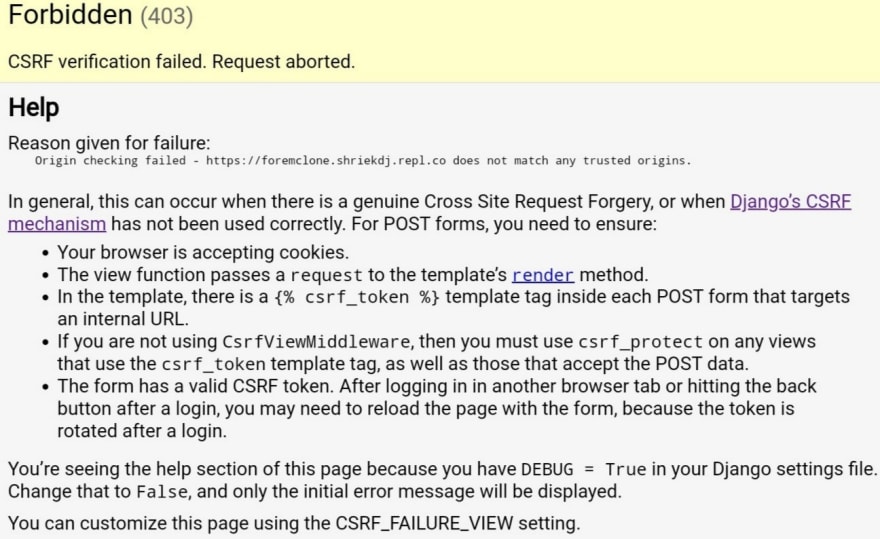
Details
Django Project Foundation team made some changes in security requirements for all Django Version 4.0 and Above. In Which they made mandatory to create an list of urls getting any type of form upload or POST request in project settings named as CSRF_TRUSTED_ORIGINS.
They did not updated the details in latest tutorial documentation but they published the Changes Notes at https://docs.djangoproject.com/en/4.0/releases/4.0/#csrf-trusted-origins-changes-4-0.
First Solution
For
localhostor127.0.0.1.Goto
settings.pyof your django project and create a new list of urls at last like given below
CSRF_TRUSTED_ORIGINS = ['http://*', 'https://*']
Enter fullscreen mode
Exit fullscreen mode
if Your running an project in localhost then you should open all urls here
*symbol means all urls also there ishttp://is mandatory.
Second Solution
This is Also for Localhost and for
DEBUG=True.Copy the list of ALLOWED_ORIGINS into CSRF_TRUSTED_ORIGINS like given below.
ALLOWED_ORIGINS = ['http://*', 'https://*']
CSRF_TRUSTED_ORIGINS = ALLOWED_ORIGINS.copy()
Enter fullscreen mode
Exit fullscreen mode
Third Solution
When Deploying you have to add urls to allow form uploading ( making any POST request ).
I Know this maybe tricky and time consuming but it’s now mandatory.
Also this is Mandatory to Online IDEs also like Replit, Glitch and Many More.
Conclusion
If you found this useful then please share this and follow me! Also check out Buy Me A Coffee if you want to support me on a new level!

Give an reaction if any solutions helped you for algorithm boost to my content.
bye 👋.