Приложения, которые не разрешены на iPhone, не могут быть установлены напрямую, но их можно установить с использованием Cydia Impactor. Однако, иногда в Cydia Impactor возникают некоторые проблемы при установке приложения. Ошибки возникают, когда мы пытаемся установить приложение на iPhone с помощью файла IPA. Ошибка отображается с сообщением «provision.cpp: 71» (ошибка 71 cydia impactor), и «provision.cpp: 81» (ошибка 81 cydia impactor).
Содержание
- 1 Как исправить ошибку 81/71 «Cydia Extender provision.cpp:81/provision.cpp:71»?
- 1.1 Проверка и подтверждение выдачи сертификатов
- 1.2 Установка файла IPA с использованием опции пакета
- 1.3 Создать новый пароль для конкретного приложения
Как исправить ошибку 81/71 «Cydia Extender provision.cpp:81/provision.cpp:71»?
Хороший, старый, простой джейлбрейк ушел в прошлое. С современным джейлбрейком возникает множество проблем.
Если Вы столкнулись с раздражающей ошибкой provision.cpp:81/provision.cpp:71 в Cydia Extender в самое неподходящий момент, не нужно паниковать или беспокоиться, так как эту проблему можно легко исправить с помощью простого трюка.
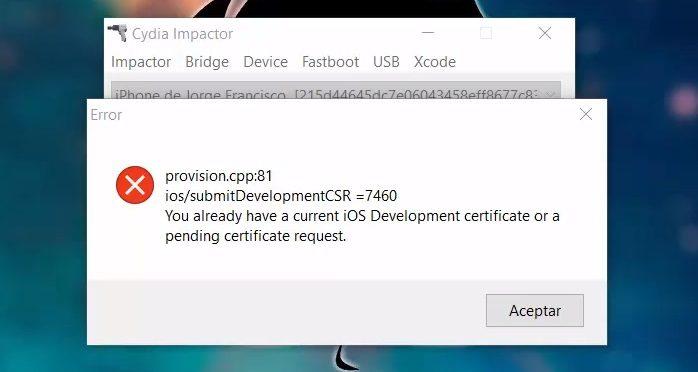
ошибка 81 cydia impactor
Проверка и подтверждение выдачи сертификатов
Первый метод – проверка и подтверждение сертификатов. Иногда бывает, что файл IPA, который мы пытаемся установить, не имеет достаточного разрешения для установки на iPhone. Файл требует наличия соответствующих сертификатов.
Сydia impactor ошибка provision cpp 81/71, вот как исправить:
1. Прежде всего, вам нужно будет подключить устройство к компьютеру с помощью обычного USB-кабеля.
2. Запустите последнюю версию Cydia Impactor на компьютере с ОС Windows или Mac. В приложение Cydia Impactor, нажмите на Xcode.
3. В этом меню, выберите отозвать сертификаты. (Revoke Certificates)
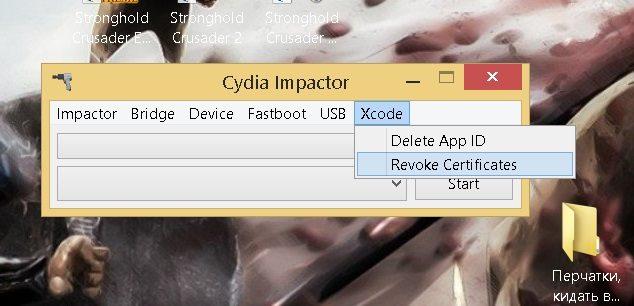
4. Он попросит вас предоставить свой Apple ID и пароль.
5. Напишите свой Apple ID и нажмите «ОК».
6. Теперь попробуйте повторно установить приложение, используя файл IPA в Cydia Impactor.
В большинстве случаев это простой процесс, вы должны исправить provision.cpp: 81/provision.cpp: 71 сообщения об ошибке отображающего при использовании Cydia Extender. Отменив сертификаты через Cydia Impactor с устройством, должно обеспечить решение проблемы.
Установка файла IPA с использованием опции пакета
Способ заключается в установке IPA с использованием опции пакета. Иногда, если вы не можете установить файл IPA на свой iPhone, вы можете попробовать вариант пакета для его установки. Если у вас все еще вылазит ошибка, вы можете повторить этот процесс два или три раза, и он, надеюсь, будет работать.
Для этого выполните описанный ниже процесс:
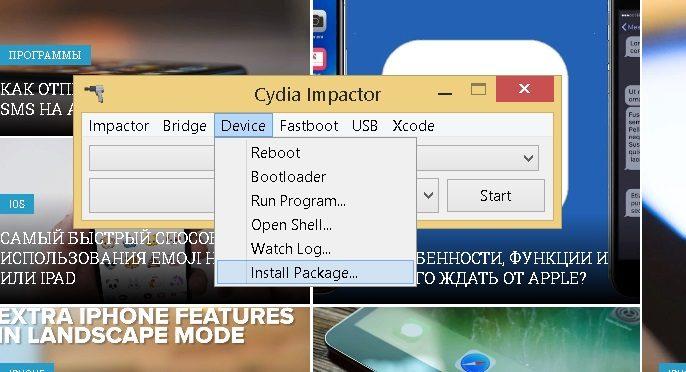
1. Откройте Cydia Impactor и выберите опцию «Устройство» в верхнем меню.
2. Теперь найдите файл IPA приложения, которое вы хотите установить на свое устройство.
3. Далее выберите приложение и запустите процесс установки.
Создать новый пароль для конкретного приложения
Третий способ – создать новый пароль для конкретного приложения. Специальный пароль для приложения позволяет иметь доступ пользователю только к этому приложению. Разные типы паролей могут быть установлены в приложениях по соображению безопасности. Если вы уже установили специальный пароль для приложения, вам придется его изменить.
Для того чтобы изменить пароль, выполните следующие действия.
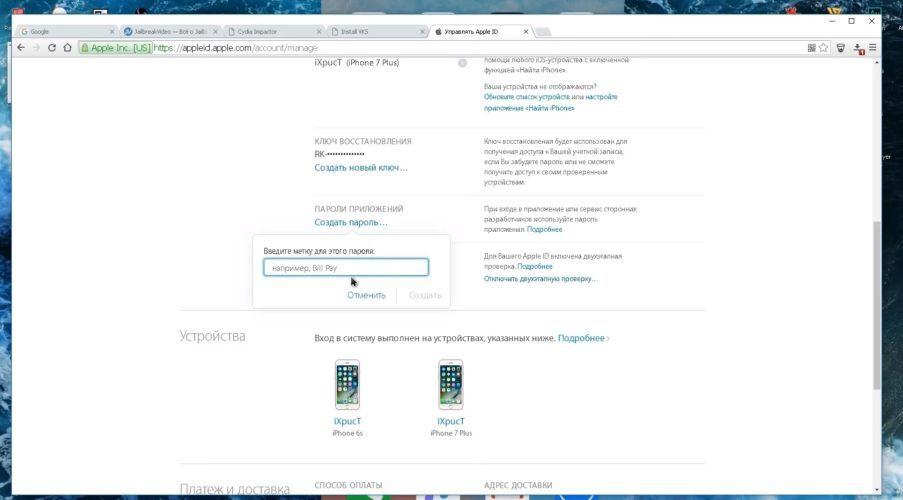
1. Откройте веб-браузер и перейдите на официальный веб-сайт Apple.
2. Ведите свой Apple ID и пароль.
3. Прокрутите вниз до конца, и вы увидите параметр безопасности.
4. Нажмите на нее, чтобы изменить настройки пароля.
5. Теперь вы можете удалить предыдущий пароль для конкретного приложения и установить новый пароль.
6. В конце концов, используйте этот специальный пароль для Cydia Impactor.
Это устранит большинство проблем, связанных с установкой приложений, используя файл IPA.
Мы надеемся, что это руководство помогло вам исправить проблемы с Cydia Impactor. Попробуйте воспользоваться некоторыми из этих методов, если вы хотите исправить ошибку Cydia Impactor ..cpp: 71 и provision.cpp: 81 (ошибка 81 cydia impactor).
As you may already know, Apple devices don’t allow users to install third-party apps. The iOS devices are restricted to only download and install apps from the Apple Store which may be quite frustrating for some users. This is where Cydia Impactor proves useful by enabling iOS users to install third-party apps by jailbreaking.
Cydia Impactor tool is available on the web for free for iOS users to access those apps and games unavailable on Apple Store. However, like most technologies (if not all), Cydia Impactor gives its users errors along the way. Many users encounter errors while using the tool. One of the Cydia Impactor errors is provision.cpp:71. Luckily, we have found some actions you can take to fix this error.
The Cydia Impactor error message provision.cpp:71 ios/submitDevelopmentCSR=7460. You already have a current iOS Development certificate or a pending certificate request occurs when the iOS development certificates used to sideload IPA files are conflicting. This makes Cydia Impactor unable to sign thus throwing the error.
Solving the “installer.cpp:71 error”
You can try the following to fix the error:
1. Remove the older versions
When you are trying to install a third-party app via Cydia impactor and encounter the installer.cpp:71 error message, it may be due to the existence of an older version of the same app on your iOS device. This leads to the certificate signing issue leading to the error, preventing you from going further.
To fix this, you should first remove the older version of the app you want from your iOS device. Thereafter, try installing the app again.
Read Also: How to use Cydia impactor to install unsigned apps
2. Find and remove the similar app
Sometimes, the error occurs when the app you are trying to install is the same as the one already installed on your iOS device, although with a different name.
If that’s the case, you just have to ensure that there are no such apps available on your device to fix the installer.cpp:71 error.
3. Revoke certificates
Revoking certificates can also help to fix the provision installer.cpp:71 error. To do it:
- Open Cydia Impactor on your computer
- Navigate to Xcode and click on it
- Click on Revoke certificates
- Enter your Apple ID and
- Click on Enter. Cydia Impactor will connect to Apple.
All the development certificates will be revoked. Try installing the app you want thereafter.
Read Also: Fix please update to Xcode 7.3 impactor error
If all the above fixes don’t work, try the following:
- Check that you are running the latest Cydia Impactor version, if not, update
- Set up a second Apple ID. This generates a new signing profile plus a new developer certificate.
- If you have two-factor authentication (2FA) in your Apple ID, create an app-specific password that you will use with that ID.
- Instead of dragging and dropping the IPA file on Cydia Impactor;
- Click on Device menu
- Select install package
- Click the IPA file that is to be sideloaded.
Hopefully, the above fixes will help you in case you encounter the provision.cpp:71 error. Feel free to share your own experiences about the same in the comments section below.
Read Also: Fixing Cydia impactor error http-win.cpp 160

Alex is an IT technician who shares his experiences with Apple devices occasionally. He has a collection of Apple devices (from iPhone 4) and has recently started trying out Android.
IG: @I M_Alex
We know that Cydia Impactor is an app that can install any app on your iPhone using Windows or Mac. The apps which are not allowed on iPhone and cannot be installed directly can be installed using Cydia Impactor. However, sometimes, Cydia Impactor causes some problems while installing an app. The errors come while we are trying to install an app on an iPhone using the IPA file. The error shows with a message “provision.cpp:71” and sometimes it comes with message “provision.cpp:81”.
Many problems can cause these error messages. Here is how to fix Cydia Impactor error provision.cpp:71 and provision.cpp:81.
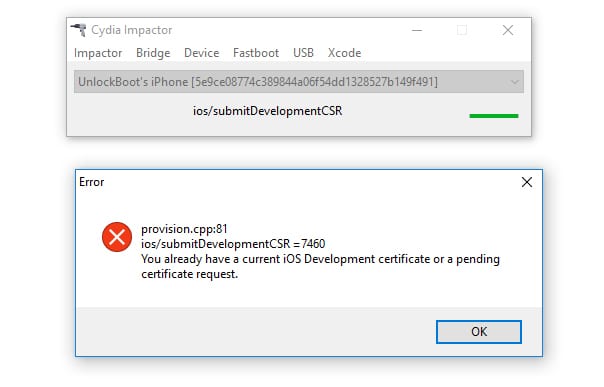
If you are having these problems with your Cydia Impactor, you are not alone. Don’t worry about it as you can easily fix Cydia Impactor error provision.cpp:71 and provision.cpp:81. You will have to take care of a few things that might cause these problems.
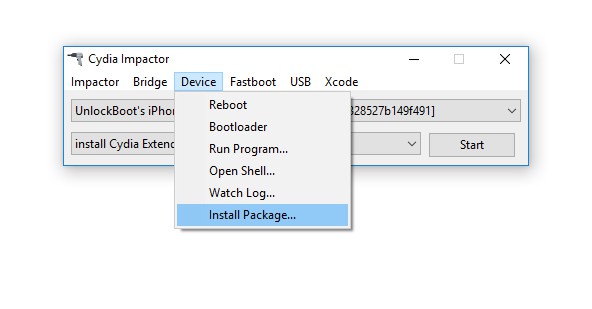
Method #1: Install IPA File Using Package Option
The first method is to installing IPA using the package option. Sometimes, if you are not able to install the IPA file on your iPhone, you can try package option to install it. If you are having problems yet, you can repeat this process for two or three times and it will hopefully work. To do this, follow the process below.
- Open Cydia Impactor and click on Device option from top menu.
- Now locate the IPA file of the app which you want to install on your device.
- Now select it and start the process.
Method #2: Create a New App Specific Password
The second method is about creating a new app specific password. An app specific password allows the app to have access by the user for just that app. User can put a specific password that can provide you access to the app. These types of passwords can be set on apps for security reasons. If you have already set an app specific password, you will have to change it. To change the password, follow the steps below.
- Open your web browser and go to Apple’s original website.
- Sign into your Apple ID and password.
- Scroll down to the bottom and you will see security option in the last.
- Click on it to edit the security settings.
- Now you can delete the previous app specific password and can set a new password.
- Eventually, use that app specific password in the Cydia Impactor.
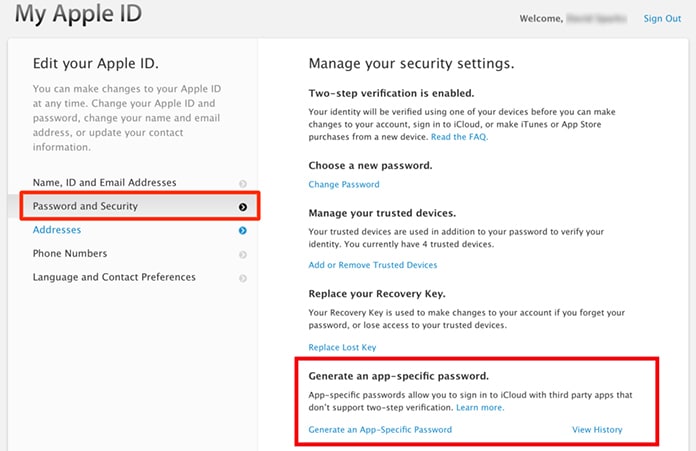
This will fix most of the problems regarding the installation of an app using the IPA file.
Method #3: Check and Confirm Revoke Certificates
The third method is about checking and confirming revoke certificates. Sometimes, it happens that the IPA file we are trying to install has not enough permission to be installed on the iPhone. The file requires proper revoke certificates to be installed. You can do this task by following the method below.
- Open Cydia Impactor and click on Xcode from the top menu.
- Now select the Revoke Certificates options from the list.
- It will ask you to provide your Apple ID and password.
- Put your Apple ID and click OK.
- Now try re installing the app using IPA file from Cydia Impactor.
We hope that this guide will help you to fix Cydia Impactor problems. Try some of these methods if you want to fix Cydia Impactor error provision.cpp:71 and provision.cpp:81.
An error is something which will generate the difference between computed and correct value. For example, while using Cydia Impactor, you may face runtime error, http-win.cpp158, cydia impactor error 173 or any of such errors. These errors cause a significant delay for a human to get work finished. It is a natural behavior to become frustrated when such errors are not getting fixed.
In this article, we have provided almost all kinds of errors you may face while using Cydia Impactor. You will get the cause of particular cydia impactor error along with its solution. Just stick with the post, and get your error solved. 🙂
In this article,
- Cydia Impactor Errors and Solution
- 1. Cydia Impactor runtime error
- 2. installation.cpp:42 error
- 3. installation.cpp:51 error
- 4. lockdown.cpp:57 error
- 5. provision.cpp:62 error
- 6. provision.cpp:68 error
- 7. provision.cpp:71 error
- 8. provision.cpp:80 error
- 9. provision.cpp:81 error
- 10. provision.cpp:150 error
- 11. provision.cpp:158 error
- 12. provision.cpp:159 error
- 13. provision.cpp:160 error
- 14. provision.cpp:168 error
- 15. provision.cpp:173 error
- 16. http-win, cpp; line 182
- 17. provision.cpp:698 error
- 18. impactor.cpp:637 error
- 19. zip.cpp:311 error
- 20. ipa.cpp:456
- 21. zip.cpp:557 error
- 22. file: zip.cpp; line: 597
- 23. provision.cpp; line: 81 (Xcode 7.3)
- Cydia Impactor Error 173 Solution
Cydia Impactor Errors and Solution
If you fail to solve encountered cydia impactor error while sideloading, you can try cydia impactor alternatives.
1. Cydia Impactor runtime error
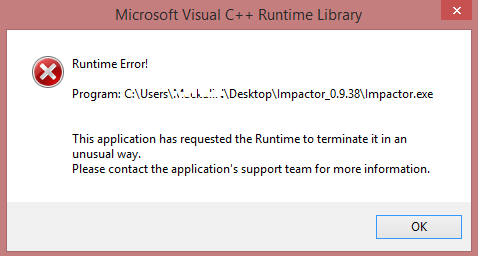
Error:
- runtime error!
- This application has requested the Runtime to terminate it in an unusual way.
Solution:
- Install Visual C++ Redistribution latest version.
2. installation.cpp:42 error
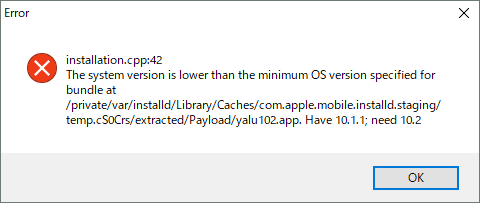
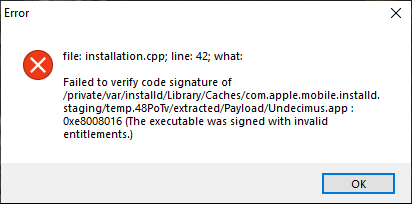
Error:
- cydia impactor installation.cpp:42
- The system version is lower than the minimum OS version specified for_directory
- File : installation.cpp;line:42;what:
Failed to verify code signature of
/private/var/installd/Library/Caches/com.apple.mobile.installd.staging/temp.Igza8P/extracred/Payload/spotify++.app:0xe8008016(The executable was signed with invalid entitlements.)
Solution 1:
- It may be caused by dragging IPA zip file directly to Cydia Impactor. Try to extract at the desktop and then drag it to the software.
- Try your luck with VPN for making an attempt with a different region.
- Utilize another tool for signing IPA file and sideload that signed IPA using Impactor. One of the community members used iOS App Signer to resign yalu.ipa and installed with the latest Impactor, it worked!
Solution 2:
The majority of community members are facing the same issue while using Cydia Impactor. Trying out available different solutions are not leading users to walk away without cydia impactor 42 error. But it can be 100% resolved with the following method where impactor won’t be our handy tool.
- Go to jailbreaks.fun from your Safari browser.
- Type unc0ver -new beta in the search bar.
- Upon finding the same, click on Get and let it install the app.
- Disable Reload System Daemons and enable Reinstall Cydia
- Now perform jailbreak. (Perform multiple attempts if necessary)
You are welcome. 😉
3. installation.cpp:51 error
Error:
- cydia impactor installation.cpp.51
- ipa does not support
Solution:
- Upgrading iOS version will solve the error.
4. lockdown.cpp:57 error
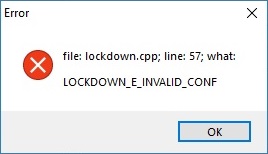
Error:
- file: lockdown.cpp; line: 57; what:LOCKDOWN_E_INVALID_CONF
Solution:
- Kill the Cydia Impactor, turn off the WiFi on your iPhone and run the impactor again.
- Tap on “Trust” on your iPhone while you connect your device to the computer.
- Simple download and install the latest iTunes and sign in using your Apple credentials.
5. provision.cpp:62 error
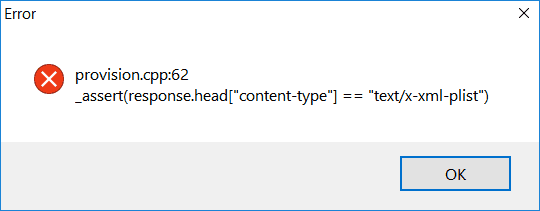
Error:
- cydia impactor provision.cpp:62
Solution:
- Repeat installation of IPA continuously
- Disable “Search for iPhone” by navigating Setting >> iCloud
6. provision.cpp:68 error
Error:
- cydia impactor provision.cpp:68
Solution:
- Agree with the terms by visiting developer section of apple: developer.apple.com
7. provision.cpp:71 error
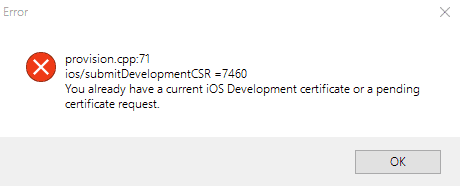
Error:
- cydia impactor provision.cpp:71
Solution:
- It is probably occurring because you are having a similar app on your iOS device.
8. provision.cpp:80 error
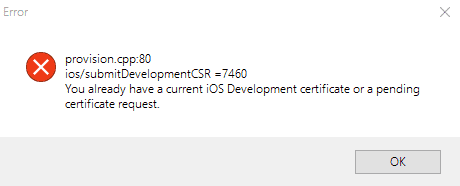
Error:
- cydia impactor provision.cpp:80
- You already have a current iOS development certificate pr pending certificate request.
Solution:
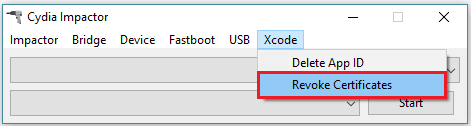
- There may be a problem with the certificate causing such action. Navigate to Xcode >> Revoke Certificates. Enter your Apple ID and password and revoke the certificate.
9. provision.cpp:81 error
Error:
- file:provision.cpp;line:81;what:ios/addAppld=9313
The “Network Extensions” feature is only available to users enrolled in Apple Developer Program. Please visit https://developer.apple.com/programs/ to enroll.
Solution:
- Utilize revoke certificate along with cydia impactor as demonstrated for 80 error.
- Create a new apple id and use it while cydia impactor asks. This will solve the actual issue.
10. provision.cpp:150 error
Error:
- provision.cpp:150 or provisoin.cpp:168
- Your Apple ID or password was entered incorrectly
Solution:
- It may be because of invalid login credentials. However, if it does not disappear, go to appleid.apple.com and generate an app-specific password. You can follow our video guide.
11. provision.cpp:158 error
Error:
- provision.cpp:158
- peer certificate cannot be authenticated with given CA certificates
Solution:
- It seems you haven’t followed our simple guide of installing IPA file on iOS. After drag and drop task, you need to allow unknown certificate. Follow Setting >> General >>Device Management >> Your Installed IPA >> Trust. You can always follow our video guide.
12. provision.cpp:159 error
Error:
- provision.cpp:159
Solution:
- High probability of facing this error may be the older version of Cydia Impactor. Download and install latest Cydia Impactor.
13. provision.cpp:160 error
Error:
- provision.cpp:160
- http-win.cpp:160
Solution:
- It encounters because of improper internet connection. For removing this cydia impactor error, ensure you are connected to the internet with the firewall. If you’re using VPN, disable it.
14. provision.cpp:168 error
Error:
- provision.cpp:168
- You already have a current iOS Development certificate or a pending certificate request
Solution:
- Utilize App-Specific Password: This is the same method that we used to eliminate cydia impactor エラー 173. However, go through our video tutorial.
- Revoke Certificates: Navigate to Cydia Impactor > Xcode > Revoke Certificates. Enter your Apple ID and password and hit enter. You will get “revoked 1 certificate” message on the screen. Now, try reinstalling your IPA file.
- Create a New Apple ID: There might be the possibility of getting this error because of your Apple ID. Create a brand new Apple ID and try sideloading your IPA package.
- Install Package Manually: If you are still unable to install the desired app, go to Device > Install Package and pick up your downloaded IPA file. This should remove the cydia impactor 168 error.
- Computer Diversification: At last, give another computer a chance as some existing installed software may be acting as a barrier for this impactor error.
15. provision.cpp:173 error
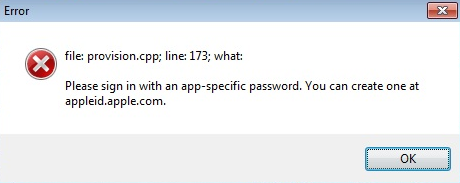
Error:
- provision.cpp; line: 173; what:
Please sign in with an app-specific password
Solution:
- As the error depicts, you need enter an app-specific password while sideloading IPA files instead of your Apple ID password. Go to https://appleid.apple.com/, log in using your Apple ID credentials and generate an app-specific password. Use it when you drag IPA on cydia impactor.
- Alternatively, you can just create a new Apple ID and give it a shot. This should eliminate cydia impactor 173 error.
- If it still appears, try disabling two-factor authentification and make an attempt using your existing Apple ID password.
16. http-win, cpp; line 182
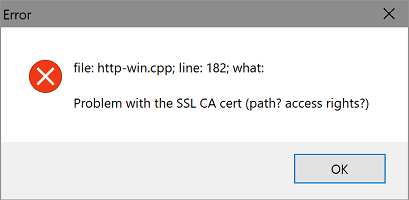
Error:
- file: http-win.cpp; line 182; what: Problem with ssl ca cert (path? access rights?)
- file:http-win, cpp; line 182; what;SSL connect error
gnutls_handshake() failed: Error in the pull function.
Solution:
- Menu >> Impactor >> Insecure SSL. (It will change your insecure ssl setting and error will be resolved.)
- Check if you have a double certificate. Turn it off and give it a go. It is worth a shot for cydia impactor 182 error.
17. provision.cpp:698 error
Error:
- provision.cpp.698
Solution:
- It appears when Cydia Impactor doesn’t detect iOS device properly. Remove USB cable and reboot iPhone once. Reinstall iTunes and then follow the entire procedure.
18. impactor.cpp:637 error
Error:
- impactor.cpp:637
- error:desktop.cpp:314
Solution:
- The simplest solution is to install iTunes that you probably forgot to install earlier.
19. zip.cpp:311 error
Error:
- .zip.cpp:311
- .zip.cpp:420
Solution:
- Your downloaded IPA file may be corrupted which is causing this issue. Download IPA file again from any trusted source.
20. ipa.cpp:456
Error:
- ipa.cpp:456
Solution:
- It is because of the lack of .app/info.plist. Find the file and replace it.
21. zip.cpp:557 error
Error:
- zip.cpp:557
- Not a zip archive
Solution:
- The primary reason behind appearing this error is an improper archive of the original IPA file or download may be interrupted. Download it again or try out another IPA provider and sideload again.
22. file: zip.cpp; line: 597
Error:
- file: zip.cpp; line: 597
- premature ends error
Solution:
- Restart the OS and try again.
- If still error occurs, download Cydia impactor 0.9.45 and try again.
23. provision.cpp; line: 81 (Xcode 7.3)
Error:
file: provision.cpp; line: 81; what:
ios/listAllDevelopmentCerts = 3018
Please update to Xcode 7.3 or later to continue developing with your Apple ID
Solution:
This is causing a lot of trouble due to core changes from Apple. Well, the backend has to be changed to get rid of this and there has not been any permanent fix so far. But in the meantime, you can fulfill your requirements using available spoofers or provision.
- Install IPAs using Windows-based 3Utools
- Use Apple Premium Developer Accounts
This issue is expected to be solved within this December itself.
Cydia Impactor Error 173 Solution
If you are trying to jailbreak iOS 13.5 and looking to fix ‘File: installer.cpp; line: 71; what_assert’ error on Cydia Impactor, here’s what you need to know.
First things first, the reason why you may be getting this error is if you are using Cydia Impactor to jailbreak your device but are not using a paid Apple D eveloper account for sideloading the IPA file. The reason for this is that sometime late last year, Apple changed something in its backend servers which broke Cydia Impactor’s functionality to sideload apps using free Apple Developer IDs.
While Saurik promised to fix it at some point, that has still not happened in over six months now. Which basically leaves you a few other options to fix this issue and successfully jailbreak your device.
The first is to obviously use paid Apple Developer account, either one that you buy yourself from Apple from developer.apple.com for $99 or ask your friend or colleague with a paid developer account to help you sideload unc0ver jailbreak IPA file. We have covered this method extensively and you can check out our video tutorial below on how to jailbreak iOS 13.5 on your iPhone or iPad using Cydia Impactor and paid Apple Developer account.
Subscribe to our YouTube channel for more videos.
If that is something you are not able to achieve, the second option is to use Xcode + iOS App Signer utility to sideload the jailbreak IPA. You can find instructions on how to do so using this method here. This option though applies only to those who have Macs as Xcode isn’t available for Windows PCs.
Alternatively, you can also use a utility called AltStore to sideload the jailbreak app using a Windows PC or Mac. You can find instructions on how to use AltStore here.
Last but not the least is to find an online signing service which is still serving signed Unc0ver jailbreak IPA file to install without needing any computer whatsoever. The problem with this is that it’s hard to find a service which always has a working signed IPA for installing without computer as these IPAs are signed using Apple Enterprise certificates and Apple is these days very very quick to revoke certificates of such IPAs. If you can come across one, use it to jailbreak your device. It’s by far the fastest and easiest way to go about jailbreaking your device. We will have a video guide on this method soon so stay tuned for that.

Hope this helps you solve the issue of not able to sideload the jailbreak IPA using Cydia Impactor. If you have any question, feel free to ask in comments below.
You may also like to check out:
- Best Cydia Repos And Sources For iOS 13.5 Jailbreak Unc0ver
- iOS 13.5 Jailbreak Tweaks Compatible With Unc0ver 5.0.x [List]
- Jailbreak iOS 13.5 On iPhone 11, Pro Max, SE, iPad Pro, More Using Unc0ver 5.0.0 [Tutorial]
- iPhone SE 2 2020 Screen Protector: Here Are The Best You Can Buy Today [List]
- iPhone SE 2 2020 Case: Here Are The Best Ones You Can Get Today [List]
- Kodi 18.7 IPA APK Download For iOS 13 / iPadOS 13, Android Released
- Run Multiple 2 WhatsApp Accounts Number On 1 iPhone The Right Way, Here’s How
- Download: iOS 13.5 Final IPSW Links, OTA Update Released Along With iPadOS 13.5
- iOS 13.5 Jailbreak Unc0ver 5.0.0 IPA Download Is Out
- Jailbreak: Downgrade iOS 13.5 To iOS 13.4.1 For Checkra1n Jailbreak, Here’s How
- Apple Watch ECG App Hack: Enable Outside US In Unsupported Country On Series 5 & 4 Without Jailbreak
You can follow us on Twitter, or Instagram, and even like our Facebook page to keep yourself updated on all the latest from Microsoft, Google, Apple, and the Web.
-
![[ Tower of God ] 신의 탑M: 위대한 여정 v1.1.64 - +2 Cheats](https://iosgods.com/applications/core/interface/js/spacer.png)
AlyssaX64 posted a topic in Free Jailbroken Cydia Cheats, 6 hours ago
Modded/Hacked App: 신의 탑M: 위대한 여정 By Co., Ltd. NGELGAMES
Bundle ID: com.ngelgames.tog
iTunes Store Link: https://apps.apple.com/kr/app/%EC%8B%A0%EC%9D%98-%ED%83%91m-%EC%9C%84%EB%8C%80%ED%95%9C-%EC%97%AC%EC%A0%95/id1594187703?uo=4Mod Requirements:
— Jailbroken iPhone/iPad/iPod Touch.
— iGameGod / Filza / iMazing or any other file managers for iOS.
— Cydia Substrate, Substitute or libhooker depending on your jailbreak.
— PreferenceLoader (from Cydia, Sileo or Zebra).Hack Features:
— x Dmg
— x DefNon-Jailbroken & No Jailbreak required hack(s): https://iosgods.com/forum/79-no-jailbreak-section/
Modded Android APK(s): https://iosgods.com/forum/68-android-section/
For more fun, check out the Club(s): https://iosgods.com/clubs/iOS Hack Download Link:
Hidden Content
Download HackInstallation Instructions:
STEP 1: Download the .deb Cydia hack file from the link above. Use Safari/Google Chrome or other iOS browsers to download.
STEP 2: Once the file has downloaded, tap on it and then you will be prompted on whether you want to open the deb with iGameGod or copy it to Filza.
STEP 3: If necessary, tap on the downloaded file, and then, you will need to press ‘Install’ from the options on your screen.
STEP 4: Let iGameGod/Filza finish the cheat installation. Make sure it successfully installs, otherwise see the note below.
STEP 5: If the hack is a Mod Menu — which is usually the case nowadays — the cheat features can be toggled in-game. Some cheats have options that can be enabled from your iDevice settings.
STEP 6: Turn on the features you want and play the game. You may need to follow further instructions inside the hack’s popup in-game.NOTE: If you have any questions or problems, read our Troubleshooting topic & Frequently Asked Questions & Answers topic. If you still haven’t found a solution, post your issue down below and we’ll do our best to help! If the hack does work for you, please post your feedback below and help out other fellow members that are encountering issues.
Credits:
— AlyssaX64Cheat Video/Screenshots:
N/A
- 1 reply

-
Rook posted a topic in Free Jailbroken Cydia Cheats, August 17, 2018
Modded/Hacked App: ドラゴンボール レジェンズ By BANDAI NAMCO Entertainment Inc.
Bundle ID: jp.co.bandainamcoent.BNEI0333
iTunes Store Link: https://itunes.apple.com/jp/app/ドラゴンボール-レジェンズ/id1358232022Mod Requirements:
— Jailbroken iPhone/iPad/iPod Touch.
— iFile / Filza / iFunBox / iTools or any other file managers for iOS.
— Cydia Substrate (from Cydia).
— PreferenceLoader (from Cydia).Hack Features:
— x Player Damage — x1 — 20
— x Player Defense — x1 — 20
— One Hit Kill
— God Mode
— 1 Enemy Per Quest
— Instant — Win — Enable It When You In Battle
— No Swap CoolDown
— No Vanish CoolDown
— No KI Cost
— Auto Complete All Challenges-> Currency/Chrono Crystals Hack!
— Always Critical
— Tutorial Bypass
— All Cards Give DragonBallsAll functions are unlinked and only for player, you!
-
-
- 1,409 replies
Picked By
Rook, 13 hours ago
-
-
Rook posted a topic in Free Non-Jailbroken IPA Cheats, June 5, 2018
Modded/Hacked App: ドラゴンボール レジェンズ By BANDAI NAMCO Entertainment Inc.
Bundle ID: jp.co.bandainamcoent.BNEI0333
iTunes Store Link: https://itunes.apple.com/jp/app/ドラゴンボール-レジェンズ/id1358232022?mt=8Mod Requirements:
— Jailbroken or Non-Jailbroken iPhone/iPad/iPod Touch.
— Cydia Impactor.
— A Computer Running Windows/Mac/Linux.Hack Features:
— Enemies Don’t Attack
— No Ki Cost
— Unlimited Ki
— No Character Swap CoolDown
— No Vanish CoolDown
— Auto Complete All Challenges — Currency/Chrono Crystals Hack!
— Always Critical
— All Cards Give DragonBallThis hack only works on x64 or ARM64 iDevices: iPhone 5s, 6, 6 Plus, 6s, 6s Plus, 7, 7 Plus, 8, 8 Plus, X, SE, iPod Touch 6G, iPad Air, Air 2, Pro & iPad Mini 2, 3, 4 and later.
-
-
- 2,532 replies
Picked By
Rook, 13 hours ago
-
-
Zahir posted a topic in Free Jailbroken Cydia Cheats, March 9, 2016
Modded/Hacked App: ドラゴンボールZ ドッカンバトル By BANDAI NAMCO Entertainment Inc.
Bundle ID: jp.co.bandainamcogames.BNGI0211
iTunes Link: https://itunes.apple.com/jp/app/ドラゴンボールz-ドッカンバトル/id951627670Hack Features
— Unlimited HP — (Put .0 at the back of your value: 1000.0)
— Unlimited Damage — (Put .0 at the back of your value: 1000.0)
— Unlimited Defense — (Put .0 at the back of your value: 1000.0)
— Dice Hack — [ONLY RANGE BETWEEN 1 — 6 or it will crash] — (Put .0 at the back of your value: 4.0)
— Dice Hack 1, 2, 3
— Dice Hack 4, 5, 6
— Auto Win Battles -> Disable if you get errors.
PUT .0 at the back of all values!- 7,434 replies
Picked By
Rook, 13 hours ago
-
Laxus posted a topic in Free Jailbroken Cydia Cheats, July 21, 2018
Modded/Hacked App: Hollywood Story By nanobitsoftware.com
Bundle ID: com.nanobitsoftware.hollywoodstory
iTunes Store Link: https://itunes.apple.com/us/app/hollywood-story/id876656488?mt=8&uo=4&at=1010lce4Hack Features:
— Infinite Cash
— Infinite Gems
— Infinite Energy
— Infinite Stars PointNon-Jailbroken & No Jailbreak required hack(s): https://iosgods.com/forum/79-no-jailbreak-section/
Modded Android APK(s): https://iosgods.com/forum/68-android-section/
For more fun, check out the Club(s): https://iosgods.com/clubs/-
-
- 618 replies

Picked By
Laxus , 13 hours ago
-
-
Zahir posted a topic in ViP Cheats, October 19, 2022
Modded/Hacked App: Millistar Raiders By SuperPlanet corp.
Bundle ID: com.superplanet.millistar
iTunes Store Link: https://apps.apple.com/us/app/millistar-raiders/id1637589205?uo=4Mod Requirements:
— Jailbroken iPhone/iPad/iPod Touch.
— iGameGod / Filza / iMazing or any other file managers for iOS.
— Cydia Substrate, Substitute or libhooker depending on your jailbreak.
— PreferenceLoader (from Cydia, Sileo or Zebra).Hack Features:
— Attack Speed Multiplier
— Move Speed Multiplier
— Never Die
— Double Damage
— Game Speed Multiplier
— Freeze Gold
— Freeze Enchant Stone
— Freeze Awakening Stone
— JB Check RemovedNon-Jailbroken & No Jailbreak required hack(s): https://iosgods.com/forum/79-no-jailbreak-section/
Modded Android APK(s): https://iosgods.com/forum/68-android-section/
For more fun, check out the Club(s): https://iosgods.com/clubs/iOS Hack Download Link:
Hidden Content
Download HackInstallation Instructions:
STEP 1: Download the .deb Cydia hack file from the link above. Use Safari/Google Chrome or other iOS browsers to download.
STEP 2: Once the file has downloaded, tap on it and then you will be prompted on whether you want to open the deb with iGameGod or copy it to Filza.
STEP 3: If necessary, tap on the downloaded file, and then, you will need to press ‘Install’ from the options on your screen.
STEP 4: Let iGameGod/Filza finish the cheat installation. Make sure it successfully installs, otherwise see the note below.
STEP 5: If the hack is a Mod Menu — which is usually the case nowadays — the cheat features can be toggled in-game. Some cheats have options that can be enabled from your iDevice settings.
STEP 6: Turn on the features you want and play the game. You may need to follow further instructions inside the hack’s popup in-game.NOTE: If you have any questions or problems, read our Troubleshooting topic & Frequently Asked Questions & Answers topic. If you still haven’t found a solution, post your issue down below and we’ll do our best to help! If the hack does work for you, please post your feedback below and help out other fellow members that are encountering issues.
Credits:
— ZahirCheat Video/Screenshots:
N/A
- 178 replies

Picked By
Zahir, 14 hours ago
-
Zahir posted a topic in ViP Cheats, August 25, 2022
Modded/Hacked App: Psychic Idle By MOBIRIX
Bundle ID: com.mobirix.pi
iTunes Store Link: https://apps.apple.com/us/app/psychic-idle/id1624862415?uo=4Mod Requirements:
— Jailbroken iPhone/iPad/iPod Touch.
— iGameGod / Filza / iMazing or any other file managers for iOS.
— Cydia Substrate, Substitute or libhooker depending on your jailbreak.
— PreferenceLoader (from Cydia, Sileo or Zebra).Hack Features:
— Freeze Diamonds
— Free Growth Upgrade
— Free Quantum Upgrade
— Free Enlighten Upgrade
— Unlimited Nano Particles [ Spend to Gain ]
— Unlimited Computer Parts [ Spend to Gain ]
— Unlimited Mileage [ Spend to Gain ]
— Equipment Merge Hack [ Spend to Gain ]
— JB Check BypassedNon-Jailbroken & No Jailbreak required hack(s): https://iosgods.com/forum/79-no-jailbreak-section/
Modded Android APK(s): https://iosgods.com/forum/68-android-section/
For more fun, check out the Club(s): https://iosgods.com/clubs/iOS Hack Download Link:
Hidden Content
Download HackInstallation Instructions:
STEP 1: Download the .deb Cydia hack file from the link above. Use Safari/Google Chrome or other iOS browsers to download.
STEP 2: Once the file has downloaded, tap on it and then you will be prompted on whether you want to open the deb with iGameGod or copy it to Filza.
STEP 3: If necessary, tap on the downloaded file, and then, you will need to press ‘Install’ from the options on your screen.
STEP 4: Let iGameGod/Filza finish the cheat installation. Make sure it successfully installs, otherwise see the note below.
STEP 5: If the hack is a Mod Menu — which is usually the case nowadays — the cheat features can be toggled in-game. Some cheats have options that can be enabled from your iDevice settings.
STEP 6: Turn on the features you want and play the game. You may need to follow further instructions inside the hack’s popup in-game.NOTE: If you have any questions or problems, read our Troubleshooting topic & Frequently Asked Questions & Answers topic. If you still haven’t found a solution, post your issue down below and we’ll do our best to help! If the hack does work for you, please post your feedback below and help out other fellow members that are encountering issues.
Credits:
— ZahirCheat Video/Screenshots:
N/A
- 311 replies
Picked By
Zahir, 14 hours ago
-
Zahir posted a topic in ViP Cheats, June 5, 2021
Modded/Hacked App: Mutiny: Pirate Survival RPG By HELIO LTD
Bundle ID: com.heliogames.pirates
iTunes Store Link: https://apps.apple.com/us/app/mutiny-pirate-survival-rpg/id1490838880?uo=4Mod Requirements:
— Jailbroken iPhone/iPad/iPod Touch.
— iFile / Filza / iFunBox / iTools or any other file managers for iOS.
— Cydia Substrate or Substitute.
— PreferenceLoader (from Cydia or Sileo).Hack Features:
— Durability Hack
— Inbox Hack
— Stat Points Hack
— Unlimited Coins [Change your name]
— Fast Travel
— No Consumable Cooldown
— Split Hack [Split to Gain]
— Craft Hack [No items needed for crafting]
— Never Die
— Custom Weapon Damage
— Speed Multiplier
— Enable VIP for some perks
— No Requirements for Collection Buildings/Items for Finalize
— Max Hunger Fill [One item = full hunger]
— Max Thirst Fill [One item = full thirst]Non-Jailbroken & No Jailbreak required hack(s): https://iosgods.com/forum/79-no-jailbreak-section/
Modded Android APK(s): https://iosgods.com/forum/68-android-section/
For more fun, check out the Club(s): https://iosgods.com/clubs/iOS Hack Download Link:
Hidden Content
Download HackInstallation Instructions:
STEP 1: Download the .deb Cydia hack file from the link above.
STEP 2: Copy the file over to your iDevice using any of the file managers mentioned above or skip this step if you’re downloading from your iDevice.
STEP 3: Using iFile or Filza, browse to where you saved the downloaded .deb file and tap on it.
STEP 4: Once you tap on the file, you will then need to press on ‘Installer’ or ‘Install’ from the options on your screen.
STEP 5: Let iFile / Filza finish the cheat installation. Make sure it successfully installs, otherwise see the note below.
STEP 6: Now open your iDevice settings and scroll down until you see the settings for this cheat and tap on it. If the hack is a Mod Menu, the cheat features can be toggled in-game.
STEP 7: Turn on the features you want and play the game. You may need to follow further instructions inside the hack’s popup in-game.NOTE: If you have any questions or problems, read our Troubleshooting topic & Frequently Asked Questions topic. If you still haven’t found a solution, post your issue down below and we’ll do our best to help! If the hack does work for you, post your feedback below and help out other fellow members that are encountering issues.
Credits:
— @ZahirCheat Video/Screenshots:
N/A
- 406 replies
Picked By
Zahir, 14 hours ago
-
Zahir posted a topic in Free Jailbroken Cydia Cheats, August 9, 2021
Modded/Hacked App: Zombie Gunship Survival By Flaregames GmbH
Bundle ID: com.flaregames.zombiegunship
iTunes Store Link: https://apps.apple.com/us/app/zombie-gunship-survival/id1019161597?uo=4Mod Requirements:
— Jailbroken iPhone/iPad/iPod Touch.
— Filza / iMazing or any other file managers for iOS.
— Cydia Substrate, Substitute or libhooker depending on your jailbreak.
— PreferenceLoader (from Cydia or Sileo).Hack Features:
— Unlimited Ammo
— No Reload
— No Overheat
— No Zombie Spawn
— Freeze Zombie
— 1 Hit Kill [Human & Gunship]
— Never Die [Human against Zombies & Tower]
— Speed MultiplierNote: Your helicopter does damage against your humans, so if you hit them while having 1 Hit Kill turned on, they die too.
Non-Jailbroken & No Jailbreak required hack(s): https://iosgods.com/forum/79-no-jailbreak-section/
Modded Android APK(s): https://iosgods.com/forum/68-android-section/
For more fun, check out the Club(s): https://iosgods.com/clubs/iOS Hack Download Link:
Hidden Content
Download HackInstallation Instructions:
STEP 1: Download the .deb Cydia hack file from the link above.
STEP 2: Copy the file over to your iDevice using any of the file managers mentioned above or skip this step if you’re downloading from your iDevice.
STEP 3: Using Filza or iFile, browse to where you saved the downloaded .deb file and tap on it.
STEP 4: Once you tap on the file, you will need to press on ‘Install’ or ‘Installer’ from the options on your screen.
STEP 5: Let Filza / iFile finish the cheat installation. Make sure it successfully installs, otherwise see the note below.
STEP 6: If the hack is a Mod Menu, which is usually the case nowadays, the cheat features can be toggled in-game. Some cheats have options that can be enabled from your iDevice settings.
STEP 7: Turn on the features you want and play the game. You may need to follow further instructions inside the hack’s popup in-game.NOTE: If you have any questions or problems, read our Troubleshooting topic & Frequently Asked Questions & Answers topic. If you still haven’t found a solution, post your issue down below and we’ll do our best to help! If the hack does work for you, post your feedback below and help out other fellow members that are encountering issues.
Credits:
— @ZahirCheat Video/Screenshots:
N/A
- 399 replies
Picked By
Zahir, 14 hours ago
-
Zahir posted a topic in ViP Cheats, October 4, 2020
Modded/Hacked App: My Cafe — Restaurant game by Melsoft
Bundle ID: com.Melesta.MyCafe
iTunes Store Link: https://apps.apple.com/us/app/my-cafe-restaurant-game/id1068204657?uo=4&at=1010lce4Mod Requirements:
— Jailbroken iPhone/iPad/iPod Touch.
— iFile / Filza / iFunBox / iTools or any other file managers for iOS.
— Cydia Substrate or Substitute.
— PreferenceLoader (from Cydia or Sileo).Hack Features:
— Unlimited Gems (add some)
— VIP Level 7
— Instant Level Up (purchase clothing then go back town)
— Gain Lots of Coins (wait for your staff to collect coin)
— Unlock All Rewards/Achievements (add some gems)
— See Hidden Recipes (add some gems) — The «?» on recipes will be shown
— Add 100 Tickets (purchase clothing)
— Add 1000 Ruby (purchase clothing)*
— Speed Up Game (purchase clothing)** = enable one at a time. After you speed up once, you can disable it and enable ruby hack
Non-Jailbroken & No Jailbreak required hack(s): https://iosgods.com/forum/79-no-jailbreak-section/
Modded Android APK(s): https://iosgods.com/forum/68-android-section/
For more fun, check out the Club(s): https://iosgods.com/clubs/iOS Hack Download Link:
Hidden Content
Not responsible for any bans.Download Hack
Installation Instructions:
STEP 1: Download the .deb Cydia hack file from the link above.
STEP 2: Copy the file over to your iDevice using any of the file managers mentioned above or skip this step if you’re downloading from your iDevice.
STEP 3: Using iFile or Filza, browse to where you saved the downloaded .deb file and tap on it.
STEP 4: Once you tap on the file, you will then need to press on ‘Installer’ or ‘Install’ from the options on your screen.
STEP 5: Let iFile / Filza finish the cheat installation. Make sure it successfully installs, otherwise see the note below.
STEP 6: Now open your iDevice settings and scroll down until you see the settings for this cheat and tap on it. If the hack is a Mod Menu, the cheat features can be toggled in-game.
STEP 7: Turn on the features you want and play the game. You may need to follow further instructions inside the hack’s popup in-game.NOTE: If you have any questions or problems, read our Troubleshooting topic & Frequently Asked Questions topic. If you still haven’t found a solution, post your issue down below and we’ll do our best to help! If the hack does work for you, post your feedback below and help out other fellow members that are encountering issues.
Credits:
— ZahirCheat Video/Screenshots:
- 846 replies
Picked By
Zahir, 14 hours ago
-
Zahir posted a topic in Free Jailbroken Cydia Cheats, October 1, 2022
Modded/Hacked App: Bacchus IDLE RPG for ASIA By MY PLAY FOR ASIA PTE. LTD.
Bundle ID: com.myplay.bacchus.asia
iTunes Store Link: https://apps.apple.com/my/app/bacchus-idle-rpg-for-asia/id1641209267?uo=4Mod Requirements:
— Jailbroken iPhone/iPad/iPod Touch.
— iGameGod / Filza / iMazing or any other file managers for iOS.
— Cydia Substrate, Substitute or libhooker depending on your jailbreak.
— PreferenceLoader (from Cydia, Sileo or Zebra).Hack Features:
— Free Equipment Enhance Cost
— Equipment Upgrade Hack —> does not reduce
— Skill Cards Hack —> does not reduce
— Stones Hack —> does not reduce
— Disable Dragon Attack
— Increase Dragon Time to 5 minutes
— No Skill Cooldown
— JB Check BypassedExtra Features:
— Free Everything —> Most stuff are free and can be purchased without having enough (risky)
— Game Speed Multiplier (risky)Non-Jailbroken & No Jailbreak required hack(s): https://iosgods.com/forum/79-no-jailbreak-section/
Modded Android APK(s): https://iosgods.com/forum/68-android-section/
For more fun, check out the Club(s): https://iosgods.com/clubs/iOS Hack Download Link:
Hidden Content
Download HackDownload Jailbreak Bypass IPA — install via Filza File Manager
Installation Instructions:
STEP 1: Download the .deb Cydia hack file from the link above. Use Safari/Google Chrome or other iOS browsers to download.
STEP 2: Once the file has downloaded, tap on it and then you will be prompted on whether you want to open the deb with iGameGod or copy it to Filza.
STEP 3: If necessary, tap on the downloaded file, and then, you will need to press ‘Install’ from the options on your screen.
STEP 4: Let iGameGod/Filza finish the cheat installation. Make sure it successfully installs, otherwise see the note below.
STEP 5: If the hack is a Mod Menu — which is usually the case nowadays — the cheat features can be toggled in-game. Some cheats have options that can be enabled from your iDevice settings.
STEP 6: Turn on the features you want and play the game. You may need to follow further instructions inside the hack’s popup in-game.NOTE: If you have any questions or problems, read our Troubleshooting topic & Frequently Asked Questions & Answers topic. If you still haven’t found a solution, post your issue down below and we’ll do our best to help! If the hack does work for you, please post your feedback below and help out other fellow members that are encountering issues.
Credits:
— ZahirCheat Video/Screenshots:
N/A
- 66 replies
Picked By
Zahir, 14 hours ago
-
Zahir posted a topic in Free Jailbroken Cydia Cheats, July 7, 2022
Modded/Hacked App: Bacchus: High Tension IDLE RPG By My Play Co., Ltd.
Bundle ID: com.myplay.bacchus
iTunes Store Link: https://apps.apple.com/us/app/bacchus-high-tension-idle-rpg/id1614587149?uo=4Mod Requirements:
— Jailbroken iPhone/iPad/iPod Touch.
— iGameGod / Filza / iMazing / or any other file managers for iOS.
— Cydia Substrate, Substitute or libhooker depending on your jailbreak.
— PreferenceLoader (from Cydia, Sileo or Zebra).Hack Features:
— Free Equipment Enhance Cost
— Equipment Upgrade Hack —> upgrade gives 100 cards
— Skill Cards Hack —> spending or adding skills will give you 50 cards
— Stones Hack —> spending or adding stones will give you 100 stones
— Unlimited Currency —> Risky! Your currency will become negative once you turn off this. Turn it off to attack enemies again.
— JB Check BypassedNon-Jailbroken & No Jailbreak required hack(s): https://iosgods.com/forum/79-no-jailbreak-section/
Modded Android APK(s): https://iosgods.com/forum/68-android-section/
For more fun, check out the Club(s): https://iosgods.com/clubs/iOS Hack Download Link:
Hidden Content
Download HackInstallation Instructions:
STEP 1: Download the .deb Cydia hack file from the link above. Use Safari/Google Chrome or other iOS browsers to download.
STEP 2: Once the file has downloaded, tap on it and then you will be prompted on whether you want to open the deb with iGameGod or copy it to Filza.
STEP 3: If necessary, tap on the downloaded file, and then, you will need to press ‘Install’ from the options on your screen.
STEP 4: Let iGameGod/Filza finish the cheat installation. Make sure it successfully installs, otherwise see the note below.
STEP 5: If the hack is a Mod Menu — which is usually the case nowadays — the cheat features can be toggled in-game. Some cheats have options that can be enabled from your iDevice settings.
STEP 6: Turn on the features you want and play the game. You may need to follow further instructions inside the hack’s popup in-game.NOTE: If you have any questions or problems, read our Troubleshooting topic & Frequently Asked Questions & Answers topic. If you still haven’t found a solution, post your issue down below and we’ll do our best to help! If the hack does work for you, please post your feedback below and help out other fellow members that are encountering issues.
Credits:
— ZahirCheat Video/Screenshots:
N/A
- 236 replies
Picked By
Zahir, 14 hours ago



Home
Cydia
Fix provision.cpp:71/provision.cpp:80 Error [CYDIA IMPACTOR]
March 13, 2017
Cydia, Errors
Saurik has released a massive update for his Cydia Impactor utility. This brings the tool to version 0.9.41. However, this didn’t stop users from experiencing errors.
Many users are reporting provision.cpp:71/provision.cpp:80 error while using Cydia Impactor. Let’s find out more about these errors.
These errors occur due to certificate signing issue. When new certificates overlap or conflict with each other, Impactor is unable to sign and throws an error. These errors usually occur on iPhone, iPad and iPod users.
Apple TV users are relatively immune to these errors.
Before we begin, have the following things ready.
Requirements
- Download Cydia Impactor
- A computer running Windows/Mac/Linux
- A USB cable
Fixing these errors is really simple.
How to Fix provision.cpp:71 and provision.cpp:80 Cydia Impactor Errors
- Connect your device to the computer.
- Launch Cydia Impactor. Wait for Cydia Impactor to recognize your device.
- Go to the Xcode tab and select Revoke Certificates option.
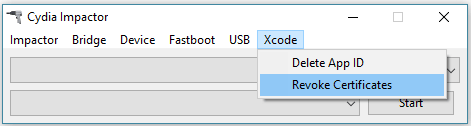
If Cydia Impactor still throws errors, follow the tutorial give below –
- [HTTP-WIN.CPP:158 Error] How to Fix Cydia Impactor not Working
For fixing other Cydia Impactor errors, read this FAQ.
Here are some other tutorials you may find interesting –
- Cydia Extender – Sign Yalu Jailbreak/IPAs without Cydia Impactor
- installd OTA Patch – Cydia Extender Fix for Free Developer Accounts
- How to Use Cydia Extender to Resign Yalu’s Certificate
If you are still facing these errors, just drop a comment below. I will be happy to help you out.
About The Author

Gian
Gian is the resident jailbreak expert at Yalu Jailbreak. He has been jailbreaking his iPhone since 2010. Best way to catch his attention? Show him a tweak he hasn’t installed.