The code below fails to start documents. I get error 193 (%1 is not a valid Win32 app). Starting executables work fine.
The files are properly associated, they start the corresponding app when double clicked.
I have searched SO and elsewhere for the error message, createprocess stuff etc. (E.g. Why is CreateProcess failing in Windows Server 2003 64-bit?
I know about quoting the command line.
-
This is a Delphi XE2 (Update 4) Win32 app in a Win7 64bit VMWare VM.
-
The code also fails on the host machine (Win7 64 bit) and in a Virtual PC VM with 32bit XP.
-
The apps that should start in the Win7 VM (Excel 2003 and Crimson Editor) are 32 bit.
-
The failure occurs both when starting from the IDE or when running the test app standalone
-
It used to be Delphi2007 code, the compiled D2007 app where this code comes from works fine everywhere.
What’s wrong with the code?
procedure StartProcess(WorkDir, Filename: string; Arguments : string = '');
var
  StartupInfo  : TStartupInfo;
  ProcessInfo  : TProcessInformation;
  lCmd         : string;
  lOK          : Boolean;
  LastErrorCode: Integer;
begin
  FillChar( StartupInfo, SizeOf( TStartupInfo ), 0 );
  StartupInfo.cb := SizeOf( TStartupInfo );
  StartupInfo.dwFlags := STARTF_USESHOWWINDOW;
  StartupInfo.wShowWindow := sw_Normal;

  FillChar( ProcessInfo, SizeOf( TProcessInformation ), 0 );

  lCmd := '"' +  WorkDir + FileName + '"';     // Quotes are needed https://stackoverflow.com/questions/265650/paths-and-createprocess
  if Arguments <> '' then lCmd := lCmd + ' ' + Arguments;

  lOk := CreateProcess(nil,
                       PChar(lCmd),
                       nil,
                       nil,
                       FALSE,  // TRUE makes no difference
                       0,      // e.g. CREATE_NEW_CONSOLE or NORMAL_PRIORITY_CLASS makes no difference
                       nil,
                       nil,    // PChar(WorkDir) makes no difference
                       StartupInfo,
                       ProcessInfo);

  if lOk then
  begin
    try
      WaitForSingleObject(ProcessInfo.hProcess, INFINITE);
    finally
      CloseHandle( ProcessInfo.hThread );
      CloseHandle( ProcessInfo.hProcess );
    end;
  end
  else
  begin
    LastErrorCode := GetLastError;
    ShowMessage(IntToStr(LastErrorCode) + ': ' + SysErrorMessage(LastErrorCode));
  end;
end;

procedure TFrmStartProcess.Button1Click(Sender: TObject);
begin
   StartProcess('c:program files (x86)axe3','axe.exe');    // Works
end;

procedure TFrmStartProcess.Button2Click(Sender: TObject);
begin
   StartProcess('d:','klad.xls');                            // Fails
end;

procedure TFrmStartProcess.Button3Click(Sender: TObject);
begin
   StartProcess('d:','smimime.txt');                         // Fails
end;
The code below fails to start documents. I get error 193 (%1 is not a valid Win32 app). Starting executables work fine.
The files are properly associated, they start the corresponding app when double clicked.
I have searched SO and elsewhere for the error message, createprocess stuff etc. (E.g. Why is CreateProcess failing in Windows Server 2003 64-bit?
I know about quoting the command line.
-
This is a Delphi XE2 (Update 4) Win32 app in a Win7 64bit VMWare VM.
-
The code also fails on the host machine (Win7 64 bit) and in a Virtual PC VM with 32bit XP.
-
The apps that should start in the Win7 VM (Excel 2003 and Crimson Editor) are 32 bit.
-
The failure occurs both when starting from the IDE or when running the test app standalone
-
It used to be Delphi2007 code, the compiled D2007 app where this code comes from works fine everywhere.
What’s wrong with the code?
procedure StartProcess(WorkDir, Filename: string; Arguments : string = '');
var
  StartupInfo  : TStartupInfo;
  ProcessInfo  : TProcessInformation;
  lCmd         : string;
  lOK          : Boolean;
  LastErrorCode: Integer;
begin
  FillChar( StartupInfo, SizeOf( TStartupInfo ), 0 );
  StartupInfo.cb := SizeOf( TStartupInfo );
  StartupInfo.dwFlags := STARTF_USESHOWWINDOW;
  StartupInfo.wShowWindow := sw_Normal;

  FillChar( ProcessInfo, SizeOf( TProcessInformation ), 0 );

  lCmd := '"' +  WorkDir + FileName + '"';     // Quotes are needed https://stackoverflow.com/questions/265650/paths-and-createprocess
  if Arguments <> '' then lCmd := lCmd + ' ' + Arguments;

  lOk := CreateProcess(nil,
                       PChar(lCmd),
                       nil,
                       nil,
                       FALSE,  // TRUE makes no difference
                       0,      // e.g. CREATE_NEW_CONSOLE or NORMAL_PRIORITY_CLASS makes no difference
                       nil,
                       nil,    // PChar(WorkDir) makes no difference
                       StartupInfo,
                       ProcessInfo);

  if lOk then
  begin
    try
      WaitForSingleObject(ProcessInfo.hProcess, INFINITE);
    finally
      CloseHandle( ProcessInfo.hThread );
      CloseHandle( ProcessInfo.hProcess );
    end;
  end
  else
  begin
    LastErrorCode := GetLastError;
    ShowMessage(IntToStr(LastErrorCode) + ': ' + SysErrorMessage(LastErrorCode));
  end;
end;

procedure TFrmStartProcess.Button1Click(Sender: TObject);
begin
   StartProcess('c:program files (x86)axe3','axe.exe');    // Works
end;

procedure TFrmStartProcess.Button2Click(Sender: TObject);
begin
   StartProcess('d:','klad.xls');                            // Fails
end;

procedure TFrmStartProcess.Button3Click(Sender: TObject);
begin
   StartProcess('d:','smimime.txt');                         // Fails
end;
The code below fails to start documents. I get error 193 (%1 is not a valid Win32 app). Starting executables work fine.
The files are properly associated, they start the corresponding app when double clicked.
I have searched SO and elsewhere for the error message, createprocess stuff etc. (E.g. Why is CreateProcess failing in Windows Server 2003 64-bit?
I know about quoting the command line.
-
This is a Delphi XE2 (Update 4) Win32 app in a Win7 64bit VMWare VM.
-
The code also fails on the host machine (Win7 64 bit) and in a Virtual PC VM with 32bit XP.
-
The apps that should start in the Win7 VM (Excel 2003 and Crimson Editor) are 32 bit.
-
The failure occurs both when starting from the IDE or when running the test app standalone
-
It used to be Delphi2007 code, the compiled D2007 app where this code comes from works fine everywhere.
What’s wrong with the code?
procedure StartProcess(WorkDir, Filename: string; Arguments : string = '');
var
  StartupInfo  : TStartupInfo;
  ProcessInfo  : TProcessInformation;
  lCmd         : string;
  lOK          : Boolean;
  LastErrorCode: Integer;
begin
  FillChar( StartupInfo, SizeOf( TStartupInfo ), 0 );
  StartupInfo.cb := SizeOf( TStartupInfo );
  StartupInfo.dwFlags := STARTF_USESHOWWINDOW;
  StartupInfo.wShowWindow := sw_Normal;

  FillChar( ProcessInfo, SizeOf( TProcessInformation ), 0 );

  lCmd := '"' +  WorkDir + FileName + '"';     // Quotes are needed https://stackoverflow.com/questions/265650/paths-and-createprocess
  if Arguments <> '' then lCmd := lCmd + ' ' + Arguments;

  lOk := CreateProcess(nil,
                       PChar(lCmd),
                       nil,
                       nil,
                       FALSE,  // TRUE makes no difference
                       0,      // e.g. CREATE_NEW_CONSOLE or NORMAL_PRIORITY_CLASS makes no difference
                       nil,
                       nil,    // PChar(WorkDir) makes no difference
                       StartupInfo,
                       ProcessInfo);

  if lOk then
  begin
    try
      WaitForSingleObject(ProcessInfo.hProcess, INFINITE);
    finally
      CloseHandle( ProcessInfo.hThread );
      CloseHandle( ProcessInfo.hProcess );
    end;
  end
  else
  begin
    LastErrorCode := GetLastError;
    ShowMessage(IntToStr(LastErrorCode) + ': ' + SysErrorMessage(LastErrorCode));
  end;
end;

procedure TFrmStartProcess.Button1Click(Sender: TObject);
begin
   StartProcess('c:program files (x86)axe3','axe.exe');    // Works
end;

procedure TFrmStartProcess.Button2Click(Sender: TObject);
begin
   StartProcess('d:','klad.xls');                            // Fails
end;

procedure TFrmStartProcess.Button3Click(Sender: TObject);
begin
   StartProcess('d:','smimime.txt');                         // Fails
end;
- Remove From My Forums
-
Question
-
Hello!
I tried to run java.exe with CreateProcess on a computer with 32 bit Windows XP SP3 , but it has failed with error code 193 (ERROR_BAD_EXE_FORMAT). On an other computer with the same OS it worked without problem. What can cause this error
193?-
Edited by
Monday, September 26, 2011 10:07 AM
-
Edited by
Answers
-
You could try to seperate the application call commandline part from the parameter part.
i.e. You call your app in this way «c:yourDirYourApp.exe Param1 Param2 Param3=1»
STARTUPINFO si = {0} ;
PROCESS_INFORMATION pi = {0};
CreateProcess( «c:yourDirYourApp.exe», «Param1 Param2 Param3=1», NULL, NULL, TRUE, HIGH_PRIORITY_CLASS, NULL, NULL, &si, &pi);I know sometimes there is a strange behaviour if the complete application path with paramters is passed to the CreateProcess function. You can do it of course with varialbes, it is not necessary to set the values directly like I did in the example.
-
Marked as answer by
Rob Pan
Tuesday, October 4, 2011 7:56 AM
-
Marked as answer by
Уведомления
- Начало
- » Центр помощи
- » PyCharm Community Edition 2021.1.3 x64 CreateProcess error=193, %1 не является приложением Win32
#1 Июль 6, 2021 18:43:32
PyCharm Community Edition 2021.1.3 x64 CreateProcess error=193, %1 не является приложением Win32
Добрый всем ! Помогите с проблемой, сынуля выразил желание изучить python. Скачал ему курс, сидит изучает. Но возникла трудность, выскакивает ошибка при выполнение. Компьютер 64-разрядная операционная система, процессор x64.
Установили Python 3.9.6 и PyCharm Community Edition 2021.1.3 x64
Error running ‘a’: Cannot run program “C:Users79166PycharmProjectspythonProjectvenvScriptspython.exe” (in directory “C:Users79166PycharmProjectspythonProject”): CreateProcess error=193, %1 не является приложением Win32
Помогите решить. Спасибо !
Офлайн
- Пожаловаться
#2 Июль 6, 2021 20:45:35
PyCharm Community Edition 2021.1.3 x64 CreateProcess error=193, %1 не является приложением Win32
Dmitry_32323
проверьте, где у вас лежит на компе python.exe и совпадает ли путь с тем, где PyСharm пытается его найти
если путь неправильный C:Users79166PycharmProjectspythonProjectvenvScriptspython.exe, то в настройках его измените на правильный
Офлайн
- Пожаловаться
- Начало
- » Центр помощи
- » PyCharm Community Edition 2021.1.3 x64 CreateProcess error=193, %1 не является приложением Win32
Причин появления несколько: неполная установка, повреждение реестра из-за изменения (установки или удаления), вредоносное ПО и т.д.

Как исправить?
Просканируйте ПК на вирусы вредоносное ПО.
Есть вероятность, что проблема связана с заражением компьютера. Вирусы повреждают или удаляют файлы. Поэтому очистка, вероятно, решит возникшую проблему.
Очистите систему от временных документов и папок.
Как запустить очистку диска в Виндовс XP, Vista, 7, 8 и 10?
- Нажимаем Winkey + R.
- Печатаем «cleanmgr» -> Enter.

- Откроется диалоговое окно «очистка диска», содержащее флажки. В большинстве, категория «временные файлы» занимает большую часть.
- Установите флажки напротив не использующихся категорий и примените.

- Поставьте автоматическое обновление драйверов устройств.
Ошибки 193 иногда связаны с повреждением или устареванием драйверов
- Запустите sysdm.cpl. Для этого используйте кнопки «Winkey + R», вбейте «sysdm.cpl» в командной строке и тапните Enter.
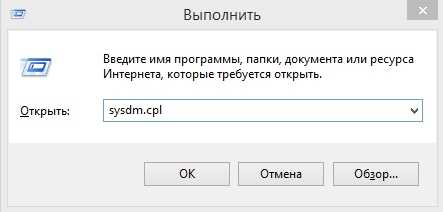
- В окне «свойства системы» кликните вкладку «оборудование».

- В «параметрах установки устройств» проверьте настройку автоматического обновления.

- На той же вкладке найдите диспетчер устройств.

- Не установленные или поврежденные драйверы обозначаются желтым знаком восклицания.

- Обновите автоматически или вручную.
Используйте «восстановление системы Виндовс» для отмены последних изменений.
Это вернет файлы и программы на вашем ПК к тому времени, когда все работало нормально. Произведите следующие шаги:
- Нажмите «пуск».
- В поисковой строке введите «Восстановление системы» и нажмите «ок».
- В окне результатов выберите «Восстановление».

- По инструкциям уже «мастера настроек» завершите работу.
- Запустите проверку системных файлов Windows («sfc /scannow»).
Весьма удобный инструмент, позволяющий просканировать и исправить поврежденные файлы (включая те, что имеют отношение к ошибка 193).
- Выберите «пуск».
- Введите «cmd».

- Запустите от имени администратора.
- Наберите «sfc /scannow» и Enter.

- Проверка начнет сканирование на наличие проблем.
- Завершите процедуру по инструкциям на экране.