Причина
Вкратце
Вы пытаетесь воспользоваться чем-то, что равно null (или Nothing в VB.NET). Это означает, что либо вы присвоили это значение, либо вы ничего не присваивали.
Как и любое другое значение, null может передаваться от объекта к объекту, от метода к методу. Если нечто равно null в методе «А», вполне может быть, что метод «В» передал это значение в метод «А».
Остальная часть статьи описывает происходящее в деталях и перечисляет распространённые ошибки, которые могут привести к исключению NullReferenceException.
Более подробно
Если среда выполнения выбрасывает исключение NullReferenceException, то это всегда означает одно: вы пытаетесь воспользоваться ссылкой. И эта ссылка не инициализирована (или была инициализирована, но уже не инициализирована).
Это означает, что ссылка равна null, а вы не сможете вызвать методы через ссылку, равную null. В простейшем случае:
string foo = null;
foo.ToUpper();
Этот код выбросит исключение NullReferenceException на второй строке, потому что вы не можете вызвать метод ToUpper() у ссылки на string, равной null.
Отладка
Как определить источник ошибки? Кроме изучения, собственно, исключения, которое будет выброшено именно там, где оно произошло, вы можете воспользоваться общими рекомендациями по отладке в Visual Studio: поставьте точки останова в ключевых точках, изучите значения переменных, либо расположив курсор мыши над переменной, либо открыв панели для отладки: Watch, Locals, Autos.
Если вы хотите определить место, где значение ссылки устанавливается или не устанавливается, нажмите правой кнопкой на её имени и выберите «Find All References». Затем вы можете поставить точки останова на каждой найденной строке и запустить приложение в режиме отладки. Каждый раз, когда отладчик остановится на точке останова, вы можете удостовериться, что значение верное.
Следя за ходом выполнения программы, вы придёте к месту, где значение ссылки не должно быть null, и определите, почему не присвоено верное значение.
Примеры
Несколько общих примеров, в которых возникает исключение.
Цепочка
ref1.ref2.ref3.member
Если ref1, ref2 или ref3 равно null, вы получите NullReferenceException. Для решения проблемы и определения, что именно равно null, вы можете переписать выражение более простым способом:
var r1 = ref1;
var r2 = r1.ref2;
var r3 = r2.ref3;
r3.member
Например, в цепочке HttpContext.Current.User.Identity.Name, значение может отсутствовать и у HttpContext.Current, и у User, и у Identity.
Неявно
public class Person {
    public int Age { get; set; }
}
public class Book {
    public Person Author { get; set; }
}
public class Example {
    public void Foo() {
        Book b1 = new Book();
        int authorAge = b1.Author.Age; // Свойство Author не было инициализировано
                                       // нет Person, у которого можно вычислить Age.
    }
}
То же верно для вложенных инициализаторов:
Book b1 = new Book { Author = { Age = 45 } };
Несмотря на использование ключевого слова new, создаётся только экземпляр класса Book, но экземпляр Person не создаётся, поэтому свойство Author остаётся null.
Массив
int[] numbers = null;
int n = numbers[0]; // numbers = null. Нет массива, чтобы получить элемент по индексу
Элементы массива
Person[] people = new Person[5];
people[0].Age = 20; // people[0] = null. Массив создаётся, но не
                    // инициализируется. Нет Person, у которого можно задать Age.
Массив массивов
long[][] array = new long[1][];
array[0][0] = 3; // = null, потому что инициализировано только первое измерение.
                 // Сначала выполните array[0] = new long[2].
Collection/List/Dictionary
Dictionary<string, int> agesForNames = null;
int age = agesForNames["Bob"]; // agesForNames = null.
                               // Экземпляр словаря не создан.
LINQ
public class Person {
    public string Name { get; set; }
}
var people = new List<Person>();
people.Add(null);
var names = from p in people select p.Name;
string firstName = names.First(); // Исключение бросается здесь, хотя создаётся
                                  // строкой выше. p = null, потому что
                                  // первый добавленный элемент = null.
События
public class Demo
{
    public event EventHandler StateChanged;

    protected virtual void OnStateChanged(EventArgs e)
    {
        StateChanged(this, e); // Здесь бросится исключение, если на
                               // событие StateChanged никто не подписался
    }
}
Неудачное именование переменных
Если бы в коде ниже у локальных переменных и полей были разные имена, вы бы обнаружили, что поле не было инициализировано:
public class Form1 {
    private Customer customer;

    private void Form1_Load(object sender, EventArgs e) {
        Customer customer = new Customer();
        customer.Name = "John";
    }

    private void Button_Click(object sender, EventArgs e) {
        MessageBox.Show(customer.Name);
    }
}
Можно избежать проблемы, если использовать префикс для полей:
private Customer _customer;
Цикл жизни страницы ASP.NET
public partial class Issues_Edit : System.Web.UI.Page
{
    protected TestIssue myIssue;

    protected void Page_Load(object sender, EventArgs e)
    {
        if (!IsPostBack)
        {
            // Выполняется только на первой загрузке, но не когда нажата кнопка
            myIssue = new TestIssue();
        }
    }

    protected void SaveButton_Click(object sender, EventArgs e)
    {
        myIssue.Entry = "NullReferenceException здесь!";
    }
}
Сессии ASP.NET
// Если сессионная переменная "FirstName" ещё не была задана,
// то эта строка бросит NullReferenceException.
string firstName = Session["FirstName"].ToString();
Пустые вью-модели ASP.NET MVC
Если вы возвращаете пустую модель (или свойство модели) в контроллере, то вью бросит исключение при попытке доступа к ней:
// Controller
public class Restaurant:Controller
{
    public ActionResult Search()
    {
         return View();  // Модель не задана.
    }
}

// Razor view
@foreach (var restaurantSearch in Model.RestaurantSearch)  // Исключение.
{
}
Способы избежать
Явно проверять на null, пропускать код
Если вы ожидаете, что ссылка в некоторых случаях будет равна null, вы можете явно проверить на это значение перед доступом к членам экземпляра:
void PrintName(Person p) {
    if (p != null) {
        Console.WriteLine(p.Name);
    }
}
Явно проверять на null, использовать значение по умолчанию
Методы могут возвращать null, например, если не найден требуемый экземпляр. В этом случае вы можете вернуть значение по умолчанию:
string GetCategory(Book b) {
    if (b == null)
        return "Unknown";
    return b.Category;
}
Явно проверять на null, выбрасывать своё исключение
Вы также можете бросать своё исключение, чтобы позже его поймать:
string GetCategory(string bookTitle) {
    var book = library.FindBook(bookTitle);  // Может вернуть null
    if (book == null)
        throw new BookNotFoundException(bookTitle);  // Ваше исключение
    return book.Category;
}
Использовать Debug.Assert для проверки на null для обнаружения ошибки до бросания исключения
Если во время разработки вы знаете, что метод может, но вообще-то не должен возвращать null, вы можете воспользоваться Debug.Assert для быстрого обнаружения ошибки:
string GetTitle(int knownBookID) {
    // Вы знаете, что метод не должен возвращать null
    var book = library.GetBook(knownBookID);

    // Исключение будет выброшено сейчас, а не в конце метода.
    Debug.Assert(book != null, "Library didn't return a book for known book ID.");

    // Остальной код...

    return book.Title; // Не выбросит NullReferenceException в режиме отладки.
}
Однако эта проверка не будет работать в релизной сборке, и вы снова получите NullReferenceException, если book == null.
Использовать GetValueOrDefault() для Nullable типов
DateTime? appointment = null;
Console.WriteLine(appointment.GetValueOrDefault(DateTime.Now));
// Отобразит значение по умолчанию, потому что appointment = null.

appointment = new DateTime(2022, 10, 20);
Console.WriteLine(appointment.GetValueOrDefault(DateTime.Now));
// Отобразит дату, а не значение по умолчанию.
Использовать оператор ?? (C#) или If() (VB)
Краткая запись для задания значения по умолчанию:
IService CreateService(ILogger log, Int32? frobPowerLevel)
{
    var serviceImpl = new MyService(log ?? NullLog.Instance);
    serviceImpl.FrobPowerLevel = frobPowerLevel ?? 5;
}
Использовать операторы ?. и ?[ (C# 6+, VB.NET 14+):
Это оператор безопасного доступа к членам, также известный как оператор Элвиса за специфическую форму. Если выражение слева от оператора равно null, то правая часть игнорируется, и результатом считается null. Например:
var title = person.Title.ToUpper();
Если свойство Title равно null, то будет брошено исключение, потому что это попытка вызвать метод ToUpper на значении, равном null. В C# 5 и ниже можно добавить проверку:
var title = person.Title == null ? null : person.Title.ToUpper();
Теперь вместо бросания исключения переменной title будет присвоено null. В C# 6 был добавлен более короткий синтаксис:
var title = person.Title?.ToUpper();
Разумеется, если переменная person может быть равна null, то надо проверять и её. Также можно использовать операторы ?. и ?? вместе, чтобы предоставить значение по умолчанию:
// обычная проверка на null
int titleLength = 0;
if (title != null)
    titleLength = title.Length;

// совмещаем операторы `?.` и `??`
int titleLength = title?.Length ?? 0;
Если любой член в цепочке может быть null, то можно полностью обезопасить себя (хотя, конечно, архитектуру стоит поставить под сомнение):
int firstCustomerOrderCount = customers?[0]?.Orders?.Count() ?? 0;
При отладке кода, написанного на ряде языков программирования (Visual Studio, Pascal и других) программист может получить сообщение «Ссылка на объект не указывает на экземпляр объекта». Обычно это означает, что программа пытается обратиться к объекту, который не инициализирован (объекту не задано значение), и вместо значения объекта виден нуль (null). Давайте разберём суть и способы решения возникшей проблемы.
Содержание
- Что означает «Ссылка на объект не указывает на экземпляр объекта»?
- Использование условного оператора Null для избежания NullReferenceExceptions
- Объединение нулей во избежание NullReferenceExceptions
- Простые примеры нулевых значений, вызывающих проблемы
- Как исправить дисфункцию, когда ссылка на необходимый объект не указывает на экземпляр объекта
- Заключение
Что означает «Ссылка на объект не указывает на экземпляр объекта»?
Как мы уже поясняли выше, возникновение данной ошибки связано с так называемой «нулевой ссылкой». Когда значений какого-либо из объектов кода не задано, и программа вместо данного значения видит нуль.
Ошибка «нулевой ссылки» составляют значимую часть в числе всех ошибок приложений. Обычно это простая проблема, вызванная отсутствием дополнительной логики в программе, предполагающей наличие допустимых значений для всех имеющихся в ней объектов.
Вы также можете столкнуться с исключением нулевой ссылки в ситуации, когда любой из типов объектов является нулём. Например, в приведенном ниже коде объект SqlCommand никогда не инициализируется. Отсутствие SQL-запроса может стать серьезной проблемой для вашего приложения. Иногда нулевую строку можно просто проигнорировать, и двигаться дальше. В других же случаях, как и в случае с SqlCommand, это может стать фатальной ошибкой, игнорировать которую не представляется возможным.

Это интересно: Как можно исправить HTTP ERROR 500.
Использование условного оператора Null для избежания NullReferenceExceptions
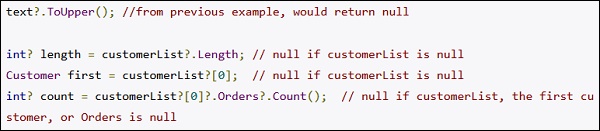
Одним из лучших новых дополнений в C # является нулевой условный оператор. Вместо сумасшедшего количества проверок типа «variable != null», можно использовать «?», Ваш код сделает небольшой круг, и вернет ноль вместо того, чтобы выдать исключение. Написанное будет иметь больше смысла в примере ниже:
Объединение нулей во избежание NullReferenceExceptions
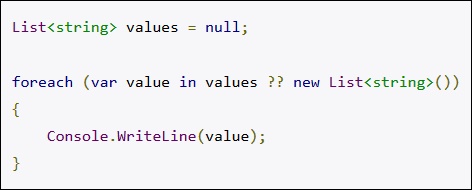
Еще одна замечательная особенность — объединение нулей (null coalescing), которое является оператором «??». Это прекрасно работает в случае получения значения по умолчанию для переменной, которая является нулём. Это работает со всеми типами данных, которые могут быть обнуляемыми. Следующий код генерирует исключение без объединения нулей. Добавление “?? new List<string>()» предотвращает исключение «Ссылка на объект не указывает на экземпляр объекта».
Простые примеры нулевых значений, вызывающих проблемы
Наиболее распространёнными причинами рассматриваемой ошибки являются неверные настройки, вызовы базы данных, а также вызовы типа API, не возвращающие ожидаемые значения.
Например, вы добавляете новое поле в свою базу данных, и не заполняете значения по умолчанию для каждой записи. Произвольно запрашиваются записи, при этом данный код не учитывает, что новое поле — нуль. Соответственно, возникает и рассматриваемая нами ошибка.
Читайте также: что за ошибка ERR_NETWORK_CHANGED.
Как исправить дисфункцию, когда ссылка на необходимый объект не указывает на экземпляр объекта
Рассматриваемая проблема может быть решена добавлением логики и кода, позволяющих гарантировать, что объекты не являются нулями. Советы, позволяющие избавиться от ошибки сводятся примерно к следующему:
- Инициализируйте переменные с допустимыми значениями;
- Если переменная может быть нулевой, то проверьте код на нули, и обработайте его соответствующим образом;
- Используйте оператор ? с методами, когда возможно. stringvar?.ToUpper();
- Применяйте инструменты уровня «Resharper» для выявления потенциальных нулевых ссылок.
Будет интересно узнать: как исправить ERR_FILE_NOT_FOUND.
Заключение
В статье мы разобрали, что означает «Ссылка на объект не указывает на экземпляр объекта», в каких ситуациях она появляется, и как её исправить. Проверяйте объекты на наличие заданных значений, используйте «Resharper», и рассматриваемая нами ошибка перестанет вам досаждать.
Variables in .NET are either reference types or value types. Value types are primitives such as integers and booleans or structures (and can be identified because they inherit from System.ValueType). Boolean variables, when declared, have a default value:
bool mybool;
//mybool == false
Reference types, when declared, do not have a default value:
class ExampleClass
{
}

ExampleClass exampleClass; //== null
If you try to access a member of a class instance using a null reference then you get a System.NullReferenceException. Which is the same as Object reference not set to an instance of an object.
The following code is a simple way of reproducing this:
static void Main(string[] args)
{
    var exampleClass = new ExampleClass();
    var returnedClass = exampleClass.ExampleMethod();
    returnedClass.AnotherExampleMethod(); //NullReferenceException here.
}

class ExampleClass
{
    public ReturnedClass ExampleMethod()
    {
        return null;
    }
}

class ReturnedClass
{
    public void AnotherExampleMethod()
    {
    }
}
This is a very common error and can occur because of all kinds of reasons. The root cause really depends on the specific scenario that you’ve encountered.
If you are using an API or invoking methods that may return null then it’s important to handle this gracefully. The main method above can be modified in such a way that the NullReferenceException should never be seen by a user:
static void Main(string[] args)
{
    var exampleClass = new ExampleClass();
    var returnedClass = exampleClass.ExampleMethod();

    if (returnedClass == null)
    {
        //throw a meaningful exception or give some useful feedback to the user!
        return;
    }

    returnedClass.AnotherExampleMethod();
}
All of the above really just hints of .NET Type Fundamentals, for further information I’d recommend either picking up CLR via C# or reading this MSDN article by the same author — Jeffrey Richter. Also check out, much more complex, example of when you can encounter a NullReferenceException.
Some teams using Resharper make use of JetBrains attributes to annotate code to highlight where nulls are (not) expected.
Variables in .NET are either reference types or value types. Value types are primitives such as integers and booleans or structures (and can be identified because they inherit from System.ValueType). Boolean variables, when declared, have a default value:
bool mybool;
//mybool == false
Reference types, when declared, do not have a default value:
class ExampleClass
{
}

ExampleClass exampleClass; //== null
If you try to access a member of a class instance using a null reference then you get a System.NullReferenceException. Which is the same as Object reference not set to an instance of an object.
The following code is a simple way of reproducing this:
static void Main(string[] args)
{
    var exampleClass = new ExampleClass();
    var returnedClass = exampleClass.ExampleMethod();
    returnedClass.AnotherExampleMethod(); //NullReferenceException here.
}

class ExampleClass
{
    public ReturnedClass ExampleMethod()
    {
        return null;
    }
}

class ReturnedClass
{
    public void AnotherExampleMethod()
    {
    }
}
This is a very common error and can occur because of all kinds of reasons. The root cause really depends on the specific scenario that you’ve encountered.
If you are using an API or invoking methods that may return null then it’s important to handle this gracefully. The main method above can be modified in such a way that the NullReferenceException should never be seen by a user:
static void Main(string[] args)
{
    var exampleClass = new ExampleClass();
    var returnedClass = exampleClass.ExampleMethod();

    if (returnedClass == null)
    {
        //throw a meaningful exception or give some useful feedback to the user!
        return;
    }

    returnedClass.AnotherExampleMethod();
}
All of the above really just hints of .NET Type Fundamentals, for further information I’d recommend either picking up CLR via C# or reading this MSDN article by the same author — Jeffrey Richter. Also check out, much more complex, example of when you can encounter a NullReferenceException.
Some teams using Resharper make use of JetBrains attributes to annotate code to highlight where nulls are (not) expected.
Object reference not set to an instance of an object error is one of the most common errors when developing .NET applications. Here are the five most common mistakes that result in this error. In this article, also learn how to fix errors, and object references not set to an instance of an object.
Why does this error happen?
This error’s description speaks for itself but when you do not have much experience in development, it is very difficult to understand. So, this error description says that an object that is being called to get or set its value has no reference. This means that you are trying to access an object that was not instantiated.
Why should I know this?
This is important in order to avoid runtime errors that could possibly expose your sensitive data and this could lead to a vulnerability breach. Vulnerability breaches are usually used by hackers for a cyber attack to steal your data or to take your server offline.
How to avoid exposing code and entities?
You must always wrap code that could possibly throw an exception inside try-catch blocks. There are others security approaches that you can use to protect your data that can be found here.
Common mistakes
Objects used in this sample.
Controller
- public class HomeController : Controller
- {
- SampleObj sampleObj;
- SampleChildObj sampleChild;
- List<string> lstSample;
- public IActionResult Index()
- {
- return View();
- }
- public IActionResult About()
- {
- ViewData[«Message»] = «Your application description page.»;
- return View();
- }
- public IActionResult Contact()
- {
- ViewData[«Message»] = «Your contact page.»;
- return View();
- }
- public IActionResult Error()
- {
- return View();
- }
- public IActionResult NewObject()
- {
- sampleChild.Item2 = «error»;
- return View();
- }
- public IActionResult ConditionStatement()
- {
- if (true == false)
- {
- sampleChild = new SampleChildObj();
- sampleChild.Item2 = «»;
- }
- else
- sampleChild.Item2 = «error»;
- return View();
- }
- public IActionResult ObjectInsideObject()
- {
- sampleObj = new SampleObj();
- sampleObj.ChildObj.Item2 = «error»;
- return View();
- }
- public IActionResult AddInNullList()
- {
- lstSample.Add(«error»);
- return View();
- }
- }
Classes
- public class SampleObj
- {
- public string Item1 { get; set; }
- public SampleChildObj ChildObj { get; set; }
- }
- public class SampleChildObj
- {
- public string Item2 { get; set; }
- }
New object not instantiated
Practical example,
Here, we have a sample situation of when we have this error.
- public IActionResult NewObject()
- {
- sampleChild.Item2 = «error»;
- return View();
- }
This happens when you create a new object but do not instantiate it before getting/setting a value.
Condition statement(if, switch)
Practical example
Here, we have a sample situation of when we have this error,
- public IActionResult ConditionStatement()
- {
- if (true == false)
- {
- sampleChild = new SampleChildObj();
- sampleChild.Item2 = «»;
- }
- else
- sampleChild.Item2 = «error»;
- return View();
- }
Why does this happen?
This is a very common mistake. It happens when you create an object that is going to be instantiated inside a conditional statement but forgets to instantiate it in one of the conditions and try to read/write on it.
Object Inside Object
Practical Example
Here, we have a sample situation of when we have this error:
- public IActionResult ObjectInsideObject()
- {
- sampleObj = new SampleObj();
- sampleObj.ChildObj.Item2 = «error»;
- return View();
- }
Why Does This Happens?
It happens when you have an object with many child objects. So, you instantiate the main object but forget to instantiate its child before trying to get/set its value.
Add an item in a null list
Practical Example
Here we have a sample situation of when we have this error,
- public IActionResult AddInNullList()
- {
- lstSample.Add(«error»);
- return View();
- }
Why does this happen?
When you are trying to read/write data in a list that was not instantiated before.
Important
- In order to avoid exposing your data, you must always handle exceptions. Read more about how to do that here.
- The items listed above are some of the most common ways to throw this type of error but there are many other situations in which we may face it. Always remember to check if your objects are instantiated before reading or writing data into them.
Best practices
- Tips about commenting your code, making it more readable in order to help others developers to understand it.
- Object naming practices, create a pattern to name variables, services, and methods.
- Handling errors to not show sensitive data to your users.
- Security tricks to protect your data.
- Reading/writing data without breaking your architecture.
*I am planning to write more about common mistakes and share tips to improve code quality. If you have any specific topic that you would like to read here, please write it below in the comments section.
Congratulations! You just learned how to deal with the most common daily mistakes.
Download the code from GitHub here.
Object reference not set to an instance of an object error is one of the most common errors when developing .NET applications. Here are the five most common mistakes that result in this error. In this article, also learn how to fix errors, and object references not set to an instance of an object.
Why does this error happen?
This error’s description speaks for itself but when you do not have much experience in development, it is very difficult to understand. So, this error description says that an object that is being called to get or set its value has no reference. This means that you are trying to access an object that was not instantiated.
Why should I know this?
This is important in order to avoid runtime errors that could possibly expose your sensitive data and this could lead to a vulnerability breach. Vulnerability breaches are usually used by hackers for a cyber attack to steal your data or to take your server offline.
How to avoid exposing code and entities?
You must always wrap code that could possibly throw an exception inside try-catch blocks. There are others security approaches that you can use to protect your data that can be found here.
Common mistakes
Objects used in this sample.
Controller
- public class HomeController : Controller
- {
- SampleObj sampleObj;
- SampleChildObj sampleChild;
- List<string> lstSample;
- public IActionResult Index()
- {
- return View();
- }
- public IActionResult About()
- {
- ViewData[«Message»] = «Your application description page.»;
- return View();
- }
- public IActionResult Contact()
- {
- ViewData[«Message»] = «Your contact page.»;
- return View();
- }
- public IActionResult Error()
- {
- return View();
- }
- public IActionResult NewObject()
- {
- sampleChild.Item2 = «error»;
- return View();
- }
- public IActionResult ConditionStatement()
- {
- if (true == false)
- {
- sampleChild = new SampleChildObj();
- sampleChild.Item2 = «»;
- }
- else
- sampleChild.Item2 = «error»;
- return View();
- }
- public IActionResult ObjectInsideObject()
- {
- sampleObj = new SampleObj();
- sampleObj.ChildObj.Item2 = «error»;
- return View();
- }
- public IActionResult AddInNullList()
- {
- lstSample.Add(«error»);
- return View();
- }
- }
Classes
- public class SampleObj
- {
- public string Item1 { get; set; }
- public SampleChildObj ChildObj { get; set; }
- }
- public class SampleChildObj
- {
- public string Item2 { get; set; }
- }
New object not instantiated
Practical example,
Here, we have a sample situation of when we have this error.
- public IActionResult NewObject()
- {
- sampleChild.Item2 = «error»;
- return View();
- }
This happens when you create a new object but do not instantiate it before getting/setting a value.
Condition statement(if, switch)
Practical example
Here, we have a sample situation of when we have this error,
- public IActionResult ConditionStatement()
- {
- if (true == false)
- {
- sampleChild = new SampleChildObj();
- sampleChild.Item2 = «»;
- }
- else
- sampleChild.Item2 = «error»;
- return View();
- }
Why does this happen?
This is a very common mistake. It happens when you create an object that is going to be instantiated inside a conditional statement but forgets to instantiate it in one of the conditions and try to read/write on it.
Object Inside Object
Practical Example
Here, we have a sample situation of when we have this error:
- public IActionResult ObjectInsideObject()
- {
- sampleObj = new SampleObj();
- sampleObj.ChildObj.Item2 = «error»;
- return View();
- }
Why Does This Happens?
It happens when you have an object with many child objects. So, you instantiate the main object but forget to instantiate its child before trying to get/set its value.
Add an item in a null list
Practical Example
Here we have a sample situation of when we have this error,
- public IActionResult AddInNullList()
- {
- lstSample.Add(«error»);
- return View();
- }
Why does this happen?
When you are trying to read/write data in a list that was not instantiated before.
Important
- In order to avoid exposing your data, you must always handle exceptions. Read more about how to do that here.
- The items listed above are some of the most common ways to throw this type of error but there are many other situations in which we may face it. Always remember to check if your objects are instantiated before reading or writing data into them.
Best practices
- Tips about commenting your code, making it more readable in order to help others developers to understand it.
- Object naming practices, create a pattern to name variables, services, and methods.
- Handling errors to not show sensitive data to your users.
- Security tricks to protect your data.
- Reading/writing data without breaking your architecture.
*I am planning to write more about common mistakes and share tips to improve code quality. If you have any specific topic that you would like to read here, please write it below in the comments section.
Congratulations! You just learned how to deal with the most common daily mistakes.
Download the code from GitHub here.
Ошибка «Object reference not set to an instance of an object» расшифровывается как «Ссылка не указывает на экземпляр объекта».
Данная ошибка означает, что происходит попытка обратиться к null, т.е. к тому, чего не существует. Рассмотрим пример:
using System;
public class Program
{
static string someString;
public static void Main()
{
Console.WriteLine(someString[0]);
}
}
При попытке запустить такую программу в среде разработки получаем ошибку
Run-time exception (line 8): Object reference not set to an instance of an object.
Stack Trace:
[System.NullReferenceException: Object reference not set to an instance of an object.]
at Program.Main() :line 8
В данном случае происходит попытка обратиться к первому символу строки someString, но поскольку там нет никакого значения, а отсутствие значения означает null для string, поэтому происходит ошибка Nullreferenceexception «Object reference not set to an instance of an object».
Попробуем пофиксить ошибку «Ссылка не указывает на экземпляр объекта», присвоим значение строке someString:
using System;
public class Program
{
static string someString;
public static void Main()
{
someString = «some»;
Console.WriteLine(someString[0]);
}
}
Запустим программу и увидим результат, как мы и хотели — получили первый символ строки someString, в данном случае был выведен результат — первая буква s.