Comments

Hello everyone,
I’m getting a strange message pop up whenever I use Optifine. It’s been happening since 1.13.1 and continues into 1.13.2
The chat/command will display «OpenGL Error: 1282 (Invalid Operation)» every 10 seconds or so which can be really tedious in multiplayer when you’re trying to follow a chat.
I’ve tried everything I can think of. Full/clean reinstall of Minecraft, updating Java, updating Windows, updating graphics drivers, but the moment I run the game with Optifine it pops up again.
Has anyone else had this bug, and if so, how do you get rid of it? I am hoping to avoid having to play Minecraft without Optifine, but that’s the only way I can stop it happening at the moment.

Can you post the game output (error log)?
It should have more details about the error.
Actually getting a 2nd error in there now, «1281 (Invalid Value)»

Before the issue is fixed, there is a setting to turn off OpenGL errors. I believe it is Options... -> Video Settings -> Other -> Show OpenGL errors.
Hope this helps.
That is really useful, AndanteDevs, thank you!

I am also getting this error periodically on 1.12.2 using the extreme current version of sildurs vibrant shaders.
Mixed with the OpenGL errors are also some NullPointerExceptions which may be related:
Caused by: java.lang.NullPointerException
	at cfc.d(SourceFile:199)
	at crd.a(SourceFile:1809)
	at lo.a(SourceFile:122)
	at lo.a(SourceFile:16)
	at ix.lambda$checkThreadAndEnqueue$0(PacketThreadUtil.java:21)
	at ix$$Lambda$1032/114356890.run(Unknown Source)
	at java.util.concurrent.Executors$RunnableAdapter.call(Executors.java:511)
	at java.util.concurrent.FutureTask.run(FutureTask.java:266)
	at k.a(Util.java:157)
The OpenGL error is very strange: OpenGL API ERROR: 1281 (GL_INVALID_VALUE error generated. View frustum must not have a zero values of: (right-left), (top-bottom), or (zFar-zNear).)
As if the view frustum is incorrectly defined.
What OS, GPU, drivers?
F3 debug screenshot?
Windows 10 1909. GTX 1070, nvidia driver version 441.41. I’ll try to get the screenshot in a bit.

Here’s the debug screenshot.
@cybercatgurrl you are running Forge with 59 mods loaded, most probably a conflict with one of the installed mods.
The original problem is OptiFine standalone, no other mods.

so im having the same errors but my game is a black screen. i can open my inventory and see my hotbar. im running on 1.7.10. i’ll post the mod list below.

Thank you and pls get back to me asap. 🙂

should probably update optifine, E3 is outdated
thanks man ill try it out and get back to you if it works or not
also do you think you can help me with some other issues im having. either through email, here or discord.
also updating the optifine version did not work still the same
here is a pic of how my game looks


@Hilife808 If u are running shaders. It can sometimes give u a black screen bc the shaders is trying to add visual effects but cant bc a mod is doing the same thing. And for ur error 1282. that is also a shader error message. which is to do with visals again. This error ecours mostly when u have a dimension mod installed since dimension mods can cause shaders issue’s.
How i fixed that error is just turn off the gui errors in your settings. but other then that with the black scrren i would contact the shader owner if still avalible for the issue to be resolved.
Most of all its a shader visual conflict

I have the same problem i select a shader and when its on the screen is black and i get the error Open GL Error 1282 (invalid operation).


You should be able to just reload the shader, and it should work. also why not use pre30
i have tried to reload the shader and the same thing happened

Hi, I am also having this error however I am not getting the black screen however my shader still isn’t loading, I also used a preview version of optifine because there was no 1.16 version, could that be the issue or do you think it was the shader? (the shader is SEUS renewed and is v1.0.1) I also don’t have any mods loaded on the game. How do I fix this error and load my shader?

Yes I have the same problem too with a different shader the other one gave me the black screen but trying a different one I got the error and can see my screen but the shader doesn’t work
Also I did get the newer preview optfine pre 30


This happens for me on mac but it does tell me that my device doesn’t support it and I get some bits of the screen staying still

My brother is running Aristois 1.16.5 with optifine and baritone on his survival hack game but it shows Open GL Error 1282 (Invalid Operation), He turns off mods and it still shows it every second please help someone?
Just regular shader errors. Always happens with optifine. To solve this issue of not getting the text. Go into options, video settings, Other settings and turn show GL errors: to off.
Edit: Some shaders are out of date and can cause more issues such as black screen and other issues. i would try finding the correct updated version of that shader.zip or find another shader to use. ^^


The thing is, im getting the same problem with Lunar Client (im using it because my normal minecraft crashes when i open it, it would be helpful if someone helps)


Hello I play forgeoptifine in 1.12.2 and when I put shaders my hand and the nether are either black or white I attach an image with my components and shader
This is what my hand looks like
that is not the color of my skin
Attached capture of the mods that I use
Plis if anyone knows how to solve it tell me and in the chat it also says OpenGl 1282


Man I actually have found out how to solve this problem. Your mod list screenshot helped me a lot. Delete «albedo». I don’t know why but this mod is ruining the visuals of your game.

Ran into the OpenGL 1282 error myself just now.
I was able to resolve the conflict by referring to the logs, where I found that at least in my case, it was Pneumaticraft having issues drawing the overlay for the pressure gauges.
Look at your latest log, scroll to the bottom and find the last occurrence of the error.
Read through the error and look for mention of a mod you have used or a default MC setting that is conflicting with Optifine.
Here is my error for reference and don’t get overwhelmed if you don’t understand everything.
You’re just looking to find what is causing the issue for OpenGL so just look for a reference to something for you to investigate further.
Then you can disable the mod or delete any error-causing items in game and the error should no longer be an issue.
Much better solution that just ignoring it and suffering the performance cost.
Hopefully this helps others figure out how to troubleshoot their specific conflict.
[20:28:13] [Client thread/ERROR]: OpenGL API ERROR: 1282 (GL_INVALID_OPERATION error generated. State(s) are invalid: primitive mode match.) java.lang.Exception: Stack trace at org.lwjgl.opengl.GLDebugMessageCallbackI.callback(GLDebugMessageCallbackI.java:39) [lwjgl-opengl-3.2.2.jar:build 10] at org.lwjgl.opengl.GL11C.glDrawArrays(Native Method) ~[lwjgl-opengl-3.2.2.jar:build 10] at org.lwjgl.opengl.GL11.glDrawArrays(GL11.java:1879) [lwjgl-opengl-3.2.2.jar:build 10] at com.mojang.blaze3d.platform.GlStateManager.drawArrays(GlStateManager.java:975) [?:?] at net.optifine.shaders.SVertexBuilder.drawArrays(SVertexBuilder.java:360) [?:?] at net.minecraft.client.renderer.WorldVertexBufferUploader.func_181679_a(WorldVertexBufferUploader.java:83) [?:?] at net.minecraft.client.renderer.Tessellator.func_78381_a(Tessellator.java:33) [?:?] at me.desht.pneumaticcraft.client.util.GuiUtils.drawPressureGauge(GuiUtils.java:95) [?:1.14.4-1.0.8-22] at me.desht.pneumaticcraft.client.model.module.ModelPressureGauge.renderDynamic(ModelPressureGauge.java:55) [?:1.14.4-1.0.8-22] at me.desht.pneumaticcraft.client.model.module.ModelPressureGauge.renderDynamic(ModelPressureGauge.java:13) [?:1.14.4-1.0.8-22] at me.desht.pneumaticcraft.client.model.module.ModelModuleBase.render(ModelModuleBase.java:25) [?:1.14.4-1.0.8-22] at me.desht.pneumaticcraft.client.render.tileentity.RenderPressureTubeModule.render(RenderPressureTubeModule.java:68) [?:1.14.4-1.0.8-22] at me.desht.pneumaticcraft.client.render.tileentity.RenderPressureTubeModule.func_199341_a(RenderPressureTubeModule.java:21) [?:1.14.4-1.0.8-22] at net.minecraft.client.renderer.tileentity.TileEntityRendererDispatcher.func_203602_a(TileEntityRendererDispatcher.java:201) [?:?] at net.minecraft.client.renderer.tileentity.TileEntityRendererDispatcher.func_180546_a(TileEntityRendererDispatcher.java:154) [?:?] at net.minecraft.client.renderer.WorldRenderer.func_215326_a(WorldRenderer.java:989) [?:?] at net.optifine.shaders.ShadersRender.renderShadowMap(ShadersRender.java:362) [?:?] at net.optifine.shaders.Shaders.beginRender(Shaders.java:4243) [?:?] at net.minecraft.client.renderer.GameRenderer.func_78471_a(GameRenderer.java:1029) [?:?] at net.minecraft.client.renderer.GameRenderer.func_195458_a(GameRenderer.java:795) [?:?] at net.minecraft.client.Minecraft.func_195542_b(Minecraft.java:890) [?:?] at net.minecraft.client.Minecraft.func_99999_d(Minecraft.java:384) [?:?] at net.minecraft.client.main.Main.main(SourceFile:155) [?:?] at sun.reflect.NativeMethodAccessorImpl.invoke0(Native Method) ~[?:1.8.0_51] at sun.reflect.NativeMethodAccessorImpl.invoke(NativeMethodAccessorImpl.java:62) ~[?:1.8.0_51] at sun.reflect.DelegatingMethodAccessorImpl.invoke(DelegatingMethodAccessorImpl.java:43) ~[?:1.8.0_51] at java.lang.reflect.Method.invoke(Method.java:497) ~[?:1.8.0_51] at net.minecraftforge.fml.loading.FMLClientLaunchProvider.lambda$launchService$0(FMLClientLaunchProvider.java:56) [forge-1.14.4-28.2.20.jar:28.2] at net.minecraftforge.fml.loading.FMLClientLaunchProvider$$Lambda$431/1353093587.call(Unknown Source) [forge-1.14.4-28.2.20.jar:28.2] at cpw.mods.modlauncher.LaunchServiceHandlerDecorator.launch(LaunchServiceHandlerDecorator.java:37) [modlauncher-4.1.0.jar:?] at cpw.mods.modlauncher.LaunchServiceHandler.launch(LaunchServiceHandler.java:54) [modlauncher-4.1.0.jar:?] at cpw.mods.modlauncher.LaunchServiceHandler.launch(LaunchServiceHandler.java:72) [modlauncher-4.1.0.jar:?] at cpw.mods.modlauncher.Launcher.run(Launcher.java:81) [modlauncher-4.1.0.jar:?] at cpw.mods.modlauncher.Launcher.main(Launcher.java:65) [modlauncher-4.1.0.jar:?]

hi, i have been having this problemwith my shaders in 1.17 and idk how to fix it, ive tried praticly evrything and nothing changes


I am also experiencing this issue, my game is vanilla except for Optifine, running through MultiMC.
The relevant line of my game log is [21:23:48] [Render thread/ERROR]: [OptiFine] OpenGL error: 1282 (Invalid operation), at: Expand VBO.
Minecraft 1.17.1, on macOS 11.5.2 on Intel.
The «OpenGL Error: 1282» is a general error which means «something is wrong».
OpenGL uses this error for many different problems at many different places.
The original issue from @bmcwal is for 1.13 about invalid frustum size with Forge and mods.
@cybercatgurrl reports it for 1.12 and running with shaders.
@Hilife808 reports it for 1.7.10 and Forge + mods.
@progamerdixie reports it for 1.15.2 with shaders.
@WilliamD47 reports it for a Mac.
@michealREEEEE reports it for https://github.com/cabaletta/baritone
@soopi-n reports it for Lunar client
@skyyxX reports it for 1.17 with shaders.
@ajs256 reports it for 1.17 on Mac running with MultiMC.
Those are different problems that need separate issues.

i having an error that says opengl error:1282 invalid operation
otherwise when i launch the game it just gets stuck at the loading screen with thedirt background pls help me some one

Error 1281 I solved it, enter the server, then press the ESC key, then, Graphics, Various Options, Reset all the configuration, Then yes, and reset all the unnecessary activity that you used.

In my case, the error stopped occurring when I turned off the «Render Regions» option of optifine.

how do i fix this error>> message: id=1282, source=API, type=ERROR, severity=HIGH, message=’Error has been generated. GL error GL_INVALID_OPERATION in (null): (ID: 173538523) Generic error’ im on vanilla by the way.
the thing is im on complete vanilla and im getting this error
The “OpenGL Error 1282 (Invalid operation)” is one of the common errors occurring in Minecraft. When this error occurs, you may experience lag issues or error message pop-ups. It’s annoying. But don’t worry. You can fix the error easily with the following methods.
There are seven methods available for you to try. You can try them one by one:
Method 1: Manually add the opengl32.dll file
Method 2: Update graphics card drivers
Method 3: Disable shaders
Method 4: Update OptiFine
Method 5: Update Java
Method 6: Try a different game version
Method 7: Turn off Show GL Errors
Method 1: Manually add the opengl32.dll file
The OpenGL error 1282 can be caused by missing the opengl32.dll file in the Minecraft folder. To fix the error , you can try manually adding the opengle32.dll file to the folder. Many Minecraft users have reported they fixed the same error with this fix. You can give it a try and see if it works for you too.
You can follow these steps to manually add the opengl32.dll file.
Firstly, download the opengl32.dll file.
1) Download the “OpenGL fix.7z” file to your computer (you can download the file from mediafire.com).
2) Extract the file.
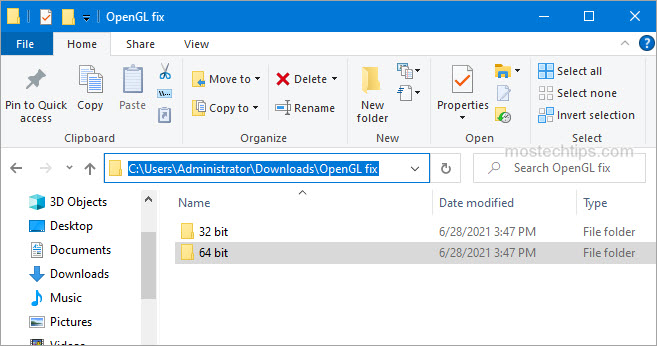
3) In the extracted folder, you’ll see two subfolders: 32 bit and 64 bit. Select one of them according to your Windows version (How to check what Windows version you have?). In my case, I have Windows 10 64-bit version, then I need to open the 64 bit folder (see the screenshot below).
4) Copy the opengl32.dll file.
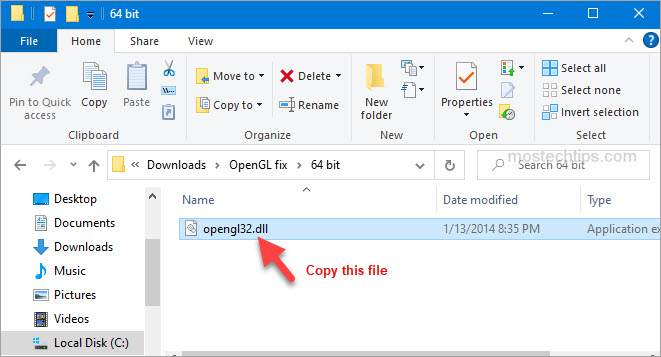
Secondly, paste the opengl32.dll file to the Minecraft folder.
1) Right-click on the shortcut of Minecraft and then select Open file location.
2) Navigate to the following location
MinecraftRuntime*JRE Version*bin
Note: The JRE Version is simply a placeholder. It depends on the game version you have, for example, Jre-x64, or something like that.
3) Paste the opengl32.dll file to the bin folder mentioned in Step 2).
4) Re-launch Minecraft and see if the error persists. If the error persists, continue to try Method 2.
Method 2: Update graphics card drivers
A faulty or missing graphics card driver can cause the Minecraft OpenGL 1282 error. You can try updating your graphics card driver and see if it helps.
You can update the graphics card driver via Device Manager:
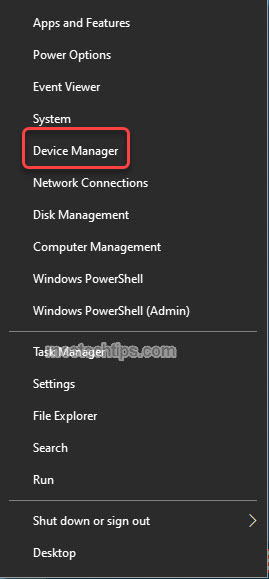
1) Right-click on the Start menu button and select Device Manager. Then the Device Manager window will open.
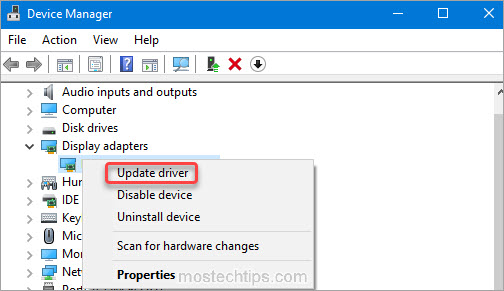
2) Expand category “Display adapters”. Right-click on your graphics card device and then select Update driver.
3) Select Search automatically for drivers. Then Windows will search for a new driver and install the driver automatically.
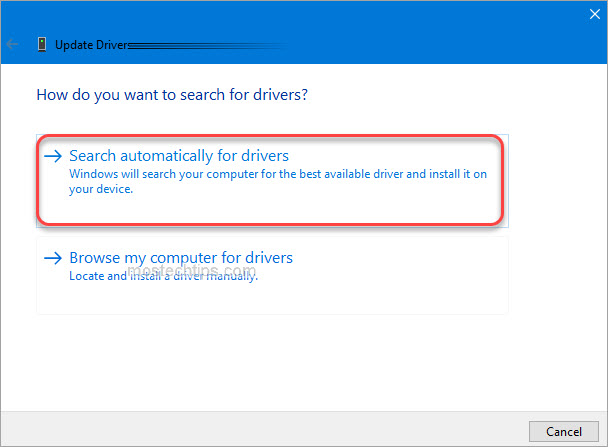
Alternatively, you can go to the PC manufacturer’s website to download the latest graphics card driver. Usually, drivers can be downloaded from the Drivers, Support or Download section.
Method 3: Disable shaders
Shaders in Minecraft allow you to set different terrains and settings so you can have a better game experience. But in the meantime, they can take up a lot of system resources, and may cause the OpenGL 1282 error. To fix the error, you can try disabling shaders in Minecraft. To do so:
1) Launch Minecraft.
2) On your keyboard, press the Esc key to pull up the Menu screen.
3) Go to Options -> Shaders.
4) Select OFF and click Done.
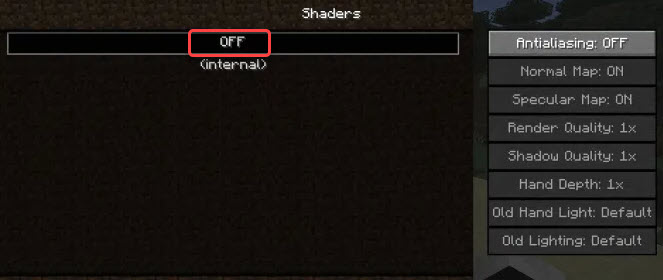
After you’re done with it, re-launch Minecraft and see if you’re still facing the OpenGL 1282 error.
Method 4: Update OptiFine
The OpenGL Error 1282 can be an OptiFine issue. If you’re using OptiFine for Minecraft , updating OptiFine to the latest version may help remove the error. If you’re using OptiFine, skip this method and continue to the next method.
Go to OptiFine’s official website and download the latest version of OptiFine, then install it on your computer. Once done, check to see if the error still occurs.

Method 5: Update Java
Minecraft relies on Java very much. If you have a low version Java or the Java files are corrupted, the OpenGL Error 1282 can occur. To fix the error, you can try updating Java to the latest version.
Go to Java’s website and download the latest version of Java to your computer, then follow the on-screen instructions to install it.
Once the installation completes, re-launch Minecraft and check to see if the OpenGL Error 1282 is fixed.
Method 6: Try a different game version
The error can occur in a specific version of Minecraft. So you could try switching to a different game version, for example a lower version, and see if the error continues.
Method 7: Turn off Show GL Errors
In some cases, the OpenGL Error 1282 is not a real error but just a bunch of pop-ups. If your game performance is not influenced due to this error, it’s nothing to worry about. To get rid of these annoying notifications, you can just turn off the Show GL Errors option in Minecraft. After that, you won’t receive any error notifications.
Here’s how to turn off the Show GL Errors option in Minecraft.
1) Launch Minecraft.
2) Go to Options > Video Settings > Others…
3) Click Show GL Errors and turn it off.
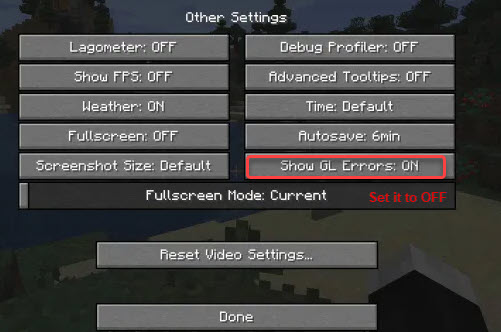
4) Save the changes and re-launch Minecraft, then you won’t see the annoying OpenGL Error 1282 message.
Hopefully you can fix OpenGL Error 1282 (Invalid operation) with the steps above. If you have any questions or suggestions, feel free to leave a comment below. I’ll get back to you ASAP.
I am trying to add lighting to my current scene of a simple cube. After setting up my uniforms I get a 1282 error from glGetError() for this piece of code
GLuint ambientHandle = glGetUniformLocation(program->getHandle(), "ambientProduct");
glUniform4fv( ambientHandle, 1, ambientProduct );
GLuint diffuseHandle = glGetUniformLocation(program->getHandle(), "diffuseProduct");
glUniform4fv( diffuseHandle, 1, diffuseProduct );
GLuint specularHandle = glGetUniformLocation(program->getHandle(), "specularProduct");
glUniform4fv( specularHandle, 1, specularProduct );
GLuint lightPosHandle = glGetUniformLocation(program->getHandle(), "lightPosition");
glUniform4fv( lightPosHandle, 1, light.position );
GLuint shinyHandle = glGetUniformLocation(program->getHandle(), "shininess");
glUniform1f( shinyHandle, materialShininess );
Here are my shaders:
vertex.glsl
#version 120

attribute vec4 coord3d;
attribute vec3 normal3d;

// output values that will be interpretated per-fragment
varying  vec3 fN;
varying  vec3 fE;
varying  vec3 fL;

uniform vec4 lightPosition;
uniform mat4 mTransform;

void main()
{
    fN = normal3d;
    fE = coord3d.xyz;
    fL = lightPosition.xyz;

    if( lightPosition.w != 0.0 ) {
    fL = lightPosition.xyz - coord3d.xyz;
    }

    gl_Position = mTransform*coord3d;
}
fragment.glsl
// per-fragment interpolated values from the vertex shader
varying  vec3 fN;
varying  vec3 fL;
varying  vec3 fE;

uniform vec4 ambientProduct, diffuseProduct, specularProduct;
uniform mat4 mTransform;
uniform vec4 lightPosition;
uniform float shininess;

void main()
{
    // Normalize the input lighting vectors
    vec3 N = normalize(fN);
    vec3 E = normalize(fE);
    vec3 L = normalize(fL);

    vec3 H = normalize( L + E );

    vec4 ambient = ambientProduct;

    float Kd = max(dot(L, N), 0.0);
    vec4 diffuse = Kd*diffuseProduct;

    float Ks = pow(max(dot(N, H), 0.0), shininess);
    vec4 specular = Ks*specularProduct;

    // discard the specular highlight if the light's behind the vertex
    if( dot(L, N) < 0.0 ) {
    specular = vec4(0.0, 0.0, 0.0, 1.0);
    }

    gl_FragColor = ambient + diffuse + specular;
    gl_FragColor.a = 1.0;
}
The products and position are each a struct of three GLfloats and shininess is a float. I have checked all of the values of the handles and the values I am passing and they all seem valid. Ideas?
—EDIT:
I have narrowed it to the glUniform4fv calls. It happens after each one. Also I have double checked that the program->getHandle() is pointing to something that looks valid.
I have checked program->getHandle is a valid program
Here are the values of all handles:
Program handle 3
ambientHandle 0
diffuseHandle 1
specularHandle 5
lightPosHandle 2
shinyHandle 4
So they all look good. For testing I am commenting out the lines below the ones for ambientProduct. For clarity I am explicitly using this line instead
glUniform4f( ambientHandle, ambientProd.x, ambientProd.y, ambientProd.z, ambientProd.w );
These are the values for ambientProd at the time that line is executed.
x = 0.200000003, y = 0.0, z = 0.200000003, w = 1.0
A collaborator on this project moved the call for glUseProgram. Thanks for the help folks.