Gluk0000
Решение найдено!
Here’s how to step by step:
1 ) Open your NVIDIA Control Panel(By right clicking on the desktop and selecting the «NVIDIA Control Panel»)
2 ) On the 3D Settings List, Chose «Manage 3D Settings»
3 ) On the «Program Settings» tab, add the SonicGenerations.exe and ConfigurationTool.exe in your installation folder, then force both of them to use the High Performance NVIDIA processor. (Don’t forget to apply the changes)
4 ) Open your «Screen Resolution» window (By right clicking on the desktop and selecting «Screen Resolution»).
5 ) Click Detect
6 ) It should display additional monitors greyed out and saying «Another display not detected». Find the one that is not Intel Integrated Graphics but your High Performance NVIDIA Graphics (Whichever it is) and select it.
7 ) On the «Multiple displays», chose «Try to connect anyway on: VGA» (it can be another slot depending on your hardware).
8 ) Apply.
9 ) Again on the «Multiple dislpays», chose «Extend these displays».
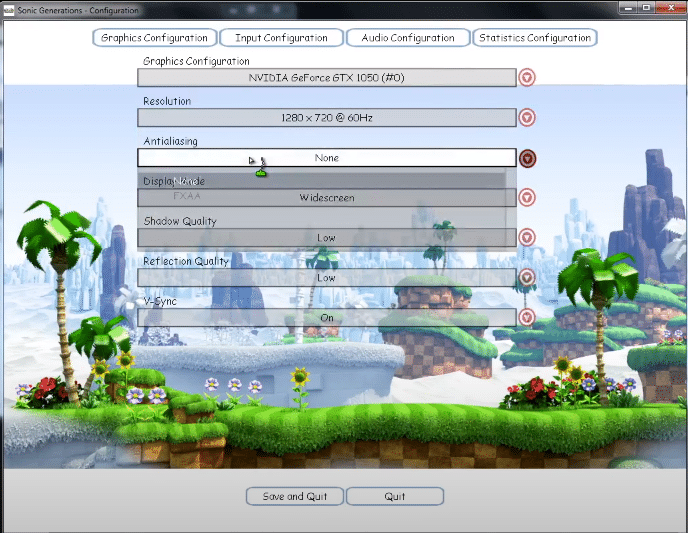
10 ) Run the ConfigurationTool.exe, it should show your NVIDIA graphics card as a graphics adapter.
11 ) Select your main display which is Intel Integrated Graphics. (Do NOT select your NVIDIA card!!! Because it is not associated with a monitor.)
12 ) Run the game normally. It should work fine now.
з.ы. У меня всё заработало на отлично!
#
29 августа 2012, 11:37
|
|
Я скачала другую версию Sonic Generatiuons обновила драйвера и не открываются настройки! Пожалуйста помогите. |
|---|

#
29 августа 2012, 13:33
|
Odin |
Ну, это все что угодно может быть. Если высвечивается ошибка что-то вроде — «The detected configuration does not match your current hardware. Please re-run the configurations tool». То запустите ConfigurationTool от имени администратора. Другова не знаю, жду подробного описания от вас. з.ы. создавайте вопрос через систему – задать вопрос. На главной странице раздела с игрой есть кнопочка. |
|---|

#
29 августа 2012, 14:39
|
Юла |
Понятно но я запускаю от имени админа и не фига! Не знаю что даже делать! |
|---|
#
29 августа 2012, 14:46
|
Odin |
Что происходит вообще, когда запускаете? Или вообще не чего не происходит? Игра то запускается? |
|---|
#
30 августа 2012, 09:53
|
Юла |
Игра начинает запускаться и выскакивает такая ошибка: The detected configuration does not match your current hardware. Please re-run the configurations tool. Запускаю настройки у меня начинает грузить настройки и не открываеться |
|---|
#
30 августа 2012, 13:45
|
Odin |
Что бы решить эту проблему нужно запустить configurations tool от имени администрации, но как вы уже писали, это не помогает. Еще советуют переустановить игру. У вас видео карта от NVIDIA? |
|---|
#
31 августа 2012, 19:43
|
Юла |
Да карта от NVIDIA. |
|---|
#
31 августа 2012, 20:01
|
Odin |
Эта проблема с картами от NVIDIA, вроде была решена с одним из патчей в Steam (попробуйте поставить последний патч и обновить драва на карту). К сожалению мне мало что известно по этому поводу. И сможешь ли что-то вообще помочь вам (ибо не сталкивался).
http://forums.playground.ru/sonic_generations/711418/ http://forum.sonic-world.ru/topic/19281-%D1%82%D0%B5%D1%85%D0%BD%D0%B8%D1%87%D0%B5%D1%81%D0%BA%D0%B8%D0%B5-%D0%BF%D1%80%D0%BE%D0%B1%D0%BB%D0%B5%D0%BC%D1%8B-%D1%81-%D0%B8%D0%B3%D1%80%D0%BE%D0%B9/ http://forums.sega.com/showthread.php?385452-Problems-with-running-game-on-NVIDIA-videocard http://forums.steampowered.com/forums/showthread.php?t=2220031 http://forums.steampowered.com/forums/showthread.php?t=2219935 |
|---|
Для комментирования необходимо авторизоваться
Обновлено: 30.01.2023
The detected configuration does not match your current hardware.
помогите. игра лицензия Steam
Данная конфигурация не соответствует текущим настройкам.
Что эти именно — можно гадать.
То ли система слабая или ОС не та, а может ты скачал игру на ПК/консоль для консоли/ПК
Создается впечатление, что дальше названия «Sonic Generations. Проблема запуска!», вы не читали вообще.
Роман Кузьменков Мудрец (15787) Создаётся впечатление, что дальше *Данная конфигурация не соответствует текущим настройкам.* вы не читали. И что, что это куплено в стиме
Скорее всего проблема в неправильных настройках игры. По идее нона должна быть у вас в стиме после покупки игры. У меня например проблема была с экраном. Изменил размер и игра пошла, как по маслу. У вас проблемы настроек могут быть другие.
а он пишет
Critical Error!
No valid Graphics Configuration File found, please run the Configuration Tool and Save.
28 мар. 2013 в 9:39
Sonic Generations not launching, No Graphics Configuration File Found.
When I try to launch it it comes up on the screen with — «No valid Graphics Configuration File found, please run the Configuration Tool and Save.» But there is no button that allows me to save my graphics settings.
2 апр. 2013 в 14:02
Getting the same thing, and when I try to run the configuration tool, it says that there is no valid graphics file found. Vicious circle.
3 апр. 2013 в 9:01
3 апр. 2013 в 9:11
i had to uninstall/reinstall sonic for game to work
3 апр. 2013 в 18:17
14 апр. 2013 в 9:06
or just press CTRL+ ALT+Left then click save and exit then press CTRL+ALT+Up
17 апр. 2013 в 5:44
how do get the confegurations to show up in the first graphic?
8 мая. 2013 в 8:26
Go to your file explorer, go to C:, Program Files, Steam, steamapps, common, Sonic Generations and in there should be 3 files; graphicsconfic.cfg, statsconfig.cfg and defaultinput.cfg, recording the settings for graphics, *not sure*, and controls, respectively. Delete graphicsconfig.cfg and rerun the Configure tool. Check the settings, and save when happy. The game should now work fine. If not, try deleting all 3 and repeating the process for all parts of the Configure tool.
5 дек. 2014 в 15:03
Got ths on the Humble bundle and I’m having the same issue as the OP. CTRL ALT Left Click doesn’t do anything and I can barely understand the last post. Shoddy work from SEGA? How surprising.
5 дек. 2014 в 15:30
Got ths on the Humble bundle and I’m having the same issue as the OP. CTRL ALT Left Click doesn’t do anything and I can barely understand the last post. Shoddy work from SEGA? How surprising.
If it’s the same problem, have you tried my suggestion above?
6 дек. 2014 в 5:20
Got ths on the Humble bundle and I’m having the same issue as the OP. CTRL ALT Left Click doesn’t do anything and I can barely understand the last post. Shoddy work from SEGA? How surprising.
If it’s the same problem, have you tried my suggestion above?
Of course I did. It says so right there in my comment
27 фев. 2015 в 19:53
or just press CTRL+ ALT+Left then click save and exit then press CTRL+ALT+Up
I’ve figuired it out. You just have to change your screen resolution in the control panel, and it should show up at the bottom.
26 мар. 2015 в 20:09
Hi, guys, I get the feeling you might be having the same problem that I was where the Save button was actually hidden behind the Task bar as the config window is too large (and changing the resolution did nothing to help this.) In this case, right click on your Task bar, select Properties and go to task bar location and move it to the left or right this should allow you to see the save button. Then just move your task bar back afterwards. Hope this helps. 🙂
27 мар. 2015 в 5:05
Yes,have,but you can’t see because if the screen is much short. put the configurations fullscreen ando you will see a litthe barrier in down,is the save button. That «invisibe button» sucks.
19 мар. 2016 в 12:09
Hello friends, I bought the game today but when i will play showed me the same ♥♥♥♥, but i fixit it’s simple all what you need to do is to launch the configue and put it in fullscreen and on top of your taskbar exist 2 box, so click on teh left box
PS:SORRY IF MY ENGLISH IS BAD BECAUSE I’M PORTUGUESE
12 июн. 2017 в 8:57

1
When I try to launch it it comes up on the screen with — «No valid Graphics Configuration File found, please run the Configuration Tool and Save.» But there is no button that allows me to save my graphics settings.
Ok i know this is a bit late but I have this problem and I sorted it by goinh to the config and then holding «Alt» and then pressing «Enter». hope this helps.

Значит так,Вот самые часто задаваемые вопросы.
1.если вы скачали пиратскую версию и выдается ошибка «Game files either missing or corrupt please reinstal»
-то нужно установить кряк sonic.exe в папку с установленной игрой.
-открываем его и выдается окно с японскими символами,нажимаем OK.
-открывается сайт,смело его закрываем он нам не нужен.
-запускаем игру — играет,приятной игры 😉
-не открывает пишет» the detected configuration does not much your corrent handware pleas re-run the —configuration tool»нужно сменить конфигурации игры,для этого открываем configuration tool и ставим настойки под свой ПК
-не открывается configuration tool,нужно запустить его с правами администратора.
-Все равно пишет эту ошибку,увы с этим не чего не поделаешь,ваш ПК слишком слаб.
2.Если в ошибке есть .dll то проблема в directx.Установите новую версию.также обновить Microsoft NET Framework.
5.сохранения пропадают. Как с этим бороться?
Необходимо запустить игру с правами Администратора

Установила эту игру.Запускаю,мне выдаёт ошибку,пишет «No valid Graphics Configuration File found,please run the Configuration Tool and Save».
Ну я подумала что нада залезть в «Sonic Generations.(Настройки)» и что-то там настоить.Захожу и передо мной такая вот картина:
Что токо не пробовала,безполезно.
Помогите!Что сделать чтоб игра у меня заработала?
Читайте также:
- Uber driver требования
- Impulserc driver fixer ошибка 99
- Как включить автосохранение в симс 3
- Neverwinter nights 2 как поменять разрешение экрана
- Как убрать консоль в май саммер кар
Страницы: Назад 1 … 8 9 10 11 [12] 13 14 15 16 … 20 Далее Вниз

Тема: Sonic Generations (Прочитано 66953 раз)
0 Пользователей и 1 Гость просматривают эту тему.
Так ребятушки, чёт у меня закозлился соник — пишет мол no valid Graphics Configuration file found? please run Configuration Tool and Save.
javascript:void(0);
В кониге при сэйве — Unhandledexception has occured in your appliction.
бла-бла-бла
Acces to the path ‘C:Program Files (x86)Sonic GenerationsGraphicsConfig.cfg’ is denied.
И правда енр там нету…
Details:
7-ка 64. Radeon HD 6550. Дрова обновил тока шо ( хотя походу и так подходили старые…)

Охххх…. Сколько раз говорили: ЗАПУСКАЙ ОТ ИМЕНИ АДМИНИСТРАТОРА!!!!
МЛЯЯЯЯЯЯЯЯЯЯЯЯЯЯЯЯЯЯЯЯЯ
— грёбанная семёрка 
Я тут сайт амд вовсю асаждаюс что мне нормальныые драва никак не даст скачать а какуют хню подсовывает, а это блиннн 
Cyb3rM4n, спасибо
Так ребятушки, чёт у меня закозлился соник — пишет мол no valid Graphics Configuration file found? please run Configuration Tool and Save.
javascript:void(0);
В кониге при сэйве — Unhandledexception has occured in your appliction.
бла-бла-бла
Acces to the path ‘C:Program Files (x86)Sonic GenerationsGraphicsConfig.cfg’ is denied.
И правда енр там нету…Details:
7-ка 64. Radeon HD 6550. Дрова обновил тока шо ( хотя походу и так подходили старые…)
При первом запуске всегда так пишет, настрой графику. Запусти ConfigurationTool в корневой папке игры, чего панику разводить?
Эх, ещё 3 числа купил в Стиме Ёжика. А качаю его до сих пор со своим «реальным безлимитом». Читаю посты поигравших, душит жаба.
Читаю посты поигравших, душит жаба.
Забей. Ёжик того стоит. 
Не понимаю, что за истерия от этой игры в стиле «не могу дождаться, душит жаба!» и т.п. Ну вышел новый соник, соники давно не торт, так зачем так истерить? Объясните ж, чем новая игра лучше кучи того шлака что выходил за последние 5-10 лет?
Да ничем. Чисто для фанатов игра, а остальные могут смело проходить мимо.
Не понимаю, что за истерия от этой игры в стиле «не могу дождаться, душит жаба!» и т.п. Ну вышел новый соник, соники давно не торт, так зачем так истерить? Объясните ж, чем новая игра лучше кучи того шлака что выходил за последние 5-10 лет?
Лучше, причем всем. После выхода хитовой SA2, было много шлака, но эта часть — лучшая за последние десять лет. Так что это, мягко говоря, не шлак. Это долгожданный хит. Но тому, кто никогда не любил эту серию игр не понять этого.
Да ничем. Чисто для фанатов игра….
А для кого она ещё должна быть, интересно? К тому же многие, кто поиграет в этого Соника впервые в жизни, станет фанатом, я гарантирую это. Но не все, конечно же. Кому-то не понравится, и это нормально.
« Последнее редактирование: 08 Ноябрь 2011, 10:21:55 от ~Scorpion- »
Только сейчас я осознал, сколько же на данном форуме фанатов соника. И ведь не первый год сижу тут.
Только сейчас я осознал, сколько же на данном форуме фанатов соника. ….
А то!  Не зря же Соник — визитной карточкой Сеги стал. В 90-е это был супер мегахит, который расходился миллионными тиражами. Многие только из-за этой игры покупали 16 битные приставки (а позже кто-то покупал 128 битную приставку, потому что там был Соник)….
« Последнее редактирование: 08 Ноябрь 2011, 10:20:05 от ~Scorpion- »
Но ведь это бред! :'(
нет, правда, в это сложно поверить, но есть такие люди 
Да,фанатизма мало не бывает.
Но ведь это бред! Плачущий
Не только Sonic продавал Mega Drive. Да и сейчас точно такая же картина. Wii берут из-за Mario, Playstation 3 из-за Final Fantasy, Xbox 360 из-за Halo 3.
Playstation 3 из-за Final Fantasy,
из-за мыльного кинца её берут. 
Wii берут из-за Mario, Playstation 3 из-за Final Fantasy, Xbox 360 из-за Halo 3.
Дооо, ведь ff13 вышла только на ps3 и именно ради неё эту консоль и покупают.
Не понимаю, что за истерия от этой игры в стиле «не могу дождаться, душит жаба!» и т.п. Ну вышел новый соник, соники давно не торт, так зачем так истерить? Объясните ж, чем новая игра лучше кучи того шлака что выходил за последние 5-10 лет?
Чем Generations лучше, например, Sonic 06, Unleashed, Colors? Наличием порта для ПК, лол
И да, сколько ещё таких скоростных платформеров с приятной графикой и хорошим саундтреком, кроме Соника?
парагон не понимает этот ваш сарказм
Добавлено позже:
Чем Generations лучше, например, Sonic 06, Unleashed, Colors? Наличием порта для ПК, лол
И да, сколько ещё таких скоростных платформеров с приятной графикой и хорошим саундтреком, кроме Соника?
ок-ок. но и одного соника слишком уж много…
ок-ок. но и одного соника слишком уж много…
Это почему же? Тебя заставляли играть в него каждый день что ли?
Просто этих игр много, они похожи и низкого качества. И такой культ 
Я бы не сказал что Sonic 1, 2, 3 & Knuckles низкого качества.
ну классические ок, не спорю.
Sonic Adventure, если не брать в расчёт баги с проваливанием вникуда, тоже крутая игра.
ну классические ок, не спорю.
А как насчёт Sonic Adventure 2?
Piratt,Sonic Adventure 2 тоже
Piratt,Sonic Adventure 2 тоже
Не играл. Не знаю.
Piratt,а ты поиграй,советую.
Unit2k, а ты вообще играл Sonic Generations, чтобы судить о качестве? 
Не играл. Не знаю.
Много потерял. Она лучше, чем 1, багов нет и графика лучше, да и скорость повыше.
Страницы: Назад 1 … 8 9 10 11 [12] 13 14 15 16 … 20 Далее Вверх
Скачал игру на ноут, проблема в том, что конфигуратор видит только встроенную видяху ноута, а основную (GeForce G540 1GB) не видит, как следствие со встроенной жутко тормозит и мне как говорится надоело это терпеть.
Судя по видеокарте, скорее всего у тебя конфигурация nVidia Optimus. Можно попробовать через панель управления nVidia заставить использовать дискретную видеокарту для того или иного приложения. В случае Sonic Generations придётся указывать 2 программы — и конфигуратор, и саму игру. Делается это в «Параметры 3D» -> «Управление параметрами 3D» — в качестве предпочитаемой видеокарты для программы выбрать видеокарту nVidia. Не мешает также обновить драйвера для видеокарты.
P.S. Это только предположение, у меня нет возможности это проверить. И этот способ не будет работать на Windows XP.
P.P.S. Можно ещё попробовать включить максимальную производительность, тогда по идее винда должна задействовать дискретную видеокарту как основную.
Изменено 10 июня, 2012 пользователем Hungry Hedgehog
Comments

Sonic Generations seems to work quite well (controller support, visuals, gamesaves, etc), besides from very broken, annoying audio after the intro videos.
- Ubuntu 18.04.1 LTS (64 bit 4.15.0-33-generic)
- GeForce GTX 1070/PCIe/SSE2 (396.54)
- Proton 3.7 (default configuration)
System information from steam

This one is nearly unplayable for me. Besides the broken audio:
- There are some big framedrops when boosting
- The game sometimes locks up when going in or out of a stage or menu, also I got a lock for several seconds on Green Hill act 1
- The buttons on my gamepad (Genius Blaze 3) are switched (A is X, Y is B, etc.)
My System:
- GTX 980
- Nvidia drivers 396.51
- Kernel 4.15.0
- Ubuntu 16.04 (KDE Neon)

The audio issue is caused by the Esync patches in proton, i think there is a way to disable but you will lose a lot of performance. Though the game itself crashes a lot in windows too.

Latest beta of Proton (3.7-4 Beta) has good performance now (the DXVK 0.70 update) but the sound issue is still there.

Depending on the game, esync may not offer a noticeable benefit anyway.
Regardless, can anyone experiencing this bug please attach logs with +esync,+server,+pid,+timestamp,+seh, ideally both with esync enabled and disabled? (If you’re not sure how to collect logs, please see the README.)
On a very subjective note: besides the audio i wouldn’t say (no)esync had a big impact on performance.
Thanks. It looks like this game is one of those that relies on PulseEvent(), which is a known insufficiency of esync. The best solution here is probably just to disable esync; generally (as here) games that use PulseEvent() are old enough that they won’t gain anything from esync anyway.
I may be looking into ways to improve the implementation of PulseEvent(), but ultimately it is a horribly broken API and difficult to correctly implement on top of eventfd.
Good to know. Thanks for the prompt feedback!

The problem is related to the esynce and setting PROTON_NO_ESYNC=1 %command% as the launch option, the game runs perfectly and no issue was noted here.
System Info
3.16-1 Proton Beta I get no sound. With PROTON_NO_ESYNC=1 %command% or just nothing.
Here, testing with Proton 3.16-1 Beta, the sound keeps working fine.
Found out my system turned down the sound. It is having the same issue with esync off though.

Enabling PROTON_NO_ESYNC fixes audio for me on Proton 3.16-1 and 3.16-2.

On Intel HD 7700K CPU, it doesn’t start.
Anyone try the latest beta? Proton 3.16-6 beta?
@romulasry still working as before for me. Didn’t remove PROTON_NO_ESYNC=1 though, see comment above.

I’m able to play the game on 3.16-6 beta as long as I use «PROTON_NO_ESYNC=1 %command%» in the launch options


The sound issue is present for me when fsync is enabled. Had to disable both esync and fsync. The game performance chugs without fsync though.

This is a clear issue with esync and the audio. Very clear A/B test results on that one.
That means we can mark that as good workaround towards whitelisting.
Performance is still unacceptable, though. I’ll have to look further on that.
I heard you can fix performance issues by enabling DXVK9 but I haven’t tested it myself. I’ll get back later on that.

with esync disabled I can measure 15 fps with dxvk. There are games I can play with 15 fps, but sonic is not one of them.
Tinkering with pulseaudio latency is a partial solution I could find, I’ll need to do more testing.

Proton 5.13-1, game still broken without disabling {e,f}sync.
Still broken in Proton Experimental. See issue above.
kisak-valve

changed the title
Sonic Generations sound issues (71340)
Sonic Generations (71340)
Jul 27, 2021

Sonic Generations «Game files either missing or corrupt please reinstall»
Issue transferred from #5021.
@dhalucario posted on 2021-07-27T19:48:27:
Compatibility Report
- Name of the game with compatibility issues: Sonic Generations
- Steam AppID of the game: 71340
System Information
- GPU: Nvidia GTX 1050 Ti (a friend tried with AMD Radeon RX 570)
- Driver/LLVM version: OpenGL version string: 4.6.0 NVIDIA 470.57.02 (my friends: OpenGL version string: 4.6 (Compatibility Profile) Mesa 21.1.5)
- Kernel version: 5.13.4-200.fc34.x86_64
- Link to full system information report as Gist: https://gist.github.com/dhalucario/b809e5c2e8265e2feb48cbbba5735362
- Proton version: 1627075293 experimental-6.3-20210723b
I confirm:
- that I haven’t found an existing compatibility report for this game.
- that I have checked whether there are updates for my system available.
steam-71340.log.gz
Symptoms
The game seems to launch but gets stuck at «Game files either missing or corrupt please reinstall»

The issue persists even after verifying the game files and running the ConfigurationTool.exe in the games folder.
We tried deleting the config files too.
Reproduction
Run the latest Fedora 34
Install steam from RPMFusion
sudo dnf install https://mirrors.rpmfusion.org/free/fedora/rpmfusion-free-release-$(rpm -E %fedora).noarch.rpm https://mirrors.rpmfusion.org/nonfree/fedora/rpmfusion-nonfree-release-$(rpm -E %fedora).noarch.rpm
sudo dnf update --refresh --best --allowerasing
sudo dnf install steam
Install the game on steam: https://store.steampowered.com/app/71340/Sonic_Generations_Collection/
Run it from steam

Any fixes for this? I’m having the exact same issue as above where I get the error «Game files either missing or corrupt please reinstall».
Same issue latest Proton Experimental.

https://steamcommunity.com/app/71340/discussions/0/527273452869957799/
Applying this registry patch to Sonic Generations got it to work on my setup.
Windows Registry Editor Version 5.00

[HKEY_LOCAL_MACHINESOFTWAREWow6432NodeSega]

[HKEY_LOCAL_MACHINESOFTWAREWow6432NodeSegaSonic Generations]
"locale"="en-us"
"SaveLocation"="%UserProfile%\Saved Games\Sonic Generations"
Presuming you have wine installed as well, you can apply this registry patch with
WINEPREFIX=/media/misc/games/steam/steamapps/compatdata/71340/pfx wine64 regedit
or so, substituting for your proper steam folder.

This was temporarily fixed with the general release stock image of SteamOS on the Steam Deck but is broken yet again if you try installing Sonic Generations after factory restoring from an image with the latest updates applied.

I’ve never encountered the above on Arch, but I will say (either vanilla or modded) that Generations has some odd audio skipping that seems all but completely disconnected from actual game stuttering/shader caching (which isn’t much). Noted on latest (as of April 2nd 2022) Experimental and GE_7-10.
Audio stuttering is often due to buffer underflow in Pulse or equivalent.
I might file a suggestion that Proton’s driver adjust it’s stream
parameters to prevent this instead of relying on default settings in the
system.
Audio stuttering is often due to buffer underflow in Pulse or equivalent. I might file a suggestion that Proton’s driver adjust it’s stream parameters to prevent this instead of relying on default settings in the system.
Even on Pipewire?
To be clear, it doesn’t seem to affect the sound effects; just the music. But now that I listen, it may or may not be related to/happening around loop points in the track.
Though now that I say this, it seems inconsistent so I’m still hesitating to call it an issue.
Yes, because the way the drivers work, music and sound effects use separate
streams on some games.
Additionally Video based sound can use a third stream.
You likely just need to increase the buffer size. There are options to do
this per program.
…
On Tue, Apr 5, 2022, 11:56 PM That One Seong ***@***.***> wrote:
Audio stuttering is often due to buffer underflow in Pulse or equivalent.
I might file a suggestion that Proton’s driver adjust it’s stream
parameters to prevent this instead of relying on default settings in the
system.
Even on Pipewire?
To be clear, it doesn’t *seem* to affect the sound effects; just the
music. But now that I listen, it may or may not be related to/happening
around loop points in the track.
Though now that I say this, it seems inconsistent so I’m still hesitating
to call it an issue.
—
Reply to this email directly, view it on GitHub
<#380 (comment)>,
or unsubscribe
<https://github.com/notifications/unsubscribe-auth/AAYFL2JSHEL7MC4TAQTIJMLVDUDQFANCNFSM4FRMUQAA>
.
You are receiving this because you commented.Message ID:
***@***.***>
Replying to #380 (comment)
This fixed it for me.
For most people the command should be:
env WINEPREFIX=/home/USERNAME/.steam/steam/steamapps/compatdata/71340/pfx/ regedit
(just need to subsitute USERNAME with your username)
Also I can confirm there are audio issues, hope it gets fixed 🙂

Poor performance on steam deck when CPU SMT is enabled, when disable the frame rate is way better could this be implemented in the game? here are videos with smt enabled and disabled.
With SMT enabled:
2022-06-09.02-38-10.mov
With SMT disabled:
2022-06-09.02-39-30.mov
Hope this help to get the better experience on sonic generations. Hope there is a way to implemented. 🙃

Replying to #380 (comment)
Hi there, I’ve tried using this registry fix to resolve the «Game files either missing or corrupt please reinstall» error on my new factory-fresh Steamdeck, when I load the regedit program I can see that the registry key for Sonic Generations and its saved games location has been added successfully, but I’m still getting the same error. I’ve tried uninstalling/reinstalling at least five times now, playing with the configuration tool, all the usual steps that people seem to reference, but nothing has worked yet.
I also posted on the Steam discussions page in a bit more depth: https://steamcommunity.com/app/71340/discussions/0/3453716885201797215/
Does anybody happen to have any additional suggestions or tips for getting Sonic Generations to get past this error? I’m really curious if anybody with a factory-fresh Steam Deck has been able to get the program to successfully install and load within the past week or two.
Who doesn’t know the great Sonic from Sega as it has spun a few generations pretty well? The game was launched with Sonic a space hedgehog as the main character who runs through the terrain and collects the golden rings.
The game was initially launched on basic consoles in 2D but later on, there have been some huge improvements as well. The popularity of Sonic can also be signified by the recent movie based on the game and it was a great hit of Course.
Sonic Generations is the 3D version of an old-school game that was launched almost a decade ago on Xbox 360, Nintendo 3Ds, and Microsoft Windows. Yet, the game is still widely played on all the platforms and has been the favorite time pass for millions of gamers worldwide.
Sonic Generations is perfectly stable and there are not any major problems that you might have to face on it. Even if you are playing on some PC, you are not going to face any major problems or errors on the game and not many specs are required either when it comes to the hardware.
However, a Critical Error has occurred in the message that you might have to encounter while playing the game and the gameplay will be halted. A few things that you will have to do in order to get this sorted out are:
1. Delete the Configuration file
The easiest solution that has helped out most of the gamers who were facing this error with their Sonic Generations game is to delete the Configuration files as that might be causing you to face this problem. You will need to access the program files folder, and then go to Steam>Steamapps>common>sonic Generations and then delete all the configuration files there.
Once you get that sorted out, and you have successfully deleted all the configuration files, you will need to re-run the configuration tool on your Sonic Generations game and that is going to help you out perfectly in solving the problem for good and you will not have to deal with any such problem afterward.
2. Restart the Game
Sometimes, it is just a minor bug or error on your game or the game data that might be causing you to have these problems. In order to get rid of that problem, you don’t need to do much at all. All you will have to do is make sure that you are closing the game completely and then start it over from scratch. It would be better if you can restart the PC once and that will help you avoid all such problems in the first place without having to face any sort of issues or problems at all.
3. Check Background Games
There is also a possibility that you might be having the problem due to some game running in the background or too much steam activity in terms of downloads and uploads. So, you will have to check on the background games and applications and make sure that there is nothing like that to affect your game performance or take up resources on your PC.
This way, you will be able to ensure that you don’t have to face the critical error on the game again and you will be able to run it without any problems.
Not only the steam activity needs to be checked, but there are limited resources on your PC and you will need to take care of the background applications on the PC as well that might be taking up the processing power and your game Sonic Generations will stop working for you. So, you will need to clear up the processing power by terminating all such applications and you will be able to run it.
4. Update Steam
Lastly, if you are unable to make it work after trying everything that is mentioned above, you might be having some problems with the Steam client. The best way to get around this problem would be to ensure that you are updating the steam client to its latest version and that will certainly be solving the problem for you.
You also need to ensure that you are running the steam as Administrator every time and that will help you avoid all such problems for good.