Игровые ошибки – это обычное дело для геймера на ПК-платформе и сегодня мы с вами разберем одну из них – Script Hook V Critical Error в GTA 5. Похоже на то, что после недавнего обновления GTA 5, Script Hook V начал выдавать игрокам ошибку, которая указывает, что у вас установлена неизвестная версия игры. Так в чем же причина этой ошибки?
Содержание
- Причина Script Hook V Critical Error
- Решение Script Hook V Critical Error
- Решение Script Hook V Critical Error на лицензии
- Решение Script Hook V Critical Error на пиратке

Причина Script Hook V Critical Error
На самом деле, причина Script Hook V Critical Error в GTA 5 довольно элементарна. При обновлении GTA 5 разработчиками, Script Hook V также должен быть обновлен, иначе возникнет несовместимость между ними. Если вы увидели у себя на экране эту ошибку, то, вероятней всего, Script Hook V просто еще не был обновлен. Процесс обновления Script Hook V занимает приблизительно два или три дня. Также сразу стоит указать на то, что этой проблемой могут страдать как игроки с лицензией, так и с пираткой GTA 5.
Решение Script Hook V Critical Error
Решается Script Hook V Critical Error в GTA 5 просто и от вас требуется только подождать пару дней после обновления GTA 5, а затем установить в нее новую версию Script Hook V. Давайте разберем этот вопрос поподробней, дабы не возникло каких-то осложнений.
- Для начала пройдите на официальный сайт Script Hook V.
- Открыв страничку, вы увидите дату выпуска последней версии Script Hook V. Если та сходится с датой выхода обновления или даже является старше версии вашей копии GTA 5, то вы зашли сюда рано и вам придется прождать несколько дней.
- Если же вы видите, что дата указывает на выход новой версии Script Hook V, то загрузите библиотеки с сайта к себе на компьютер.
- Извлеките файлы из скачанного архива и поместите их в корневую папку GTA 5.
Заметка: если вы увидите в папке с игрой файл под именем dsound.dll, то удалите его.
Решение Script Hook V Critical Error на лицензии
Что же, порой бывает такое сильное желание поиграть, что прям нет сил терпеть. Если вы знаете, что не сможете подождать, то в этом случае можно сделать следующее:
- Выполнить откат GTA 5 до более старой версии.
- Удалить те файлы Script Hook V, которые вы переносили в игру. Однако, модификации в этом случае потеряют работоспособность. Также вам потребуется выполнить переустановку измененных предметов.
Чтобы вернуть игру к старой версии, вам нужно для начала удалить полностью GTA 5. При этом не забудьте сделать бэкап модификаций и сохранений. Далее вам нужно установить чистую версию GTA 5, а затем начать обновлять ее. Как только игра дойдет до нужной вам версии GTA 5 – прекращайте процесс обновления.
Решение Script Hook V Critical Error на пиратке
В случае пиратской версии GTA 5, вам необходимо ожидать релиза новой версии таблетки для игры. Тем не менее ожидать вам долго нет нужды, так как таблетка должна будет обновиться довольно быстро. Вы также можете попробовать попросту удалить библиотеки Script Hook V, но модификации потеряют работоспособность. Плюс, ваша копия GTA 5 может начать работать нестабильно.
Нашли опечатку? Выделите текст и нажмите Ctrl + Enter
Поделись с друзьями:
Твитнуть
Поделиться
Поделиться
Отправить
Класснуть
Вотсапнуть
Запинить
Подпишись на наш канал в Яндекс.Дзенzen.yandex.ru/rockstargames.su
-
Partition Wizard
-
Partition Magic
- Top 2 Solutions to Script Hook V Critical Error in GTA V
By Sherry | Follow |
Last Updated December 29, 2020
Some Grand Theft Auto V players complain that they keep receiving the same error message: script hoot V critical error. Why does this occur? How to solve this problem? Don’t worry, you can find some suggestions in this post provided by MiniTool Partition Wizard.
Grand Theft Auto V (GTA V), the second best-selling video game, is popular action-adventure game developed by Rockstart North. It is played from either a third-person or first-person perspective.
The good news is that the game is available on many platforms, including PlayStation 3, Xbox 360, PlayStation 4, Xbox One and Microsoft Windows. And in late 2021, PlayStation 5 and Xbox Series X versions are scheduled to release.
Recently, some users who play GTA V on Microsoft Windows report that a window showing Script Hook V critical error pops up while they are trying to launch the game. The error comes with a message “unknown game version” and they are unable to open the game because of this error. It happens even in the offline mode.
Why does Script Hook V critical error occur? Actually, the Script Hook V is the library that allows to use GTA V script native functions in custom *.asi plugins. However, the developers of the game don’t support it and the application is regarded as a cheat. So, when they update GTA V, the Script Hook V program will be patched. That’s why you encounter the critical error.
How to solve the problem and play GTA V again? You can refer to the following solutions.
Solution 1: Update the Script Hook V Program
Script Hook V also keeps releasing new updates all the time. When you can’t open GTA 5 due to Script Hook V critical error, the first thing you need to do is to update the Script Hook V program and install the latest patches.
Here is how to do it.
Step 1: Search for Script Hook V in your browser and download it from a reliable website.
Note: Please make sure that the Script Hook V version supports the GTAV version and it’s the latest one.
Step 2: Open File Explorer by pressing Win + E and extract the downloaded zip file and open the bin folder.
Step 3: Copy all the files inside the bin folder and paste them to your GTA V installation folder to replace the old ones.
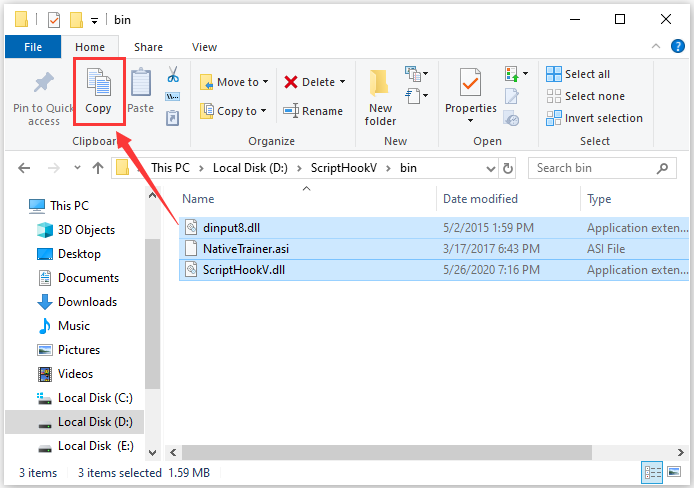
After updating the Script Hook V program, you can run GTA V again and check whether the critical error has been removed.
Solution 2: Revert Your Game to an Old Version
If the developers of the Script Hook V hasn’t released a new version after the game is updated, you can solve the Script Hook V critical error by reverting the game to an old version.
You can refer to the following steps.
Step 1: Get the GTA V downgrade zip from the website.
Step 2: Extract the downloaded files, copy GTAV and GTAVLauncher application and paste them to your GTA V game installation folder.
Step 3: If there is a pop-up window reminding you that the destination already has the file, select Replace the file in the destination.
Step 4: Copy the downloaded update.RPF file and paste it to the Updates folder inside the game installation folder.
Now you should have reverted your GTA V to an old version. And you can launch the game to check if it works properly without any errors.
About The Author

Position: Columnist
Sherry has been a staff editor of MiniTool for a year. She has received rigorous training about computer and digital data in company. Her articles focus on solutions to various problems that many Windows users might encounter and she is excellent at disk partitioning.
She has a wide range of hobbies, including listening to music, playing video games, roller skating, reading, and so on. By the way, she is patient and serious.
-
Partition Wizard
-
Partition Magic
- Top 2 Solutions to Script Hook V Critical Error in GTA V
By Sherry | Follow |
Last Updated December 29, 2020
Some Grand Theft Auto V players complain that they keep receiving the same error message: script hoot V critical error. Why does this occur? How to solve this problem? Don’t worry, you can find some suggestions in this post provided by MiniTool Partition Wizard.
Grand Theft Auto V (GTA V), the second best-selling video game, is popular action-adventure game developed by Rockstart North. It is played from either a third-person or first-person perspective.
The good news is that the game is available on many platforms, including PlayStation 3, Xbox 360, PlayStation 4, Xbox One and Microsoft Windows. And in late 2021, PlayStation 5 and Xbox Series X versions are scheduled to release.
Recently, some users who play GTA V on Microsoft Windows report that a window showing Script Hook V critical error pops up while they are trying to launch the game. The error comes with a message “unknown game version” and they are unable to open the game because of this error. It happens even in the offline mode.
Why does Script Hook V critical error occur? Actually, the Script Hook V is the library that allows to use GTA V script native functions in custom *.asi plugins. However, the developers of the game don’t support it and the application is regarded as a cheat. So, when they update GTA V, the Script Hook V program will be patched. That’s why you encounter the critical error.
How to solve the problem and play GTA V again? You can refer to the following solutions.
Solution 1: Update the Script Hook V Program
Script Hook V also keeps releasing new updates all the time. When you can’t open GTA 5 due to Script Hook V critical error, the first thing you need to do is to update the Script Hook V program and install the latest patches.
Here is how to do it.
Step 1: Search for Script Hook V in your browser and download it from a reliable website.
Note: Please make sure that the Script Hook V version supports the GTAV version and it’s the latest one.
Step 2: Open File Explorer by pressing Win + E and extract the downloaded zip file and open the bin folder.
Step 3: Copy all the files inside the bin folder and paste them to your GTA V installation folder to replace the old ones.
After updating the Script Hook V program, you can run GTA V again and check whether the critical error has been removed.
Solution 2: Revert Your Game to an Old Version
If the developers of the Script Hook V hasn’t released a new version after the game is updated, you can solve the Script Hook V critical error by reverting the game to an old version.
You can refer to the following steps.
Step 1: Get the GTA V downgrade zip from the website.
Step 2: Extract the downloaded files, copy GTAV and GTAVLauncher application and paste them to your GTA V game installation folder.
Step 3: If there is a pop-up window reminding you that the destination already has the file, select Replace the file in the destination.
Step 4: Copy the downloaded update.RPF file and paste it to the Updates folder inside the game installation folder.
Now you should have reverted your GTA V to an old version. And you can launch the game to check if it works properly without any errors.
About The Author
Position: Columnist
Sherry has been a staff editor of MiniTool for a year. She has received rigorous training about computer and digital data in company. Her articles focus on solutions to various problems that many Windows users might encounter and she is excellent at disk partitioning.
She has a wide range of hobbies, including listening to music, playing video games, roller skating, reading, and so on. By the way, she is patient and serious.
Grand Theft Auto — это франшиза видеоигр, которая на протяжении многих лет собирала армию преданных поклонников. Однако, как и в любой сложной игре, требующей большого количества ресурсов, пользователи столкнулись с проблемами. Например, критическая ошибка Script Hook V.
Причиной этой проблемы является античит-система. Разработчики не поддерживают приложение Script Hook, которое используется для моддинга в GTA V. В этом случае приложение определяется как чит и исправляется каждый раз, когда игра получает обновление.
Также бывают ситуации, когда появляется критическая ошибка Script Hook V со спецификацией, которая не может найти родную, и в этом случае вам может потребоваться полностью переустановить игру.
В этой статье мы хотим предложить вам три решения относительно того, как вы можете исправить распространенную критическую ошибку Script Hook V, чтобы вы могли возобновить свою игровую деятельность.
Один очень важный аспект, который вы должны учитывать перед началом процесса устранения неполадок, заключается в том, что вам необходимо перезагрузить системный диск и ваше сетевое оборудование.
Когда возникает критическая ошибка Script Hook V?
Пользователи сообщали о различных сценариях, в которых они получили критическую ошибку Script Hook V. Вот некоторые из них:
- Неустранимая ошибка Script Hook V, неизвестная версия игры. Это происходит, когда версия игры и версия Script Hook V не работают вместе, поскольку они несовместимы.
- Критическая ошибка Script Hook V не может найти родной — попробуйте переустановить игру несколько раз, так как могут быть задействованы некоторые поврежденные файлы.
- Критическая ошибка Script Hook V в GTA 5. Следуйте приведенным ниже решениям, поскольку они касаются, в частности, ошибки GTA 5.
- Критическая ошибка Script Hook V в Epic Games. Если программа запуска Epic Games не работает должным образом, это может быть вызвано повреждением кеша, связанным со сторонними скриптами.
- Критическая ошибка Script Hook V после обновления. Обновление приложения может привести к сбоям в работе из-за невидимых ошибок, которые попали в код.
- Критическая ошибка Script Hook V в лаунчере Rockstart. Если игра получает обновление, в результате библиотека также должна быть обновлена. В противном случае ваш лаунчер Rockstar выйдет из строя.
При этом давайте перейдем к списку методов, с помощью которых вы можете исправить проблему с критической ошибкой на вашем компьютере и вернуться к игре в свою любимую игру. Продолжайте читать!
Как исправить критическую ошибку и Script Hook в GTA 5?
1. Обновите приложение Script Hook
- Загрузите программное обеспечение Script Hook из надежного источника.
- Нажмите Windows+ E , чтобы открыть проводник, и извлеките загруженную zip-папку.

- Откройте папку bin и скопируйте туда все файлы. Перейдите в исходную папку, которую вы установили, и вставьте туда файлы. Выберите «Заменить файлы в месте назначения».

- Вот и все. Повторно загрузив Script Hook, вы убедитесь, что у вас установлена его последняя версия.
Если вам нужна дополнительная помощь, ознакомьтесь с нашей статьей о том, как обновить Script Hook V до последней доступной версии.
2. Верните свою игру к старой версии.
- Загрузите архив для понижения версии:
- Steam-версия
- Социальная версия Cub
- Извлеките загруженные файлы, щелкнув их правой кнопкой мыши и выбрав «Извлечь все». Затем скопируйте файлы GTAV.exe и GTAVLauncher.exe. в прежней папке установки GTA V.

- Нажмите «Заменить файлы в месте назначения» во всплывающем диалоговом окне.
- Щелкните правой кнопкой мыши файл Update.rpf и выберите значок «Копировать» в раскрывающемся меню.

- Выберите «Заменить файлы в месте назначения» во всплывающем диалоговом окне.
- Перейдите в папку «Установка игры», откройте «Обновления» и нажмите «Вставить», затем выберите «Заменить файлы в месте назначения».
- Загрузите мод No launcher, распакуйте файл и скопируйте файлы в папку установки Grand Theft Auto V.

- Чтобы запустить игру, дважды щелкните файл No_GTAVLAUNCHER.exe. Вот и все! Критическая ошибка Script Hook V должна быть устранена.
3. Используйте стороннее программное обеспечение
У вас также есть возможность использовать программное обеспечение для автоматического ремонта ПК, такое как Outbyte PC Repair Tool. Инструмент обнаруживает ошибки в вашей системе и исправляет их с помощью собственной базы данных системных файлов Windows.
Когда Outbyte PC Repair Tool обнаруживает, что на вашем компьютере есть поврежденные или отсутствующие файлы, он заменяет их новыми и хорошо функционирующими.
Это безопасный и простой метод, который поможет вам с ошибкой GTA 5 и множеством других проблем, с которыми регулярно сталкиваются владельцы ПК.
Как вы можете видеть, нужно ли вам сделать некоторые подергивания в стороннем программном обеспечении или в вашей реальной системе, критическая ошибка Script Hook V — это распространенная проблема, которую вы можете решить довольно легко. Все, что вам нужно сделать, это внимательно следовать шагам, которые мы представили вам в этой статье.
Мы хотим услышать ваше мнение по этому вопросу, поэтому не стесняйтесь делиться своими мыслями с нами, зайдя в раздел комментариев ниже. Спасибо за чтение!
Содержание
- Scripts hook v critical error gta 5 что делать
- Как исправить ошибку Script Hook V Critical Error в GTA 5?
- Причина Script Hook V Critical Error
- Решение Script Hook V Critical Error
- Решение Script Hook V Critical Error на лицензии
- Решение Script Hook V Critical Error на пиратке
- Ошибка SCRIPT HOOK V CRITICAL ERROR
- Ошибка: SCRIPT HOOK V CRITICAL ERROR
- Что делать и как исправить данную ошибку?
- Что делать если самая последняя версия на странице загрузки не помогает?
- Как поиграть если новая версия Script Hook v еще не вышла?
- Исправлено: критическая ошибка Script Hook V в Grand Theft Auto V
- Что вызывает критическую ошибку Script Hook V?
- Решение 1. Обновите приложение Script Hook.
- Решение 2. Возврат к старой версии игры.
- Fix: Script Hook V Critical Error in Grand Theft Auto V
- What Causes the “Script Hook V Critical Error”?
- Solution 1: Update the Script Hook Application.
- Solution 2: Reverting to Old Version of the Game.
Scripts hook v critical error gta 5 что делать



| 206 | уникальных посетителей |
| 2 | добавили в избранное |

Данная ошибка появляется при запуске гта 5, из-за чего она?
Вероятней всего у вас лицензионная игра, и всего скорее вышло новое обновление для гта 5, как итог у игры стала другая версия.
Script Hook v — это специальный мод необходимый для запуска других модов для игры, и этот мод у вас устарел, как видно на картинке он указал, какие версии игры поддерживает данная версия Script Hook v, всего скорее у вас более новая версия игры.
Что делать и как исправить данную ошибку?
Вам необходимо обновить файлы Script Hook v на более новые, т.е заново скачать архив с Script Hook v, и перенести файлы dinput8.dll и ScriptHookV.dll в папку с игрой, подтвердить замену файлов.
Что делать если самая последняя версия на странице загрузки не помогает?
Новая версия Script Hook v выходит через 1-3 дня после обновления игры, если на странице скачивания Script Hook v нет более новой версии, вам придется подождать.
Источник
Как исправить ошибку Script Hook V Critical Error в GTA 5?
Игровые ошибки – это обычное дело для геймера на ПК-платформе и сегодня мы с вами разберем одну из них – Script Hook V Critical Error в GTA 5. Похоже на то, что после недавнего обновления GTA 5, Script Hook V начал выдавать игрокам ошибку, которая указывает, что у вас установлена неизвестная версия игры. Так в чем же причина этой ошибки?
Причина Script Hook V Critical Error
На самом деле, причина Script Hook V Critical Error в GTA 5 довольно элементарна. При обновлении GTA 5 разработчиками, Script Hook V также должен быть обновлен, иначе возникнет несовместимость между ними. Если вы увидели у себя на экране эту ошибку, то, вероятней всего, Script Hook V просто еще не был обновлен. Процесс обновления Script Hook V занимает приблизительно два или три дня. Также сразу стоит указать на то, что этой проблемой могут страдать как игроки с лицензией, так и с пираткой GTA 5.
Решение Script Hook V Critical Error
Решается Script Hook V Critical Error в GTA 5 просто и от вас требуется только подождать пару дней после обновления GTA 5, а затем установить в нее новую версию Script Hook V. Давайте разберем этот вопрос поподробней, дабы не возникло каких-то осложнений.
- Для начала пройдите на официальный сайт Script Hook V.
- Открыв страничку, вы увидите дату выпуска последней версии Script Hook V. Если та сходится с датой выхода обновления или даже является старше версии вашей копии GTA 5, то вы зашли сюда рано и вам придется прождать несколько дней.
- Если же вы видите, что дата указывает на выход новой версии Script Hook V, то загрузите библиотеки с сайта к себе на компьютер.
- Извлеките файлы из скачанного архива и поместите их в корневую папку GTA 5.
Заметка: если вы увидите в папке с игрой файл под именем dsound.dll, то удалите его.
Решение Script Hook V Critical Error на лицензии
Что же, порой бывает такое сильное желание поиграть, что прям нет сил терпеть. Если вы знаете, что не сможете подождать, то в этом случае можно сделать следующее:
- Выполнить откат GTA 5 до более старой версии.
- Удалить те файлы Script Hook V, которые вы переносили в игру. Однако, модификации в этом случае потеряют работоспособность. Также вам потребуется выполнить переустановку измененных предметов.
Чтобы вернуть игру к старой версии, вам нужно для начала удалить полностью GTA 5. При этом не забудьте сделать бэкап модификаций и сохранений. Далее вам нужно установить чистую версию GTA 5, а затем начать обновлять ее. Как только игра дойдет до нужной вам версии GTA 5 – прекращайте процесс обновления.
Решение Script Hook V Critical Error на пиратке
В случае пиратской версии GTA 5, вам необходимо ожидать релиза новой версии таблетки для игры. Тем не менее ожидать вам долго нет нужды, так как таблетка должна будет обновиться довольно быстро. Вы также можете попробовать попросту удалить библиотеки Script Hook V, но модификации потеряют работоспособность. Плюс, ваша копия GTA 5 может начать работать нестабильно.
Источник
Ошибка SCRIPT HOOK V CRITICAL ERROR
Ошибка: SCRIPT HOOK V CRITICAL ERROR
SCRIPT HOOK V CRITICAL ERROR, данная ошибка появляется при запуске гта 5, из-за чего она?
Вероятней всего у вас лицензионная игра, и всего скорее вышло новое обновление для гта 5, как итог у игры стала другая версия.
Script Hook v – это специальный мод необходимый для запуска других модов для игры, и этот мод у вас устарел, как видно на картинке он указал, какие версии игры поддерживает данная версия Script Hook v, всего скорее у вас более новая версия игры.
Что делать и как исправить данную ошибку?
Вам необходимо обновить файлы Script Hook v на более новые, т.е заново скачать архив с Script Hook v, и перенести файлы dinput8.dll и ScriptHookV.dll в папку с игрой, подтвердить замену файлов.

Ошибка SCRIPT HOOK V CRITICAL ERROR
Что делать если самая последняя версия на странице загрузки не помогает?
Новая версия Script Hook v выходит через 1-3 дня после обновления игры, если на странице скачивания Script Hook v нет более новой версии, вам придется подождать.
Как поиграть если новая версия Script Hook v еще не вышла?
Вариант есть, просто удалите файлы dinput8.dll и ScriptHookV.dll из папки с игрой, но у вас перестанут работать моды, в том числе трейнеры.
А так же при запуске игры может появиться ошибка ERR_GEN_INVALID, если вы устанавливали моды которые редактируют файлы игры, в таком случае либо ждать выхода новой версии Script Hook v, либо удалять файлы dinput8.dll и ScriptHookV.dll и восстанавливать оригинальные файлы игры.
Помогла ли вам наша инструкция? Делитесь мнением в комментариях.
Источник
Исправлено: критическая ошибка Script Hook V в Grand Theft Auto V
Script Hook V – это библиотека, которая позволяет использовать собственные функции сценария GTA V в настраиваемых * .asi-плагинах. Однако совсем недавно у нас было много сообщений о «Критической ошибке Script Hook V», возникающей при попытке запустить игру. Ошибка сохраняется даже в автономном режиме. В этой статье мы обсудим некоторые причины этой проблемы и предоставим вам жизнеспособные решения для ее устранения. 
Что вызывает критическую ошибку Script Hook V?
Мы исследовали проблему после получения многочисленных отчетов от пользователей и разработали набор решений, которые, как сообщалось, устраняют ошибку для большинство пользователей. Кроме того, мы изучили причину проблемы, которая указана ниже.
- Anti-Cheat System: Приложение Script Hook используется для модификации в GTA V, но разработчики не поддерживают эту практику, и приложение определяется как «чит», поэтому оно исправляется в каждом обновлении игры. Разработчики приложения Script Hook всегда выпускают обходной путь для этого в новых обновлениях, но они выходят некоторое время,
Теперь, когда вы знаете причину проблема, которую мы будем решать.
Но прежде чем переходить к решениям, перезапустите вашу систему и сетевое оборудование.
Решение 1. Обновите приложение Script Hook.
Обычно всякий раз, когда разработчики GTA V исправляют приложение Script Hook в своих обновлениях, разработчики Script Hook выпускают новое обновление в качестве обходного пути. . Поэтому на этом этапе мы обновим наше приложение Script Hook
- Загрузите приложение ScriptHook . .
- Извлеките zip-файл и откройте папку « bin » в извлеченных файлах
- все файлы в « bin » в папку установки GTAV
Примечание. Убедитесь, что версия Script Hook поддерживает версию GTA V, а дата выпуска более поздняя, чем дата обновления GTA V.
Если это не сработает для вас или Разработчики из Script Hook не выпустили редактировал исправление, а затем вам следует попробовать следующее решение.
Решение 2. Возврат к старой версии игры.
Если Grand Theft Auto V был обновлено разработчиками, и в новом обновлении исправлено приложение Script Hook V, оно не будет работать. Обычно разработчики Script Hook V выпускают новое обновление, которое служит обходным путем для исправления, но если оно еще не было предоставлено, нам придется вернуться к старой версии игры, для которой
- Загрузить GrandTheftАвтофайлов (для версии Steam ).
- Загрузить файлы GrandTheftAuto (для версии RockstarClub ).
- Теперь извлекитезагруженные файлы и скопируйте файлы GTAV.exe и GTAVLauncher.exe в папку установки игры.
- Выберите « Заменитьфайлыв trong>destination ».
- Кроме того, Right – Нажмите на « Update . rpf » и выберите « Скопируйте ”
- Теперь Откройте файл« Папка Updates », расположенная внутри папки установки игры , и
- Еще раз, выберите параметр « Заменитьфайлыв пункте назначения ».
- Это вернет игру к старой версии, и Script Hook должен работать, но игра проверяет наличие обновлений каждый раз, когда вы пытаетесь запустить ее через средство запуска .
- Загрузите программу запуска « Нет
- Теперь извлекитезагруженный ong> « RAR » файл
- Скопируйте оба файла, расположенные внутри извлеченной папки внутри Grand Папка установки Theft Auto V
- Теперь дважды щелкните значок « No_GTAVLAUNCHER.exe »для запуска игры.
- Этот режим пропускает процесс проверки на наличие обновлений и, следовательно, позволяет играть в игру в более старой версии.
Если это решение не решает вашу проблему, вам следует попробовать чистую установку обоих приложение Script Hook V , а также игру Grand Theft Auto .
Источник
Fix: Script Hook V Critical Error in Grand Theft Auto V
Script Hook V is the library that allows using GTA V script native functions in custom *.asi plugins. However, quite recently we have had many reports of a “ Script Hook V Critical Error ” occurring while trying to launch the game. The error persists even in the Offline mode. In this article, we will discuss some of the causes of this problem and provide you with viable solutions to eradicate it.
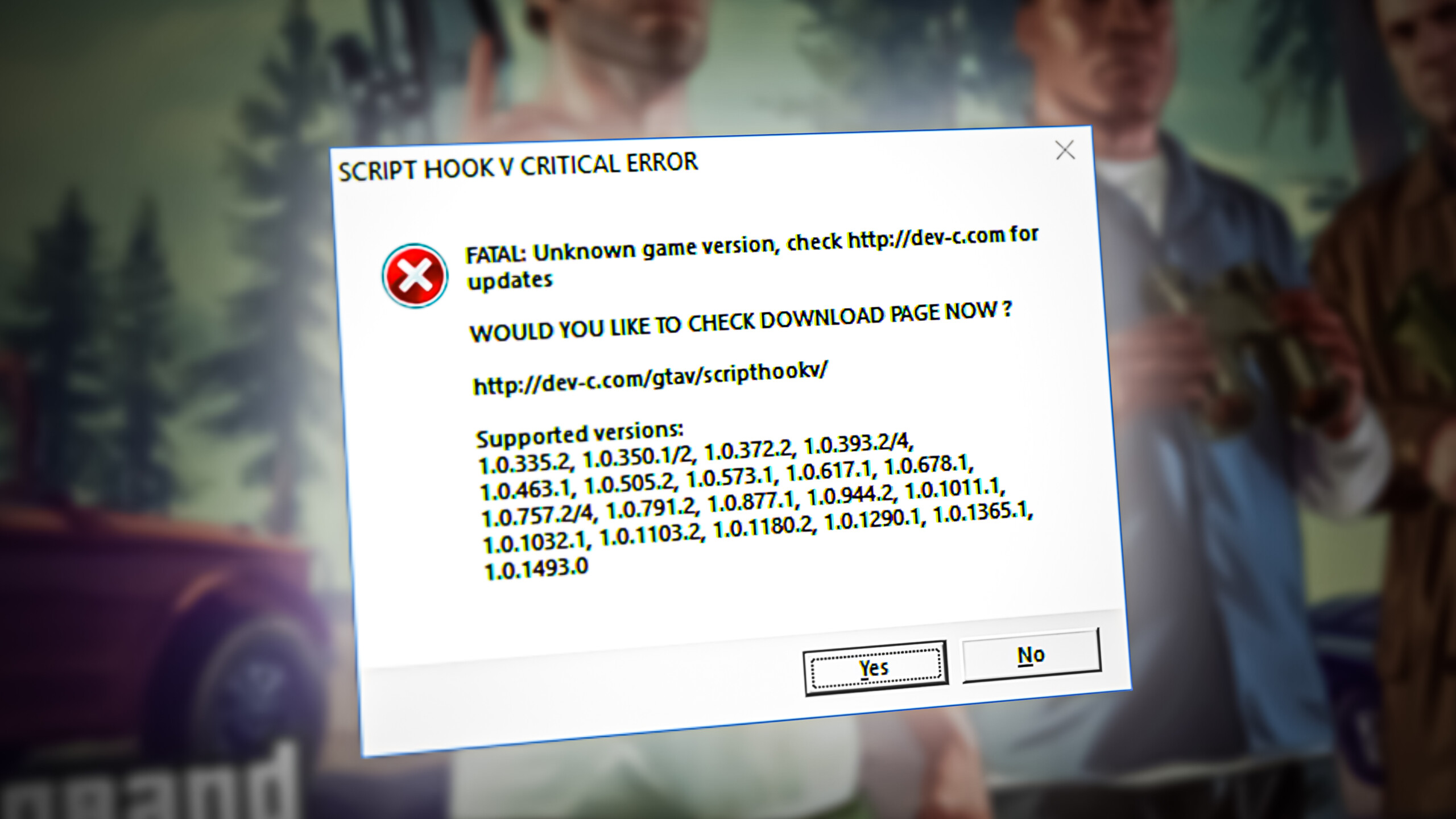 Script Hook V Critical Error GTA V
What Causes the “Script Hook V Critical Error”?
We investigated the issue after receiving numerous reports from users and came up with a set of solutions that were reported to solve the error for most users. Also, we looked into the cause of the problem which is listed as follows.
- Anti-Cheat System: The Script Hook application is used for modding in GTA V but the developers don’t support this practice and the application is detected as a “cheat” therefore it is patched in every update of the game. The developer’s of the Script Hook application always release a workaround for this in the new updates but they take some time to come out,
Now that you know the cause of the problem we will be moving on towards the solutions.
But before moving on with the solutions, restart your system and the network equipment.
Solution 1: Update the Script Hook Application.
Usually whenever the GTA V developers patch the Script Hook application in their updates the developers at Script Hook release a new update as a workaround that patch. Therefore in this step, we will be updating our Script Hook application
- Download the ScriptHook application.
- Extract the zip file and open the “bin” folder in the extracted files
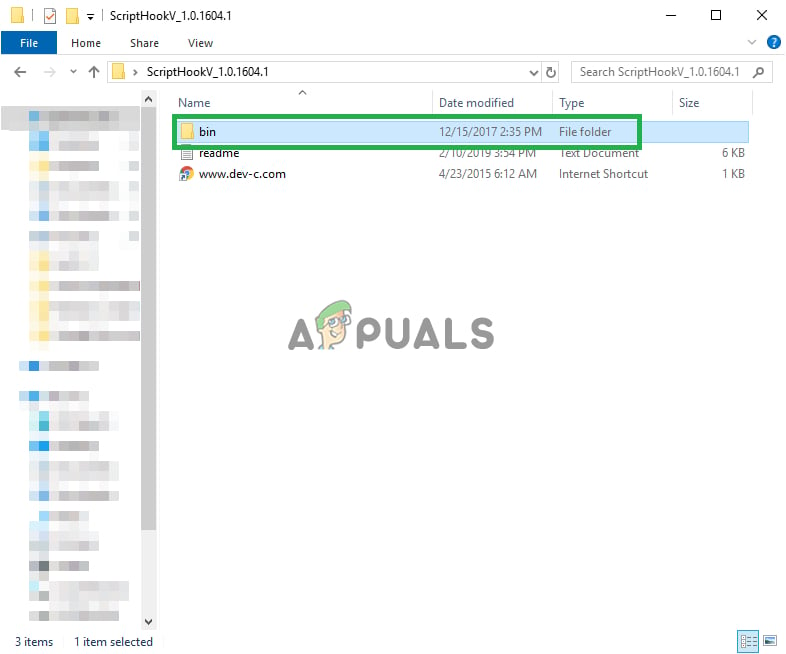 Opening the Bin folder inside the extracted zip file
 - Copy all the files inside the “bin” folder to your GTAV installation folder
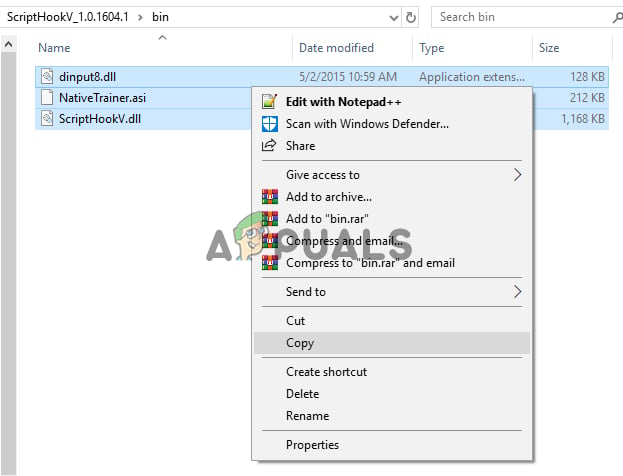 Copying the files inside the bin folder to the GTA V installation folder
Note: Make sure that the version of the Script Hook supports the GTA V version and the release date is after the date of the GTA V update.
If this does not work for you or the Developers from the Script Hook have not released a fix yet and then you should try the next solution.
Solution 2: Reverting to Old Version of the Game.
If the Grand Theft Auto V has been updated by the developers and the new update has patched the Script Hook V application then it will not work. Usually, the Developers of the Script Hook V release a new update that serves as a workaround for the patch but if that has not yet been provided then we will have to revert to the old version of the game for which
- Download the GrandTheftAutofiles (for the Steamversion).
- Download the GrandTheftAutofiles (for the Rockstar’sClubversion).
- Download the GrandTheftAutofiles (for the Epic Games Launcher version).
- Now extract the downloaded files and copy the GTAV.exe and the GTAVLauncher.exe into the game installation folder.
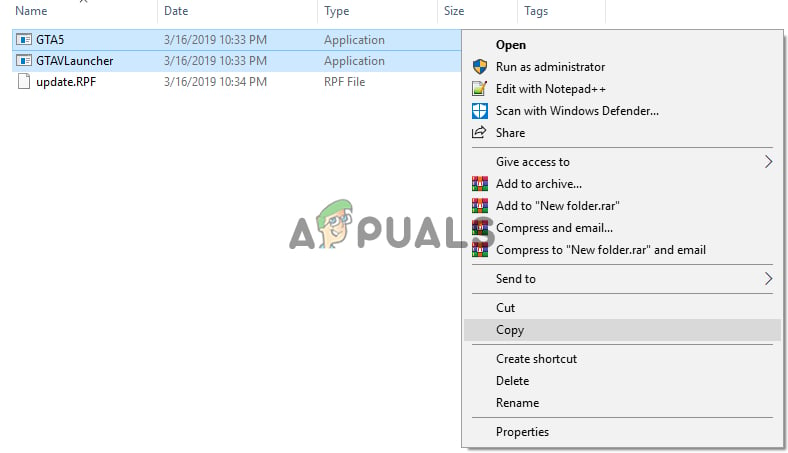 Copying
 - Select “Replacethefilesin thedestination” option.
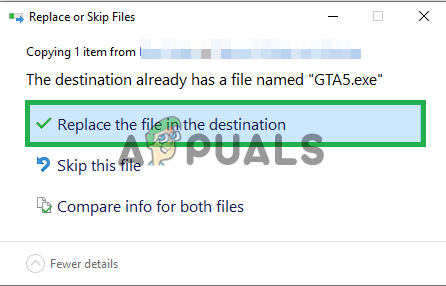 Selecting the “Replace the files in destination” option
 - Also, Right–Click on the”Update.rpf” and select “Copy”
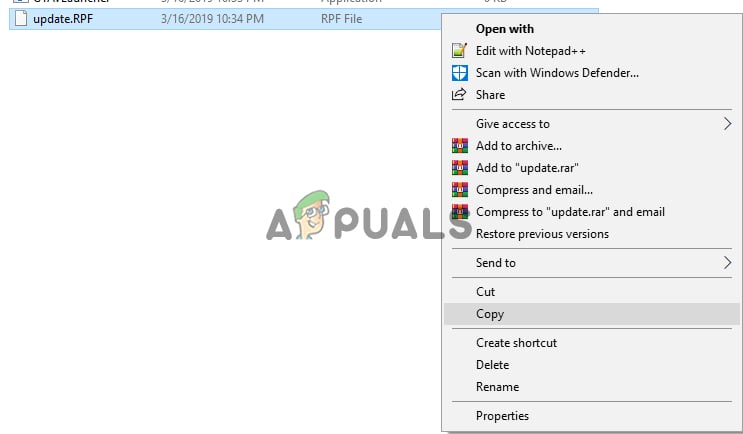 Copying the “update.RPF” into the game folder
 - Now Open the “Updates” folder situated inside the game installation folder and paste
- Once more, select the “Replacethe filesin the Destination” option.
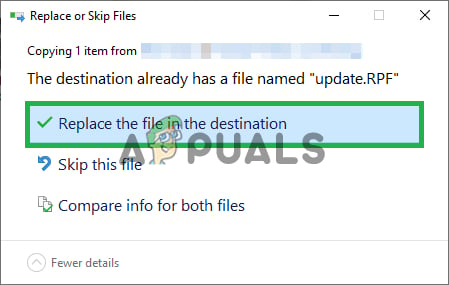 Selecting the Replace the files in the destination option
 - This will revert the game to the old version and the Script Hook should work but the game checks for updates every time you try to launch it through the launcher.
- Download the “NolauncherMod”.
- Now extract the downloaded “RAR” file
- Copy both the files situated inside the extracted folder inside the Grand Theft Auto V installation folder
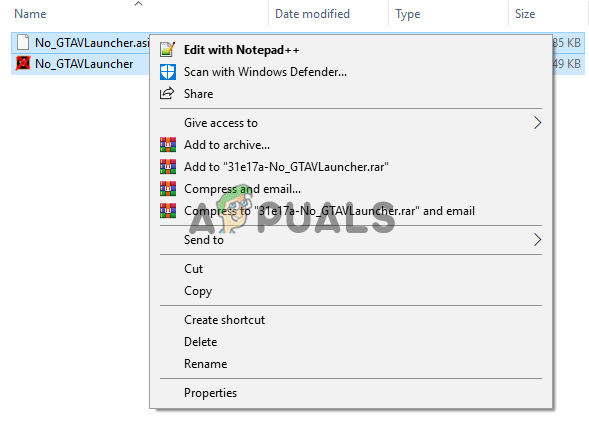 Copying the files
 - Now double click on the “No_GTAVLAUNCHER.exe” to run the game
- This mode skips the process of checking for updates and thus allows you to play the game on an older version.
If this solution does not solve your problem then you should try a clean install of both the Script Hook V application and also the Grand Theft Auto game.
Источник
Script Hook V is the library that allows using GTA V script native functions in custom *.asi plugins. However, quite recently we have had many reports of a “Script Hook V Critical Error” occurring while trying to launch the game. The error persists even in the Offline mode. In this article, we will discuss some of the causes of this problem and provide you with viable solutions to eradicate it.
What Causes the “Script Hook V Critical Error”?
We investigated the issue after receiving numerous reports from users and came up with a set of solutions that were reported to solve the error for most users. Also, we looked into the cause of the problem which is listed as follows.
- Anti-Cheat System: The Script Hook application is used for modding in GTA V but the developers don’t support this practice and the application is detected as a “cheat” therefore it is patched in every update of the game. The developer’s of the Script Hook application always release a workaround for this in the new updates but they take some time to come out,
Now that you know the cause of the problem we will be moving on towards the solutions.
But before moving on with the solutions, restart your system and the network equipment.
Solution 1: Update the Script Hook Application.
Usually whenever the GTA V developers patch the Script Hook application in their updates the developers at Script Hook release a new update as a workaround that patch. Therefore in this step, we will be updating our Script Hook application
- Download the Script Hook application.
- Extract the zip file and open the “bin” folder in the extracted files
Opening the Bin folder inside the extracted zip file - Copy all the files inside the “bin” folder to your GTA V installation folder
Copying the files inside the bin folder to the GTA V installation folder Note: Make sure that the version of the Script Hook supports the GTA V version and the release date is after the date of the GTA V update.
- Select “Copy and Replace” to complete the action
- Now that the Script Hook application is updated, try to run the game
If this does not work for you or the Developers from the Script Hook have not released a fix yet and then you should try the next solution.
Solution 2: Reverting to Old Version of the Game.
If the Grand Theft Auto V has been updated by the developers and the new update has patched the Script Hook V application then it will not work. Usually, the Developers of the Script Hook V release a new update that serves as a workaround for the patch but if that has not yet been provided then we will have to revert to the old version of the game for which
- Download the Grand Theft Auto files (for the Steam version).
- Download the Grand Theft Auto files (for the Rockstar’s Club version).
- Download the Grand Theft Auto files (for the Epic Games Launcher version).
- Now extract the downloaded files and copy the GTAV.exe and the GTAVLauncher.exe into the game installation folder.
Copying - Select “Replace the files in the destination” option.
Selecting the “Replace the files in destination” option - Also, Right–Click on the”Update.rpf” and select “Copy”
Copying the “update.RPF” into the game folder - Now Open the “Updates” folder situated inside the game installation folder and paste
- Once more, select the “Replace the files in the Destination” option.
Selecting the Replace the files in the destination option - This will revert the game to the old version and the Script Hook should work but the game checks for updates every time you try to launch it through the launcher.
- Download the “No launcher Mod”.
- Now extract the downloaded “RAR” file
- Copy both the files situated inside the extracted folder inside the Grand Theft Auto V installation folder
Copying the files - Now double click on the “No_GTAVLAUNCHER.exe” to run the game
- This mode skips the process of checking for updates and thus allows you to play the game on an older version.
If this solution does not solve your problem then you should try a clean install of both the Script Hook V application and also the Grand Theft Auto game.

Kevin Arrows
Kevin is a dynamic and self-motivated information technology professional, with a Thorough knowledge of all facets pertaining to network infrastructure design, implementation and administration. Superior record of delivering simultaneous large-scale mission critical projects on time and under budget.
Back to top button
На чтение 3 мин. Просмотров 186 Опубликовано 20.04.2021
Script Hook V – это библиотека, которая позволяет использовать собственные функции сценария GTA V в настраиваемых * .asi-плагинах. Однако совсем недавно у нас было много сообщений о «Критической ошибке Script Hook V», возникающей при попытке запустить игру. Ошибка сохраняется даже в автономном режиме. В этой статье мы обсудим некоторые причины этой проблемы и предоставим вам жизнеспособные решения для ее устранения. 
Содержание
- Что вызывает критическую ошибку Script Hook V?
- Решение 1. Обновите приложение Script Hook.
- Решение 2. Возврат к старой версии игры.
Что вызывает критическую ошибку Script Hook V?
Мы исследовали проблему после получения многочисленных отчетов от пользователей и разработали набор решений, которые, как сообщалось, устраняют ошибку для большинство пользователей. Кроме того, мы изучили причину проблемы, которая указана ниже.
- Anti-Cheat System: Приложение Script Hook используется для модификации в GTA V, но разработчики не поддерживают эту практику, и приложение определяется как «чит», поэтому оно исправляется в каждом обновлении игры. Разработчики приложения Script Hook всегда выпускают обходной путь для этого в новых обновлениях, но они выходят некоторое время,
Теперь, когда вы знаете причину проблема, которую мы будем решать.
Но прежде чем переходить к решениям, перезапустите вашу систему и сетевое оборудование.
Решение 1. Обновите приложение Script Hook.
Обычно всякий раз, когда разработчики GTA V исправляют приложение Script Hook в своих обновлениях, разработчики Script Hook выпускают новое обновление в качестве обходного пути. . Поэтому на этом этапе мы обновим наше приложение Script Hook
- Загрузите приложение Script Hook . .
- Извлеките zip-файл и откройте папку « bin » в извлеченных файлах

- все файлы в « bin » в папку установки GTA V

Примечание. Убедитесь, что версия Script Hook поддерживает версию GTA V, а дата выпуска более поздняя, чем дата обновления GTA V.
- Выберите « Копировать и заменить », чтобы завершить действие.
- Теперь, когда приложение Script Hook updated , попробуйте запустить игру.
Если это не сработает для вас или Разработчики из Script Hook не выпустили редактировал исправление, а затем вам следует попробовать следующее решение.
Решение 2. Возврат к старой версии игры.
Если Grand Theft Auto V был обновлено разработчиками, и в новом обновлении исправлено приложение Script Hook V, оно не будет работать. Обычно разработчики Script Hook V выпускают новое обновление, которое служит обходным путем для исправления, но если оно еще не было предоставлено, нам придется вернуться к старой версии игры, для которой
- Загрузить Grand Theft Авто файлов (для версии Steam ).
- Загрузить файлы Grand Theft Auto (для версии Rockstar Club ).
- Теперь извлеките загруженные файлы и скопируйте файлы GTAV.exe и GTAVLauncher.exe в папку установки игры.

- Выберите « Заменить файлы в trong> destination ».

- Кроме того, Right – Нажмите на « Update . rpf » и выберите « Скопируйте ”

- Теперь Откройте файл« Папка Updates », расположенная внутри папки установки игры , и
- Еще раз, выберите параметр « Заменить файлы в пункте назначения ».

- Это вернет игру к старой версии, и Script Hook должен работать, но игра проверяет наличие обновлений каждый раз, когда вы пытаетесь запустить ее через средство запуска .
- Загрузите программу запуска « Нет
- Теперь извлеките загруженный ong> « RAR » файл
- Скопируйте оба файла, расположенные внутри извлеченной папки внутри Grand Папка установки Theft Auto V

- Теперь дважды щелкните значок « No_GTAVLAUNCHER.exe »для запуска игры.
- Этот режим пропускает процесс проверки на наличие обновлений и, следовательно, позволяет играть в игру в более старой версии.
Если это решение не решает вашу проблему, вам следует попробовать чистую установку обоих приложение Script Hook V , а также игру Grand Theft Auto .
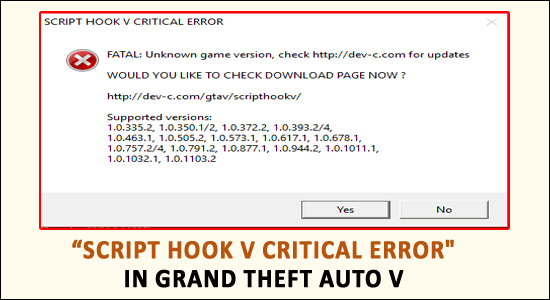
Script Hook V Critical Error is encountered by the gamers while launching the Grand theft auto V. This is a common error and seen even in the offline mode and as a result, the user is unable to play the game.
The Script Hook V is an essential GTA V library that allows using the script native functions in custom *.asi plugins.
And while updating the game to the latest version the GTA V script hook error message appears on the screen that the game version is unknown.
Well, GTA 5 is a leading and highly popular game, but this is not free from errors or bugs. There are many different errors reported by the gamers. Read the article to find out different GTA 5 errors and ways to fix them.
Moreover, this GTA 5 script hook is recently seen and reported by many gamers so here in this article I have shortlisted the possible fixes that worked for other affected users to fix the error.
But first, learn why I am getting the “Script Hook V Critical Error FATAL: Unknown Game Version in GTA 5”
What Causes Script Hook V Critical Error?
The main reason for the Script Hook V error is the inconsistencies between the game versions and the library.
Despite this, it is also found that the Script Hook application is utilized for modding but the developers of the game won’t support mods. And due to this, the application is detected as a “cheat” and as a result, it is patched in every game update.
The developers of the Script Hook application always release the latest updates and patches to get it fixed. As of now, we are well aware of the reasons responsible for the Script Hook V Critical Error on the GTA V game. Now follow the fixes given one by one.
Other Script Hook V Critical Related Error:
- Script hook v critical error can’t find native
- Script hook v old version
- Unknown game version 2020
- Script hook v error an exception occurred while executing
- Script hook v old version
- Fatal ScriptHookV Error
- Script hook v critical error fatal can’t find native
- Script hook v critical error unknown game version
It doesn’t matter which error code you are seeing in your case, just follow the fixes given to solve the Script Hook V error.
Fix 1 – Update Script Hook Application
When the GTA V developers patch the Script Hook application in their updates then the Script Hook developers also release the latest update as a workaround of that patch.
Therefore here it is suggested to update the script hook application:
- First, download the ScriptHook
- After that extract, the zip file,> in the extracted files open the bin
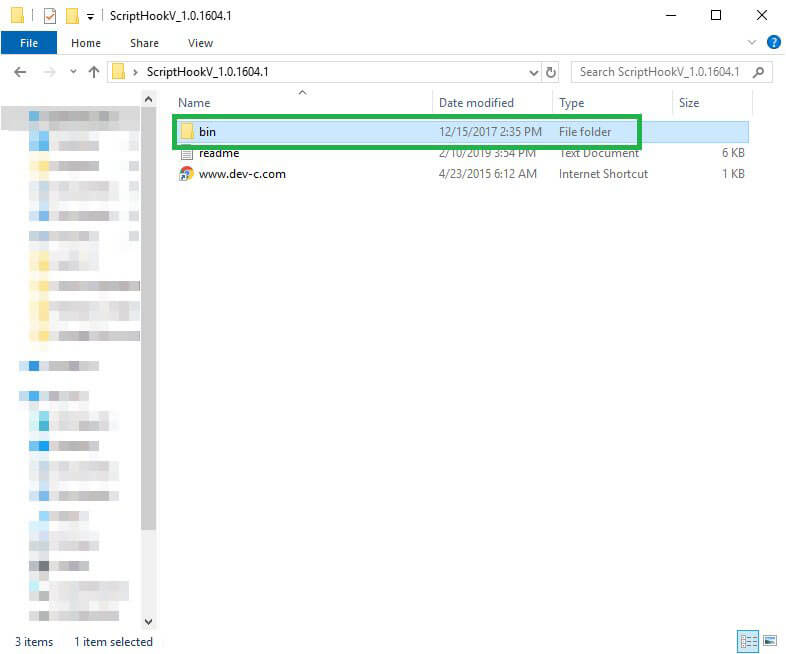
- Now to your GTAV installation folder > copy entire files in the bin
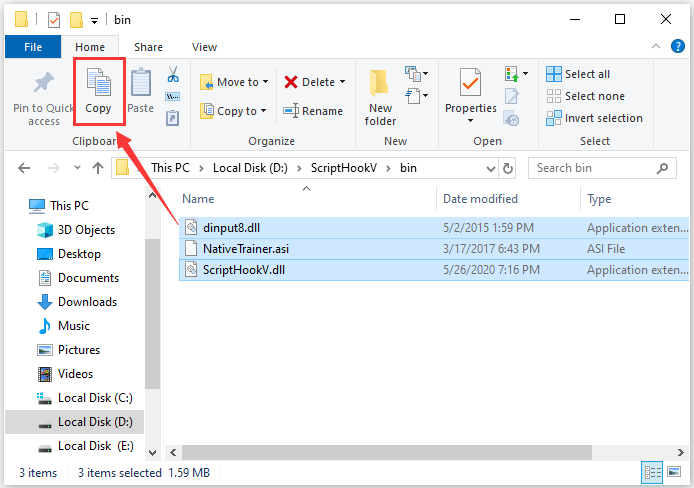
Please Note – Be sure that the Script Hook supports the GTA V version and also the release date must be after the date of the GTA V update.
- Choose Copy and Replace for completing the action
- Well as the Script Hook application is updated now, try running the GTA 5 game.
Hope this works for you or else the Script Hook Developers would have not released a fix.
But if still, you are getting the Script Hook V Critical Error while launching GTA 5 then follow the next solution.
Fix 2 – Revert to Old Game Version
As said above the Script Hook V developers had released a new update that works as a workaround for the patch. But if updating the patch won’t work for you then here it is suggested to revert to the old version of the game.
This trick also worked for many gamers to get past GTA 5 script hook error.
Follow the steps to do so:
- First, download the GrandTheft Auto files (for the Steam version).
- Download the GrandTheft Auto files (for the Rockstar’s Club version).
- Then extract the downloaded files > copy the GTAV.exe and the GTAVLauncher.exe in the game installation folder.
- Now choose to Replace the files in the destination
- Then right-click on the Update.rpf > choose Copy
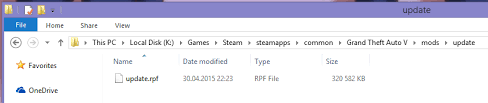
- And inside the game installation folder,> open the Updates folder > and paste it
- Again choose the Replace the files in the Destination
- Doing this will revert the game to the old version > and the Script Hook should work but the game will check for updates every time when you launch it through the launcher.
- Next download the No launcher Mod > extract the downloaded RAR file
- Then copy both the files located inside the extracted folder inside the Grand Theft Auto V installation folder.
- Double click on the exe for running the game
- The mode skips the method of checking for updates and allows you to play the game on the older version.
It is estimated this solution works for you to fix Script Hook V Critical Error in GTA 5 but if not then perform a clean install.
Fix 3 – Reinstall GTA 5 & Script Hook V Application
If none of the above-given fixes works for you to resolve Script Hook V Critical Error then reinstall the game and the script hook V application and this surely fix the error on Grand Theft Auto V game.
Manually uninstalling the program won’t remove it completely, as some of the registry entries, and junk files are left behind that cause interruption the next time application is installed.
So here it is suggested to uninstall the game and the script hook application using the third-party uninstaller.
Get Revo Uninstaller to uninstall the application completely
Recommended Solution to Fix Windows 10/11 Issues & Errors
If your Windows 10 PC or laptop is running slow or showing various errors and issues then here it is suggested to scan your system with the PC Repair Tool.
This is a multifunctional tool that just by scanning once detect and fix various computers errors, remove malware, hardware failure, prevent file loss, and repair the corrupted system files to speed up Windows PC performance.
Not only this, but you can also fix other PC fatal errors like BSOD errors, DLL errors, repair registry entries, runtime errors, application errors, and many others.
Get PC Repair Tool to Optimize Your Windows PC Performance
Conclusion:
So this is all about the Script Hook V Critical Error in GTA V. Well this is a common error and it is estimated the solutions given work for you.
Make sure to follow the fixes given carefully. Hope we managed to help you to fix the error completely.
Moreover, if you are encountering any other issues on your Windows PC, then you can share your queries with us on the Facebook page. Our team will help you to fix the issue on your end.
Good Luck..!!

Hardeep has always been a Windows lover ever since she got her hands on her first Windows XP PC. She has always been enthusiastic about technological stuff, especially Artificial Intelligence (AI) computing. Before joining PC Error Fix, she worked as a freelancer and worked on numerous technical projects.
В играх Grand Theft Auto всегда было здоровое сообщество моддеров, позволяющее игрокам изменять игру в соответствии со своим личным стилем. и вкус. Однако моддинг часто приводит к появлению в игре новых ошибок, таких как критическая ошибка Script Hook V в GTA V. Если вы уже сталкивались с этой ошибкой, вот все, что вам нужно знать о том, почему она возникает и как ее устранить. Исправьте это.
 Изображение взято с Rockstar Игры

Script Hook V — это библиотека, которая позволяет Grand Theft Auto V создавать сценарии собственных функций в игре, а именно то, как запускаются многие современные моды для игры. Это означает, что вам понадобится последняя версия Script Hook V, установленная для запуска модов, но здесь есть одна загвоздка. Программное обеспечение GTA Anti-Cheat распознает Script Hook V как читерское приложение даже при игре в автономном режиме.
Создатели Script Hook обычно создают в библиотеке обходной путь, чтобы античит-функции в GTA V не могли его обнаружить, но этот обходной путь меняется каждый раз, когда в игре появляется новое обновление. Учитывая, как часто GTA V обновляется новым контентом, это означает, что разработчикам Script Hook необходимо часто вносить небольшие изменения в библиотеку.
Как исправить критическую ошибку Script Hook V в GTA V
<р>Хорошей новостью является то, что когда вы сталкиваетесь с критической ошибкой Script Hook V в GTA V, решение довольно простое. Просто загрузите и установите последнюю версию Script Hook с вашего любимого веб-сайта для моддинга, и, надеюсь, разработчики реализовали новый обходной путь, позволяющий библиотеке работать без обнаружения программным обеспечением Anti-Cheat.
Если вы обновили библиотеку Script Hook V, но по-прежнему получаете критическую ошибку при загрузке Grand Theft Auto V, то вероятная причина в том, что недавно вышло обновление для игры, а разработчики Script Hook еще не накатили собственное последующее обновление. К сожалению, в этом случае вы мало что можете сделать, пока Script Hook V не будет обновлен.
Единственный выход в этой ситуации — откатить игру до более ранней версии, которая не распознает ваш Script Hook V. файлы. Однако это может вызвать проблемы с онлайн-контентом для Grand Theft Auto V и потребовать загрузки файлов игры из юридически сомнительных источников, поэтому мы не рекомендуем это в качестве долгосрочного решения сообщения о критической ошибке Script Hook V. Лучше подождать несколько дней, пока Script Hook V будет обновлен.