
Не запускается CHIRP (отчёты об ошибках включены)
Получил небольшую пачку писем, все с одной проблемой — CHIRP не запускается. При запуске программы появляется окно отчёты об ошибках включены или на английском error reporting is enabled, нажимаешь OK и программа закрывается. Сначала даже незнал чем помочь людям, у меня то запускается нормально, но это на ноутбуке…. Возникла необходимость установить CHIRP на обычный компьютер. Вот проблема и вылезла.
Стал рабираться. Пробую рекомендацию который сам всем писал имя пользователя должно быть на английском языке. У меня имя действительно на русском, создаю тестового пользователя с именем «1». Запускаю CHIP — не работает. Все тоже самое.
Лезу в google, пишу «chirp error reporting is enabled», в первых ссылках баг репорт на официальном сайте CHIRP — ссылка. Ответ разработчиков : «с CHiRP won´t start on any of my systems на CHiRP won´t start on any of my systems: UTF-8 in path».
Для тех кто попроще перевод с импровизацией автора — «CHIRP не стартует при использовании путей с не англйскими символами».
Пользоватеря переименовал, CHIRP — лежит в C:Program FilesCHIRP. Что не так? Запускаю командную строку и вот она проблема:

Имя компьютера у меня оказывается тоже на русском.

Переименовываю компьютер, запускаю chirp — не запускается. Вроде все рекомендации выполенены. Опять запускаю командную строку и вижу что надпись Игорь-ПК осталась, видимо так создался пользователь. Создаю второго с именем «2». И вот оно счестье — chirp запустился.


Решение проблемы:
1. Смотрим имя пользователя и имя компьютера.
2. Если имя компьютера на англ. языке — создаем нового пользователя на англ языке. Должно заработать.
3. Если имя компьютера на русском языке: переименовываем компьютер и лишь затем создаем пользователя.
|
ert 2021-01-02 20:20:58
удали chirp. перезагрузи комп. скачай другой chirp и установи
[Ответить] |
|


|
Роман 2019-03-08 21:50:21
Всё сделал. Один фиг не работает. В диспетчере задач появляется и сразу исчезает.
[Ответить] |
|
|
Айдар 2018-02-11 01:00:50
Все сделал, все имена прописал на английском, и даже локальный диск С у меня теперь Local C? все равно не хотит запускаться прога…..(((((
[Ответить] |
|
|
Роман 2019-03-08 21:51:47
Надо пробовать более старые сборки. В новых что-то накосячили.
[Ответить] |
|
|
Владимир 2018-01-21 19:47:58
Две абсолютно одинаковые рации… Одна версия прошивки (BFB297)… Одна радиостанция легко программируется через Chirp. Настройки без проблем скачиваются-заливаются, а вот вторая припопытке скачать-залить сразу ребутится и Chirp выдает: «Radio did not respond». Кто подскажет где копать?
[Ответить] |
|
|
Александр 2018-05-31 15:03:03
Проблема скорее всего в разъеме на рации. У баофенгов такое очень часто. Их контакты немного не достают до контакта на проводе. Решается небольшой напайкой олова на контакт на программаторе
[Ответить] |
|
|
влад 2017-06-23 15:46:48
Сделал все как описали.сменил пользователя-программа загрузилась.Спасибо за статью.Хотя сам пользуюсь баофенговской прогой. Эту воткнул из принципа.
[Ответить] |
|

|
ruslan 2017-06-04 04:35:23
Надо создать нового пользователя с англ. именем, и все получилось
[Ответить] |
|
|
Сергей 2017-01-28 02:31:29
Косорукая китайская софтина, каменный век — может еще отсосать этот кабель? Пошел он нахер, больно много чести юзвера переименовывать и плодить всякую щнягу англицкую…
[Ответить] |
|
|
Admin 2019-09-13 01:29:05
Поддерживаю. Говнософтина написанная быдлокодерами косоухими.
[Ответить] |
|
|
Игорь 2017-01-30 15:11:34
Достаточно создать нового пользователя, например. Попробуйте родной софт для прошивки и chirp вам покажется сказкой.
[Ответить] |
|
|
Игорь 2016-12-06 01:20:31
Здравствуйте, с рации скачивается без проблем, а вот обратно редко когда дойдёт до середины и полоска в CHIRP останавливается, рация перезагружается и всё. После этого с рации не считывает, ошибку порта выдаёт. Только после перезагрузки компа.
[Ответить] |
|
|
Анатолий 2017-03-12 15:01:39
у меня схожая проблема. сначала при загрузки данных с рации доходило до середины и выдавало ошибку, потом один рас всё же получилось загрузить данные на комп но при загрузке обратно прога зависла но данные всё же записались, а теперь chirp вообще не запускается
[Ответить] |
|
|
Костя 2015-11-22 02:53:54
Переустановка Windows с заменой имени ПК и имени пользователя помогла. СПАСИБО! До этого голову ломал.
[Ответить] |
|
|
R0RAAD 2015-06-27 22:46:04
Здравствуйте, для решения проблемы создал в корне диска С папку (C:CHIRP SAVES) и все пошло как по маслу, программа очень хороша, главное никакой кириллицы в пути сохранения))))
[Ответить] |
|
|
Сергей 2014-11-20 22:18:01
Нашел ответ. Нужно сохранять файл в ту папку, в которую установлена программа, т.е., например, c:Program FilesCHIRP
[Ответить] |
|
|
Серый 2015-04-11 15:16:39
какой фаил сохранить
[Ответить] |
|
|
Сергей 2014-11-20 22:04:09
Пытаюсь сохранить прошивку в Файл-Save — выдает ошибку file access error. Т.е. не могу сохранить прошивку, в чем проблема?
[Ответить] |
|
|
Игорь 2014-11-20 22:12:04
О такой проблеме ранее не сообщали, на сайте разработчика есть тикет с подобной проблемой. Ответа нету…
[Ответить] |
|
|
дМИТРИЙ 2017-06-06 19:28:51
ПРОБЛЕМА решается сохранением конфига в корне диска. Видимо и здесь важна латиница
[Ответить] |
|
|
Денис 2016-02-20 01:25:08
при подключении через чирп для чтения каналов с рации,пишет отказ радио.No response from radio.что не так?
[Ответить] |
|
|
Анатолий 2014-11-08 18:27:15
Была та же проблема. Создал новую учётную запись (на eng), зашёл с неё и CHIRP запустился.
[Ответить] |
|

|
Олег 2015-03-29 17:59:11
Изменил и имя компа и группу-НИХРЕНА НЕ ЗАПУСКАЕТСЯ…
[Ответить] |
|
|
Олег 2015-03-29 17:44:03
Что значит НОВАЯ УЧЕТНАЯ ЗАПИСЬ? У меня имя на АНГЛ. языке и все равно CHIRP не запускается. В чем причина?
[Ответить] |
|
|
Анатолий 2015-03-30 13:02:30
Имя пользователя и имя компьютера должны быть на англ. языке. Oleg-ПК CHIRP ругается именно на ПК .
[Ответить] |
|
|
Олег 2015-03-30 20:41:16
Все сделал именно так, запускаю CHIRP-выходит рамка «об отключении ошибок», нажимаю «ОК» и всё… Тишина.. Скажите, как запустить эту заколдованную программу?? Если можно на мой адрес sho-man@rambler.ru
[Ответить] |
|
|
Юрий 2014-10-13 01:30:51
Сделал все как тут описано!!! По шагова, ничего не пропустил. Все равно не запускается. Драйвер не находит. Короче одни проблемы с такими прогами. Если ломаете, то ломать надо правильно. Что бы люди не ломали себе голову по пол дня!!!
[Ответить] |
|
|
Игорь 2014-10-13 08:33:50
Программа Chirp — Freeware (бесплатная).
[Ответить] |
|
Страницы: [1]
$begingroup$
I’m trying to program my Baofeng bf-f8hp with the chirp software, but as I have to do, «Download From Radio», after I choose the appropriate maker, product and model, all I get is an error message which reads, «An Error has occured: The Radio did not respond.»
I’ve unplugged all, restarted computer and plugged all back in, turned on radio, same result.
Ideas?

mike65535
1,0231 gold badge11 silver badges25 bronze badges
asked Apr 8, 2018 at 7:50

$endgroup$
$begingroup$
For me I didn’t have my radio cable fully pushed into my radio. It took some extra pressure and then it snapped in place. I had to press harder than expected.
answered Jan 6, 2021 at 20:57

RayLovelessRayLoveless
2112 silver badges5 bronze badges
$endgroup$
5
$begingroup$
The most common error is not selecting the correct COM port for the virtualized USB cable.
answered Apr 8, 2018 at 11:33

Glenn W9IQGlenn W9IQ
18.3k1 gold badge21 silver badges54 bronze badges
$endgroup$
1
$begingroup$
A lot of the USB programming cables are not supported by the new Windows drivers that are installed automatically -specifically those with the Prolific PL-2303 USB chip set. You ‘can’ sometimes use them by downloading and installing an older driver. Better to get a proper cable though.
CHIRP Cable Guide
Glenn W9IQ
18.3k1 gold badge21 silver badges54 bronze badges
answered May 10, 2018 at 18:40

$endgroup$
$begingroup$
Another common error is related to their quality control. I had a unit (UV-5R+) that wouldn’t work, like that.
Contacted the seller and they sent me a new «body» — and it worked.
So in a case where you are really stuck, I suggest you contact the seller.
answered Apr 11, 2018 at 2:32

SDsolarSDsolar
2,0511 gold badge14 silver badges36 bronze badges
$endgroup$
$begingroup$
the most common problem I have encountered with folks I’ve helped … the connector is not all the way seated in the radio.
answered Jan 15, 2021 at 2:09

$endgroup$
$begingroup$
The USB -> Baofeng cable can be difficult to seat properly in the radio. If it isn’t making good contact, it can affect whether CHRIP will function correctly or not.
You might check the connection and connect your cable with the radio more tightly.

answered Sep 4, 2021 at 6:11

$endgroup$
1
$begingroup$
I found this question while troubleshooting my own problem. Chirp on Arch Linux. There were over 32 COM ports labeled tty0-tty32 that were all throwing errors. Here is what I had to do:
- Run chirp as root so that I did not run into permission issues using the COM ports. You can get around this by adding your user to the dialout group, but as I did not have this group, I just run as root.
- Use a USB port that plugs directly into the motherboard, not the front panel, since those function as a hub.
- Use a legacy 2.0 (not 3.0) USB port
- Reboot the machine with the USB cable plugged in (not sure if this step is necessary, but I did it during my testing).
- Now at the very bottom of the list there was a /dev/ttyUSB0 that was not there before.
- Select a compatible radio from the list. In my case, using Radioddity UV-5RX3 for Baofeng UV-S9PLUS
answered Sep 8, 2022 at 1:04

$endgroup$
You must log in to answer this question.
Not the answer you’re looking for? Browse other questions tagged
.
Not the answer you’re looking for? Browse other questions tagged
.
-
-
October 17 2014, 15:37
Радиогубителям. Китайское, полезное
Есть у меня портативная радиостанция Yaesu FT-60R. Программировать её всегда было проблемой, потому что если программировать каналы с самой радиостанции то это бешенное вращение валкодера и тыканье кнопок, в случае если не просто частоту запомнить, а настроить коды, репитер, или вбить название канала. Конечно же производитель охотно продаст кабель и софт за 40 долларов, не считая доставки. Что на мой взгляд — жлобство, и у буржуев такое поведение компании называется как-то так — «Because we hate you!».
Зашел на DX, вдруг, думаю, китайцы что-нибудь такое клонировали. Точно! Есть кабель за $8.5, причем универсальный, подходит для разных разъемов и производителей. Называется «6-in-1 USB Programming Cable for Kenwood / HYT / Mag A8 / GP88S / ICOM / YAES — Black», меня собственно интересовало то что «YAES» 🙂 Заказал, привезли. Драйверов отдельных под win не надо, определяется как переходник USB-to-COM. В комплекте диск с двумя версиями некоей проги на китайском языке, возможно она работает, но что означают пункты меню мне не понять.
Ищем софт.
FT-60 commander вроде бы специально под эту радиостанцию, но не работает, не скачивает даже данные из памяти радио. До редактирования добраться не удалось.
CHIRP — под много радиостанций, FT-60 почуял, скачал данные из памяти. Отказался записывать. Говорит «Failed to communicate with radio: Radio did not respond». На сайте проекта зарегистрирован этот баг, автор отписался месяца три назад, что да мол, есть такой баг, возможно дело в кабеле или драйвере. Обещал исправить.
baoclone заточена под несколько баофенгов и только одну yaesu — FT-60R. Простенько сделано — командная строка, правка текстовых файлов, но работает, само детектит какое радио подключено. И читает память радиостанции и записывает.
Я рад.
Если кому такое надо — могу дать линк где кабель продают.
|
|
|
Radio did Not Respond |
|
This is a very common Make sure the connector is
(Other possibilities are listed below) |
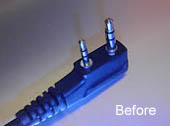 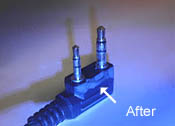
Graphic by Mike KF5DEY GT3
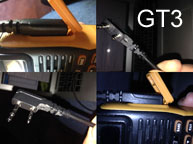
The GT3 and similar radios with optional case designs may require a slightly different approach to trimming the cable. The cable cannot seat properly, not because it is misaligned, but rather the ridge on the case may be protruding out too far.
The cable may still need to be trimmed, but from the cable tension area. The graphic below shows the problem and potential solution.
|
| Many programming cables supplied with the radios are not manufactured by Baofeng, even if they have Baofeng stamped on the USB connector. If you are still having issues after trimming the cable, you may want to refer to the Drivers and Software sections of Miklor.com Other possibilities have also been identified:
|
|
|
|
Each USB slot is connected to a separate com port to avoid conflict. Changing your USB slot will change the com port number. After making this change, you must unplug and replug your USB programming cable |
|
(see Drivers Page) |
|
Error occurs if Prolific driver version is higher than v3.2.0.0 Downgrade to v3.2.0.0 and the error should go away. |
|
CHIRP does not support my (Model Radio)
Radio Version Not |
|
These messages are generated if you are running a much older version of CHIRP. You must upgrade to CHIRP’s Latest Daily Build. |
|
Fail Connect with Transceiver |
This message is generated by the Factory Software. It can occur when: 1. (UV-5R) Incorrect software version for your 2. Your radio is not turned ON when trying to program. 3. You are receiving a signal while trying to connect. 4. Your cable is not plugged in all the way. (See above) 5. |
|
Could not open port com xx (2, ‘CreateFile, ‘The system cannot find the file specified.’) |
| This message is generated by CHIRP. The USB Com Port entered is not correct. Plug the programming cable into the desired USB port and run: |
Store the file name in nullity |
|
Occurs when trying to save a data file using the Factory This error occurs when you don’t have a valid filename for the |
|
Cable without Echo |
|
This indicates that the RX and TX serial lines have not been connected together with a loopback device (a plug that connects the RX and TX lines of a serial port connector for testing) so the characters being sent on the TX line are not being echoed back on the RX line. |
|
Radio NAK’d block at address 0xF010 |
|
Some more recent UV-B5 / B6 radios ship with only 27 menu options as compared to the 29.
|
|
Application cannot run because application configuration is incorrect |
| This message is generated by Windows XP. The following needs to be loaded to your PC. |
-
To anyone looking to acquire commercial radio programming software:
Please do not make requests for copies of radio programming software which is sold (or was sold) by the manufacturer for any monetary value. All requests will be deleted and a forum infraction issued. Making a request such as this is attempting to engage in software piracy and this forum cannot be involved or associated with this activity. The same goes for any private transaction via Private Message. Even if you attempt to engage in this activity in PM’s we will still enforce the forum rules. Your PM’s are not private and the administration has the right to read them if there’s a hint to criminal activity.
If you are having trouble legally obtaining software please state so. We do not want any hurt feelings when your vague post is mistaken for a free request. It is YOUR responsibility to properly word your request.
To obtain Motorola software see the Sticky in the Motorola forum.
The various other vendors often permit their dealers to sell the software online (i.e., Kenwood). Please use Google or some other search engine to find a dealer that sells the software. Typically each series or individual radio requires its own software package. Often the Kenwood software is less than $100 so don’t be a cheapskate; just purchase it.
For M/A Com/Harris/GE, etc: there are two software packages that program all current and past radios. One package is for conventional programming and the other for trunked programming. The trunked package is in upwards of $2,500. The conventional package is more reasonable though is still several hundred dollars. The benefit is you do not need multiple versions for each radio (unlike Motorola).
This is a large and very visible forum. We cannot jeopardize the ability to provide the RadioReference services by allowing this activity to occur. Please respect this.
-
Thread starter
77Impala
-
Start date
Oct 16, 2017
- Status
- Not open for further replies.
-
#1
Last night I tried to program the UV-5R-3 (tri-bander: 144, 220, 440 Mhz) radio with Chirp. Was not able to get the radio to talk to Chirp. Did confirm that my older UV-5R did allow Chirp to read the program I have in it.
So Chirp can read the older radio just fine.
I did the radio side plug mod of trimming the edge that plugs into the radio.
I tried to see if the UV-5X would read and it did not.
I tried a different brand and saw a mesage that the radio sent to much information, more than the make/model I selected should have. That tells me that the radio is trying to communicate with Chirp.
Any suggestions or is it that Chirp just does not have the software updated for this newer model?
-
#2
Make sure you have the latest version of Chirp.
Index of /chirp_daily/LATEST
As far as I know there are no Baofeng tri-band radios.
Do you have a BTECH UV-5X3? That’s not the same as a Baofeng UV-5R.
Are you selecting the right radio in the Chirp menu?
-
#3
Bought it Saturday from Main Trading Company. I will work on posting a picture of the front of it.
Yes I was using the latest Chirp build, the UV-5R-3 was not on the Baofeng list.
Sent from my SM-G930U using Tapatalk
Last edited: Oct 16, 2017
-
#4
Here is the picture.

Sent from my SM-G930U using Tapatalk

-
#6
CHIRP may not support the model yet. The UV-5R-3 does not show up in the supported models list.
-
#7
There is no UV-5R-3 on MTC’s web site. It must be something new. Contact them and see if they have software for it.
-
#8
They had quite a few for sale Saturday during their yearly big outdoor event.
I am surprised that I have actually bought something very new on the market, I am one who usually waits a while before buying new type of gear.
Hopefully Chirp will have the update for this radio soon.
-
#9
OK… if this is a tri-band radio… just for funsies…. In Chirp, select BTECH>UV-5X3 as your radio model number and give that a shot. You really have nothing to lose.
-
#10
OK… if this is a tri-band radio… just for funsies…. In Chirp, select BTECH>UV-5X3 as your radio model number and give that a shot. You really have nothing to lose.
Tried that and the statement was «Error reading data from radio: not the amount of data we want.»
-
#11
Same issue…
I’m having the same issue. Both CHIRP and BaoFeng UV-5R Series Program Software won’t communicate with the radio.
Tried all the BaoFeng and BTECH radios listed in CHIRP.
Tk
-
#12
I sent this issue to Baofengtech website support team and I am waiting for their response.
-
#13
Just sent them pictures that they requested (front and back) of the radio.
-
#14
Well no help from Baofengtech, their reply to me was: «This is not a radio we sell or support; as well knowing the chipsets in place there would be a very unlikely chance that the receiver performs on 220 if it all «
So I double checked with my frequecy counter and verified that it does indeed transmit on 223.500.
I then called MTC and was told to use Chirp and the Baofeng BF-888 as the radio. Well as some one else also pointed out that did not work.
Finally I did find the OEM website and here is their page but still no software support: Home_BAOFENG official website_baofengradio.com
I have found written instructions on how to manually program the radio, looks that is the only way to program it for now.
-
#15
Offset does not manually save either
I can program a channel in frequency mode and it works. However, when saving to a memory channel the offset shows «000.000» when looking at the settings. It does not seem to save the offset.
As for the suggestion of using BF-888, I get a message of «No response from Radio».
I am starting to feel like MTC sold a bad batch of radios.
-
#16
I can program a channel in frequency mode and it works. However, when saving to a memory channel the offset shows «000.000» when looking at the settings. It does not seem to save the offset.
Which model are you referring to?
This is normal operation for the UV-5R/UV-82 type radios. You don’t use an offset for memory channels.
First you program the receive frequency and then you program the transmit frequency.
-
#17
UV-5R-3… In the memory options, number 25 is the direction of frequency shift and number 26 is the offset (frequency shift as in 000.600). It works fine in the frequency mode but when you save it to a memory channel, it saves everything except the Offset. The Frequency Shift shows to be 000.000 instead of 000.600.
The UV-5R-3 is a tri-band radio. It works fine if I want to program a frequency in frequency mode… one at a time but all info does not save to memory channel.
Last edited: Oct 22, 2017
-
#18
UV-5R-3… In the memory options, number 25 is the direction of frequency shift and number 26 is the offset (frequency shift as in 000.600). It works fine in the frequency mode but when you save it to a memory channel, it saves everything except the Offset. The Frequency Shift shows to be 000.000 instead of 000.600.
That’s normal and the UV-5R-3 programs exactly like the other radios then. You don’t understand how to program it.
The offset and shift direction (menus 25 and 26) are ONLY for frequency (VFO) mode. You can’t save the offset to memory channels. Many hams have only learned how to program Yaecomwoodco Japanese rigs and for some reason are incapable of understanding this.
You have to program the tx and rx frequencies separately.
-
#19
OK, I see what you mean. Thanks for the clarification. My other radio does it all in one step. I did a quick search and found the other steps here:
https://www.buytwowayradios.com/blo…rogram_the_baofeng_uv-5r_from_the_keypad.aspx
You get what you pay for… It worked with the extra steps… 12-15..
Now, we wait for Chirp to update and be able to communicate with the radio. Currently, Chirp says the radio does not respond.
Last edited: Oct 22, 2017
-
#20
I was able to program the local repeaters and my most used simplex channels into my UV-5R-3 this morning.
I sent messages to the the OEM Baofeng and to Chirp as well over the weekend, waiting on their reply’s.
- Status
- Not open for further replies.
Baofeng UV-5R
Re: Baofeng UV-5R
Внесу свои 5 копеек по программированию baofeng uv-5r(у меня версия прошивки BFS297). Программировал каналы вышевыложенным файлом img вышевыложенным же чирпом. Радиостанция наотрез отказывалась выходить на связь,пока не вывинтил антенну.Может,кому пригодится.(видимо любая активность в эфире даже за шумодавом влияет на установление связи)
- DDV432
- Сообщений: 2
- Зарегистрирован: 24 сен 2014, 17:42
Re: Baofeng UV-5R
 Andrey » 19 янв 2015, 22:09
Запись частоты ретранслятора автоканала в память радиостанции.
Для введения частот с разносом (без компьютера)
1) Вводим в режиме частот A/B в верхнюю строку частоту 433.500
Переходим в МЕНЮ №27 «MEM-CH» и сохраняем в нужный нам канал,выходим из МЕНЮ (Exit)
2) Вводим в режиме частот A/B в верхнюю строку частоту 438.500
Переходим в МЕНЮ № 11 «R-CTCS» выбираем субтон 77,выбираем в Меню №13 «T-CTCS» выбираем субтон 77
Выходим из МЕНЮ.(Exit)
3) Переходим в МЕНЮ № 27 «MEM-CH» и сохраняем в тот же канал (что и частоту приёма)
Выходим из МЕНЮ.(Exit)
На дисплее в нужном нам канале памяти (VFO/MR) высвечивается частота приёма, +-, номер канала.
- Andrey
- Сообщений: 2
- Зарегистрирован: 15 дек 2014, 17:43
Re: Baofeng UV-5R
Yuriy » 02 мар 2015, 19:46
Произвел настройки как указано, кроме все прочего на дисплее есть метка «СТ». Общение слышу, меня похоже никто. Радиостанция Baofeng UV5-R. Может штатная антенна слабовата? Нахожусь на микрорайоне.
Baofeng UV-5R, позывной 455
- Yuriy
- Сообщений: 18
- Зарегистрирован: 02 мар 2015, 19:36
- Откуда: Россия, г.Орел
Re: Baofeng UV-5R
pavel » 09 мар 2015, 17:08
Yuriy писал(а):Произвел настройки как указано, кроме все прочего на дисплее есть метка «СТ». Общение слышу, меня похоже никто. Радиостанция Baofeng UV5-R. Может штатная антенна слабовата? Нахожусь на микрорайоне.
Тоже долго мучался с настройкой такой рации. Если хочешь могу помочь и показать как у меня настроена такая рация. Если надумаешь пиши в личку телефон.
- pavel
- Сообщений: 7
- Зарегистрирован: 14 июл 2014, 22:12
Re: Baofeng UV-5R
Yuriy » 30 мар 2015, 16:39
pavel писал(а):
Yuriy писал(а):Произвел настройки как указано, кроме все прочего на дисплее есть метка «СТ». Общение слышу, меня похоже никто. Радиостанция Baofeng UV5-R. Может штатная антенна слабовата? Нахожусь на микрорайоне.
Тоже долго мучался с настройкой такой рации. Если хочешь могу помочь и показать как у меня настроена такая рация. Если надумаешь пиши в личку телефон.
Спасибо за предложенную помощь, Павел! Понемногу сам разобрался  Ручками тыкать неудобно, собрал себе кабель и заодно сделал «мануал» для тех кому захочется повторить конструкцию.
- Вложения
-
 сборка кабеля для UV5-R.JPG
- (137.75 KiB) Скачиваний: 0
Последний раз редактировалось Yuriy 30 мар 2015, 18:07, всего редактировалось 1 раз.
Baofeng UV-5R, позывной 455
- Yuriy
- Сообщений: 18
- Зарегистрирован: 02 мар 2015, 19:36
- Откуда: Россия, г.Орел
Re: Baofeng UV-5R
Yuriy » 30 мар 2015, 16:48
После сборки кабеля стал разбираться с софтом и настройкой. На ноутбуке установлена Win XP. Установил себе CHIRP и родной китайский софт UV_5R_VIP.
Хочу поделиться способами решения проблем, с которыми столкнулся (скорее всего не я один с таким столкнулся).
В китайском софте при попытке изменить субтон ( CTCSS ) вылетает ошибка «RunTime error 13» и программа закрывается. Для решения проблемы надо зайти в Пуск- Панель управления- Язык и региональные стандарты и во вкладке Региональные параметры установить формат — Английский (США). Данный глюк китайского софта больше не беспокоит.
Последний раз редактировалось Yuriy 09 апр 2015, 19:20, всего редактировалось 2 раз(а).
Baofeng UV-5R, позывной 455
- Yuriy
- Сообщений: 18
- Зарегистрирован: 02 мар 2015, 19:36
- Откуда: Россия, г.Орел
Re: Baofeng UV-5R
Yuriy » 30 мар 2015, 17:11
По работе с CHIRP было веселее  При попытке подключиться к своей UV5-R вылетала ошибка «Radio refused to send block 0x0000»
На русскоязычных форумах нихрена толкового не нашел по этой проблеме, все мучаются и никто так и не разобрался.
В процессе экспериментов выяснил, что Драйвер для кабеля надо ставить не самый новый ( это связано с тем что происходит проверка подлиности цифрового ключа драйвера и автоматическое его обновление) как-то так…
Я собрал кабель на чипе Prolific PL2303 , для этого чипа рекомендуют драйвер v3.2.0.0 ( Win Vista, 7,) и v 2.0.2 (для Win XP)
Проверил программой ChekChipVersion, чип определяется правильно, значит драйвер подходящий.
Версию CHIRP устанавливать обязательно chirp-daily. (ключевое слово — daily ) как можно более свежей версии (
http://chirp.danplanet.com/
)
Дальше самое ГЛАВНОЕ ! Глюк с «Radio refused to send block 0x0000» решается так ( полностью вылечить раз и навсегда, как я понял пока нереально) :
1. копируем себе файл uv5r.py
2. устанавливаем свежую версию CHIRP daily
3. запускаем CHIRP
4.в меню программы жмем Help и ставим галку на Enable Developer Functions
5.далее в меню жмем File и Load Module, указываем путь к файлу uv5r.py
Все! CHIRP отлично начинает подключаться к радиостанции UV-5R и ошибки из разряда «radio refused to send block code 0x1ec0 или 0х0000» не мешают.
Единственное неудобство- пункты 4 и 5 придется повторять каждый раз при запуске CHIRP. Меня это не напрягает, главное что можно нормально работать и программировать
Baofeng UV-5R, позывной 455
- Yuriy
- Сообщений: 18
- Зарегистрирован: 02 мар 2015, 19:36
- Откуда: Россия, г.Орел
Re: Baofeng UV-5R
Yuriy » 30 мар 2015, 17:20
Кому интересно, прилагаю программки и файл для устранения глюка CHIRP.
Checkchipversion — проверка модели чипа адаптера включенного в USBпорт. Установив изначально кривые драйвера у меня тип чипа не определялся.
uv5r.py — файл для устранения беды с ошибкой «radio refused to send block code 0x1ec0 или 0х0000)
- Вложения
-
- uv5r.zip
- (12.03 KiB) Скачиваний: 1103
-
- checkchipversion_v1006.rar
- (86.38 KiB) Скачиваний: 1005
Baofeng UV-5R, позывной 455
- Yuriy
- Сообщений: 18
- Зарегистрирован: 02 мар 2015, 19:36
- Откуда: Россия, г.Орел
Re: Baofeng UV-5R
Yuriy » 30 мар 2015, 17:34
И вот такая еще возникала проблемка. Впервые скачав CHIRP, при попытке его запустить, вылезла ошибка «application configuration is incorrect».
Полная расшифровка ошибки «Application cannot run because application configuration is incorrect»
Это происходит из-за отсутствия необходимых библиотек в Windows. Лечится установкой библиотеки Microsoft Visual C++ 2008 SP1 Redistributable Package.
Вот пока все самое главное изложил. Надеюсь пригодится кому-то. Вся информация найдена на англоязычных сайтах, переведена, протестирована «на себе».
Baofeng UV-5R, позывной 455
- Yuriy
- Сообщений: 18
- Зарегистрирован: 02 мар 2015, 19:36
- Откуда: Россия, г.Орел
Re: Baofeng UV-5R
591 » 31 мар 2015, 11:51
Спасибо! Очень ценное дополнение!
Я то использую CHIRP в Linux, проблем не возникало.
Сейчс скачал chirp-daily-20150325-installer.exe установил на Win XP.
Все работает c Puxing PX-2R без бубнов и проблем, кабель програмирования родной для Puxing. На том же чипе как и у Вас, Prolific PL2303, драйвер Prolific 2.1.51.238 от 22.10.2013
- 591
- Сообщений: 21
- Зарегистрирован: 12 янв 2014, 19:55
Вернуться в ТЕХНИЧЕСКИЙ РАЗДЕЛ
Кто сейчас на форуме
Сейчас этот форум просматривают: нет зарегистрированных пользователей и гости: 0