
If you’ve ever used JavaScript’s split method, there’s a good chance that you’ve encountered the following error: TypeError: Cannot read property 'split' of undefined.
There are a few reasons why you would receive this error. Most likely it’s just a basic misunderstanding of how split works and how to iterate through arrays.
For example, if you try to submit the following code for the Find the Longest Word in a String challenge:
function findLongestWord(str) {
  for(let i = 0; i < str.length; i++) {
    const array = str.split(" ");
    array[i].split("");
  }
}

findLongestWord("The quick brown fox jumped over the lazy dog");
it will throw the TypeError: Cannot read property 'split' of undefined error.
The split method
When split is called on a string, it splits the string into substrings based on the separator passed in as an argument. If an empty string is passed as an argument, split treats each character as a substring. It then returns an array containing the substrings:
const testStr1 = "Test test 1 2";
const testStr2 = "cupcake pancake";
const testStr3 = "First,Second,Third";

testStr1.split(" "); // [ 'Test', 'test', '1', '2' ]
testStr2.split(""); // [ 'c', 'u', 'p', 'c', 'a', 'k', 'e', ' ', 'p', 'a', 'n', 'c', 'a', 'k', 'e' ]
testStr3.split(","); // [ 'First', 'Second', 'Third' ]
Check out MDN for more details about split.
The problem explained with examples
Knowing what the split method returns and how many substrings you can expect is the key to solving this challenge.
Let’s take another look at the code above and see why it’s not working as expected:
function findLongestWord(str) {
  for(let i = 0; i < str.length; i++) {
    const array = str.split(" ");
    array[i].split("");
  }
}

findLongestWord("The quick brown fox jumped over the lazy dog");
Splitting str into an array like this (const array = str.split(" ");) works as expected and returns [ 'The', 'quick', 'brown', 'fox', 'jumped', 'over', 'the', 'lazy', 'dog' ].
But take a closer look at the for loop. Rather than using the length of array as a condition to iterate i, str.length is used instead.
str is «The quick brown fox jumped over the lazy dog», and if you log str.length to the console, you’ll get 44.
The last statement in the body of the for loop is what’s causing the error: array[i].split("");. The length of array is 9, so i would quickly go way over the maximum length of array:
function findLongestWord(str) {
  for(let i = 0; i < str.length; i++) {
    const array = str.split(" ");
    console.log(array[i]);
    // array[0]: "The"
    // array[1]: "quick"
    // array[2]: "brown"
    // ...
    // array[9]: "dog"
    // array[10]: undefined
    // array[11]: undefined
  }
}

findLongestWord("The quick brown fox jumped over the lazy dog");
Calling array[i].split(""); to split each string into substrings of characters is a valid approach, but it will throw TypeError: Cannot read property 'split' of undefined when it’s passed undefined.
How to solve Find the Longest Word in a String with split
Let’s quickly go over some pseudo code for how to solve this problem:
- Split
strinto an array of individual words - Create a variable to track the greatest word length
- Iterate through the array of words and compare the length of each word to the variable mentioned above
- If the length of the current word is greater than the one stored in the variable, replace that value with the current word length
- Once the length of every word is compared with the maximum word length variable, return that number from the function
First, split str into an array of individual words:
function findLongestWordLength(str) {
  const array = str.split(" ");
}
Create a variable to keep track of the longest word length and set it to zero:
function findLongestWordLength(str) {
  const array = str.split(" ");
  let maxWordLength = 0;
}
Now that the value of array is ['The', 'quick', 'brown', 'fox', 'jumped', 'over', 'the', 'lazy', 'dog'], you can use array.length in your for loop:
function findLongestWordLength(str) {
  const array = str.split(" ");
  let maxWordLength = 0;

  for (let i = 0; i < array.length; i++) {

  }
}
Iterate through the array of words and check the length of each word. Remember that strings also have a length method you can call to easily get the length of a string:
function findLongestWordLength(str) {
  const array = str.split(" ");
  let maxLength = 0;

  for (let i = 0; i < array.length; i++) {
    array[i].length;
  }
}
Use an if statement check if the length of the current word (array[i].length) is greater than maxLength. If so, replace the value of maxLength with array[i].length:
function findLongestWordLength(str) {
  const array = str.split(" ");
  let maxLength = 0;

  for (let i = 0; i < array.length; i++) {
    if (array[i].length > maxLength) {
      maxLength = array[i].length;
    }
  }
}
Finally, return maxLength at the end of the function, after the for loop:
function findLongestWordLength(str) {
  const array = str.split(" ");
  let maxLength = 0;

  for (let i = 0; i < array.length; i++) {
    if (array[i].length > maxLength) {
      maxLength = array[i].length;
    }
  }

  return maxLength;
}
Learn to code for free. freeCodeCamp’s open source curriculum has helped more than 40,000 people get jobs as developers. Get started
@evilebottnawi here’s a test repo — https://github.com/hellatan/webpack-mini-css-bug
I’ve been digging around and it seems like it has to do with how webpack is compiling the assets from my observations. I’m also using css modules for my config.
Just for reference, then I mention options with css-loader, the configuration looks like this:
module: {
  rules: [
    MiniCssExtractPlugin.loader,
    {
      loader: require.resolve('css-loader'), // could also just do `loader: 'css-loader'`
      options: {
        // options for css-loader
      }
    }
  ]
}
When I mentions css-loader is a string, the configuration is the following:
module: {
  rules: [
    MiniCssExtractPlugin.loader,
    require.resolve('css-loader'), // could also just do `loader: 'css-loader'`
  ]
}
In the string configuration, you can even do this:
module: {
  rules: [
    MiniCssExtractPlugin.loader,
    {
      loader: require.resolve('css-loader'),
    }
  ]
}
and it will act like the string option.
Now that that setup is out of the way, from what I can tell, the following is getting set to undefined in src/index.js#L33 because the dependency argument is null when the CssModule class is instantiated. Walking through the loader, this condition is what provides the null argument: src/loader.js#L185. When you are passing in options to css-loader, the output ends up being something like this:
[ null,
  { classA: '_33e67a30',
    classB: '_b9e4c43c' } ]
When css-loader is just a string, the output ends up looking something like this:
{ identifier:
   '/projects/project/node_modules/css-loader/dist/cjs.js!/projects/project/node_modules/postcss-loader/lib/index.js??ref--6-2!/projects/project/node_modules/sass-loader/dist/cjs.js??ref--6-3!/projects/project/src/main.scss',
  content:
   ':local .classA {n  overflow-y: hidden;n}nn:local .classB {n  position: absolute;n}n}n',
  media: '',
  sourceMap: undefined }
By having the latter shape, this error is not thrown.
I was really trying to track this problem, but I’m really not familiar with how webpack internally handles module rule settings and loaders. I saw that output from src/loader.js#L122 is different when using the options vs string configurations.
The options configuration output something like this:
CachedSource {
  _source:
   ConcatSource {
     children:
      [ 'module.exports =n',
        '/******/ (function(modules) { // webpackBootstrapn',
        [PrefixSource],
        '/******/ })n',
        '/************************************************************************/n',
        '/******/ (',
        '[n',
        '/* 0 */',
        'n',
        '/*!*********************************************************************************************************************************************************************************************************************************\n',
        '  !*** '/projects/project/node_modules/css-loader/dist/cjs.js!/projects/project/node_modules/postcss-loader/lib/index.js??ref--6-2!/projects/project/node_modules/sass-loader/dist/cjs.js??ref--6-3!/projects/project/src/main.scss' ***!n',
        '  \********************************************************************************************************************************************************************************************************************************/n',
        '/*! no static exports found */n',
        '/***/ (function(module, exports) {nn',
        [CachedSource],
        'nn/***/ })',
        'n/******/ ]',
        ')',
        ';' ] },
  _cachedSource:
   'module.exports =n/******/ (function(modules) { // webpackBootstrapn/******/ t// The module cachen/******/ tvar installedModules = {};n/******/n/******/ t// The require functionn/******/ tfunction __webpack_require__(moduleId) {n/******/n/******/ tt// Check if module is in cachen/******/ ttif(installedModules[moduleId]) {n/******/ tttreturn installedModules[moduleId].exports;n/******/ tt}n/******/ tt// Create a new module (and put it into the cache)n/******/ ttvar module = installedModules[moduleId] = {n/******/ ttti: moduleId,n/******/ tttl: false,n/******/ tttexports: {}n/******/ tt};n/******/n/******/ tt// Execute the module functionn/******/ ttmodules[moduleId].call(module.exports, module, module.exports, __webpack_require__);n/******/n/******/ tt// Flag the module as loadedn/******/ ttmodule.l = true;n/******/n/******/ tt// Return the exports of the modulen/******/ ttreturn module.exports;n/******/ t}n/******/n/******/n/******/ t// expose the modules object (__webpack_modules__)n/******/ t__webpack_require__.m = modules;n/******/n/******/ t// expose the module cachen/******/ t__webpack_require__.c = installedModules;n/******/n/******/ t// define getter function for harmony exportsn/******/ t__webpack_require__.d = function(exports, name, getter) {n/******/ ttif(!__webpack_require__.o(exports, name)) {n/******/ tttObject.defineProperty(exports, name, { enumerable: true, get: getter });n/******/ tt}n/******/ t};n/******/n/******/ t// define __esModule on exportsn/******/ t__webpack_require__.r = function(exports) {n/******/ ttif(typeof Symbol !== 'undefined' && Symbol.toStringTag) {n/******/ tttObject.defineProperty(exports, Symbol.toStringTag, { value: 'Module' });n/******/ tt}n/******/ ttObject.defineProperty(exports, '__esModule', { value: true });n/******/ t};n/******/n/******/ t// create a fake namespace objectn/******/ t// mode & 1: value is a module id, require itn/******/ t// mode & 2: merge all properties of value into the nsn/******/ t// mode & 4: return value when already ns objectn/******/ t// mode & 8|1: behave like requiren/******/ t__webpack_require__.t = function(value, mode) {n/******/ ttif(mode & 1) value = __webpack_require__(value);n/******/ ttif(mode & 8) return value;n/******/ ttif((mode & 4) && typeof value === 'object' && value && value.__esModule) return value;n/******/ ttvar ns = Object.create(null);n/******/ tt__webpack_require__.r(ns);n/******/ ttObject.defineProperty(ns, 'default', { enumerable: true, value: value });n/******/ ttif(mode & 2 && typeof value != 'string') for(var key in value) __webpack_require__.d(ns, key, function(key) { return value[key]; }.bind(null, key));n/******/ ttreturn ns;n/******/ t};n/******/n/******/ t// getDefaultExport function for compatibility with non-harmony modulesn/******/ t__webpack_require__.n = function(module) {n/******/ ttvar getter = module && module.__esModule ?n/******/ tttfunction getDefault() { return module['default']; } :n/******/ tttfunction getModuleExports() { return module; };n/******/ tt__webpack_require__.d(getter, 'a', getter);n/******/ ttreturn getter;n/******/ t};n/******/n/******/ t// Object.prototype.hasOwnProperty.calln/******/ t__webpack_require__.o = function(object, property) { return Object.prototype.hasOwnProperty.call(object, property); };n/******/n/******/ t// __webpack_public_path__n/******/ t__webpack_require__.p = "https://local.intranet.1stdibs.com:5901/app-admin-cms/";n/******/n/******/n/******/ t// Load entry module and return exportsn/******/ treturn __webpack_require__(__webpack_require__.s = 0);n/******/ })n/************************************************************************/n/******/ ([n/* 0 */n/*!*********************************************************************************************************************************************************************************************************************************************************************************************************************************************************************************************!*\n  !*** /Users/daletan/projects/dibs-scripts/node_modules/css-loader/dist/cjs.js??ref--6-1!/Users/daletan/projects/dibs-scripts/node_modules/postcss-loader/lib??ref--6-2!/Users/daletan/projects/dibs-scripts/node_modules/sass-loader/dist/cjs.js??ref--6-3!/Users/daletan/projects/dibs-scripts/src/lib/webpack/scssCustomVarsLoader.js??ref--6-4!./src/navigation/components/Section.scss ***!n  \*********************************************************************************************************************************************************************************************************************************************************************************************************************************************************************************************/n/*! no static exports found */n/***/ (function(module, exports) {nn// Exportsnmodule.exports = {nt"section": "_3868dde8",nt"iosSection": "_dc55311d",nt"sectionLinks": "_6be9f33b",nt"sectionLink": "_6dc1a348",nt"plusIcon": "_b7705030",nt"addButton": "_5e327036",nt"link": "_7b5c1aa1"n};nn/***/ })n/******/ ]);',
  _cachedSize: undefined,
  _cachedMaps: {},
  node: [Function],
  listMap: [Function] }
The string configuration output something like this:
CachedSource {
  _source:
   ConcatSource {
     children:
      [ 'module.exports =n',
        '/******/ (function(modules) { // webpackBootstrapn',
        [PrefixSource],
        '/******/ })n',
        '/************************************************************************/n',
        '/******/ (',
        '[n',
        '/* 0 */',
        'n',
        '/*!*********************************************************************************************************************************************************************************************************************************\n',
        '  !*** '/projects/project/node_modules/css-loader/dist/cjs.js!/projects/project/node_modules/postcss-loader/lib/index.js??ref--6-2!/projects/project/node_modules/sass-loader/dist/cjs.js??ref--6-3!/projects/project/src/main.scss' ***!n',
        '  \********************************************************************************************************************************************************************************************************************************/n',
        '/*! no static exports found */n',
        '/***/ (function(module, exports, __webpack_require__) {nn',
        [CachedSource],
        'nn/***/ })',
        ',n',
        '/* 1 */',
        'n',
        '/*!****************************************************************************************!*\n',
        '  !*** /Users/daletan/projects/dibs-scripts/node_modules/css-loader/dist/runtime/api.js ***!n',
        '  \****************************************************************************************/n',
        '/*! no static exports found */n',
        '/***/ (function(module, exports, __webpack_require__) {nn',
        '"use strict";n',
        [CachedSource],
        'nn/***/ })',
        'n/******/ ]',
        ')',
        ';' ] },
  _cachedSource:
   'module.exports =n/******/ (function(modules) { // webpackBootstrapn/******/ t// The module cachen/******/ tvar installedModules = {};n/******/n/******/ t// The require functionn/******/ tfunction __webpack_require__(moduleId) {n/******/n/******/ tt// Check if module is in cachen/******/ ttif(installedModules[moduleId]) {n/******/ tttreturn installedModules[moduleId].exports;n/******/ tt}n/******/ tt// Create a new module (and put it into the cache)n/******/ ttvar module = installedModules[moduleId] = {n/******/ ttti: moduleId,n/******/ tttl: false,n/******/ tttexports: {}n/******/ tt};n/******/n/******/ tt// Execute the module functionn/******/ ttmodules[moduleId].call(module.exports, module, module.exports, __webpack_require__);n/******/n/******/ tt// Flag the module as loadedn/******/ ttmodule.l = true;n/******/n/******/ tt// Return the exports of the modulen/******/ ttreturn module.exports;n/******/ t}n/******/n/******/n/******/ t// expose the modules object (__webpack_modules__)n/******/ t__webpack_require__.m = modules;n/******/n/******/ t// expose the module cachen/******/ t__webpack_require__.c = installedModules;n/******/n/******/ t// define getter function for harmony exportsn/******/ t__webpack_require__.d = function(exports, name, getter) {n/******/ ttif(!__webpack_require__.o(exports, name)) {n/******/ tttObject.defineProperty(exports, name, { enumerable: true, get: getter });n/******/ tt}n/******/ t};n/******/n/******/ t// define __esModule on exportsn/******/ t__webpack_require__.r = function(exports) {n/******/ ttif(typeof Symbol !== 'undefined' && Symbol.toStringTag) {n/******/ tttObject.defineProperty(exports, Symbol.toStringTag, { value: 'Module' });n/******/ tt}n/******/ ttObject.defineProperty(exports, '__esModule', { value: true });n/******/ t};n/******/n/******/ t// create a fake namespace objectn/******/ t// mode & 1: value is a module id, require itn/******/ t// mode & 2: merge all properties of value into the nsn/******/ t// mode & 4: return value when already ns objectn/******/ t// mode & 8|1: behave like requiren/******/ t__webpack_require__.t = function(value, mode) {n/******/ ttif(mode & 1) value = __webpack_require__(value);n/******/ ttif(mode & 8) return value;n/******/ ttif((mode & 4) && typeof value === 'object' && value && value.__esModule) return value;n/******/ ttvar ns = Object.create(null);n/******/ tt__webpack_require__.r(ns);n/******/ ttObject.defineProperty(ns, 'default', { enumerable: true, value: value });n/******/ ttif(mode & 2 && typeof value != 'string') for(var key in value) __webpack_require__.d(ns, key, function(key) { return value[key]; }.bind(null, key));n/******/ ttreturn ns;n/******/ t};n/******/n/******/ t// getDefaultExport function for compatibility with non-harmony modulesn/******/ t__webpack_require__.n = function(module) {n/******/ ttvar getter = module && module.__esModule ?n/******/ tttfunction getDefault() { return module['default']; } :n/******/ tttfunction getModuleExports() { return module; };n/******/ tt__webpack_require__.d(getter, 'a', getter);n/******/ ttreturn getter;n/******/ t};n/******/n/******/ t// Object.prototype.hasOwnProperty.calln/******/ t__webpack_require__.o = function(object, property) { return Object.prototype.hasOwnProperty.call(object, property); };n/******/n/******/ t// __webpack_public_path__n/******/ t__webpack_require__.p = "https://local.intranet.1stdibs.com:5901/app-admin-cms/";n/******/n/******/n/******/ t// Load entry module and return exportsn/******/ treturn __webpack_require__(__webpack_require__.s = 0);n/******/ })n/************************************************************************/n/******/ ([n/* 0 */n/*!***********************************************************************************************************************************************************************************************************************************************************************************************************************************************************************************!*\n  !*** /Users/daletan/projects/dibs-scripts/node_modules/css-loader/dist/cjs.js!/Users/daletan/projects/dibs-scripts/node_modules/postcss-loader/lib??ref--6-2!/Users/daletan/projects/dibs-scripts/node_modules/sass-loader/dist/cjs.js??ref--6-3!/Users/daletan/projects/dibs-scripts/src/lib/webpack/scssCustomVarsLoader.js??ref--6-4!./src/navigation/components/Section.scss ***!n  \***********************************************************************************************************************************************************************************************************************************************************************************************************************************************************************************/n/*! no static exports found */n/***/ (function(module, exports, __webpack_require__) {nnexports = module.exports = __webpack_require__(/*! ../../../../../../dibs-scripts/node_modules/css-loader/dist/runtime/api.js */ 1)(false);n// Modulenexports.push([module.i, ".section {\n  padding-bottom: 36px;\n  margin-bottom: 36px;\n}\n\n.section:nth-child(even) {\n  border-bottom: 1px solid #ddd;\n}\n\n.section.iosSection {\n  border: 1px dashed #ddd;\n  padding: 9px;\n}\n\n.sectionLinks {\n  border: 1px solid #f3f3f3;\n  margin: 18px 0 18px 18px;\n}\n\n.sectionLink {\n  padding: 9px;\n}\n\n.sectionLink:nth-child(even) {\n  background-color: #f3f3f3;\n}\n\n.plusIcon {\n  height: 12px;\n  width: 12px;\n  fill: #fff;\n  margin-right: 9px;\n  vertical-align: text-top;\n}\n\n.addButton {\n  margin: 18px 0;\n}\n\n.link {\n  cursor: pointer;\n  color: #559b5e;\n}\n\n.link:hover {\n  color: #437a4a;\n}\n", ""]);nnn/***/ }),n/* 1 */n/*!****************************************************************************************!*\n  !*** /Users/daletan/projects/dibs-scripts/node_modules/css-loader/dist/runtime/api.js ***!n  \****************************************************************************************/n/*! no static exports found */n/***/ (function(module, exports, __webpack_require__) {nn"use strict";nnn/*n  MIT License http://www.opensource.org/licenses/mit-license.phpn  Author Tobias Koppers @sokran*/n// css base code, injected by the css-loadern// eslint-disable-next-line func-namesnmodule.exports = function (useSourceMap) {n  var list = []; // return the list of modules as css stringnn  list.toString = function toString() {n    return this.map(function (item) {n      var content = cssWithMappingToString(item, useSourceMap);nn      if (item[2]) {n        return "@media ".concat(item[2], "{").concat(content, "}");n      }nn      return content;n    }).join('');n  }; // import a list of modules into the listn  // eslint-disable-next-line func-namesnnn  list.i = function (modules, mediaQuery) {n    if (typeof modules === 'string') {n      // eslint-disable-next-line no-param-reassignn      modules = [[null, modules, '']];n    }nn    var alreadyImportedModules = {};nn    for (var i = 0; i < this.length; i++) {n      // eslint-disable-next-line prefer-destructuringn      var id = this[i][0];nn      if (id != null) {n        alreadyImportedModules[id] = true;n      }n    }nn    for (var _i = 0; _i < modules.length; _i++) {n      var item = modules[_i]; // skip already imported modulen      // this implementation is not 100% perfect for weird media query combinationsn      // when a module is imported multiple times with different media queries.n      // I hope this will never occur (Hey this way we have smaller bundles)nn      if (item[0] == null || !alreadyImportedModules[item[0]]) {n        if (mediaQuery && !item[2]) {n          item[2] = mediaQuery;n        } else if (mediaQuery) {n          item[2] = "(".concat(item[2], ") and (").concat(mediaQuery, ")");n        }nn        list.push(item);n      }n    }n  };nn  return list;n};nnfunction cssWithMappingToString(item, useSourceMap) {n  var content = item[1] || ''; // eslint-disable-next-line prefer-destructuringnn  var cssMapping = item[3];nn  if (!cssMapping) {n    return content;n  }nn  if (useSourceMap && typeof btoa === 'function') {n    var sourceMapping = toComment(cssMapping);n    var sourceURLs = cssMapping.sources.map(function (source) {n      return "/*# sourceURL=".concat(cssMapping.sourceRoot).concat(source, " */");n    });n    return [content].concat(sourceURLs).concat([sourceMapping]).join('\n');n  }nn  return [content].join('\n');n} // Adapted from convert-source-map (MIT)nnnfunction toComment(sourceMap) {n  // eslint-disable-next-line no-undefn  var base64 = btoa(unescape(encodeURIComponent(JSON.stringify(sourceMap))));n  var data = "sourceMappingURL=data:application/json;charset=utf-8;base64,".concat(base64);n  return "/*# ".concat(data, " */");n}nn/***/ })n/******/ ]);',
  _cachedSize: undefined,
  _cachedMaps: {},
  node: [Function],
  listMap: [Function] }
The most significant difference is that the string config has this function(module, exports, __webpack_require__) AND one additional method compiled with it as apart of its output whereas the options config looks more like function(module, exports). Maybe I’m grasping at straws at this point, so I’m not sure if this is of significance or not.
Hopefully all of this info helps out as i’m stuck on css-loader@1.0.1 for the time being because I need to pass options into our css-loader. I think this issue even popped up when upgrading to css-loader@2.0.0.
|
Karmisha 2 / 2 / 1 Регистрация: 04.07.2013 Сообщений: 27 |
||||||||||||
|
1 |
||||||||||||
|
25.04.2014, 19:58. Показов 28382. Ответов 3 Метки нет (Все метки)
Вот кусок кода
после этой строчки
выдает
JS начал изучать не так давно, подскажите пожалуйста, в чем проблема?
__________________
0 |

|
sKotenok 363 / 334 / 38 Регистрация: 29.03.2011 Сообщений: 838 |
||||
|
25.04.2014, 22:10 |
2 |
|||
|
Karmisha, для начала сделайте:
Или остановите отладчик на предыдущей строке.
1 |
|
2 / 2 / 1 Регистрация: 04.07.2013 Сообщений: 27 |
|
|
25.04.2014, 22:32 [ТС] |
3 |
|
sKotenok, если не сложно, можешь немного розъяснить сам алгоритм? Просто по примеру переписать без толку, я понять хочу, но такого в интернете не встречал. Буду благодарен.
0 |
|
Mysterious Light
4163 / 2066 / 424 Регистрация: 19.07.2009 Сообщений: 3,125 Записей в блоге: 24 |
||||
|
25.04.2014, 23:33 |
4 |
|||
|
Вам предлагают немного самому поэкспериментировать. Сейчас во многих браузерах есть консоль, куда можно выводить всякую информацию, пользуйтесь этим:
Если не удобно использовать console.log, используйте alert вместо него.
1 |

I’m trying to create a custom LightningMessageChannel to use in my aura component. I followed the documentation and created a file for the message channel:
main/default/messageChannels/SampleMessageChannel.messageChannel-meta.xml
The file looks like this:
<?xml version="1.0" encoding="UTF-8"?>
<LightningMessageChannel xmlns="http://soap.sforce.com/2006/04/metadata">
    <masterLabel>SampleMessageChannel</masterLabel>
    <description>Description</description>
    <isExposed>false</isExposed>

    <lightningMessageFields>
        <description>Defines the type of record to create</description>
        <fieldName>entityApiName</fieldName>
    </lightningMessageFields>

    <lightningMessageFields>
        <description>Defines the default values to use for the record</description>
        <fieldName>defaultFieldValues</fieldName>
    </lightningMessageFields>
</LightningMessageChannel>
Up next, I added the following to my aura component:
<lightning:messageChannel type="SampleMessageChannel__c" onMessage="{!c.handleMessage}" scope="APPLICATION" />
However, when trying to push this to my scratch org (sfdx force:source:push), it throws the following error:
ERROR running force:source:push: Cannot read properties of undefined (reading 'split')
When running the same command with the --json tag it gives the following details:
{
  "status": 1,
  "name": "TypeError",
  "message": "Cannot read properties of undefined (reading 'split')",
  "exitCode": 1,
  "commandName": "Push",
  "stack": "TypeError: Cannot read properties of undefined (reading 'split')n    at /Users/user/.local/share/sfdx/client/7.154.0-1c265b4/node_modules/@salesforce/source-deploy-retrieve/lib/src/resolve/treeContainers.js:165:37n    at Array.map (<anonymous>)n    at Function.fromFilePaths (/Users/user/.local/share/sfdx/client/7.154.0-1c265b4/node_modules/@salesforce/source-deploy-retrieve/lib/src/resolve/treeContainers.js:164:15)n    at PushResultFormatter.componentsFromFilenames (/Users/user/.local/share/sfdx/client/7.154.0-1c265b4/node_modules/@salesforce/plugin-source/lib/formatters/source/pushResultFormatter.js:169:129)n    at PushResultFormatter.correctFileResponses (/Users/user/.local/share/sfdx/client/7.154.0-1c265b4/node_modules/@salesforce/plugin-source/lib/formatters/source/pushResultFormatter.js:81:57)n    at new PushResultFormatter (/Users/user/.local/share/sfdx/client/7.154.0-1c265b4/node_modules/@salesforce/plugin-source/lib/formatters/source/pushResultFormatter.js:25:35)n    at Push.formatResult (/Users/user/.local/share/sfdx/client/7.154.0-1c265b4/node_modules/@salesforce/plugin-source/lib/commands/force/source/push.js:153:27)n    at Push.run (/Users/user/.local/share/sfdx/client/7.154.0-1c265b4/node_modules/@salesforce/plugin-source/lib/commands/force/source/push.js:32:21)n    at processTicksAndRejections (node:internal/process/task_queues:96:5)n    at async Push._run (/Users/user/.local/share/sfdx/client/7.154.0-1c265b4/node_modules/@salesforce/plugin-source/node_modules/@salesforce/command/lib/sfdxCommand.js:81:40)nOuter stack:n    at Function.wrap (/Users/user/.local/share/sfdx/client/7.154.0-1c265b4/node_modules/@salesforce/core/lib/sfdxError.js:171:27)n    at Push.catch (/Users/user/.local/share/sfdx/client/7.154.0-1c265b4/node_modules/@salesforce/plugin-source/node_modules/@salesforce/command/lib/sfdxCommand.js:248:67)n    at processTicksAndRejections (node:internal/process/task_queues:96:5)n    at async Push._run (/Users/user/.local/share/sfdx/client/7.154.0-1c265b4/node_modules/@salesforce/plugin-source/node_modules/@salesforce/command/lib/sfdxCommand.js:85:13)n    at async Config.runCommand (/Users/user/.local/share/sfdx/client/7.154.0-1c265b4/node_modules/@oclif/config/lib/config.js:173:24)n    at async SfdxMain.run (/Users/user/.local/share/sfdx/client/7.154.0-1c265b4/node_modules/@oclif/command/lib/main.js:27:9)n    at async SfdxMain._run (/Users/user/.local/share/sfdx/client/7.154.0-1c265b4/node_modules/@oclif/command/lib/command.js:43:20)n    at async Object.run (/Users/user/.local/share/sfdx/client/7.154.0-1c265b4/dist/cli.js:162:47)",
  "warnings": []
}
Is this an issue with the SFDX CLI (sfdx-cli/7.154.0 darwin-x64 node-v16.15.0) or am I doing something wrong regarding the creation of the lighting message channel?
Split() is a JavaScript string method that splits a string into an array of substrings without mutating the original string. As a JavaScript developer, there’s a good chance that you’ve used the split() method and encountered this error: «Cannot read property split of undefined».
This error is a TypeError, and it occurs when calling a method, operand, or argument on the wrong data type, or when calling the split () method on a variable that returns undefined. A TypeError is one of the most common errors in JavaScript and so it’s important to understand why it happens and how to avoid it.
In this article, you’ll take a closer look at the meaning of the error «Cannot read property split of undefined», what causes it, some examples, and techniques to prevent it.
Why is it Important to Understand this Error
As a developer, you’re constantly dealing with user inputs as strings. Understanding this error will enable you to work with strings more effectively and will help prevent your users from having a bad experience with your application.
What Causes «Cannot Read Property Split of Undefined»
The split() method divides a string into an array of substrings based on the separator argument passed in. Let’s look at a few code examples below:
const sampleString = "This is a sample string";Call the split() method on the string:
sampleString.split(' ');After running this code in your console, you’ll see the split() method in action:
['This', 'is', 'a', 'sample', 'string'] %20method%20dividing%20a%20string%20into%20an%20array%20of%20substrings-oag7k.jpg)
The split() method can be a very useful tool in algorithms involving string data types. For example, you could use it when you need to reverse a string, or remove spaces from within a string.
The error «Cannot read property split of undefined» can occur when performing any of these types of operations if the variable is undefined. Furthermore, when you are working on a project, there are several other scenarios where this error can occur, including the following:
- If different values are assigned to a variable several times, calling the
split()method on the variable when it is set to undefined will result in the error. For example, a variable is defined as a string in a global scope and set to undefined in the function scope. In this case calling thesplit ()method on the variable in the function scope will result in an error.
- In cases where the return value of a variable could be a string or undefined, the function could return undefined, and thus calling split on the output might result in an error.
Let’s look at a concrete example. Suppose you’d like to return a message depending on the value of n. The variable, message, is initialized on the first line. When n is greater than five, the message is ‘This number is greater than five’, and the Split() method is called on the message.
function greaterThanFive(n) {
    let message;
    if (n > 5) {
        message = 'This number is greater than five';
        return message.split(' ')
    } else {
        return message.split(' ');
    }
}

console.log(greaterThanFive(6));
The output will be:
[ 'This', 'number', 'is', 'greater', 'than', 'five' ]The value of the message when n is less than five is not defined. As such, when n is less than five, the split function will be called on the undefined message, which will return an error. For example, calling greaterThanFive(4) will throw an error, as can be seen in the screenshot:
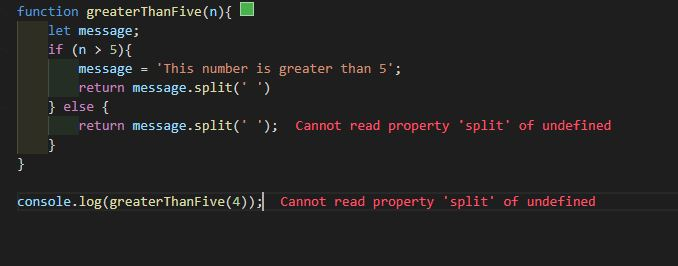
- If you’re dealing with JavaScript promises and you are trying to access the response from the promise without awaiting it, if the
split()method is called on this response, this error would be generated. This is because when the response is accessed, the promise is unresolved and as such the response will be undefined.
How Can you Fix this Error
Now that you understand why this error occurs and its potential impact on your work, how can you avoid it? There are several ways of doing this.
Check Data Types
Check the data type of your variable before proceeding to call the split() method. If the data type is a string, then you can proceed with your splitting operation. You can check a data type using the typeof() method, then call the split() method using conditional statements like if and else, as shown in the following code:
const sampleString = "This is a sample text";
if (typeof(sampleString) === 'string') {
    return sampleString.split('');
} else {
    return sampleString;
}
The first line in the code snippet defines the sample variable you want to check with the conditional statement in the next line. If the conditional if statement is true, then the sample variable is split; if it returns false, then the algorithm returns the original variable. This is a simple, easily added check to catch and address the Cannot read property split of undefined error.
Another way to implement more thorough type checks in your code is to use TypeScript. TypeScript is a strongly typed superset of JavaScript that allows you to catch type errors at build time rather than at runtime. For example, a function written in TypeScript might look like this:
// note the `string` type specified for the input parameter
const splitString = (input: string) => {
    return input.split('');
}

console.log(splitString('foo')); // [ 'f', 'o', 'o' ]

console.log(splitString(undefined)); // Argument of type 'undefined' is not assignable to parameter of type 'string'.
When using TypeScript, you’re able to annotate your code with types the way you would in other strongly typed languages. This enables deeper levels of IntelliSense and in-editor errors and hints. In this case, assuming you’re using a code editor with TypeScript support, the second call to splitString will show you an error directly in your code editor when you try to invoke the function with an invalid type. This can save a lot of time and effort, as it drastically shortens the feedback loop when it comes to type-related errors, allowing you to find and fix them before your code ever runs.
Assign an Alternative Value
If the variable the split() method is called on resolves to undefined, you can assign an alternative value to it.
const sampleString = undefined;
const result = sampleString || ‘ ’
return result.split()
Here, the sample variable is declared at undefined in line one. Rather than calling the split method directly on the variable, line two assigns an alternative value so the split operation will execute without error.
Optional Chaining
Optional chaining allows you to optionally call the split() method, depending on if a variable is defined or not. If the variable is defined, the function runs as expected; if it’s undefined or null, it stops and returns undefined. This is especially useful in situations where the variable is optional, and may or may not be present.
const person = {}; // empty object
const personalDetails = person.location?.address.split('')
return personalDetails // returns undefined
Because the property location is not present in the person object, the code returns undefined.
try and catch Blocks
Wrapping your code in a try and catch block. While this method doesn’t prevent the error from occurring, it does ensure that if it occurs, it’s handled gracefully. This method is especially useful when there are edge cases that cannot be accounted for in your algorithm. You can read more about try-catch in this blog post here.
One of the benefits of the try and catch block is that it allows developers to handle errors seamlessly, and to customize your error messages. Putting your function in a try and catch block would ensure that a simple, easy-to-understand response is returned to the client if an error occurs.
function convertString(sampleString) {
  const result = sampleString.split(" ");
  return result;
}

let invalidInput;

try {
  const parts = convertString(invalidInput);
} catch (error) {
  // handle error and display message here
  console.log(error);
}
Conclusion
In this post, you have seen the many different scenarios that can result in a «Cannot read property split of undefined» error showing up in your application. You’ve also learned that carrying out data type checks, assigning alternative values to variables, and exception handling with a try and catch block are some of the best ways to handle the error in your project.
Knowing how to handle errors is important, but a better approach is to avoid them altogether. Integrating Meticulous into your CI flow will allow you to easily catch errors before they reach your customers.
Meticulous
Meticulous is a tool for software engineers to catch visual regressions in web applications without writing or maintaining UI tests.
Inject the Meticulous snippet onto production or staging and dev environments. This snippet records user sessions by collecting clickstream and network data. When you post a pull request, Meticulous selects a subset of recorded sessions which are relevant and simulates these against the frontend of your application. Meticulous takes screenshots at key points and detects any visual differences. It posts those diffs in a comment for you to inspect in a few seconds. Meticulous automatically updates the baseline images after you merge your PR. This eliminates the setup and maintenance burden of UI testing.
Meticulous isolates the frontend code by mocking out all network calls, using the previously recorded network responses. This means Meticulous never causes side effects and you don’t need a staging environment.
Learn more here.
Authored by Oluseun Falodun