/* Linked server between local(Client) SQL server and Remote SQL server 2005*/

USE master
GO
-- To use named parameters: Add linked server in the source (Local machine - eg: MachineName or LocalSeverLoginName)

sp_addlinkedserver
 @server = N'LnkSrv_RemoteServer_TEST',
 @srvproduct=N'', -- Leave it blank when its not 'SQL Server'
 @provider=N'SQLNCLI', -- see notes
 @datasrc=N'RemoteServerName',
 @provstr=N'UID=sa;PWD=sa;'
 --,@catalog = N'MYDATABASE' eg: pubs
GO

/*
 Note:
  To check provider name use the folling query in the destination server
   Select Provider From sys.servers
*/
----------------------------------------------------------------------------------------------------------
-- Optional
--EXEC sp_addlinkedsrvlogin 'LnkSrv_RemoteServer_TEST', 'true' -- (self is true) -- for LocalSeverLoginName
--GO

-- Remote login
sp_addlinkedsrvlogin
 @rmtsrvname = 'LnkSrv_RemoteServer_TEST',
 @useself = 'False',
 @rmtuser = 'sa',
 @rmtpassword = 'sa'
GO

-- OR
/*
IF the above add linked server login failed then try in the Linked Server (LnkSrv_RemoteServer_TEST) Property
Select -> Security - > 'For a login not defined in the list above, Connection will:'

Choose - > Be made using this security context
SET Remote login: sa
With password: sa
*/
----------------------------------------------------------------------------------------------------------

-- Test server connection
declare @srvr nvarchar(128), @retval int;
set @srvr = 'LnkSrv_RemoteServer_TEST';
begin try
    exec @retval = sys.sp_testlinkedserver @srvr;
end try
begin catch
    set @retval = sign(@@error);
end catch;
if @retval <> 0
  raiserror('Unable to connect to server. This operation will be tried later!', 16, 2 );

-- OR

BEGIN TRY
    EXEC sp_testlinkedserver N'LnkSrv_RemoteServer_TEST';
END TRY
BEGIN CATCH
    PRINT 'Linked Server not available';
    RETURN;
END CATCH
----------------------------------------------------------------------------------------------------------

-- Get access linked server database
SET xact_abort ON
GO

BEGIN TRANSACTION
SELECT  *  FROM LnkSrv_RemoteServer_TEST.DBName.dbo.tblName
COMMIT TRAN
GO

-- OR
SELECT * FROM OPENQUERY(LnkSrv_RemoteServer_TEST, 'SELECT * FROM DBName.dbo.tblName')
GO

-- OR
SELECT * FROM OPENQUERY(LnkSrv_RemoteServer_TEST, 'SELECT * FROM sys.databases Order by name')
GO
----------------------------------------------------------------------------------------------------------
Greetings,
I am implementing an update to an application that needs to run some SQL Server Stored Procedures queries against a legacy Access database. I implemented a linked server for this purpose. If I run the queries as an Administrative user, all is well. But for limited rights users, I get the following error if I try to access any of the Access data:
«Cannot initialize the data source object of OLE DB provider «Microsoft.Jet.OLEDB.4.0» for linked server «XYZ».»
I’ve looked at any permissions related items I could find in SQL Server Management Studio 2005 (Express). I can’t find anything different in permissions between the Users and Administrators group. I confirmed that the query would run if I simply added the limited rights user to the Windows Administrators group. I opened all the permissions on the directories and files where the Access .mdb file and the SQL MDF/LDF files are located with no increase in joy.
After some ‘research’ (i.e., googling), I replaced the linked server with the openrowset command, and changed the provider to MSDASQL (to get more verbose error messages). From that arrangement, I received the following messages:
OLE DB provider «MSDASQL» for linked server «(null)» returned message «[Microsoft][ODBC Microsoft Access Driver] Disk or network error.».
OLE DB provider «MSDASQL» for linked server «(null)» returned message «[Microsoft][ODBC Microsoft Access Driver]General error Unable to open registry key ‘Temporary (volatile) Jet DSN for process 0x6a4 Thread 0xc3c DBC 0x453b3fd4 Jet’.».
Cannot initialize the data source object of OLE DB provider «MSDASQL» for linked server «(null)».
Any ideas? I am quite stumped.
Here’s the initial setup I had for the linked server
EXEC sp_grantlogin [BUILTINAdministrators]
EXEC sp_addsrvrolemember @loginame = [BUILTINAdministrators], @rolename = ‘sysadmin’
— Create linked server so we can use SQL Server to query the DAFIF
— Edition 7 Access database prepared by PFPS
exec sp_addlinkedserver
@server = ‘XYZ’,
@srvproduct = ‘Access 97’,
@provider = ‘Microsoft.Jet.OLEDB.4.0’,
@datasrc = ‘C:XYZDBase<Access_Filename>.mdb’,
@location = ‘localhost’,
@catalog = ‘XYZ’
—The following command will fail with the «Cannot initialize …» error message
SELECT * FROM ACOM —ACOM is a SQL view for one of the tables in the Access DB
Hi,
We have just moved our primary SQL server to a new server (SQL 2012 Standard). I did this via log shipping and then failing over to the new server so it became the primary as due to the size of the database and time restiction of when the move could
be made I chose log shipping to limit any down time.
Everything went to plan with one exception. One of the linked servers we use from the server to a SQL 2000 server using a ODBC connection is not working when being called upon in stored procedures. You can see the catalogs and run queries on it but we are
getting the below error’s. I have googled for 4 days and tried various things but to no avail. Part of me thinks this is due to double hop?
The DBA before me used synonyms and did not document any of the work he did when he first set up the original server so this has been a nightmare. I have ensured that all logins etc… have the same permissions as they did on the old server but I still cannot
get this to work.
When we use a try catch in the stored procedures being called it brings back «Cannot initialize the data source object of OLE DB provider «MSDASQL» for linked server «». Error Number 7303.
But when they are using the linked server from their end (they use a linked server on the SQL 2000 server, it is then executing part of the stored procedures on the SQL 2012 server but when it goes back out to reference the SQL 2000 linked server it brings
the below error).
«Mail (Id: 1078) queued. OLE DB provider «MSDASQL» for linked server «Server» returned message «[Microsoft][ODBC SQL Server Driver][SQL Server] cannot open user default database. Login failed.». OLE DB provider «MSDASQL»
for linked server «Server» returned message «»[Microsoft][ODBC SQL Server Driver][SQL Server] Cannot open user default databse. Login failed.». String data, right truncation, string data, right truncation»
Any help would be greatly appreciated as everything I have found so far has not helped.
Regards
Jordan
I tried to read CSV file from SQL Server and seen vairous errors. Below thread helps to fix the issue
Syntax to read csv file from SQL Server
SELECT * FROM OPENROWSET(‘MSDASQL’,’Driver={Microsoft Text Driver (*.txt; *.csv)};
DefaultDir=C:kalyanCsvFiles’,’SELECT * FROM filename.csv’)
Error
OLE DB provider «MSDASQL» for linked server «(null)» returned message «[Microsoft][ODBC Driver Manager] Data source name not found and no default driver specified».
Msg 7303, Level 16, State 1, Line 1
Cannot initialize the data source object of OLE DB provider «MSDASQL» for linked server «(null)».
If you run on a 64bit environment we need to download new version of 2010 office system driver which supports both 32bit, 64 bit environments,the provider name is Microsoft.ACE.OLEDB.12.0.
Download Microsoft Access Database Engine 2010 Redistributable from Microsoft and Install suitable version of software on the machine.
After successful installation of provider you can verify it in the below location
SSMS — Server Objects — Linked Server — Providers — Microsoft.ACE.OLEDB.12.0.
Modify your query as below
SELECT * FROM OPENROWSET(‘Microsoft.ACE.OLEDB.12.0’,’Text;
Database=C:kalyanCsvFiles’,’SELECT * FROM filename.csv’)
But not like below
SELECT * FROM OPENROWSET(‘Microsoft.ACE.OLEDB.12.0’,’Driver={Microsoft Text Driver (*.txt; *.csv)};
DefaultDir==E:DataSqlCmd2009′,’SELECT * FROM DataSqlCmd2008.csv’)
If you run above syntax you will get the below error,
OLE DB provider «Microsoft.ACE.OLEDB.12.0» for linked server «(null)» returned message «Could not find installable ISAM.».
Run the command
SELECT * FROM OPENROWSET(‘Microsoft.ACE.OLEDB.12.0’,’Text;
Database=C:kalyanCsvFiles’,’SELECT * FROM filename.csv’)
Error
Msg 7308, Level 16, State 1, Line 1
OLE DB provider ‘Microsoft.ACE.OLEDB.12.0’ cannot be used for distributed queries because the provider is configured to run in single-threaded apartment mode.
To fix the above error, run the below command
Use master
go
sp_configure ‘show advanced options’, 1;
GO
RECONFIGURE;
GO
sp_configure ‘Ad Hoc Distributed Queries’, 1;
GO
RECONFIGURE;
GO
Re-run the command again
SELECT * FROM OPENROWSET(‘Microsoft.ACE.OLEDB.12.0’,’Text;
Database=C:kalyanCsvFiles’,’SELECT * FROM filename.csv’)
Again Error
Msg 7399, Level 16, State 1, Line 1
The OLE DB provider «Microsoft.ACE.OLEDB.12.0» for linked server «(null)» reported an error. Access denied.
Msg 7350, Level 16, State 2, Line 1
Cannot get the column information from OLE DB provider «Microsoft.ACE.OLEDB.12.0» for linked server «(null)».
Make sure your SQL Service account has full permissions on the directory where csv files are exists.
Re-run the command again
SELECT * FROM OPENROWSET(‘Microsoft.ACE.OLEDB.12.0’,’Text;
Database=C:kalyanCsvFiles’,’SELECT * FROM filename.csv’)
Again Error
Msg 7357, Level 16, State 2, Line 1
Cannot process the object «SELECT * FROM filename.csv». The OLE DB provider «Microsoft.ACE.OLEDB.12.0» for linked server «(null)» indicates that either the object has no columns or the current user does not have permissions on that object.
Make sure the service account has full permissions to
c:usersservice account folderappdatalocaltemp folder — If you receive error after doing this also we need to modify a value in the registry
HKEY_LOCAL_MACHINESOFTWAREMicrosoftMicrosoft SQL ServerMSSQL10_50.SQLEXPRESSProvidersMicrosoft.ACE.OLEDB.12.0
Create a new dwordvalue with the below key name and value
key name — AllowInProcess value — «dword:00000001» Close the registry and now it will work.
Run the below commands
USE [master]
GO
EXEC master.dbo.sp_MSset_oledb_prop N’Microsoft.ACE.OLEDB.12.0′, N’AllowInProcess’, 1
GO
EXEC master.dbo.sp_MSset_oledb_prop N’Microsoft.ACE.OLEDB.12.0′, N’DynamicParameters’, 1
GO
If you are still facing the error might be below is the reason
OS — Windows 64 bit
SQL Server — 64 bit
Office Products — 32 bit
Then you need to uninstall 32bit office products and install 64bit Microsoft Access Database Engine.

- Remove From My Forums
-
Question
-
I am getting below error when i trying to access the linked server.
OLE DB provider «MSDASQL» for linked server «linkedservername» returned message «[Microsoft][ODBC Driver Manager] Data source name not found and no default driver specified».
Msg 7303, Level 16, State 1, Line 1
Cannot initialize the data source object of OLE DB provider «MSDASQL» for linked server «linkedservername».Kindly help.we are using sql server 2104 standard edition 64bit.
All replies
-
Which version of the driver you installed? 32 or 64 bit?
Based on the version installed, you’ve to create the DSN by running the corresponding version of ODBC Data Sources application.
Also you’ve to create a System DSN rather than a user DSN for SQLServer agent service account to access them in jobs
Please Mark This As Answer if it solved your issue
Please Vote This As Helpful if it helps to solve your issue
Visakh
—————————-
My Wiki User Page
My MSDN Page
My Personal Blog
My Facebook Page -
-
Proposed as answer by
Wednesday, October 25, 2017 9:57 AM
-
Proposed as answer by
- Remove From My Forums
-
Question
-
I am getting below error when i trying to access the linked server.
OLE DB provider «MSDASQL» for linked server «linkedservername» returned message «[Microsoft][ODBC Driver Manager] Data source name not found and no default driver specified».
Msg 7303, Level 16, State 1, Line 1
Cannot initialize the data source object of OLE DB provider «MSDASQL» for linked server «linkedservername».Kindly help.we are using sql server 2104 standard edition 64bit.
All replies
-
Which version of the driver you installed? 32 or 64 bit?
Based on the version installed, you’ve to create the DSN by running the corresponding version of ODBC Data Sources application.
Also you’ve to create a System DSN rather than a user DSN for SQLServer agent service account to access them in jobs
Please Mark This As Answer if it solved your issue
Please Vote This As Helpful if it helps to solve your issue
Visakh
—————————-
My Wiki User Page
My MSDN Page
My Personal Blog
My Facebook Page -
-
Proposed as answer by
Wednesday, October 25, 2017 9:57 AM
-
Proposed as answer by
Содержание
- Msdasql linked server error
- Answered by:
- Question
- Answers
- Msdasql linked server error
- Answered by:
- Question
- Answers
- Msdasql linked server error
- Asked by:
- Question
- All replies
Msdasql linked server error

This forum has migrated to Microsoft Q&A. Visit Microsoft Q&A to post new questions.
Answered by:

Question
I’m trying to connect to Mongo database from Microsoft SQL Server Management Studio.I created linked server which use ODBC for connecting to remote server with Mongo. For ODBC driver I use Simba Mongo ODBC Driver.
I can connect to database, can see all tables in the SSMS, but if I try to make request like:
Select * from openquery(simba,’Select listNumber from codelists’),
I receive error:
OLE DB provider «MSDASQL» for linked server «simba» returned message «Requested conversion is not supported.».
Msg 7341, Level 16, State 2, Line 4
Cannot get the current row value of column «[MSDASQL].listNumber» from OLE DB provider «MSDASQL» for linked server «simba».
I checked in «ODBC Administrator» in «Schema Definition» and this field — listNumber — has SQL_VARCHAR type. Maximum string length set to 16383.
Any ideas what can be the problem?
Answers
About the first question: «The provider indicates that the user did not have the permission to perform the operation.» Do you know where I can change these permissions?
When a third-party OLE DB provider is used, the account under which the SQL Server service runs must have read and execute permissions for the directory, and all subdirectories, in which the provider is installed.
About the second question: What should I do if I need to query (with openquery command) field which exceeds 8000 characters length?
By default, DTL binds std::string to a database by using SQL_VARCHAR for the source ODBC datatype. Unfortunately, doing this means that we are binding to the default character type in the target database which may have length limitations. DTL provides a default string type of SQL_VARCHAR with a maximum column size of 255 for Access and 2000 for Oracle and SQL Server. If these defaults don’t satisfy our needs, either or both of these values may be changed.
For more information about Binding Very Long Strings in DTL, please refer to the following article: http://dtemplatelib.sourceforge.net/LongStrings.htm
If you have any question, please feel free to let me know.
Источник
Msdasql linked server error
This forum has migrated to Microsoft Q&A. Visit Microsoft Q&A to post new questions.
Answered by:
Question
I am trying to connect a link server from SQL Server DB to PostgreSQL DB. I have SQL Server 2012 in Prod and 2016 in UAT.
I have configured ODBC Driver and it is working fine. I tested this using SSIS and I am able to connect to PostgreSQL from my Local Computer and can see tables in SSIS ODBC Source.
But when I try to create a link Server getting error message:
On Prod server Getting error Message: «
Cannot initialize the data source object of OLE DB provider «MSDASQL» for linked server «POSTGRESQL».
OLE DB provider «MSDASQL» for linked server «POSTGRESQL» returned message «[Microsoft][ODBC Driver Manager] Data source name not found and no default driver specified». (Microsoft SQL Server, Error: 7303)
On UAT Getting Error Message: «Cannot create an instance of OLE DB provider «MSDASQL» for linked server «POSTGRESQL». (Microsoft SQL Server, Error: 7302)«
Thanks Shiven:) If Answer is Helpful, Please Vote
Answers
Existing Architecture:
- I have SQL Server 2016 installed on On-premise VM.
- I have PostgreSQL Installed on Azure Ubuntu VM. Also DBeaver client tool has been installed on this VM to query PostgreSQL DB. https://scalegrid.io/blog/which-is-the-best-postgresql-gui-2019-comparison/
Requirement:
- Want to create a link server between SQL Server and PostgreSQL DB so that PostgreSQL query can be executed from SSMS.
- Need to create a SSIS connection to connect to PostgreSQL DB to pull data from it.
Steps:
- Download the ODBC Drivers (32-bit and 64-bit both) from link: https://www.postgresql.org/ftp/odbc/versions/msi/ . You need 32-bit for SSIS packages and 64-bit for Linked server (If your SQL server is 64)
- Install PostgreSQL ODBC Driver: Follow this link for installation. https://www.mssqltips.com/sqlservertip/3662/sql-server-and-postgresql-linked-server-configuration—part-2/Install both 32-bit and 64-bit on your local computer as well as on SQL Server Compute.
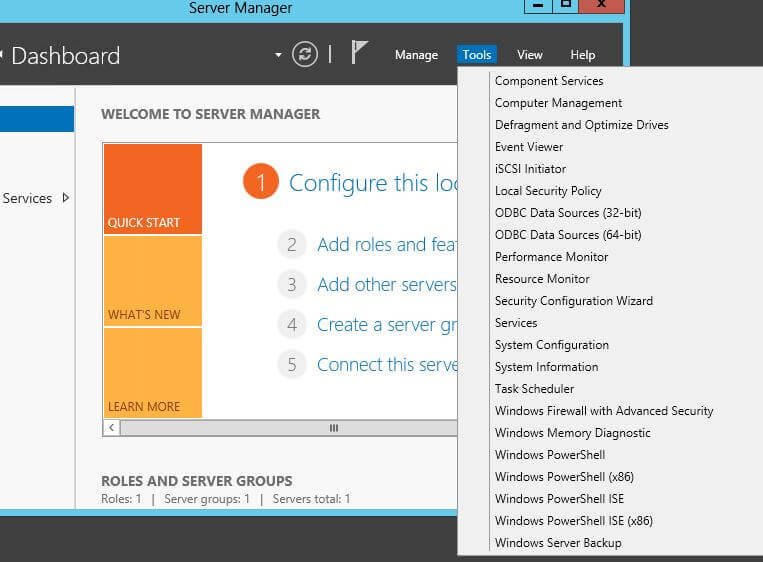
- Create ODBC Data Source: Do this for both 32-bit and 64-bit and on your local computer (this is for SSIS to create and run packages from your local) as well as on SQL server Machine. Once the driver has been installed, it’s time to create a System DSN from it. So, let’s start the ODBC Data Source (64-bit) application from the Server Manager applet (see below) or by typing ODBC. Repeat these steps for 32-bit also.
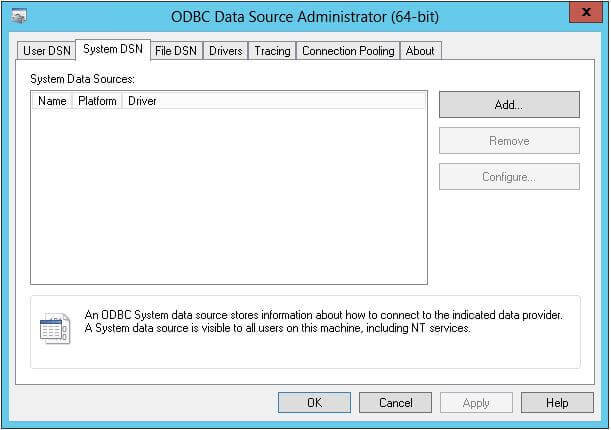
In the next few screenshots, we can see how an ODBC data source is created.
Step 1: First let’s choose the System DSN tab and then click Add.
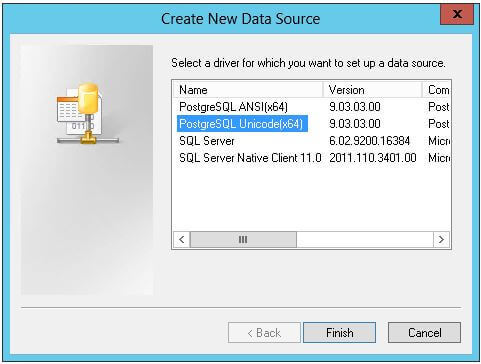
Step 2: Next we choose the PostgreSQL Unicode (x64) version and click Finish.
Step 3: In the dialog box that pops-up, provide a name and description for the data source, specify the database name, server’s IP address, port, username and password as connection parameters. Once done, test the details by clicking on the Test button.
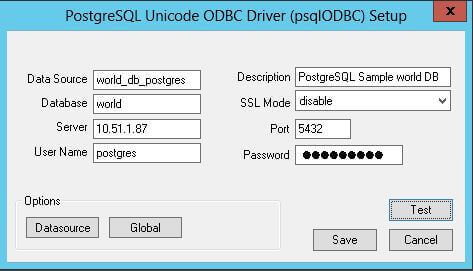
In my case I used port 5433 as 5432 was not working and after checking with infrastructure guy, I have been advised to use port 5433.
If the test is successful, click Save and then click OK in the ODBC Data Source Administrator.
- Troubleshooting: When creating a linked server in SSMS, most errors happen due to security issues with DCOM class MSDAINITIALIZE. We need to alter the DCOM Class MSDAINITIALIZE security settings on the System/Machine where SQL Server is installed to make it work. https://www.devart.com/odbc/postgresql/docs/troubleshooting_ssms.htm
Following are the steps:
- RDP to the Machine your SQL Server is installed.
- Open Component Services (Start>Run>DCOMCNFG)
- Expand Component Services>Computers>My Computer>DCOM Config
- From the list of DCOM components on the right side, select MSDAINITIALIZE and go to its properties:
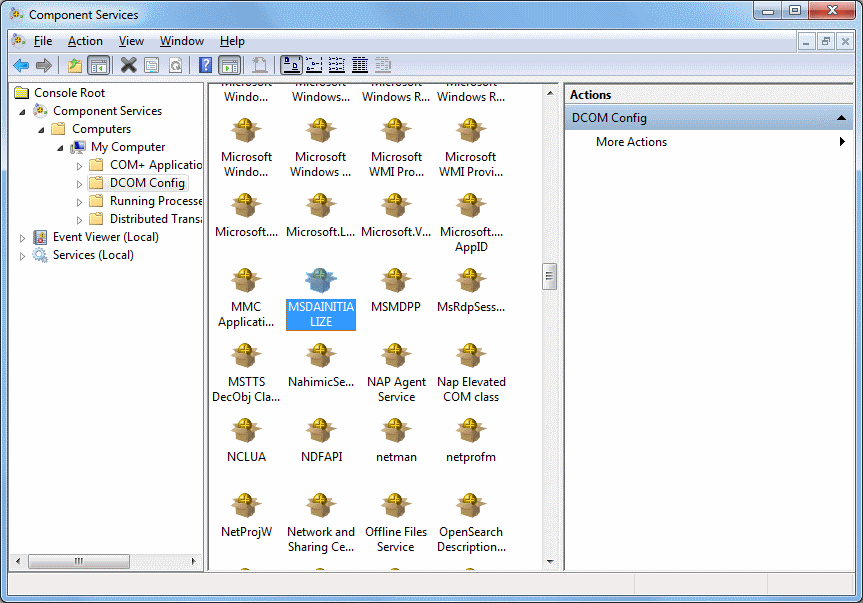
- Go to the Security Tab, choose ‘Customize’ and click on the ‘Edit’ Button:
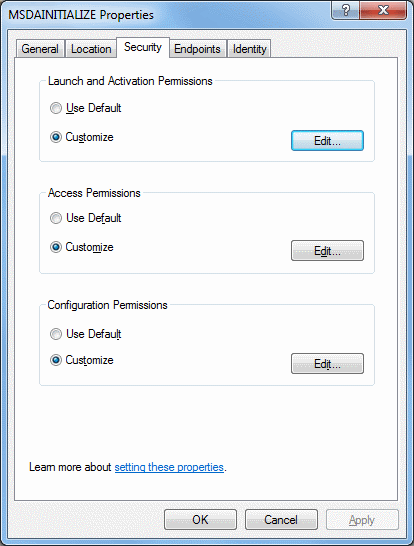
- Add the Domain User (you need to add all individual users who are going to use this link server) who is accessing the linked server and ‘Allow’ all the permissions available (Local Launch, Remote Launch, Local Activation, Remote Activation). If you are connecting to SQL server using SQL account, you need to provide this permission to the account under which the SQL service is running.
- Do this for all the 3 sections in the above screenshot.
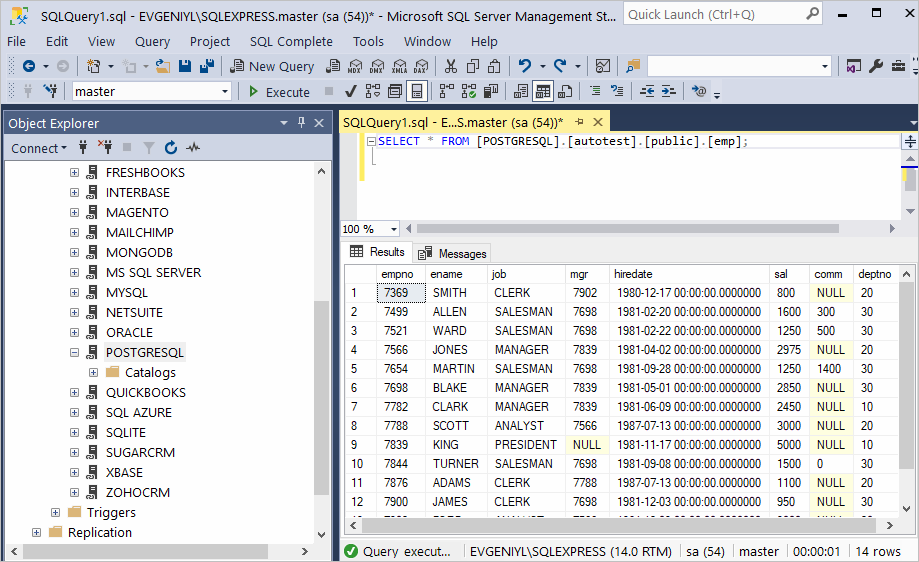
OR you can run query like this:
‘SELECT * From stg.pageviews’ )
As a result, you can see the contents of the selected table retrieved directly from the PostgreSQL account you are connected to.
- Create a SSIS Connection: Create an ODBC connection in SSIS and select DNS from dropdown. Note: With SSIS only 32-bit DNS does work.
Thanks Shiven:) If Answer is Helpful, Please Vote
Источник
Msdasql linked server error
This forum has migrated to Microsoft Q&A. Visit Microsoft Q&A to post new questions.
Asked by:
Question
We are using MSDASQL (Microsoft oledb provider for odbc drivers) and our own odbc driver to testing below scenarios
1) using Rowsetviewer tool the connection is successful with our odbc driver.
2) When we tried sql server linked server ‘Test Connection’ we are getting below error message in windows event log
Faulting application name: sqlservr.exe, version: 2011.110.3128.0, time stamp: 0x50ded0a3
Faulting module name: bigsqldrv.dll, version: 0.0.0.0, time stamp: 0x51bfe4d0
Exception code: 0xc0000005
Fault offset: 0x00016de1
Faulting process id: 0x2284
Faulting application start time: 0x01ce6bde11382afa
Faulting application path: C:Program Files (x86)Microsoft SQL ServerMSSQL11.MSSQLSERVERMSSQLBinnsqlservr.exe
Faulting module path: C:Program Files (x86)IBMIBM Big SQL Driverwin32bindriver.dll
Report Id: d114f0f4-d7d1-11e2-a6e4-00a0c6000000
Component Prog ID: SC.Pool 0 0
Method Name: IDispenserDriver::CreateResource
Process Name: sqlservr.exe
Exception: C0000005
Address: 0x66F66DE1
pls let us know why the odbc driver dll invocation is failing through sqlserver.
How to know if you use a home grown ODBC driver, also using the Microsoft oledb provider for odbc drivers is very uncommon, question is why?
I guess you can see the data in preview because it is a read-only cursor, but when it comes to actually processing data the mystery data source objects issuing an updetable cursor.
Thanks for reply.
The odbc driver we are using works fine with MS Excel. but when trying with sql server getting the error.
The linked server has been created but failed a connection test. Do you want to keep the linked server?
===================================
An exception occurred while executing a Transact-SQL statement or batch. (Microsoft.SqlServer.ConnectionInfo)
——————————
Program Location:
at Microsoft.SqlServer.Management.Common.ServerConnection.ExecuteNonQuery(String sqlCommand, ExecutionTypes executionType)
at Microsoft.SqlServer.Management.Smo.ExecutionManager.ExecuteNonQuery(String cmd)
at Microsoft.SqlServer.Management.Smo.LinkedServer.TestConnection()
at Microsoft.SqlServer.Management.SqlManagerUI.LinkedServerProperties.DoPreProcessExecution(RunType runType, ExecutionMode& executionResult)
The OLE DB provider «MSDASQL» for linked server «BIGSQL» reported an error. The provider reported an unexpected catastrophic failure.
Cannot initialize the data source object of OLE DB provider «MSDASQL» for linked server «BIGSQL». (.Net SqlClient Data Provider)
Server Name: localhost
Error Number: 7399
Severity: 16
State: 1
Procedure: sp_testlinkedserver
Line Number: 1
——————————
Program Location:
at Microsoft.SqlServer.Management.Common.ConnectionManager.ExecuteTSql(ExecuteTSqlAction action, Object execObject, DataSet fillDataSet, Boolean catchException)
at Microsoft.SqlServer.Management.Common.ServerConnection.ExecuteNonQuery(String sqlCommand, ExecutionTypes executionType)
pls provide some info on why the server throwing this error
Источник
Hi,
I am in the process of upgrading from SQL 2000 on Win Server 2000 to SQL 2008 R2 Express on a Win Server 2008 R2. I did a backup and restore of the Data and Stored procedures and I am now trying to run Crystal Reports against the server.
I am running the crystal reports from a Windows 2003 server that uses an ODBC connection into the 2008 database, I am using the 2008 native ODBC Client.
At first the error message was I don’t have the rights to execute a stored procedure. So I gave my self the rights.
Then it said that I could not run Ad hoc access to OLE DB provider has been denied, so I added the DWORD DisallowAdhocAccess with value of 0. (see link below)
http:/ Opens a new window/blog.bansheetechnologies.co.uk/2010/04/sql-20052008-ad-hoc-access-to-ole-db.html Opens a new window
Now I am getting the below error message
Database Connector Error: ‘42000:[Microsoft][SQL Server Native Client 10.0][SQL Server] Cannot initialize the data source object of OLE DB provider «MSDASQL» for link server «(null)», [Database Vendor Code: 7412]’
I checked the SQL Service and it is running under the NETWORKSERVICE account which according to the link below can cause permissions issues but I can find the temp folder on the 2008 R2 server.
http://social.msdn.microsoft.com/Forums/en-US/sqldatabaseengine/thread/b9ad4df2-b256-4a33-911b-a06001250f9e/ Opens a new window