
При запуске игры пишет»configuration file not found please run the configuration tool», я поискал в интернете, там пишут, что надо в корне папки запустить BinaryDomainConfiguration, но не получается и пишет ошибка при инцилизации приложения и т.д. Как решить эту проблему?

попробуй готовый конфиг попросить у кого нибудь и закинуть в папку, где конфиги
: Steam / steamapps / common/ binary domain / savedata (конфиг)
Botponevole, а ты не можешь скинуть?

Botponevole
мне если можно тоже скинь плз!!!!!
У меня так запустилась — нужно в папке с игрой steamapps / common/ binary domain найти BinaryDomainConfiguration и запустить его от имени администратора. Затем входим в аудио настройки и в Input audio выбираем none.

Решение:
Выполнить два шага:
1) Перейти в папку :
SteamsteamappscommonBinary Domain
правая кнопка мыши на BinaryDomainConfiguration, свойства -> совместимость -> «Выполнять эту программу от имени администратора» -> нажать ok.
2) Запустить файл конфигурации -> «Audio Configuration» вкладка -> и изменить «Input Audio Adapter» на None, что означает микрофон, и нажать «Save and Quit». После этого игра запустится.
Enjoy 🙂

zevsinc
Человечише! Спасибо тебе!
dOrgnar
Вооо, а админы не хотят его добавить в Советы((( (Говорят уже не актуально)
народ а как найти папку Steam подскажите пожалуйста)

zevsinc
Попробовал оба ваших метода — ничего не работает. Ни первый способ не второй.
Похожая херня. Делаю все так же, но при нажатии «Save and Quit» зависает и ничего не происходит.
В заголовке окна пишет «Binary Domain Configuration (Не отвечает)»

zevsinc Привет всем. Сделал все что вы посоветовали но ничего в конфигурациях нет функцыи Save and Quit. Что в етом случае делать.
Читал,читал не чего не понял,я не качал её из стима просто пиратский репак,мне что посоветуете делать ошибка такая же Critical Error где эту папку искать хоть бы подсказали,в реестре или ещё где

zevsinc
Спасибо очень помогло
cRUSis1989
Да не за что 🙂

И да,если у кого пропадет звук,ищите во вкладке Audio adapter/audio adapter свое звуковое устройство(в моем случае это было(Динамики(устройство с поддержкой High Definition Audio))

У меня вообще нет звука в игре=( Как исправить?

kBadratukВ конфигурации выбери настройки звука, а там Audio Adapter ставь на None

BeliySlon
Помогло ! Спасибо большое )
ЧУВАКИ ОБОЖАЮ ВАС ВЫ ТАК ПОМОГЛИ СПАСИБО ОГРОМНОЕ)))
BeliySlon
ЧУВАК ТЫ ЛУЧШИЙ!ИЗМЕНИЛ ФОРМАТ ЗАПИСИ ЗВУКА В BinaryDomainConfiguration И ВСЕ ЗАРАБОТАЛО.
СПАСИБО ОГРОМНОЕ ЧУВАКИ!!!
Обновлено: 27.01.2023
Данная тема предназначена для решения технических проблем и вопросов связанных с игрой. Если вы хотите просто обсудить Binary Domain, то будьте добры, проследуйте по ссылке ниже в тему обсуждения.
В: Черные полосы по краям экрана. Как от них, таких некрасивых и назойливых, избавиться?
О: Запустите игру, пройдите по следующему адресу: «Options -> Screen -> Screen size» и там, путем перетаскивания ползунка, отрегулируйте размер полос на ваше усмотрение.
В: Как отдавать команды напарникам без микрофона, а то обижаются ведь, ироды!
О: В меню («Options -> Game settings») отключите голосовое управление (Voice input off). После этого все команды можно отдавать через кнопку Tab на клавиатуре.
В: Сильно сбоит управление в игре, несмотря на то что ручками выставлены все нужные значения в конфигураторе. Что делать?
О: Выдерните шнур, выдавите стекло. Или просто гляньте, не подключен ли к вашему ПК геймпад. Подключен? Отключите и наслаждайтесь.
В: Ай-яй, мою замечательную видеокарточку не видит конфигуратор игры, упорно замечая лишь интегрированную видеокарту. Что же делать мне посоветуете?
О: Ставьте бета-версию драйвера за номером 301.24 и будет вам щастье.
В: Мой англицкий игра криво воспринимать изволитъ. Можно её проучить, то есть научить меня понимайтъ?
О: Увы и ах, но нет. Выход один — использовать текстовые команды с клавиатуры (для них есть специальная кнопка, ага).
Эта публикация удалена, так как она нарушает рекомендации по поведению и контенту в Steam. Её можете видеть только вы. Если вы уверены, что публикацию удалили по ошибке, свяжитесь со службой поддержки Steam.
Этот предмет несовместим с Binary Domain. Пожалуйста, прочитайте справочную статью, почему этот предмет может не работать в Binary Domain.
Этот предмет виден только вам, администраторам и тем, кто будет отмечен как создатель.
В результатах поиска этот предмет сможете видеть только вы, ваши друзья и администраторы.

Configuration file not found please run the configuration tool
Configuration file not found please run the configuration tool fixing
Исправляем ошибку Configuration file not found please run the configuration tool возникающую при запуске игры

4

| 9,828 | уникальных посетителей |
| 73 | добавили в избранное |

Во вкладке Audio Adapter ставим Default
Во вкладке Input Audio Adapter ставим None
Select in Audio Adapter — Default
Select in Input Audio Adapter — None

правая кнопка мыши на BinaryDomainConfiguration, свойства -> совместимость -> «Выполнять эту программу от имени администратора» -> нажать ok.
2) Запустить файл конфигурации -> «Audio Configuration» вкладка -> и изменить «Input Audio Adapter» на None, что означает микрофон, и нажать «Save and Quit». После этого игра запустится.
ПРЕЖДЕ ЧЕМ ПОСТИТЬ В ТЕМЕ
РЕКОМЕНДУЕТСЯ ПОЧИТАТЬ ПРАВИЛА РАЗДЕЛА «GAMEZ BAZAR» и Правила форума
Binary Domain
Жанр: Action / TPS
Разработчик: SEGA
Издатель: SEGA
Платформы: PC , PS3 , Xbox 360
Дата выхода: уже в продаже
Данная тема предназначена для решения технических проблем и вопросов связанных с игрой. Если вы хотите просто обсудить Binary Domain, то будьте добры, проследуйте по ссылке ниже в тему обсуждения.

В: Черные полосы по краям экрана. Как от них, таких некрасивых и назойливых, избавиться?
О: Запустите игру, пройдите по следующему адресу: «Options -> Screen -> Screen size» и там, путем перетаскивания ползунка, отрегулируйте размер полос на ваше усмотрение.
В: Как отдавать команды напарникам без микрофона, а то обижаются ведь, ироды!
О: В меню («Options -> Game settings«) отключите голосовое управление (Voice input off). После этого все команды можно отдавать через кнопку Tab на клавиатуре.
В: Сильно сбоит управление в игре, несмотря на то что ручками выставлены все нужные значения в конфигураторе. Что делать?
О: Выдерните шнур, выдавите стекло. Или просто гляньте, не подключен ли к вашему ПК геймпад. Подключен? Отключите и наслаждайтесь.
В: Ай-яй, мою замечательную видеокарточку не видит конфигуратор игры, упорно замечая лишь интегрированную видеокарту. Что же делать мне посоветуете?
О: Ставьте бета-версию драйвера за номером 301.24 и будет вам щастье.
В: Мой англицкий игра криво воспринимать изволитъ. Можно её проучить, то есть научить меня понимайтъ?
О: Увы и ах, но нет. Выход один — использовать текстовые команды с клавиатуры (для них есть специальная кнопка, ага).
Читайте также:
- Как сделать турель в реальной жизни
- Rust как сделать ящик
- Как нарисовать статую scp
- Кодекс фавония genshin impact кому подходит
- Dragon age inquisition хитрые демоны где видрис
When you start the game writesconfiguration file not found please run the configuration tool, I searched the Internet, they write that it is necessary in the root folder to run BinaryDomainConfiguration, but fails and writes an error intilization apps, etc. How to solve this problem?
- 1
- 2
B
Botponevole
08.11.19
try the config ready to ask someone to throw in a folder where the configs
: Steam / steamapps / common/ binary domain / savedata (config)
k
kBadratuk
08.11.19
Botponevole, and you can’t throw?
D
Diman150
08.11.19
Botponevole
if I can also throw plz!!!!!
B
BeliySlon
08.11.19
I have so start — you need in the game folder steamapps / common/ binary domain find BinaryDomainConfiguration and run it as administrator. Then enter the audio settings and select audio Input none.
z
zevsinc
08.11.19
Solution:
To perform two steps:
1) Go to the folder :
SteamsteamappscommonBinary Domain
right click on BinaryDomainConfiguration, properties -> compatibility -> Run this program as an administrator -> click ok.
2) Launch configuration file -> Audio Configuration tab -> and change the Input Audio Adapter to None, which means the microphone and click Save and Quit. After that, the game will start.
Enjoy 🙂
d
dOrgnar
08.11.19
zevsinc
Chelovechische! Thank you!
z
zevsinc
08.11.19
dOrgnar
Vooo, and the admins don’t want to add it to the Tips((( (they Say it is not true)
E
Elton412
08.11.19
the people and how to find the Steam folder please tell me)
f
fisher678
08.11.19
zevsinc
Tried both your method — nothing works. Neither the first method not the second.
T
Tech De7iL
08.11.19
Similar garbage. Doing the same but clicking Save and Quit hangs and nothing happens.
The title of the window says Binary Domain Configuration (Not responding)
A
Aleksandr Chernenko
08.11.19
zevsinc hi all. Did what you advised but nothing in configurations no funkcii Save and Quit. In this case to do.
S
Statick-X1
08.11.19
Read,read, not what is not understood,I did not shake it from steam just pirate the Repack,I advise that to do the error is the same Critical Error where the folder to find at least suggested,in the registry or somewhere else
z
zevsinc
08.11.19
cRUSis1989
But not for that 🙂
T
Texnapb Dik
08.11.19
And Yes,if anyone lost the sound,look in the tab Audio adapter/audio adapter your audio device(in my case it was the(dynamic(the device with support High Definition Audio))
G
GoliafJx
08.11.19
I have no sound in the game=( How to fix?
M
Matvey Ahmedov
08.11.19
kBadratuk? configuration choose your audio settings and there Audio Adapter put on None
- 1
- 2
 |
|
| Developers | |
|---|---|
| Ryu Ga Gotoku Studio | |
| Windows | Devil’s Details |
| Publishers | |
| Sega | |
| Release dates | |
| Windows | April 27, 2012 |
| Taxonomy | |
| Modes | Singleplayer |
| Pacing | Real-time |
| Perspectives | Third-person |
| Controls | Direct control |
| Genres | Action, Shooter |
| Art styles | Realistic |
| Themes | Japan, Sci-fi |
|
|

Key points
- Best suited for a controller due to the odd mouse controls, often unmarked keyboard prompts, and flawed key rebinding. See Issues fixed regarding XInput controllers.
General information
- Steam Community Discussions
Availability
| Source | DRM | Notes | Keys | OS |
|---|---|---|---|---|
| Steam |
|
|
- All versions require Steam DRM.
- A demo is available on Steam.
DLC and expansion packs
| Name | Notes | |
|---|---|---|
| Dan Marshall Pack |
|
|
| Multiplayer Map Pack |
|
Game data
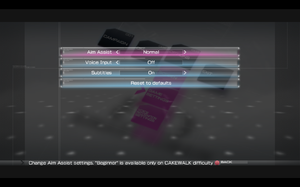
In-game general settings.
Configuration file(s) location
Save game data location
Save game cloud syncing
Video
- Most graphical options have to be set through an external configuration utility.
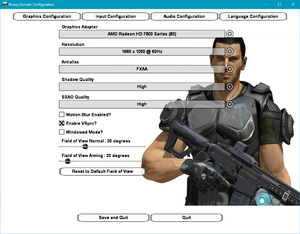
External video settings.
Input
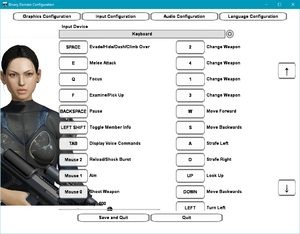
External keyboard and mouse settings.
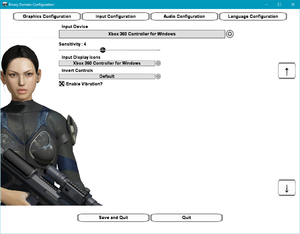
External gamepad settings.
Audio
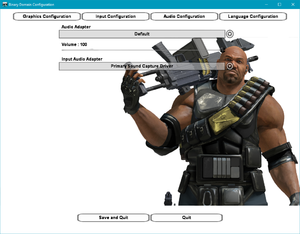
External audio settings.
| Audio feature | State | Notes |
|---|---|---|
| Separate volume controls | ||
| Surround sound | ||
| Subtitles | ||
| Closed captions | ||
| Mute on focus lost | ||
| Royalty free audio |
Localizations
| Language | UI | Audio | Sub | Notes |
|---|---|---|---|---|
| English | ||||
| French | ||||
| German | ||||
| Italian | ||||
| Brazilian Portuguese | Fan translation; download. | |||
| Russian | Fan translation by «ZoG Forum Team / ENPY Studio» link #1 #2. | |||
| Spanish |
- The game features characters speaking in Japanese, regardless of the chosen language, although individual subtitles for these dialogues are not provided. General subtitles have to be enabled instead.
Network
Multiplayer types
Connection types
VR support
Issues unresolved
Low performance with certain AMD configurations
In certain AMD CPU + GPU configurations performance will be extremely low when engaged in combat.
Issues fixed
Negative mouse acceleration
| Use RollinBarrel’s «Binary Domaim» fix[2] |
|---|
|
Controller inputs are illogical or not working correctly
- XInput controllers, especially Xbox One controllers, will have their button mappings in awkward places.
| Disable the appropriate ‘HID-compliant game controller’ under ‘Human Interface Devices’ in Device Manager |
|---|
Launch the game directly through BinaryDomain.exe instead of the Steam Client or disable Steam input for the game and only connect the controller after launching the game
|
|---|
| Use a modified version of Dark_Buf0n’s controller configuration[3] |
|---|
|
| Use devreorder to hide XInput device(s) and disable Steam Input support for the game |
|---|
|
Incorrect Input Display Icons
Normally the game shows you the Xbox 360 buttons for the buttons you have to press. You can change this in the configuration utility of the game under the Input configuration tab.
«Graphics device is invalid, please run the configuration tool» error on launch
| Reapply settings[4] |
|---|
|
«Configuration file not found» error on launch
| Run as administrator with audio input disabled[5] |
|---|
|
Sudden Game Over near the objective’s goal during Chapter 2’s sewer rescue Mission even when well within the time limit
This can always happen on the first attempt of any playthrough, any subsequent attempt plays out fine. Can be pre-emptively avoided by manually reloading the checkpoint right after you first get to this part.
Other information
API
| Technical specs | Supported | Notes |
|---|---|---|
| Direct3D | 9 | |
| Shader Model support | 3 |
| Executable | 32-bit | 64-bit | Notes |
|---|---|---|---|
| Windows |
Middleware
| Middleware | Notes | |
|---|---|---|
| Audio | SpeechFX, CriWare | |
| Multiplayer | Steamworks |
System requirements
| Windows | ||
|---|---|---|
| Minimum | Recommended | |
| Operating system (OS) | XP | 7 |
| Processor (CPU) | Intel Core 2 Duo 2.66 GHz AMD equivalent |
Intel Core i5 2.66 GHz AMD equivalent |
| System memory (RAM) | 2 GB (XP) 3 GB (Vista, 7) |
3 GB |
| Hard disk drive (HDD) | 8 GB | |
| Video card (GPU) | Nvidia GeForce GT 220 ATI Radeon HD 2600 XT 512 MB of VRAM |
Nvidia GeForce GTX 460 ATI Radeon HD 5750 1 GB of VRAM |
Notes
- ↑ 1.0 1.1 When running this game without elevated privileges (Run as administrator option), write operations against a location below
%PROGRAMFILES%,%PROGRAMDATA%, or%WINDIR%might be redirected to%LOCALAPPDATA%VirtualStoreon Windows Vista and later (more details). - ↑ 2.0 2.1 File/folder structure within this directory reflects the path(s) listed for Windows and/or Steam game data (use Wine regedit to access Windows registry paths). Games with Steam Cloud support may store data in
~/.steam/steam/userdata/<user-id>/203750/in addition to or instead of this directory. The app ID (203750) may differ in some cases. Treat backslashes as forward slashes. See the glossary page for details.
References
- ↑ New 120Hz Games Report
- ↑ Binary Domaim — Mod for Binary Domain aimed at improving mouse aiming — last accessed on 2021-03-29
- ↑ Verified by User:Shooterboss on 2020-08-05
- ↑ Graphics device is invalid, please run the configuration tool :: Binary Domain General Discussions
- ↑ steamcommunity.com — A solution for the «configuration file not found error» :: Binary Domain General Discussions — last accessed on 2017-08-21