One point missed in the existing answers is show how to inherit the error traps. The bash shell provides one such option for that using set
-E
If set, any trap on
ERRis inherited by shell functions, command substitutions, and commands executed in a subshell environment. TheERRtrap is normally not inherited in such cases.
Adam Rosenfield’s answer recommendation to use set -e is right in certain cases but it has its own potential pitfalls. See GreyCat’s BashFAQ — 105 — Why doesn’t set -e (or set -o errexit, or trap ERR) do what I expected?
According to the manual, set -e exits
if a simple commandexits with a non-zero status. The shell does not exit if the command that fails is part of the command list immediately following a
whileoruntilkeyword, part of thetest in a if statement, part of an&&or||list except the command following thefinal && or ||,any command in a pipeline but the last, or if the command’s return value is being inverted via!«.
which means, set -e does not work under the following simple cases (detailed explanations can be found on the wiki)
-
Using the arithmetic operator
letor$((..))(bash4.1 onwards) to increment a variable value as#!/usr/bin/env bash set -e i=0 let i++ # or ((i++)) on bash 4.1 or later echo "i is $i" -
If the offending command is not part of the last command executed via
&&or||. For e.g. the below trap wouldn’t fire when its expected to#!/usr/bin/env bash set -e test -d nosuchdir && echo no dir echo survived -
When used incorrectly in an
ifstatement as, the exit code of theifstatement is the exit code of the last executed command. In the example below the last executed command wasechowhich wouldn’t fire the trap, even though thetest -dfailed#!/usr/bin/env bash set -e f() { if test -d nosuchdir; then echo no dir; fi; } f echo survived -
When used with command-substitution, they are ignored, unless
inherit_errexitis set withbash4.4#!/usr/bin/env bash set -e foo=$(expr 1-1; true) echo survived -
when you use commands that look like assignments but aren’t, such as
export,declare,typesetorlocal. Here the function call tofwill not exit aslocalhas swept the error code that was set previously.set -e f() { local var=$(somecommand that fails); } g() { local var; var=$(somecommand that fails); } -
When used in a pipeline, and the offending command is not part of the last command. For e.g. the below command would still go through. One options is to enable
pipefailby returning the exit code of the first failed process:set -e somecommand that fails | cat - echo survived
The ideal recommendation is to not use set -e and implement an own version of error checking instead. More information on implementing custom error handling on one of my answers to Raise error in a Bash script
One point missed in the existing answers is show how to inherit the error traps. The bash shell provides one such option for that using set
-E
If set, any trap on
ERRis inherited by shell functions, command substitutions, and commands executed in a subshell environment. TheERRtrap is normally not inherited in such cases.
Adam Rosenfield’s answer recommendation to use set -e is right in certain cases but it has its own potential pitfalls. See GreyCat’s BashFAQ — 105 — Why doesn’t set -e (or set -o errexit, or trap ERR) do what I expected?
According to the manual, set -e exits
if a simple commandexits with a non-zero status. The shell does not exit if the command that fails is part of the command list immediately following a
whileoruntilkeyword, part of thetest in a if statement, part of an&&or||list except the command following thefinal && or ||,any command in a pipeline but the last, or if the command’s return value is being inverted via!«.
which means, set -e does not work under the following simple cases (detailed explanations can be found on the wiki)
-
Using the arithmetic operator
letor$((..))(bash4.1 onwards) to increment a variable value as#!/usr/bin/env bash set -e i=0 let i++ # or ((i++)) on bash 4.1 or later echo "i is $i" -
If the offending command is not part of the last command executed via
&&or||. For e.g. the below trap wouldn’t fire when its expected to#!/usr/bin/env bash set -e test -d nosuchdir && echo no dir echo survived -
When used incorrectly in an
ifstatement as, the exit code of theifstatement is the exit code of the last executed command. In the example below the last executed command wasechowhich wouldn’t fire the trap, even though thetest -dfailed#!/usr/bin/env bash set -e f() { if test -d nosuchdir; then echo no dir; fi; } f echo survived -
When used with command-substitution, they are ignored, unless
inherit_errexitis set withbash4.4#!/usr/bin/env bash set -e foo=$(expr 1-1; true) echo survived -
when you use commands that look like assignments but aren’t, such as
export,declare,typesetorlocal. Here the function call tofwill not exit aslocalhas swept the error code that was set previously.set -e f() { local var=$(somecommand that fails); } g() { local var; var=$(somecommand that fails); } -
When used in a pipeline, and the offending command is not part of the last command. For e.g. the below command would still go through. One options is to enable
pipefailby returning the exit code of the first failed process:set -e somecommand that fails | cat - echo survived
The ideal recommendation is to not use set -e and implement an own version of error checking instead. More information on implementing custom error handling on one of my answers to Raise error in a Bash script
One point missed in the existing answers is show how to inherit the error traps. The bash shell provides one such option for that using set
-E
If set, any trap on
ERRis inherited by shell functions, command substitutions, and commands executed in a subshell environment. TheERRtrap is normally not inherited in such cases.
Adam Rosenfield’s answer recommendation to use set -e is right in certain cases but it has its own potential pitfalls. See GreyCat’s BashFAQ — 105 — Why doesn’t set -e (or set -o errexit, or trap ERR) do what I expected?
According to the manual, set -e exits
if a simple commandexits with a non-zero status. The shell does not exit if the command that fails is part of the command list immediately following a
whileoruntilkeyword, part of thetest in a if statement, part of an&&or||list except the command following thefinal && or ||,any command in a pipeline but the last, or if the command’s return value is being inverted via!«.
which means, set -e does not work under the following simple cases (detailed explanations can be found on the wiki)
-
Using the arithmetic operator
letor$((..))(bash4.1 onwards) to increment a variable value as#!/usr/bin/env bash set -e i=0 let i++ # or ((i++)) on bash 4.1 or later echo "i is $i" -
If the offending command is not part of the last command executed via
&&or||. For e.g. the below trap wouldn’t fire when its expected to#!/usr/bin/env bash set -e test -d nosuchdir && echo no dir echo survived -
When used incorrectly in an
ifstatement as, the exit code of theifstatement is the exit code of the last executed command. In the example below the last executed command wasechowhich wouldn’t fire the trap, even though thetest -dfailed#!/usr/bin/env bash set -e f() { if test -d nosuchdir; then echo no dir; fi; } f echo survived -
When used with command-substitution, they are ignored, unless
inherit_errexitis set withbash4.4#!/usr/bin/env bash set -e foo=$(expr 1-1; true) echo survived -
when you use commands that look like assignments but aren’t, such as
export,declare,typesetorlocal. Here the function call tofwill not exit aslocalhas swept the error code that was set previously.set -e f() { local var=$(somecommand that fails); } g() { local var; var=$(somecommand that fails); } -
When used in a pipeline, and the offending command is not part of the last command. For e.g. the below command would still go through. One options is to enable
pipefailby returning the exit code of the first failed process:set -e somecommand that fails | cat - echo survived
The ideal recommendation is to not use set -e and implement an own version of error checking instead. More information on implementing custom error handling on one of my answers to Raise error in a Bash script
Написание надежного, без ошибок сценария bash всегда является сложной задачей. Даже если вы написать идеальный сценарий bash, он все равно может не сработать из-за внешних факторов, таких как некорректный ввод или проблемы с сетью.
В оболочке bash нет никакого механизма поглощения исключений, такого как конструкции try/catch. Некоторые ошибки bash могут быть молча проигнорированы, но могут иметь последствия в дальнейшем. 
Проверка статуса завершения команды
Всегда рекомендуется проверять статус завершения команды, так как ненулевой статус выхода обычно указывает на ошибку
if ! command; then
    echo "command returned an error"
fi
Другой (более компактный) способ инициировать обработку ошибок на основе статуса выхода — использовать OR:
<command_1> || <command_2>С помощью оператора OR, <command_2> выполняется тогда и только тогда, когда <command_1> возвращает ненулевой статус выхода.
В качестве второй команды, можно использовать свою Bash функцию обработки ошибок
error_exit()
{
    echo "Error: $1"
    exit 1
}

bad-command || error_exit "Some error"
В Bash имеется встроенная переменная $?, которая сообщает вам статус выхода последней выполненной команды.
Когда вызывается функция bash, $? считывает статус выхода последней команды, вызванной внутри функции. Поскольку некоторые ненулевые коды выхода имеют специальные значения, вы можете обрабатывать их выборочно.
status=$?

case "$status" in
"1") echo "General error";;
"2") echo "Misuse of shell builtins";;
"126") echo "Command invoked cannot execute";;
"128") echo "Invalid argument";;
esac
Выход из сценария при ошибке в Bash
Когда возникает ошибка в сценарии bash, по умолчанию он выводит сообщение об ошибке в stderr, но продолжает выполнение в остальной части сценария. Даже если ввести неправильную команду, это не приведет к завершению работы сценария. Вы просто увидите ошибку «command not found».
Такое поведение оболочки по умолчанию может быть нежелательным для некоторых bash сценариев. Например, если скрипт содержит критический блок кода, в котором не допускаются ошибки, вы хотите, чтобы ваш скрипт немедленно завершал работу при возникновении любой ошибки внутри этого блока . Чтобы активировать это поведение «выход при ошибке» в bash, вы можете использовать команду set следующим образом.
set -e
# некоторый критический блок кода, где ошибка недопустима
set +e
Вызванная с опцией -e, команда set заставляет оболочку bash немедленно завершить работу, если любая последующая команда завершается с ненулевым статусом (вызванным состоянием ошибки). Опция +e возвращает оболочку в режим по умолчанию. set -e эквивалентна set -o errexit. Аналогично, set +e является сокращением команды set +o errexit.
set -e
true | false | true
echo "Это будет напечатано" # "false" внутри конвейера не обнаружено
Если необходимо, чтобы при любом сбое в работе конвейеров также завершался сценарий bash, необходимо добавить опцию -o pipefail.
set -o pipefail -e
true | false | true # "false" внутри конвейера определен правильно
echo "Это не будет напечатано"
Для «защиты» критический блока в сценарии от любого типов ошибок команд или ошибок конвейера, необходимо использовать следующую комбинацию команд set.
set -o pipefail -e
# некоторый критический блок кода, в котором не допускается ошибка или ошибка конвейера
set +o pipefail +eattempt=0
until gksu command; do
attempt=$((attempt + 1))
if [ "$attempt" -gt 5 ]; then
exit 1
fi
done
exit exits the script unless it’s called in a subshell. If that part of the script is in a subshell, for instance because it’s within (...) or $(...) or part of a pipe-line, then it will only exit that subshell.
In that case, if you want the script to exit in addition to the subshell, then you’ll need to call exit upon that subshell exiting.
For instance, here with 2 nested levels of subshells:
(
  life=hard
  output=$(
    echo blah
    [ "$life" = easy ] || exit 1 # exit subshell
    echo blih not run
  ) || exit # if the subshell exits with a non-zero exit status,
            # exit as well with the same exit status

  echo not run either
) || exit # if the subshell exits with a non-zero exit status,
          # exit as well with the same exit status
It can become trickier if the subshell is part of a pipeline. bash has a special $PIPESTATUS array, similar to zsh‘s $pipestatus one that can help you here:
{
   echo foo
   exit 1
   echo bar
} | wc -c
subshell_ret=${PIPESTATUS[0]}
if [ "$subshell_ret" -ne 0 ]; then
  exit "$subshell_ret"
fi
Инструменты автоматизации и мониторинга удобны тем, что разработчик может взять готовые скрипты, при необходимости адаптировать и использовать в своём проекте. Можно заметить, что в некоторых скриптах используются коды завершения (exit codes), а в других нет. О коде завершения легко забыть, но это очень полезный инструмент. Особенно важно использовать его в скриптах командной строки.
Что такое коды завершения
В Linux и других Unix-подобных операционных системах программы во время завершения могут передавать значение родительскому процессу. Это значение называется кодом завершения или состоянием завершения. В POSIX по соглашению действует стандарт: программа передаёт 0 при успешном исполнении и 1 или большее число при неудачном исполнении.
Почему это важно? Если смотреть на коды завершения в контексте скриптов для командной строки, ответ очевиден. Любой полезный Bash-скрипт неизбежно будет использоваться в других скриптах или его обернут в однострочник Bash. Это особенно актуально при использовании инструментов автоматизации типа SaltStack или инструментов мониторинга типа Nagios. Эти программы исполняют скрипт и проверяют статус завершения, чтобы определить, было ли исполнение успешным.
Кроме того, даже если вы не определяете коды завершения, они всё равно есть в ваших скриптах. Но без корректного определения кодов выхода можно столкнуться с проблемами: ложными сообщениями об успешном исполнении, которые могут повлиять на работу скрипта.
Что происходит, когда коды завершения не определены
В Linux любой код, запущенный в командной строке, имеет код завершения. Если код завершения не определён, Bash-скрипты используют код выхода последней запущенной команды. Чтобы лучше понять суть, обратите внимание на пример.
#!/bin/bash
touch /root/test
echo created file
Этот скрипт запускает команды touch и echo. Если запустить этот скрипт без прав суперпользователя, команда touch не выполнится. В этот момент мы хотели бы получить информацию об ошибке с помощью соответствующего кода завершения. Чтобы проверить код выхода, достаточно ввести в командную строку специальную переменную $?. Она печатает код возврата последней запущенной команды.
$ ./tmp.sh
touch: cannot touch '/root/test': Permission denied
created file
$ echo $?
0
Как видно, после запуска команды ./tmp.sh получаем код завершения 0. Этот код говорит об успешном выполнении команды, хотя на самом деле команда не выполнилась. Скрипт из примера выше исполняет две команды: touch и echo. Поскольку код завершения не определён, получаем код выхода последней запущенной команды. Это команда echo, которая успешно выполнилась.
Скрипт:
#!/bin/bash
touch /root/test
Если убрать из скрипта команду echo, можно получить код завершения команды touch.
$ ./tmp.sh
touch: cannot touch '/root/test': Permission denied
$ echo $?
1
Поскольку touch в данном случае — последняя запущенная команда, и она не выполнилась, получаем код возврата 1.
Как использовать коды завершения в Bash-скриптах
Удаление из скрипта команды echo позволило нам получить код завершения. Что делать, если нужно сделать разные действия в случае успешного и неуспешного выполнения команды touch? Речь идёт о печати stdout в случае успеха и stderr в случае неуспеха.
Проверяем коды завершения
Выше мы пользовались специальной переменной $?, чтобы получить код завершения скрипта. Также с помощью этой переменной можно проверить, выполнилась ли команда touch успешно.
#!/bin/bash
touch /root/test 2> /dev/null
if [ $? -eq 0 ]
then
  echo "Successfully created file"
else
  echo "Could not create file" >&2
fi
После рефакторинга скрипта получаем такое поведение:
- Если команда
touchвыполняется с кодом0, скрипт с помощьюechoсообщает об успешно созданном файле. - Если команда
touchвыполняется с другим кодом, скрипт сообщает, что не смог создать файл.
Любой код завершения кроме 0 значит неудачную попытку создать файл. Скрипт с помощью echo отправляет сообщение о неудаче в stderr.
Выполнение:
$ ./tmp.sh
Could not create file
Создаём собственный код завершения
Наш скрипт уже сообщает об ошибке, если команда touch выполняется с ошибкой. Но в случае успешного выполнения команды мы всё также получаем код 0.
$ ./tmp.sh
Could not create file
$ echo $?
0
Поскольку скрипт завершился с ошибкой, было бы не очень хорошей идеей передавать код успешного завершения в другую программу, которая использует этот скрипт. Чтобы добавить собственный код завершения, можно воспользоваться командой exit.
#!/bin/bash
touch /root/test 2> /dev/null
if [ $? -eq 0 ]
then
  echo "Successfully created file"
  exit 0
else
  echo "Could not create file" >&2
  exit 1
fi
Теперь в случае успешного выполнения команды touch скрипт с помощью echo сообщает об успехе и завершается с кодом 0. В противном случае скрипт печатает сообщение об ошибке при попытке создать файл и завершается с кодом 1.
Выполнение:
$ ./tmp.sh
Could not create file
$ echo $?
1
Как использовать коды завершения в командной строке
Скрипт уже умеет сообщать пользователям и программам об успешном или неуспешном выполнении. Теперь его можно использовать с другими инструментами администрирования или однострочниками командной строки.
Bash-однострочник:
$ ./tmp.sh && echo "bam" || (sudo ./tmp.sh && echo "bam" || echo "fail")
Could not create file
Successfully created file
bam
В примере выше && используется для обозначения «и», а || для обозначения «или». В данном случае команда выполняет скрипт ./tmp.sh, а затем выполняет echo "bam", если код завершения 0. Если код завершения 1, выполняется следующая команда в круглых скобках. Как видно, в скобках для группировки команд снова используются && и ||.
Скрипт использует коды завершения, чтобы понять, была ли команда успешно выполнена. Если коды завершения используются некорректно, пользователь скрипта может получить неожиданные результаты при неудачном выполнении команды.
Дополнительные коды завершения
Команда exit принимает числа от 0 до 255. В большинстве случаев можно обойтись кодами 0 и 1. Однако есть зарезервированные коды, которые обозначают конкретные ошибки. Список зарезервированных кодов можно посмотреть в документации.
Адаптированный перевод статьи Understanding Exit Codes and how to use them in bash scripts by Benjamin Cane. Мнение администрации Хекслета может не совпадать с мнением автора оригинальной публикации.
Why would you exit from a Bash script?
Let’s say you are writing a script…there’s one thing that is almost certain…
At some point, your script is likely to break because of unexpected conditions you might have not considered.
So, what can you do about it?
How can you exit a Bash script in case of errors?
Bash provides a command to exit a script if errors occur, the exit command. The argument N (exit status) can be passed to the exit command to indicate if a script is executed successfully (N = 0) or unsuccessfully (N != 0). If N is omitted the exit command takes the exit status of the last command executed.
In this guide you will learn how to use the exit command in your scripts to make them more robust and to provide a great experience to those who are using your scripts.
Let’s get started.
Exit a Bash Script With Error
What can you do to write robust scripts that don’t break in unexpected ways in case of errors?
The answer to this question is: don’t forget error handling.
Instead of “hoping” that nothing will go wrong with your program, you can predict possible failures and decide how your program will react to those.
How will you handle a failure if it occurs? What will the user see?
We will have a look at how error handling works in Bash scripting (or Shell scripting in general).
These concepts apply to all programming languages even if the way error handling is implemented varies between programming languages.
To handle errors in Bash we will use the exit command, whose syntax is:
exit NWhere N is the Bash exit code (or exit status) used to exit the script during its execution.
Different values of N are used to indicate if the script exits with success or failure.
But, why different exit codes depending on the success or failure of a script?
Because often other programs will be calling your script and they will need to be able to understand if everything goes well with the execution of your script or not as part of their error handling.
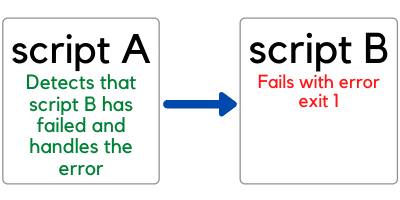
Let’s have a look at what exit 1 means.
What Are Exit 0 and Exit 1 in a Bash Script?
How do you exit a Bash script on error?
The standard convention is the following:
| Bash exit code | Meaning |
| Zero (0) | Success |
| Non-zero (1, 2, 3, etc…) | Failure |
As you can see from the table above, failures can be represented with any non-zero exit codes.
For instance:
- 1 may be used if incorrect arguments are passed to the script
- 2 if the script cannot find a file it needs
- 3 if the file it needs has an incorrect format
- And so on…
You can be creative and use non-zero Bash exit codes to be very clear about the reason why your script has failed.
So, going back to the exit command.
What happens when it gets executed?
The exit command returns an exit code back to the shell.
Here’s an example…
Let’s write a script called exit_status.sh:
#!/bin/bash

echo "Exit command test"
exit 0
So, here we are passing the exit code 0 to the exit command.
How can we verify that this is actually the code passed by the script back to the shell?
We use the $? variable. Remember it, this is very important!
$? is a variable that contains the exit code of the last command executed.
And how can we read its value?
Using the echo command, in the same way we print the value of any variable:
(localhost)$ ./exit_status.sh
Exit command test
(localhost)$ echo $?
0
Voilà, here is the 0 exit code.
And what happens if we remove “exit 0” from the script?
#!/bin/bash

echo "Exit command test"
Run the script again and check the value of $?:
(localhost)$ ./exit_status.sh
Exit command test
(localhost)$ echo $?
0
We still get the 0 exit code back…
So, nothing changed…why?
Because every command we execute, including the echo command (the only command in our script) returns an exit code.
And in this case the echo command executed as part of the script is returning a 0 exit code because the echo “Exit command test” command is executed successfully.
More About The Status of the Bash Exit Command
I will show you an example of how the exit code is applied to the execution of any commands.
This is really important in your Bash knowledge and I want to make sure it’s clear to you.
Here is an example with the cat command (this applies to all commands)…
I open a shell on my computer and in the current directory I have the following files:
(localhost)$ ls -al
total 16
drwxr-xr-x   4 myuser  mygroup  128  4 Jul 12:38 .
drwxr-xr-x  11 myuser  mygroup  352  4 Jul 12:38 ..
-rw-r--r--   1 myuser  mygroup   10  4 Jul 12:38 test_file1
-rw-r--r--   1 myuser  mygroup   10  4 Jul 12:38 test_file2
If I use the cat command to see the content of the file test_file1 the exit code stored in the variable $? after the execution of the cat command is 0 because the execution of the cat command is successful:
(localhost)$ cat test_file1
Test file
(localhost)$ echo $?
0
If by mistake I try to print the content of the file test_file3 (that doesn’t exist), the value of the variable $? is not 0.
In this case it’s 1, but it can have other values different than zero. This is useful to represent multiple types of errors for a given command:
(localhost)$ cat test_file3
cat: test_file3: No such file or directory
(localhost)$ echo $?
1
All clear?
If you have any questions please let me know in the comments below.
An Example of Script Failure
Now let’s modify the echo command in the simple script we have used before.
We want run it with an incorrect syntax and see if it exits with a non-zero exit code.
Remove the double quotes at the end of the echo command as shown below:
#!/bin/bash

echo "Exit command test
If we execute the script we see the message “syntax error: unexpected end of file“:
(localhost)$ ./exit_status.sh
./exit_status.sh: line 3: unexpected EOF while looking for matching `"'
./exit_status.sh: line 4: syntax error: unexpected end of file
(localhost)$ echo $?
2
And the exit code is 2. So a non-zero exit code as we expected.
As mentioned before, remember the $? variable because it makes a big difference in the way you handle errors and you make your scripts robust.
The Bash if else statement can also be used to write more complex logic that checks the value of the $? variable and takes different actions based on that.
Bash If Else Applied to $? Variable
Let’s see how you can use a Bash if else statement together with the $? variable.
The following script tries to create a subdirectory tmp/project in the current directory.
In the condition of the if statement we verify if the value of the variable $? is different than 0. If that’s the case we print an error message and exit the script with exit code 1.
The else branch prints a successful message and it’s executed only if the value of $? is 0.
#!/bin/bash

mkdir tmp/project

if [[ $? -ne 0 ]] ; then
    echo "Unable to create directory tmp/project"
    exit 1
else
    echo "Directory tmp/project created successfully"
fi
Let’s run the script:
(localhost)$ ./exit.sh
mkdir: tmp: No such file or directory
Unable to create directory tmp/project
(localhost)$ echo $?
1
The mkdir command fails because the tmp directory doesn’t exist and as expected the exit status of the script is 1.
I want to see what happens if I update the mkdir command in the script to include the -p flag that creates the tmp directory if it doesn’t exist:
mkdir -p tmp/projectAnd here is the output of the script:
(localhost)$ ./exit.sh
Directory tmp/project created successfully
(localhost)$ echo $?
0
This time the directory gets created successfully and the exit code returned by the script is zero as expected (the else branch of the if else statement gets executed).
Conclusion
We went through quite a lot!
Now you know:
- Why exit 0 and exit 1 are used in Bash scripts.
- How you can use the variable $? to read the exit code returned by a command (or script)
- The way to use a Bash if else statement together with the $? variable.
And now it’s your turn…
What kind of failures do you want to handle in your script?
Let me know in the comments! 😀
Related FREE Course: Decipher Bash Scripting
Related posts:

I’m a Tech Lead, Software Engineer and Programming Coach. I want to help you in your journey to become a Super Developer!
Here it shows to use the || and && in a single line to concatenate the execution of commands: How can I check for apt-get errors in a bash script?
I am trying to stop a script execution if a certain condition fails,
e.g.
false || echo "Obvious error because its false on left" && exit
Here it prints Obvious error because its false on the left and exits the console which is what I wanted.
true || echo "This shouldn't print" && exit
Here, there’s no echo print but the exit command runs as well, i.e., the console is closed, shouldn’t the exit command not run because the echo command on the right was not executed?
Or is by default a statement considered false on the left hand side of an && operator?
Edit:
I should have mentioned it before, my aim was to echo the error and exit if it was not clear.
w.r.t to my specific case of catching errors when grouping conditions using && and ||, @bodhi.zazen answer solves the problem.
@takatakatek answer makes it more clear about the flow control and the bash guide links are excellent
@muru answer has good explanation of why not to use set -e if you want custom error messages to be thrown with alternatives of using perl and trap which I think is a more robust way and see myself using it from my second bash script onwards!