
- FORUM
- PC Components
- Other Series Motherboards
- Error Code 55 Maximus Gene V
-
01-16-2014 03:13 PM
#1

ROG Member
Array
Error Code 55 Maximus Gene V
Hello,
I just received my motherboard back from the repair center and I am still having issues. It’s partially fixed I would say.
I’m experiencing Error code 55 when I have more than one stick of ram installed. The slot closest to the CPU is the only one that works. I tested the rest of the slots with working ram and 3 of the 4 will present an error code 55. I also downloaded the latest bios, cleared cmos and the same problem persists. All ram has been tested good. Only thing I have not tested is the CPU itself but I can’t imagine that would be the issue?
I can also upload pictures of the socket if needed.
Another question I have is if it is a faulty motherboard would I have to pay shipping for an RMA? Is it possible to get it waived? I have already sent my board in once and it kind of sucks that it still doesn’t work properly.
PC parts
Motherboard Maximus Gene V
CPU intel i5 3570k
Ram Gskill Sniper 4x8GB
PSU Seasonic Gold 650 watt
CPU cooler stock intel
Samsung 840 pro SSDLast edited by Ekina; 01-16-2014 at 09:07 PM.
-
01-16-2014 04:32 PM
#2
ROG Guru: Grand Master
Array
Welcome to the ROG forums, Ekina.
Inspect the CPU socket for any bent or missing pins.
-
01-16-2014 06:05 PM
#3
ROG Member
Array
Just got the board back from repair center yesterday. Pins are fine but I can take a picture of the socket after I get off work for you to look over.
-
01-16-2014 07:54 PM
#4
ROG Guru: Grand Master
Array
Sure, mate. Better safe than sorry.
Also, it’d help greatly if you listed your other specifications as well especially the heatsink that you’re using.
-
01-16-2014 09:12 PM
#5
ROG Member
Array
Just updated my parts above. Keeping it simple because I just want to make sure it works before I even attempt to add my GPUs in. I get off work in 3 and a half hours so I’ll get that photo as soon as I can. Using stock intel cooler right now.
-
01-16-2014 10:06 PM
#6
ROG Member
Array
Hey I have been reading through the threads from other users. Some say it might be faulty CPU? Is faulty CPU a possibility? I can boot into windows with 1 stick of ram closest to the CPU but that’s all. I don’t have another CPU to test.. hmm maybe I can pull one out of my computer at work..
-
01-16-2014 10:47 PM
#7
ROG Guru: Grand Master
Array
 Originally Posted by Ekina

Hey I have been reading through the threads from other users. Some say it might be faulty CPU? Is faulty CPU a possibility?
It’s too soon to tell. And yes, it could be a faulty CPU. But don’t jump to conclusions just yet.
-
01-17-2014 01:36 AM
#8
ROG Member
Array
-
01-17-2014 08:20 PM
#9
ROG Guru: Grand Master
Array
1. Disconnect every single cable and remove all your components.
2. Put your motherboard on the cardboard box that it came in.
3. Remove the CMOS battery for 10 minutes.
4. Press the Start button.
5. Reinstall the CMOS battery in its place.
6. Install your CPU with its stock heatsink.
7. Install one stick of RAM into the DIMM_A2 slot.
8. Connect the 24 pin and 8 pin power cables.
9. Press the Start button.Did the 55 QCODE come up in the DEBUG LED?
-
01-20-2014 09:30 AM
#10
ROG Member
Array
I think i solved the problem. It could have been any number of things. I pressed down on the cpu heatsink while powering on the system and it booted right up no issues. The minute I let go the computer freezes. I eventually just pulled the cooler off cleaned the top and bottom of the cpu reinserted the cpu. Then I put on a different cpu cooler one that had a back plate and screws. The system now boots up correctly.

Posting Permissions
- You may not post new threads
- You may not post replies
- You may not post attachments
- You may not edit your posts
- BB code is On
- Smilies are On
- [IMG] code is On
- [VIDEO] code is On
- HTML code is Off
Forum Rules
Recommended Posts


-
- Share
Hi boys…
I have a strange problem with my mboard or my cpu, I don’t know what is the problem!
I have use a 2600K for some benchs with ram in slot dual channel red with no problem but now when I start the system I have 55 error code with the ram in dual channel slot red. I have try the other slot black and nothing, error code 55. The system boot only in single channel mode. I try the same ram with a 3570K and the sistem start regular in dual channel mode slot red. What is the problem? It’s 2600K ram controller died?
Thanks
- Quote
Link to comment
Share on other sites


-
- Share
Take out your cpu of socket and put it again 
- Quote
Link to comment
Share on other sites

Guest John Lam
-
- Share
55 always the memory problem, check your socket pin near the memory dimm.
- Quote
Link to comment
Share on other sites

-
- Share
check the ram socket and the cpu socket too 
- Quote
Link to comment
Share on other sites
- Author
-
- Share
I saw the socket PINS and they are regular. The slot dimm are ok, I would like to clean the socket and the slot dimm contact.
- Quote
Link to comment
Share on other sites


-
- Share
Same as my 3570K, only sigle channel work and PCI-E #1 won’t work. I guess imc half dead:(
- Quote
Link to comment
Share on other sites
- Author
-
- Share
Same as my 3570K, only sigle channel work and PCI-E #1 won’t work. I guess imc half dead:(
Today I try another time with single module of ddr in every slot and the ram run only in third and fourth slot, black and red together = single channel. On slot one and two (black and red) i have 55 error code. I try with an other motherboard but I think is the memory controller at this time. What do you think ?
- Quote
Link to comment
Share on other sites

-
- Share
It can be, I had one 3770K with exactly the same symptoms. Could boot only with memories in first and/or second slot.
- Quote
Link to comment
Share on other sites
- Author
-
- Share
If I do RMA, Intel would accept ?
- Quote
Link to comment
Share on other sites
-
- Share
If physically no damage on CPU, no problem with RMA.
- Quote
Link to comment
Share on other sites
- Author
-
- Share
If physically no damage on CPU, no problem with RMA.
The CPU run with memory in slot three e four, I don’t think CPU is dameged. Can you tell me the process to do RMA? I’m in Italy. Thanks
- Quote
Link to comment
Share on other sites
-
- Share
I have the same problem with error code 55 but on a 3570K and biostar tz77 hi-fi.The problem is that i receive this code each time i set the memory higher than 2133,no matter if single,dual channel,timings or voltages,so i guess it’s mobo related.
Could a ivy bridge have an IMC so bad that it won’t do anything higher than 2133?It can do 2133 with default SA and VCCIO,however higher nothing works.Memories are samsung eco’s 1600 so they are capable of much higher freq.
- Quote
Link to comment
Share on other sites
- Author
-
- Share
Probably is the ram the problem. Are they 100% compatible with the mboard? Have you try other timings as CAS 9, 10, 11 for frequencies higher 2133mhz? I don’t think your 3570K has so bad IMC
- Quote
Link to comment
Share on other sites
-
- Share
Code 55 is memory related — that’s true… however, you can get that whenever you have DIMM slot, memory or CPU (because of the IMC) problem… Since your memory is working with an another CPU, I suspect the IMC…
When you checked the socket pins, did you take a look on the bottom of the CPU? Sometimes the socket pins shows pretty normal, but you can see a difference on the CPU, on those connectors at the bottom of it…
Whenever you’re replacing/remounting the CPU cooler, be sure that you’re tightening it correctly! Uneven pressure is causing frequently code 55…
- Quote
Link to comment
Share on other sites
-
- Share
Yes i checked everything,cpu proper in socket,memory does not work above 2133 either single or dual channel,either slot.2133 9-10-10 fully stable at 1.5,anything above 2133 get’s 55,no matter what cas 11,12,13 etc.Guess it’s the cpu itself,it’s a terrible clocker too,needs 1.35 for 4.5 and won’t go above 4.7 on air for a bench no matter what 
- Quote
Link to comment
Share on other sites
- Author
-
- Share
Code 55 is memory related — that’s true… however, you can get that whenever you have DIMM slot, memory or CPU (because of the IMC) problem… Since your memory is working with an another CPU, I suspect the IMC…
When you checked the socket pins, did you take a look on the bottom of the CPU? Sometimes the socket pins shows pretty normal, but you can see a difference on the CPU, on those connectors at the bottom of it…
Whenever you’re replacing/remounting the CPU cooler, be sure that you’re tightening it correctly! Uneven pressure is causing frequently code 55…
I have checked all this things but the socket pins and slot ram are in order. I try yo check the cpu but I think is 2600K IMC the problem at this time.
- Quote
Link to comment
Share on other sites
- Author
-
- Share
With an other 3570K no problem with the ram in dual channel…It’s 2600K IMC half died…
- Quote
Link to comment
Share on other sites
Join the conversation
You can post now and register later.
If you have an account, sign in now to post with your account.
| Автор |
|
|||
|---|---|---|---|---|
|
[ТС] |
Заголовок сообщения: Asus Maximus V Formula посткод 55h со вставленной памятью
|
|||
Сообщения: 466 |
Итак, на этой 1155 матери изначально было поправлено неск. контактов в сокете, ну да ладно, вроде всё на месте, DDR-тестер так же пропусков не показывает.
|
|||
|
|
|
|||
 |
 Добавлено: 05 ноя 2017, 14:44


|
Rimlen |
Заголовок сообщения: Re: Asus Maximus V Formula посткод 55h со вставленной памятью
|
|
Сообщения: 720 |
Попробуйте память от разных производителей. |
|
|
|
|
|
HeXakep |
Заголовок сообщения: Re: Asus Maximus V Formula посткод 55h со вставленной памятью
|
|
Сообщения: 466 |
Дело точно не в памяти, пробовал конечно же 2-3 модуля, да и тестовая юзается каждый день..
|
|
|
|
|
|
stasdenis |
Заголовок сообщения: Re: Asus Maximus V Formula посткод 55h со вставленной памятью
|
|
Сообщения: 561 |
HeXakep писал(а): на этой 1155 матери изначально было поправлено неск. контактов в сокете, ну да ладно, вроде всё на месте Как насчёт этого? Контроллер памяти как раз в проце. И нет информации насчёт того, подкидывали Вы заведомо рабочий проц или нет.
|
|
|
|
|
|
HeXakep |
Заголовок сообщения: Re: Asus Maximus V Formula посткод 55h со вставленной памятью
|
|
Сообщения: 466 |
Информация есть, процессор тестовый G460, юзается каждодневно на 1155 матерях))
|
|
|
|
|
|
Away |
Заголовок сообщения: Re: Asus Maximus V Formula посткод 55h со вставленной памятью
|
|
Сообщения: 1258 |
Такая же фигня у меня была (и есть) на 1155 от MSI. Нет питания встроенной графики. При этом 55h это «не поддерживаемый CPU» хотя стоит поддерживаемый. Если прошить BIOS или вставить CPU который плата не поддерживает будет пост 22h |
|
|
|
|
|
marchal |
Заголовок сообщения: Re: Asus Maximus V Formula посткод 55h со вставленной памятью
|
|
Сообщения: 82 |
бордвью есть на эту материнскую плату? |
|
|
|
|
|
HeXakep |
Заголовок сообщения: Re: Asus Maximus V Formula посткод 55h со вставленной памятью
|
|
Сообщения: 466 |
marchal писал(а): бордвью есть на эту материнскую плату? Да, есть
|
|
|
|
|
|
Tektronix |
Заголовок сообщения: Re: Asus Maximus V Formula посткод 55h со вставленной памятью
|
|
Сообщения: 306 |
С какими контактами в сокете были проблемы? См. даташит на проц — если DDR или питание общее с памятью, то вообщем то все тут понятно. Как вариант, можно закрасить площадки на камне маркером и посмотреть стирается ли на них краска при установке в сокет.
|
|
|
|
|
|
HeXakep |
Заголовок сообщения: Re: Asus Maximus V Formula посткод 55h со вставленной памятью
|
|
Сообщения: 466 |
Проблемные контакты были в нижней области в центре и слева, по борде проверял специально их — всё абсолютно контачит, да и ддр-слоты перекопал по сигнальным и остальным линиям насколько возможно, не в них там дело…
|
|
|
|
|
|
sensey |
Заголовок сообщения: Re: Asus Maximus V Formula посткод 55h со вставленной памятью
|
|
Сообщения: 259 |
HeXakep писал(а): акрасить площадки на камне маркером и посмотреть стирается ли на них краска при установке в сокет. Cкорее всего или нет повер ок (ддр) от процесора на хаб. Причины шим не отпускает повер ок -теряэтся сигнал повер ок. Далее сокет или хаб. 55 код сродни b1 (далле после повер ока на хаб с него должен быть сигнал какой-то точно не помню. -Смотреть повер сиквенс). Также всю обвязку (пару диодов шотки и смд керамики) по пути и обратно. Проверяйте. |
|
|
|
|
|
Rimlen |
Заголовок сообщения: Re: Asus Maximus V Formula посткод 55h со вставленной памятью
|
|
Сообщения: 720 |
sensey писал(а): Cкорее всего или нет повер ок (ддр) от процесора на хаб Извини, но Вы не до конца понимаете о чем пишите. sensey писал(а): Смотреть повер сиквенс) Да,да, посмотрите, потом советуйте. |
|
|
|
|
|
sensey |
Заголовок сообщения: Re: Asus Maximus V Formula посткод 55h со вставленной памятью
|
|
Сообщения: 259 |
Извиняю. Речь шла о DRAMPWROK. Всеже я тоже ошибся 55 код это не из тойже области что b1. Это разные стадии исполнения биоса. 55-это раздел PEI (как раз инициализации памяти). Так что моя «теория» о поверке вся и всего связаного с памятю и разрешающими сигналими на работу памяти очень даже актуальна. |
|
|
|
|
|
Rimlen |
Заголовок сообщения: Re: Asus Maximus V Formula посткод 55h со вставленной памятью
|
|
Сообщения: 720 |
sensey писал(а): DRAMPWROK и DRAMPWRGD это одно и тоже. |
|
|
|
|
|
sensey |
Заголовок сообщения: Re: Asus Maximus V Formula посткод 55h со вставленной памятью
|
|
Сообщения: 259 |
HeXakep писал(а): Смбдата и клок, относящиеся к SPD, мультиметром тыкал, но даже по нему видно, что шевеление есть только при исполнении постов до стопора… Я извиняюсь но Вы имели ввиду 118 и 238 пины? |
|
|
|
|
|
HeXakep |
Заголовок сообщения: Re: Asus Maximus V Formula посткод 55h со вставленной памятью
|
|
Сообщения: 466 |
sensey писал(а): HeXakep писал(а): Смбдата и клок, относящиеся к SPD, мультиметром тыкал, но даже по нему видно, что шевеление есть только при исполнении постов до стопора… Я извиняюсь но Вы имели ввиду 118 и 238 пины? Так точно
|
|
|
|
|
|
sensey |
Заголовок сообщения: Re: Asus Maximus V Formula посткод 55h со вставленной памятью
|
|
Сообщения: 259 |
Проверте все что связано с шимкой памяти. Выводи H-svid-alert, vr-hot, power -ok и еще обвязку аж до сокета. Мамка сильно умная и имея отклонения не дает ити далее. Уже два разы так находил резисторы в обрыве. Последний раз резистор на 0 ом- а было 7.6 Мом. Замена и пост-коды бегут далее и выдыхаем… |
|
|
|
|
|
SEmp |
Заголовок сообщения: Re: Asus Maximus V Formula посткод 55h со вставленной памятью
|
|
Сообщения: 35 |
Может банально дорожки перецарапаны? |
|
|
|
|
- Major Hayden/
- Oldposts/
- Asus Maximus VI Gene – Error 55/
22 August 2014·560 words·3 mins
It’s been quite a while since I built a computer but I decided to give it a try for a new hypervisor/NAS box at home. I picked up an Asus Maximus VI Gene motherboard since it had some good parts installed and it seems to work well with Linux. This was my first time doing water cooling for the CPU and I picked up a Seidon 240M after getting some recommendations.
Rubber hits the road #
Once everything was in the box and the power was applied, I was stuck with an error code. There’s a two-digit LCD display on the motherboard that rapidly flips between different codes during boot-up. If it stays on a code for a while and you don’t get any display output, you have a problem. For me, this Asus Q code was 55.
The manual says it means that RAM isn’t installed. I pulled out my four sticks of RAM and reseated all of them. I still got the same error. After reading a bunch of forum posts, I ran through a lot of troubleshooting steps:
- Reseat the RAM
- Try one stick of RAM and add more until the error comes back
- Reseat the CPU cooler (at least three times)
- Reseat the CPU (at least three times)
- Upgrade the BIOS
- Clear the CMOS
- Curse loudly, drink a beer, and come back
I still had error 55 and wasn’t going anywhere fast. After some further testing, I found that if I left the two RAM slots next to the CPU empty, the system would boot. If I put any RAM in the two left RAM slots (A1 and A2), the system wouldn’t boot. Here’s an excerpt from the manual:
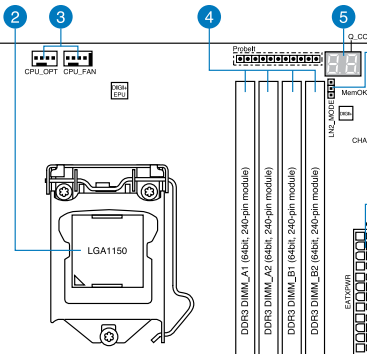
CPU is on the left. RAM slots are A1, A2, B1, B2, left to right.
Fine-tuning the Google search #
I adjusted my Google terms to include “A1 A2 slots” and found more posts talking about CPU coolers being installed incorrectly. Mine had to be correct — I installed it four times! I decided to try re-installing it one last time.
When I removed the CPU cooler from the CPU, I noticed something strange. There are four standoffs around the CPU that the cooler would attach to with screws. Those standoffs screwed into posts that connected to a bracket on the back of the motherboard.
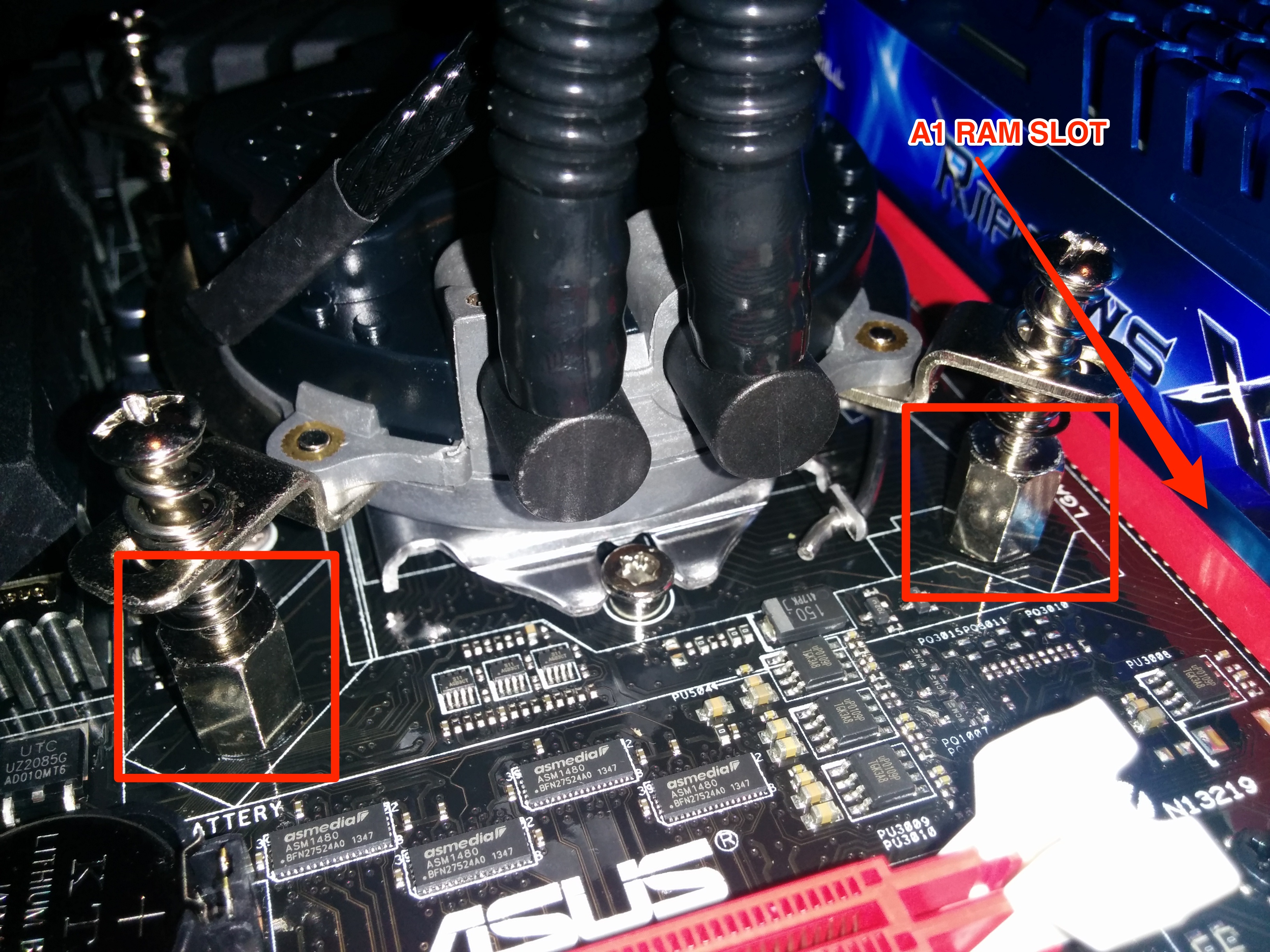
The lower two standoffs are highlighted.
I removed the two standoffs that were closest to the A1/A2 RAM slots and noticed something peculiar. One side of the standoff had a black coating that seemed a bit tacky while the other side of the standoff was bare metal. Three of the standoffs had the black side down (against the board) while one had the black side up. I unscrewed that standoff and found that the bare metal side was wedged firmly onto some connections that run from the CPU to the A1/A2 RAM slots. Could this be the issue?
Eureka #
After double-checking all of the CPU cooler standoffs and attaching the cooler to the board, I crossed my fingers and hit the power button. The machine shot through POST and I was staring down a Fedora logo that quickly led to a GDM login.
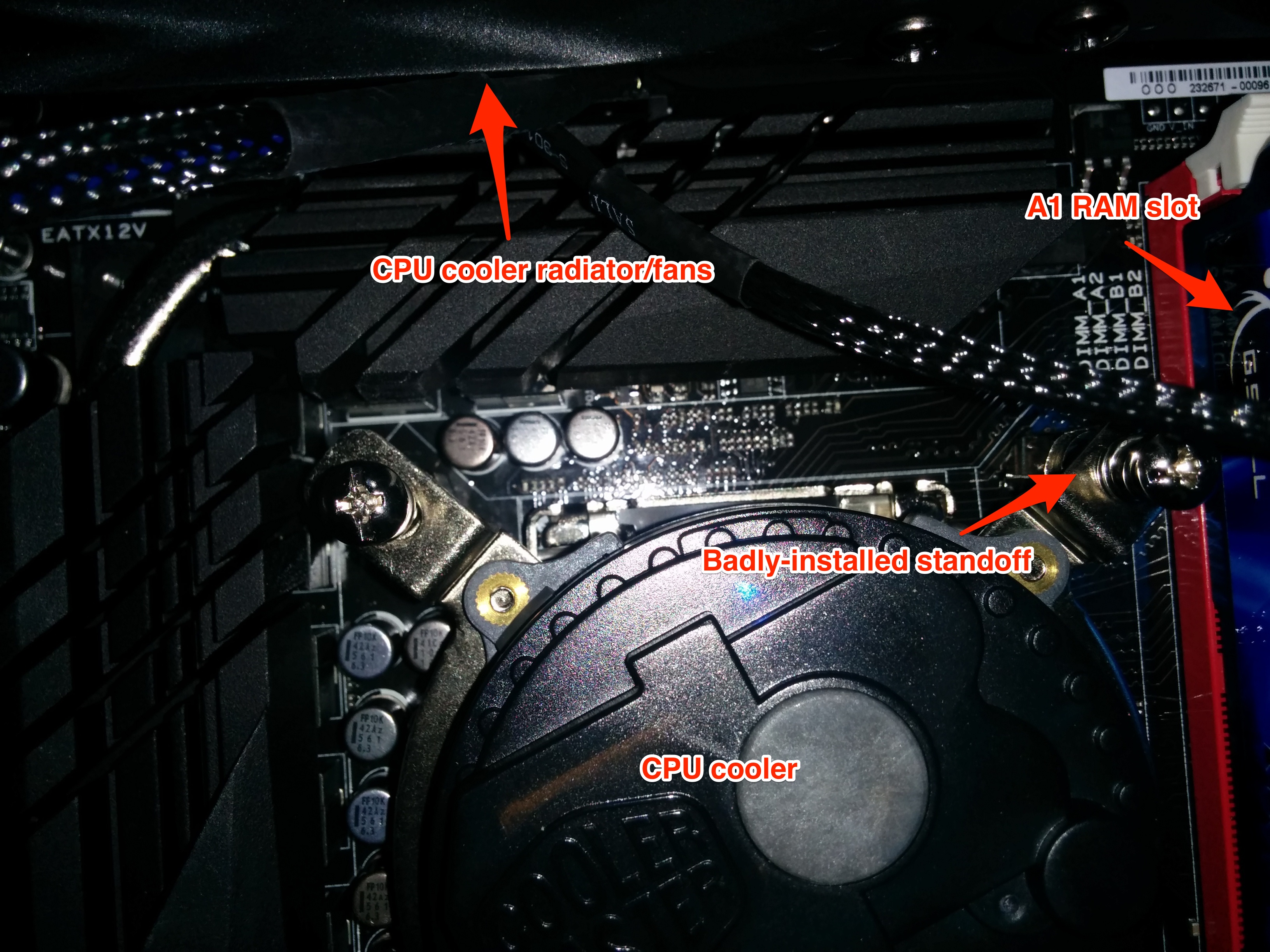
The culprit
I don’t talk about hardware too often on the blog, but I certainly hopes this helps someone else who is desperately trying to find a solution.

-
#1
I’m in need of some help and I am not sure how to proceed.
I recently bought an Asus ROG Z690 Maximus Extreme Motherboard with an Intel Core I9-1200K and 32GB Corsair Dominator 5600MHz memory (CMT32GXM2X5600C36).
After putting everything together I ran into issues trying to get the system to boot and the Q-Code displayed was 55 Memory Not Installed. I realised my mistake when I checked the supported memory list on the Asus QVL to find that my chosen memory was not supported.
I then bought some G.Skill Trident Z5 RGB Black 32GB 5600MHz memory (F5-5600U3636C16GX2-TZ5RK) which is supported but I am having the same issue.
I have tried flashing the Bios to the newest version and reset the bios to no avail.
I am unsure if I am overlooking something I could try and maybe avoid raising an RMA.
Any help would be appreciated
-

20220125_151808.thumb.jpg.1968ccc0c6f942bc7be40db0033a3313.jpg
134.3 KB · Views: 211
-

20220125_151813.thumb.jpg.97b236509bfc9f8e964ef80d93af8190.jpg
102.7 KB · Views: 196
-
#2
If you are sure the RAM is socketed with the clips locked, and you have tried all four slots, the only other thing I can think of would be to look at the socket.
Just out of morbid curiosity, that iCUE cooler, are you using LGA115x/1200 hardware, or 1700?
-
#3
I’m in need of some help and I am not sure how to proceed.
I recently bought an Asus ROG Z690 Maximus Extreme Motherboard with an Intel Core I9-1200K and 32GB Corsair Dominator 5600MHz memory (CMT32GXM2X5600C36).
After putting everything together I ran into issues trying to get the system to boot and the Q-Code displayed was 55 Memory Not Installed. I realised my mistake when I checked the supported memory list on the Asus QVL to find that my chosen memory was not supported.
I then bought some G.Skill Trident Z5 RGB Black 32GB 5600MHz memory (F5-5600U3636C16GX2-TZ5RK) which is supported but I am having the same issue.
I have tried flashing the Bios to the newest version and reset the bios to no avail.
I am unsure if I am overlooking something I could try and maybe avoid raising an RMA.
Any help would be appreciated
Did you clear the CMOS? I am assuming that board has a Clear CMOS button. If that doesn’t work take out the battery for a minute with the system unplugged (Which you should do to clear the CMOS anyway. The board could be thinking that the same RAM is still there.
-
#4
Did you clear the CMOS? I am assuming that board has a Clear CMOS button. If that doesn’t work take out the battery for a minute with the system unplugged (Which you should do to clear the CMOS anyway. The board could be thinking that the same RAM is still there.
Yeah I’ve cleared the CMOS and updated it via flashback but nothing works.
-
#5
Yeah I’ve cleared the CMOS and updated it via flashback but nothing works.
Did you remove the battery?
-
#6
Check cpu orientation, lga pins for damage
-
#7
Did you remove the battery?
Yes. No luck
Check cpu orientation, lga pins for damage
No damage to pins and CPU inserted correctly
-
#8
did ya try the safe boot button?
both bioses with the bios switch ?
try with slow mode on?
-
#9
I’m in need of some help and I am not sure how to proceed.
I recently bought an Asus ROG Z690 Maximus Extreme Motherboard with an Intel Core I9-1200K and 32GB Corsair Dominator 5600MHz memory (CMT32GXM2X5600C36).
After putting everything together I ran into issues trying to get the system to boot and the Q-Code displayed was 55 Memory Not Installed. I realised my mistake when I checked the supported memory list on the Asus QVL to find that my chosen memory was not supported.
I then bought some G.Skill Trident Z5 RGB Black 32GB 5600MHz memory (F5-5600U3636C16GX2-TZ5RK) which is supported but I am having the same issue.
I have tried flashing the Bios to the newest version and reset the bios to no avail.
I am unsure if I am overlooking something I could try and maybe avoid raising an RMA.
Any help would be appreciated
Test ram in another system, if no issue the board is fugged
-
#10
I have tried all suggestions.
-
#11
I have tried all suggestions.
Hi, I am currently having the same issues as you listed above. How did you end up resolving your issue?
-
#12
I sent the board back to the retailer on 1st February via RMA who then sent it to Asus. I’ve not yet received the board back so I cannot confirm cause of the issue.

-
#13
Hi,
Wow two months and still counting 

-
#14
That is a looong turn around. Both times I RMA stuff to ASUS it was 2 weeks in total.
Better ask for your money back fron that shop.
-
#1
I’m in need of some help and I am not sure how to proceed.
I recently bought an Asus ROG Z690 Maximus Extreme Motherboard with an Intel Core I9-1200K and 32GB Corsair Dominator 5600MHz memory (CMT32GXM2X5600C36).
After putting everything together I ran into issues trying to get the system to boot and the Q-Code displayed was 55 Memory Not Installed. I realised my mistake when I checked the supported memory list on the Asus QVL to find that my chosen memory was not supported.
I then bought some G.Skill Trident Z5 RGB Black 32GB 5600MHz memory (F5-5600U3636C16GX2-TZ5RK) which is supported but I am having the same issue.
I have tried flashing the Bios to the newest version and reset the bios to no avail.
I am unsure if I am overlooking something I could try and maybe avoid raising an RMA.
Any help would be appreciated
-
20220125_151808.thumb.jpg.1968ccc0c6f942bc7be40db0033a3313.jpg
134.3 KB · Views: 211
-
20220125_151813.thumb.jpg.97b236509bfc9f8e964ef80d93af8190.jpg
102.7 KB · Views: 196
-
#2
If you are sure the RAM is socketed with the clips locked, and you have tried all four slots, the only other thing I can think of would be to look at the socket.
Just out of morbid curiosity, that iCUE cooler, are you using LGA115x/1200 hardware, or 1700?
-
#3
I’m in need of some help and I am not sure how to proceed.
I recently bought an Asus ROG Z690 Maximus Extreme Motherboard with an Intel Core I9-1200K and 32GB Corsair Dominator 5600MHz memory (CMT32GXM2X5600C36).
After putting everything together I ran into issues trying to get the system to boot and the Q-Code displayed was 55 Memory Not Installed. I realised my mistake when I checked the supported memory list on the Asus QVL to find that my chosen memory was not supported.
I then bought some G.Skill Trident Z5 RGB Black 32GB 5600MHz memory (F5-5600U3636C16GX2-TZ5RK) which is supported but I am having the same issue.
I have tried flashing the Bios to the newest version and reset the bios to no avail.
I am unsure if I am overlooking something I could try and maybe avoid raising an RMA.
Any help would be appreciated
Did you clear the CMOS? I am assuming that board has a Clear CMOS button. If that doesn’t work take out the battery for a minute with the system unplugged (Which you should do to clear the CMOS anyway. The board could be thinking that the same RAM is still there.
-
#4
Did you clear the CMOS? I am assuming that board has a Clear CMOS button. If that doesn’t work take out the battery for a minute with the system unplugged (Which you should do to clear the CMOS anyway. The board could be thinking that the same RAM is still there.
Yeah I’ve cleared the CMOS and updated it via flashback but nothing works.
-
#5
Yeah I’ve cleared the CMOS and updated it via flashback but nothing works.
Did you remove the battery?
-
#6
Check cpu orientation, lga pins for damage
-
#7
Did you remove the battery?
Yes. No luck
Check cpu orientation, lga pins for damage
No damage to pins and CPU inserted correctly
-
#8
did ya try the safe boot button?
both bioses with the bios switch ?
try with slow mode on?
-
#9
I’m in need of some help and I am not sure how to proceed.
I recently bought an Asus ROG Z690 Maximus Extreme Motherboard with an Intel Core I9-1200K and 32GB Corsair Dominator 5600MHz memory (CMT32GXM2X5600C36).
After putting everything together I ran into issues trying to get the system to boot and the Q-Code displayed was 55 Memory Not Installed. I realised my mistake when I checked the supported memory list on the Asus QVL to find that my chosen memory was not supported.
I then bought some G.Skill Trident Z5 RGB Black 32GB 5600MHz memory (F5-5600U3636C16GX2-TZ5RK) which is supported but I am having the same issue.
I have tried flashing the Bios to the newest version and reset the bios to no avail.
I am unsure if I am overlooking something I could try and maybe avoid raising an RMA.
Any help would be appreciated
Test ram in another system, if no issue the board is fugged
-
#10
I have tried all suggestions.
-
#11
I have tried all suggestions.
Hi, I am currently having the same issues as you listed above. How did you end up resolving your issue?
-
#12
I sent the board back to the retailer on 1st February via RMA who then sent it to Asus. I’ve not yet received the board back so I cannot confirm cause of the issue.
-
#13
Hi,
Wow two months and still counting
-
#14
That is a looong turn around. Both times I RMA stuff to ASUS it was 2 weeks in total.
Better ask for your money back fron that shop.
Thread: Error Code 55 (Maximus VI Hero)
Thread Tools
Search Thread
Display
Error Code 55 (Maximus VI Hero)
Hello, I’m building a PC for the first time. Earlier, I had error code 00, i took it out of the case and tried, it fixed itself. Now, I have error code 55. I consulted the manual, and it said that it needed ram. So I reseated the ram in the 4 different slots. I also tried using 3 different sticks of ram, Error 55 on and on (2 of them factory new and 2 are from the previous computer). I tried resetting my CMOS, error 55. I loosened up my fan, 55. I reseated the cpu. I reseated pretty much everything. I tried updating the BIOS through the flash thingy, even though it was updated already. Halp? Like I said, I’m building for the first time, so if picked parts horribly wrong, I’m sorry for the pain.
EDIT: There should be a song dedicated to error 55.
Last edited by burntcheese; 01-05-2015 at 05:02 AM .
Moderator Array Nate152 PC Specs
| Nate152 PC Specs | |
| Motherboard | ROG Strix Z690-F Gaming WiFi |
| Processor | i7-12700KF |
| Memory (part number) | Kingston Fury Beast 16GB (2x8GB) 6000MT/s (KF560C40B) |
| Graphics Card #1 | ROG Strix 3090 Ti LC OC |
| Sound Card | ROG SupremeFX |
| Monitor | HP ZR30w |
| Storage #1 | Seagate Firecuda 530 1TB |
| CPU Cooler | EK Quantum Velocity2 |
| Case | Thermaltake Tower 900 |
| Power Supply | EVGA Supernova 1600 T2 |
| Keyboard | ROG Falchion NX / Strix Flare II |
| Mouse | ROG Chakram X/Chakram Core/Spatha X |
| Headset | ROG Delta S Animate |
| Mouse Pad | Steelseries Prism XL + ROG Scabbard II |
| OS | Windows 11 Home |
| Accessory #1 | 2x Swiftech Maelstrom X300 D5 V2 |
| Accessory #2 | 2x Hardware Labs SR2 560 MP radiators |
| Accessory #3 | Lamptron FC-5 V3 fan controller |
 Join Date Feb 2013 Reputation 386 Posts 17,480
The ripjaws x ram is on the QVL list for your motherboard so it should work. The bios update seemed to work as you went from code 00 to code 55.
All the parts you’ve chosen are compatible so that means there is a problem somewhere. Try with just 1 stick in slot A1.
You say you’ve loosened your fan, I hope that means you’ve loosened your cpu cooler a touch, sometimes an over tightened cpu cooler can cause code 55. If this does not help, remove your cpu cooler and cpu and check the socket pins very close in good light with a magnifying glass for any bent or misaligned socket pins. Make sure they are ALL evenly spaced. Look carefully.
****, 3 bent pins. The bottom right one is more visible if you were there. What now?
ROG Member Array AliceInBroadband PC Specs
| AliceInBroadband PC Specs | |
| Motherboard | Asus Maximus VII Formula |
| Processor | Intel Core i7 4790K 4.0 GHZ |
| Memory (part number) | G.Skill F3-2400C10D-8GTX Trident X 8GB (2 x 4GB) |
| Graphics Card #1 | Gigabyte GTX970 |
| Sound Card | TBB |
| Monitor | TBB |
| Storage #1 | Samsung Evo 840 120GB |
| Storage #2 | Western Digital Caviar Black 1TB |
| CPU Cooler | Corsair Hydro H100i |
| Case | Cooler Master Cosmos SE |
| Power Supply | EVGA Supernova 1300 G2 (1300w) |
| Keyboard | Razer Deathstalker |
| Mouse | Razer Naga 2014 |
| Headset | Asus Orion Pro 7.1 |
| OS | Windows 8.1 |
Join Date Jan 2015 Reputation 10 Posts 11
You have several options, with Risk running inversely proportional to Cost on the scale.
1. Contact Asus Support and see if they can do anything for you.
2. You could send it to a local PC-Repair shop and have them fix it for you, most shops in my experience have dealt with this sort of problem before (I bent the pins on an old AMD CPU back 2005 or so and I took it in and they fixed my blunder for me).
3. And here is the most risky one. You can repair it yourself. I myself however do not recommend this and urge you to rather contact Asus about the problem, however, for the sake of education: Take a standard mechanical pencil — the kind that holds sticks of lead — and remove all the lead from it. Proceed — preferably with a magnifying glass to aid your vision — to straighten out the pins using the front of the mechanical pencil. You run the risk of breaking the pins off completely or bending them into an even worse condition and thus I wouldn’t recommend you do this unless you have a lot of money or have no other options.
I hope you can get this fixed. Its not a nice situation to be dealing with. Next time you install your CPU, be absolutely sure you have orientated it 100% correctly. Never force the CPU in. As a rule of thumb, I always let the CPU put itself in place — in other words, I simply ‘drop’ it in and let gravity do the work as apposed to pushing it in.
Moderator Array Nate152 PC Specs
| Nate152 PC Specs | |
| Motherboard | ROG Strix Z690-F Gaming WiFi |
| Processor | i7-12700KF |
| Memory (part number) | Kingston Fury Beast 16GB (2x8GB) 6000MT/s (KF560C40B) |
| Graphics Card #1 | ROG Strix 3090 Ti LC OC |
| Sound Card | ROG SupremeFX |
| Monitor | HP ZR30w |
| Storage #1 | Seagate Firecuda 530 1TB |
| CPU Cooler | EK Quantum Velocity2 |
| Case | Thermaltake Tower 900 |
| Power Supply | EVGA Supernova 1600 T2 |
| Keyboard | ROG Falchion NX / Strix Flare II |
| Mouse | ROG Chakram X/Chakram Core/Spatha X |
| Headset | ROG Delta S Animate |
| Mouse Pad | Steelseries Prism XL + ROG Scabbard II |
| OS | Windows 11 Home |
| Accessory #1 | 2x Swiftech Maelstrom X300 D5 V2 |
| Accessory #2 | 2x Hardware Labs SR2 560 MP radiators |
| Accessory #3 | Lamptron FC-5 V3 fan controller |
Join Date Feb 2013 Reputation 386 Posts 17,480
Since there are only 3 bent ones, you could try straightening them yourself with a small thin blade pocket knife or a toothpick. I have seen people here straighten bent socket pins with success. Good light, a good eye and a steady hand are a must when doing this. BE EXTREMELY CAREFUL not to damage any of the other pins.
If you don’t feel comfortable doing it, you can take it to a pc shop or maybe a jeweler could do it for you.
Last edited by Nate152; 01-06-2015 at 03:47 AM .
Источник
Thread: Maximus Hero X — Error 55 — Troubleshooting Help
Thread Tools
Search Thread
Display
Maximus Hero X — Error 55 — Troubleshooting Help
Hello everyone and thank you all in advance. This my first «big boy» motherboard and I’m a bit overwhelmed with all the options available to me (in a good way).
So I can’t get my computer to even load the BIOS if I have stock speed RAM in A1 or A2 (the two closest to the CPU, pretty sure they’re A). Boots no problem with any of the 4 sticks in B1 and B2 in solo or duo configurations. The motherboard read-out will hang with the code CC and finally error out to 55.
I have basically tried all the non-voltage tweak settings listed in this thread from the IX Hero forum: https://rog.asus.com/forum/showthrea. 1-A2-populated (seemed pertinent since it was the same problem). I didn’t try the voltage tweaks since my understanding is that should have only been a potential issue if I could boot from the slots with just a single stick of RAM in them but not with all 4 slots populated.
So just to recap:
-No bent pins that I could see
-CPU isn’t bent (both spreader and PCB check out with a level, and yes this was interesting to try to do since its so small)
-Tried with/without the heatsink just to see
-Cleaned the bottom of the CPU with 99% Isopropyl Alcohol just to be sure and used compressed air to clean out anything in the motherboard socket.
-Reseated the CPU 3 times in the process.
-Populated each RAM slot with individual sticks of RAM and then tested working slots with RAM in the other slots individually. Only the farthest two from CPU socket (I think B1/B2) worked in either situation.
-Fully tested the durability of the Reset CMOS button pushing it quite often.
Everything is @ stock settings outside of disabling MCE when I was able to get into the BIOS by having RAM in the «good» slots. This was done after it already wasn’t booting properly with a single stick of RAM. I tried flashing the BIOS to the newest version on the website as of 10/24/17 to no avail.
The RAM does receive power being plugged in as the RGB turns on and syncs up with the other RAM. Not sure if this is important but figure I’ll be as complete as possible.
These are the specs:
i7-8700k @ stock
GSkill TridentZ RGB C14 3200mHz 32gb (4×8) kit w/o the XMP activated (It’s on the QVL)
Alpha Cool Eisbaer 420mm Radiator (didn’t feel like bending tubes =P)
Maximus X Hero Wifi
Samsung 960 Pro main 960 Evo data drives
Gigabyte Aorus 1080Ti Extreme Edition (Birthday Gift, would have gotten ASUS myself)
What I’m looking for is a *most likely* culprit as I do understand there are entirely too many potential issues associated with Error 55. It’s basically impossible to get another 8700K at the moment so naturally I can’t *test* that all too easily but whatever suggestions you can give me I’m willing to try.
Thank you all so much for reading this and I hope we can sort this out. The machine runs beautifully when I can get it to work.
Источник
Asus MAXIMUS VII Hero Q-code 55.
Iriso
Reputable





Hello everyone,
After 1st boot I get the error 55 on vii hero motherboard and no signal on monitor. It is supposed to be memory error caused by pins bending or sliding of cpu pads or memory sticks incompatibility but I checked everything and it seems to be fine. No pins are bent and the CPU waterblock sits correctly with all screws even, the memory sticks are compatible and I even flash updated the bios to last version supported by my CPU but I still get the 55 error no matter in which memory slot I installed the memory stick(I tried putting both in all combinations and by one in each slot). I am grateful for any suggestions.
CPU:i7-4790k
CPU cooler:swiftech h220-x
RAM:Corsair vengeance LP 1600 mHz
MOBO:Asus MAXIMUS VII hero

Darkbreeze
Retired Mod






















I’d look at this,
as possible solutions. There’s a good chance of a bad module. You might want to talk with Corsair or ASUS on the issue as well and setup an RMA if none of those solutions addresses the issue.
Darkbreeze
Retired Mod
I’d look at this,
as possible solutions. There’s a good chance of a bad module. You might want to talk with Corsair or ASUS on the issue as well and setup an RMA if none of those solutions addresses the issue.

Dark Lord of Tech
Retired Moderator

















Iriso
Reputable
I’d look at this,
as possible solutions. There’s a good chance of a bad module. You might want to talk with Corsair or ASUS on the issue as well and setup an RMA if none of those solutions addresses the issue.
Tried all of that, it might be a bad module. I’ll make a double check on everything.
Iriso
Reputable
It sits just enough to get screws into the backplate, so in my opinion it’s fine.
Darkbreeze
Retired Mod
Iriso
Reputable
Would you mind explaining me how to boot memtest86 if I can’t get into Bios?
Darkbreeze
Retired Mod
Would you mind explaining me how to boot memtest86 if I can’t get into Bios?
My bad. I was thinking you said it worked with a single stick. If you can’t boot with any of the modules you bought, have you tried other modules? Do you maybe have a stick of DDR3 from another rig? Have you tried booting with NO cpu cooler installed, just to see if it posts? Surprisingly, I’ve seen a few threads where this has worked and after several mountings of the aftermarket cooler not working but the stock cooler working it was determined that either they HAD been overtightened, that they didn’t use the plastic shield under the backplate or that the board was faulty.
Iriso
Reputable
Would you mind explaining me how to boot memtest86 if I can’t get into Bios?
My bad. I was thinking you said it worked with a single stick. If you can’t boot with any of the modules you bought, have you tried other modules? Do you maybe have a stick of DDR3 from another rig? Have you tried booting with NO cpu cooler installed, just to see if it posts? Surprisingly, I’ve seen a few threads where this has worked and after several mountings of the aftermarket cooler not working but the stock cooler working it was determined that either they HAD been overtightened, that they didn’t use the plastic shield under the backplate or that the board was faulty.
I alredy tried booting with no CPU cooler, it didn’t work and unfortunatly I don’t have another DDR3 stick nor another MOBO. I decided on sending parts back to reseller so that he can check them and see if there’s anything wrong with them. I will post an update when he will answer.
Darkbreeze
Retired Mod

gbakmars
Distinguished


TOPIC: A1 and B1 Failure on Maximus VII Hero
I posted this on the Asus VIP forum and have not received a response; so I thought I would paste it in here. I haven’t finished reading this thread and may be pleasantly surprised. The reason for my reply is to illuminate the ever-present dark places on the path that would be solved by someone in the building just turning on a few light switches. Very few large corporations are going to do this because that action is falsely perceived to be a sign of weakness.
Hi there! This is hard to believe for I, as far as it appears here, have the exact same issue; but I am typing this reply to what appears to be an unanswered question.
Did you ever get a response?
I am running Corsair Platinum 1866 C9 1.5v 2X8GB kits. I know with 100% certainty that the memory is not the issue. I also own another identical Hero, 3 Z97-WS boards, 1 VII Gene, and 3 Z97-A boards and all I am running is Platinum. I have the resources to run trial and error on the Memory!
I built the first Hero 12-12-2014 and it is running two of the above mention kits and is running flawlessly. I have finished the 2nd Hero build just within the past few days, although they were purchased together off the same shelf at MicroC.
Asus has seen this problem; this I know for 100% certainty.
Asus distributed BIOS updates which now are no where to be found except if one should wander over to, say for example, the Asus VII Gene Downloads; and low and behold there it is.
I have backed down in BIOS releases.
I have run so many different scenarios that I am dizzy!
If I were to go with my gut, I would venture to say that this is not a hardware issue. I even went so far as to run 2 X 8 GB in A2 and B2 and right before I entered the BIOS, I pushed in 2 X8
GB’s into A1 and B1.
What I found reported in the BIOS was identical information from A1,A2 and B1,B2 ! All accounted for and specs were identical for all 4!
What bothers me more than anything is that I can find answers to issues that Asus has to already have the answers for, but withholds the information, preventing it from filtering down to the «Customer-Technician» connection.
This is a terrible waste of a customer’s time and energy. What foolish person came up with the slogan for a «drink»; «Image is Everything, Thirst is Nothing!»? And why as customers do we just as foolishly entrust our resources to any Corporation which builds on this kind of foundation?
I would expect a quick and clear response from Asus; without first trying to «Assess my problem», for the problem is within the walls and halls of Asus.
Источник
-
#1
Motherboard: ASUS MAXIMUS VI EXTREME LGA 1150 Intel Z87
CPU: Intel Core i7-4770K
GPU: GIGABYTE GeForce GTX 770
RAM: CORSAIR Dominator Platinum 240-Pin DDR3 SDRAM DDR3 1866
Power: CORSAIR HX Series HX850 850W

-
- Oct 30, 2004
-
- 32,256
-
- 12
-
- 99,960
- 4,908
-
#5
Again, start 1 at a time.
-
- Oct 30, 2004
-
- 32,256
-
- 12
-
- 99,960
- 4,908
-
#2
Connected where …. what slots …is it as per the manual ? Asus standard was usually 2nd and 4th from CPU … On Maximus VI Formula it was 1st and 3rd.
After verifying slots to be used, put 1 stick in in the left most of the two designated spots as per the manual. Boot.
If it doesn’t work, try other stick. If it doesn’t work try the other usable slot again one at a time. This should determine of you have a bad module or bad slot.
I have seen slots «killed» by over tightening a CPU cooler.
Is system on XMP profile, it so try standard.
Make a Boot CD for Memtest86+ and see if you can get far enough to test RAM in correct slots. If fails, again try on eat a time.
-
#3
-
#4
Also, I am using all 4 memory slots.
-
- Oct 30, 2004
-
- 32,256
-
- 12
-
- 99,960
- 4,908
-
#5
Again, start 1 at a time.
-
#6
I had a perfectly working system with Asus Maximus VI Gene and upgraded it with a Cooler Master 240M Nepton. After that I got the error 55, which puzzled me greatly as the memory modules was probably the only component that I hadnt touched during that upgrade. In my case the issue was incorrectly installed cooler standoffs. There are apparantly a small layer of insulations on one side of the standoffs, which if you choose poorly will result in error 55. Luckily it was as easy as unscrewing the standoff and flipping it over to make my problem disappear.
A throwback to the blog that saved my rig https://major.io/2014/08/22/asus-maximus-vi-gene-error-55/
-
#7
It happened when trying to put an IVY BRIDGE CPU onto the Z68 Board:
No sound, no picture.
And sometimes it’s really necessary to find out, what the booting process does «next».
It held at code 55, but the RAM was fine.
The error was the CPU MISMATCH, because the BIOS VERSION was too old. So the LED just stuck in the latest step before the error occurred.
Thank god, ASUS offers the USB BIOS FLASHBACK, which allows you to (re-)set your BIOS on a blank board (without CPU, RAM etc…)
Due to the fact that i found uncountable different hints for this:
a) Find USB Stick (max 4GB) and format it to FAT32
b) Download latest BIOS Version on ASUS Page
c) Download the Bios Renamer (Bios Tools) for the same Mainboard
d) Put Bios (.rom or .cap) and renamer on stick. Renamer does nothing than rename the file to a specific mainboard shortname (e.g. M4EZ.rom for the Maximus IV Extreme-Z…)
e) Find the ROG Connect/ BIOS Flashback USB Port on the Board and put the Stick in.
f) Push ROG-Connect / BIOS Flashback Button for at least 3 seconds.
g) The BIOS LED on the Mainboard should blink for about 3 Minutes, (if there is none, the button might blink) — BIOS Flash is finished.
h) No Blink means that there is a BIOS mismatch, filename mismatch or the USB Stick is broken/too large/wrong format.
And — to close this up:
Experiencing a blue screen when exchanging mainboard and cpu when restarting windows might be a result of a misconfigured sata controller. Open BIOS and make sure that the configuration sais IDE and not AHCI. After installing the matching ahci drivers for the mainboard, you can switch this setting back to default.
Hope that helps anyone with the same issue.
| Thread starter | Similar threads | Forum | Replies | Date |
|---|---|---|---|---|
|
|
Question Q-Code «OE» on Asus ROG Maximus X Hero WiFi ? | Motherboards | 2 | Dec 27, 2022 |
|
|
Question Has anyone managed to get the NODE header to work on the Asus Maximus XI Hero ? | Motherboards | 0 | Dec 18, 2022 |
|
R
|
Question Bluetooth Mouse stopped working in BIOS on Asus ROG Maximus XI Hero ? | Motherboards | 4 | Dec 5, 2022 |
|
R
|
Question ASUS ROG Maximus XI Hero (Wi-Fi) TPM 2.0 Question | Motherboards | 7 | Dec 5, 2022 |
|
F
|
Question Z790 Maximus Extreme — — — problem with M.2 slot ? | Motherboards | 0 | Nov 23, 2022 |
|
F
|
Question Asus ROG Z690 Maximus Glacial Extreme Compatiblity with Thermaltake Pacific Ultra A2/R2? | Motherboards | 3 | Jun 3, 2022 |
|
G
|
Question Asus Maximus Z690 Extreme motherboard completely covers the grommets in a Fractal Design Define S Vision case ? | Motherboards | 9 | May 29, 2022 |
|
|
[SOLVED] Bluetooth on ROG Maximus IX Extreme | Motherboards | 1 | Mar 29, 2022 |
|
S
|
Question ASUS Republic of Gamers Maximus Z690 Extreme Glacial LGA 1700 E-ATX Motherboard | Motherboards | 2 | Mar 4, 2022 |
|
C
|
[SOLVED] Asus ROG Maximus Z690 Extreme won’t go in to suspend mode ? | Motherboards | 8 | Feb 7, 2022 |


- Advertising
- Cookies Policies
- Privacy
- Term & Conditions
- Topics