Узнайте, что следует делать, когда отображается ошибка с кодом 183 при попытке установить или обновить приложение Creative Cloud для настольных ПК или приложение Creative Cloud (например, Photoshop, Premiere Pro и Illustrator).
Как устранить ошибку 183 для приложений Creative Cloud?
Ошибка 183 представляет собой общую ошибку, которая может означать ряд различных проблем, от проблем с разрешениями до агрессивной проверки на вирусы настройки в Windows, которая препятствует установке.
Какое приложение вы пытаетесь установить или обновить?
Чтобы исправить ошибку 183, следуйте инструкциям для приложения, которое вы пытались установить или обновить
Первый способ
-
Временно отключите антивирусную программу (например, Cylance Antivirus). Для получения подробных инструкций см. документацию антивирусной программы.
-
Попробуйте запустить установку повторно. Если это не помогло, перейдите к шагу 3.
Примечание. По окончании установки не забудьте снова включить антивирусную программу.
-
Проверьте, установлена ли на вашем компьютере антивирусная программа Segurazo Antivirus.
-
После удаления антивирусной программы Segurazo Antivirus попробуйте запустить установку повторно.
Примечание. Если вы намеренно установили антивирусную программу Segurazo Antivirus, ее можно переустановить после завершения установки.
Неполадка не устранена?
Если ошибка 183 не исчезла, выполните дополнительные действия, приведенные ниже.
-
Нажмите Подробнее в окне ошибки. В открывшемся всплывающем диалоговом окне нажмите Просмотр журнала ошибок.
-
В открывшемся журнале ошибок найдите папку, которая привела к ошибке.
Журнал ошибок может выглядеть следующим образом.

-
Выполните одно из следующих действий в зависимости от вашей папки.
- Папка «Adobe Creative Cloud Experience»: выполните шаги с 4 по 6.
- Любая другая папка: удалите или переименуйте папку. Перейдите к шагу 6.
-
Перейдите в Диспетчер задач (Windows) или приложение Мониторинг системы (macOS) и закройте Creative Cloud Content Manager.
-
Найдите папку «Adobe Creative Cloud Experience» и удалите ее.
- Windows (64-разрядная версия): C:Program FilesAdobeAdobe Creative Cloud Experience
- Windows (32-разрядная версия): C:Program Files (x86) AdobeAdobe Creative Cloud Experience
/Applications/Utilities/Adobe Creative Cloud Experience
-
Попробуйте установить приложение еще раз.
-
Удалите приложение Creative Cloud для настольных ПК.
-
Загрузите программу установки приложения Creative Cloud для настольных ПК.
-
Щелкните загруженный файл.
-
Дважды щелкните Install.app.
Приложение Creative Cloud для настольных ПК начнет устанавливаться. После завершения установки оно откроется автоматически.
I have the same issue, except I had previously downloaded it and I was just trying to update XD. It now downloads to 44% and stops with the error code 183.
I’m running windows 10.
I have tried a number of other solutions floating around like uninstalling all CC products, stopping all adobe processes that are running, removing all files and folders in %temp%.
I’m not sure what I should try now.
Let me know if you need any more information.
Here is a section of the log file right as it happens.
Logs
03/22/17 07:51:02:818 | [INFO] | | HDSetup | OOBEUtils | ProcessUtils | | OOBEUtils | 19692 | Launching Process as DeElevated :C:Program Files (x86)AdobeAdobe Creative CloudHDCoreHDHelper.exe : SUCCESSFUL
03/22/17 07:51:04:296 | [WARN] | | HDSetup | HDPIM | RunProgramCommand | | HDPIM | 19692 | Program «C:Program FilesCommon FilesAdobeAdobe XDCSDKConfigurator.exe» failed with exit code: -1
03/22/17 07:51:04:296 | [FATAL] | | HDSetup | HDPIM | InstallHelper | | HDPIM | 19692 | Error (Code = 183) executing in command ‘RunProgramCommand’ for package: ‘UWPAssets’, version:0.6.16.7
03/22/17 07:51:04:297 | [FATAL] | | HDSetup | HDPIM | InstallHelper | | HDPIM | 19692 | Error occurred in install of package (Name: UWPAssets Version: 0.6.16.7). Error code: ‘183’
03/22/17 07:51:04:697 | [INFO] | | HDSetup | HDSetup | AppContext | | HDSetup | 2232 | Exit Code: 183
————————————— Summary —————————————
— 2 fatal error(s), 0 error(s), 1 warnings(s)
FATAL: Error (Code = 183) executing in command ‘RunProgramCommand’ for package: ‘UWPAssets’, version:0.6.16.7
FATAL: Error occurred in install of package (Name: UWPAssets Version: 0.6.16.7). Error code: ‘183’
WARN: Program «C:Program FilesCommon FilesAdobeAdobe XDCSDKConfigurator.exe» failed with exit code: -1
————————————————————————————-
03/22/17 07:51:04:748 | [INFO] | | HDSetup | HDPIM | HDPIMSessionManager | | HDPIM | 25692 | Inside hdpimControlProgress for request type ‘2’ with driverXML
03/22/17 07:51:04:750 | [INFO] | | HDSetup | HDPIM | HDPIMSessionManager | | HDPIM | 25692 | Exiting hdpimControlProgress with status ‘0’
03/22/17 07:51:05:217 | [INFO] | | HDSetup | HDPIM | HDPIMSessionManager | | HDPIM | 25692 | Inside hdpimTerminateSession
03/22/17 07:51:05:231 | [INFO] | | HDSetup | OOBEUtils | FileUtils | | OOBEUtils | 25692 | Successfully deleted directory from path: C:adobeTempETRF477.tmp. Recursive: 1
03/22/17 07:51:05:232 | [INFO] | | HDSetup | HDPIM | HDPIMSessionManager | | HDPIM | 25692 | Exiting hdpimTerminateSession, successfully closed session ‘0’
03/22/17 07:51:05:238 | [INFO] | | HDSetup | HDSetup | AppContext | | HDSetup | 19604 | Exit Code: 183
————————————— Summary —————————————
— 2 fatal error(s), 0 error(s), 1 warnings(s)
FATAL: Error (Code = 183) executing in command ‘RunProgramCommand’ for package: ‘UWPAssets’, version:0.6.16.7
FATAL: Error occurred in install of package (Name: UWPAssets Version: 0.6.16.7). Error code: ‘183’
WARN: Program «C:Program FilesCommon FilesAdobeAdobe XDCSDKConfigurator.exe» failed with exit code: -1
————————————————————————————-
03/22/17 07:51:05:239 | [WARN] | | HDSetup | OOBEUtils | CommBridge | | OOBEUtils | 25692 | Pipe 00000000 not initialized, aborting write.
03/22/17 07:51:05:240 | [ERROR] | | HDSetup | HDSetup | IPCInterface | | HDSetup | 25692 | Error sending IPC packet to ACC: -4
03/22/17 07:51:05:242 | [INFO] | | HDSetup | HDSetup | AppContext | | HDSetup | 19604 | ************************* END Adobe Setup *************************
I have the same issue, except I had previously downloaded it and I was just trying to update XD. It now downloads to 44% and stops with the error code 183.
I’m running windows 10.
I have tried a number of other solutions floating around like uninstalling all CC products, stopping all adobe processes that are running, removing all files and folders in %temp%.
I’m not sure what I should try now.
Let me know if you need any more information.
Here is a section of the log file right as it happens.
Logs
03/22/17 07:51:02:818 | [INFO] | | HDSetup | OOBEUtils | ProcessUtils | | OOBEUtils | 19692 | Launching Process as DeElevated :C:Program Files (x86)AdobeAdobe Creative CloudHDCoreHDHelper.exe : SUCCESSFUL
03/22/17 07:51:04:296 | [WARN] | | HDSetup | HDPIM | RunProgramCommand | | HDPIM | 19692 | Program «C:Program FilesCommon FilesAdobeAdobe XDCSDKConfigurator.exe» failed with exit code: -1
03/22/17 07:51:04:296 | [FATAL] | | HDSetup | HDPIM | InstallHelper | | HDPIM | 19692 | Error (Code = 183) executing in command ‘RunProgramCommand’ for package: ‘UWPAssets’, version:0.6.16.7
03/22/17 07:51:04:297 | [FATAL] | | HDSetup | HDPIM | InstallHelper | | HDPIM | 19692 | Error occurred in install of package (Name: UWPAssets Version: 0.6.16.7). Error code: ‘183’
03/22/17 07:51:04:697 | [INFO] | | HDSetup | HDSetup | AppContext | | HDSetup | 2232 | Exit Code: 183
————————————— Summary —————————————
— 2 fatal error(s), 0 error(s), 1 warnings(s)
FATAL: Error (Code = 183) executing in command ‘RunProgramCommand’ for package: ‘UWPAssets’, version:0.6.16.7
FATAL: Error occurred in install of package (Name: UWPAssets Version: 0.6.16.7). Error code: ‘183’
WARN: Program «C:Program FilesCommon FilesAdobeAdobe XDCSDKConfigurator.exe» failed with exit code: -1
————————————————————————————-
03/22/17 07:51:04:748 | [INFO] | | HDSetup | HDPIM | HDPIMSessionManager | | HDPIM | 25692 | Inside hdpimControlProgress for request type ‘2’ with driverXML
03/22/17 07:51:04:750 | [INFO] | | HDSetup | HDPIM | HDPIMSessionManager | | HDPIM | 25692 | Exiting hdpimControlProgress with status ‘0’
03/22/17 07:51:05:217 | [INFO] | | HDSetup | HDPIM | HDPIMSessionManager | | HDPIM | 25692 | Inside hdpimTerminateSession
03/22/17 07:51:05:231 | [INFO] | | HDSetup | OOBEUtils | FileUtils | | OOBEUtils | 25692 | Successfully deleted directory from path: C:adobeTempETRF477.tmp. Recursive: 1
03/22/17 07:51:05:232 | [INFO] | | HDSetup | HDPIM | HDPIMSessionManager | | HDPIM | 25692 | Exiting hdpimTerminateSession, successfully closed session ‘0’
03/22/17 07:51:05:238 | [INFO] | | HDSetup | HDSetup | AppContext | | HDSetup | 19604 | Exit Code: 183
————————————— Summary —————————————
— 2 fatal error(s), 0 error(s), 1 warnings(s)
FATAL: Error (Code = 183) executing in command ‘RunProgramCommand’ for package: ‘UWPAssets’, version:0.6.16.7
FATAL: Error occurred in install of package (Name: UWPAssets Version: 0.6.16.7). Error code: ‘183’
WARN: Program «C:Program FilesCommon FilesAdobeAdobe XDCSDKConfigurator.exe» failed with exit code: -1
————————————————————————————-
03/22/17 07:51:05:239 | [WARN] | | HDSetup | OOBEUtils | CommBridge | | OOBEUtils | 25692 | Pipe 00000000 not initialized, aborting write.
03/22/17 07:51:05:240 | [ERROR] | | HDSetup | HDSetup | IPCInterface | | HDSetup | 25692 | Error sending IPC packet to ACC: -4
03/22/17 07:51:05:242 | [INFO] | | HDSetup | HDSetup | AppContext | | HDSetup | 19604 | ************************* END Adobe Setup *************************
[ad_1]
183 Ошибка Windows вызвана рядом проблем с настройками и параметрами вашего ПК. Более конкретно, это вызвано тем, что временные пути файлов Windows не могут работать должным образом — это приводит к тому, что ваш ПК работать намного медленнее, и в результате возникает большое количество проблем. Мы обнаружили, что, хотя ошибка 183 может с & # 39; являться, когда вы используете такое программное обеспечение, как Adobe Acrobat, оно порождает глубинный случай внутри самой системы Windows. Чтобы восстановить проблемы, которые могут возникнуть у вашего компьютера & # 39; ютера, вы должны иметь возможность исправить следующие проблемы:
- «Справочник пути к программе» может быть некорректным внутри реестра
- Реестр вашего ПК может иметь ошибки
- Windows может иметь проблемы с его программным обеспечением — предотвратить его правильному функционированию
Как исправить ошибки 183 Ошибка
1) Изменить путь данных приложений внутри реестра
- Щелкните на «Пуск»> поиск «Regedit.exe»
- Переход к следующему пути в RegEdit:
- HKEY_CURRENT_USERSoftwareMicrosoftWindowsCurrentVersionExplorerUser Shell Folders
- Дважды щелкните запись под названием «AppData»
- Замените оригинал значения с помощью собственного пути локального профиля
- Нажмите ОК
- Перезапустите свой ПК
2) Повторная установка любого поврежденного программного обеспечения
Это заменит любые поврежденные части программного обеспечения, которые могут вызвать проблемы. Это не только гарантирует, что ваш компьютер & # 39; Компьютер сможет обрабатывать параметры, которые ему нужно запустить, но также будет убедиться, что вы можете избавиться наибольшего количества проблем, которые могут быть вызваны программным обеспечением в вашей системе:
3) Очистите реестр Windows
Последний шаг — очистить реестр вашего ПК. Это очень важная часть вашего компьютера & # 39; ютера, потому что там, где хранятся похожи на ваши новейшие сообщения электронной почты, настольные обои и даже ваши пароли. Хотя реестр постоянно приводит к большому количеству ошибок в вашей системе, он постоянно препятствует работе комп & # 39; ютера работать как можно гладко, что приводит к образованию большого количества ошибок. Чтобы устранить эту проблему, вам придется исправить любые ошибки, которые может иметь реестр, — это можно сделать, нажав на Интернет, загрузив программу для очистки реестра, установив ее, а затем позволив исправить различные проблемы, которые ваша может иметь компьютер & # 39 ; Компьютер. Инструмент, называется Frontline Registry Cleaner, является тем, который мы обнаружили для этого лучшим.
[ad_2]
Технические проблемы с Adobe Premiere возникают чаще всего после установки или обновления программы. Самая популярная ошибка связана с компиляцией фильма при которой пользователь видит различные описания. На основе кода выдаваемым вместе с критическим сообщением, можно определить причину и способ исправления данной неисправности.
Содержание
- Внутренняя ошибка MME Premiere
- Причина
- Решение
- Ошибка 183
- Решение
- Ошибка компиляции Adobe Premiere Pro
- Ошибка запуска программы
- Ошибка средства импорта
- Ошибка 146 при установке
Внутренняя ошибка MME Premiere
Самая простая ошибка которая связана с блокировкой устройств и новой политикой операционной системы. Дословно она звучит так: «Не удалось применить настройки устройства, так как возникла следующая ошибка: Внутренняя ошибка устройства MME«.
Причина
Блокировка использования аудио или видеоустройства для сторонних приложений групповой политикой Windows 10. По стандарту нужно выдавать специальное разрешение на использование программой. Обычно она запрашивает его в процессе установки и если этого не произошло, выдает ошибку.
Решение
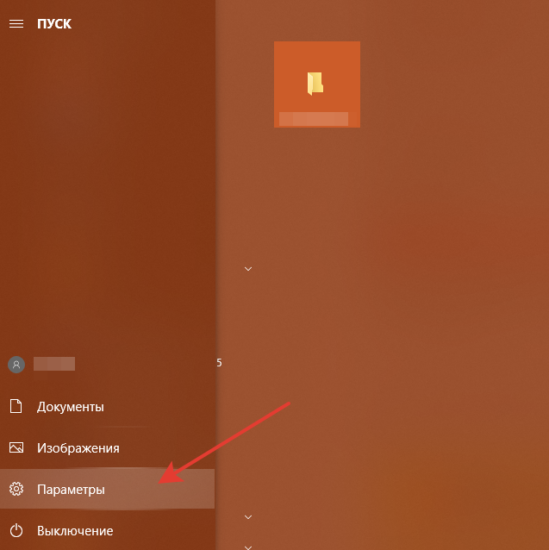
Нажимаем клавишу WIN (или Пуск) и выбираем раздел «Параметры»:
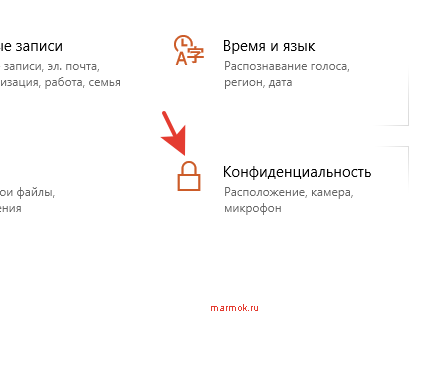
Идем во вкладку «Конфиденциальность» в списке:
и находим раздел «микрофон» с левой стороны. В данном разделе, прокрутив мышкой немного вниз, нам необходимо найти список приложений к которым разрешен доступ по умолчанию.
Выбираем нашу программу и кликаем на ползунок в состояние «Вкл«.
Ошибка 183
Данная неисправность возникает в процессе установке компонента Adobe XD.
Решение
Как рекомендует разработчик, следует полностью удалить все пакеты Microsoft Visual C++, либо компонент не может быть установлен по причине отсутствия доступа приложения.
Ошибка компиляции Adobe Premiere Pro
В процессе компиляции используется множество дополнительных компонентов, которые должны быть не только доступны но и обновлены. Важно поддерживать в актуальности все кодеки и средства визуализации для успешной компиляции.
Если небольшие рекомендации разработчиков для решения данной неисправности:
- Проверьте свободное место на жестком диске. Во время компиляции резервируется дополнительное физическое пространство в большом количестве. При недостатке скорее всего отобразится данная ошибка.
- Освободите ОЗУ. Для компиляции обычно требуется 1-2ГБ свободных, но при тяжелых проектах попробуйте очистить больше.
- Откройте программу с правами администратора. Некоторые функции (или драйвера) требуют дополнительных прав.
Ошибка запуска программы
Проблема с запуском возникает периодически у пользователей с ограниченным доступом в интернет или при использовании нелицензионных версий. Для начала следует проверить подключение к Adobe ID или прописанные пути в файле hosts.
Основная проблема обычно заключается в подключении к аккаунту. Попробуйте зайти в него через веб-версию. Если все получится, то логиньтесь через программу.
Ошибка средства импорта
Средства импорта могут быть недоступны и отображать ошибку в случае неверно установленных компонентов приложения. Попробуйте запустить Премьер с правами администратора или проверьте папку в которую импортёр подключается по умолчанию. Она должна быть создана и доступна для записи.
Ошибка 146 при установке
Установка может быть ограничена, если сервер откуда происходит скачивания репозитория недоступен или интернет-соединение пользователя было прервано.
Ошибка 146 указывает на недоступность считывания с Adobe. Вам необходимо перезагрузить компьютер или дождаться когда интернет будет более стабильным.
Технические проблемы с Adobe Premiere возникают чаще всего после установки или обновления программы. Самая популярная ошибка связана с компиляцией фильма при которой пользователь видит различные описания. На основе кода выдаваемым вместе с критическим сообщением, можно определить причину и способ исправления данной неисправности.
Внутренняя ошибка MME Premiere
Самая простая ошибка которая связана с блокировкой устройств и новой политикой операционной системы. Дословно она звучит так: «Не удалось применить настройки устройства, так как возникла следующая ошибка: Внутренняя ошибка устройства MME«.
Причина
Блокировка использования аудио или видеоустройства для сторонних приложений групповой политикой Windows 10. По стандарту нужно выдавать специальное разрешение на использование программой. Обычно она запрашивает его в процессе установки и если этого не произошло, выдает ошибку.
Решение
Нажимаем клавишу WIN (или Пуск) и выбираем раздел «Параметры»:

Идем во вкладку «Конфиденциальность» в списке:

и находим раздел «микрофон» с левой стороны. В данном разделе, прокрутив мышкой немного вниз, нам необходимо найти список приложений к которым разрешен доступ по умолчанию.
Выбираем нашу программу и кликаем на ползунок в состояние «Вкл«.
Ошибка 183
Данная неисправность возникает в процессе установке компонента Adobe XD.
Решение
Как рекомендует разработчик, следует полностью удалить все пакеты Microsoft Visual C++, либо компонент не может быть установлен по причине отсутствия доступа приложения.
В процессе компиляции используется множество дополнительных компонентов, которые должны быть не только доступны но и обновлены. Важно поддерживать в актуальности все кодеки и средства визуализации для успешной компиляции.
Если небольшие рекомендации разработчиков для решения данной неисправности:
Ошибка запуска программы
Проблема с запуском возникает периодически у пользователей с ограниченным доступом в интернет или при использовании нелицензионных версий. Для начала следует проверить подключение к Adobe ID или прописанные пути в файле hosts.
Основная проблема обычно заключается в подключении к аккаунту. Попробуйте зайти в него через веб-версию. Если все получится, то логиньтесь через программу.
Ошибка средства импорта
Средства импорта могут быть недоступны и отображать ошибку в случае неверно установленных компонентов приложения. Попробуйте запустить Премьер с правами администратора или проверьте папку в которую импортёр подключается по умолчанию. Она должна быть создана и доступна для записи.
Ошибка 146 при установке
Установка может быть ограничена, если сервер откуда происходит скачивания репозитория недоступен или интернет-соединение пользователя было прервано.
Ошибка 146 указывает на недоступность считывания с Adobe. Вам необходимо перезагрузить компьютер или дождаться когда интернет будет более стабильным.
Error Code 183 Adobe
Below are 46 working coupons for Error Code 183 Adobe from reliable websites that we have updated for users to get maximum savings. Take action now for maximum saving as these discount codes will not valid forever. You can always come back for Error Code 183 Adobe because we update all the latest coupons and special deals weekly. View more
Sep 23, 2020 · Pro Tip: Scan your PC for performance issues, junk files,
harmful apps, and security threats that can cause system issues or slow performance.
Sep 27, 2019 · For example, if I want to install Premiere Pro, the instal
Feb 01, 2021 · Error 183 is a fairly generic error that could mean a numb
er of different problems, from permissions to an aggressive virus checker to a setting on Windows that prevents installation. Which app are you trying to install or update? To fix error 183, follow the instructions for the app you were trying to install or update. Adobe XD on Windows
May 24, 2011 · One of the big causes of runtime 183 errors is through the
“registry” database of your computer. This is a large database which stores vital information & settings for your PC, and is used continually to help Windows to read the files, settings & options that it needs to run.
Sep 17, 2020 · Complete the following to uninstall Microsoft Visual C++ 2
010 Redistributable: Select Microsoft Visual C++ 2010 x64 Redistributable and click Next. Click Yes, try Uninstall. Click Close and run the downloaded file again. Select Microsoft Visual …
how to solve error 183 (Installation & updates)
These forums are now Read Only. If you have an Acrobat question, ask questio
ns and get help from the community.
Mar 22, 2020 · hello guys today we fix photoshop cc and all version 183 a
nd 184 problem so watch full tutorial and you face any problem dm me on insta insta = https://www.
We’ve found that although the 183 error may appear when you use such softwar
e as Adobe Acrobat, it’s got a cause deep within the core of the Windows system itself. In order to repair the problems that your computer might have, you have to be able to repair the following issues: The «Application Path Reference» may be incorrect inside the registry
Aug 16, 2020 · Like share & subscribe for more videoscomment down for fee
When you are trying to do the system update or updating your Windows PC driv
ers or access any folder on your Windows PC or even try to open the adobe player on your PC, then you must …
Jan 18, 2019 · In this video tutorial, I show you how you can convert aud
io files that have been sent to you for inclusion in your Adobe Captivate eLearning project but are in the wrong file format. The good news is that you already have this software installed on your computer. Paul Wilson. 1 comment. 4 likes.
Jul 31, 2017 · WARN: Program «C:Program Files (x86)AdobeAdobe SyncCor
eSynccustomhookCoreSyncCustomHook. exe» failed with exit code: 105 This one is unclear. No idea about what RunProgramCommand is trying to do.
Claim Adjustment Reason Codes | X12
The «PR» is a Claim Adjustment Group Code and the description for «32» is be
low. The Claim Adjustment Group Codes are internal to the X12 standard. These codes generally assign responsibility for the adjustment amounts. The format is always two alpha characters. For convenience, the values and definitions are below: CO. Contractual Obligation. CR.
error code 183 :: SNOW General Discussions
Feb 13, 2014 · Last System Error: Cannot create a file when that file al
ready exists. Windows Vista 32 bit SP 2 (build 6.0.6002) I have tried uninstalling and reinstalling as well as verifying game cache..
Official Adobe coupons, promos, special offers and discounts
Browse the official list of Adobe coupon codes, promos, special offers and d
iscounts on software. Shop and save on a variety of Adobe products. Special Offers. All Products; Make the Leap with Creative Cloud. Students and teachers, save over 60% on Adobe Creative Cloud. Get all the best apps including Photoshop, Illustrator, and over 20 more.
Harassment is any behavior intended to disturb or upset a person or group of
people. Threats include any threat of suicide, violence, or harm to another.
Oct 09, 2019 · After recent Windows 10 update, My Adobe PhotoShop wont wo
rk. Hello Everyone! This recent Windows 10 update has caused a ruckus w/ my Adobe programs now! : (. No longer can I make PhotoShop work correctly. First I kept getting the «Crash Report Window». Then I contacted Adobe and their Tech Support did a remote session that took …
Cx51 User’s Guide: Error C183 (*** Error C183.)
The object to be changed resides in code memory or has const attribute and t
herefore cannot be modified. Products Download Events Support Videos All Product Families ARM7, ARM9, and Cortex-M3 Products C16x, XC16x, and ST10 Products C251 …
Popular Adobe Discount Codes & Deals. Discount. Description. Expires. 20% OF
F. Enjoy up to 20% off Creative Cloud All Apps. 23 April. FREE APPS. Get the Adobe …
You are specifying a strongly-typed object client side object nameon the cli
ent using RemoteClass metadata and a strongly typed object server side object nameon the server using item-class. If you wish to have strongly typed objects on both client and server, you must specify RemoteClass(alias=’server. Object’) where ‘server. Object’ is the target item type on the server.
Instructions To Fix Windows Error Code 183
If you always apply patches manually, get the fix only from the Microsoft si
te to make sure that you are getting the right one. Let the installation for the hot-fix run and then reboot your Windows server. The issue should be resolved after the Server is back online. Take care when applying hot-fixes to your servers.
Solved: Acrobat Distiller error 183 | Experts Exchange
Oct 31, 2007 · Experts Exchange always has the answer, or at the least po
ints me in the correct direction! It is like having another employee that is extremely experienced.
Error: 183 – Cannot create a file when that file already exists. 1. Ensure
System Error Codes 1 to 15841 & What Each One Means
Sep 22, 2020 · Tim Fisher has 30+ years’ professional technology support
experience. He writes troubleshooting content and is the General Manager of Lifewire.
Adobe Creative Cloud Resubscribe
Students and teachers. You’re eligible for a big discount. Save over 65% o
n Creative Cloud. Just £16.24/mo. Buy Now.
Jul 18, 2019 · ERROR_BAD_ENVIRONMENT. 10 (0xA) The environment is incorre
ct. ERROR_BAD_FORMAT. 11 (0xB) An attempt was made to load a program with an incorrect format. ERROR_INVALID_ACCESS. 12 (0xC) The access code is invalid. ERROR_INVALID_DATA. 13 (0xD) The data is invalid. ERROR_OUTOFMEMORY. 14 (0xE) …
Offer’s Details: Follow this link to get Over 60% Off Teachers & Students Di
scount from Adobe. Limited time only! Terms: Available whilst stocks last. Discount applies to selected products. See website for more details. The merchant reserves the right to cut out any offer or deal without giving prior notice.
Jul 02, 2017 · Thanks for contributing an answer to Stack Overflow! Pleas
e be sure to answer the question. Provide details and share your research! But avoid …. Asking for help, clarification, or responding to other answers.
Free trial: Adobe discount codes April 2021 | Finder Canada
Sep 07, 2020 · Adobe discounts, promo codes, coupons and sales. Adobe. 60
% off Adobe Creative Cloud. Offer valid on students and teachers subscription. Get all the best apps such as Photoshop, Illustrator and over 20 more. Exclusions, T&Cs apply. Last verified 21 Aug 2020. Get deal. Adobe.
วิธีสมัครใช้งาน AWS (Amazon Web Services Cloud
Adobe Discount Hacks. Adobe offers a free trial of Creative Cloud for seven
days. Shop the Adobe Special Offers page to find current promotions and discounts. If you’re a student or a teacher, get Adobe products at a 60% or higher discount. Adobe offers 15% off of Creative Cloud for veterans; join Veterans Advantage to get this deal.
Adobe Discounts & Deals in 2021 | Last Chance to Save 60%
Adobe discounts to save up to 60% on Adobe softwares and apps. Install all t
he best Adobe softwares for realizing your craziest ideas out there. Don’t waste time and receive 25%, 39%, and 60% OFF on Adobe CC softwares.
Adobe Promo Codes: Coupons, Discounts 2021
et 15 Adobe promo codes and coupons for 2021 on RetailMeNot.
Error Code 182 Photoshop Cc 2019, Discount Adobe Creative Suite 6 Design Sta
May 12, 2021 · Adobe apps download and install errors. Grab Awesome Deals
at helpx. adobe. com Use this document to reference Adobe apps download, install, uninstall, and miscellaneous errors.
How to Fix Windows Error Code 182
In order to solve windows unknown error code 182, you need to use manual way
s or third party repair tool or RegCure Pro software.
Tips on How to Get Adobe Acrobat Student Discount
Dec 21, 2020 · Luckily, Adobe is offering a 60% discount which means you
Understanding quarantine management | Adobe Campaign
Adobe Campaign manages a list of quarantined addresses. Recipients whose add
Adobe Account
Manage your Adobe Account profile, password, security options, product and s
ervice subscriptions, privacy settings, and communication preferences.
Premiere Pro Error Code 2147287036
Premiere Pro Error Code 2147287036, Adobe Photoshop Cc Help, Cost Of MacItBe
tter BetterZip 4, How To Buy Adobe Edge Animate CC 2014
And Adobe recommends against using mixed versions of Acrobat. Uninstalll Rea
der and repair Acrobat and see if that fixes your problem. Acrobat and Reader share many files but they can be different for different versions so have mixed versions can easily result in the wrong code being run to perform a given task.
Adobe Creative Cloud
Adobe Creative Cloud krever JavaScript for å kunne lastes inn på riktig m�
�te. Aktiver JavaScript i nettleseren, og last inn siden på nytt. Skripty JavaScript jsou zakázány. Služba Adobe Creative Cloud ke správném načtení vyžaduje zapnuté skripty JavaScript. Zapněte ve svém prohlížeči skripty JavaScript a stránku znovu načtěte.
Jan 30, 2018 · Auto-suggest helps you quickly narrow down your search res
ults by suggesting possible matches as you type.
Listed above you’ll find some of the best adobe after effects coupons, disco
unts and promotion codes as ranked by the users of RetailMeNot. com. To use a coupon simply click the coupon code then enter the code during the store’s checkout process.
Please Rate Here
? Average Discount: $20
? Amount Of Coupons: 46
? Highest Discount: 60% off
Filter Search
Coupon Type
Other Good Coupons
What is Adobe Acrobat error 183?
Why do I get error 183 when installing Adobe XD?
If you received error 183 while trying to install Adobe XD on Windows, see Error code 183 when installing Adobe XD on Windows. If you received error 183 while trying to install Adobe Dreamweaver on Windows, see Fix error code 183 when installing Dreamweaver. Disable your antivirus program (such as Cylance Antivirus) temporarily.
What to do when file code 183 occurs?
What you can do when File code 183 occurs. Microsoft has recognized this error as a problem and has released an official hot-fix to resolve the error. This is not a computer error that you will simply be able to solve by changing a few settings on your Windows server. You will need to go to the Microsoft support website and locate.
Why do I get error 183 when installing Adobe Dreamweaver?
If you received error 183 while trying to install Adobe Dreamweaver on Windows, see Fix error code 183 when installing Dreamweaver. Disable your antivirus program (such as Cylance Antivirus) temporarily. See your antivirus documentation for instructions. Try your install again. If this doesn’t fix the issue, go to step 3.
Top Stores
Tips Not To Miss Any Coupons 24/7
1. Email subscription
To receive coupons and discounts notification, sign up for email list of the retailer.
Check out Facebook, Twitter, Instagram page for upcoming sales and coupon promotions.
You have free access to different coupon sites like isCoupon to search for active discounts.
 Full advantages of Amazon Discount Hunter.
The tool filters out the lowest price and the highest discounts available, making purchase decisions easier than ever.
2. Customized search
Type in search bar whatever product you look for and the tool will show you the best deals
Not much time wasted for the results. You are just a few clicks away from accurate options for your saving.
Источники:
https://marmok. ru/pc/oshibki-adobe-premiere-i-reshenie-problem/
https://iscoupon. com/error-code-183-adobe
I have the same error and have tried to fix it with the guide on link you posted, but it doesn’t work. I have a brand new Macbook Pro M1 and I cant find the error files, so I can’t delete them.
This is my error log:
Exit Code: 183
-------------------------------------- Summary --------------------------------------
 - 2 fatal error(s), 1 error(s), 3 warnings(s)

FATAL: Error (Code = 183) executing in command 'RunProgramCommand' for package: 'AdobeAfterEffects22AllTrial', version:22.5.0.53
FATAL: Error occurred in install of package (Name: AdobeAfterEffects22AllTrial Version: 22.5.0.53). Error code: '183'
ERROR: launchedTaskWithLaunchPath. Exception while fetching terminationStatus
WARN: Attempt to register application "/Applications/Adobe After Effects 2022/Plug-ins/Format/ProImport/Pro Import AE.plugin/Contents/Resources/Automatic Duck.app" failed
WARN: Warning (Code = 186) executing in command 'RegisterApplication' for package: 'AdobeAfterEffects22AllTrial', version:22.5.0.53
WARN: Unable to run program "/Library/Application Support/Adobe/Keyfiles/AfterEffects/22/CustomHooks/dvaPlistGen2016"
-------------------------------------------------------------------------------------
I can’t find neither
"/Applications/Adobe After Effects 2022/Plug-ins/Format/ProImport/Pro Import AE.plugin/Contents/Resources/Automatic Duck.app"
or
"/Library/Application Support/Adobe/Keyfiles/AfterEffects/22/CustomHooks/dvaPlistGen2016"
on my computer.
There shouldn’t be an antivirus, it’s a brand new MacBook and has downloading Adobe apps was the first and only thing it has done so far,
I have the same problem with downloading Premiere Pro, but Photoshop, Lightroom Classic, Audition etc. works fine.
Thing is, the apps seem to install and I can work from them, but I can’t render anything from After Effects, because Media Encoder can’t find After Effects as installed.
I have the same error and have tried to fix it with the guide on link you posted, but it doesn’t work. I have a brand new Macbook Pro M1 and I cant find the error files, so I can’t delete them.
This is my error log:
Exit Code: 183
-------------------------------------- Summary --------------------------------------
 - 2 fatal error(s), 1 error(s), 3 warnings(s)

FATAL: Error (Code = 183) executing in command 'RunProgramCommand' for package: 'AdobeAfterEffects22AllTrial', version:22.5.0.53
FATAL: Error occurred in install of package (Name: AdobeAfterEffects22AllTrial Version: 22.5.0.53). Error code: '183'
ERROR: launchedTaskWithLaunchPath. Exception while fetching terminationStatus
WARN: Attempt to register application "/Applications/Adobe After Effects 2022/Plug-ins/Format/ProImport/Pro Import AE.plugin/Contents/Resources/Automatic Duck.app" failed
WARN: Warning (Code = 186) executing in command 'RegisterApplication' for package: 'AdobeAfterEffects22AllTrial', version:22.5.0.53
WARN: Unable to run program "/Library/Application Support/Adobe/Keyfiles/AfterEffects/22/CustomHooks/dvaPlistGen2016"
-------------------------------------------------------------------------------------
I can’t find neither
"/Applications/Adobe After Effects 2022/Plug-ins/Format/ProImport/Pro Import AE.plugin/Contents/Resources/Automatic Duck.app"
or
"/Library/Application Support/Adobe/Keyfiles/AfterEffects/22/CustomHooks/dvaPlistGen2016"
on my computer.
There shouldn’t be an antivirus, it’s a brand new MacBook and has downloading Adobe apps was the first and only thing it has done so far,
I have the same problem with downloading Premiere Pro, but Photoshop, Lightroom Classic, Audition etc. works fine.
Thing is, the apps seem to install and I can work from them, but I can’t render anything from After Effects, because Media Encoder can’t find After Effects as installed.