Whenever SAP comes across an issue that causes it to stop processing it generates an ABAP Runtime Error. A basic example of this would be a divide by zero but there and many such errors defined in SAP such as DBIF_RSQL_INVALID_REQUEST Invalid Request.
The runtime error would be presented immediately if executing a dialog process but can be recovered any time using transaction ST22. All runtime errors that happen during a background or RFC process are also available via tcode ST22.
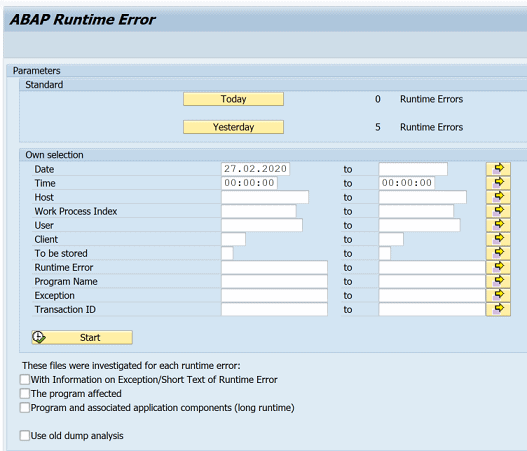
The runtime error contains all the details about the type of error as well as the contents of the program variables at the point of the error. for example here is an example of the description you might see for DBIF_RSQL_INVALID_REQUEST.
What Happened? The current ABAP/4 program terminated due to an internal error in the database interface. What can you do? Make a note of the actions and input which caused the error. To resolve the problem contact your system administrator. You can use transaction ST22 (ABAP dump analysis) to view and administer termination messages, especially those beyond their normal deletion date. Error analysis.
In a statement, an invalid request was made to the database interface when accessing the table “EKKO”.
SAP Runtime error transactions and ABAP programs
ST22 –ABAP runtime error
RSLISTDUMPS – List All Runtime Errors and short description
RSSHOWRABAX – Program associated with ST22
SAP Runtime error tables
SNAP – ABAP/4 Snapshot for Runtime Errors (ST22 list)
SNAPTID – ABAP Runtime Errors – Uses SNAPT as a text table so Includes first text line(TLINE)
SNAPT – ABAP Runtime Error Texts
SNAPTTREX – Exception table for translation
Runtime Error categories (SNAPTID-CATEGORY)
Field: SNAPTID-CATEGORY
Domain: S380CATEGORY
- I Internal Error
- R Error at ABAP Runtime
- Y Error at Screen Runtime
- D Error in Database Interface
- A ABAP Programming Error
- F Installation Errors
- O Resource Shortage
- E External Error
- U End User Error
- K No Error
- S ST Runtime Error
- J Internal ST Error
- X XSLT Runtime Error& Text Include (no Short Dump, only Text Module)
- & Text Include (no Short Dump, only Text Module)
- B ITS Error
- Q Error in Open SQL
- – Unclassified Error
Most common SAP runtime errors
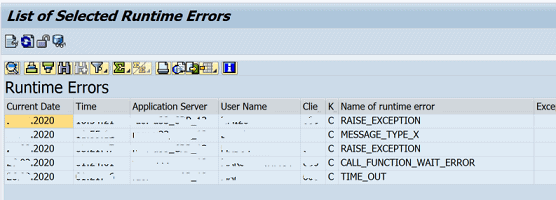
Below is a list of some of the more common runtime errors including a link to full details of the error and what causes it.
DBIF_RSQL_INVALID_REQUEST
MESSAGE_TYPE_X
TIME_OUT
OPEN_DATASET_NO_AUTHORITY
CONVT_NO_NUMBER
GETWA_NOT_ASSIGNED
TSV_TNEW_PAGE_ALLOC_FAILED
LOAD_PROGRAM_CLASS_MISMATCH
LOAD_PROGRAM_INTF_MISMATCH

When a report or module dumps, the reason is mostly quite obvious. Some runtime errors are «catchable», but when not caught they will stop your report. If you are the user causing the dump, there is a «Debug» button available to you to start the debugger.
This is «Post mortum» debugging — where you know the patient has already died — but having a look around in the debugger can be very useful. Catchable runtime errors are handled with CATCH SYSTEM-EXCEPTIONS using the name of the runtime error. Here’s a list of runtime errors with a brief explanation of what to look out for.
To detect semantically related runtime errors using a common name, they are combined into exception groups. You can handle catchable runtime errors in an ABAP program using the following control statements:
CATCH SYSTEM-EXCEPTIONS exc1 = rc1 ... excn = rcn.
  ...
ENDCATCH.
The expressions exc1 … excn indicate either a catchable runtime error or the name of an exception class. The expressions rc1 … rcn are numeric literals. If one of the specified runtime errors occurs between CATCH and ENDCATCH, the program does not terminate. Instead, the program jumps straight to the ENDCATCH statement. After ENDCATCH, the numeric literal rc1 … rcn that you assigned to the runtime error is contained in the return code field SY-SUBRC. The contents of any fields that occur in the statement in which the error occurred cannot be guaranteed after ENDCATCH.
If you don’t know which exception class to catch, you can use OTHERSto catch all possible catchable runtime errors. Do beware: not all runtime errors are catchable !
CATCH SYSTEM-EXCEPTIONS others = 4.
  ...
ENDCATCH.
Catching the error that would cause a dump — TRY — ENDTRY
One example problem that can not be caught with CATCH SYSTEM-EXCEPTIONSis the example below:
APPEND 'MSGNR = 123' TO options.
APPEND 'ORX' TO options.  "<== ERROR HERE
APPEND 'MSGNR = 124' TO options.
* Dump: SAPSQL_WHERE_PARENTHESES
*       CX_SY_DYNAMIC_OSQL_SYNTAX

CATCH SYSTEM-EXCEPTIONS others = 4.
  SELECT * FROM t100
    UP TO 1 ROWS
    WHERE (options).
  ENDSELECT.
ENDCATCH.
The solution for this is the TRY - ENDTRY block, which is a much more precise version of the CATCH SYSTEM-ERRORS. The above example solved:
TRY.
    SELECT * FROM t100
      UP TO 1 ROWS
      WHERE (options).
    ENDSELECT.
  CATCH cx_sy_dynamic_osql_error.
    MESSAGE `Wrong WHERE condition!` TYPE 'I'.
ENDTRY.
The exceptions hierarchy
So which exceptions are available ? And which ones can be caught with CATCH ? Note that exceptions live in exception classes, which adhere to the naming convention CL_CX_*. There’s many examples available through transaction SE24 class builder. Also note that there is a class-hierarchy on the exceptions. The top op the hierarchy is class CX_DYNAMIC_CHECK, below is you could finr e.g. CX_SY_CONVERSION_ERROR and below that the CX_SY_CONVERSION_NO_NUMBER can be found. If you want to specifically catch a number conversion error, the ...NO_NUMBER exception is your candidate of choice. It it’s all possible conversion errors you are interested in catching, the .._ERROR candidate is better, and so on. This example doesn’t care what exception is caught — as long as it is caught:
DATA: lv_char TYPE c LENGTH 50,
      lv_num TYPE n LENGTH 6,
      lo_error_ref TYPE REF TO cx_dynamic_check.

TRY.
    lv_num = 123.
    lv_char = 'Test'.

    lv_num = lv_char. "<= No dump (lv_num = 000000)

    IF lv_num = lv_char. "<= DUMP! - uncatchable !!
    ENDIF.

  CATCH cx_dynamic_check INTO lo_error_ref.
    MESSAGE `Conversion error` TYPE 'I'. "<= Catches nothing...
ENDTRY.
Normally the dump that is produced when a conversion error happened will also state the exception that should/could be used to CATCH it. However, there is an exception — so I found. The IF statement above produces a dump, which can not be caught.
The solution for this is a bit of leg-work. With DESCRIBE FIELD ... TYPE ... the type of the field can be determined. If it is N, the lv_CHAR variable better only contains numbers.
So SAP — why is the conversion done in an IF statement not catchable ?
-
31 Oct 2013 5:57 am Rohit Mahajan
Run transaction ST22 to get the details of the error, and find the one for your particular run.
It will show the program line where the error occurred.
Find ‘pernr’ to get the employee’s pers.no.
Then determine the cause of error
as below:
a)In transaction SE38 display the program as above. Go to the line where the error occurred,
b)Set break point just before the line or at the line.
c)Re-run the payroll for the employee.
d)When the program stops at the breakpoint, check all the relevant data.
e)Where required, execute one line at a time, so that you can understand what is happening.Then you should be able to find the reason for the error.
If the problem is in a custom ABAP function, then consult the programmer.
If the problem is in a SAP program object,
1)find OSS notes relevant to the problem.
2)If there are any, apply the notes in the dev.system, import the employee’s data to the dev test client. Repeat the payroll as above and check if the problem is fixed.
3)If not found, report the error to SAP with an OSS message and all relevant details of data used, transaction, which pay period, expected results, etc.; follow up with SAP for a resolution
 19.09.2010
 778986
Ошибку runtime error могут вызвать множество причин и одна из самых распространенных — это установка новых версий программ поверх уже установленных, что приводит к появлению ошибок в системном реестре. Другая распространенная причина — связана с деятельностью различных вирусов, троянов и рекламных шпионов, которые проникают на ваш компьютер и могут удалить, либо модифицировать критически важные файлы вашей операционной системы.
Ошибку runtime error достаточно легко исправить. В 99% случаев, любой чистильщик реестра поможет восстановить удаленные файлы, либо исправить поврежденные. Чистильщики реестра специально разработаны для исправления большинства ошибок, связанных с runtime error, в том числе и runtime error 91, runtime error 13 и многих других, т.к. они проверяют целостность файловой системы.
Скачайте и установите себе программу для чистки реестра, например, CCleaner. Проведите полное сканирование вашего компьютера и найдите причины, которые вызывают ошибку runtime error. В зависимости от количества файлов на вашем компьютере, сканирование может занять время от нескольких минут до получаса. Приятным дополнением будет то, что чистильщик реестра не только исправит ошибки вида runtime error, но и увеличит производительность вашего компьютера.
P.S.1. Еще советы по устранению ошибки runtime error вы можете найти здесь.
P.S.2. Если у вас ошибка: «This application has requested the runtime to terminate it in an unusual way. Please contact the application’s support team for more information», то вам сюда.
Dear Gurus,
Our user often got this message when running customized ABAP program:
ABAP runtime errors RAISE_EXCEPTION
A RAISE statement in the program «»SAPLOLEA «» raised the exception
condition «»CNTL_ERROR»».
Since the exception was not intercepted by a superior program
in the hierarchy, processing was terminated.
Can you please give me a simple solution?
Best of luck,
Pras
Read these next…

WINDOWS 10 «glitch» — file explorer
Windows
Hi.I have been experiencing a black line (glitch) on my file explorer which comes for milliseconds then it goes away. See screen grab. Is there anyone who has experienced such and how were they able to solve it?Thank you.

Are you updating workstations to Windows 11?
Windows
Has anyone started updating workstations on a AD domain to Windows 11? what type of issues are you facing?What is the user reaction been?Thanks!

Snap! — Psyche Probe, DIY Gene Editing, RaiBo, AI handwriting, Metric Pirates
Spiceworks Originals
Your daily dose of tech news, in brief.
Welcome to the Snap!
Flashback: January 27, 1880: Thomas Edison receives patent for the Electric Lamp. (Read more HERE.)
Bonus Flashback: January 27, 1967: Apollo 1 Tragedy (Read more HERE.)
You …

NEC Inmail Email doesn’t Change
Collaboration
Hey Everyone,Recently a client of mine wanted to change the email to their QA extension to her email as to help keep voicemails consolidated instead of spread out among different emails. Normally this wouldn’t be a huge deal. Logged in to to Webpro, hoppe…

I inherited some really cool equipment. I just have no clue how to use it!
Hardware
So I’ve got some switches, and some servers. The switches seem pretty straight forward, plug in packet go zoom, but I have no clue how these servers work. They’re headless rack servers. I know there must be a way to get some kind of UI going with a monito…