Все современные копировальные аппараты, мфу и принтеры Kyocera имеют возможность диагностировать все узлы устройства в режиме запуска и во время работы аппарата. По этому, если во время включения или во время работы произошел сбой, то техника Kyocera сможет сообщить о наличии ошибки.
В большинстве случаев у аппаратов Kyocera код ошибки отображается на дисплее, в остальных случаях тип ошибки зависит от последовательности и количества миганий индикаторов.
Если Ваш копировальный аппарат, МФУ или принтер Kyocera выдал на дисплее некий код, то узнать причину, описание возникновения ошибки, а так же в каком узле аппарата стоит искать проблему, Вы можете в этом разделе выбрав интересующую модель из списка.
Но диагностика не решит проблему сбоя аппарата, для этого лучше обратиться к профессиональным и опытным сервисным специалистам компании Kyomart! Позвоните нам по телефону
8 (343) 288-23-45 или отправьте запрос на электронную почту: sales@kyomart.ru , и мы обязательно свяжемся с Вами в кратчайшие сроки.
Processing with the fax software was disabled due to a hardware problem.
Abnormal detection of FAX control PWB incompatibility In the initial communication with the FAX control PWB, any normal communication command is not transmitted.
Defective FAX control PWB.
For data in which the MAC address is invalid.
Defective flash memory.
Defective engine PWB.
Defective main PWB.
Defective main PWB.
Detecting engine PWB EEPROM communication error.
Defective engine PWB.
Device damage of EEPROM.
Defective engine PWB.
A checksum error is detected in the main and engine backup memories for the billing counters.
Defective PWB.
Machine number of main and engine does not match.
A communication error is detected 10 times in succession.
JAM05 is detected twice.
A checksum error occurred with the program of the FAX control PWB.
Defective FAX control PWB.
The time is judged to go back based on the comparison of the RTC time and the current time or five years or more have passed.
Defective main PWB.
High-capacity data transfer between the FAX control PWB and the main PWB of the machine was not normally performed even if the data transfer was retried the specified times.
Defective FAX control PWB or main PWB.
The backup data is not retained for file system abnormality of flash memory of the FAX control PWB.
After cassette 1 is inserted, lift sensor does not turn on within 12 s. This error is detected four times successively.
Defective connector cable or poor contact in the connector.
Defective drive transmission system of the lift motor.
Defective lift motor.
Defective engine PWB.
After cassette 2 is inserted, PF lift sensor 1 does not turn on within 12 s. This error is detected four times successively.
Defective connector cable or poor contact in the connector.
Defective drive transmission system of the PF lift motor 1.
Defective PF lift motor 1.
Defective PF main PWB.
After cassette 3 is inserted, PF lift sensor 2 does not turn on within 12 s. This error is detected four times successively.
Defective connector cable or poor contact in the connector.
Defective drive transmission system of the PF lift motor 2.
Defective PF lift motor 2.
Defective PF main PWB.
A communication error is detected 10 times in succession.
Defective connector cable or poor contact in the connector.
Defective engine PWB.
Defective PF main PWB.
When writing the data, the write data and the read data is not continuously in agreement 5 times.
Device damage of EEPROM.
Stable OFF is detected for 1 s continuously after main motor stabilized.
Defective drive transmission system of the main motor.
Defective main motor.
Defective engine PWB.
The main motor is not stabilized within 2 s after driving starts.
Defective drive transmission system of the main motor.
Defective main motor.
Defective engine PWB.
The rated speed signal detected the stability OFF continuously for 1 s after the developer motor K stabilizes.
Defective drive transmission system.
Defective motor.
Defective PWB.
The rated speed signal detected the stability OFF continuously for 1 s after the developer motor YCM stabilizes.
Defective drive transmission system.
Defective motor.
Defective PWB.
Developer motor K is not stabilized within 2 s since the motor is activated.
Defective drive transmission system.
Defective motor.
Defective PWB.
Developer motor YCM is not stabilized within 2 s since the motor is activated.
Defective drive transmission system.
Defective motor.
Defective PWB.
The rated speed signal detected the stability OFF continuously for 1 s after the fuser motor stabilizes.
Defective drive transmission system.
Defective motor.
Defective PWB.
Fuser motor is not stabilized within 2 s since the motor is activated.
Defective drive transmission system.
Defective motor.
Defective PWB.
The rated speed signal detected the stability OFF continuously for 1 s after the conveying motor stabilizes.
Defective drive transmission system.
Defective motor.
Defective PWB.
Conveying motor is not stabilized within 2 s since the motor is activated.
Defective drive transmission system.
Defective motor.
Defective PWB.
When the PF drive motor is driven, error signal is detected continuously for 1 s.
Defective drive transmission system of the PF drive motor.
Defective PF drive motor.
Defective PF main PWB.
When the TC belt motor is driven, error signal is detected continuously for 1 s.
Defective drive transmission system of the PF drive motor.
Defective PF drive motor.
Defective PF main PWB.
The home position is not correct when the power is turned on or at the start of copying using the table.
Defective home position sensor.
Defective ISU motor.
Defective CCD PWB.
Defective engine PWB.
When input value at the time of exposure lamp illumination does not exceed the threshold value between 5 s.
Defective exposure lamp.
Defective CCD PWB.
Defective main PWB.
An error code is detected 3 times in succession.
Defective CCD PWB.
Defective main PWB.
The polygon motor is not stabilized within 10 s after driving starts.
Defective polygon motor.
Defective engine PWB.
The rated speed signal detected the stability OFF continuously for 1 s after the polygon motor (K) stabilizes.
Defective motor
Defective PWB.
The rated speed signal detected the stability OFF continuously for 1 s after the polygon motor (С) stabilizes.
Defective motor
Defective PWB.
The rated speed signal detected the stability OFF continuously for 1 s after the polygon motor (M) stabilizes.
Defective motor
Defective PWB.
The rated speed signal detected the stability OFF continuously for 1 s after the polygon motor (Y) stabilizes.
Defective motor
Defective PWB.
Stable OFF is detected for 1 s continuously after polygon motor stabilized.
Defective polygon motor.
Defective engine PWB.
Polygon motor (K) is not stabilized within 10 s since the motor is activated.
Defective motor.
Defective PWB.
Polygon motor (C) is not stabilized within 10 s since the motor is activated.
Defective motor.
Defective PWB.
Polygon motor (M) is not stabilized within 10 s since the motor is activated.
Defective motor.
Defective PWB.
Polygon motor (Y) is not stabilized within 10 s since the motor is activated.
Defective motor.
Defective PWB.
BD is not detected within 1 s after polygon motor stabilized.
Defective APC PWB.
Defective BD PWB.
Defective main PWB.
When the LSU cleaning motor is driven, an error signal is detected continuously for 1 s.
Defective drive transmission system.
Defective motor. Defective PWB.
Defective main PWB or engine PWB.
A communication error is detected 10 times in succession.
Defective PWB.
The detected temperature of fuser thermistor does not reach the specified temperature (ready indication temperature) after the fuser heater has been turned on continuously for 60 s in warming up. The fusing temperature at 7 seconds and 20 seconds since fuser temperature control has occurred differs by 43°C/109.4°F or less.
Deformed connector pin.
Defective triac.
Fuser thermostat triggered.
Broken fuser heater wire.
Defective engine PWB.
6020
6030
6050
Abnormally high fuser thermistor temperature Broken fuser thermistor wire Abnormally low fuser thermistor temperature
Defective triac.
The fuser thermistor detects a temperature higher than 230°C/446°F continuously for 40 ms. High fuser temperature signal detects a temperature of 255°C/491°F continuously for 40 ms.
Defective triac.
Shorted fuser thermistor.
Defective engine PWB.
A/D value of the fuser thermistor exceeds 251 bit continuously for 7 s during warming up.
Deformed connector pin.
Defective triac.
Defective fuser thermistor.
Defective engine PWB
As the stable temperature has reached the second time, the decrease in the fuser thermistor temperature of 60°C/140°F or greater is detected for one second.
Defective triac.
Defective fuser thermistor
Defective fuser heater.
Defective engine PWB.
The fuser temperature exceeds 200 °C/392 °F for 1 s.
Defective IH PWB.
Defective fuser thermistor.
Defective engine PWB.
Deformed connector pin.
Defective IH PWB.
Defective fuser thermistor.
Defective engine PWB.
The fuser temperature lower than 30 °C/86 °F is detected continuously for 1 s.
Defective fuser thermistor
Defective fuser heater.
Defective engine PWB.
Fuser thermistor 1 does not reach 50° C/122 °F even after20 s during warming up. The detected temperature of fuser thermistor1 does not reach the specified temperature (ready indication temperature) for 20 s in warming up after reaching 50° C/122 °F.
Deformed connector pin.
Fuser thermostat triggered.
Broken fuser heater wire.
Defective engine PWB.
The fuser temperature exceeds 240 °C/464 °F for 1 s
Deformed connector pin.
Fuser thermostat triggered.
Broken fuser heater wire.
Defective engine PWB.
During warming up a hearter, fuser thermistor 2 detects a temperature of 100 °C/212 °F or higher and, fuser thermistor 1 detects a temperature of 37 °C/99 °F or lower.
Deformed connector pin.
Fuser thermostat triggered.
Broken fuser heater wire.
Defective engine PWB.
The fuser temperature lower than 100 °C/212 °F is detected continuously for 1 s during printing. The fuser temperature lower than 50 °C/122 °F is detected continuously for 1 s during pre-heating.
Deformed connector pin.
Fuser thermostat triggered.
Broken fuser heater wire.
Defective engine PWB.
While fuser heater control is performed, the zero-cross signal is not input within 3 s.
Defective power source PWB or engine PWB.
Absence of the fuser unit is detected.
Different type of the fuser unit is installed.
The belt was detected to stop for 1 s continuously during motor remote is on.
Defective IH belt.
Defective IH PWB.
Defective engine PWB.
Defective PWB.
Defective PWB.
Defective PWB.
Defective PWB.
Absence of the developing unit K is detected.
Different type of the developing unit is installed.
Defective PWB.
Absence of the developing unit C is detected.
Different type of the developing unit is installed.
Defective PWB.
Absence of the developing unit M is detected.
Different type of the developing unit is installed.
Defective PWB.
Absence of the developing unit Y is detected.
Different type of the developing unit is installed.
Defective PWB.
Absence of the drum unit K is detected.
Different type of the drum unit is installed.
Defective PWB.
Absence of the drum unit C is detected.
Different type of the drum unit is installed.
Defective PWB.
Absence of the drum unit M is detected.
Different type of the drum unit is installed.
Defective PWB.
Absence of the drum unit Y is detected.
Different type of the drum unit is installed.
Defective PWB.
Absence of the transfer belt unit is detected.
Different type of the transfer belt unit is installed.
Defective PWB.
Defective PWB.
Defective PWB.
When ID sensor 2 detected CTD is 500 or less.
Defective PWB.
When ID sensor 2 detected CTD is 500 or less.
Defective PWB.
When ID sensor 2 detected CTD is 500 or less.
Defective PWB.
When ID sensor 2 detected CTD is 500 or less.
Defective PWB.
Color registration correction was failed.
Defective PWB.
The thermistor output value is 0.3 V or less.
Defective temperature sensor.
The thermistor output value is 3 V or more.
Defective temperature sensor.
No response is issued from the device in reading/writing for 5 ms or more and this problem is repeated five times successively. Mismatch of reading data from two locations occurs eight times successively. Mismatch between writing data and reading data occurs eight times successively.
Defective drum unit.
No response is issued from the device in reading/writing for 5 ms or more and this problem is repeated five times successively. Mismatch of reading data from two locations occurs eight times successively. Mismatch between writing data and reading data occurs eight times successively.
Defective drum unit.
No response is issued from the device in reading/writing for 5 ms or more and this problem is repeated five times successively. Mismatch of reading data from two locations occurs eight times successively. Mismatch between writing data and reading data occurs eight times successively.
Defective drum unit.
No response is issued from the device in reading/writing for 5 ms or more and this problem is repeated five times successively. Mismatch of reading data from two locations occurs eight times successively. Mismatch between writing data and reading data occurs eight times successively.
Defective drum unit.
No response is issued from the device in reading/writing for 5 ms or more and this problem is repeated five times successively. Mismatch of reading data from two locations occurs eight times successively. Mismatch between writing data and reading data occurs eight times successively.
Defective drum unit.
No response is issued from the device in reading/writing for 5 ms or more and this problem is repeated five times successively. Mismatch of reading data from two locations occurs eight times successively. Mismatch between writing data and reading data occurs eight times successively.
Defective developer unit.
No response is issued from the device in reading/writing for 5 ms or more and this problem is repeated five times successively. Mismatch of reading data from two locations occurs eight times successively. Mismatch between writing data and reading data occurs eight times successively.
Defective developing PWB.
No response is issued from the device in reading/writing for 5 ms or more and this problem is repeated five times successively. Mismatch of reading data from two locations occurs eight times successively. Mismatch between writing data and reading data occurs eight times successively.
Defective developing PWB.
No response is issued from the device in reading/writing for 5 ms or more and this problem is repeated five times successively. Mismatch of reading data from two locations occurs eight times successively. Mismatch between writing data and reading data occurs eight times successively.
Defective developing PWB.
No response is issued from the device in reading/writing for 5 ms or more and this problem is repeated five times successively. Mismatch of reading data from two locations occurs eight times successively. Mismatch between writing data and reading data occurs eight times successively.
Defective developing PWB.
When the tray elevation motor raises a tray, the ON status of the tray upper limit sensor is detected.
Defective tray upper limit sensor, paper surface sensor 1/2.
Defective DF main PWB.
The belt sensor does not turn on/off within specified time of the belt solenoid turning on.
Defective belt sensor.
Defective belt solenoid.
Defective DF main PWB.
The tray low limit sensor or paper surface sensor 1/2 cannot be detected to be on within 10 s since the tray elevation motor is activated.
Defective connector cable or poor contact in the connector.
The tray elevation motor malfunctions.
Defective tray lower limit sensor, paper surface sensor 1/2.
Defective DF main PWB.
Jam 7012 or 7023 is indicated.
The stapler is blocked with a staple.
The stapler is broken
Defective DF main PWB.
The adjustment sensor 2 does not turn on/off within specified time of the adjustment motor 2 turning on.
Defective adjustment sensor 2.
Defective adjustment motor 2.
Defective DF main PWB.
The adjustment sensor 1 does not turn on/off within specified time of the adjustment motor 1 turning on.
Defective adjustment sensor 1.
Defective adjustment motor 1.
The roller sensor does not turn on/off within specified time of the roller motor turning on.
Defective connector cable or poor contact in the connector.
Defective roller sensor.
Defective roller motor.
Defective DF main PWB.
The slide sensor does not turn on/off within specified time of the slide motor turning on.
Defective slide sensor.
Defective slide motor.
Defective DF main PWB.
Reading from or writing to EEPROM cannot be performed.
A communication error is detected 10 times in succession.
Defective DF main PWB.
Defective engine PWB.
A communication error is detected 10 times in succession.
Defective bridge PWB.
Defective engine PWB.
Defective DF main PWB.
Defective bridge PWB.
A communication error is detected 10 times in succession.
Defective DP main PWB.
Device damage of EEPROM.
Defective operation panel PWB.
Defective engine PWB.
Kyocera Taskalfa 3050ci ошибка с7102
после не оригинального тонера пришлось чистить блок проявки.
теперь при запуске выдает ошибку С7102.
что за ошибка? может она быть с отсутствием тонера внутри блока проявки?
- alex-r1
- новичок
- Сообщения: 6
- Зарегистрирован: 02:11 — 13.11.17
- Баллы репутации: 0

Re: Kyocera Taskalfa 3050ci ошибка с7102
 pokyocere » 02:04 — 14.11.17
Я так понимаю, вы полностью очистили блок проявки ?
Если это так, то датчик у вас 100% рабочий, ведь аппарат вам выдал С 7102.
Если вы не готовы потрать на мфу 120 000 р., то тему можно закрывать.
- pokyocere
- новичок
- Сообщения: 43
- Зарегистрирован: 00:45 — 30.08.15
- Баллы репутации: 0
Re: Kyocera Taskalfa 3050ci ошибка с7102
alex-r1 » 02:18 — 14.11.17
Если вы не готовы потрать на мфу 120 000 р., то тему можно закрывать.
хороший совет 
то есть заменить developerunit вместе с его :%;:;ми датчиками 20 000 не вариант?
- alex-r1
- новичок
- Сообщения: 6
- Зарегистрирован: 02:11 — 13.11.17
- Баллы репутации: 0
Re: Kyocera Taskalfa 3050ci ошибка с7102
Mishel01 » 14:32 — 14.11.17
Весело у вас тут))
Нет, за 20 тыс — не вариант: вы знаете места, где НОВЫЕ 8305тые проявки лежат дешевле чем за 28-29 тыс?
Датчик, в этой ситуации, скорее всего 100% НЕрабочий — потому и выдает ошибки С71хх.
Про 120 тыс — спасибо, посмеялся от души))
- Mishel01
- эксперт
- Сообщения: 8413
- Зарегистрирован: 01:10 — 10.01.11
- Баллы репутации: 1

Re: Kyocera Taskalfa 3050ci ошибка с7102
mark.76 » 14:33 — 14.11.17
alex-r1 писал(а):после не оригинального тонера пришлось чистить блок проявки.
теперь при запуске выдает ошибку С7102.
что за ошибка? может она быть с отсутствием тонера внутри блока проявки?
1 Если вычистили блок проявки — носитель чистый засыпали?
2 Да именно отсуотствием тонера в блоке проявки и вызвана — Чтобы намешался тонер и аппарат не выпадал в ошибку можно похлопать крышками пока не выйдет на готовность. (для ускорения процесса можно подсыпать тонера прямо в блок, но немного и всё равно похлопать )
www.veneta.ru
- mark.76
- ученик
- Сообщения: 129
- Зарегистрирован: 14:41 — 07.06.07
- Баллы репутации: 0
Re: Kyocera Taskalfa 3050ci ошибка с7102
Mishel01 » 15:35 — 14.11.17
Носителя он туда НИКАКОГО не сыпал))
Тонер-то в проявке явно есть, только скушно ему там: не носят его..)) А из состояния ошибки он не будет подмешивать, насколько помню.
- Mishel01
- эксперт
- Сообщения: 8413
- Зарегистрирован: 01:10 — 10.01.11
- Баллы репутации: 1
Re: Kyocera Taskalfa 3050ci ошибка с7102
pokyocere » 22:27 — 14.11.17
Mishel01 писал(а):Весело у вас тут))
Нет, за 20 тыс — не вариант: вы знаете места, где НОВЫЕ 8305тые проявки лежат дешевле чем за 28-29 тыс?
Датчик, в этой ситуации, скорее всего 100% НЕрабочий — потому и выдает ошибки С71хх.
Про 120 тыс — спасибо, посмеялся от души))
Наивно полагать, что левый тонер, был только синего цвета.
Кто из вас поручится, что после исправления 7102, не начнут гулять другие цвета и не выскочит ошибка по другому блоку ?
Так что, давайте смотреть реально на такие ремонты.
DV-8305 29-30 т.р. х 4 = 116-120 т.р. не обязательно сразу, но в перспективе точно.
Датчик 100% рабочий, он просто не поймет что находится в блоке и инициирует эту ошибку.
Для проверки нужно зайти в U155 и посмотреть показания датчика.
Возьмите рабочий DV, все из него вытряхните, вставьте в аппарат и получите ошибку, а потом утверждайте что датчик 100% не рабочий.
Ведь alex-r1 очень понятно написал «после не оригинального тонера пришлось чистить блок проявки. теперь при запуске выдает ошибку С7102»
Очевидно, что ошибка до чистки отсутствовала . После чистки появилась.
С чего вдруг датчик сломался ?
- pokyocere
- новичок
- Сообщения: 43
- Зарегистрирован: 00:45 — 30.08.15
- Баллы репутации: 0
Re: Kyocera Taskalfa 3050ci ошибка с7102
Mishel01 » 23:32 — 14.11.17
«Полагать» — в данном случае совсем не наша забота. Поручаться — тем более. Появится аналогичная проблема по другому цвету — будет ОТДЕЛЬНЫЙ сюжет по уже накатанной дорожке. Куда уж реальнее. Чем менять все 4 — гораздо выгоднее выкинуть данный аппарат и купить другой (нормальный, не Киосеру).
Проверить датчик можно и без вытрахивания, но одного снятия показаний тут будет мало. И не факт, что до чистки ошибки не было.
Если бы я знал точную первопричину выхода из строя этих датчиков — у меня сейчас был бы большой чемодан исправных датчиков))
- Mishel01
- эксперт
- Сообщения: 8413
- Зарегистрирован: 01:10 — 10.01.11
- Баллы репутации: 1
Re: Kyocera Taskalfa 3050ci ошибка с7102
alex-r1 » 02:54 — 15.11.17
1 Если вычистили блок проявки — носитель чистый засыпали?
2 Да именно отсуотствием тонера в блоке проявки и вызвана — Чтобы намешался тонер и аппарат не выпадал в ошибку можно похлопать крышками пока не выйдет на готовность. (для ускорения процесса можно подсыпать тонера прямо в блок, но немного и всё равно похлопать
добавления тонера не помогло, в прочем я этого ожидал. как тут говорили тонеру без носителя скучно будет.
да…носитель я не досыпал, у меня его просто нет.
Кто из вас поручится, что после исправления 7102, не начнут гулять другие цвета и не выскочит ошибка по другому блоку ?
Так что, давайте смотреть реально на такие ремонты.
DV-8305 29-30 т.р. х 4 = 116-120 т.р. не обязательно сразу, но в перспективе точно.
все вполне логично. к счастью пострадал только 1 цвет. остальные не успели угробить подделкой. владельцев о проблеме предупредил  ,картриджи изъял .
и все же я надеюсь решить проблему более бюджетным способом.
https://kupi-print.ru/catalog/kyocera_1 … 7978200002
или смесью тонер +девелопер за 2800р.
Последний раз редактировалось alex-r1 03:01 — 15.11.17, всего редактировалось 1 раз.
- alex-r1
- новичок
- Сообщения: 6
- Зарегистрирован: 02:11 — 13.11.17
- Баллы репутации: 0
Re: Kyocera Taskalfa 3050ci ошибка с7102
alex-r1 » 03:00 — 15.11.17
Чем менять все 4 — гораздо выгоднее выкинуть данный аппарат и купить другой (нормальный, не Киосеру).
признаюсь Kyocera мне тоже не нравится ( технически). есть рекомендации? приоритет под полиграфию
- alex-r1
- новичок
- Сообщения: 6
- Зарегистрирован: 02:11 — 13.11.17
- Баллы репутации: 0
Re: Kyocera Taskalfa 3050ci ошибка с7102
alex-r1 » 10:47 — 15.11.17
и так ситуация все смешнее.
еще вчера сообщил владельцам что причина в нехватке расходных, а это значит доставка из Москвы не меньше месяца.
сегодня он вдруг  вспомнил ,что где-то там у них «что-то»было и достает тубу с девелопером
всыпали грамм 20-30. аппарат запустился.
- alex-r1
- новичок
- Сообщения: 6
- Зарегистрирован: 02:11 — 13.11.17
- Баллы репутации: 0
Re: Kyocera Taskalfa 3050ci ошибка с7102
Mishel01 » 11:34 — 15.11.17
alex-r1 писал(а): есть рекомендации? приоритет под полиграфию
Рекомендации будут, сначала жду более подробно о потребностях, пожеланиях, возможностях и проч.
- Mishel01
- эксперт
- Сообщения: 8413
- Зарегистрирован: 01:10 — 10.01.11
- Баллы репутации: 1
Re: Kyocera Taskalfa 3050ci ошибка с7102
gregory » 19:44 — 13.12.17
столкнулся с такой же бедой. и тоже неориг тонер с пометкой япония. чем закончились изыскания и способы борьбы?
кстати этот клиент вопреки рекомендациям купить оки и не напрягаться взял киосеру. монохромники обалденные у них а вот цвет капризный (((
- gregory
- новичок
- Сообщения: 5
- Зарегистрирован: 11:15 — 21.01.13
- Баллы репутации: 0
Re: Kyocera Taskalfa 3050ci ошибка с7102
Mishel01 » 22:52 — 13.12.17
gregory писал(а): чем закончились изыскания и способы борьбы?
Никаких изысканий и выбора способов тут уже давно не надобно. Все прозрачно и предсказуемо… хоть и печально.
- Mishel01
- эксперт
- Сообщения: 8413
- Зарегистрирован: 01:10 — 10.01.11
- Баллы репутации: 1
Вернуться в KYOCERA
Кто сейчас на конференции
Сейчас этот форум просматривают: нет зарегистрированных пользователей и гости: 0
Code
Contents
7101
Toner sensor K error
7102
Toner sensor C error
7103
Toner sensor M error
7104
Toner sensor Y error
7601
ID sensor 1 (front) error
7602
ID sensor 2 (rear) error
7611
ID sensor (K) density error
When ID sensor 2 detected
CTD is 500 or less.
7612
ID sensor (C) density error
When ID sensor 2 detected
CTD is 500 or less.
7613
ID sensor (M) density error
When ID sensor 2 detected
CTD is 500 or less.
Causes
Defective Devel-
Replace the developer unit K
oper unit.
(see page 1-5-14).
Defective PWB.
Replace the engine PWB check for correct
operation (see page 1-5-32).
Defective Devel-
Replace the developer unit C
oper unit.
(see page 1-5-14).
Defective PWB.
Replace the engine PWB check for correct
operation (see page 1-5-32).
Defective Devel-
Replace the developer unit M
oper unit.
(see page 1-5-14).
Defective PWB.
Replace the engine PWB check for correct
operation (see page 1-5-32).
Defective Devel-
Replace the developer unit Y
oper unit.
(see page 1-5-14).
Defective PWB.
Replace the engine PWB check for correct
operation (see page 1-5-32).
Defective ID sen-
Replace the ID sensor 1.
sor.
Defective PWB.
Replace the engine PWB check for correct
operation (see page 1-5-32).
Defective ID sen-
Replace the ID sensor 2.
sor.
Defective PWB.
Replace the engine PWB check for correct
operation (see page 1-5-32).
Defective ID sen-
Replace the ID sensor.
sor.
Defective PWB.
Replace the engine PWB check for correct
operation (see page 1-5-32).
Defective ID sen-
Replace the ID sensor.
sor.
Defective PWB.
Replace the engine PWB check for correct
operation (see page 1-5-32).
Defective ID sen-
Replace the ID sensor.
sor.
Defective PWB.
Replace the engine PWB check for correct
operation (see page 1-5-32).
1-4-28
Check procedures/
corrective measures
2MY/2MZ
Модератор: vetal

 Andreyak777 » Ср янв 12, 2022 6:26 pm
То, что другие люди говорят обо мне, никак не характеризует меня. Зато отлично характеризует их.
-

Andreyak777
- Избран тонером
-


Andreyak777 » Ср янв 12, 2022 7:03 pm
То, что другие люди говорят обо мне, никак не характеризует меня. Зато отлично характеризует их.
-
Andreyak777
- Избран тонером
-
Andreyak777 » Пн янв 17, 2022 5:10 pm
То, что другие люди говорят обо мне, никак не характеризует меня. Зато отлично характеризует их.
-
Andreyak777
- Избран тонером
-
Вернуться в Принтеры, МФУ, факсы, копиры формата A4
Кто сейчас на форуме
Сейчас этот форум просматривают: mjj44tt и гости: 75
Содержание
- Kyocera ошибка соединения 0x2101 smtp
- Устранение ошибок передачи и соединения на принтерах Kyocera
- Что значит такая ошибка: информация из руководства
- Когда возникает
- Возможные причины сбоев
- Правильная настройка
- Другие ошибки и их решение
- Устранение ошибки передачи – Инструкция по эксплуатации Kyocera Ecosys m2040dn
- Страница 367
- Kyocera ошибка соединения 0x2101 smtp
- Thread: KM-5050 Scan to SMB Error 2101
- KM-5050 Scan to SMB Error 2101
- Re: KM-5050 Scan to SMB Error 2101
- Re: KM-5050 Scan to SMB Error 2101
- Re: KM-5050 Scan to SMB Error 2101
Kyocera ошибка соединения 0x2101 smtp

Код ошибки:4701,
5101, 5102, 5103, 5104,
7102, 720f
Выключите и затем включите
главный включатель питания. Если
эта ошибка возникнет повторно,
запишите код ошибки, который
отображается на дисплее
сообщений, и обратитесь к
специалисту по обслуживанию.
(См. процедуру в Сбой аппарата
Вызовите сервисный
персонал.)
Возможно, отсканированы
999 страниц оригиналов?
Если число страниц оригинала
превышает 999, передавайте
страницы отдельными пакетами.
Код ошибки при сканировании с отправкой по Email
Возможно, неправильное
имя сервера SMTP/POP3?
Установите правильное имя
сервера в COMMAND CENTER.
Возможно, вы указали
недопустимые имя
пользователя или пароль?
Введите правильные имя
пользователя и пароль.
Указали ли вы адрес
адресата?
Укажите адрес адресата.
Включен ли протокол
SMTP?
Включите протокол SMTP в
COMMAND CENTER.
Код ошибки:2101,
2102, 2103, 2201, 2202,
2203
Выбрано ли «Другая
аутентификация», когда
выполняется
аутентификация POP
перед SMTP?
Выберите действующего
пользователя POP3,
отличающегося от «Other».
Является ли указанный
сервер сервером SMTP?
Установите правильное имя
сервера в COMMAND CENTER.
Правильно ли выполнено
подключение к сети?
Убедитесь, что сетевой кабель
правильно подключен.
Убедитесь, что сетевая среда
(сервер, концентратор или другая
сеть LAN) работает правильно.
Не пытаетесь ли вы
передать слишком
большой объем данных?
Измените размер, который можно
передавать, в COMMAND
CENTER.
Источник
Устранение ошибок передачи и соединения на принтерах Kyocera
Ошибки передачи (1102, 1101, 2101) и соединения (0×1102) на принтерах Kyocera происходят из-за неправильной настройки, сетевых сбоев, неправильного ввода данных авторизации при подключении к папке на удаленном ПК.
Основной способ устранения сбоя – правильная настройка оборудования. Необходимо указать нужные параметры на печатающем устройстве и на компьютере, через который выполняется удаленное сканирование.
Что значит такая ошибка: информация из руководства
Неисправность возникает во время передачи документа в папку на удаленном ПК. Код 1102 или 1103 говорят, что принтер не получил доступ из-за неправильного ввода пары логин-пароль или адреса компьютера.
На устройствах Kyocera в случае такого сбоя отображается сообщение «Login to the host has failed». Также возможно появление надписи «Connection Error».
Когда возникает
На принтерах и МФУ ошибка вылетает в таких ситуациях:
- Работе через SMB или FTP сервер.
- Отправке электронных писем из-за ввода неактуальных username или пароля для сервера SMTP либо POP3.
Возможные причины сбоев
Причиной могут быть следующие факторы:
- Периодическое или постоянное отсутствие доступа к сети.
- Недопустимое число символов в названии устройства, логине, пароле.
- Указаны неполный домен, пользовательское имя.
- Путь к сетевой директории прописан неверно.
Неправильная настройка брандмауэра: наличие задач с более высоким приоритетом.
Правильная настройка
Для устранения неисправности нужно правильно настроить оборудование. Сначала проверьте параметры на компьютере, затем на печатающем устройстве.
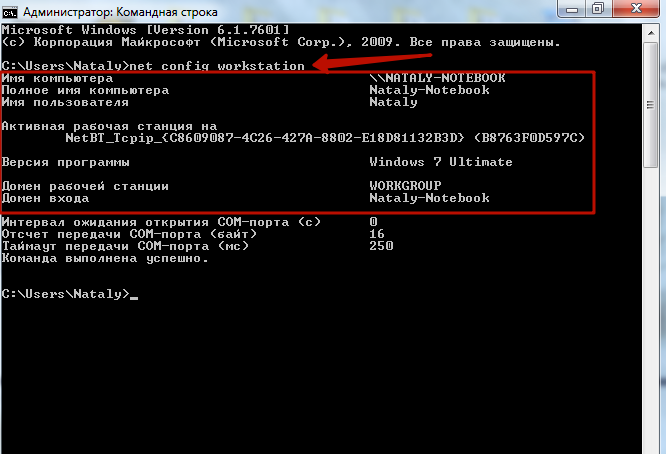
Проверьте, правильно ли указано имя ПК, доменный адрес и username. Для этого введите в командной строке «net config workstation».
Убедитесь, что правильно указан путь к сетевой папке. Его можно посмотреть в свойствах.
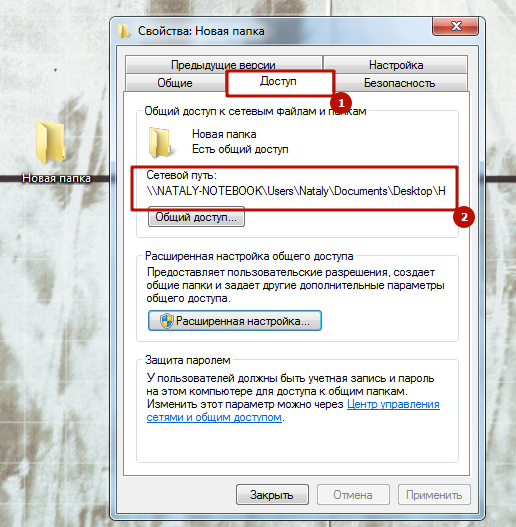 Windows 7
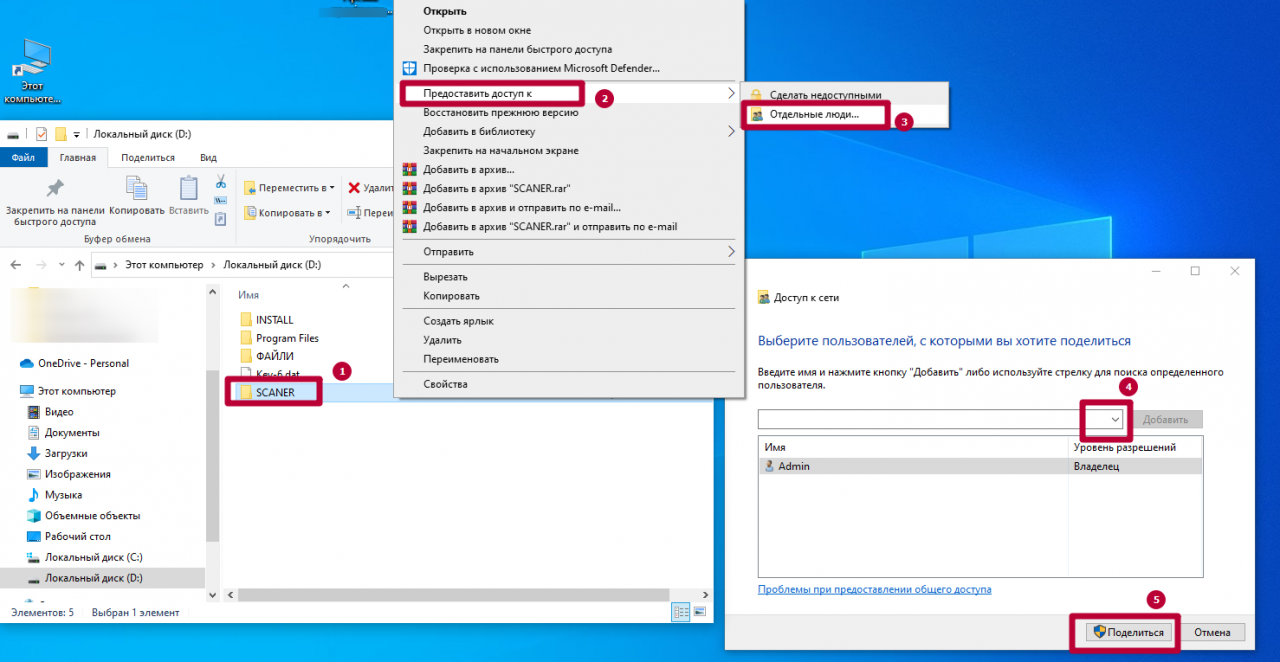 Windows 10
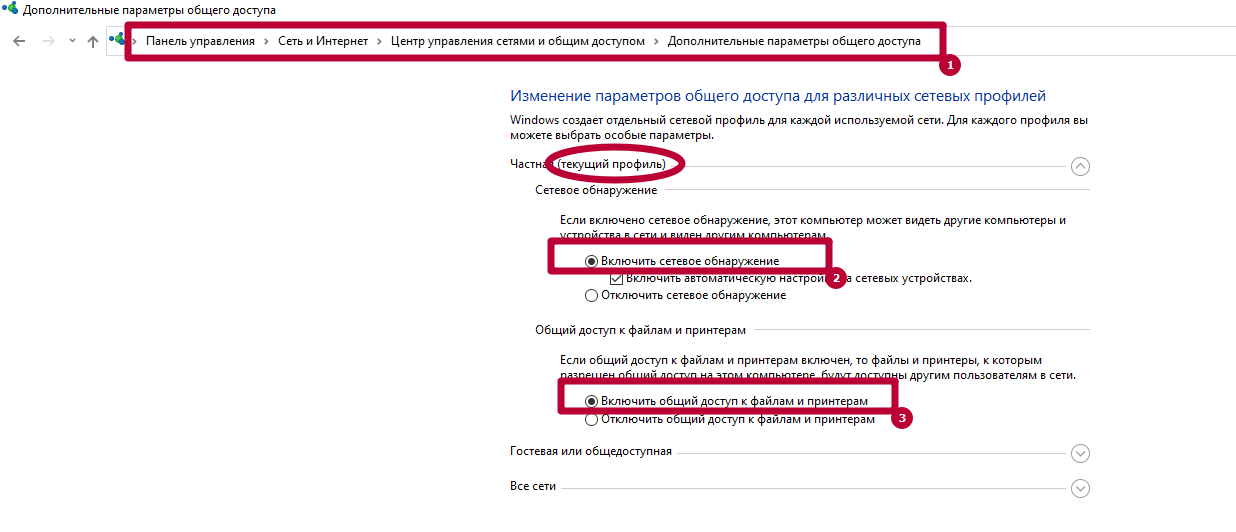
Включите общий доступ для файлов и принтеров. Это можно сделать в «Центре управления сетями», во вкладке «Дополнительные параметры общего доступа».
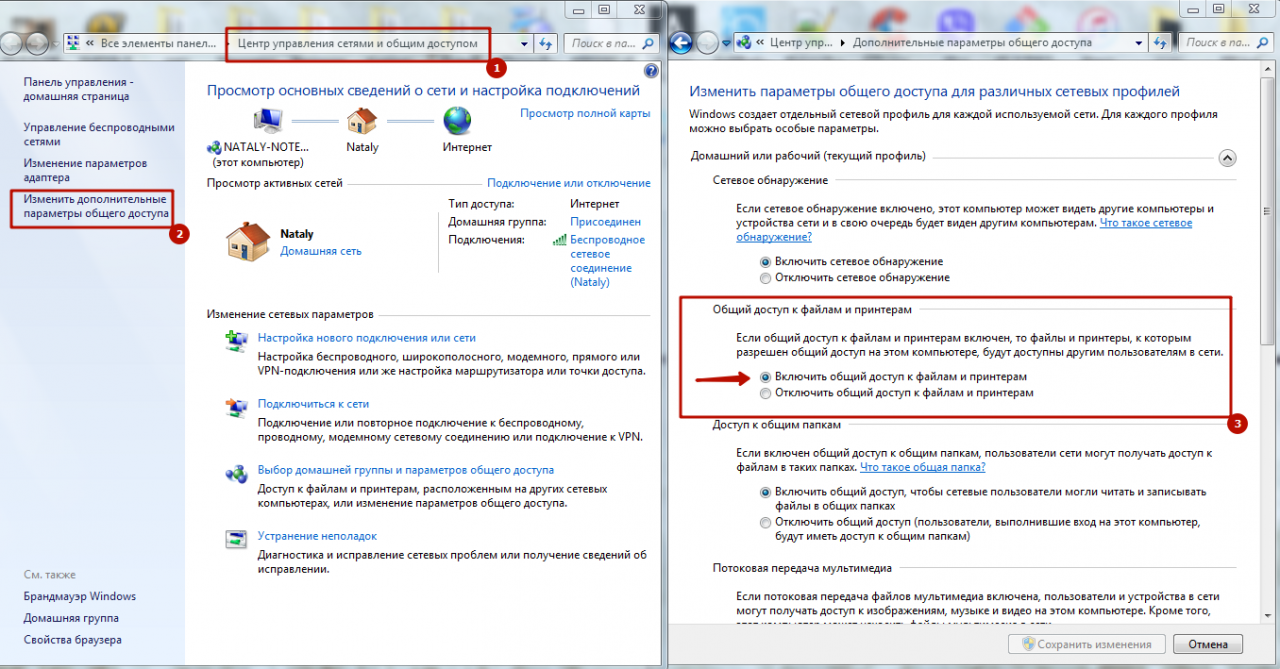 Windows 7
 Windows 10
Убедитесь, что на МФУ включены протоколы FTP и SMB. Это можно сделать через интерфейс Command Center. Отправьте оригинал документа, выбрав направление обмена данными.
Укажите имя компьютера и название папки, открытой для общего доступа. Пропишите актуальные данные авторизации для входа на ПК. После проверки подтвердите операцию, нажав «Старт».
Другие ошибки и их решение
На МФУ также могут появиться похожие сбои. Наиболее распространенные – 1103 и 1105.
Появляется при передаче через SMB либо FTP сервер из-за неправильно указанного имени пользователя либо пароля. Также появляется при отсутствии прав доступа к сетевой папке.
Возникает, если в Command Center на Kyocera не включена функция передачи через FTP, SMB или SMTP сервер. В этом случае необходимо задать значение в настройках принтера.
Источник
Устранение ошибки передачи – Инструкция по эксплуатации Kyocera Ecosys m2040dn
Страница 367
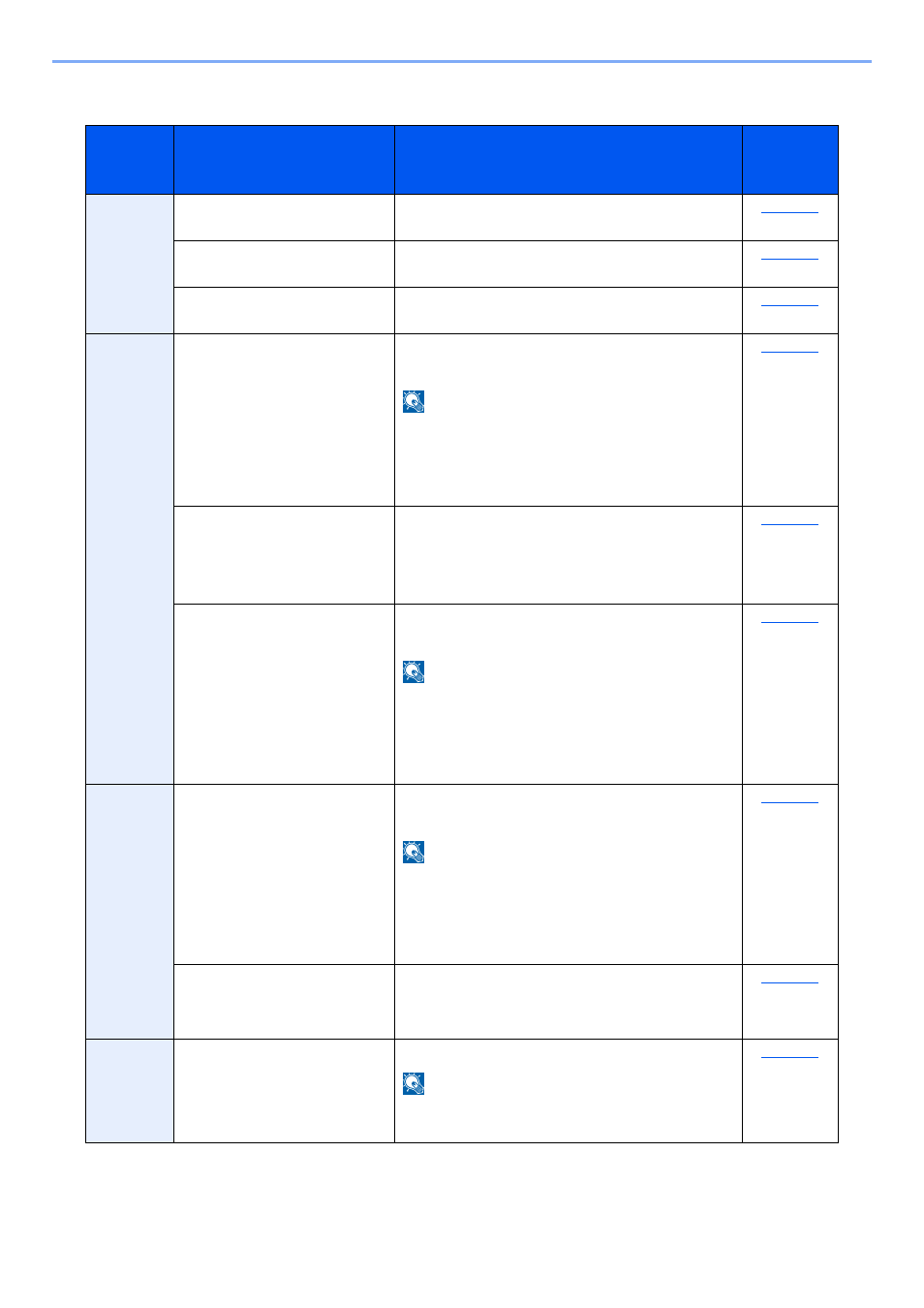
Устранение неисправностей > Устранение неисправностей
Устранение ошибки передачи
Меры по устранению
Не удалось отправить
электронную почту.
Проверьте правильность имени хоста SMTP
сервера в Command Center RX.
Не удалось отправить через
FTP.
Проверьте имя хоста FTP.
Не удалось отправить через
SMB.
Проверьте имя хоста SMB.
Не удалось отправить через
SMB.
Проверьте настройки SMB:
•
имя пользователя и пароль при входе.
Если отправитель является пользователем
домена, укажите имя домена:
•
Не удалось отправить
электронную почту.
Проверьте следующее на Command Center RX:
•
имя пользователя и пароль для сервера SMTP;
имя пользователя и пароль для сервера POP3;
предел размера сообщения эл. почты.
Не удалось отправить через
FTP.
Проверьте настройки FTP-сервера:
•
имя пользователя и пароль при входе.
Если отправитель является пользователем
домена, укажите имя домена:
право доступа получателя к папке.
Не удалось отправить через
SMB.
Проверьте настройки SMB:
•
имя пользователя и пароль при входе.
Если отправитель является пользователем
домена, укажите имя домена:
право доступа получателя к папке.
Не удалось отправить через
FTP.
Проверьте настройки FTP-сервера:
•
право доступа получателя к папке.
Не удалось отправить
электронную почту.
Проверьте адрес электронной почты.
Если адрес отклонен доменом, отправка
электронного письма невозможна.
Источник
Kyocera ошибка соединения 0x2101 smtp
Для сканирования и отправки документов по e-mail для МФУ М2835dw необходимо не только наполнить адресную книгу, но и настроить отправку почты по e-mail. Для реализации этой возможности нужно настроить параметры почтовых протоколов, благодаря которым почта будет отправляться на выбранные адреса.
Для настройки отправки почты придется пройтись по меню аппарата, перепрыгивая с одного окна на другое. Над удобством меню, как и над логикой управления инженерам kyocera явно стоит поработать. Перед настройкой необходимо создать пользователя на любом почтовом сервере. В данном случае был создан пользователь Адрес электронной почты защищен от спам-ботов. Для просмотра адреса в вашем браузере должен быть включен Javascript. (на почтовом сервере yandex).
1. Открываем веб-панель МФУ Ecosys Kyocera M2835dw, набираем логин, пароль (по умолчанию Admin — Admin).
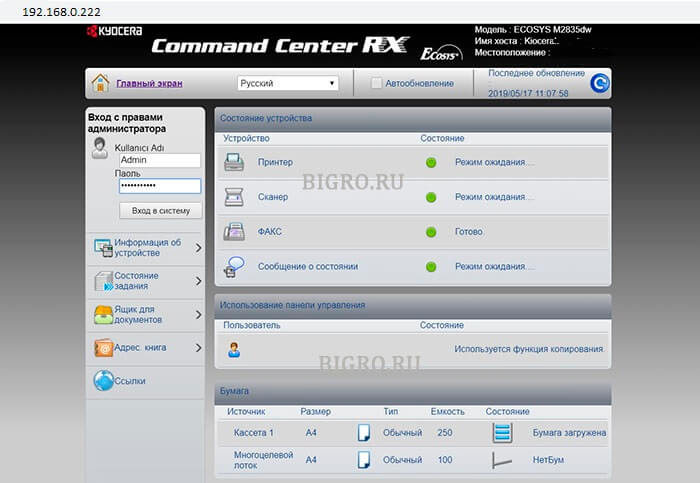
2. Далее переходим «Настройки функций» — «Электронная почта«.
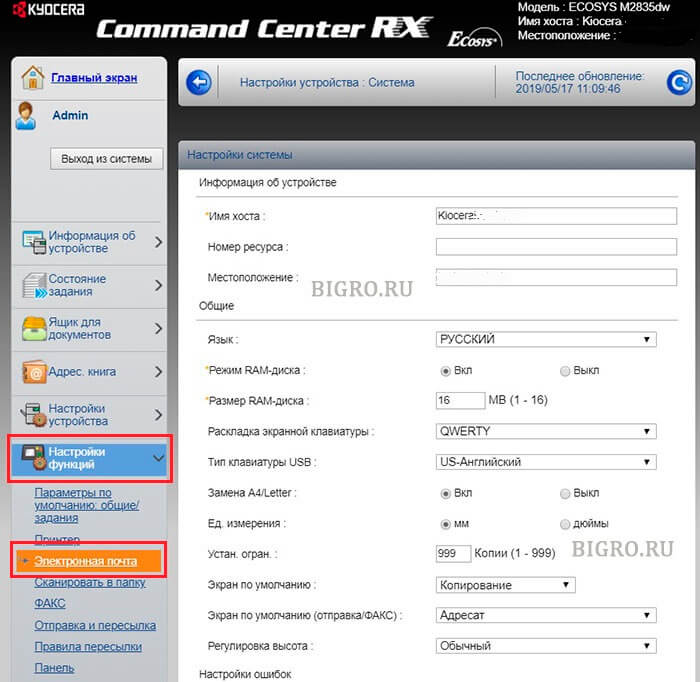
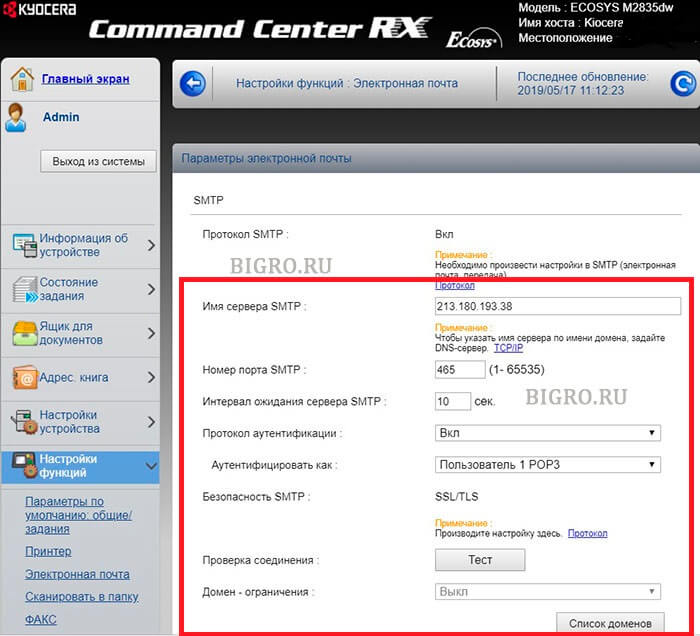
3. В открывшемся окне заполняем:
Имя сервера SMTP: 213.180.193.38
Имя севера SMTP (сервер исходящей почты) зависит от используемого почтового сервера. В данном случае IP-адрес почтового сервера по протоколу smtp 213.180.193.38 (smtp.yandex.ru). Посмотреть настройки основных почтовых серверов можно ЗДЕСЬ.
Имя сервера SMTP лучше задать по имени (например, для Yandex — smtp.yandex.ru), но если в сети не работает DNS, то МФУ не будет понимать, что такое smtp.yandex.ru. Проверить можно набрав в командной строке: ping smtp.yandex.ru. Если будет ответ от сервера (пройдут пинги), то можно прописать имя почтового сервера по протоколу smtp, если пинги не пройдут, тогда указываем IP-адрес.
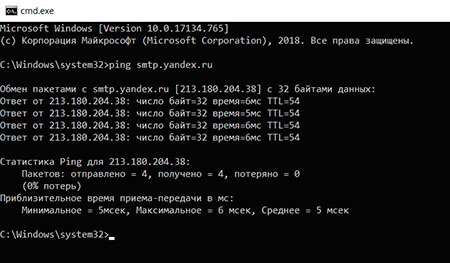
Номер порта smtp: 465.
В данном случае используется шифрование, данный порт используется на почтовом сервере Yandex по протоколу SMTP.
Протокол аутентификации: Вкл.
Аутенфицировать как: Пользователь 1 POP3.
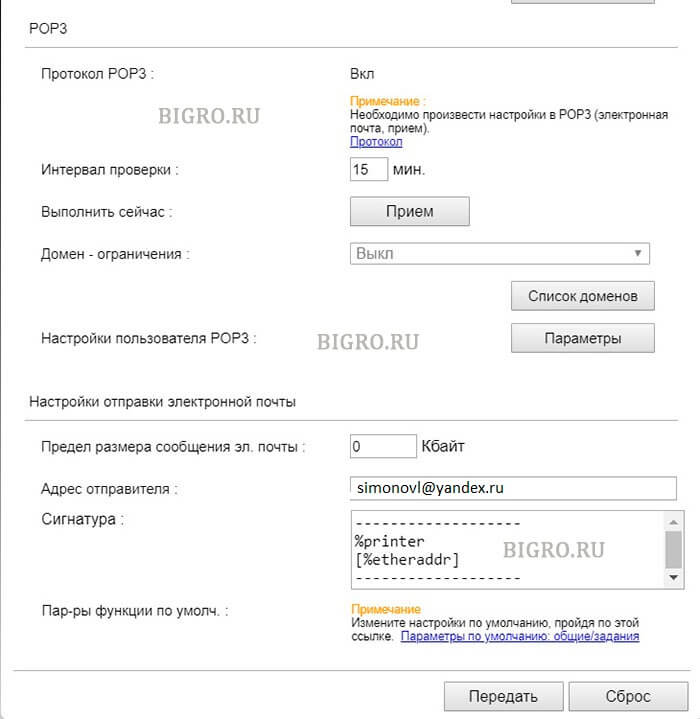
4. В секции «Настройки отправки электронной почты» настраиваем:
Адрес отправителя: Адрес электронной почты защищен от спам-ботов. Для просмотра адреса в вашем браузере должен быть включен Javascript. .
Адрес отправителя — созданный почтовый аккаунт.
Нажимаем «Передать» для сохранения настроек. Далее в секции «POP3» нажимаем кнопку «Параметры» («Настройки пользователя POP3«).
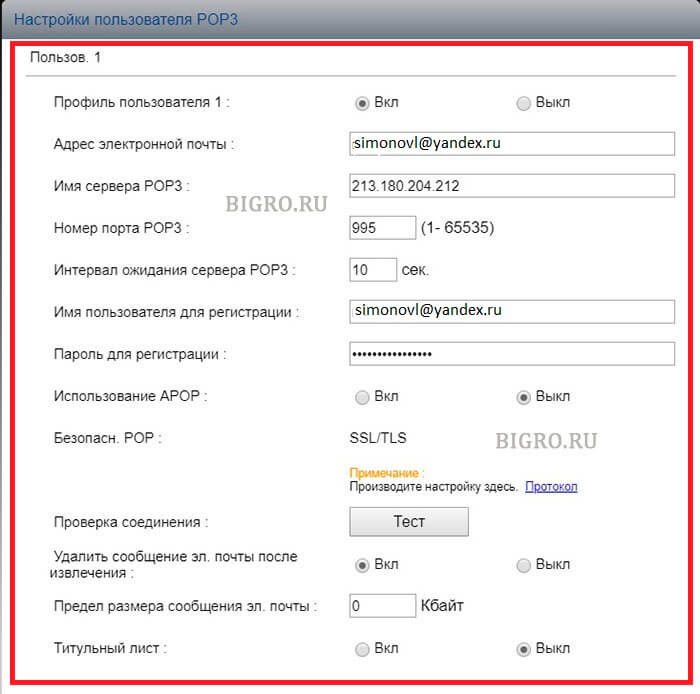
5. В окне «Настройки пользователя POP3«:
Профиль пользователя 1: Вкл.
Адрес электронной почты: Адрес электронной почты защищен от спам-ботов. Для просмотра адреса в вашем браузере должен быть включен Javascript. .
Адрес электронной почты — созданный почтовый аккаунт.
Имя сервера POP3: 213.180.204.212
Имя севера POP3 (сервер входящей почты) зависит от используемого почтового сервера. В данном случае IP-адрес почтового сервера по протоколу pop3 213.180.204.212 (pop.yandex.ru). Посмотреть настройки основных почтовых серверов можно ЗДЕСЬ.
Имя сервера POP3 лучше задать по имени (например, для Yandex — pop.yandex.ru), но если в сети не работает DNS, то МФУ не будет понимать, что такое pop.yandex.ru. Проверить можно набрав в командной строке: ping pop.yandex.ru. Если будет ответ от сервера (пройдут пинги), то можно прописать имя почтового сервера по протоколу POP3, если пинги не пройдут, тогда указываем IP-адрес.
Номер порта POP3: 995.
В данном случае используется шифрование, данный порт используется на почтовом сервере Yandex по протоколу POP3.
Имя пользователя для регистрации Адрес электронной почты защищен от спам-ботов. Для просмотра адреса в вашем браузере должен быть включен Javascript. .
Имя пользователя для регистрации — созданный почтовый аккаунт.
Нажимаем «Передать» для сохранения настроек. Далее нажимаем «Протокол» (Примечание: Произведите настройку здесь).
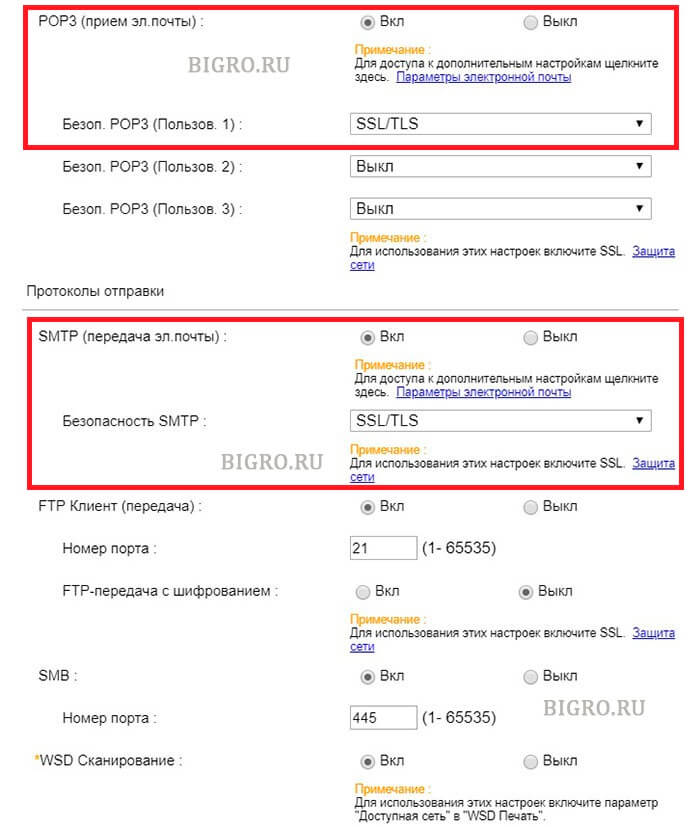
6. В новом окне настраиваем:
POP3 (прием эл. почты): Вкл.
Безоп. POP3 (Пользов. 1): SSL/TLS.
SMTP (передача эл. почты): Вкл.
Безопасность SMTP: SSL/TLS.
Нажимаем «Передать» для сохранения настроек. Далее нажимаем «Защита сети» (Примечание: Для использования этих настроек включите SSL).
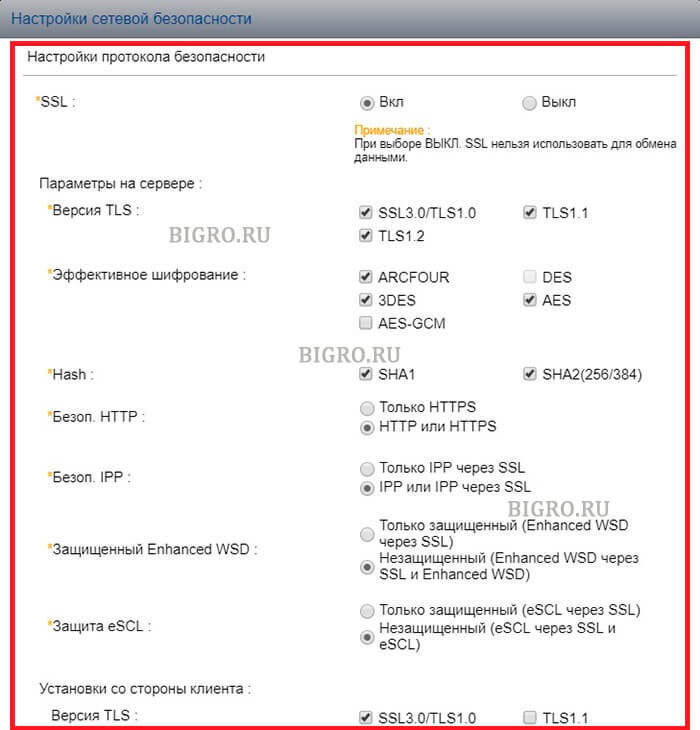
7. В открывшемся окне «Настройки сетевой безопасности» включаем SSL:
SSL: Вкл.
Нажимаем «Передать» для сохранения настроек.
7. Далее переходим в «Настройки электронной почты» (Настройки функций — Электронная почта), в секции SMTP нажимаем кнопку «Тест«. При успешном соединении появится сообщение «Соединение ОК». Это значит, что настройки произведены правильно. Теперь можно сканировать документы и передавать по электронной почте выбранным в адресной книге адресатам.
Источник
Thread: KM-5050 Scan to SMB Error 2101
Thread Tools
Display
KM-5050 Scan to SMB Error 2101
Hello everyone,
I have a KM-5050 with firmware version 2GR_2000.014.028 2007.11.02,
Print works ok.
Trying to hook it up to scan to a folder (via SMB) on Windows Server 2008 R2 Data Center.
Scan to email is also working. I have tried using the hostname and IP address. The username and password is also a domain admin account.
For testing, when hooking it up to an individual laptop, the scan to SMB folder works ok.
Is there any suggestion anyone may know about to get this working?
Is my firmware the culprit?
Thanks in advance for your help.
Claudio
Re: KM-5050 Scan to SMB Error 2101
I remember seeing something like this before. When you put in the username info you need to add the domain info as well. I for the life can’t remember where I saw this but I’ll look around in some stuff I have around and see if I can find it.
update found the info in the Kyocera Scan to SMB(PC) set up guide. check this
Check the information in “domain nameuser name” format for logging onto Windows.
1 Press the Ctrl-Alt-Delete key combination on the
keyboard.
2 Check the Logon Information that appears on the
Windows Security window. In the sample window
below, “ABCDNETjames.smith” corresponds to
“domain nameuser name”.
(Example: ABCDNET james.smith)
Service Manager 1,000+ Posts 

 Join Date Feb 2010 Posts 1,910 Rep Power 71
I think 2101 implies a firewall/anti virus issue
Master Of The Obvious 10,000+ Posts
 Join Date Jul 2007 Location Lapeer, Michigan Posts 21,181 Rep Power 422
Re: KM-5050 Scan to SMB Error 2101
You can get 2101 for a hostname IP issue, or a login/password issue. Either one.
For the sake of diagnosis, I’d suggest creating a new user with a new known password, and new admin properties. Most times it’s login/password related, even if you can log in to the PC/server with this info sometimes it won’t work from the MFP. Many times this has resolved 2101 errors. =^..^=
Re: KM-5050 Scan to SMB Error 2101
Totally agree with this solution, I have a story
Call out to the Customer, 2 local Meath GAA players (Gaelic football) for top tray malfunction on a Kyocera model /Utax 1625. I cleaned the machine located the problem as the try paper size guide was broke etc. I taught I was done, when the Customer told me that the machine won’t print or scan.
I re-installed drivers etc., put in all the scan data and tried to scan ERROR 2101 kept coming up. So out to the car and plugged in the laptop and print and scan function working 100%. I asked the Customer any changes recently and they said the router so I inspect and its fine. I then check the only Pc connected to the machine and give it a good going over. I find the McAfee anti-virus software and disable it and hooray I can print but no scan. I ask the Customer was the anti-virus updated and he said no, shortly after my SM rang because I was there 1.5 hours I explained what happened and he told me to just get going.
I tell the Customer that I must go but would be back with the rtf parts that my SM has been on and that they should have logged the call regarding the print and scan, as I was only into my 2nd year and that call would require a more exp Tech and that if they wanted to print they must either disable or change their settings in the Anti-virus to allow printing. I was not long gone when the Customer called the Office giving out saying I was hopeless etc. and yes my SM called the Customer and asked was the Anti-Virus changed, when he finished that call he gave me the hairdryer treatment. I told him that when I finished the call they wanted me to look at the printing etc., I told him it was the Anti-Virus blocking the printing and he still fumed and sent my Supervisor there. The Supervisor rang me and I told him the story and he came back with a report that the Router was faulty and told the Customer to change it.
It was less than a week and the Customer was raging, the router did not work. The call was logged and the SM sent out his golden boy, the Polish Master who was a lazy git TBH, I have to admit he was there for 3 hours and solved the problem. It was the anti-virus, and yes they had recently got an IT guy in to install it. I was never thanked for attempting the repair but the Customer was charged for the call out and not telling anyone about the change. SUCKER
Источник
 Thanks: 0
 Likes: 0
 Dislikes: 0
-
06-14-2012
#1
TaskAlfa 250Ci C7102 — C7103 — C7104 Error Codes
Dear All Friends
i have a problem with 250ci (cdc 1725), gaves 7102 — 7103 — 7104
total counter :90000
main fw :2H7_2F00_010.007all toner and dv units motors are working perfect via simulation.
What is ur advices?Best Redards
Serdar
-
06-14-2012
#2
Re: TaskAlfa 250Ci C7102 — C7103 — C7104 Error Codes
How are the values in U155?
If they are nearby 20, you lost the 24V for the tonersensors.
Did someone exchanged the toner container motor in past?
If yet, please check the wiring above the main front pwb, at a few cases in europe, the wiring would damaged by mounting the plastic cover above the main- and sub front pwb….
In worst case, the engine pwb is damaged totally, this happened in france.
-
06-25-2012
#3

Technician
- Rep Power
- 22
Re: TaskAlfa 250Ci C7102 — C7103 — C7104 Error Codes
you must make an Firmwareupdate the new DV -b working only with the new FW
-
06-26-2012
#4
Re: TaskAlfa 250Ci C7102 — C7103 — C7104 Error Codes
 Originally Posted by Mike L

you must make an Firmwareupdate the new DV -b working only with the new FW
Mike L,
if you are using the old FW you�ll get C7401 !!!
It�s totally different Errorcode. Unknown Dev-Unit
But he get Tonersensor Errors.Best regards
KYO_OEM
-
12-03-2013
#5
Junior Member
- Rep Power
- 0
Re: TaskAlfa 250Ci C7102 — C7103 — C7104 Error Codes
any news about this problem?i have the same problem C7103(magenta DV)…firmware update,change DV-M but still the errors there…any suggestion?
-
12-04-2013
#6
Re: TaskAlfa 250Ci C7102 — C7103 — C7104 Error Codes
I had a Saturn recently with a dead color developing motor. At first it was giving magenta «Add Toner» indications. With the new motor it changed to C7103, it think.
The secondary problem was that while the color developing units were not agitating, the toner add system had been packing toner into the magenta developing unit. When it couldn’t take any more it compacted the magenta toner in the spout of the toner cartridge. Once the developing motor was turning again, it took about three days to detone the magenta developer to the point where it tried to add magenta toner, unsuccessfully.
My solution to the secondary problem was to beat on the toner cartridge until the agitation mechanism would turn again. =^..^=
If you’d like a serious answer to your request:
1) demonstrate that you’ve read the manual
2) demonstrate that you made some attempt to fix it.
3) if you’re going to ask about jams include the jam code.
4) if you’re going to ask about an error code include the error code.
5) You are the person onsite. Only you can make observations.
blackcat: Master Of The Obvious =^..^=
-
05-20-2016
#7
Trusted Tech
50+ Posts
- Rep Power
- 23
Re: TaskAlfa 250Ci C7102 — C7103 — C7104 Error Codes
Hello,
I have a problem with a C7103 on a TA 250ci.
I got in U155 (Toner senor output) «26» instead of «+300».
I tried the DV M in another TA300ci and there is de DV M working perfect!
I changed also the engine pwb without result, changed the DV CMY color motor, front main/sub pcb, motor control pwb without result.
Could it be a broken gear in the main imaging drive unit?
This is my last option because it’s a lot of work to disamble this unit!Before i had also C2810. I cleaned the waste toner pipe of the ICL motor. It was stuck with toner. (I did the spring back inside)
thx.
-
05-21-2016
#8
Re: TaskAlfa 250Ci C7102 — C7103 — C7104 Error Codes
The Voyager and VoyagerE series both used to shatter the color developer drive gear, but the Saturn series doesn’t seem to do that in my experience. More common is motor failures. Since there are several motors of the same type, I would remove the back to see if the color developer motor is turning. If no, I would swap around the color developing motor to see if a different motor will turn. =^..^=
If you’d like a serious answer to your request:
1) demonstrate that you’ve read the manual
2) demonstrate that you made some attempt to fix it.
3) if you’re going to ask about jams include the jam code.
4) if you’re going to ask about an error code include the error code.
5) You are the person onsite. Only you can make observations.
blackcat: Master Of The Obvious =^..^=
-
05-21-2016
#9
Trusted Tech
50+ Posts
- Rep Power
- 23
Re: TaskAlfa 250Ci C7102 — C7103 — C7104 Error Codes
Hello blackcat,
I’ve changed already the CMY DV motor without result…
Monday i go back and change the DV M unit with a new one (not a used one).
I can still print in B&W.
-
05-23-2016
#10
Trusted Tech
50+ Posts
- Rep Power
- 23
Re: TaskAlfa 250Ci C7102 — C7103 — C7104 Error Codes
Hello,
Problem solved by swapping the green relay pwb (next to the orange relay pwb) who’s connecting the drums and dv’s.
DV Magenta toner values again +400.
Anyway thx to all!
Bookmarks
Bookmarks

Posting Permissions
- You may not post new threads
- You may not post replies
- You may not post attachments
- You may not edit your posts
- BB code is On
- Smilies are On
- [IMG] code is On
- [VIDEO] code is On
- HTML code is Off
Forum Rules