Notice
How to obtain help and support for this security update
Symptoms of the problem
When you try to install an update for the Microsoft .NET Framework 1.0, for the Microsoft .NET Framework 1.1, the Microsoft .NET Framework 2.0, the Microsoft .NET Framework 3.0, or for the Microsoft .NET Framework 3.5, you may receive the following Microsoft Windows Update error code:
0x643
Or, you may receive the following Microsoft Windows Installer error code:
1603
This problem may occur when you use certain system configurations.
Cause
Windows Update error code «0x643» and Windows Installer error code «1603» are generic error codes. Typically, these error codes mean that the update was not installed. These errors codes are usually caused by a corruption in the .NET Framework installation or by an inconsistency on the MSI database state.
Resolution
To resolve this problem, you must fix the MSI software update registration corruption issues, or uninstall multiple versions of the .NET Framework by using the .NET Framework Cleanup Tool, and then reinstall those components.
To troubleshoot this problem, follow these steps starting with Method 1. Proceed to the Method 2 if Method 1 does not resolve the problem.
Method 1: Fix MSI software update registration corruption issues
For more information about how to fix MSI software update registration corruption issues, click the following article number to view the article in the Microsoft Knowledge Base:
971187 How to fix MSI software update registration corruption issuesTo fix this problem automatically, click the Fix it button or link in the 971187 article.
Then visit the Windows Update Web site and try to install the updates:
http://update.microsoft.comIf the problem is not resolved, proceed to Method 2.
Method 2: Repair the .NET Framework
To repair the .NET Framework, you must uninstall multiple versions of the .NET Framework by using the .NET Framework Cleanup Tool, and then reinstall the components.
To do this, follow these steps:
-
Click the following link to download the .NET Framework Cleanup Tool:
http://blogs.msdn.com/b/astebner/archive/2008/08/28/8904493.aspx
-
Use the .NET Framework Cleanup Tool to uninstall the .NET Framework versions 1.0, 1.1, 2.0, 3.0, and 3.5
Note The cleanup tool does not let you remove the .NET Framework 2.0 in Windows Vista or later versions because the .NET Framework is installed as an operating system component.
-
Restart the computer.
-
Download and install the following components:
-
.Net Framework 1.1
http://www.microsoft.com/download/details.aspx?displaylang=en&FamilyID=262d25e3-f589-4842-8157-034d1e7cf3a3
-
.Net Framework 1.1 SP1
http://www.microsoft.com/download/details.aspx?familyid=A8F5654F-088E-40B2-BBDB-A83353618B38&displaylang=en
-
.NET Framework 3.5 SP1
Note This will also install .Net Framework 2.0 SP2 and .Net Framework 3.0 SP2http://www.microsoft.com/download/details.aspx?familyid=AB99342F-5D1A-413D-8319-81DA479AB0D7&displaylang=en
-
-
Restart the computer.
-
Visit the Windows Update Web site and install the updates:
http://update.microsoft.com
STILL NEED HELP?
If this article does not answer your question, click this button to pose your question to other community members at Microsoft Community:
More Information
You may experience this problem when you use any of the following configurations:
-
Microsoft .NET Framework 1.0 Service Pack 3 when you use it with any of the following operating systems:
-
Microsoft Windows 2000 Advanced Server Service Pack 4 (SP4)
-
Microsoft Windows 2000 Datacenter Server SP4
-
Microsoft Windows 2000 Professional SP4
-
Microsoft Windows 2000 Server SP4
-
Windows Server 2003, Datacenter Edition for Itanium-based Systems SP1
-
Windows Server 2003, Datacenter Edition for Itanium-based Systems SP2
-
Windows Server 2003, Datacenter Edition SP1
-
Windows Server 2003, Datacenter Edition SP2
-
Windows Server 2003, Datacenter x64 Edition SP2
-
Windows Server 2003, Datacenter x64 Edition
-
Windows Server 2003, Enterprise Edition for Itanium-based Systems SP1
-
Windows Server 2003, Enterprise Edition for Itanium-based Systems SP2
-
Windows Server 2003, Enterprise Edition SP1
-
Windows Server 2003, Enterprise Edition SP2
-
Windows Server 2003, Enterprise x64 Edition SP2
-
Windows Server 2003, Enterprise x64 Edition
-
Windows Server 2003, Standard Edition 32-bit x86 SP1
-
Windows Server 2003, Standard Edition 32-bit x86 SP2
-
Windows Server 2003, Standard x64 Edition SP2
-
Windows Server 2003, Standard x64 Edition
-
Windows Server 2003, Web Edition SP1
-
Windows Server 2003, Web Edition SP2
-
Windows Vista Business
-
Windows Vista Enterprise
-
Windows Vista Home Basic
-
Windows Vista Home Premium
-
Windows Vista Ultimate
-
Windows XP Home Edition SP2
-
Windows XP Media Center Edition 2005
-
Windows XP Professional SP2
-
Windows XP Professional x64 Edition
-
Windows XP Professional x64 Edition SP2
-
Windows XP Tablet PC Edition SP2
-
-
Microsoft .NET Framework 1.1 Service Pack 1 when you use it with any of the following operating systems:
-
Windows 2000 Advanced Server SP4
-
Windows 2000 Datacenter Server SP4
-
Windows 2000 Professional SP4
-
Windows 2000 Server SP4
-
Windows Server 2003, Datacenter Edition for Itanium-based Systems SP1
-
Windows Server 2003, Datacenter Edition for Itanium-based Systems SP2
-
Windows Server 2003, Datacenter Edition SP2
-
Windows Server 2003, Datacenter x64 Edition SP2
-
Windows Server 2003, Datacenter x64 Edition
-
Windows Server 2003, Enterprise Edition for Itanium-based Systems SP1
-
Windows Server 2003, Enterprise Edition for Itanium-based Systems SP2
-
Windows Server 2003, Enterprise Edition SP2
-
Windows Server 2003, Enterprise x64 Edition SP2
-
Windows Server 2003, Enterprise x64 Edition
-
Windows Server 2003, Standard Edition 32-bit x86 SP2
-
Windows Server 2003, Standard x64 Edition SP2
-
Windows Server 2003, Standard x64 Edition
-
Windows Server 2003, Web Edition SP2
-
Windows Vista Business
-
Windows Vista Enterprise
-
Windows Vista Home Basic
-
Windows Vista Home Premium
-
Windows Vista Ultimate
-
Windows XP Home Edition SP2
-
Windows XP Media Center Edition 2005
-
Windows XP Professional SP2
-
Windows XP Professional x64 Edition
-
Windows XP Professional x64 Edition SP2
-
-
Microsoft .NET Framework 2 or Microsoft .NET Framework 2 SP1 when you use it with any of the following operating systems:
-
Windows 2000 Advanced Server SP4
-
Windows 2000 Datacenter Server SP4
-
Windows 2000 Professional SP4
-
Windows 2000 Server SP4
-
Windows Server 2003, Datacenter Edition for Itanium-based Systems SP1
-
Windows Server 2003, Datacenter Edition for Itanium-based Systems SP2
-
Windows Server 2003, Datacenter Edition SP1
-
Windows Server 2003, Datacenter Edition SP2
-
Windows Server 2003, Datacenter x64 Edition
-
Windows Server 2003, Datacenter x64 Edition SP2
-
Windows Server 2003, Enterprise Edition for Itanium-based Systems SP1
-
Windows Server 2003, Enterprise Edition for Itanium-based Systems SP2
-
Windows Server 2003, Enterprise Edition SP1
-
Windows Server 2003, Enterprise Edition SP2
-
Windows Server 2003, Enterprise x64 Edition
-
Windows Server 2003, Enterprise x64 Edition SP2
-
Windows Server 2003, Standard Edition 32-bit x86 SP1
-
Windows Server 2003, Standard Edition 32-bit x86 SP2
-
Windows Server 2003, Standard x64 Edition
-
Windows Server 2003, Standard x64 Edition SP2
-
Windows Server 2003, Web Edition SP1
-
Windows Server 2003, Web Edition SP2
-
Windows XP Home Edition SP2
-
Windows XP Media Center Edition 2005
-
Windows XP Professional SP2
-
Windows XP Professional x64 Edition
-
Windows XP Professional x64 Edition SP2
-
Windows XP Tablet PC Edition SP2
-
-
Microsoft .NET Framework 3.0 or Microsoft .NET Framework 3.0 SP1 when you use it with any of the following operating systems:
-
Windows Server 2003, Datacenter Edition for Itanium-based Systems SP1
-
Windows Server 2003, Datacenter Edition for Itanium-based Systems SP2
-
Windows Server 2003, Datacenter Edition SP1
-
Windows Server 2003, Datacenter Edition SP2
-
Windows Server 2003, Datacenter x64 Edition
-
Windows Server 2003, Datacenter x64 Edition SP2
-
Windows Server 2003, Enterprise Edition for Itanium-based Systems SP1
-
Windows Server 2003, Enterprise Edition for Itanium-based Systems SP2
-
Windows Server 2003, Enterprise Edition SP1
-
Windows Server 2003, Enterprise Edition SP2
-
Windows Server 2003, Enterprise x64 Edition
-
Windows Server 2003, Enterprise x64 Edition SP2
-
Windows Server 2003, Standard Edition 32-bit x86 SP1
-
Windows Server 2003, Standard Edition 32-bit x86 SP2
-
Windows Server 2003, Standard x64 Edition
-
Windows Server 2003, Standard x64 Edition SP2
-
Windows Server 2003, Web Edition SP1
-
Windows Server 2003, Web Edition SP2
-
Windows XP Home Edition SP2
-
Windows XP Media Center Edition 2005
-
Windows XP Professional SP2
-
Windows XP Professional x64 Edition
-
Windows XP Professional x64 Edition SP2
-
Windows XP Tablet PC Edition SP2
-
-
Microsoft .NET Framework 3.5 when you use it with any of the following operating systems:
-
Windows Server 2003, Datacenter Edition for Itanium-based Systems SP1
-
Windows Server 2003, Datacenter Edition for Itanium-based Systems SP2
-
Windows Server 2003, Datacenter Edition SP1
-
Windows Server 2003, Datacenter Edition SP2
-
Windows Server 2003, Datacenter x64 Edition
-
Windows Server 2003, Datacenter x64 Edition SP2
-
Windows Server 2003, Enterprise Edition for Itanium-based Systems SP1
-
Windows Server 2003, Enterprise Edition for Itanium-based Systems SP2
-
Windows Server 2003, Enterprise Edition SP1
-
Windows Server 2003, Enterprise Edition SP2
-
Windows Server 2003, Enterprise x64 Edition
-
Windows Server 2003, Enterprise x64 Edition SP2
-
Windows Server 2003, Standard Edition 32-bit x86 SP1
-
Windows Server 2003, Standard Edition 32-bit x86 SP2
-
Windows Server 2003, Standard x64 Edition
-
Windows Server 2003, Standard x64 Edition SP2
-
Windows Server 2003, Web Edition SP1
-
Windows Server 2003, Web Edition SP2
-
Windows Vista Business
-
Windows Vista Enterprise
-
Windows Vista Home Basic
-
Windows Vista Home Premium
-
Windows Vista Ultimate
-
Windows XP Home Edition SP2
-
Windows XP Media Center Edition 2005
-
Windows XP Professional SP2
-
Windows XP Professional x64 Edition
-
Windows XP Professional x64 Edition SP2
-
Windows XP Tablet PC Edition SP2
-
For more information about another error message that you may receive when you try to install this update, click the following article number to view the article in the Microsoft Knowledge Base:
923101Error message when you try to install a security update for the .NET Framework 2.0 on a computer that is running Windows Server 2003 x64 Edition: «Error 1324. The folder ‘Program Files’ contains an invalid character»
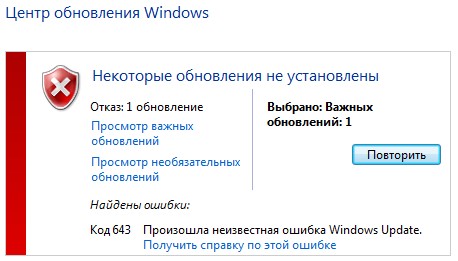
При попытке обновить систему Windows 7, пользователь может столкнуться с кодом ошибки 643 в центре обновления. В большинстве случаев виновником данной ошибки является .NET Framework или антивирус блокирует сетевой доступ. Ошибка 643 также может появится и в Windows 8.1 или Windows 10. Давайте разберем, что делать и как исправить код ошибки 643 в Windows.
1. Удалите и переустановите NET Framework
- Скачайте специальную утилиту по удалению NET Framework с сервиса Microsoft.
- В скаченном архиве запустите cleanup_tool.exe.
- Нажмите на Cleanup Now для удаления компонентов.
- Перейдите на сайт Microsoft и скачайте последнюю версию Framework.
- Перезагрузите ПК после всех действий.

2. Антивирус
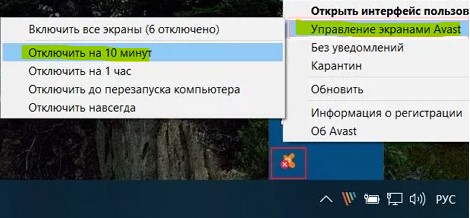
Некоторые антивирусы могут сработать ложно и заблокировать доступ к центру обновления, тем самым выдавая код ошибки 643. Отключите на время антивирусное ПО и попробуйте обновить систему.
Смотрите еще:
- Код 43: Windows остановила это устройство — Как исправить?
- Запрошенная операция требует повышения — Код 740
- Код 19: Windows 10 не удается запустить это устройство
- Не удалось инициализировать драйвер этого устройства (Код 37)
- Ошибка DistributedCOM Код события 10016 Windows 10
[ Telegram | Поддержать ]
 |
Номер ошибки: | Ошибка 643 |
| Название ошибки: | Microsoft Error Code 643 Windows 7 | |
| Описание ошибки: | Ошибка 643: Возникла ошибка в приложении Windows 7. Приложение будет закрыто. Приносим извинения за неудобства. | |
| Разработчик: | Microsoft Corporation | |
| Программное обеспечение: | Windows 7 | |
| Относится к: | Windows XP, Vista, 7, 8, 10, 11 |
Проверка «Microsoft Error Code 643 Windows 7»
Как правило, практикующие ПК и сотрудники службы поддержки знают «Microsoft Error Code 643 Windows 7» как форму «ошибки во время выполнения». Программисты, такие как Microsoft Corporation, стремятся создавать программное обеспечение, свободное от этих сбоев, пока оно не будет публично выпущено. К сожалению, многие ошибки могут быть пропущены, что приводит к проблемам, таким как те, с ошибкой 643.
Ошибка 643 также отображается как «Microsoft Error Code 643 Windows 7». Это распространенная ошибка, которая может возникнуть после установки программного обеспечения. Если возникает ошибка 643, разработчикам будет сообщено об этой проблеме через уведомления об ошибках, которые встроены в Windows 7. Затем программисты могут исправить эти ошибки в коде и включить исправление, которое можно загрузить с их веб-сайта. Если есть запрос на обновление Windows 7, это обычно обходной путь для устранения проблем, таких как ошибка 643 и другие ошибки.
В чем причина ошибки 643?
Ошибки выполнения при запуске Windows 7 — это когда вы, скорее всего, столкнетесь с «Microsoft Error Code 643 Windows 7». Вот три наиболее заметные причины ошибки ошибки 643 во время выполнения происходят:
Ошибка 643 Crash — ошибка 643 блокирует любой вход, и это может привести к сбою машины. Эти ошибки обычно возникают, когда входы Windows 7 не могут быть правильно обработаны, или они смущены тем, что должно быть выведено.
Утечка памяти «Microsoft Error Code 643 Windows 7» — этот тип утечки памяти приводит к тому, что Windows 7 продолжает использовать растущие объемы памяти, снижая общую производительность системы. Возможные провокации включают отсутствие девыделения памяти и ссылку на плохой код, такой как бесконечные циклы.
Ошибка 643 Logic Error — Логические ошибки проявляются, когда пользователь вводит правильные данные, но устройство дает неверный результат. Это видно, когда исходный код Microsoft Corporation включает дефект в анализе входных данных.
Большинство ошибок Microsoft Error Code 643 Windows 7 являются результатом отсутствия или повреждения версии файла, установленного Windows 7. Основной способ решить эти проблемы вручную — заменить файл Microsoft Corporation новой копией. В качестве последней меры мы рекомендуем использовать очиститель реестра для исправления всех недопустимых Microsoft Error Code 643 Windows 7, расширений файлов Microsoft Corporation и других ссылок на пути к файлам, по причине которых может возникать сообщение об ошибке.
Распространенные проблемы Microsoft Error Code 643 Windows 7
Типичные ошибки Microsoft Error Code 643 Windows 7, возникающие в Windows 7 для Windows:
- «Ошибка программы Microsoft Error Code 643 Windows 7. «
- «Недопустимая программа Win32: Microsoft Error Code 643 Windows 7»
- «Microsoft Error Code 643 Windows 7 должен быть закрыт. «
- «К сожалению, мы не можем найти Microsoft Error Code 643 Windows 7. «
- «Microsoft Error Code 643 Windows 7 не может быть найден. «
- «Ошибка запуска программы: Microsoft Error Code 643 Windows 7.»
- «Microsoft Error Code 643 Windows 7 не выполняется. «
- «Microsoft Error Code 643 Windows 7 выйти. «
- «Ошибка пути программного обеспечения: Microsoft Error Code 643 Windows 7. «
Обычно ошибки Microsoft Error Code 643 Windows 7 с Windows 7 возникают во время запуска или завершения работы, в то время как программы, связанные с Microsoft Error Code 643 Windows 7, выполняются, или редко во время последовательности обновления ОС. Отслеживание того, когда и где возникает ошибка Microsoft Error Code 643 Windows 7, является важной информацией при устранении проблемы.
Причины ошибок в файле Microsoft Error Code 643 Windows 7
Проблемы Windows 7 и Microsoft Error Code 643 Windows 7 возникают из отсутствующих или поврежденных файлов, недействительных записей реестра Windows и вредоносных инфекций.
В основном, осложнения Microsoft Error Code 643 Windows 7 связаны с:
- Поврежденные ключи реестра Windows, связанные с Microsoft Error Code 643 Windows 7 / Windows 7.
- Вредоносные программы заразили Microsoft Error Code 643 Windows 7, создавая повреждение.
- Microsoft Error Code 643 Windows 7 злонамеренно или ошибочно удален другим программным обеспечением (кроме Windows 7).
- Другое программное приложение, конфликтующее с Microsoft Error Code 643 Windows 7.
- Windows 7 (Microsoft Error Code 643 Windows 7) поврежден во время загрузки или установки.
Продукт Solvusoft
Загрузка
WinThruster 2022 — Проверьте свой компьютер на наличие ошибок.
Совместима с Windows 2000, XP, Vista, 7, 8, 10 и 11
Установить необязательные продукты — WinThruster (Solvusoft) | Лицензия | Политика защиты личных сведений | Условия | Удаление