Код ошибки в формате 5хх говорит о том, что на стороне сервера есть проблема: сервер не может обработать запрос от клиента. Клиентом в данном случае выступает браузер.
Ошибка 504 Gateway Time Out возникает, когда в заданный промежуток времени сервер не получает ответ от другого сервера, при этом другой сервер выполняет роль прокси или шлюза.
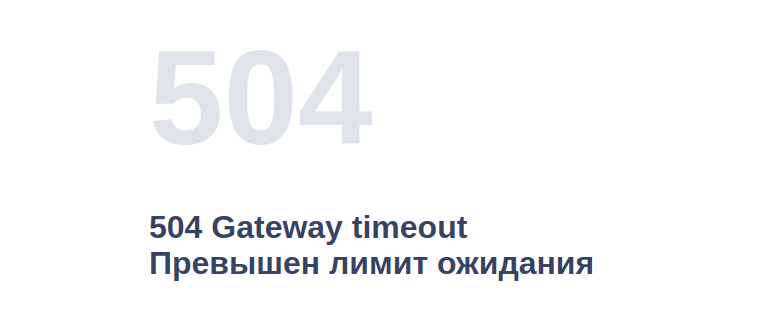
Ошибка 504 что значит
Какие ещё бывают варианты отображения ошибки:
- HTTP Error 504,
- Gateway Timeout Error,
- HTTP Error 504 – Gateway Timeout,
- 504 Gateway Timeout nginx,
- 504 Gateway Time-out – The server didn’t respond in time,
- Ошибка 504 Время ответа сервера истекло,
- Время ожидания шлюза (504),
- Ошибка тайм-аута шлюза,
- HTTP 504,
- 504 Ошибка.
В этой статье мы расскажем, как устранить код ошибки 504.
Как исправить ошибку 504 посетителю сайта
Итак, вы перешли на сайт, но вместо веб-страницы видите сообщение с кодом 504.
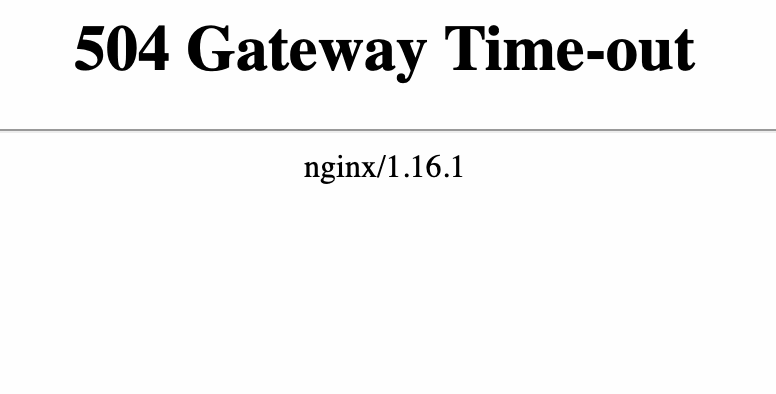
Что такое тайм аут шлюза
Проблема может быть как со стороны сайта, так и со стороны устройства, например настроек браузера.
Чтобы убедиться в том, что настройки браузера в порядке:
1) Обновите страницу. Но обновите не клавишей F5, а выделите содержимое адресной строки и нажмите Enter. Если после этих действий ошибка 504 не возникает ни на текущем, ни на любом другом сайте – её можно проигнорировать.
2) Зайдите на тот же ресурс через другой браузер. Если в этом случае сайт открылся корректно, перейдите к следующему пункту.
3) Очистите кэш браузера и удалите файлы cookie. После этого браузер будет работать быстрее.
Воспользуйтесь инструкцией Как очистить кэш браузера.
4) Перезагрузите роутер или модем. Отключите устройство от сети примерно на 10 минут.
5) Очистите кэш DNS. Для этого воспользуйтесь инструкцией ниже.
Как очистить кэш DNS
В зависимости от вашей операционной системы очистите кэш по одной из инструкций.
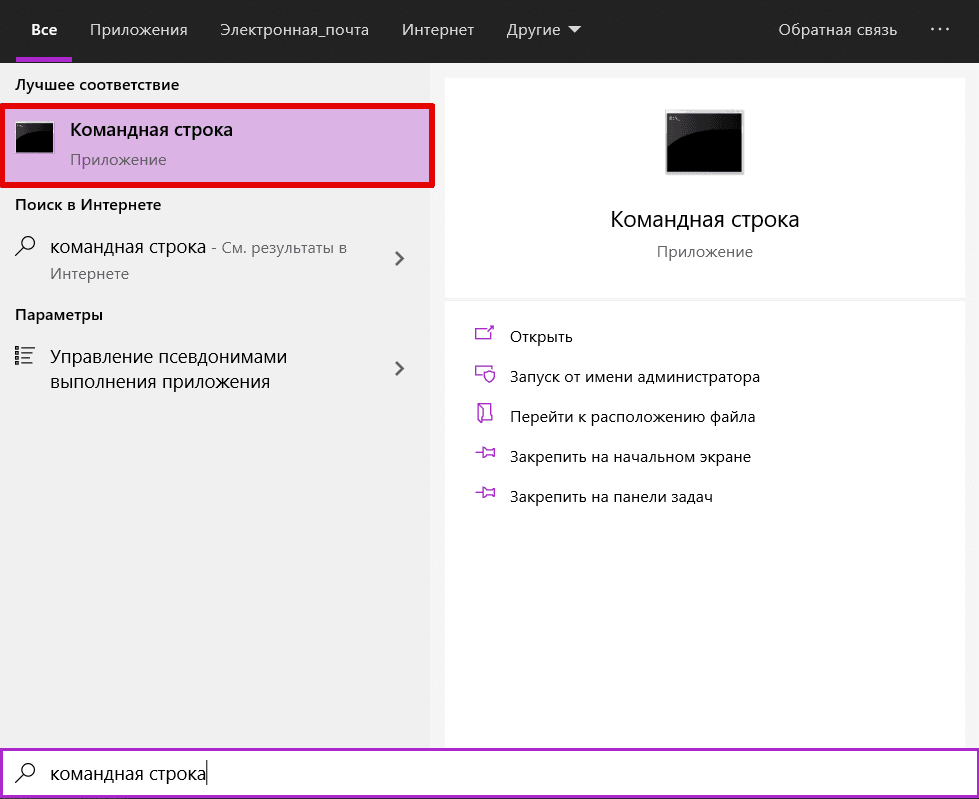
1) Откройте командную строку. Для этого введите в поисковую строку «Командная строка» и выберите появившееся приложение:
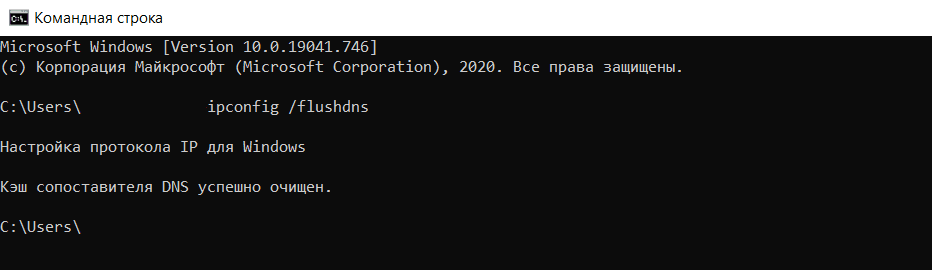
2) Введите команду:
3) Дождитесь сообщения об очистке кэша:
1) Откройте терминал клавишами Ctrl+Alt+T.
2) Введите команду:
Для Ubuntu:
sudo service network-manager restartДля других дистрибутивов:
sudo /etc/init.d/nscd restart1) Войдите в терминал. Для этого нажмите клавиши Command + Space. Введите Терминал и нажмите на найденное приложение.
2) Введите команду:
sudo killall -HUP mDNSResponderГотово, вы очистили кэш DNS.
6) Обратитесь в техподдержку вашего интернет-провайдера. Возможно, это проблема сети, за которую отвечает провайдер.
Если эти действия не принесли результата – обратитесь в техническую поддержку сайта.
Если вы владелец сайта
Как исправить ошибку 504 на виртуальном хостинге
1 способ
Эта ошибка может возникнуть в случае, если для Nginx был превышен лимит на время ответа сайта. По умолчанию это 30 секунд, при этом среднее время загрузки сайта не должно превышать 1-3 секунды.
Если скрипты вашего сайта должны исполняться дольше 30 секунд, вы можете миновать Nginx и обратиться к сайту по другим портам. Если ваша панель управления хостингом:
- ISPManager – используйте порт 8081
- cPanel или Plesk – используйте порт 8080.
2 способ
Если этот вариант вам не подходит, рекомендуем перенести ваш сайт на Облачный сервер, на котором доступна гибкая настройка сервера, в том числе и лимитов. Для этого закажите услугу «Облачные серверы» и перенесите сайт по инструкции Как перенести сайты между услугами REG.RU.
3 способ
Также вы можете изменить директиву max_execution_time в файле php.ini. Она указывает на время, за которое должен отрабатываться скрипт. Для этого:
- 1.
-
2.
Укажите нужное значение в строке:
Где 30 – время выполнения скрипта в секундах.
4 способ
Если вы используете CDN, проблема может быть связана с ней.
Что такое CDN
CDN – это сетевая инфраструктура, которая распределена географически. Она обеспечивает быструю загрузку контента пользователям веб-сервисов и сайтов. Серверы, которые входят в состав CDN, географически расположены так, чтобы сделать время ответа сайта или сервиса минимальным для пользователей.
Пользователь ищет ресурс и тем самым посылает запрос. Запрос идентифицируется и направляется на PoP – на ближайший к пользователю кэширующий сервер в этой инфраструктуре. Возможны два варианта:
- Если в кэше PoP есть данные об этом запросе, он отвечает браузеру, а тот отображает контент.
- Если в кэше этого сервера нет данных, запрос переадресовывается к ориджину – центральному серверу, на котором хранятся все данные. Когда ориджин отвечает на запрос, PoP кэширует его и передаёт ответ браузеру. После этого контент отображается в браузере.
Ошибку 504 может вернуть кэширующий сервер, если превышено время ожидания от центрального сервера.
Если ошибку исправить не удалось, обратитесь в техническую поддержку.
Как исправить ошибку 504 на VPS
1 способ
Эта ошибка может возникнуть в случае, если для Nginx был превышен лимит на время ответа сайта. По умолчанию это 30 секунд, при этом среднее время загрузки сайта не должно превышать 1-3 секунды.
Чтобы избавиться от этой ошибки, попробуйте повысить время ожидания веб-сервера Nginx.
2 способ
Также ошибка 504 может возникать, когда Nginx используется как прокси-сервер для Apache. В этом случае нужно настроить параметры времени ожидания при проксировании. Максимальное время исполнения скрипта в настройках веб-сервера — 300 секунд.
Изменить параметры ожидания можно в конфигурационном файле nginx.conf. Для этого:
-
1.
Подключитесь к серверу по SSH.
-
2.
Откройте конфигурационный файл с помощью команды:
sudo nano /etc/nginx/nginx.conf -
3.
Добавьте строки в блоке server:
#server {

#...

proxy_connect_timeout 600;
proxy_send_timeout 600;
proxy_read_timeout 600;
send_timeout 600;

#...
#}
Где 600 — время в секундах.
-
4.
Перезапустите Nginx с помощью команды:
Если решить проблему не удалось, обратитесь в техническую поддержку или на тематические форумы по Nginx.
Roblox is a massive platform that spans the website client and the game launcher, so it’s no surprise that players experience issues from time to time. Here’s a list of all the known error codes with potential fixes and/or reasons for the error.
Players may experience issues on both the Roblox website and the Roblox game launcher. Having trouble with issues that aren’t related to this list? We also have a guide on How to check Roblox server status with methods to quickly check if your Roblox issues are related to your home connection, or if downtime occurs worldwide.
Check out these error codes for issues related to the Roblox website.
| Error | Description | Fix/Reason for Error |
| 503 | The request could not be satisfied. | Occurs during a Roblox outage or downtime. Does not involve website maintenance. |
| 504 | This page isn’t working: roblox.com took too long to respond.» (Chrome) | Web-host timeout. Most likely caused by Roblox maintenance/downtime. Or, user experiencing faulty internet connection. |
| Access Denied | 403 — You don’t have permission to view this page. | User attempted to view a restricted page. |
| An error occurred, please try again. | Error | Invalid IP or attempting to load on some VPNs. |
| Avatar Page Error | The avatar page is temporarily unavailable. | Avatar page is unavailable because of technical difficulties. |
| Bad Request | 400 | There was a problem with your request. | Occurs when web request made by device is incorrect. |
| Down For Maintenance | We’re making things more awesome. Be back soon.
This site is currently offline for maintenance and upgrades. Please check back soon! Our payment system is currently under maintenance. Please check back shortly! |
Closed maintenance or Roblox admins are fixing something on the site. |
| Game Pass Loading Error | Failed to load Game Passes. Please try again later. | Caused due to Roblox issues or user is experiencing faulty internet connection. |
| Internal Server Error | 500 | An unexpected error occurred | Internal error on server. Contact customer service at [email protected] if issue persists. |
| Item Owned | Item Owned: You already own this item. | User attempted to purchase an item they already own. |
| Library Error | Library temporarily unavailable, please try again later. | User entered an invalid Category # in the URL bar. |
| Maximum Friends Error | Unable to process request. That user currently has the max number of Friends allowed. | The user you are attempting to friend has reached max limit of friends allowed on account. |
| Page cannot be found or no longer exists | 404 | Page Not found | URL was typed incorrectly or user attempted to reach a profile with a terminated account. |
| Registration error | Sorry, an error occured. | Issues occurred on Roblox‘s end or user experiencing faulty internet connection. |
| Something went wrong | Error | An unexpected error occurred. Please try again later. | Error number in the error page URL was changed to a non-existent number. |
| Too Many Redirects | The page isn’t redirecting properly (Firefox)
This page isn’t working; www.roblox.com redirected you too many times (Chrome) |
Occurs on accounts with a poison ban. |
| Unable to join | Unable to join: You cannot join this VIP server because this game is private | User attempted to join a VIP server on a private/under review game. |
| Updating Avatar Error | Items you don’t own in this outfit: (X) | User attempted to wear a limited hat that has traded or sold. User is wearing a previously deleted item. |
Check out these error codes for all issues related to Roblox games and the game launcher.
| Error | Description | Fix/Reason for Error |
| Client Crash | An unexpected error occurred and Roblox needs to quit. We’re sorry! | Possible causes: ran out of memory, high ping, extreme lag, connecting to a game while using a known exploit. |
| Connection Fail | Failed to download or apply critical settings, please check your internet connection. Error info: (error info) | User lost internet or DNS resolution failed while connecting to Roblox. |
| Error starting game | An error occurred trying to launch the game. Please try again later
Mobile version (Android): |
User experiencing faulty internet connection or Roblox undergoing maintenance. Player may also have attempted to join a game while their account was disabled. |
| HttpSend RequestFailed | An error occured while starting roblox.’Details: HttpSendRequest Failed.
Error: A connection with the server could not be established. |
Roblox having trouble communicating certain bits of information to servers. |
| Loading Error 0x1 (Intentional) (Unused) | Roblox cannot startup. User code = 0x1 | User violated Roblox terms of service. |
| Purchase Error | #1: This item is not currently for sale. Your account has not been charged.
#2: Your purchase failed because your account does not have enough Robux. Your account has not been charged. #3: Your purchase of [name of item] failed because something went wrong. Your account has not been charged. Please try again later. |
#1: User attempted to purchase an offsale item.
#2: User did not have enough Robux. #3: Something went wrong during purchase. Try again later. |
| 6 | An error occurred while starting Roblox; Details: … Error Code: 6 | Launcher timed out while downloading a new Roblox version or launching a game. Most likely occurred due to faulty internet connection or anti-virus detections. |
| 256/274 | Developer has shut down all game servers or game server has shut down for other reasons, please reconnect (Error Code: 256)
The game’s developer has temporarily shut down the server. Please try again. (Error Code: 274) |
Occurs when a developer manually closed a game server, a VIP server owner shut down the VIP server, or when a player is banned while in-game. |
| 260 | There was a problem receiving data, please reconnect. (Error Code: 260) | No data being received by Roblox web servers. |
| 261 | Error while receiving data, please reconnect. (Error Code: 261
There was a problem streaming data, please reconnect. (Error Code: 261) |
Occurred due to faulty internet connect, Roblox downtime, or other unknown issues. |
| 262 | There was a problem sending data, please reconnect. (Error Code: 262) | Game could not load after data failed to send. |
| 264 | The same account launched the game from a different device. Reconnect if you prefer to use this device. (Error Code: 264)
You are already playing a game. Please shut down the other game and try again. (Error Code: 264) |
Occurs when a second client starts on the same account. Meaning, an unknown user might be signed onto user’s account. Account might be compromised. |
| 266 | Your connection timed out. Check your internet connection and try again. (Error Code: 266) | User’s connection lagged or was AFK for a long time. |
| 267 | You were kicked from this game: [Reason] (Error Code: 267)
You have been kicked from the game (Error Code: 267) |
User was kicked from a game session using a script. Most likely occurred due to a script inserted by game developer. |
| 268 | You have been kicked by the server. Please close and rejoin another game (Error Code: 268)
You have been kicked due to unexpected client behavior. (Error Code: 268) |
Occurs due to general connection issues, user employed exploits, or user experiencing lag. Can also occur due to compatibility issues depending on the operating system. |
| 271 | #1: Server was shut down due to no active players. (Error Code: 271)
#2: You have been kicked by the server, please reconnect. (Error Code: 271) #3: Unable to find instance |
#1: All players in server were inactive at the same time.
#2: Player joined server while server was attempting to shut down. #3: Old version of inactive players issue. |
| 272 | Disconnected due to the Security Key Mismatch (Error Code: 272)
Lost connection due to an error. (Error Code: 272) |
Can occur due to user exploiting in games. |
| 273 | Disconnected from the game, possibly due to the game joined from another device (Error Code: 273)
The same account launched the game from a different device. Reconnect if you prefer to use this device. (Error Code: 273) |
Same as error 264, except user also joined a game while banned or warned. |
| 275 | Roblox has shut down the server for maintenance. Please try again. (Error Code: 275)
Roblox has shut down this game server for maintenance (Error Code: 275) |
Roblox closed due to maintenance or game was deleted while user was playing. |
| 277 | Lost connection to the game server, please reconnect (Error Code: 277)
Please check your internet connection and try again. (Error Code: 277) |
May occur due to these issues: User’s IP address changed, user turned off WiFi, user experienced additional general internet issues |
| 278 | You were disconnected for being idle 20 minutes (Error Code: 278) | Player was AFK for more than 20 minutes while in a game. |
| 279 | #1: Failed to connect to the Game. (ID = 17: Connection attempt failed.) (Error Code: 279)
#2: Failed to connect to the Game. (ID = 146: Illegal teleport destination.) #3: Failed to connect to the game. (ID = 148: Roblox version is out of date. Please uninstall and try again.) |
#1: Client unable to connect to game server, Roblox is down, or additional issues.
#2: Client attempted to teleport to an inactive place in game world. #3: Launcher or client must be updated or re-installed. |
| 280 | Your version of Roblox may be out of date. Please update Roblox and try again. (Error Code: 280) | Client needs updating. Check PC’s date and time are correct if issue persists. |
| 517 | This game is currently unavailable. Please try again later. (Error Code: 517)
This game has ended. (Error Code: 517) |
Client attempted to join a server while server was closing. May also occur if Roblox was uninstalled while user was in-game. |
| 522 | Followed user has left the game (Error Code: 522)
«The user you attempted to join has left the game (Error Code: 522) |
User attempted to join a player’s game after the player they are joining has left. |
| 523 | The status of the game has changed and you no longer have access. Please try again later. (Error Code: 523)
This game is restricted. (Error Code: 523) |
Server has shut down. |
| 524 | Not authorized to join this game. (Error Code: 524)
«You do not have permission to join this game. (Error Code: 524) |
Occurs during Roblox downtime, attempted to join a blocked VIP server, or attempted to join as a Guest. |
| 529 | An Http error has occurred. Please close the client and try again. (Error Code: 529)
We are experiencing technical difficulties. Please try again later. (Error Code: 529) |
Occurs when Roblox servers are down or slow. |
| 769 | Teleport Failed: Unknown exception. (Error Code: 769)
Teleport failed due to an unexpected error. (Error Code: 769) |
In-game teleportation failed for various reasons. Also occurs if reconnecting to game failed. |
| 770 | #1: Game’s root place is not active. (Error Code: 770)
#2: Attempted to teleport to a place that does not exist. (Error Code: 770) #3: Teleport Failed. Unknown error. (Error Code: 770) |
#1: Player attempted to join an inactive part of game.
#2: Player attempted to teleport to an inactive or deleted section of game. #3: Common in games that use teleport. |
| 771 | Teleport failed, the server is no longer available. (Error Code: 771) | Player attempted to teleport to an inactive or deleted section of game. |
| 772 | Teleport failed, the server is full. (Error Code: 772) | Player attempted to teleport to a full game server. |
| 773 | Teleport Failed: This game has not been approved, yet. (Error Code: 773)
Teleport Failed: Attempted to teleport to a place that is restricted. (Error Code: 773) |
Player attempted to teleport to a non-approved game, or a game where player was not permitted to join. |
Looking for free Roblox rewards? We have a ton of them in our Roblox Game Codes post! You can also get a bunch of free stuff via our Roblox Promo Codes page.
Roblox is a massive platform that spans the website client and the game launcher, so it’s no surprise that players experience issues from time to time. Here’s a list of all the known error codes with potential fixes and/or reasons for the error.
Players may experience issues on both the Roblox website and the Roblox game launcher. Having trouble with issues that aren’t related to this list? We also have a guide on How to check Roblox server status with methods to quickly check if your Roblox issues are related to your home connection, or if downtime occurs worldwide.
Check out these error codes for issues related to the Roblox website.
| Error | Description | Fix/Reason for Error |
| 503 | The request could not be satisfied. | Occurs during a Roblox outage or downtime. Does not involve website maintenance. |
| 504 | This page isn’t working: roblox.com took too long to respond.» (Chrome) | Web-host timeout. Most likely caused by Roblox maintenance/downtime. Or, user experiencing faulty internet connection. |
| Access Denied | 403 — You don’t have permission to view this page. | User attempted to view a restricted page. |
| An error occurred, please try again. | Error | Invalid IP or attempting to load on some VPNs. |
| Avatar Page Error | The avatar page is temporarily unavailable. | Avatar page is unavailable because of technical difficulties. |
| Bad Request | 400 | There was a problem with your request. | Occurs when web request made by device is incorrect. |
| Down For Maintenance | We’re making things more awesome. Be back soon.
This site is currently offline for maintenance and upgrades. Please check back soon! Our payment system is currently under maintenance. Please check back shortly! |
Closed maintenance or Roblox admins are fixing something on the site. |
| Game Pass Loading Error | Failed to load Game Passes. Please try again later. | Caused due to Roblox issues or user is experiencing faulty internet connection. |
| Internal Server Error | 500 | An unexpected error occurred | Internal error on server. Contact customer service at [email protected] if issue persists. |
| Item Owned | Item Owned: You already own this item. | User attempted to purchase an item they already own. |
| Library Error | Library temporarily unavailable, please try again later. | User entered an invalid Category # in the URL bar. |
| Maximum Friends Error | Unable to process request. That user currently has the max number of Friends allowed. | The user you are attempting to friend has reached max limit of friends allowed on account. |
| Page cannot be found or no longer exists | 404 | Page Not found | URL was typed incorrectly or user attempted to reach a profile with a terminated account. |
| Registration error | Sorry, an error occured. | Issues occurred on Roblox‘s end or user experiencing faulty internet connection. |
| Something went wrong | Error | An unexpected error occurred. Please try again later. | Error number in the error page URL was changed to a non-existent number. |
| Too Many Redirects | The page isn’t redirecting properly (Firefox)
This page isn’t working; www.roblox.com redirected you too many times (Chrome) |
Occurs on accounts with a poison ban. |
| Unable to join | Unable to join: You cannot join this VIP server because this game is private | User attempted to join a VIP server on a private/under review game. |
| Updating Avatar Error | Items you don’t own in this outfit: (X) | User attempted to wear a limited hat that has traded or sold. User is wearing a previously deleted item. |
Check out these error codes for all issues related to Roblox games and the game launcher.
| Error | Description | Fix/Reason for Error |
| Client Crash | An unexpected error occurred and Roblox needs to quit. We’re sorry! | Possible causes: ran out of memory, high ping, extreme lag, connecting to a game while using a known exploit. |
| Connection Fail | Failed to download or apply critical settings, please check your internet connection. Error info: (error info) | User lost internet or DNS resolution failed while connecting to Roblox. |
| Error starting game | An error occurred trying to launch the game. Please try again later
Mobile version (Android): |
User experiencing faulty internet connection or Roblox undergoing maintenance. Player may also have attempted to join a game while their account was disabled. |
| HttpSend RequestFailed | An error occured while starting roblox.’Details: HttpSendRequest Failed.
Error: A connection with the server could not be established. |
Roblox having trouble communicating certain bits of information to servers. |
| Loading Error 0x1 (Intentional) (Unused) | Roblox cannot startup. User code = 0x1 | User violated Roblox terms of service. |
| Purchase Error | #1: This item is not currently for sale. Your account has not been charged.
#2: Your purchase failed because your account does not have enough Robux. Your account has not been charged. #3: Your purchase of [name of item] failed because something went wrong. Your account has not been charged. Please try again later. |
#1: User attempted to purchase an offsale item.
#2: User did not have enough Robux. #3: Something went wrong during purchase. Try again later. |
| 6 | An error occurred while starting Roblox; Details: … Error Code: 6 | Launcher timed out while downloading a new Roblox version or launching a game. Most likely occurred due to faulty internet connection or anti-virus detections. |
| 256/274 | Developer has shut down all game servers or game server has shut down for other reasons, please reconnect (Error Code: 256)
The game’s developer has temporarily shut down the server. Please try again. (Error Code: 274) |
Occurs when a developer manually closed a game server, a VIP server owner shut down the VIP server, or when a player is banned while in-game. |
| 260 | There was a problem receiving data, please reconnect. (Error Code: 260) | No data being received by Roblox web servers. |
| 261 | Error while receiving data, please reconnect. (Error Code: 261
There was a problem streaming data, please reconnect. (Error Code: 261) |
Occurred due to faulty internet connect, Roblox downtime, or other unknown issues. |
| 262 | There was a problem sending data, please reconnect. (Error Code: 262) | Game could not load after data failed to send. |
| 264 | The same account launched the game from a different device. Reconnect if you prefer to use this device. (Error Code: 264)
You are already playing a game. Please shut down the other game and try again. (Error Code: 264) |
Occurs when a second client starts on the same account. Meaning, an unknown user might be signed onto user’s account. Account might be compromised. |
| 266 | Your connection timed out. Check your internet connection and try again. (Error Code: 266) | User’s connection lagged or was AFK for a long time. |
| 267 | You were kicked from this game: [Reason] (Error Code: 267)
You have been kicked from the game (Error Code: 267) |
User was kicked from a game session using a script. Most likely occurred due to a script inserted by game developer. |
| 268 | You have been kicked by the server. Please close and rejoin another game (Error Code: 268)
You have been kicked due to unexpected client behavior. (Error Code: 268) |
Occurs due to general connection issues, user employed exploits, or user experiencing lag. Can also occur due to compatibility issues depending on the operating system. |
| 271 | #1: Server was shut down due to no active players. (Error Code: 271)
#2: You have been kicked by the server, please reconnect. (Error Code: 271) #3: Unable to find instance |
#1: All players in server were inactive at the same time.
#2: Player joined server while server was attempting to shut down. #3: Old version of inactive players issue. |
| 272 | Disconnected due to the Security Key Mismatch (Error Code: 272)
Lost connection due to an error. (Error Code: 272) |
Can occur due to user exploiting in games. |
| 273 | Disconnected from the game, possibly due to the game joined from another device (Error Code: 273)
The same account launched the game from a different device. Reconnect if you prefer to use this device. (Error Code: 273) |
Same as error 264, except user also joined a game while banned or warned. |
| 275 | Roblox has shut down the server for maintenance. Please try again. (Error Code: 275)
Roblox has shut down this game server for maintenance (Error Code: 275) |
Roblox closed due to maintenance or game was deleted while user was playing. |
| 277 | Lost connection to the game server, please reconnect (Error Code: 277)
Please check your internet connection and try again. (Error Code: 277) |
May occur due to these issues: User’s IP address changed, user turned off WiFi, user experienced additional general internet issues |
| 278 | You were disconnected for being idle 20 minutes (Error Code: 278) | Player was AFK for more than 20 minutes while in a game. |
| 279 | #1: Failed to connect to the Game. (ID = 17: Connection attempt failed.) (Error Code: 279)
#2: Failed to connect to the Game. (ID = 146: Illegal teleport destination.) #3: Failed to connect to the game. (ID = 148: Roblox version is out of date. Please uninstall and try again.) |
#1: Client unable to connect to game server, Roblox is down, or additional issues.
#2: Client attempted to teleport to an inactive place in game world. #3: Launcher or client must be updated or re-installed. |
| 280 | Your version of Roblox may be out of date. Please update Roblox and try again. (Error Code: 280) | Client needs updating. Check PC’s date and time are correct if issue persists. |
| 517 | This game is currently unavailable. Please try again later. (Error Code: 517)
This game has ended. (Error Code: 517) |
Client attempted to join a server while server was closing. May also occur if Roblox was uninstalled while user was in-game. |
| 522 | Followed user has left the game (Error Code: 522)
«The user you attempted to join has left the game (Error Code: 522) |
User attempted to join a player’s game after the player they are joining has left. |
| 523 | The status of the game has changed and you no longer have access. Please try again later. (Error Code: 523)
This game is restricted. (Error Code: 523) |
Server has shut down. |
| 524 | Not authorized to join this game. (Error Code: 524)
«You do not have permission to join this game. (Error Code: 524) |
Occurs during Roblox downtime, attempted to join a blocked VIP server, or attempted to join as a Guest. |
| 529 | An Http error has occurred. Please close the client and try again. (Error Code: 529)
We are experiencing technical difficulties. Please try again later. (Error Code: 529) |
Occurs when Roblox servers are down or slow. |
| 769 | Teleport Failed: Unknown exception. (Error Code: 769)
Teleport failed due to an unexpected error. (Error Code: 769) |
In-game teleportation failed for various reasons. Also occurs if reconnecting to game failed. |
| 770 | #1: Game’s root place is not active. (Error Code: 770)
#2: Attempted to teleport to a place that does not exist. (Error Code: 770) #3: Teleport Failed. Unknown error. (Error Code: 770) |
#1: Player attempted to join an inactive part of game.
#2: Player attempted to teleport to an inactive or deleted section of game. #3: Common in games that use teleport. |
| 771 | Teleport failed, the server is no longer available. (Error Code: 771) | Player attempted to teleport to an inactive or deleted section of game. |
| 772 | Teleport failed, the server is full. (Error Code: 772) | Player attempted to teleport to a full game server. |
| 773 | Teleport Failed: This game has not been approved, yet. (Error Code: 773)
Teleport Failed: Attempted to teleport to a place that is restricted. (Error Code: 773) |
Player attempted to teleport to a non-approved game, or a game where player was not permitted to join. |
Looking for free Roblox rewards? We have a ton of them in our Roblox Game Codes post! You can also get a bunch of free stuff via our Roblox Promo Codes page.