Многим из вас известно, что при наборе несуществующего URL сайта «вылазит» ошибка 404, которая сообщает вам, что введённый адрес не правильный, либо запрошенная страница не существует. Вот так выглядит базовый вывод в Drupal 7 этой ошибки:
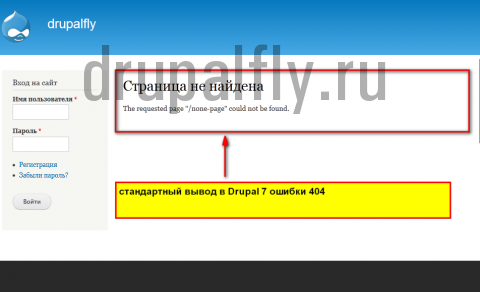
Из админки сайта можно прописать свою существующую страницу, которая будет показываться пользователю, если тот набрал неправильный URL.
Продемонстрирую:
1.Для начала нам необходимо создать эту самую страницу
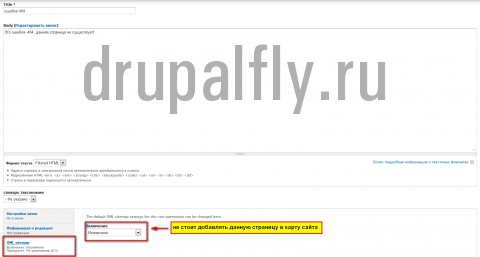
Замечу, что если вы используете карту сайта (модуль XML-sitemap (создание «карты сайта» можно почитать здесь)), то добавлять её не нужно, также нет необходимости разрешать поисковым системам её индексировать, поэтому не забудьте добавить запись в файл «robots.txt», который должен у вас находиться в корне сайта – запись
Disallow: /node/id // url страницы
В результате эта страница у нас выглядит вот так:
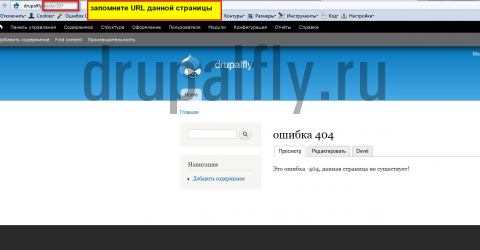
Запомните URL данной страницы
2.Идём в Конфигурация->Информация о сайте и добавляем в поле «Страница по умолчанию для ошибки 404 (не найдено)» URL созданной нашей страницы.
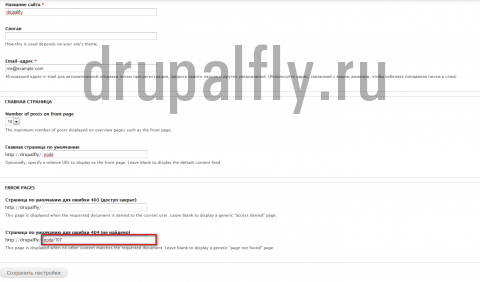
И сохраняем настройки.
3. Теперь для проверки наберём адрес не существующей страницы и посмотрим, что у нас получилось:
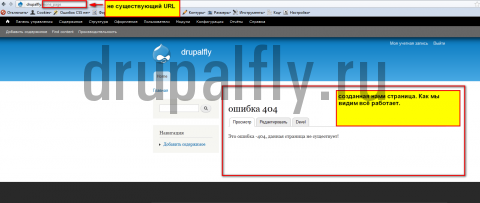
Как мы видим всё у нас работает.
Но есть одно «НО», вывод не очень нагляден, другими словами «НЕ КАШЕРЕН». Так как помимо вывода самой страницы у нас выводятся и блоки и меню , а нам необходимо от всего этого избавиться. Поэтому перекроем данную страницу на свою, как перекрыть любую страницу сайта на свою можно почитать вот здесь.
Перекрываем страницу.
1.Создаём файл с название
page--node--ID.tpl.php//вместо ID прописываете id ноды
2.Вносим в него необходимую разметку и сохраняем его в формате UTF-8
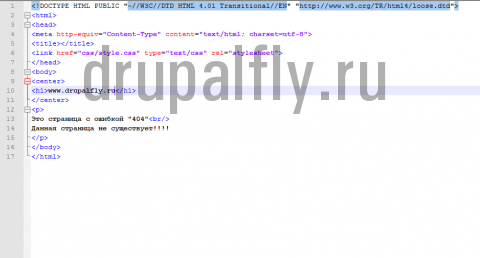
3.Переносим созданный файл в корень нашего шаблона сайта, пересохраняем наш шаблон из админки и для уверености очистим кеш.
4. Смотрим что у нас получилось:
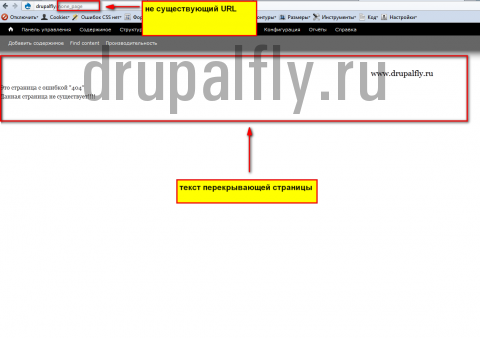
Как мы видим, всё работает именно так, как мы и хотели. Если вам необходимо создать также и свою страницу для ошибки «403-доступ запрещён», то шаги создания полностью аналогичны.
Доброго дня всем.
Задумался над решением такой проблемы: в Drupal 7 при обращении к несуществующей странице, например www.domain.tld/production/not_exist выдается полноценная html-страница с кодом ответа HTTP 200 OK, а при дополнении к существующей ноде любого бредового суффикса, например, www.domain.tld/production/some_product/any_suffix, тем не менее, выдается страница some_product.
Возможно ли как-то заставить Drupal отдавать именно 404-ю ошибку?
- Drupal7
- Есть вопрос
- Блог
- Войдите или зарегистрируйтесь, чтобы отправлять комментарии
Комментарии

Айдар
21 мая 2012 в 12:39
Попробуйте поиск модулей по оргу по ключу «404» — вроде что-то было. Для вьюс точно было.

inspire
21 мая 2012 в 13:03
Так и дело-то в том, что вьюсами дело не ограничичвается. Есть модуль Fast 404, но он ограничивается подменой вывдоа друпала, HTTP-код, тем не менее, 200 ОК. А модулей, решающих вышеозначенную задачу я не нашел.
Виктор Степаньк…
21 мая 2012 в 14:21
inspire
21 мая 2012 в 14:31
RxB, этот модуль применим для Views, да и то, только для Drupal 6, а меня интересует ситуация не только с вьюсами, но и с нодами, причем для 7-й версии.
inspire
24 мая 2012 в 12:46
Таких модулей я не нашел. Видимо, придется искать в коде где проверяется условие существования страниц. Если кто подскажет — буду признателен.
inspire
24 мая 2012 в 14:56
Для несуществующих страниц решение придумал такое: в page.tpl.php в начале написал
<?php $current_path = current_path();
            if (!drupal_valid_path($current_path))
                header("HTTP/1.0 404 Not Found");?>
Но, это решение не прокатывает, если дописывать суффикс вида www.domain.tld/node/10/SUFFIX — все равно, drupal_valid_path возвращает TRUE.

rimen
4 июня 2012 в 10:03
Если поглядеть на функцию [api=drupal_deliver_html_page], то можно понять, что Drupal должен верно ставит заголовки сам.
Проверьте ответы Ваших страниц _http://mainspy.ru/otvet_servera или в Яндексе.
Ответ одной из 7-к по абракадабровому запросу.
HTTP/1.1 404 Not Found
Server: nginx
Date: Mon, 04 Jun 2012 05:45:58 GMT
Content-Type: text/html; charset=utf-8
Connection: keep-alive
Keep-Alive: timeout=20
X-Drupal-Cache: MISS
Expires: Sun, 19 Nov 1978 05:00:00 GMT
Last-Modified: Mon, 04 Jun 2012 05:45:58 +0000
Cache-Control: public, max-age=0
ETag: «1338788758-0»
Content-Language: ru
X-Generator: Drupal 7 (http://drupal.org)
Vary: Cookie,Accept-Encoding
inspire
4 июня 2012 в 16:40
«rimen» wrote:
Проверьте ответы Ваших страниц _http://mainspy.ru/otvet_servera или в Яндексе.
Ну вот, к примеру, обращение к несуществующему (по идее) URL — www.domain.tld/node/10/SUFFIX (причем, www.domain.tld/node/10 реально существует)
HTTP/1.1 200 OK
Server: nginx/1.0.6
Date: Mon, 04 Jun 2012 12:35:56 GMT
Content-Type: text/html; charset=utf-8
Connection: keep-alive
X-Powered-By: PHP/5.2.10
Expires: Sun, 19 Nov 1978 05:00:00 GMT
Last-Modified: Mon, 04 Jun 2012 12:35:55 +0000
Cache-Control: no-cache, must-revalidate, post-check=0, pre-check=0
ETag: «1338813355»
Content-Language: ru
Link: ; rel=»canonical»,; rel=»shortlink»
X-Generator: Drupal 7 (http://drupal.org)
Естественно, возвращается код 200, потому что сам друпал выводит страницу www.domain.tld/node/10, игнорируя все, что там дальше написано после слеша. Т.е. работают и www.domain.tld/node/10/SUFFIX и www.domain.tld/node/10/SUFFIX/QWERTY
rimen
5 июня 2012 в 10:34
«inspire» wrote:
в Drupal 7 при обращении к несуществующей странице, например www.domain.tld/production/not_exist выдается полноценная html-страница с кодом ответа HTTP 200 OK, а при дополнении к существующей ноде…
вопрос в двух частях, мой ответ на первую — действительно несуществующие страницы отдаются корректно.
вторая — не такая уж и проблема ,если только не плодить такие «неправильные ссылки» руками.
inspire
8 июня 2012 в 12:43
«rimen» wrote:
вторая — не такая уж и проблема ,если только не плодить такие «неправильные ссылки» руками.
Я-то их плодить не собираюсь, конечно )))
Это вопрос безопасности, скорее. Да и логичнее, на мой взгляд, так поступать.
DenisVS
25 июня 2013 в 7:07
Актуально.
Раньше сайт был на Joomla, и проиндексировалась куча страниц вида /?page=13&option=com_virtuemart&category_id=1
Отдаётся 200, дублируя при этом страницу /?page=13
Смотрю лог, яндекс и гугл боты до сих пор дёргают старые URL наряду с новыми. Думал, время лечит, карта сайта, ан нет, год прошёл, а воз и ныне там. В результате, с такой кучей мусора неполная индексация нормальных страниц.
Надо как-то радикально решить, чтобы 301 отдавало. Или хотя бы 404.
rimen
25 июня 2013 в 9:07
Смотри как работает модуль Global Redirect — например, он проверяет существование алиаса для системного пути и при необходимости отдает 301 на корректный путь. Воспользовавшись подходом и написав свой модуль, думаю, можно аналогично без проблем отдавать 404 когда нужно
DenisVS
30 июня 2013 в 9:57
Решил реврайтами в .htaccess, оказалось проще.
Что-то сразу не докумекал…
I need to throw 404 error in module. Or may be there are any possibility to set required option for menu hook?

Muhammad Reda
26.1k14 gold badges91 silver badges103 bronze badges
asked Jun 22, 2012 at 7:53

For Drupal 8+
use SymfonyComponentHttpKernelExceptionNotFoundHttpException;
// then
throw new NotFoundHttpException();
answered May 7, 2016 at 0:36
Muhammad RedaMuhammad Reda
26.1k14 gold badges91 silver badges103 bronze badges
Look into the drupal_add_http_header() function to play with the HTTP header attributes. Also make sure you stick this at the top of your module’s code to make sure it executes first. Also, you might find this helpful. https://www.drupal.org/project/generate_errors
answered Nov 13, 2014 at 2:23

dsteplightdsteplight
7797 silver badges5 bronze badges
On my site, some nodes are unpublished forever instead of being deleted. I’d like to return Page not found (404) for anonymous trying to access unpublished node pages instead of Access denied (403). It’s not about displaying a different message to the user, but rather about returning the 404 error code (important for bots).
So I’ve added the following to my module:
function mymodule_init() {
global $user;

  $normal_path = current_path();
  $parts=explode('/', $normal_path);
  $nid_part = $parts[1];
  $node = node_load($nid_part);
  if (!isset($node)) {
    return;
  }
  if (($node->status == 0) &&
    ($node->nid == $nid_part) &&
    ($user->uid == 0)) {
    drupal_not_found();
  }
}
But I still get Access denied as anonymous user on unpublished pages. How to implement it?
asked Apr 30, 2015 at 20:59

1
You should be able to do it with Rules:
The Rules module allows site administrators to define conditionally
executed actions based on occurring events (known as reactive or ECA
rules). It’s a replacement with more features for the trigger module
in core and the successor of the Drupal 5 workflow-ng module.
Using Rules…
Event: Content is being Viewed (by content type if you desire)
Condition: Content is Published, Negate
Event: Redirect to custom 404 page

This requires that you set up a custom 404 page, but most people do that anyways, and core takes care of everything else.
Specify 403 and 404 error pages for more info on setting up a custom 403 and 404 page
answered Apr 30, 2015 at 21:51

GeoffGeoff
3,8772 gold badges12 silver badges23 bronze badges
2
My solution was to allow access to unpublished nodes, but then return a 404 result before rendering the page. If you have other modules controlling or depending on node_access(), this solution may not be for you.
/**
 * Implements hook_node_access().
 *
 * Allow users to view unpublished nodes, but modify them later to return 404
 * in hook_view_node_alter().
 */
function MODULE_node_access($node, $op, $account) {
  if ($op == 'view') {
    return NODE_ACCESS_ALLOW;
  }

  return NODE_ACCESS_IGNORE;
}

/**
 * Implements hook_node_view_alter().
 *
 * Provide a 404 page for unpublished nodes.
 * Access is allowed through hook_node_access().
 */
function MODULE_node_view_alter(&$build) {
  $node = $build['#node'];
  if ($node->status == NODE_NOT_PUBLISHED) {
    drupal_not_found();
    drupal_exit();
  }
}
My use case was much more limited, and so I was able to limit hook_node_access() to only affect permissions for anonymous users, and then have hook_node_view_alter() ignore logged in users.
I also inlined code from drupal_deliver_html_page() in order to provide a custom 404 message instead of the site-wide page given by drupal_not_found()
answered Jun 4, 2015 at 21:47

gapplegapple
1,54412 silver badges24 bronze badges
-
Use the view_unpublished module to grant access to unpublished nodes for anonymous users. — https://www.drupal.org/project/view_unpublished
-
Add this to your module:
    /**
     * Implements hook_init().
     */
    function MYMODULE_init() {
      // For anon users, show a 404 for unpublished content instead of a 403.
      if(user_is_anonymous() && ($node = menu_get_object()) && $node->status == NODE_NOT_PUBLISHED) {
      drupal_not_found();
      drupal_exit();
      }
    }
answered Dec 17, 2015 at 22:34

I have used Hook_preprocess to direct them to the ‘page not found’ page.
I was able to redirect them to the 404 page by the following code. hope this helps for someone in future.
This was written for a Drupal 6 site. I have slightly modified @camcam’s code for drupal 6. you’ll be able to use his code for drupal 7 and use drupal_exit() for exit() method.
function Hook_preprocess_page(&$vars) {
  global $user;

  if ($vars['title'] == 'Access denied') {
    $normal_path = $_GET['q'];
    $parts=explode('/', $normal_path);
    $nid_part = $parts[1];
    $node = node_load($nid_part);

    if (!isset($node)) {
      return;
    }

    if (($node->status == 0) &&
      ($node->nid == $nid_part) &&
      ($user->uid == 0)) {
      drupal_not_found();
      exit();
    }
  }
}
cheers. this is my first post here.

answered Jun 8, 2016 at 23:32

danuddaradanuddara
4484 silver badges10 bronze badges
Drupal’s page error messages are meant to be direct and to the point. If you want page error messages that are a little more user-friendly, Drupal allows you to customize them.
- Create two nodes, one for each kind of page error (403 and 404).
- Determine the ID number of the node you wish to redirect users to. One way to determine the node’s ID number is to visit the node and look at the number after the last slash in your browser’s address bar. This is your node’s ID number.
- Now enter the paths to your nodes in the appropriate boxes on your error reporting settings page. For example, if the node ID number for 403 error codes is «83,» you would type «node/83» into the «Default 403 (access denied) page» setting.
- Drupal 6
mysite.com/admin/settings/error-reporting - Drupal 7
mysite.com/admin/config/system/site-information
- Drupal 6
Because you are creating nodes, they will show up in the tracker and popular content blocks and anywhere else real nodes would be display. If this isn’t acceptable, there is a contributed module called Custom Error that avoids this problem.
Also consider the Drupal 7 contributed module, Redirect 403 to User Login. Which provides redirection to the login page and configurable 403 and 404 error messages.
I had a strange error today. Lukily, a friend of mine warned me about it. I could hardly be aware of it without his help. (Thanks, Iosif!) So…
Why does Drupal 7 throws 404 error (Page not found)?
There could be plenty of reasons, but I guess the reason here is a bit stranger. All urls looked absolutely normal to me. I am using Pathauto with clean urls on. So why only SOME users get the page not found error? While looking at access logs, it seemed absolutely random to me. Of course, I had no 301 or 302 redirection component in case of errors.
I also didn’t display a nice and friendly page for 404 errors (I thought I hadn’t any). Pretty ignorant, huh? Visitors were discouraged and left away without even bothering to use the search box.
After a little bit of reasearch, I found a topic on a forum (I can’t remember it, sorry) that gave me a hint.
I had a multilanguage module installed I almost have forgotten of. In the module’s settings page (admin/config/regional/language/configure) there were two checkboxes checked: User (Follow the user’s language preference) and Browser (Determine the language from the browser’s language settings).
With these settings on, the browsers who had a different default language other than English could have been redirected to a non existing page. That’s because the website’s interface is now in English only.
How to fix Drupal 7 Page not found error?
- Disable multilanguage support if not needed.
- Uncheck ALL support for automatic language detection in admin/config/regional/language/configure.
- Change all content’s default language to Language neutral (If you choose this you won’t be able to edit your content later) English (or your default website language). If you have lots of content use VBO + Administration Views.
- Lastly, monitor your 404 error pages and redirect them with Redirect module or other redirection module.
If I helped you with this article, leave some feedback please. I really enjoy reading comments!