Здравствуйте.
Ubuntu 16, FastCGI (Nginx + PHP-FPM), PHP 7.2.
Со вчерашнего дня сайт периодически выдает 502 ошибку, в лог пишет:
2018/09/02 08:41:18 [error] 7016#7016: *7584 recv() failed (104: Connection reset by peer) while reading response header from upstream, client: xx.xxx.xxx.xxx, server: site.com, request: "GET /page/url/ HTTP/1.1", upstream: "fastcgi://unix:/run/php/php7.2-fpm.sock:", host: "site.com"Мой конфиг:
user www-data;
worker_processes auto;
worker_rlimit_nofile 65000;
timer_resolution 100ms;
worker_priority -5;

error_log  /var/log/nginx/error.log warn;
pid        /var/run/nginx.pid;

events {
	worker_connections 4096;
	multi_accept on;
	use epoll;
}

http {
	include      /etc/nginx/mime.types;
	default_type application/octet-stream;

	log_format main '$remote_addr - $remote_user [$time_local] "$request" '
					'$status $body_bytes_sent "$http_referer" '
					'"$http_user_agent" "$http_x_forwarded_for"';

	access_log /var/log/nginx/access.log main;

	sendfile on;
	keepalive_timeout 65;

	reset_timedout_connection on;

	include /etc/nginx/conf.d/*.conf;
	include /etc/nginx/vhosts/*/*.conf;

	client_body_buffer_size 8m;
	client_max_body_size    128m;

	open_file_cache max=200000 inactive=20s;
	open_file_cache_valid 30s;
	open_file_cache_min_uses 2;
	open_file_cache_errors on;

	server {
		server_name      localhost;
		disable_symlinks if_not_owner;

		include /etc/nginx/vhosts-includes/*.conf;

		location @fallback {
			error_log /dev/null crit;

			proxy_pass http://127.0.0.1:8080;
			proxy_redirect http://127.0.0.1:8080 /;
			proxy_set_header Host $host;
			proxy_set_header X-Forwarded-For $proxy_add_x_forwarded_for;
			proxy_set_header X-Forwarded-Proto $scheme;

			access_log off ;
		}

		listen 80;
		listen [::]:80;
	}
}
И второй конфиг:
server {
	server_name site.com www.site.com;
	charset UTF-8;
	index index.php;
	disable_symlinks if_not_owner from=$root_path;
	include /etc/nginx/vhosts-includes/*.conf;
	include /etc/nginx/vhosts-resources/site.com/*.conf;
	error_log /var/www/httpd-logs/site.com.error.log crit;
	ssi on;
	return 301 https://$host:443$request_uri;
	set $root_path /var/www/www-root/data/www/site.com;
	root $root_path;
	gzip on;
	gzip_comp_level 5;
	gzip_disable "msie6";
	gzip_types text/plain text/css application/json application/x-javascript text/xml application/xml application/xml+rss text/javascript application/javascript;
	error_log /var/www/httpd-logs/site.com.error.log notice;
	location ~* ^.+.(jpg|jpeg|gif|png|ico|css|js|ico)$ {
		expires 7d;
	}
	location / {
		try_files $uri /index.php?do=$uri;
		location ~ [^/].ph(pd*|tml)$ {
			try_files /does_not_exists @php;
		}
	}
	location @php {
		fastcgi_index index.php;
		fastcgi_param PHP_ADMIN_VALUE "sendmail_path = /usr/sbin/sendmail -t -i -f znleha@yandex.ru";
		fastcgi_pass unix:/run/php/php7.2-fpm.sock;
		fastcgi_split_path_info ^((?U).+.ph(?:pd*|tml))(/?.+)$;
		try_files $uri =404;

		fastcgi_buffers 4 512k;
		fastcgi_busy_buffers_size 512k;
		fastcgi_temp_file_write_size 512k;

		include fastcgi_params;
	}
	access_log off;
	listen 77.222.63.224:80 default_server;
	listen [2a02:408:7722:54:77:222:63:224]:80 default_server;
}
server {
	server_name site.com www.site.com;
	ssl_certificate "/var/www/httpd-cert/www-root/site.com_le1.crtca";
	ssl_certificate_key "/var/www/httpd-cert/www-root/site.com_le1.key";
	ssl_ciphers EECDH:+AES256:-3DES:RSA+AES:!NULL:!RC4;
	ssl_prefer_server_ciphers on;
	ssl_protocols TLSv1 TLSv1.1 TLSv1.2;
	add_header Strict-Transport-Security "max-age=31536000;";
	ssl_dhparam /etc/ssl/certs/dhparam4096.pem;
	charset UTF-8;
	index index.php;
	disable_symlinks if_not_owner from=$root_path;
	include /etc/nginx/vhosts-includes/*.conf;
	include /etc/nginx/vhosts-resources/site.com/*.conf;
	error_log /var/www/httpd-logs/site.com.error.log crit;
	ssi on;
	set $root_path /var/www/www-root/data/www/site.com;
	root $root_path;
	gzip on;
	gzip_comp_level 5;
	gzip_disable "msie6";
	gzip_types text/plain text/css application/json application/x-javascript text/xml application/xml application/xml+rss text/javascript application/javascript;
	error_log /var/www/httpd-logs/site.com.error.log notice;
	listen [2a02:408:7722:54:77:222:63:224]:443 ssl default_server;
	listen 77.222.63.224:443 ssl default_server;
	location ~* ^.+.(jpg|jpeg|gif|png|ico|css|js|ico)$ {
		expires 7d;
	}
	location / {
		try_files $uri /index.php?do=$uri;
		location ~ [^/].ph(pd*|tml)$ {
			try_files /does_not_exists @php;
		}
	}
	location @php {
		fastcgi_index index.php;
		fastcgi_param PHP_ADMIN_VALUE "sendmail_path = /usr/sbin/sendmail -t -i -f znleha@yandex.ru";
		fastcgi_pass unix:/run/php/php7.2-fpm.sock;
		fastcgi_split_path_info ^((?U).+.ph(?:pd*|tml))(/?.+)$;
		try_files $uri =404;

		fastcgi_buffers 4 512k;
		fastcgi_busy_buffers_size 512k;
		fastcgi_temp_file_write_size 512k;

		include fastcgi_params;
	}
	access_log off;
}
Ошибка может появиться в любой момент (может и не появиться)… От куда ноги растут, не пойму…
Подскажите, куда копать?
Спасибо.
Nginx 502 is an uncommon error that causes due to issue with your server Nginx and PHP-FastCGI. If you notice any Nginx 502 error it is better to check the Nginx log.
When you are investigating the Nginx error logs, you can see that the “recv() failed (104: Connection reset by peer) while reading response header from upstream,” error. This also results in a “no live upstreams while connecting to upstream” error. When I’m checking my WordPress site logs I saw that several times appeared that error log. This is an issue with the Nginx and PHP-FPM configurations. Can easily fix it in just a few steps.
There are mainly three different reasons for Nginx Connection reset by peer.
- Nginx and PHP-FPM communication error.
- PHP-FPM is timing out quickly.
- PHP-FPM is not running.
In order to fix 104: Connection reset by peer while reading response header from upstream issue, you should have access to modify the PHP and Nginx configuration files. If you are on shared hosting or a managed hosting package, you can ask your hosting partner to correct that configuration file.

If you can see continuous connection reset by peer error your visitors may receive “502 Bad Gateway” errors. To correct this Nginx error you must set Nginx keepalive_requests and PHP-FPM pm.max_requests equal value. If these two values are not equal then the Nginx or PHP-FPM end up closing the connection. This is an issue caused by server configuration mismatch, you can fix it by like our Logrotate issue guide.
Change Nginx keepalive_requests.
- Open the nginx.conf configuration file with sudo privileges.
- Change keepalive_requests as per your need. Don’t use too high keepalive_requests, it can cause excessive memory usage.

- Save the configuration file.
Change PHP-FPM www.conf
- Open the www.conf file with sudo privilege.
- In “pm.max_requests” enter the same value you set on “keepalive_requests” in the Nginx conf file.

- Save the configuration file.
- Restart the Nginx and PHP-FPM by running the following command line.
Check PHP permission for session.save_path.
In some situations, your PHP is not able to write the season file. This will generate Nginx 502 connection reset by peer while reading response header from upstream.
There can be several reasons for PHP is not able to write the season file. It can be bad permissions, bad directory ownership, or even bad user/group.
- First check where your PHP session.save_path is. Some situations it is “/var/lib/php/sessions” or “/var/lib/php/session“
- Open your system php.ini file and search for “session.save_path“.
- Then you can see your system PHP session.save_path.
- Run the following command in your SSH terminal to fix the permission issue. In this example my LEMP stack php session.save_path is “/var/lib/php/session“
- Then restart php.
Change FastCGI Timeouts.
Another solution is to change the Nginx Fast-CGI timeouts. Default FastCGI timeout is the 60s. Your application may require higher than the 60s to run, therefore it is better to change the following timeouts to prevent Nginx 502 bad gateway error.
- Open the nginx configuration file. Generally it is “/etc/nginx/nginx.conf“.
- Change add the following timeout values to your nginx.conf.
-
- fastcgi_read_timeout 300;
- fastcgi_send_timeout 300;
- fastcgi_connect_timeout 300;
-
- Save the changes and restart nginx.
Increase opcache memory limit.
If your system PHP uses opcache if the opcache memory gets filled, it will show connection reset by peer while reading response header from upstream. The simple solution is to increase the opcache memory limit.
- Open the php.ini file.
- Search for “opcache.memory_consumption”.
- Change the value to a higher amount like below.
opcache.memory_consumption = 256
- From now, your error should disappear and visitors can access your site without any error.

We’re developing a Python web service and a client web site in parallel. When we make an HTTP request from the client to the service, one call consistently raises a socket.error in socket.py, in read:
(104, 'Connection reset by peer')
When I listen in with wireshark, the «good» and «bad» responses look very similar:
- Because of the size of the OAuth header, the request is split into two packets. The service responds to both with ACK
- The service sends the response, one packet per header (HTTP/1.0 200 OK, then the Date header, etc.). The client responds to each with ACK.
- (Good request) the server sends a FIN, ACK. The client responds with a FIN, ACK. The server responds ACK.
- (Bad request) the server sends a RST, ACK, the client doesn’t send a TCP response, the socket.error is raised on the client side.
Both the web service and the client are running on a Gentoo Linux x86-64 box running glibc-2.6.1. We’re using Python 2.5.2 inside the same virtual_env.
The client is a Django 1.0.2 app that is calling httplib2 0.4.0 to make requests. We’re signing requests with the OAuth signing algorithm, with the OAuth token always set to an empty string.
The service is running Werkzeug 0.3.1, which is using Python’s wsgiref.simple_server. I ran the WSGI app through wsgiref.validator with no issues.
It seems like this should be easy to debug, but when I trace through a good request on the service side, it looks just like the bad request, in the socket._socketobject.close() function, turning delegate methods into dummy methods. When the send or sendto (can’t remember which) method is switched off, the FIN or RST is sent, and the client starts processing.
«Connection reset by peer» seems to place blame on the service, but I don’t trust httplib2 either. Can the client be at fault?
** Further debugging — Looks like server on Linux **
I have a MacBook, so I tried running the service on one and the client website on the other. The Linux client calls the OS X server without the bug (FIN ACK). The OS X client calls the Linux service with the bug (RST ACK, and a (54, ‘Connection reset by peer’)). So, it looks like it’s the service running on Linux. Is it x86_64? A bad glibc? wsgiref? Still looking…
** Further testing — wsgiref looks flaky **
We’ve gone to production with Apache and mod_wsgi, and the connection resets have gone away. See my answer below, but my advice is to log the connection reset and retry. This will let your server run OK in development mode, and solidly in production.
Это одна из тех ошибок, которая является причиной появления ответов Bad Gateway с 502 кодом на сайтах. Но что является истинной причиной проблемы и как ещё устранить? Итак, если в журнальных файлах /var/log/nginx/error.log вы обнаружили что-то подобное:
2018/10/05 06:28:17 [error] 3111#0: *54528 recv() failed (104: Connection reset by peer) while reading response header from upstream, client: ip.ip.ip.ip, server: site.com request: ""GET / HTTP/1.1", upstream: "fastcgi://127.0.0.1:9000", host: "site.com"Это означает, что nginx не смог получить от php-fpm вразумительного ответа. Чаще всего это происходит в результате каких-то ошибок в скриптах, а в некоторых случаях причиной проблемы может стать сам php либо одна их его библиотек содержащих ошибку и приводящая к вылету php-скрипта посредине обработки.
В первую очередь нужно проверить логи PHP, а если их нет — включить максимальный уровень логирования. Затем попытайтесь устранить ошибку указанную в логах.
Post Views:
8 673
@Naobana can be paste the log output from when you get these errors? If it is in
iter_cache_remote_filethen a potential fix is likely to be pretty hard. If it is anywhere else, then I need more infos from logs.
@fschulze
Thanks for your reply. The logs of the error:
nCollecting Django==2.0.9n Downloading Django-2.0.9-py3-none-any.whl (7.1 MB)nu001b[91mERROR: Exception:nTraceback (most recent call last):n File "/usr/local/lib/python3.6/site-packages/pip/_vendor/urllib3/response.py", line 425, in _error_catchern yieldn File "/usr/local/lib/python3.6/site-packages/pip/_vendor/urllib3/response.py", line 507, in readn data = self._fp.read(amt) if not fp_closed else b""n File "/usr/local/lib/python3.6/site-packages/pip/_vendor/cachecontrol/filewrapper.py", line 62, in readn data = self.__fp.read(amt)n File "/usr/local/lib/python3.6/http/client.py", line 459, in readn n = self.readinto(b)n File "/usr/local/lib/python3.6/http/client.py", line 503, in readinton n = self.fp.readinto(b)n File "/usr/local/lib/python3.6/socket.py", line 586, in readinton return self._sock.recv_into(b)n File "/usr/local/lib/python3.6/ssl.py", line 1012, in recv_inton return self.read(nbytes, buffer)n File "/usr/local/lib/python3.6/ssl.py", line 874, in readn return self._sslobj.read(len, buffer)n File "/usr/local/lib/python3.6/ssl.py", line 631, in readn v = self._sslobj.read(len, buffer)nConnectionResetError: [Errno 104] Connection reset by peernnDuring handling of the above exception, another exception occurred:nnTraceback (most recent call last):n File "/usr/local/lib/python3.6/site-packages/pip/_internal/cli/base_command.py", line 186, in _mainn status = self.run(options, args)n File "/usr/local/lib/python3.6/site-packages/pip/_internal/commands/install.py", line 331, in runn resolver.resolve(requirement_set)n File "/usr/local/lib/python3.6/site-packages/pip/_internal/legacy_resolve.py", line 177, in resolven discovered_reqs.extend(self._resolve_one(requirement_set, req))n File "/usr/local/lib/python3.6/site-packages/pip/_internal/legacy_resolve.py", line 333, in _resolve_onen abstract_dist = self._get_abstract_dist_for(req_to_install)n File "/usr/local/lib/python3.6/site-packages/pip/_internal/legacy_resolve.py", line 282, in _get_abstract_dist_forn abstract_dist = self.preparer.prepare_linked_requirement(req)n File "/usr/local/lib/python3.6/site-packages/pip/_internal/operations/prepare.py", line 482, in prepare_linked_requirementn hashes=hashes,n File "/usr/local/lib/python3.6/site-packages/pip/_internal/operations/prepare.py", line 287, in unpack_urln hashes=hashes,n File "/usr/local/lib/python3.6/site-packages/pip/_internal/operations/prepare.py", line 159, in unpack_http_urln link, downloader, temp_dir.path, hashesn File "/usr/local/lib/python3.6/site-packages/pip/_internal/operations/prepare.py", line 303, in _download_http_urln for chunk in download.chunks:n File "/usr/local/lib/python3.6/site-packages/pip/_internal/utils/ui.py", line 160, in itern for x in it:n File "/usr/local/lib/python3.6/site-packages/pip/_internal/network/utils.py", line 39, in response_chunksn decode_content=False,n File "/usr/local/lib/python3.6/site-packages/pip/_vendor/urllib3/response.py", line 564, in streamn data = self.read(amt=amt, decode_content=decode_content)n File "/usr/local/lib/python3.6/site-packages/pip/_vendor/urllib3/response.py", line 529, in readn raise IncompleteRead(self._fp_bytes_read, self.length_remaining)n File "/usr/local/lib/python3.6/contextlib.py", line 99, in __exit__n self.gen.throw(type, value, traceback)n File "/usr/local/lib/python3.6/site-packages/pip/_vendor/urllib3/response.py", line 443, in _error_catchern raise ProtocolError("Connection broken: %r" % e, e)npip._vendor.urllib3.exceptions.ProtocolError: ("Connection broken: ConnectionResetError(104, 'Connection reset by peer')", ConnectionResetError(104, 'Connection reset by peer'))nu001b[0m", "stdout_lines": ["Step 1/26 : FROM python:3.6-slim", " ---> 4871acfd1b92", "Step 2/26 : RUN echo 'debconf debconf/frontend select Noninteractive' | debconf-set-selections", " ---> Using cache", " ---> 40086b8ddee4", "Step 3/26 : RUN apt-get update", " ---> Using cache", " ---> 4f64fccb0405", "Step 4/26 : RUN pip install --upgrade pip", " ---> Using cache", " ---> 37d711c3d53a", "Step 5/26 : RUN apt-get install gcc -y", " ---> Using cache", " ---> 948837ebb399", "Step 6/26 : RUN apt-get install dialog apt-utils -y", " ---> Using cache", " ---> 44d98c6b7898", "Step 7/26 : RUN apt-get install apt-utils -y", " ---> Using cache", " ---> a1e8900b613e", "Step 8/26 : RUN apt-get install libjpeg-dev -y", " ---> Using cache", " ---> e446d8069e75", "Step 9/26 : RUN apt-get install zlib1g-dev -y", " ---> Using cache", " ---> b7c525c3f7bf", "Step 10/26 : RUN apt-get install python3-setuptools -y", " ---> Using cache", " ---> 51ecdcf47f9d", "Step 11/26 : RUN apt-get install python3-dev -y", " ---> Using cache", " ---> fe1af97a8460", "Step 12/26 : RUN apt-get install libmariadb-dev -y", " ---> Using cache", " ---> 889b8e5d3829", "Step 13/26 : RUN apt-get install libcurl4-openssl-dev -y", " ---> Using cache", " ---> 612b037eb690", "Step 14/26 : RUN apt-get install libssl-dev -y", " ---> Using cache", " ---> 6a5954062cdc", "Step 15/26 : RUN apt-get install cron -y", " ---> Using cache", " ---> b6546a3a1378", "Step 16/26 : RUN apt-get install nano -y", " ---> Using cache", " ---> 147722d6641d", "Step 17/26 : RUN (crontab -l ; echo "30 0 * * * /usr/local/bin/python /opt/services/djangoapp/src/manage.py process_invoices") | crontab", " ---> Using cache", " ---> 333f42728302", "Step 18/26 : RUN (crontab -l ; echo "* * * * * /usr/local/bin/python /opt/services/djangoapp/src/manage.py send_queued_mails >/dev/null 2>/dev/null") | crontab", " ---> Using cache", " ---> 50db6f456b90", "Step 19/26 : RUN /etc/init.d/cron restart", " ---> Using cache", " ---> f7339d95a0eb", "Step 20/26 : RUN mkdir -p /opt/services/djangoapp/src", " ---> Using cache", " ---> d6a32140f68b", "Step 21/26 : WORKDIR /opt/services/djangoapp/src", " ---> Using cache", " ---> 24312c4ce52e", "Step 22/26 : COPY requirements.txt /opt/services/djangoapp/src", " ---> 7cccfe65d0bd", "Step 23/26 : RUN pip install -r requirements.txt", " ---> Running in 0977d1bfe625", "Collecting Babel==2.5.1", " Downloading Babel-2.5.1-py2.py3-none-any.whl (6.8 MB)", "Collecting cachetools==2.1.0", " Downloading cachetools-2.1.0-py2.py3-none-any.whl (12 kB)", "Collecting coreapi==2.3.3", " Downloading coreapi-2.3.3-py2.py3-none-any.whl (25 kB)", "Collecting coreschema==0.0.4", " Downloading coreschema-0.0.4.tar.gz (10 kB)", "Collecting Django==2.0.9", " Downloading Django-2.0.9-py3-none-any.whl (7.1 MB)", "u001b[91mERROR: Exception:", "Traceback (most recent call last):", " File "/usr/local/lib/python3.6/site-packages/pip/_vendor/urllib3/response.py", line 425, in _error_catcher", " yield", " File "/usr/local/lib/python3.6/site-packages/pip/_vendor/urllib3/response.py", line 507, in read", " data = self._fp.read(amt) if not fp_closed else b""", " File "/usr/local/lib/python3.6/site-packages/pip/_vendor/cachecontrol/filewrapper.py", line 62, in read", " data = self.__fp.read(amt)", " File "/usr/local/lib/python3.6/http/client.py", line 459, in read", " n = self.readinto(b)", " File "/usr/local/lib/python3.6/http/client.py", line 503, in readinto", " n = self.fp.readinto(b)", " File "/usr/local/lib/python3.6/socket.py", line 586, in readinto", " return self._sock.recv_into(b)", " File "/usr/local/lib/python3.6/ssl.py", line 1012, in recv_into", " return self.read(nbytes, buffer)", " File "/usr/local/lib/python3.6/ssl.py", line 874, in read", " return self._sslobj.read(len, buffer)", " File "/usr/local/lib/python3.6/ssl.py", line 631, in read", " v = self._sslobj.read(len, buffer)", "ConnectionResetError: [Errno 104] Connection reset by peer", "", "During handling of the above exception, another exception occurred:", "", "Traceback (most recent call last):", " File "/usr/local/lib/python3.6/site-packages/pip/_internal/cli/base_command.py", line 186, in _main", " status = self.run(options, args)", " File "/usr/local/lib/python3.6/site-packages/pip/_internal/commands/install.py", line 331, in run", " resolver.resolve(requirement_set)", " File "/usr/local/lib/python3.6/site-packages/pip/_internal/legacy_resolve.py", line 177, in resolve", " discovered_reqs.extend(self._resolve_one(requirement_set, req))", " File "/usr/local/lib/python3.6/site-packages/pip/_internal/legacy_resolve.py", line 333, in _resolve_one", " abstract_dist = self._get_abstract_dist_for(req_to_install)", " File "/usr/local/lib/python3.6/site-packages/pip/_internal/legacy_resolve.py", line 282, in _get_abstract_dist_for", " abstract_dist = self.preparer.prepare_linked_requirement(req)", " File "/usr/local/lib/python3.6/site-packages/pip/_internal/operations/prepare.py", line 482, in prepare_linked_requirement", " hashes=hashes,", " File "/usr/local/lib/python3.6/site-packages/pip/_internal/operations/prepare.py", line 287, in unpack_url", " hashes=hashes,", " File "/usr/local/lib/python3.6/site-packages/pip/_internal/operations/prepare.py", line 159, in unpack_http_url", " link, downloader, temp_dir.path, hashes", " File "/usr/local/lib/python3.6/site-packages/pip/_internal/operations/prepare.py", line 303, in _download_http_url", " for chunk in download.chunks:", " File "/usr/local/lib/python3.6/site-packages/pip/_internal/utils/ui.py", line 160, in iter", " for x in it:", " File "/usr/local/lib/python3.6/site-packages/pip/_internal/network/utils.py", line 39, in response_chunks", " decode_content=False,", " File "/usr/local/lib/python3.6/site-packages/pip/_vendor/urllib3/response.py", line 564, in stream", " data = self.read(amt=amt, decode_content=decode_content)", " File "/usr/local/lib/python3.6/site-packages/pip/_vendor/urllib3/response.py", line 529, in read", " raise IncompleteRead(self._fp_bytes_read, self.length_remaining)", " File "/usr/local/lib/python3.6/contextlib.py", line 99, in __exit__", " self.gen.throw(type, value, traceback)", " File "/usr/local/lib/python3.6/site-packages/pip/_vendor/urllib3/response.py", line 443, in _error_catcher", " raise ProtocolError("Connection broken: %r" % e, e)", "pip._vendor.urllib3.exceptions.ProtocolError: ("Connection broken: ConnectionResetError(104, 'Connection reset by peer')", ConnectionResetError(104, 'Connection reset by peer'))", "u001b[0m"]}
Recently Nginx reverse agent encountered «104: Connection Reset by Peer» error, Google, record it.
This article is formed in accordance with the content of many Internet s, the copyright of the reference content is owned by the original author, limited to learning research.
1 Error reason: Check if the link is already a close.
Upstream sends RST to reset the connection.
Errno=104 Error indicates that you call WRITE or SEND method on a connection to a peer Socket, in which case the WRITE or SOCKET will send a RESET signal to this SOCKET, After this, if the WRITE or SEND operation is continued, Errno is 104, and the error is described as Connection Reset by Peer.
If the other party Socket has executed a CLOSE operation, this Socket continues to send and receive data on this connection, trigger the peer Socket to send RST packets. According to the four handshake principles of TCP, this time SOCKET should also start executing the CLOSE’s operational process, not the data.
2 possible reasons
2.1 Links have been disconnected
This should be the most fundamental reason.
2.2 Data length is inconsistent
If the transmitting end and the receiving end are not uniformly caused, the receiving end is notified that the data length to be received is less than the data length actually transmitted in the transmitting end.
2.3 Nginx cache is small, TIMEOUT is too small.
Nginx’s buffer is too small, TIMEOUT is too small.
Nginx HTTP module Add the following parameter configuration:
  client_header_buffer_size 64k;
Large_client_header_buffers 4 64k;
Client_body_buffer_size 20m;
Fastcgi_buffer_size 128k;
Fastcgi_buffers 4 128k;
Fastcgi_busy_buffers_size 256k;
Gzip_buffers 16 8K;
Proxy_buffer_size 64k;
Proxy_buffers 4 128k;
Proxy_busy_buffers_size 256k;

Keepalive_Timeout 240;
Fastcgi_connect_timeout 600;
Fastcgi_send_timeout 600;
FastCGi_Read_Timeout 600;

Proxy_connect_timeout 600s;
Proxy_send_timeout 1200;
Proxy_read_timeout 1200;
2.3 Nothing set KeePalive
NGX_HTTP_UPSTREAM_CHECK_MODULE This module, when using the TCP to detect the bacterm, only the three handshakes of TCP, no active disconnection, but waiting for the server to disconnect. When the backend is Nginx or Tomcat (on Linux), the rear end will send a FIN package to close this connection.
This error log rv () failed (104: connection reset by peer) is thrown in the rear end for IIS, the captain discovery IIS does not send FIN bag to disconnect the link, but after timeout, RST The package reset is connected, so this problem has led to this problem.
From this question, the NGX_HTTP_UPSTREAM_CHECK_MODULE does still need to improve the detection mechanism, if it takes the connection to the connection after the rear end state, there should be no connection if connect reset
This problem has been solved by modifying the source code
Static NGX_CHECK_CONF_T NGX_CHECK_TYPES []={
{NGX_HTTP_CHECK_TCP,
NGX_String («TCP»),
NGX_NULL_STRING,
0,
NGX_HTTP_UPSTREAM_CHECK_PEEK_HANDLER,
NGX_HTTP_UPSTREAM_CHECK_PEEK_HANDLER,
NULL,
NULL,
NULL,
0,
1 },
Change 1 of the last line to 0, according to data structural analysis, this 1 means enables KeePalive, so the client will not actively disconnect the connection, because this is the port connectivity check of TCP, do not need KeePalived, Change it to 0 to prohibit KeePalived.
The code after the modification is as follows:
Static NGX_CHECK_CONF_T NGX_CHECK_TYPES []={
{NGX_HTTP_CHECK_TCP,
NGX_String («TCP»),
NGX_NULL_STRING,
0,
NGX_HTTP_UPSTREAM_CHECK_PEEK_HANDLER,
NGX_HTTP_UPSTREAM_CHECK_PEEK_HANDLER,
NULL,
NULL,
NULL,
0,
0},
2.4 settings
lingeering_close
Even if you disable HTTP Keepalive, Nginx will still try to process the request for HTTP 1.1 PipeLine. You can configure
Lingering_close OFF disables this behavior, but this is not a recommended approach because it will violate the HTTP protocol. see
http://nginx.org/en/docs/http/ngx_http_core_module.html#lingering_close
3 Nginx fast positioning exception
Error message
Wrong description
«UPSTREAM Prematurely» Closed Connection »
The exception that appears when the URI is requested, because the UPSTREAM has not returned to the user, and the user has no effect, it has no effect on the system, which can be ignored.
«RECV () failed (104: connection reset by peer»
(1) The number of concurrent connections of the server exceeds its carrier, and the server will connect some of them;
(2) The customer turns off the browser, and the server is still sending data to the client;
(3) The browser is pressed by STOP.
«(111: Connection Refused) While Connecting to Upstream»
When the user is connected, if the backend UPSTREAM is encountered or not, it will receive the error.
«(111: Connection Refused) While Reading Response Header from Upstream»
When the user reads the data after the connection is successful, if the backend UPSTREAM hangs or not, it will receive the error.
«(111: Connection Refused) While Sending Request to Upstream»
When the NGINX and UPSTREAM are successfully sent, if the backend UPSTREAM is encountered or not, it will receive the error.
«(110: Connection Timed Out) While Connecting to Upstream
When the UPSTREAM after the Nginx connection is timeout
«(110: Connection Timed Out) While Reading Upstream
Nginx reads the response from UPSTREAM
«(110: Connection Timed Out) While Reading Response Header from Upstream
Nginx reads the response head from UPSTREAM
«(110: Connection Timed Out) While Reading Upstream
Nginx reads the response from UPSTREAM
«(104: Connection Reset by peer) While Connecting to Upstream»
Upstream sends RST to reset the connection
«Upstream Sent Invalid Header While Reading Response Header from Upstream»
The response header sent by the UPSTream is invalid
Upstream Sent No Valid HTTP/1.0 Header While Reading Re Sponse header from upstream »
The response header sent by the UPSTream is invalid
«Client Intended to Send Too Large Body»
The maximum value used to set the client request content, the default value is 1M, the Body sent by the client exceeds the setting value.
Reopening logs
User sends a kill -usr1 command
«GRACEFULLY SHUTTING DOWN»,
User sends a kill -winch command
«No Servers Are Inside Upstream»
No Server is configured under UPSTREAM
«no live upstreams while connection to upstream»
Server under UPSTREAM hangs
«SSL_DO_HANDSHAKE () FAILED»
SSL handshake failed
«NGX_SLAB_ALLOC () Failed: No Memory In SSL Session Shared Cache
SSL_SESSION_CACHE is not enough, etc.
«Could not add new ssl session to the session cache while ssl handshaking»
SSL_SESSION_CACHE is not enough, etc.
reference:
Https://github.com/alibaba/tengine/issues/901
Https://my.oschina.net/u/1024107//1838968
Https://..net/zjk2752/Article/details/21236725
http://nginx.org/en/docs/http/ngx_http_core_module.html#lingering_close
Https://..net/crj121624/Article/details/79956283
Please drink coffee
If you think that the article is good, you can help you, you can scan my WeChat QR code, please drink coffee ~~ haha ~~

When you are attempting to log into any website, you get Error 104 Connection Reset by Peer shows like, ‘The Information you have entered is not valid.’ So, if you are getting or facing this type of error code problem, you must check out this post once sufficiently to get the best and right solutions for your this error problem. So check out,
It shows an error code message like,

This webpage is not available
The webpage might be temporarily down, or it may have moved permanently to a new web address.
Error 104 (net::ERR_CONNECTION_FAILED). The attempt to connect to the server failed.
This error may occur when your PC or the router cannot find the internet connection. This error may also result in a fault in the router’s settings or the modem. It is mainly found on the D-Link router & modems. It is a standard error that most users face. & it mostly showed in the google chrome browser. This Error Code 104 includes PC crashes, freezes & malware, or virus infection.
Causes of Error 104 Connection Reset by Peer Issue:
- Connection reset by peer
- Windows PC error problem
- Google Chrome Browser error issue
So, here are the guide and some solutions for fixing and solving this type of Error 104 Connection Reset by Peer problem from you completely.
How to Fix Error 104 Connection Reset by Peer Windows Issue
1. Clear your Internet Browser Cache & Cookies on your PC –
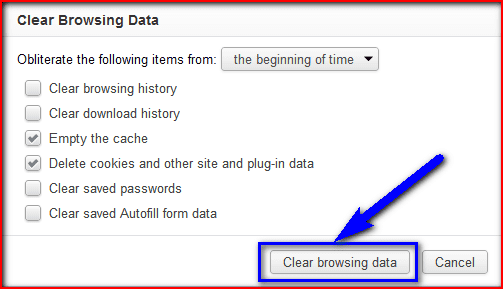
- Go to your Browser
- Click on the Settings tab or click on the History option
- Go to the “Clear Browsing Data” option there
- Tick the ‘Cookies‘ and ‘Caches‘ options there
- If you want any more to delete, then tick that option too
- Now click on their drop-down menu
- Select the ‘from the beginning‘ option there
- Now, click on the “Clear Browsing Data” button there
- Wait for some minutes to delete it
- Now, close the tab
- That’s it, done
Clearing your browser’s browsing data can eliminate this WebEx Error 104 (connection reset by peer) problem from you.
2. Run a Full Scan of your Windows PC for Viruses/Malware –
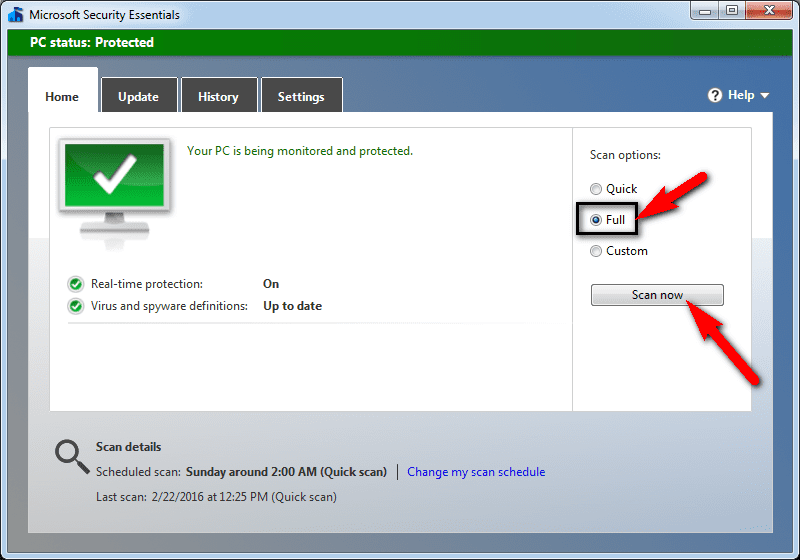
- Go to the start menu.
- Search or go to the “Microsoft Security Essentials” there
- Click on it and opens it there
- A Pop-up will open there
- Check the ‘Full‘ option there to scan thoroughly
- After, click on the ‘Scan Now‘ option to scan carefully
- After scanning, close the tab
- That’s it, done
Running a full scan of your PC can completely eliminate this Error 104 Connection reset by peer problem from your PC.
3. Uninstall the Unwanted Extensions from your Internet Browser –

- Go to the start menu
- Search or go to your Browser
- Click on it and opens it there
- After that, click on the three dots signs there
- & click on ‘More Tools‘ there
- Now, click on the ‘Extensions‘ option there
- Click on the extension which you do not want (Unwanted)
- Click on the Trash sign there to remove it from the browser
- After removing, close the tab
- That’s it, done
Uninstalling unwanted extensions from your browser can quickly fix and solve this pad error 104 Netflix problems from your PC browsers.
4. Do a Windows Disk CleanUp on your PC –
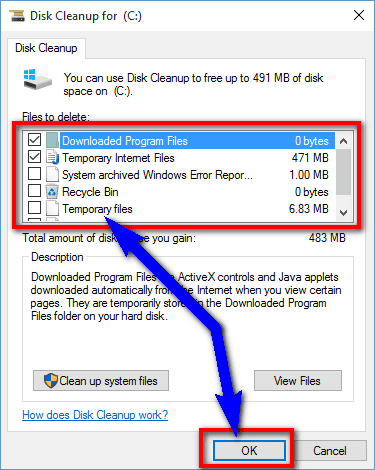
- Go to the start menu
- Search or go to the Disk Cleanup
- Opens it and after that
- Select the Disk you want to clean
- Now, tick & select the options which you want to clean it
- Wait for some minutes to clean
- After completing, close the tab
- That’s it, done
Running a disk cleanup of your full PC can quickly fix and solve this Error 104 Connection reset by peer problem from your PC.
5. Create a System Restore Point on your Windows PC –

- Go to the start menu
- Search or go to the ‘System Restore.’
- Clicks on it and open it there
- After that, tick on the “Recommended settings” or ‘Select a restore point‘ there.
- After selecting, click on the Next option there
- Now, follow the wizard
- After completing, close the tab
- That’s it, done
By trying this guide and tips from here, you will eliminate this pad Error 104 problem issue.
“ OR “

- Go to the start menu
- Search or go to the ‘System Properties.’
- Click on it and opens it.
- After that, go to the “System Protection” option there
- Now, click on the “System Restore” option there
- & Create a Restore point there
- After completing, close the tab
- That’s it, done
Running a system restore and creating a new restore point by any of these two methods can completely solve this Error 104 Netflix problem from your PC.
Conclusion:
These are some tips and guides for permanently removing this Error 104 Connection Reset by Peer problem from you. Hopefully, these solutions will help you get back from this Error 104 problem.
If you are facing any Error 104 Connection Reset by Peer problem or any problem while fixing it, then comment down the error problem below so that we can fix and solve it too by our quick guide solutions.
I have a server which was working ok until 3rd Oct 2013 at 10:50am when it began to intermittently return «502 Bad Gateway» errors to the client.
Approximately 4 out of 5 browser requests succeed but about 1 in 5 fail with a 502.
The nginx error log contains many hundreds of these errors;
2013/10/05 06:28:17 [error] 3111#0: *54528 recv() failed (104: Connection reset by peer) while reading response header from upstream, client: 66.249.66.75, server: www.bec-components.co.uk request: ""GET /?_n=Fridgefreezer/Hotpoint/8591P;_i=x8078 HTTP/1.1", upstream: "fastcgi://127.0.0.1:9000", host: "www.bec-components.co.uk"
However the PHP error log does not contain any matching errors.
Is there a way to get PHP to give me more info about why it is resetting the connection?
This is nginx.conf;
user              www-data;
worker_processes  4;
error_log         /var/log/nginx/error.log;
pid               /var/run/nginx.pid;

events {
   worker_connections  1024;
}

http {
  include          /etc/nginx/mime.types;
  access_log       /var/log/nginx/access.log;

  sendfile               on;
  keepalive_timeout      30;
  tcp_nodelay            on;
  client_max_body_size   100m;

  gzip         on;
  gzip_types   text/plain application/xml text/javascript application/x-javascript text/css;
  gzip_disable "MSIE [1-6].(?!.*SV1)";

  include /gvol/sites/*/nginx.conf;

}
And this is the .conf for this site;
server {

  server_name   www.bec-components.co.uk bec3.uk.to bec4.uk.to bec.home;
  root          /gvol/sites/bec/www/;
  index         index.php index.html;

  location ~ .(js|css|png|jpg|jpeg|gif|ico)$ {
    expires        2592000;   # 30 days
    log_not_found  off;
  }

  ## Trigger client to download instead of display '.xml' files.
  location ~ .xml$ {
    add_header Content-disposition "attachment; filename=$1";
  }

   location ~ .php$ {
      fastcgi_read_timeout  3600;
      include               /etc/nginx/fastcgi_params;
      keepalive_timeout     0;
      fastcgi_param         SCRIPT_FILENAME  $document_root$fastcgi_script_name;
      fastcgi_pass          127.0.0.1:9000;
      fastcgi_index         index.php;
   }
}

## bec-components.co.uk ##
server {
   server_name   bec-components.co.uk;
   rewrite       ^/(.*) http://www.bec-components.co.uk$1 permanent;
}
-
#1
Ошибка: ERROR SOCKET:[104] Connection reset by peer.
Платформа Debian+PHP+Мускул
Сервер на неблокирующихся сокетах. Около 80 клиентов которые постоянно весят на порту. Обмен данными переодический, раз в 2 -20мин. Переодически (раз в 1 — 10 дней) стала валиться ошибка:
<b>Warning</b>: socket_write() [<a href=’function.socket-write’>function.socket-write</a>]: unable to write to socket [104]: Connection reset by peer in <b>/home/qvadro/Daemon/sc4_.php</b> on line <b>82</b><br /> Posle zapisi v socet: ERROR SOCKET:[104] Connection reset by peer.
происходит это в строке:
PHP:
socket_write($this->socket, $mess, strlen($mess));Не могу никак понять откуда эта ошибка  . Толи что то с портом происходит толи с сокетами. Толи сам Линух порт передергивает. Система работает круглосуточно, мож какое переполнение случается ? У кого какие мысли есть ?
И еще : сколько сокетов можно нормально открывать на одном порту ?
-
#2
«Connection reset by peer» по-твоему что означает?
-
#5
Alexandre
Сенк, это понятно, что сокет разорвался…Не понятно почему так происходит и что делать…Можно ли каким то образом проверять состояние сокета перед записью в него ?
-
#6
не уверен что можно это в рнр
-
#7
Так куда копать ?
Сколько реально можно сокетов вешать на 1 порт ?
-
#8
Tayson, а с чего ты решил, что это проблема у сервера, а не отваливается клиент? ты воспроизвести такую ситуацию пробовал?
-
#9
За клиента уверен почти на 100%. Клиент будет ждать 20 ctr ответа. Врспроизвести тяжело — так как не постоянно это выскакивает
-
#10
Клиент будет ждать 20 ctr ответа.
то есть ты смотришь на этих клиентов, пингуешь с них сервер, клиенты «ждут» и не отваливаются, а на сервере происходит эта ошибка?
Врспроизвести тяжело — так как не постоянно это выскакивает
у тебя общение «периодическое». кто его инициирует? клиент? и сервер пытается ему послать ответ (вопрос еще с какой задержкой) и при этом получает эту ошибку?
а под воспроизвести я подразумевал просто убить клиента, сервер получит такое сообщение
да, посмотри netstat & tcpdump по интересующим портам
-
#11
1.Я вижу в логе что клиент приконектился (и покаместь в лог не пропишется что он отвалился — считаю что он в конекте.)
2.Клиент посылает пакет и ждет 20 сек ответа. Если ответа нет — клиент все повторяет заново.
3.На каждый запрос клиента — сервер шлет ответ. Всегда инициатор клиент.
4.Ответ сервер шлет мгновенно (по логу всегда в туже секунду),
5.Ошибка всегда в одном месте — когда сервер пытается записать в сокет ответ клиенту. Ошибка не системная.