If you need to install the webkit* Windows library for Qt 5.7 you should compile it manually because in new version webkit (WebView?) replaced by WebEngine.
Read about Qt 5.7 release (comments): http://blog.qt.io/blog/2016/06/16/qt-5-7-released/
Build sequence (static OR shared):
1) Download Qt 5.7.0 sources: http://download.qt.io/community_releases/5.7/5.7.0/
2) Download required tools: ActiveState Perl (binary), Python (binary), Ruby (binary), GnuWin Bison (binary), GPref (binary), Grep (binary), WinFlex, LibIconv, make (binary), sqlite (source!), ICU (source), windows msys (binary) (unix like shell with the tools), mingw-w64 (bin+dev) for build Qt with QtWebKit, see link on: https://trac.webkit.org/wiki/BuildingQtOnWindows
3) After download ICU source into C:icuicu. Open msys QT mingw console shell by open Start windows menu (msys should be downloaded and installed) and search or use fast search. In opened console start configure script and then compile and install:
$ cd C:icuicusource
$ ./runConfigureICU
$ set PATH=%PATH%;C:msys1.0bin
$ make.exe
$ make.exe install
4) Build Qt with(!) ICU support (set «-icu» to configure) see compile script below. Change PATH to your environment.
Directory structure:
- C:Qt5.7.0 — download binary version of Qt 5.7.0 here
- C:Qt5.7.0n — directory for new (compiled) version of 5.7.0 (just make dir)
- C:QtSrc — download source of Qt 5.7.0 here
C:QtSrcqtbasecompile.bat
set INCLUDE=C:icuicudistinclude
set LIB=C:icuicudistlib
set QTDIR=C:Qt5.7.0n
set PATH=%PATH%;C:QtQt5.7.05.7mingw53_32bin;C:QtQt5.7.0ToolsQtCreatorbin;C:QtQt5.7.0Toolsmingw530_32bin;C:QtSrcqtbasebin;C:Program Files (X86)GnuWin32bin;C:winflex;C:Ruby23-x64bin;C:Python27;C:mingw-w64i686-1mingw32bin;C:icubin
set QMAKESPEC=win32-g++
set BUILD_DIR=C:QtQt5.7.0n
call C:QtSrcqtbaseconfigure.bat -prefix %BUILD_DIR% -platform %QMAKESPEC% -confirm-license -debug-and-release -opensource -opengl desktop -no-compile-examples -icu -I C:/icu/icu/dist/include -L C:/icu/icu/dist/lib
jom.exe -j 4
pause
Run command in exmaple in Windows Power Shell:
$ cd C:QtSrcqtbase
$ ./compile.bat
After pass through compile use it to install files in the BUILD_DIR (install Qt files):
$ C:mingw-w64i686-1mingw32binmingw32-make.exe install
Qt should start to install
5) Download Qtwebkit sources to C:QtSrcqtwebkit. Use compile script below to compile the qtwebkit using new Qt 5.7.0 build with files in C:Qt5.7.0n with ICU.
C:QtSrcqtwebkitToolsScriptscompile.bat
set INCLUDE=C:sqlite
set LIBS=C:sqlite
set SQLITE3SRCDIR=C:sqlite
set QTDIR=C:QtQt5.7.0n
set PATH=%PATH%;C:QtQt5.7.0nbin;C:QtSrcqtbasebin;C:winflex;C:Ruby23-x64bin;C:Python27;C:mingw-w64i686-1mingw32bin;C:icubin;C:Program Files (x86)GnuWin32bin
set QMAKESPEC=win32-g++
call perl.exe .build-webkit --qt --release
Compile the qtwebkit:
$ cd C:QtSrcqtwebkitToolsScripts
$ ./compile.bat
$ cd C:QtSrcqtwebkitWebKitBuildRelease
$ C:mingw-w64i686-1mingw32binmingw32-make.exe install
It should be possible to compile your application with the qtwebkit after successfull compile and install.
BUILD QT FOR STATIC
Edit file C:QtSrcqtbasecompile.bat and pass through build.
...
call C:QtSrcqtbaseconfigure.bat -prefix %BUILD_DIR% -platform %QMAKESPEC% -confirm-license -debug-and-release -opensource -opengl desktop -static -no-compile-examples -icu
echo "QMAKE_FLAGS += -static -static-libgcc" >> .mkspecs/%QMAKESPEC%/qmake.conf
...
POSSIBLE ERRORS
1) While build qtwebkit: "fatal error: unicode/uchar.h: No such file or directory"
Check that your Qt 5.7.0n build with ICU. IT also could notify you about «ICU required» at configure in qtwebkit.
2) flex: unknown flag '-'. For usage, try
You should use correct version of Flex that is «win_flex» in this case. You should rename files to use win_flex instead of just flex (and bison).
1) rename C:Program Files (x86)GnuWin32binflex.exe to some unused name.
2) rename C:Program Files (x86)GnuWin32binbison.exe to some unused name.
3) rename C:winflexwin_bison.exe to bison.exe.
3) While build qtwebkit: "fatal error: sqlite3.h: No such file or directory"
Edit file C:QtSrcqtwebkitToolsScriptscompile.bat and check for correct path to sqlite:
set SQLITE3SRCDIR=C:(path to some SQLITE .h/source files)
4) skipping incompatible ... when searching for ...
You should download right library arch (32bit or 64bit)
5) View.cpp ... undefined reference to WKPageCanGoBack
Could happens when pass through some test or MiniBrowser. You can search in files for the «UIProcess/API/qt» and «MiniBroswer» and remove it from
Makefile’s and some other files and then start build again.
LINKS
Build Qt5: https://wiki.qt.io/Building_Qt_5_from_Git Qt WebKit build
like how to: https://trac.webkit.org/wiki/BuildingQtOnWindows ICU
build with GNU: https://wiki.qt.io/Compiling-ICU-with-MinGW
|
7 / 7 / 0 Регистрация: 08.10.2015 Сообщений: 126 |
|
|
1 |
|
|
16.07.2016, 19:10. Показов 14469. Ответов 14
Доброго времени суток. При переходе на компилятор 5.6, 5.7 последние матерятся что не знаю что такое модули webkit и webkitwidgets, хотя у 5.5 всё хорошо запускается. Их переименовали в более новых версиях ?
__________________
0 |

|
Programming Эксперт 94731 / 64177 / 26122 Регистрация: 12.04.2006 Сообщений: 116,782 |
16.07.2016, 19:10 |
|
Ответы с готовыми решениями: Unknown module(s) in QT: webkitwidgets webkit Project ERROR: Unknown module(s) in QT: webkitwidgets Вот пытаюсь использовать QWebView, но ловлю такую ошибку: QtCreator, ошибка: Unknown module(s) in QT: KXmlGui Начало здесь Без QtCreator, с терминала компилируется qmake,… Не собирается, не запускается. Ошибка: Unknown module(s) in QT: phonon 14 |
|
1067 / 649 / 229 Регистрация: 14.01.2016 Сообщений: 2,031 Записей в блоге: 9 |
|
|
16.07.2016, 21:56 |
2 |
|
Решение
Их переименовали в более новых версиях ? Нет, их удалили. Они давно были deprecated. https://wiki.qt.io/New_Features_in_Qt_5.6
1 |
 Сообщение было отмечено Wolf_Lone как решение


|
7 / 7 / 0 Регистрация: 08.10.2015 Сообщений: 126 |
|
|
16.07.2016, 22:36 [ТС] |
3 |
|
Нет, их удалили Ага, спасибо. Тогда такой вопрос. Чем заменить ? У меня на QWebView колонка новости. Грузит html с серва. Добавлено через 6 минут
0 |
|
1442 / 1323 / 131 Регистрация: 20.03.2009 Сообщений: 4,689 Записей в блоге: 11 |
|
|
16.07.2016, 22:40 |
5 |
|
Qt WebEngine, он на базе хрома.
0 |
|
Wolf_Lone 7 / 7 / 0 Регистрация: 08.10.2015 Сообщений: 126 |
||||
|
16.07.2016, 22:57 [ТС] |
6 |
|||
|
Qt WebEngine, он на базе хрома. Да, это я понял. Не понял лишь вот что. Это приват плюшки или нет ? Пытаюсь подключить
ругается Добавлено через 1 минуту
И т.д. и т.п. Сам сильно в этом не шарю. Если надо — создавай тему с вопросом по конкретному портированию. Понял, спасибо
0 |
|
Pied Piper 236 / 227 / 57 Регистрация: 15.01.2013 Сообщений: 855 |
|
|
18.07.2016, 12:20 |
8 |
|
annulen, вы уже пробовали? Я как-то сам собирал из последних сорсов веб кит — иногда приложение просто крашилось.
0 |
|
0 / 0 / 0 Регистрация: 18.07.2016 Сообщений: 4 |
|||||
|
18.07.2016, 19:36 |
9 |
||||
|
annulen, вы уже пробовали? Я как-то сам собирал из последних сорсов веб кит — иногда приложение просто крашилось. Вообще я разработчик 🙂
0 |

|
7 / 7 / 0 Регистрация: 08.10.2015 Сообщений: 126 |
|
|
18.07.2016, 20:19 [ТС] |
10 |
|
можно ничего не портировать, а взять новую версию WebKit признан устаревшим или это нет так ? Если устарел зачем собирать старую вещь если есть более новый аналог.
0 |
|
0 / 0 / 0 Регистрация: 18.07.2016 Сообщений: 4 |
|
|
18.07.2016, 20:34 |
11 |
|
Вещь 2016 года — это старая вешь? А как у вас там в будущем, хорошо живется?
0 |
|
1442 / 1323 / 131 Регистрация: 20.03.2009 Сообщений: 4,689 Записей в блоге: 11 |
|
|
18.07.2016, 21:40 |
12 |
|
Вещь 2016 года — это старая вешь? Дата последнего комита не говорит новая это вещь или нет.
0 |
|
0 / 0 / 0 Регистрация: 18.07.2016 Сообщений: 4 |
|
|
18.07.2016, 21:47 |
13 |
|
А что тогда говорит? Поддержка ES6, например, говорит?
0 |
|
Wyn |
|||||
|
18.07.2016, 22:17
|
|||||
0 |
|
7 / 7 / 0 Регистрация: 08.10.2015 Сообщений: 126 |
|
|
19.07.2016, 20:08 [ТС] |
15 |
|
Wyn, закрой пожалуйста тему, на вопрос ответ получен. Заранее спасибо
0 |
This topic has been deleted. Only users with topic management privileges can see it.
I have been trying to use Qt WebEngine, but I need to add it to my .pro file. I tried adding ‘webkitwidgets’, but all I get is the error ‘Unknown module(s) in QT: webkitwidgets’. I would appreciate some help. Thanks in advance!
Note
- I am running Ubuntu Mate
- I am running Qt Creator 4.6.2
- I am running Qt 5.10.1
Again thanks in advance! : )
Also my .pro file.
TEMPLATE +=app
QT+= webkitwidgets
CONFIG += c++11
webengine != webkit. the first is based on the core of Google Chrome while the other is based on the core of Apple’s Safari
use QT += webenginewidgets
Sorry, I did do that, I just wrote it down wrong. Its still is an error.
//My actual .pro file
TEMPLATE +=app
QT+= webenginewidgets
CONFIG+= c++11
Try:
QT += widgets webenginewidgets
It still won’t work. Is it my version? Qt 5.10.1
Look at the .pro file of the DemoBrowser in the Examples folder that come along with Qt.
I did. That’s what was in the .pro file.
//Simple Browser .pro File

TEMPLATE = app
TARGET = simplebrowser
QT += webenginewidgets
CONFIG += c++11

HEADERS +=
    browser.h
    browserwindow.h
    downloadmanagerwidget.h
    downloadwidget.h
    tabwidget.h
    webpage.h
    webpopupwindow.h
    webview.h

SOURCES +=
    browser.cpp
    browserwindow.cpp
    downloadmanagerwidget.cpp
    downloadwidget.cpp
    main.cpp
    tabwidget.cpp
    webpage.cpp
    webpopupwindow.cpp
    webview.cpp

FORMS +=
    certificateerrordialog.ui
    passworddialog.ui
    downloadmanagerwidget.ui
    downloadwidget.ui

RESOURCES += data/simplebrowser.qrc

# install
target.path = $$[QT_INSTALL_EXAMPLES]/webenginewidgets/simplebrowser
INSTALLS += target
@Nite-Coder
Hi
Make sure to delete the build folder
and re-run qmake from build menu to make sure .pro file is 100% parsed again.
What is the build folder? Sorry if I am asking a lot of, probably pointless, questions. But I appreciate the help.
@Nite-Coder
All questions are fine.
The build folder is where it puts all generated files. all the .o files etc.
Its normally located on same level as the project folder.
and named something like
build-PROJECTNAME-Desktop_Qt_5_10_1_CompilerName-Debug
if you are using shadow build. you can see it in projects
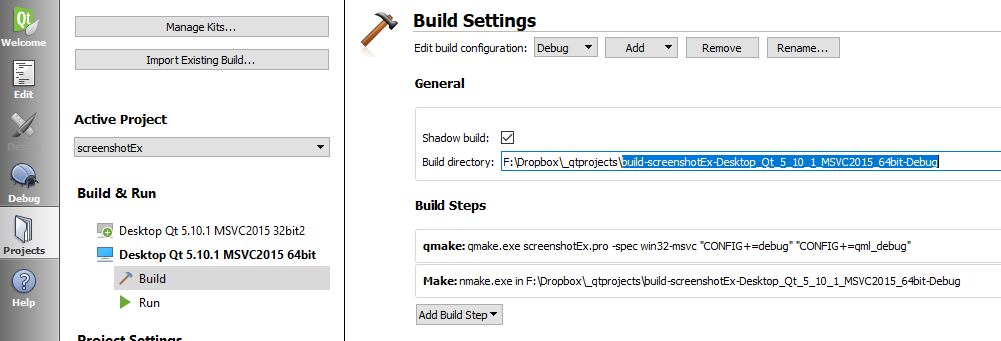
If issue finding it then
Open project
Right click on any file in proejct
select Open containing folder
The file explorer should come.
Go one step up/ back
you should see folder. ( that is if u did build the project)
Okay, I did that and it still didn’t work. I deleted the build folder and re-built it.
@Nite-Coder
ok so we know u 100% have
QT += webenginewidgets
I wonder if its installed ?
It has to be selected during install if not whole group was selected.
If you used the online installer, you can use
MaintenanceTool.exe in Qt folder.
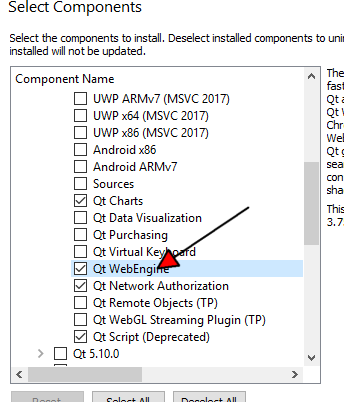
Okay, I have the Maintenance Tool. But it is a .dat file. Do I have to run a chmod command to get it running? And what would the chmod command be. Thanks for upvoting me mrjj!
@Nite-Coder
Hmm. I just releasize you are on linux. 🙂
Did you use online installer or got Qt via distro ?
update:
should be something like
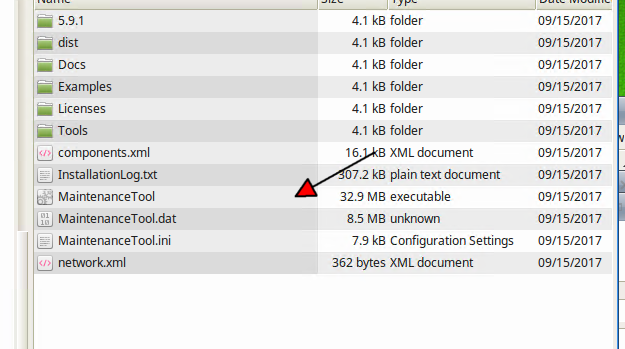
I used the online installer after using the distro’s repositories. Would that affect anything?
Edit: I got the .dat and .ini
@Nite-Coder
So you dont have the «.exe» ?
No I don’t…
@Nite-Coder
https://forum.qt.io/topic/80874/why-can-t-i-find-maintenance-tool-in-qt5-for-ubuntu-16-04-lts
Im not 100% sure but i think easy route to install extra Qt version from
online to get the tool. ( and install in local user folder, NOT system wide folder )
If wonder if we can just copy exe. but i fear .dat is not updated.
@mrjj
What is the local user folder?
And…
So you want me to install Qt again with the online install
I just managed to copy the .dat file so I could rename it o .exe. It opened up an archive manager and displayed an error message saying it couldn’t open the file as a PE archive
@Nite-Coder
well just in our home folder.
Not in /opt or anywhere rest of system might look for so files etc.
(just to be safe. not sure it matters)
Well it seems to be suggested that.
Else wait a few hours and maybe someone know how to apt-get it directly or
something faster.
we could also just try to copy my version and see but im not sure it has its right ini file and dat file then.
maybe you can apt-get webengine directly, but im not sure under which name/deb file.
the .dat file is NOT the exe. 🙂
Thanks for the help mrjj! I upvoted you on every post : ) (Thanks for the upvote!) I think I’ll wait. The apt-get method seems to be the best idea. But I’ll try installing it again.
@Nite-Coder
I agree. Its pretty normal to use distro Qt and for say unity i think it was
also needed for integration. So i assume there is some other way.
I just found the exe file! : ) lol
@Nite-Coder
hehe 🙂
it was in other location ?
So hopefully now it works!
No… It was in the same location… I missed it…
It still doesn’t work…
Though I updated to 5.11.1 and I checked it installed QWebEngine
@Nite-Coder
Ok but to talk it over
You had the webengine in the list and it installed ?
Do you have the samples installed ?
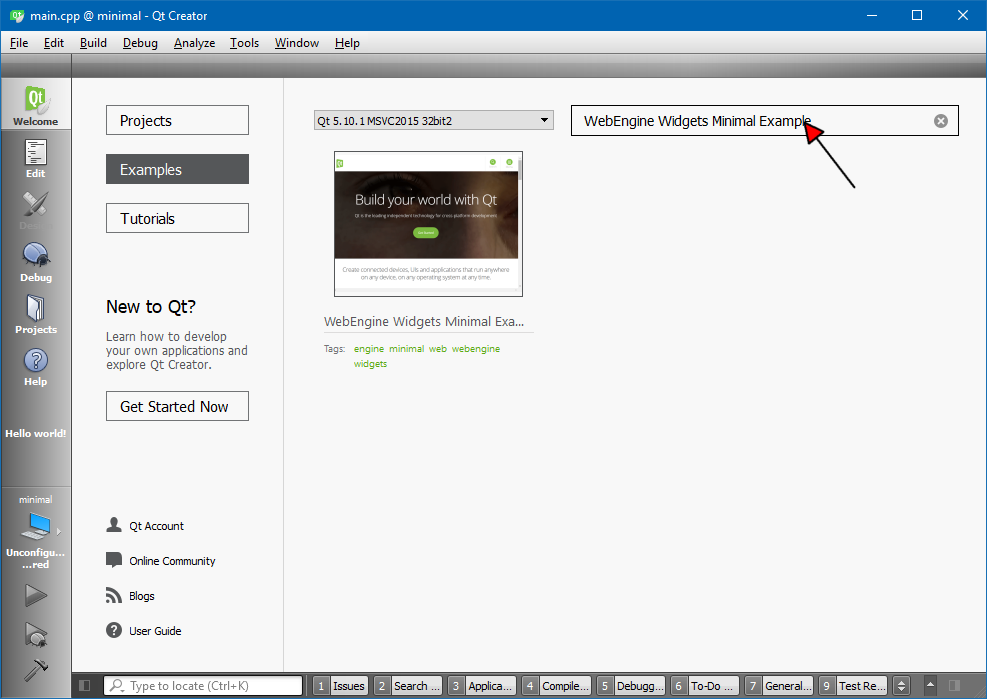
I do have the examples
@Nite-Coder
They also complain about
QT += webenginewidgets
or do they compile and run ?
They compile and run and I don’t know why
@Nite-Coder
well your project should too then. 🙂
try delete build folder again.
also any .user file to select the new Qt for the project.
It might remember the old version of Qt or have old files in build folder.
Still doesn’t work. I deleted the build folder and the .user file. Though… I might create a new project and try
@Nite-Coder
Good plan.
Since the sample works, there are high hopes 🙂
Those high hopes are now dashed… Though your upvote is appreciated : )
Do you know if Chromium has to be installed? I know that it is based on Chromium
@Nite-Coder
so new project didnt compile?
After adding
QT += webenginewidgets
did you run qmake from menu ?
How do you qmake from the menu?
Hi
Its in build menu
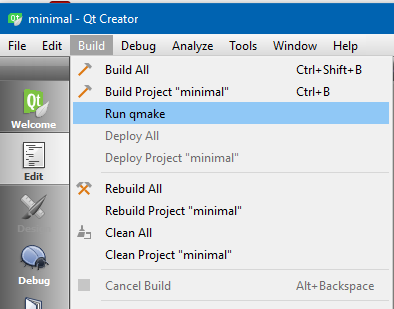
It doesn’t work still
@Nite-Coder
Ok. very odd.
What about copy all the files from the
Minimal example folder to a new folder and try that ?
I followed this link: https://github.com/therecipe/qt/wiki/Getting-Started and did the basic examples as the following, but I got Project ERROR: Unknown module(s) in QT: webkit webkitwidgets, and the hello widgets dialog window did show up, so please help me resolve the error, thanks. IDoor
go get -d -v github.com/therecipe/examples/…
cd $GOPATH/src/github.com/therecipe/examples
qtdeploy test desktop ./basic/widgets
ERRO[0011] failed to run command cmd=»/usr/local/opt/qt5/bin/qmake -o Mfile ../webkit.pro -spec macx-clang CONFIG+=x86_64 CONFIG+=release» dir=/Users/d2233/workspace/go/src/github.com/therecipe/qt/webkit env= error=»exit status 3″ func=RunCmdOptional name=»run qmake for darwin on darwin»
Info: creating stash file /Users/d2233/workspace/go/src/github.com/therecipe/qt/webkit/.qmake.stash
Project ERROR: Unknown module(s) in QT: webkit webkitwidgets
ERRO[0011] failed to load /Users/d2233/workspace/go/src/github.com/therecipe/qt/webkit/Mfile error=»open /Users/d2233/workspace/go/src/github.com/therecipe/qt/webkit/Mfile: no such file or directory»
Если вам нужно установить webkit * библиотека Windows для Qt 5.7, вы должны скомпилировать ее вручную, потому что в новой версии webkit (WebView?) заменен на WebEngine.
читайте о выпуске Qt 5.7 (комментарии):http://blog.qt.io/blog/2016/06/16/qt-5-7-released/
Последовательность сборки (статическая или общая):
1) Скачать Qt 5.7.0 источники:http://download.qt.io/community_releases/5.7/5.7.0/
2) Скачать необходимые инструменты: Активностити на Perl (бинарный), питон (бинарный), Рубин (двоичный), GnuWin Зубр (двоичный), GPref (двоичный), то команда grep (бинарный), WinFlex, LibIconv, сделать (бинарный), базы данных SQLite (источник!), ICU (source), windows msys (binary) (unix like shell с инструментами), mingw-w64 (bin+dev) для сборки Qt с QtWebKit, см. ссылку:https://trac.webkit.org/wiki/BuildingQtOnWindows
3) После загрузки источника ICU в C:icuicu. Откройте msys QT MinGW console shell с помощью open Start windows меню (msys должны быть загружены и установлены) и поиск или использовать быстрый поиск. В открывшейся консоли запустите configure script, а затем скомпилируйте и установите:
$ cd C:icuicusource
$ ./runConfigureICU
$ set PATH=%PATH%;C:msys1.0bin
$ make.exe
$ make.exe install
4) построить Qt с(!) Поддержка ICU (установите «- icu » для настройки) см. сценарий компиляции ниже. Изменить путь для вашего окружения.
каталог структуру:
- C:Qt5.7.0 -скачать двоичную версию Qt 5.7.0 можно здесь
- C:Qt5.7.0n -каталог для новой (скомпилированной) версии 5.7.0 (просто сделайте dir)
- C:QtSrc -скачать исходник Qt 5.7.0 можно здесь
C:QtSrcqtbasecompile.летучая мышь
set INCLUDE=C:icuicudistinclude
set LIB=C:icuicudistlib
set QTDIR=C:Qt.7.0n
set PATH=%PATH%;C:QtQt5.7.0.7mingw53_32bin;C:QtQt5.7.0ToolsQtCreatorbin;C:QtQt5.7.0Toolsmingw530_32bin;C:QtSrcqtbasebin;C:Program Files (X86)GnuWin32bin;C:winflex;C:Ruby23-x64bin;C:Python27;C:mingw-w64i686-1mingw32bin;C:icubin
set QMAKESPEC=win32-g++
set BUILD_DIR=C:QtQt5.7.0n
call C:QtSrcqtbaseconfigure.bat -prefix %BUILD_DIR% -platform %QMAKESPEC% -confirm-license -debug-and-release -opensource -opengl desktop -no-compile-examples -icu -I C:/icu/icu/dist/include -L C:/icu/icu/dist/lib
jom.exe -j 4
pause
выполнить команду в exmaple в Windows Power Shell:
$ cd C:QtSrcqtbase
$ ./составлять.летучая мышь
после прохождения через компиляцию используйте его для установки файлов в BUILD_DIR (install Qt files):
$ C:mingw-w64i686-1mingw32binmingw32-make.exe install
Qt должен начать установку
5) загрузите источники Qtwebkit в C:QtSrcqtwebkit. Используйте сценарий компиляции ниже, чтобы скомпилировать qtwebkit с помощью новой сборки Qt 5.7.0 с файлами в C:Qt5.7.0n с помощью ОТДЕЛЕНИЕ ИНТЕНСИВНОЙ ТЕРАПИИ.
C:QtSrcqtwebkitToolsScriptscompile.летучая мышь
set INCLUDE=C:sqlite
set LIBS=C:sqlite
set SQLITE3SRCDIR=C:sqlite
set QTDIR=C:QtQt5.7.0n
set PATH=%PATH%;C:QtQt5.7.0nbin;C:QtSrcqtbasebin;C:winflex;C:Ruby23-x64bin;C:Python27;C:mingw-w64i686-1mingw32bin;C:icubin;C:Program Files (x86)GnuWin32bin
set QMAKESPEC=win32-g++
call perl.exe .build-webkit --qt --release
компилироваться qtwebkit:
$ cd C:QtSrcqtwebkitToolsScripts
$ ./составлять.летучая мышь
$ cd C:QtSrcqtwebkitWebKitBuildRelease
$ C:mingw-w64i686-1mingw32binmingw32-make.exe install
должно быть возможно скомпилировать ваше приложение с помощью qtwebkit после успешной компиляции и установить.
ПОСТРОИТЬ QT ДЛЯ СТАТИЧЕСКОГО
редактировать файл C:QtSrcqtbasecompile.летучая мышь и пройти через сборки.
...
call C:QtSrcqtbaseconfigure.bat -prefix %BUILD_DIR% -platform %QMAKESPEC% -confirm-license -debug-and-release -opensource -opengl desktop -static -no-compile-examples -icu
echo "QMAKE_FLAGS += -static -static-libgcc" >> .mkspecs/%QMAKESPEC%/qmake.conf
...
ВОЗМОЖНЫЕ ОШИБКИ
1) пока строим qtwebkit:
"fatal error: unicode/uchar.h: No such file or directory"проверьте, что ваш Qt 5.7.0 n строится с ICU. Он также может уведомить вас о «ICU required» при настройке в qtwebkit.
2)
flex: unknown flag '-'. For usage, tryвы должны использовать правильную версию Flex, которая является «win_flex» в этом случае. Вы должны переименовать файлы для использования win_flex вместо того, чтобы просто Flex (и бизонов).
1) переименовать C:Program файлы (x86)GnuWin32binflex.exe в какое уникальное имя.
2) переименовать C:Program файлы (x86)GnuWin32binbison.exe в какое уникальное имя.
3) переименовать C:winflexwin_bison.ехе к зубру.исполняемый.
3) пока строим qtwebkit:
"fatal error: sqlite3.h: No such file or directory"редактировать файл C:QtSrcqtwebkitToolsScriptscompile.летучая мышь и проверить правильный путь к sqlite:
set SQLITE3SRCDIR=C:(path to some SQLITE .h/source files)4)
skipping incompatible ... when searching for ...вы должны скачать правую библиотеку arch (32bit или 64bit)
5)
View.cpp ... undefined reference to WKPageCanGoBackбывает, когда проходите через некоторые испытания или Минибраузер. Вы можете искать в файлах для «UIProcess / API / qt» и «MiniBroswer» и удалить его из
Makefile и некоторые другие файлы, а затем снова начать сборку.ссылки
Сборка Qt5: https://wiki.qt.io/Building_Qt_5_from_Git Qt WebKit build
например, как: https://trac.webkit.org/wiki/BuildingQtOnWindows ICU
сборка с GNU:https://wiki.qt.io/Compiling-ICU-with-MinGW
Если вам нужно установить библиотеку webkit * Windows для Qt 5.7, вы должны скомпилировать ее вручную, потому что в новой версии webkit (WebView?) заменяется WebEngine.
Читайте о выпуске Qt 5.7 (комментарии): http://blog.qt.io/blog/2016/06/16/qt-5-7-released/
Строка сборки (статическая или общая):
1) Загрузите источники Qt 5.7.0: http://download.qt.io/community_releases/5.7/5.7.0/
2) Загрузите необходимые инструменты: ActiveState Perl (двоичный), Python (двоичный), Ruby (двоичный), GnuWin Bison (двоичный), GPref (двоичный), Grep (двоичный), WinFlex, LibIconv, make (двоичный) sqlite (источник!), ICU (источник), windows msys (двоичный) (unix-подобный shell с инструментами), mingw-w64 (bin + dev) для сборки Qt с QtWebKit, см. ссылку на: https://trac.webkit.org/wiki/BuildingQtOnWindows
3) После загрузки источника ICU в C:icuicu. Откройте консольную консоль MSys QT через открытое меню «Пуск» (msys необходимо загрузить и установить) и выполнить поиск или использовать быстрый поиск. В открывшейся консоли запустите configure script, а затем выполните компиляцию и установку:
$cd C:icuicusource
$./runConfigureICU
$set PATH =% PATH%; C:msys1.0bin
$make.exe
$make.exe install
4) Создайте Qt с поддержкой (!) ICU (установите «-icu» для настройки) см. компиляцию script ниже. Измените PATH на свою среду.
Структура каталогов:
- C:Qt5.7.0 — загрузите двоичную версию Qt 5.7.0 здесь
- C:Qt5.7.0n — каталог для новой (скомпилированной) версии 5.7.0 (просто сделать dir)
- C:QtSrc — скачать источник Qt 5.7.0 здесь
C:QtSrcqtbasecompile.bat
set INCLUDE=C:icuicudistinclude
set LIB=C:icuicudistlib
set QTDIR=C:Qt5.7.0n
set PATH=%PATH%;C:QtQt5.7.05.7mingw53_32bin;C:QtQt5.7.0ToolsQtCreatorbin;C:QtQt5.7.0Toolsmingw530_32bin;C:QtSrcqtbasebin;C:Program Files (X86)GnuWin32bin;C:winflex;C:Ruby23-x64bin;C:Python27;C:mingw-w64i686-1mingw32bin;C:icubin
set QMAKESPEC=win32-g++
set BUILD_DIR=C:QtQt5.7.0n
call C:QtSrcqtbaseconfigure.bat -prefix %BUILD_DIR% -platform %QMAKESPEC% -confirm-license -debug-and-release -opensource -opengl desktop -no-compile-examples -icu -I C:/icu/icu/dist/include -L C:/icu/icu/dist/lib
jom.exe -j 4
pause
Запустить команду в exmaple в Windows Power Shell:
$cd C:QtSrcqtbase
$./compile.bat
После прохождения через компиляцию используйте его для установки файлов в BUILD_DIR (установите файлы Qt):
$C:mingw-w64i686-1mingw32binmingw32-make.exe install
Qt должен начать установку
5) Загрузите источники Qtwebkit в C:QtSrcqtwebkit. Используйте compile script ниже, чтобы скомпилировать qtwebkit, используя новую сборку Qt 5.7.0 с файлами в C:Qt5.7.0n с ICU.
C:QtSrcQtWebKitToolsScriptscompile.bat
set INCLUDE=C:sqlite
set LIBS=C:sqlite
set SQLITE3SRCDIR=C:sqlite
set QTDIR=C:QtQt5.7.0n
set PATH=%PATH%;C:QtQt5.7.0nbin;C:QtSrcqtbasebin;C:winflex;C:Ruby23-x64bin;C:Python27;C:mingw-w64i686-1mingw32bin;C:icubin;C:Program Files (x86)GnuWin32bin
set QMAKESPEC=win32-g++
call perl.exe .build-webkit --qt --release
Скомпилируйте qtwebkit:
$cd C:QtSrcqtwebkitToolsScripts
$./compile.bat
$cd C:QtSrcqtwebkitWebKitBuildRelease
$C:mingw-w64i686-1mingw32binmingw32-make.exe install
Должна быть возможность скомпилировать ваше приложение с помощью qtwebkit после успешной компиляции и установки.
СОЗДАТЬ QT ДЛЯ STATIC
Отредактируйте файл C:QtSrcqtbasecompile.bat и пройдите через сборку.
...
call C:QtSrcqtbaseconfigure.bat -prefix %BUILD_DIR% -platform %QMAKESPEC% -confirm-license -debug-and-release -opensource -opengl desktop -static -no-compile-examples -icu
echo "QMAKE_FLAGS += -static -static-libgcc" >> .mkspecs/%QMAKESPEC%/qmake.conf
...
ВОЗМОЖНЫЕ ОШИБКИ
1) Во время сборки qtwebkit: "fatal error: unicode/uchar.h: No such file or directory"
Убедитесь, что ваш Qt 5.7.0n построен с ICU. IT также может уведомить вас о необходимости «ICU» при настройке в qtwebkit.
2) flex: unknown flag '-'. For usage, try
В этом случае вы должны использовать правильную версию Flex, которая является «win_flex». Вы должны переименовать файлы, чтобы использовать win_flex вместо flex (и bison).
1) переименуйте C:Program Files (x86)GnuWin32binflex.exe в какое-то неиспользуемое имя.
2) переименуйте C:Program Files (x86)GnuWin32binbison.exe в какое-то неиспользуемое имя.
3) переименуйте C:winflexwin_bison.exe в bison.exe.
3) Во время сборки qtwebkit: "fatal error: sqlite3.h: No such file or directory"
Отредактируйте файл C:QtSrcqtwebkitToolsScriptscompile.bat и проверьте правильный путь к sqlite:
set SQLITE3SRCDIR=C:(path to some SQLITE .h/source files)
4) skipping incompatible ... when searching for ...
Вы должны загрузить правую библиотечную арку (32 бит или 64 бит)
5) View.cpp ... undefined reference to WKPageCanGoBack
Может произойти, если пройти через какой-либо тест или MiniBrowser. Вы можете искать в файлах для «UIProcess/API/qt» и «MiniBroswer» и удалять их из
Makefile и некоторые другие файлы, а затем снова начните сборку.
ССЫЛКА
Построить Qt5: https://wiki.qt.io/Building_Qt_5_from_Git Qt WebKit build
как: https://trac.webkit.org/wiki/BuildingQtOnWindows ICU
построить с GNU: https://wiki.qt.io/Compiling-ICU-with-MinGW
You need to install the webkitwidgets library.
On Ubuntu, try this in a terminal:
sudo apt-get install libqt5webkit5-dev
If you need to install the webkit* Windows library for Qt 5.7 you should compile it manually because in new version webkit (WebView?) replaced by WebEngine.
Read about Qt 5.7 release (comments): http://blog.qt.io/blog/2016/06/16/qt-5-7-released/
Build sequence (static OR shared):
1) Download Qt 5.7.0 sources: http://download.qt.io/community_releases/5.7/5.7.0/
2) Download required tools: ActiveState Perl (binary), Python (binary), Ruby (binary), GnuWin Bison (binary), GPref (binary), Grep (binary), WinFlex, LibIconv, make (binary), sqlite (source!), ICU (source), windows msys (binary) (unix like shell with the tools), mingw-w64 (bin+dev) for build Qt with QtWebKit, see link on: https://trac.webkit.org/wiki/BuildingQtOnWindows
3) After download ICU source into C:icuicu. Open msys QT mingw console shell by open Start windows menu (msys should be downloaded and installed) and search or use fast search. In opened console start configure script and then compile and install:
$ cd C:icuicusource
$ ./runConfigureICU
$ set PATH=%PATH%;C:msys1.0bin
$ make.exe
$ make.exe install
4) Build Qt with(!) ICU support (set «-icu» to configure) see compile script below. Change PATH to your environment.
Directory structure:
- C:Qt5.7.0 — download binary version of Qt 5.7.0 here
- C:Qt5.7.0n — directory for new (compiled) version of 5.7.0 (just make dir)
- C:QtSrc — download source of Qt 5.7.0 here
C:QtSrcqtbasecompile.bat
set INCLUDE=C:icuicudistinclude
set LIB=C:icuicudistlib
set QTDIR=C:Qt5.7.0n
set PATH=%PATH%;C:QtQt5.7.05.7mingw53_32bin;C:QtQt5.7.0ToolsQtCreatorbin;C:QtQt5.7.0Toolsmingw530_32bin;C:QtSrcqtbasebin;C:Program Files (X86)GnuWin32bin;C:winflex;C:Ruby23-x64bin;C:Python27;C:mingw-w64i686-1mingw32bin;C:icubin
set QMAKESPEC=win32-g++
set BUILD_DIR=C:QtQt5.7.0n
call C:QtSrcqtbaseconfigure.bat -prefix %BUILD_DIR% -platform %QMAKESPEC% -confirm-license -debug-and-release -opensource -opengl desktop -no-compile-examples -icu -I C:/icu/icu/dist/include -L C:/icu/icu/dist/lib
jom.exe -j 4
pause
Run command in exmaple in Windows Power Shell:
$ cd C:QtSrcqtbase
$ ./compile.bat
After pass through compile use it to install files in the BUILD_DIR (install Qt files):
$ C:mingw-w64i686-1mingw32binmingw32-make.exe install
Qt should start to install
5) Download Qtwebkit sources to C:QtSrcqtwebkit. Use compile script below to compile the qtwebkit using new Qt 5.7.0 build with files in C:Qt5.7.0n with ICU.
C:QtSrcqtwebkitToolsScriptscompile.bat
set INCLUDE=C:sqlite
set LIBS=C:sqlite
set SQLITE3SRCDIR=C:sqlite
set QTDIR=C:QtQt5.7.0n
set PATH=%PATH%;C:QtQt5.7.0nbin;C:QtSrcqtbasebin;C:winflex;C:Ruby23-x64bin;C:Python27;C:mingw-w64i686-1mingw32bin;C:icubin;C:Program Files (x86)GnuWin32bin
set QMAKESPEC=win32-g++
call perl.exe .build-webkit --qt --release
Compile the qtwebkit:
$ cd C:QtSrcqtwebkitToolsScripts
$ ./compile.bat
$ cd C:QtSrcqtwebkitWebKitBuildRelease
$ C:mingw-w64i686-1mingw32binmingw32-make.exe install
It should be possible to compile your application with the qtwebkit after successfull compile and install.
BUILD QT FOR STATIC
Edit file C:QtSrcqtbasecompile.bat and pass through build.
...
call C:QtSrcqtbaseconfigure.bat -prefix %BUILD_DIR% -platform %QMAKESPEC% -confirm-license -debug-and-release -opensource -opengl desktop -static -no-compile-examples -icu
echo "QMAKE_FLAGS += -static -static-libgcc" >> .mkspecs/%QMAKESPEC%/qmake.conf
...
POSSIBLE ERRORS
1) While build qtwebkit: "fatal error: unicode/uchar.h: No such file or directory"
Check that your Qt 5.7.0n build with ICU. IT also could notify you about «ICU required» at configure in qtwebkit.
2) flex: unknown flag '-'. For usage, try
You should use correct version of Flex that is «win_flex» in this case. You should rename files to use win_flex instead of just flex (and bison).
1) rename C:Program Files (x86)GnuWin32binflex.exe to some unused name.
2) rename C:Program Files (x86)GnuWin32binbison.exe to some unused name.
3) rename C:winflexwin_bison.exe to bison.exe.
3) While build qtwebkit: "fatal error: sqlite3.h: No such file or directory"
Edit file C:QtSrcqtwebkitToolsScriptscompile.bat and check for correct path to sqlite:
set SQLITE3SRCDIR=C:(path to some SQLITE .h/source files)
4) skipping incompatible ... when searching for ...
You should download right library arch (32bit or 64bit)
5) View.cpp ... undefined reference to WKPageCanGoBack
Could happens when pass through some test or MiniBrowser. You can search in files for the «UIProcess/API/qt» and «MiniBroswer» and remove it from
Makefile’s and some other files and then start build again.
LINKS
Build Qt5: https://wiki.qt.io/Building_Qt_5_from_Git Qt WebKit build
like how to: https://trac.webkit.org/wiki/BuildingQtOnWindows ICU
build with GNU: https://wiki.qt.io/Compiling-ICU-with-MinGW
The community builds referenced by Alex are only available until Qt 5.9.
If you want to use newer Qt5 (current version is 5.11), then another option is to port «QtWebKit» to «QtWebEngine».
See: https://wiki.qt.io/QtWebEngine/Porting_from_QtWebKit
Если вам нужно установить библиотеку webkit* для Windows для Qt 5.7, вам следует скомпилировать ее вручную, потому что в новой версии webkit (WebView?) заменен на WebEngine.
Читайте о выпуске Qt 5.7 (комментарии): http://blog.qt.io/blog/2016/06/16/qt-5-7-released/
Последовательность сборки (статическая ИЛИ общая):
1) Загрузите исходники Qt 5.7.0: http://download.qt.io/community_releases/5.7/5.7.0/
2) Загрузите необходимые инструменты: ActiveState Perl (двоичный), Python (двоичный), Ruby (двоичный), GnuWin Bison (двоичный), GPref (двоичный), Grep (двоичный), WinFlex, LibIconv, make (двоичный), sqlite (исходный код). !), ICU (исходный код), windows msys (бинарный) (unix-подобная оболочка с инструментами), mingw-w64 (bin+dev) для сборки Qt с QtWebKit, см. ссылку на: https://trac.webkit.org/wiki/BuildingQtOnWindows
3) После загрузки исходного кода ICU в C:icuicu. Откройте консольную оболочку msys QT mingw, открыв меню «Пуск» Windows (msys должен быть загружен и установлен) и выполните поиск или используйте быстрый поиск. В открывшейся консоли запустите скрипт configure, а затем скомпилируйте и установите:
$ cd C:icuicuисточник
$ ./runConfigureICU
$ установить PATH=%PATH%;C:msys1.0bin
$ make.exe
$ make.exe установить
4) Соберите Qt с (!) поддержкой ICU (установите «-icu» для настройки), см. скрипт компиляции ниже. Измените PATH на вашу среду.
Структура каталогов:
- C:Qt5.7.0 — загрузите бинарную версию Qt 5.7.0 здесь
- C:Qt5.7.0n — каталог для новой (скомпилированной) версии 5.7.0 (просто создайте каталог)
- C:QtSrc — скачать исходный код Qt 5.7.0 здесь
C:QtSrcqtbasecompile.bat
set INCLUDE=C:icuicudistinclude
set LIB=C:icuicudistlib
set QTDIR=C:Qt5.7.0n
set PATH=%PATH%;C:QtQt5.7.05.7mingw53_32bin;C:QtQt5.7.0ToolsQtCreatorbin;C:QtQt5.7.0Toolsmingw530_32bin;C:QtSrcqtbasebin;C:Program Files (X86)GnuWin32bin;C:winflex;C:Ruby23-x64bin;C:Python27;C:mingw-w64i686-1mingw32bin;C:icubin
set QMAKESPEC=win32-g++
set BUILD_DIR=C:QtQt5.7.0n
call C:QtSrcqtbaseconfigure.bat -prefix %BUILD_DIR% -platform %QMAKESPEC% -confirm-license -debug-and-release -opensource -opengl desktop -no-compile-examples -icu -I C:/icu/icu/dist/include -L C:/icu/icu/dist/lib
jom.exe -j 4
pause
Запустите команду в примере в Windows Power Shell:
$ компакт-диск C:QtSrcqtbase
$ ./compile.bat
После прохождения компиляции используйте его для установки файлов в BUILD_DIR (установите файлы Qt):
$ C:mingw-w64i686-1mingw32binmingw32-make.exe install
Qt должен начать установку
5) Загрузите исходники Qtwebkit в C:QtSrcqtwebkit. Используйте приведенный ниже скрипт компиляции, чтобы скомпилировать qtwebkit, используя новую сборку Qt 5.7.0 с файлами в C:Qt5.7.0n с помощью ICU.
C:QtSrcqtwebkitToolsScriptscompile.bat
set INCLUDE=C:sqlite
set LIBS=C:sqlite
set SQLITE3SRCDIR=C:sqlite
set QTDIR=C:QtQt5.7.0n
set PATH=%PATH%;C:QtQt5.7.0nbin;C:QtSrcqtbasebin;C:winflex;C:Ruby23-x64bin;C:Python27;C:mingw-w64i686-1mingw32bin;C:icubin;C:Program Files (x86)GnuWin32bin
set QMAKESPEC=win32-g++
call perl.exe .build-webkit --qt --release
Скомпилируйте qtwebkit:
$ cd C:QtSrcqtwebkitToolsScripts
$ ./compile.bat
$ cd C:QtSrcqtwebkitWebKitBuildRelease
$ C:mingw-w64i686-1mingw32binmingw32-make.exe install
Должна быть возможность скомпилировать ваше приложение с помощью qtwebkit после успешной компиляции и установки.
СБОРКА QT ДЛЯ СТАТИКИ
Отредактируйте файл C:QtSrcqtbasecompile.bat и выполните сборку.
...
call C:QtSrcqtbaseconfigure.bat -prefix %BUILD_DIR% -platform %QMAKESPEC% -confirm-license -debug-and-release -opensource -opengl desktop -static -no-compile-examples -icu
echo "QMAKE_FLAGS += -static -static-libgcc" >> .mkspecs/%QMAKESPEC%/qmake.conf
...
ВОЗМОЖНЫЕ ОШИБКИ
1) При сборке qtwebkit: "fatal error: unicode/uchar.h: No such file or directory"
Убедитесь, что ваша сборка Qt 5.7.0n с ICU. ИТ-отдел также может уведомить вас о «требуется ICU» при настройке в qtwebkit.
2) flex: unknown flag '-'. For usage, try
В этом случае вы должны использовать правильную версию Flex, то есть «win_flex». Вы должны переименовать файлы, чтобы использовать win_flex вместо просто flex (и bison).
1) переименуйте C:Program Files (x86)GnuWin32binflex.exe в какое-нибудь неиспользуемое имя.
2) переименовать C:Program Files (x86)GnuWin32binbison.exe на какое-нибудь неиспользуемое имя.
3) переименуйте C:winflexwin_bison.exe в bison.exe.
3) При сборке qtwebkit: "fatal error: sqlite3.h: No such file or directory"
Отредактируйте файл C:QtSrcqtwebkitToolsScriptscompile.bat и проверьте правильный путь к sqlite:
set SQLITE3SRCDIR=C:(path to some SQLITE .h/source files)
4) skipping incompatible ... when searching for ...
Вы должны скачать правильную библиотечную арку (32-битную или 64-битную)
5) View.cpp ... undefined reference to WKPageCanGoBack
Могло произойти при прохождении через какой-нибудь тест или MiniBrowser. Вы можете найти в файлах «UIProcess/API/qt» и «MiniBroswer» и удалить их из Makefile и некоторых других файлов, а затем снова начать сборку.
ССЫЛКИ
Сборка Qt5: https://wiki.qt.io/Building_Qt_5_from_Git Сборка Qt WebKit
например, как: https://trac.webkit.org/wiki/BuildingQtOnWindows ICU
сборка с помощью GNU: https://wiki.qt.io/Compiling-ICU-with-MinGW