
7 April 2021 Senior Program Developer
Summary
Many users complain that their USB flash drives and the other devices cannot be recognized and the status of the properties is shown as data transfer error 0xc0000719 after they have updated the operating system to Windows 10. In this essay, we will talk about how to remove this error.
Part 1: Why Data Transfer Error Appears?
Many new Windows 10 users complain that some devices cannot be recognized, such as USB flash drives, monitors and Bluetooth devices. When they check the device properties in Device Manager, the status is shown as the data transfer error “0xc0000719”.
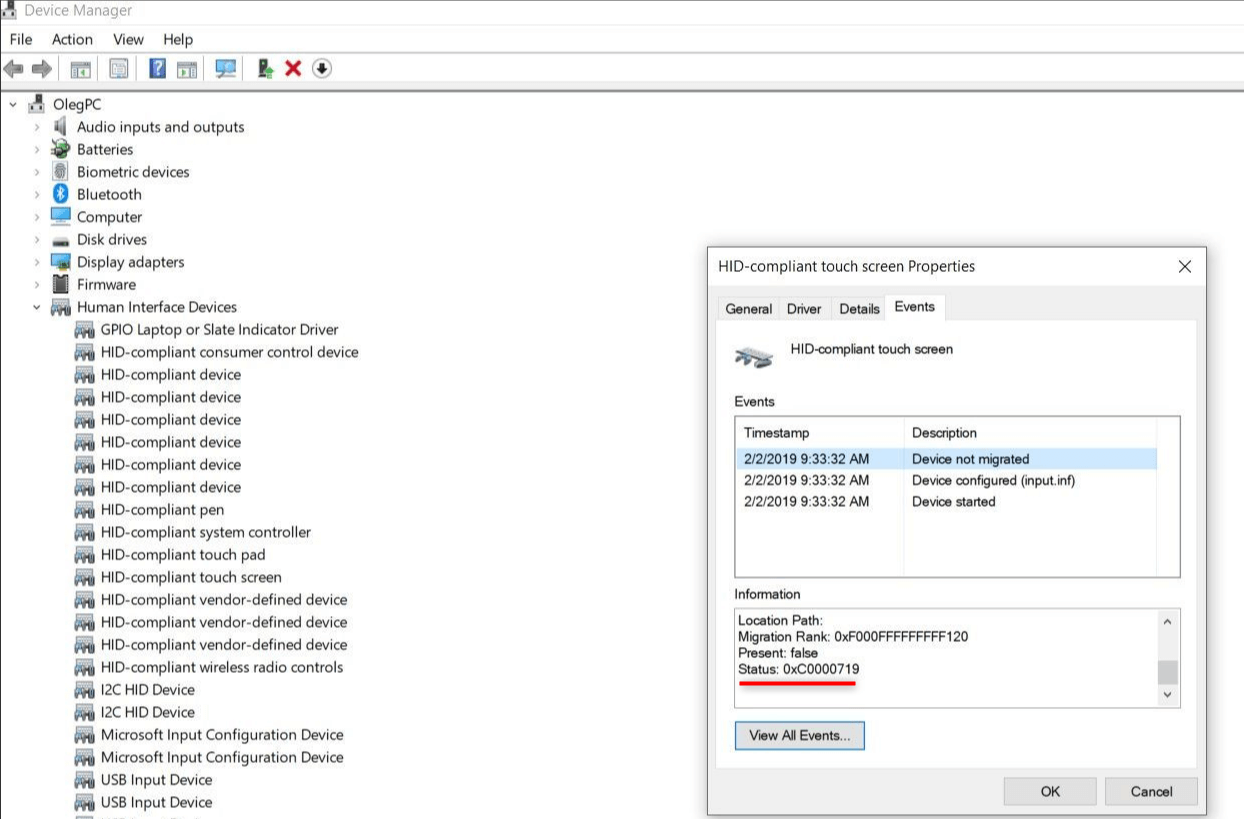
The followings are possible reasons:
① The Windows system files have been corrupted, so the devices cannot be recognized;
② The driver is incompatible with the operating system;
③ The driver has been corrupted.
Next, we will put forward some methods to solve these problems.
Hot Topic — ADsRenee Becca – Professional, Reliable Tools for Data Backup and Recovery 
Quick Back up files at up to 3,000MB/min.
Overall Support system backup, disk/partition backup, file backup and disk clone.
Intelligent Automatically analyze the data differences between the source files and the backup files and save disk space by backing up incremental/differential data.
Convenient Support VSS, allowing to freely view web pages during the backup of the operating system.
Highly compatible Support various files and storage devices.
Quick Back up at up to 3,000MB/min
Overall System/partition/disk backup
Incremental/differential technology Save disk space
Free TrialFree TrialNow 2000 people have downloaded!
Method 1: Check System Files
If the system files have been corrupted, you can follow these steps to fix them.
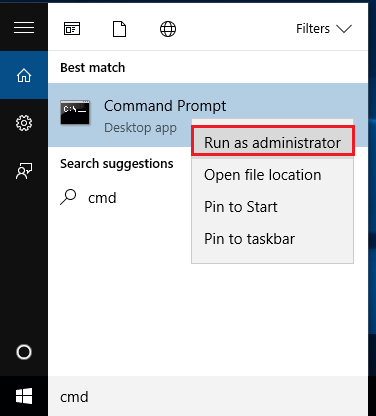
① Search [cmd] in Windows. Then, right-click at the search result [Command Prompt] and select [Run as administrator].
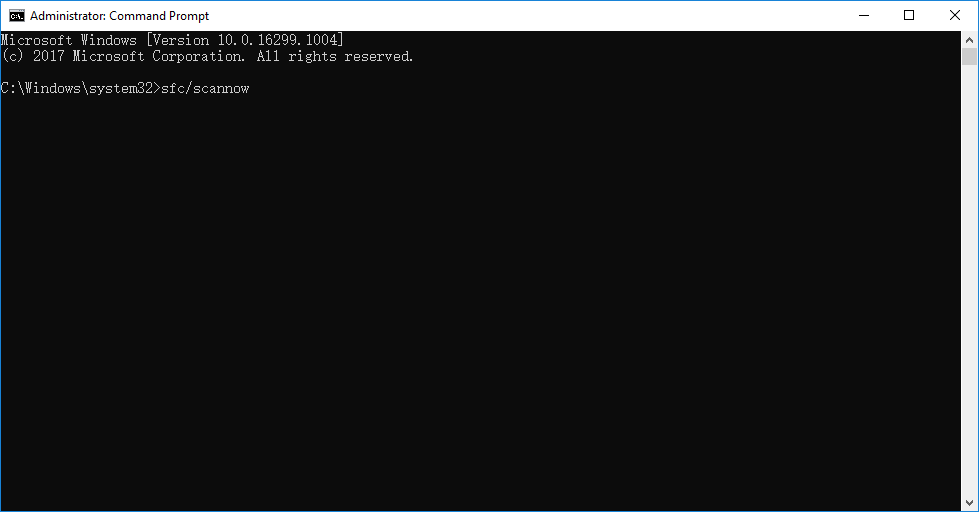
② In the window, type [sfc/scannow] and press Enter to run this command.
③ It will take 15 to 45 minutes to scan the system. If any error is found in this process, the system will fix automatically.
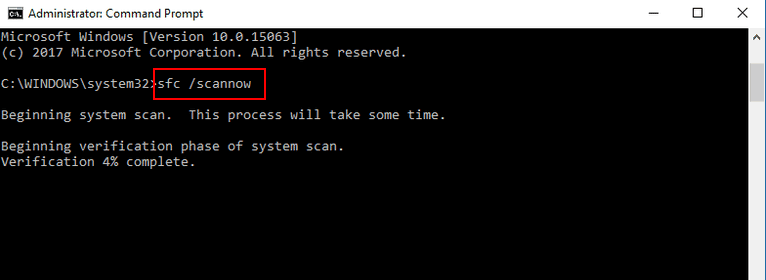
④ Reboot the computer and check whether the device can be recognized.
Method 2: Update Chipset Drivers
If the Windows chipset drivers are outdated, the computer or the some parts will be faulty, and then the computer will have no capacity to recognize external devices. It is suggested that you log in the official web pages of the chipset suppliers and check whether the drivers should be updated.
Method 3: Uninstall and Reinstall Drivers
Perhaps, the data transfer error is caused by the corrupted or incompatible drivers. It is not suggested that you update the drivers through the third-party software because the software can lead the device fail to be recognized.
① Right-click at the Start menu and select [Device Manager].
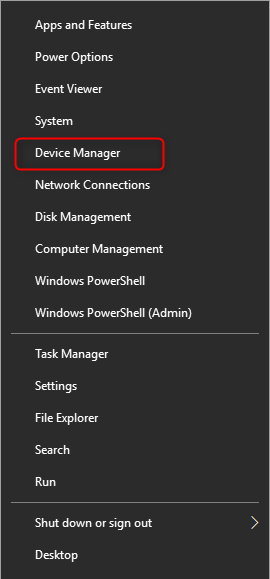
② Locate at the target device. Right-click at it and select [Uninstall device].
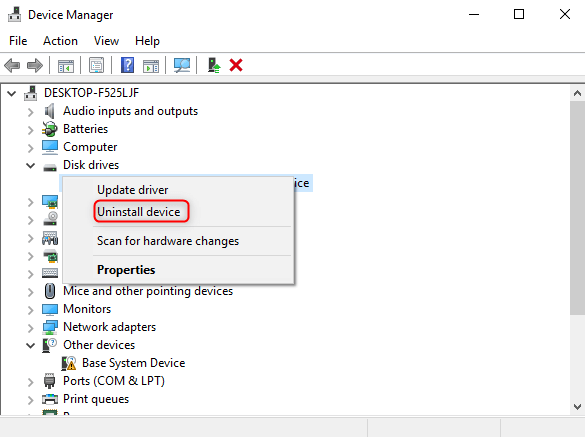
③ Reboot the computer. During this process, the operating system will reinstall the driver. Finally, check whether the device can be recognized.
Method 4: Try Other USB Ports
You can try other USB ports if the data transfer error appears on the USB flash drive. If this method doesn’t work, you continue to try the method 3.
If the above methods cannot solve the problems, you can try to get a new environment by reinstalling the operating system. But, before this step, please back up well your files. We recommend you try Renee Becca which can offer fast backup and recovery.
Part 3: How to Back up before Reinstalling Operating System?
Steps:
① Download and install Renee Becca.

② Launch the software and go to the tab [Backup].
System Backup: Back up Windows system.
Disk/Partition Backup: Backup a hard disk r partition.
File Backup: Backup files or folders.
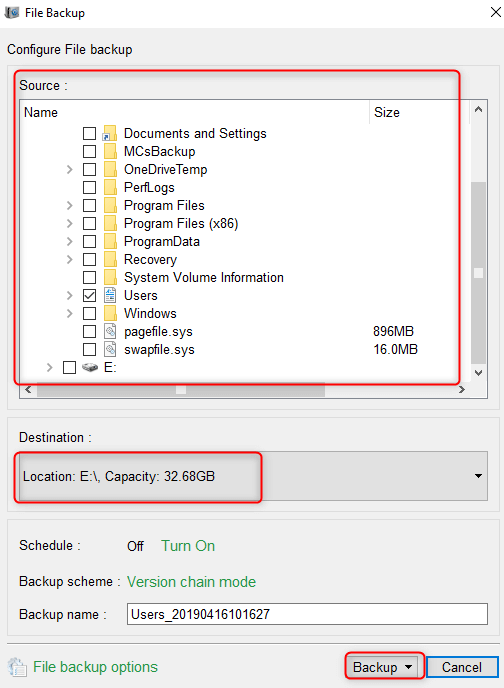
In this case, we talk about how to use [File Backup].
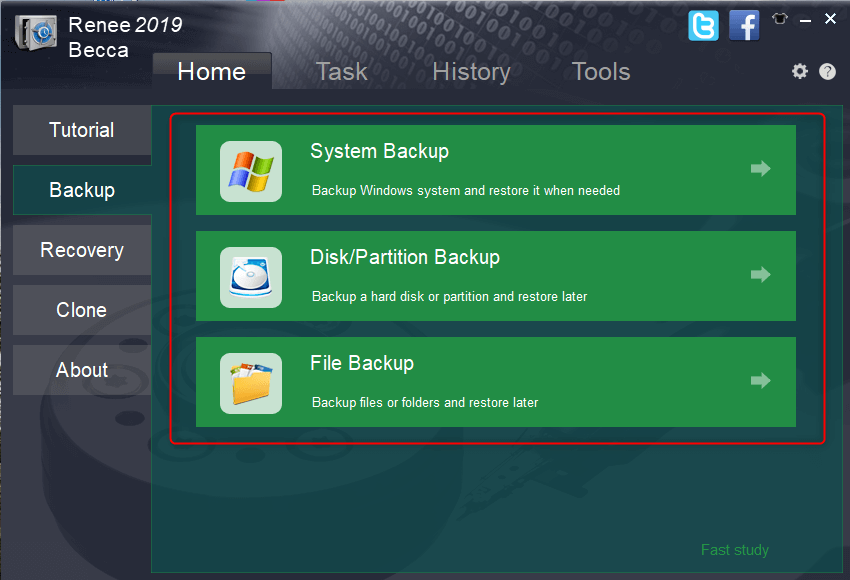
③ Select one or more target files. Then, set the output destination and the name of the backup file. Finally, click [Backup] to back up them.
Note: If reinstalling the operating system is still unable to solve the data transfer error, you have to downgrade to Windows 7, Windows 8.1 or stop using this computer.
-
- Aug 18, 2014
-
- 310
-
- 0
-
- 4,860
- 34
-
#1
I have a problem with my disc. It won’t show in windows, but in device management it’s shown as connected. It’s connected to my system but it isn’t working as HDD. How do I solve this? Is the sata port corrupted or am i missing out something? Thank you
HDD: Seagate SSHD

-
- Jul 31, 2014
-
- 6,052
-
- 2
-
- 35,960
- 2,422
-
#2
Would you please post a screenshot of what you see in Disk Management about the drive (you can use imgur.com to upload the image)?
Usually this error code indicates a problem with the OS (missing or corrupted files). You could try running a system restore, to see if the drive is recognized properly afterwards. Another option would be to try and update the OS if you have available updates, to see if that fixes the issue.
However, you can never be too careful, so I’d suggest that you try the drive with a different computer, to see if the same thing happens. Download the manufacturer’s diagnostics tool and run some tests, to see if everything’s OK with the SSHD. If you don’t have a different computer to test the drive with, you could at least try a different SATA port and different cables on yours.
Please let me know how everything goes.
Boogieman_WD
-
- Aug 18, 2014
-
- 310
-
- 0
-
- 4,860
- 34
-
#3
Would you please post a screenshot of what you see in Disk Management about the drive (you can use imgur.com to upload the image)?
Usually this error code indicates a problem with the OS (missing or corrupted files). You could try running a system restore, to see if the drive is recognized properly afterwards. Another option would be to try and update the OS if you have available updates, to see if that fixes the issue.
However, you can never be too careful, so I’d suggest that you try the drive with a different computer, to see if the same thing happens. Download the manufacturer’s diagnostics tool and run some tests, to see if everything’s OK with the SSHD. If you don’t have a different computer to test the drive with, you could at least try a different SATA port and different cables on yours.
Please let me know how everything goes.
Boogieman_WD
Hey,
actually I solved this by myself. I downloaded Seagate’s DiscWizard and searched for a new drive. It has recognized the disc and I needed to create a partition NTFS, and it works now. Windows successfully detected the disc.
| Thread starter | Similar threads | Forum | Replies | Date |
|---|---|---|---|---|
|
M
|
Question Dedicated Windows drive, just a partition, or no partition at all? | Storage | 0 | 54 minutes ago |
|
C
|
Question My hdd is in RAW format after make a booteable hdd of Windows 10. Can DMDE to fix it? | Storage | 5 | Wednesday at 12:38 PM |
|
|
Question Internal SSD/HDD suddenly running slow — Performance stuck at 100% | Storage | 12 | Jan 21, 2023 |
|
|
Question HDD shows up in BIOS but not in Windows ? | Storage | 6 | Jan 20, 2023 |
|
Z
|
[SOLVED] Windows won’t boot without secundary drive, which has been corrupted | Storage | 10 | Jan 20, 2023 |
|
S
|
Question Need help — MSI X399 SLI PLUS — Raid 1 issues — Windows won’t boot | Storage | 11 | Jan 15, 2023 |
|
|
Question M.2 SATA SSD nowhere to be seen | Storage | 6 | Jan 14, 2023 |
|
F
|
[SOLVED] Windows can’t be found after disabling IRST? | Storage | 3 | Jan 14, 2023 |
|
D
|
Question Standard NVM Express Controller error — NVMe drive not detected in BIOS ? | Storage | 2 | Jan 14, 2023 |
|
A
|
[SOLVED] Windows will not boot from M.2 NVMe SSD on PCIe socket | Storage | 4 | Jan 10, 2023 |


- Advertising
- Cookies Policies
- Privacy
- Term & Conditions
- Topics
-
- Aug 18, 2014
-
- 310
-
- 0
-
- 4,860
- 34
-
#1
I have a problem with my disc. It won’t show in windows, but in device management it’s shown as connected. It’s connected to my system but it isn’t working as HDD. How do I solve this? Is the sata port corrupted or am i missing out something? Thank you
HDD: Seagate SSHD
-
- Jul 31, 2014
-
- 6,052
-
- 2
-
- 35,960
- 2,422
-
#2
Would you please post a screenshot of what you see in Disk Management about the drive (you can use imgur.com to upload the image)?
Usually this error code indicates a problem with the OS (missing or corrupted files). You could try running a system restore, to see if the drive is recognized properly afterwards. Another option would be to try and update the OS if you have available updates, to see if that fixes the issue.
However, you can never be too careful, so I’d suggest that you try the drive with a different computer, to see if the same thing happens. Download the manufacturer’s diagnostics tool and run some tests, to see if everything’s OK with the SSHD. If you don’t have a different computer to test the drive with, you could at least try a different SATA port and different cables on yours.
Please let me know how everything goes.
Boogieman_WD
-
- Aug 18, 2014
-
- 310
-
- 0
-
- 4,860
- 34
-
#3
Would you please post a screenshot of what you see in Disk Management about the drive (you can use imgur.com to upload the image)?
Usually this error code indicates a problem with the OS (missing or corrupted files). You could try running a system restore, to see if the drive is recognized properly afterwards. Another option would be to try and update the OS if you have available updates, to see if that fixes the issue.
However, you can never be too careful, so I’d suggest that you try the drive with a different computer, to see if the same thing happens. Download the manufacturer’s diagnostics tool and run some tests, to see if everything’s OK with the SSHD. If you don’t have a different computer to test the drive with, you could at least try a different SATA port and different cables on yours.
Please let me know how everything goes.
Boogieman_WD
Hey,
actually I solved this by myself. I downloaded Seagate’s DiscWizard and searched for a new drive. It has recognized the disc and I needed to create a partition NTFS, and it works now. Windows successfully detected the disc.
| Thread starter | Similar threads | Forum | Replies | Date |
|---|---|---|---|---|
|
M
|
Question Dedicated Windows drive, just a partition, or no partition at all? | Storage | 0 | 54 minutes ago |
|
C
|
Question My hdd is in RAW format after make a booteable hdd of Windows 10. Can DMDE to fix it? | Storage | 5 | Wednesday at 12:38 PM |
|
|
Question Internal SSD/HDD suddenly running slow — Performance stuck at 100% | Storage | 12 | Jan 21, 2023 |
|
|
Question HDD shows up in BIOS but not in Windows ? | Storage | 6 | Jan 20, 2023 |
|
Z
|
[SOLVED] Windows won’t boot without secundary drive, which has been corrupted | Storage | 10 | Jan 20, 2023 |
|
S
|
Question Need help — MSI X399 SLI PLUS — Raid 1 issues — Windows won’t boot | Storage | 11 | Jan 15, 2023 |
|
|
Question M.2 SATA SSD nowhere to be seen | Storage | 6 | Jan 14, 2023 |
|
F
|
[SOLVED] Windows can’t be found after disabling IRST? | Storage | 3 | Jan 14, 2023 |
|
D
|
Question Standard NVM Express Controller error — NVMe drive not detected in BIOS ? | Storage | 2 | Jan 14, 2023 |
|
A
|
[SOLVED] Windows will not boot from M.2 NVMe SSD on PCIe socket | Storage | 4 | Jan 10, 2023 |
- Advertising
- Cookies Policies
- Privacy
- Term & Conditions
- Topics

Есть два жескача, на них я храню информацию. Внезапно оба через кабель SATA перестали видиться в проводнике и Acronise.
В параметрах устройства:
Mass Storage Device USB Device
Кликните здесь для просмотра всего текста
01.02.2020 20:33:58 Устройство не перенесено
Устройство USBSTORDisk&Ven____Mass&Prod_Storage_Device&Rev_ 116AC2101219&0 не было перемещено из-за частичного или неоднозначного совпадения.
Последний код экземпляра устройства: USBSTORDisk&Ven_JetFlash&Prod_Transcend_16GB&Rev_ 1.004084458960&0
GUID класса: {4d36e967-e325-11ce-bfc1-08002be10318}
Путь расположения:
Ранг перемещения: 0xF000FC000000F120
Присутствует: false
Состояние: 0xC0000719
01.02.2020 20:33:58 Устройство настроено
Устройство USBSTORDisk&Ven____Mass&Prod_Storage_Device&Rev_ 116AC2101219&0 настроено.
Имя драйвера: disk.inf
GUID класса: {4d36e967-e325-11ce-bfc1-08002be10318}
Дата драйвера: 06/21/2006
Версия драйвера: 10.0.18362.1
Поставщик драйвера: Microsoft
Раздел драйвера: disk_install.NT
Ранг драйвера: 0xFF0006
Соответствующий ИД устройства: GenDisk
Драйверы с более низким рангом: disk.inf:GenDisk:00FF2002
Устройство обновлено: false
Родительское устройство: USBVID_14CD&PID_6116116AC2101219
01.02.2020 20:33:58 Устройство запущено
Устройство USBSTORDisk&Ven____Mass&Prod_Storage_Device&Rev_ 116AC2101219&0 запущено.
Имя драйвера: disk.inf
GUID класса: {4d36e967-e325-11ce-bfc1-08002be10318}
Служба: disk
Нижние фильтры:
Верхние фильтры:
Подскажите, пожалуйста, что сделать.
Дополню после возможности проверить, вставив в порт материнки.
Добавлено через 59 минут
[Решено]
Удалил устройство и подключил заново.
__________________
Помощь в написании контрольных, курсовых и дипломных работ, диссертаций здесь