Ошибка 093-974 типична для всех принтеров и МФУ, построенных на базе принтера Xerox Phaser 3010 (Xerox 3040 / WC3045 / Epson AcuLaser M1400 / MX14).
Проблема заключается в том, что контакты принтера неплотно прилегают к чипу, что приводит к ошибке считывания чипа и в итоге приводит к ошибке «093-974». Решение проблемы банально: нужно просто подогнуть контакты. Однако реализация поставленной задачи для обычного пользователя весьма затруднительна ввиду сложности самого процесса.
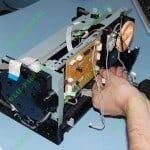
Демонтаж блока Toner Dispense Assembly
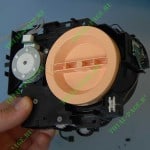
Демонтированный блок Toner Dispense Assembly
Кто виноват и с кого спрашивать. В возникновении этой ошибки пользователь не виноват — это ошибка разработчиков. Из обслуживаемых нами аппаратов процедуре подгибания контактов подвергается каждый третий, а это уже статистика, с которой не поспоришь. При установке картриджей (при пробеге ок.10000 копий) наступает так называемая «усталость» металла контактной площадки. Именно она не обеспечивает стабильный контакт с чипом.
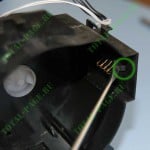
Выщелкивание контактной площадки.
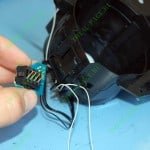
Демонтированная контактная площадка
Конструкция контактной площадки такова, что без извлечения блока «Toner Dispense Assembly» подогнуть контакты, идущие на чип, невозможно. Для того, чтобы извлечь блок, необходимо частично разобрать аппарат. Как это сделать, можно посмотреть по этой ссылке. После того, как блок был успешно извлечен из принтера, вооружившись плоской отверткой, выщелкиваем контактную площадку. Для этого надавливаем на защелки (см.фото) и аккуратно выщелкиваем контактную площадку. Будьте предельно внимательны и аккуратны: если отвертка соскочит, то может нанести контактам непоправимые повреждения.
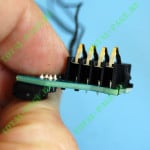
Контактная площадка крупным планом.
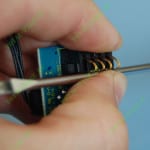
Подгибание контактов
В извлеченной контактной площадке подгибаем контакты. Контакты следует подгибать одновременно, как на фотографии справа. Это позволит добиться одинакового наклона и высоты контактов, что добавит стабильности контактному соединению с чипом. Кстати, вместе с контактами на площадке находится микроконтроллер, отвечающий за идентификацию чипа.
На этом все, желаем успехов!!!
Оцените качество заметки
 Загрузка…
093-413, 093-418 to 093-420, 093-944 to 093-947 Developer Unit End of Life RAP
093-413 The black developer unit has passed end of life.
093-418 The yellow developer unit has passed end of life.
093-419 The magenta developer unit has passed end of life.
093-420 The cyan developer unit has passed end of life.
093-944 The yellow developer unit has reached end of life.
093-945 The magenta developer unit has reached end of life.
093-946 The cyan developer unit has reached end of life.
093-947 The black developer unit has reached end of life.
Procedure
Install a new developer unit:
• Black developer unit, PL 90.05 Item 9. Enter dC135 code 954-833 to reset the HFSI value for the black developer unit.
• Yellow developer unit, PL 90.05 Item 6. Enter dC135 code 954-830 to reset the HFSI value for the yellow developer unit.
• Magenta developer unit, PL 90.05 Item 7. Enter dC135 code 954-831 to reset the HFSI value for the magenta developer unit.
• Cyan developer unit, PL 90.05 Item 8. Enter dC135 code 954-832 to reset the HFSI value for the cyan developer unit.
**This RAP is from Xerox Service Manual. All brand names and trademarks are their respective owner’s property.**
You may be also interested in below toner and drum chip (CRUM) for Xerox VersaLink C7020, C7025, C7030, C7000.
Toner Chip (For North America and West Europe Region):
• 106R03741 106R03744 106R03743 106R03742
• 106R03757 106R03760 106R03759 106R03758
• 106R03737 106R03740 106R03739 106R03738
Toner Chip (For South America and East Europe Region):
• 106R03749 106R03752 106R03751 106R03750
• 106R03745 106R03748 106R03747 106R03746
• 106R03765 106R03768 106R03767 106R03766
Toner Chip (For Metered Machine):
• 106R03733 106R03736 106R03735 106R03734
Drum Chip:
• 113R00780 113R00782
This section describes error codes.
An error message and error code (xxx-xxx) are displayed if printing terminated abnormally
because of an error, or a malfunction occurred in the machine.
Refer to the error codes in the following table to resolve problems.
Important • If an error code is displayed, any print data remaining in the machine and information stored in the
If an error code is displayed that is not listed in the following table, or if you cannot resolve
an error despite following the instructions described in the table, contact our Customer
Support Center.
Error Code
005-942
016-503
016-504
016-505
016-506
016-507
016-520
016-521
016-570
016-571
016-572
016-573
016-718
016-720
016-737
016-741
016-742
016-743
016-744
016-745
016-746
016-757
016-758
016-759
machine’s memory is not secured.
The original size is not detected accurately. Check the originals loaded in the
document feeder, reload the originals, and then press the <Start> button.
Note
• When using a non-standard size document, specify the original size in
[Original Size]. Depending on the selected document size, the printout
may be too large for the paper or may have shadows at the edges.
Select [Close], or wait for the time set in [Fault Timeout] for the machine to
recover. Check if the SMTP server and the DNS server are set correctly on
CentreWare Internet Services.
Select [Close], or wait for the time set in [Fault Timeout] for the machine to
recover. Check if the POP3 server and the DNS server are set correctly on
CentreWare Internet Services.
Select [Close], or wait for the time set in [Fault Timeout] for the machine to
recover. Check if the user name and password used for the POP3 server are set
correctly on CentreWare Internet Services.
Select [Close], or wait for the time set in [Fault Timeout] for the machine to
recover. Check if the SMTP server or the POP3 server is set on CentreWare
Internet Services.
Select [Close], or wait for the time set in [Fault Timeout] for the machine to
recover. Check if the user name and password used for the SMTP server are
set correctly on CentreWare Internet Services.
Contact your system administrator.
Select [Close], or wait for the time set in [Fault Timeout] for the machine to
recover.
Switch off the machine power, make sure that the touch screen is blank, and
then switch on the machine power. Contact our Customer Support Center if
this failure is repeated.
Select [Close] to recover the machine.
Contact your server administrator.
Remedy
Error Code
13
265
| Free | Pro | Business | |
|---|---|---|---|
| Free |
|
|
|
| Choose | Choose | Choose | |
| Custom LogoAdd logos to all protected items | — | ||
| Custom creator profileA public list that shows all the items a creator/owner has in DMCA system | — | ||
| Digital Ink SignatureSign with your mobile, tablet, finger, mouse, touchpad etc. | |||
| Add ItemsItems add to dmca.com content registry. Get your content registered in a globally recognized 3rd party system. | |||
| Max itemsUnlimited number of items can add to dmca.com content registry. Over 400 million assets already under protection | Unlimited | Unlimited | Unlimited |
| DashboardIn DMCA dashboard takedowns, monitoring, lookups etc are much easier and more convenient | |||
| APIDMCA API access | |||
| QR Codedmca.com grants your content a QR code to be used for public identification purposes, QR code link back to your dmca.com profile(s) | |||
| Site ProfileOthers can view the ownership / profile information of claimed owner | |||
| Shorty URLPermanent, shortened hyperlink to content status page | |||
| Site AlertsTracking and change info preserved and made public | |||
| Encrypted fingerprintdmca.com grants your content an id and a badge and QR code to be used for public identification purposes, all these links and ids link back to your dmca.com profile(s) | |||
| Account VerificationSite verified means dmca.com has confirmed the DNS / page is controlled by given name or has a billing relationship in place. Extra verification levels are detailed where presented | Level 1 | Level 2 | Level 3 |
| DIY DMCA TakedownsDMCA.com offers a complete online toolkit for you to create, research and conduct your own takedowns. Complete with: an easy to use takedown case management system, website detective, auto-generating takedown form, and a download option so you can email the takedown request | — |
Pro Version |
Pro Version |
| DIY templates (US, EU, India)Includes the following DIY DMCA Templates (US, EU, INDIA) | — | ||
| right click blockingDisable right click on web pages | — | ||
| copy scannerCopy scanner | — | ||
| monitoringKeep an eye on your digital content with DMCA.com’s Monitoring Services | — |
10 items/month |
100 items/month |
| image lookupImage monitoring is the ability to scan daily, weekly, monthly for one or more images of your choice. You simply upload 1 or more photos and we monitor them as often as you like. Image monitoring uses 5 scan credits (more expensive than text). A scan credit is 1 scan per month. So to monitor 1 image every week would be 5 scan credits per week. Need more? you can easily upgrade from your dashboard. Volume discounts apply | — |
10 items/month |
100 items/month |
|
content ownership verificationTracking and change info preserved and made public. Others can view the ownership / profile information of claimed owner |
Claim Only |
Assigned per item |
Assigned per item |
| Choose | Choose | Choose | |
| Free |
|
|
|
| FREE | PRO | BUSINESS |